



October 1, 2026
|
5 min read


احصل على وصول فوري إلى بيئة TrueFoundry مباشرة. انشر النماذج، ووجّه حركة مرور LLM، واستكشف المنصة بالكامل — بيئة الاختبار الخاصة بك جاهزة في ثوانٍ، ولا يلزم وجود بطاقة ائتمان.



Published: July 4, 2026
.webp)
Blazingly fast way to build, track and deploy your models!
Out of the box, Cursor's AI agent only knows about your codebase. That's it. It can't see your Postgres tables, has no clue what GitHub issues are piling up, and definitely can't pull design tokens from Figma. MCP servers are what bridge that gap. They're lightweight programs that plug external tools into Cursor through one standardized protocol—the Model Context Protocol—so the agent can query databases, file issues, or fetch API data right from the editor.
Some quick history. Anthropic open-sourced MCP in November 2024. OpenAI adopted it by May 2025, and Google DeepMind brought Gemini support in April. Then, in December 2025, Anthropic donated the whole thing to the Agentic AI Foundation (under the Linux Foundation), co-founded with Block and OpenAI. That move was significant. MCP went from being Anthropic's project to a genuinely vendor-neutral standard.
Cursor has emerged as one of the go-to MCP clients among IDEs. But getting it set up properly—and understanding what can go wrong from both a config and security standpoint—takes more than just pasting a JSON snippet you found on Reddit.
This is one reason MCP vs API matters for IDE agents: APIs require explicit integration logic, while MCP lets Cursor dynamically load available tools from connected servers.
MCP defines three moving pieces. Hosts are the application—Cursor. Clients are connectors inside the host that handle individual server connections. Servers are the lightweight programs on the other end, exposing tools via JSON-RPC 2.0.
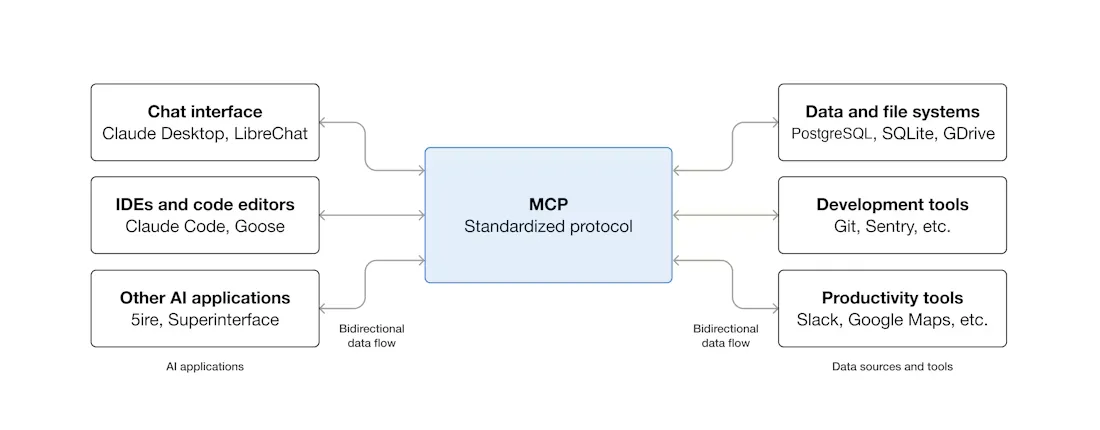
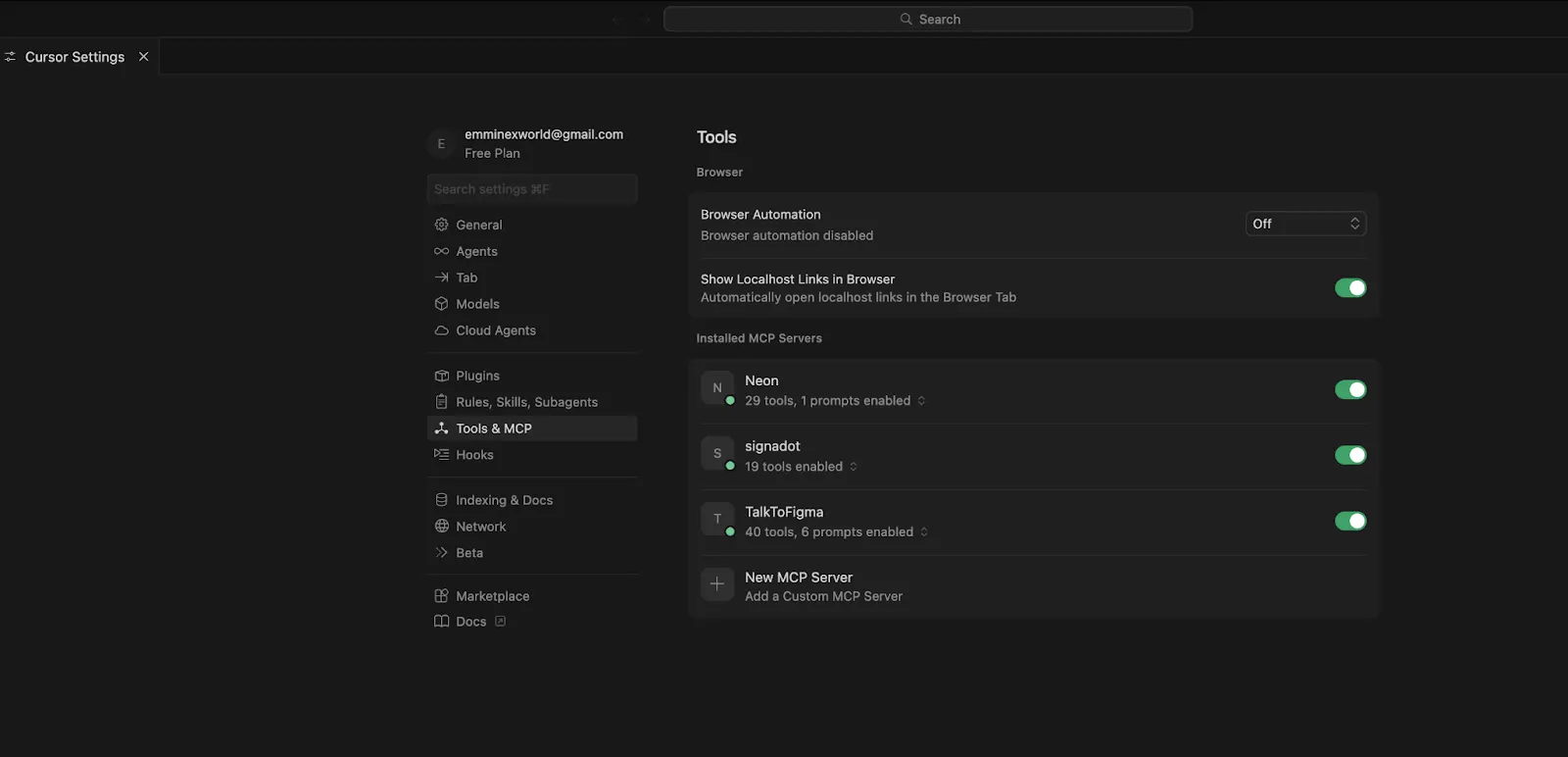
In practice? You open Cursor. Its Agent scans your enabled MCP servers, loads the tools they expose, and figures out which ones to call as part of whatever task it's working on. Head over to Cursor Settings > Tools & MCP and you'll see every loaded server with a status indicator. You can flip individual tools on or off from that panel.
Servers can expose three types of things:
For a more thorough walkthrough of MCP architecture and server primitives, check out our guide on MCP and How It Works.
Three options here. Which one you pick depends on a simple question—local server or remote?
Our recommendation: stdio for local experimentation. Streamable HTTP for literally everything else.
More and more MCP servers now have an "Add to Cursor" button sitting right on their docs page. Click that, and Cursor opens a dialog with the server name, transport, and URL already filled in. Click Install. That's the whole process.
Servers requiring authentication will trigger a browser-based OAuth flow, and Cursor stores the resulting credentials for you. If you're a server developer wanting to add these deep links, the Cursor MCP documentation explains how.
Open Cursor Settings > Tools & MCP, hit New MCP Server (which drops you into mcp.json), or just create the file manually. Put it at .cursor/mcp.json inside your project for project-scoped config, or ~/.cursor/mcp.json for global.
Here's what a GitHub MCP server looks like running through Docker:
{
  "mcpServers": {
    "github": {
      "command": "docker",
      "args": [
        "run", "-i", "--rm",
        "-e", "GITHUB_PERSONAL_ACCESS_TOKEN",
        "ghcr.io/github/github-mcp-server"
      ],
      "env": {
        "GITHUB_PERSONAL_ACCESS_TOKEN": "<YOUR_TOKEN>"
      }
    }
  }
}
The fields, briefly:
Way simpler. Just a URL and optional headers:
{
  "mcpServers": {
    "remote-api": {
      "url": "https://mcp.example.com/mcp",
      "headers": {
        "Authorization": "Bearer <YOUR_API_KEY>"
      }
    }
  }
}
No command. No args. Cursor hits the HTTP endpoint directly.
Project config (.cursor/mcp.json in the repo root) affects only that project. Global config (~/.cursor/mcp.json) applies everywhere. Same server defined in both files? Project-level wins.
Cursor has a ceiling of roughly 40 active tools across all your MCP servers combined. Exceed it and two things happen: you get a warning, and the agent silently loses access to some tools. It just can't see them anymore.
Why does the limit exist? Each tool definition burns context tokens. And once you shove 40+ tool descriptions into a prompt, the LLM's ability to pick the right one deteriorates noticeably.
What to do about it: open each server in settings and switch off the tools you're not actively using. And as a general rule, a server exposing 5 to 10 well-defined tools will serve you better than one megaserver trying to do 30 things.
Your MCP server didn't start. Cursor shows no error. No warning. Nothing. You just notice that tools aren't showing up.
Nine times out of ten, the problem is one of these: Node.js or Python isn't installed (or isn't on your PATH). The package version in your config doesn't exist. Or an environment variable you referenced is either empty or completely missing.
Fastest way to debug: copy the command from your mcp.json verbatim and run it in a terminal. Like this: npx -y @modelcontextprotocol/server-postgres postgresql://localhost/mydb. Whatever error Cursor was swallowing will print right to your screen.
stdio transport and remote environments do not get along. The subprocess launches on the remote side, but Cursor expects it locally. You end up with intermittent connection failures that are incredibly annoying to track down.
Just use Streamable HTTP. Deploy the MCP server as a hosted endpoint and point Cursor at the URL. Saves hours of debugging.
We keep running into the same three:
Key Metrics for Evaluating Gateway
| Criteria | What should you evaluate ? | Priority | TrueFoundry |
|---|---|---|---|
| Latency | Adds <10ms p95 overhead for time-to-first-token? | Must Have | ✅ Supported |
| Data Residency | Keeps logs within your region (EU/US)? | Depends on use case | ✅ Supported |
| Latency-Based Routing | Automatically reroutes based on real-time latency/failures? | Must Have | ✅ Supported |
| Key Rotation & Revocation | Rotate or revoke keys without downtime? | Must Have | ✅ Supported |
| Key Rotation & Revocation | Rotate or revoke keys without downtime? | Must Have | ✅ Supported |
| Key Rotation & Revocation | Rotate or revoke keys without downtime? | Must Have | ✅ Supported |
| Key Rotation & Revocation | Rotate or revoke keys without downtime? | Must Have | ✅ Supported |
| Key Rotation & Revocation | Rotate or revoke keys without downtime? | Must Have | ✅ Supported |

MCP servers run code with your credentials. Let that sink in for a moment. Whatever permissions you hand a server—database access, GitHub tokens, API keys—it will use them. Every MCP server is, for all practical purposes, a fully trusted integration. If a server is compromised or malicious, it has everything you gave it.
2025 was a rough year for Cursor MCP security. Researchers published multiple critical CVEs, and each one exposed a fundamentally different attack surface:
مزيد من التفاصيل حول هذه المواضيع في أدلتنا حول المؤسسات أمان MCP و أنماط التحكم في الوصول.
بالنسبة للمطور الفردي، MCP رائع. قم بإعداده مرة واحدة، استمتع بزيادة الإنتاجية، ثم انتقل إلى التالي. ولكن ماذا عن التوسع إلى فريق مكون من 20؟ أو 200؟ هنا تبدأ المشكلة.
تنتهي مفاتيح API متناثرة عبر أجهزة الكمبيوتر المحمولة الفردية. لا توجد رؤية مركزية للخوادم والأدوات النشطة عبر المؤسسة. لا يوجد سجل تدقيق على الإطلاق. وعندما يغادر شخص ما الشركة—أو حتى ينتقل إلى فريق آخر—تجد نفسك مضطرًا لتغيير بيانات الاعتماد في عشرات ملفات تكوين Cursor الفردية المنتشرة عبر عدد لا يحصى من الأجهزة.
بوابة MCP تضع طبقة بين وكلاءك وخوادم MCP الخاصة بك تتعامل مع كل ما سبق: المصادقة المركزية، والوصول المستند إلى الأدوار، وإمكانية المراقبة، وتطبيق السياسات.
بوابة MCP من TrueFoundry تفعل ذلك بالضبط. يقوم المطورون بالمصادقة مرة واحدة عبر البوابة. ومنذ تلك اللحظة، تتولى البوابة إدارة كل رمز OAuth وبيانات الاعتماد اللاحقة نيابة عنهم. يحدد المسؤولون ضوابط الوصول والأذونات لكل خادم من خلال RBAC. يتم تسجيل كل استدعاء أداة — كل واحد منها — مع تتبع كامل على مستوى الطلب.
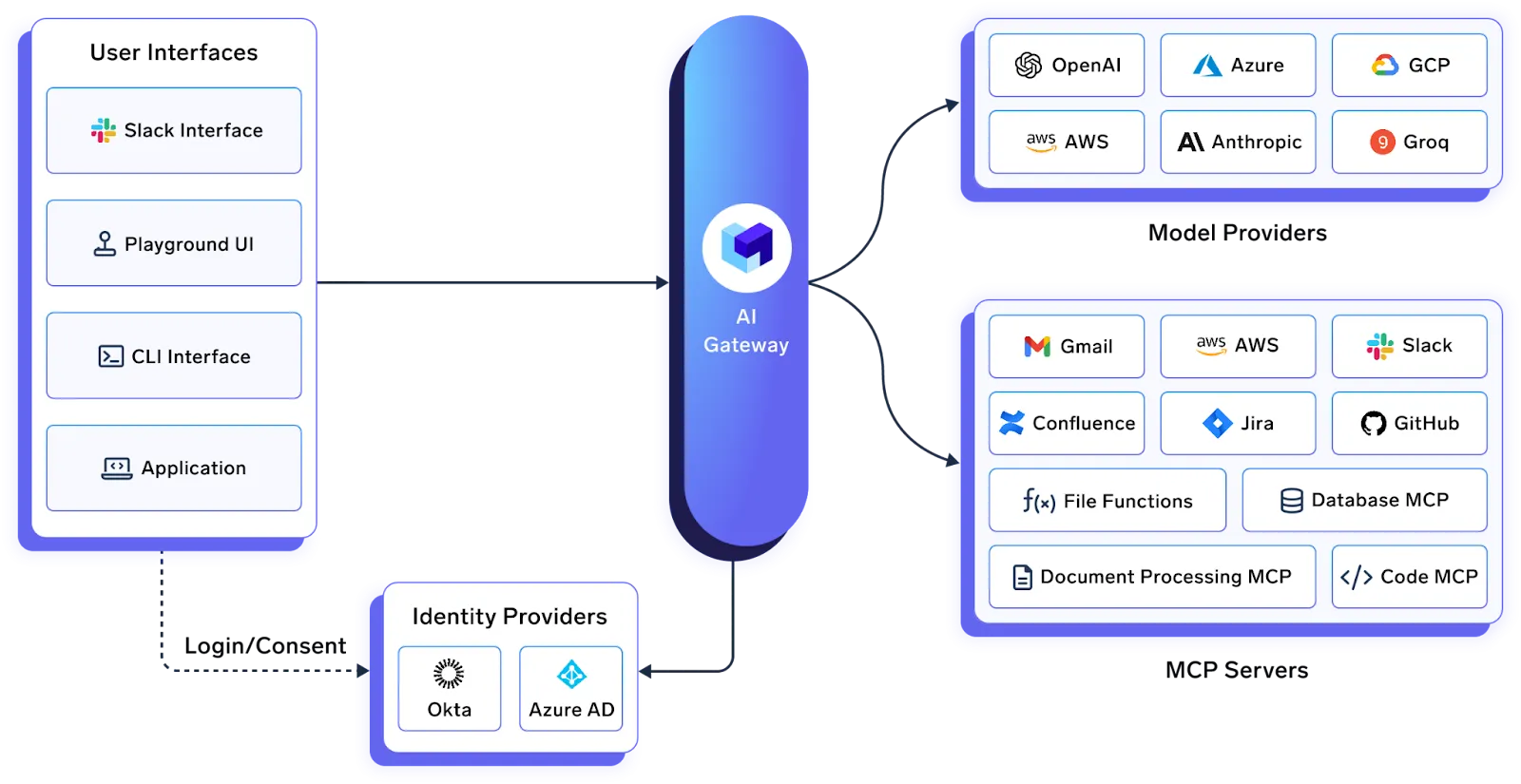
ميزة واحدة تستحق الإشارة إليها تحديدًا: خوادم MCP الافتراضية. يمكن للبوابة أن تعرض مجموعة فرعية محددة من الأدوات من الخوادم الموجودة خلفها. لنفترض أنك تريد وكيلًا يمكنه قراءة مشكلات GitHub ولكن يجب ألا يقوم أبدًا، تحت أي ظرف من الظروف، بحذف مستودع. لا تفرض ذلك عبر موجه نظام قد يتجاهله نموذج اللغة الكبير (LLM). تفرض البوابة ذلك على مستوى البروتوكول. أداة "حذف المستودع" ببساطة لا توجد من منظور الوكيل.
المؤسسات التي تستخدم بالفعل بوابة الذكاء الاصطناعي من TrueFoundry لتوجيه نماذج اللغة الكبيرة (LLM) والتحكم في التكاليف تحصل على تكامل أصلي مع بوابة MCP. لوحة تحكم واحدة تغطي النماذج والأدوات والوكلاء.
يمكن لـ Cursor أيضًا الاتصال مباشرة ببوابة الذكاء الاصطناعي من TrueFoundry لتوجيه نماذج اللغة الكبيرة (LLM) المركزي وتتبع التكاليف وإدارة المفاتيح.
يمنح MCP برنامج Cursor القدرة على التفاعل مع أدوات خارجية حقيقية — وليس فقط ملفاتك المصدرية. يستغرق الإعداد الفردي دقائق. يظهر التحدي الهندسي الحقيقي لاحقًا: الحوكمة، وإدارة بيانات الاعتماد، والتحكم في الوصول، وإمكانية المراقبة على مستوى الفريق.
ابدأ صغيرًا. خادم أو خادمان. استخدم الروابط العميقة حيثما توفرت. التزم بحد الأربعين أداة. ابقَ محدثًا لتكون في طليعة تحديثات الأمان. وإذا كنت تنشر MCP عبر فريق أو مؤسسة، فابحث في بوابة MCP قبل أن تحل مشكلة انتشار بيانات الاعتماد نفسها بالتحول إلى حادث أمني.
استكشف بوابة MCP من TrueFoundry أو احجز عرضًا توضيحيًا لرؤيته عمليًا.
برنامج خفيف يربط وكيل الذكاء الاصطناعي الخاص بـ Cursor بأداة خارجية أو مصدر بيانات عبر Model Context Protocol. إنه يكشف عن وظائف (تسمى "أدوات") يكتشفها الوكيل ويستدعيها أثناء سير العمل. GitHub، Postgres، Figma، Slack—كلها تحتوي على خوادم MCP متاحة.
ثلاث طرق. أزرار الارتباط العميق بنقرة واحدة في صفحة وثائق الخادم (الأسهل). الـ إعدادات Cursor > الأدوات و MCP > خادم MCP جديد واجهة المستخدم. أو إنشاء .cursor/mcp.json يدويًا (خاص بالمشروع) أو ~/.cursor/mcp.json (عام).
حوالي 40 أداة نشطة عبر جميع الخوادم. بعد ذلك، يصبح الوكيل أسوأ في اختيار الأداة الصحيحة لأن السياق يمتلئ. قم بإيقاف تشغيل ما لا تستخدمه.
نعم. تم شحن الموارد في الإصدار 1.6 (سبتمبر 2025)—بيانات سياقية مثل المخططات ومحتويات الملفات. وصل الاستنباط في v1.5 (أغسطس 2025)—يمكن للخوادم طلب إدخال مستخدم منظم أثناء التنفيذ.
يعتمد ذلك على إعداداتك. تشغل خوادم MCP التعليمات البرمجية بالصلاحيات التي توفرها. وجد الباحثون العديد من الثغرات الأمنية الحرجة في عام 2025، وتم إصلاحها جميعًا بسرعة. حافظ على تحديث Cursor، وعطّل التشغيل التلقائي، وقيد بيانات الاعتماد، وثبّت إصدارات الحزم، وراجع خوادم الجهات الخارجية قبل إضافتها.
عبر بوابة MCP. تعمل بوابة TrueFoundry على مركزة المصادقة، وتفرض التحكم في الوصول المستند إلى الأدوار (RBAC)، وتسجل كل استدعاء أداة. يتحكم المسؤولون بدقة في الفرق التي تحصل على صلاحية الوصول إلى أي خوادم. اطلع على مقارنة بوابات MCP الخاصة بنا للحصول على تفصيل شامل.
TrueFoundry AI Gateway delivers ~3–4 ms latency, handles 350+ RPS on 1 vCPU, scales horizontally with ease, and is production-ready, while LiteLLM suffers from high latency, struggles beyond moderate RPS, lacks built-in scaling, and is best for light or prototype workloads.





أحدث الأخبار والمقالات والموارد تصلك مباشرة إلى بريدك الوارد
.png)



.png)
.png)
.png)

.png)
.png)
.png)
.png)
.png)
.png)
.png)


