


October 14, 2026
|
5 min read


Obtenha acesso instantâneo a um ambiente TrueFoundry ao vivo. Implante modelos, direcione o tráfego de LLM e explore a plataforma completa — seu sandbox estará pronto em segundos, sem necessidade de cartão de crédito.


Published: October 10, 2026

Blazingly fast way to build, track and deploy your models!
Anthropic's September 2025 essay on context engineering reframed the discipline: from picking the right words for a single prompt to deciding what information should be in the context window at each step of an agent's work. This post is about the infrastructure that executes those decisions at the gateway layer. Session tracking, conversation compaction, and prefix caching are the gateway-level primitives that let context engineering actually run in production — not the strategy (that belongs to the agent), but the substrate that makes the strategy enforceable across thousands of long-running runs.
Friday afternoon at Northwind. Maya, staff engineer on the platform team, opens the Slack thread titled "#agent-help: code-review is failing on big PRs." She traces the failure to PR #4127 — a 600-line refactor. The agent ran 23 tool calls: read four files, ran the test suite twice, queried the linter, fetched coverage. On turn 24 the model returned a response that repeated the same paragraph three times and ended mid-sentence.
The gateway's session view shows the smoking gun. By the time it failed, the request payload had grown past 185K tokens against a 200K-context model — the two test-suite runs alone had added tens of thousands of tokens each. The agent never noticed it was running out of room; it kept appending tool results to the conversation array until the model's attention budget collapsed.
The fix is usually not a smarter base model. It is infrastructure that prevents the agent from running its context budget into the ground — turning "we accidentally filled the context window" into "the gateway compacted around the 150K threshold, and the agent kept going." This post is how that infrastructure works.
In many 2023-era applications, prompt engineering meant choosing the right phrasing, examples, and ordering to get a single response right. Context engineering, as Anthropic articulated in their September 2025 essay, is the successor — it asks what configuration of context is most likely to produce the model's desired behavior across an agent's entire run, not just one call.
The shift matters because long-running agents accumulate state. Every tool result, prior model response, and user follow-up either lives in the context window or doesn't. Model behavior degrades — context rot, in Anthropic's framing — well before the nominal context limit is reached, with the exact degradation curve varying by model, task, and where the relevant information sits in the window. So the agent has decisions to make: what to keep, what to summarize, what to discard, what to pay full price for, what to cache. Those decisions belong to the agent. The mechanics that execute them belong to the gateway — the layer that, in TrueFoundry's AI Gateway, already sits on every call: tagging a request with a conversation ID, computing what fraction of context is system prompt vs. growing history, calling the compaction endpoint at a threshold, hitting the prefix cache instead of paying for the same 12K-token system prompt on every call. The agent decides the context configuration it wants; the gateway implements that configuration efficiently. The rest of this post is the mechanics.
A single agent run is many provider calls. A code-review agent processing one PR might make 10–30 of them — one to plan, several to read files, several to run tests, one to draft the review, one to revise after a tool error. Without session metadata, the trace store sees 30 disconnected requests; with it, the trace store sees a 30-turn conversation that can be replayed end-to-end.
The convention is a header set by the agent at the outer call. In TrueFoundry's AI Gateway this is the X-TFY-CONVERSATION-ID header — the X-TFY- prefix is TrueFoundry's namespace, paired with the X-TFY-METADATA header from the cost-attribution post. Treat the specific name as an illustrative gateway convention rather than an industry standard; the equivalent header could be named anything, and what matters is that the value propagates through the span tree:
HTTP — application tags every turn of a multi-turn agent with a conversation ID
POST /v1/responses HTTP/1.1
Host: gateway.northwind.internal
Authorization: Bearer ...
Content-Type: application/json
X-TFY-CONVERSATION-ID: conv-pr-4127-review-2026-05-22-14-03
X-TFY-METADATA: {"team": "platform-eng", "app": "code-review-agent",
                 "feature": "pr-review", "env": "production",
                 "pr_id": "northwind/cargo-copilot#4127"}

{"model": "claude-sonnet-4-6", "input": [...], "tools": [...]}
What the gateway records per session: the ordered sequence of provider calls in the conversation with their trace IDs; cumulative input, output, cache-read and cache-write tokens both per turn and across the conversation; the metadata fields from each call (carrying forward the cost-attribution schema from the previous post); and references to trace IDs rather than the full text — the rendered context window stays with the provider, the session record is small.
This matters for debugging. A 20-turn agent that fails at turn 15 is not debuggable as 20 isolated requests. It needs to be debuggable as a sequence — turn 14 produced a tool result that triggered turn 15's bad behavior; turn 13's input was already 95% of context limit. The session view collapses 20 traces into one queryable timeline with cumulative token counts, latency profile, and cache hit rates per turn.
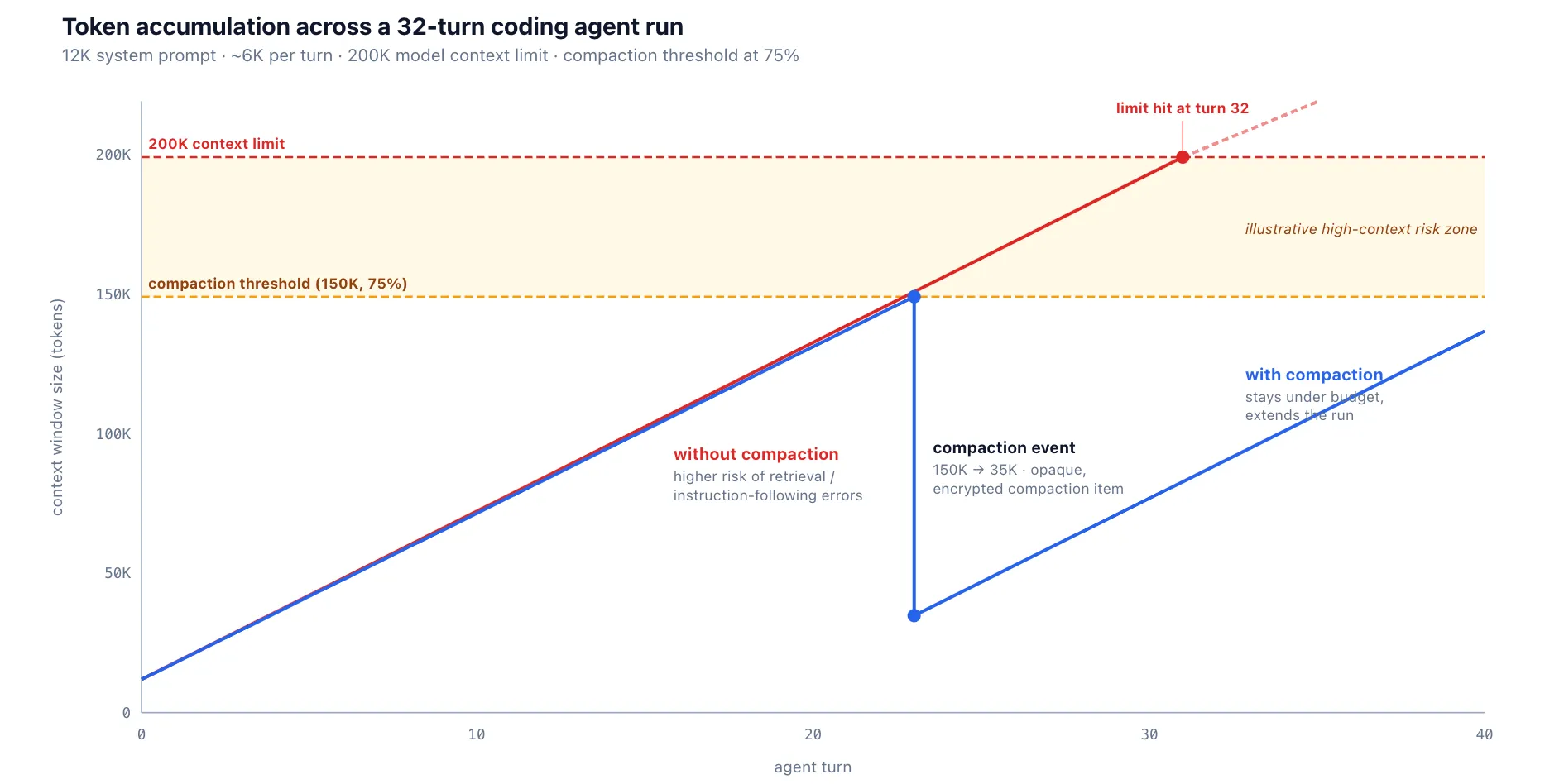
A coding agent's context window grows in a predictable pattern. For the simplified model below, assume a 12K-token system prompt (tool definitions, style guide, examples) at turn 0, and that each subsequent turn appends roughly 6K rendered tokens — a tool result plus the assistant's response and per-turn overhead. That gives a linear climb of about 6K per turn (real runs are burstier; see the note after the table):
What happens as the window fills is not failure exactly — it is degradation. Model accuracy on retrieval and instruction-following tends to slip well before the nominal limit, and worse, the model gives no signal that it has degraded — confident, well-formatted output that happens to be wrong. By the time the window is full, the model is more likely to hallucinate, repeat itself, miss instructions, or return malformed tool calls. The degradation is a gradient, not a cliff, and where it starts varies by model, task, and where the relevant tokens sit — but the operational implication is the same: infrastructure has to act before behavior collapses, not after. (The table above is an illustrative linear model; real coding-agent runs are typically burstier — a single grep across a large codebase or a verbose test run can add 20K tokens in one turn.)
TrueFoundry AI Gateway delivers ~3–4 ms latency, handles 350+ RPS on 1 vCPU, scales horizontally with ease, and is production-ready, while LiteLLM suffers from high latency, struggles beyond moderate RPS, lacks built-in scaling, and is best for light or prototype workloads.





As últimas notícias, artigos e recursos enviados para sua caixa de entrada




.png)
.png)
.png)
.png)
.png)






.png)


