


October 22, 2026
|
5 min de lecture


Accédez instantanément à un environnement TrueFoundry en direct. Déployez des modèles, acheminez le trafic LLM et explorez la plateforme complète : votre sandbox est prête en quelques secondes, aucune carte de crédit n'est requise.




Une méthode incroyablement rapide pour créer, suivre et déployer vos modèles !
Claude Code is quickly becoming a standard AI coding assistant for enterprise engineering teams. Developers use it to write code, debug issues, understand codebases, and increasingly interact with enterprise tools through the Model Context Protocol (MCP).
But as Claude Code adoption grows, so do the security challenges. Many organizations still rely on shared API keys, long-lived credentials, unmanaged MCP servers, and limited visibility into how AI tools are being used. These practices can create security, compliance, and governance risks at scale.
Unlike traditional developer tools, Claude Code can access code repositories, internal systems, databases, and MCP-powered tools. Securing it requires more than protecting API keys, it requires identity-based authentication, user-level auditability, access controls, and governance over the tools and data it can access.
In this guide, we'll cover the most important Claude Code security best practices for enterprise deployments, including SSO, AI gateways, audit logging, cost controls, and MCP governance.
Traditional developer tools operate within a relatively narrow scope. A developer logs in, writes code, and interacts with a specific application. Claude Code is different.
With Claude Code, developers can not only generate and modify code but also interact with external tools, repositories, databases, APIs, and enterprise systems through MCP servers. As a result, the security perimeter extends beyond the model itself to include the tools, data, and actions available to the AI assistant.
This introduces new risks, including:
As Claude Code becomes more deeply integrated into engineering workflows, organizations need a security model that focuses on identity, governance, observability, and access control not just API key management.
One of the most common mistakes in enterprise Claude Code deployments is distributing shared API keys or service account credentials across teams.
While this approach may work for a small pilot, it quickly creates security and operational challenges at scale.
Shared credentials make it difficult to:
For example, if multiple developers use the same API key, every request appears to originate from a single identity. Security teams lose the ability to attribute actions to individual users, creating audit and compliance gaps.
Instead, enterprises should adopt identity-based authentication where every Claude Code request is associated with a specific user. This allows organizations to maintain user-level attribution, apply access policies, and simplify onboarding and offboarding processes.
The goal is simple: every Claude Code action should be traceable to an individual user, not a shared credential.
Once shared API keys are eliminated, the next step is to ensure every user accesses Claude Code through your organization's identity provider.
Single Sign-On (SSO) allows developers to authenticate using existing corporate accounts from providers such as OKTA, Microsoft Entra ID, or Google Workspace. Instead of distributing API keys, organizations can leverage the same identity and access management systems already used for applications like GitHub, Jira, Slack, and AWS.
SSO provides several security and operational benefits:
For example, when an employee leaves the organization, disabling their account in the identity provider immediately removes access to Claude Code and related AI services. There is no need to track down API keys or rotate shared credentials.
Most importantly, SSO establishes a trusted identity layer that can be used to enforce permissions, audit activity, and govern access across the entire AI stack.
Authentication alone is not enough. Enterprises also need visibility and control over how Claude Code is being used. When developers connect directly to model providers, organizations often have limited insight into usage patterns, model access, spending, and tool interactions.
A more secure architecture routes all Claude Code traffic through an AI Gateway.
Instead of:
Developer → Claude
The flow becomes:
Developer → AI Gateway → Claude
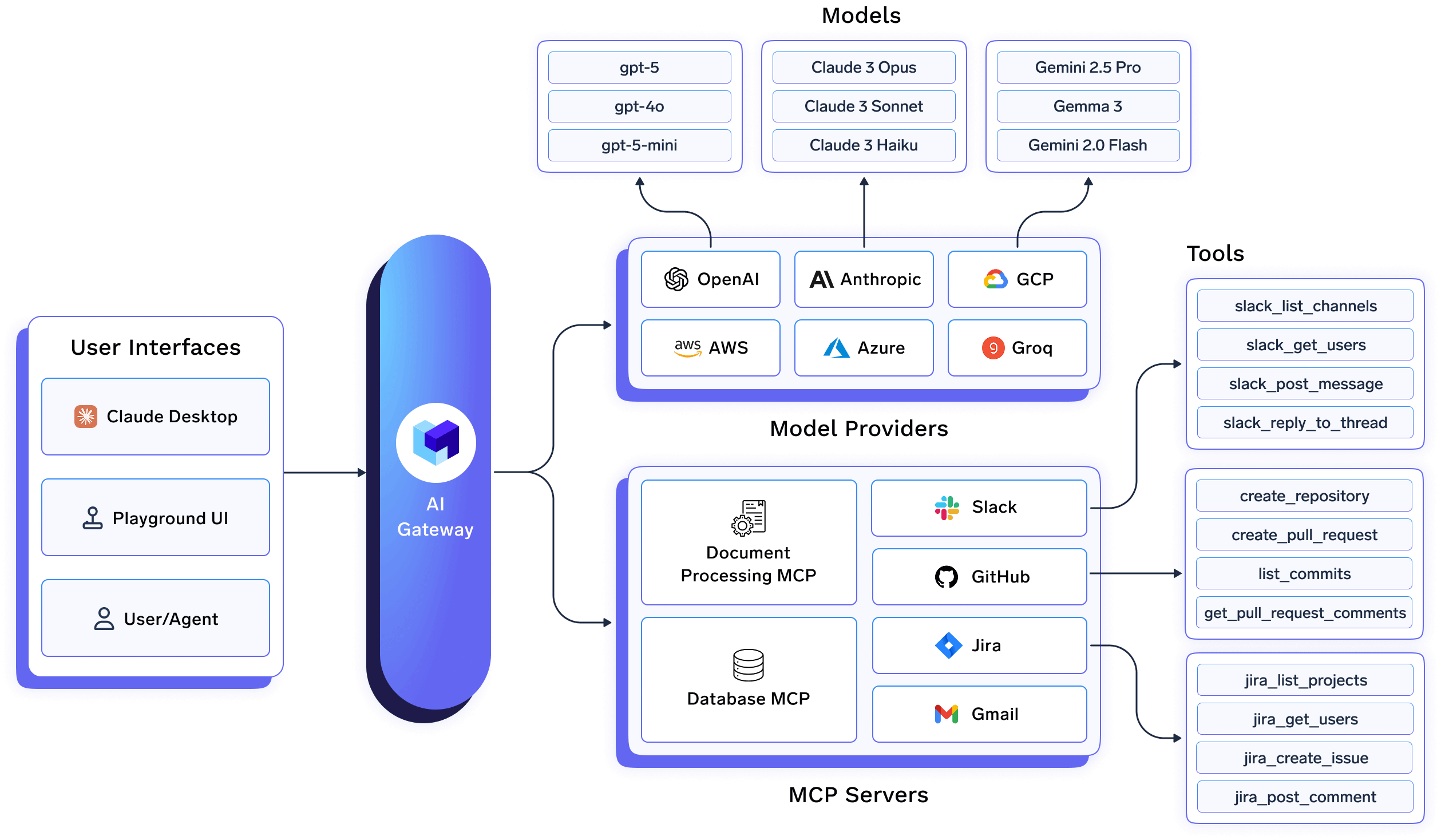
This additional layer enables organizations to:
An AI Gateway also creates a consistent control plane for multiple models and providers, allowing organizations to govern AI usage without requiring developers to manage credentials or provider-specific configurations.
For enterprises deploying Claude Code at scale, an AI Gateway becomes the foundation for secure, observable, and cost-controlled AI adoption. Rather than treating Claude Code as a standalone tool, organizations can manage it as part of a broader AI platform with centralized governance and security controls.
As Claude Code adoption grows across engineering teams, visibility becomes just as important as access control.
Security and platform teams need answers to questions such as:
Without user-level attribution, these questions become difficult or impossible to answer. If multiple developers share the same API key or service account, all activity appears under a single identity, creating significant audit and compliance gaps.
Every Claude Code request should be traceable to an individual user. Organizations should maintain logs that capture:
These logs are critical for security investigations, compliance reviews, cost allocation, and operational monitoring.
By routing traffic through an AI Gateway, enterprises can centralize audit logging and gain a complete view of AI activity across teams. Instead of piecing together logs from multiple providers and tools, organizations get a single source of truth for AI usage and governance.
As organizations adopt the Model Context Protocol (MCP), the security conversation extends beyond models and prompts.
MCP enables Claude Code to interact with external systems such as:
While this significantly expands what Claude Code can do, it also introduces new security risks.
An over-permissioned MCP server can expose sensitive data or allow actions that users were never intended to perform. In many cases, the risk comes not from the model itself but from the tools it can access.
To securely deploy MCP in the enterprise, organizations should:
For example, not every employee should have access to production databases, deployment systems, or sensitive internal tools through Claude Code. Access controls should be enforced consistently across both models and MCP servers.
This is where MCP governance becomes critical. Just as organizations govern access to cloud infrastructure and SaaS applications, they must also govern the tools and actions available to AI assistants.
An MCP Gateway provides a centralized layer for authentication, authorization, observability, and policy enforcement, helping organizations safely scale Claude Code and other AI agents without sacrificing security.
Security and governance are no longer limited to access control. As AI adoption grows, cost governance has become an equally important concern for enterprise teams.
Claude Code can significantly increase developer productivity, but it can also drive substantial token consumption when used across hundreds or thousands of developers. Without visibility into usage patterns, organizations may struggle to understand where AI spending is coming from or how it is being allocated across teams.
Common challenges include:
To address these challenges, organizations should implement:
For example, engineering teams may require access to premium models for complex coding tasks, while other teams can operate effectively on lower-cost models. Establishing usage policies helps balance productivity with cost efficiency.
An AI Gateway plays a key role here by providing centralized visibility into token consumption and spend across users, teams, models, and applications. Rather than waiting for a billing surprise at the end of the month, organizations can proactively monitor usage and enforce cost controls in real time.
Even with SSO in place, organizations must ensure that credentials are handled securely throughout their lifecycle.
A common mistake is storing long-lived tokens in scripts, configuration files, or developer environments. These credentials can be accidentally exposed through source code repositories, shared workstations, or misconfigured systems.
Instead, enterprises should follow modern credential management practices:
A secure deployment should minimize the number of long-lived credentials in circulation and ensure that users authenticate through approved identity providers rather than managing API keys themselves.
For example, when Claude Code is integrated with an enterprise identity provider such as OKTA, users can authenticate using SSO while access tokens are refreshed automatically behind the scenes. This improves both security and developer experience by reducing manual credential management.
The goal is to make the secure path the easiest path. Developers should not have to copy API keys, manage secrets, or manually refresh tokens to access Claude Code.
Many organizations still view Claude Code as a developer productivity tool. In reality, it increasingly behaves like an AI agent with access to enterprise systems and the ability to take actions on behalf of users.
Through MCP integrations, Claude Code can:
This changes the security model entirely.
The primary question is no longer:
"Who can access Claude?"
Instead, it becomes:
"What can Claude access and do on behalf of a user?"
Organizations should evaluate Claude Code using the same security principles applied to any privileged system:
As AI agents become more capable, governance must extend beyond the model itself to include the tools, data sources, and actions available to those agents.
The most successful enterprise deployments treat Claude Code as part of a broader AI platform governed through centralized identity, policy enforcement, observability, and access controls.
Bringing these best practices together requires more than securing Claude Code itself. Organizations need a centralized architecture that provides identity, governance, observability, and control across the entire AI stack.
A typical enterprise deployment looks like this:
Developer
    ↓
SSO (OKTA / Entra ID)
    ↓
TrueFoundry AI Gateway
    ↓
Claude Models
    ↓
MCP Gateway
    ↓
Enterprise Tools & Systems
Each layer serves a specific purpose:
Users authenticate using their existing corporate identity provider, such as OKTA or Microsoft Entra ID.
This eliminates the need to distribute API keys and ensures every action is associated with a verified user identity.
The AI Gateway acts as the central control plane for all Claude Code traffic.
Instead of allowing developers to connect directly to model providers, requests flow through the gateway, where organizations can:
This provides a single point of governance without impacting the developer experience.
As Claude Code interacts with GitHub, Jira, databases, internal APIs, and other tools, organizations need visibility and control over those interactions.
An MCP Gateway enables enterprises to:
This ensures Claude Code only interacts with trusted and authorized systems.
At the bottom of the stack are the repositories, databases, APIs, and business applications that Claude Code can access through MCP.
These systems often contain sensitive data and critical workflows, making governance and access control essential.
By combining SSO, an AI Gateway, and MCP governance, organizations can securely deploy Claude Code while maintaining the controls required by security, compliance, and platform teams.
Before rolling out Claude Code across your organization, use the following checklist to validate your security posture:
☑ Eliminate shared API keys
☑ Enable SSO through OKTA, Entra ID, or another identity provider
☑ Enforce multi-factor authentication (MFA)
☑ Ensure every request is tied to an individual user
☑ Route Claude Code traffic through an AI Gateway
☑ Enable user-level audit logs
☑ Track model usage and token consumption
☑ Maintain centralized visibility across teams
☑ Maintain an approved list of MCP servers
☑ Restrict access using role-based permissions
☑ Audit MCP tool usage
☑ Monitor interactions with enterprise systems
☑ Configure team budgets and quotas
☑ Set rate limits and spending alerts
☑ Monitor usage by user, team, and model
☑ Review AI spend regularly
☑ Avoid hardcoded credentials
☑ Use short-lived tokens
☑ Automate token refresh
☑ Store credentials securely
Organizations that implement these controls can significantly reduce the security, compliance, and operational risks associated with large-scale Claude Code deployments.
Claude Code is transforming how engineering teams write, review, and maintain software. But as its capabilities expand through MCP integrations and access to enterprise systems, the security requirements also become more complex.
The biggest risk is not the model itself—it's deploying Claude Code without the identity, governance, and observability controls needed to operate it safely at scale.
By eliminating shared API keys, implementing SSO, routing traffic through an AI Gateway, governing MCP access, enabling audit logging, and enforcing cost controls, organizations can provide developers with the benefits of Claude Code while maintaining enterprise-grade security and compliance.
A secure Claude Code deployment starts with visibility and control. Platforms like TrueFoundry's AI Gateway and MCP Gateway provide the foundation enterprises need to authenticate users, govern AI activity, monitor costs, and safely scale AI-powered development across teams.
TrueFoundry AI Gateway helps enterprises deploy Claude Code with:
Learn how TrueFoundry AI Gateway can help your organization securely adopt Claude Code and other AI agents at scale.
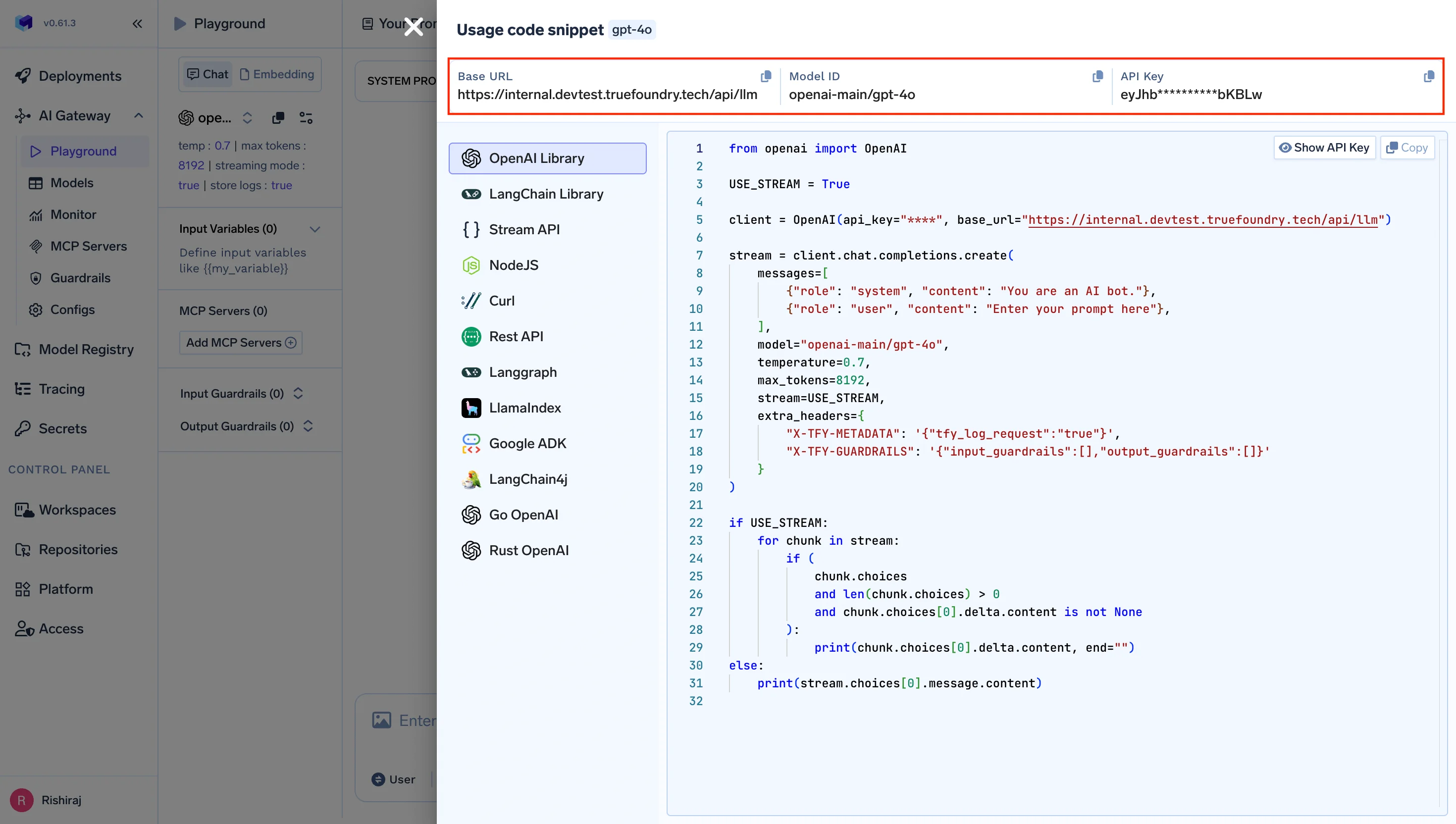
TrueFoundry AI Gateway offre une latence d'environ 3 à 4 ms, gère plus de 350 RPS sur 1 processeur virtuel, évolue horizontalement facilement et est prête pour la production, tandis que LiteLM souffre d'une latence élevée, peine à dépasser un RPS modéré, ne dispose pas d'une mise à l'échelle intégrée et convient parfaitement aux charges de travail légères ou aux prototypes.





Les dernières nouvelles, articles et ressources envoyés dans votre boîte de réception
.webp)

.png)
.png)
.png)
.png)
.png)
.png)
.png)
.png)
.png)
.png)
.png)


