


September 26, 2026
|
5 min read


Published: May 14, 2026

Blazingly fast way to build, track and deploy your models!
Oracle Cloud Infrastructure (OCI) takes a different approach to AI compute than the VM-first hyperscalers. The differentiated layer is bare-metal: OCI's GPU shapes — like BM.GPU.H100.8 — run with zero hypervisor overhead and connect through NVIDIA ConnectX SmartNICs over a custom RDMA over Converged Ethernet (RoCE v2) cluster network.
That performance ceiling has an operational cost. Bare metal means you're now responsible for the layer that VMs usually abstract: GPU drivers and the OFED stack, scheduling within the cluster network's topology constraints, federating identity through OCI IAM, and choosing among several storage paths for model weights. None of this is exotic, but it's substantial Kubernetes work that doesn't show up on managed-VM offerings.
TrueFoundry's role on this stack is the Kubernetes-native operational layer. The Compute Plane is your own Oracle Cloud Infrastructure Kubernetes Engine (OKE) cluster running on OCI bare metal. The platform packages a set of open-source and CNCF-affiliated components (ArgoCD, Argo Workflows, NVIDIA GPU Operator, Prometheus, KEDA, Istio, and others) into a managed deployment, adds a unified UI and GitOps workflow, and provides observability across services, jobs, and GPU utilization. It does not replace OCI primitives — it sits on top of them.
This post walks through the architecture you end up with when you run TrueFoundry on OCI bare metal: the control/compute plane split, how RDMA training fits into Kubernetes, how workload identity works, and the practical patterns for loading model weights at scale.
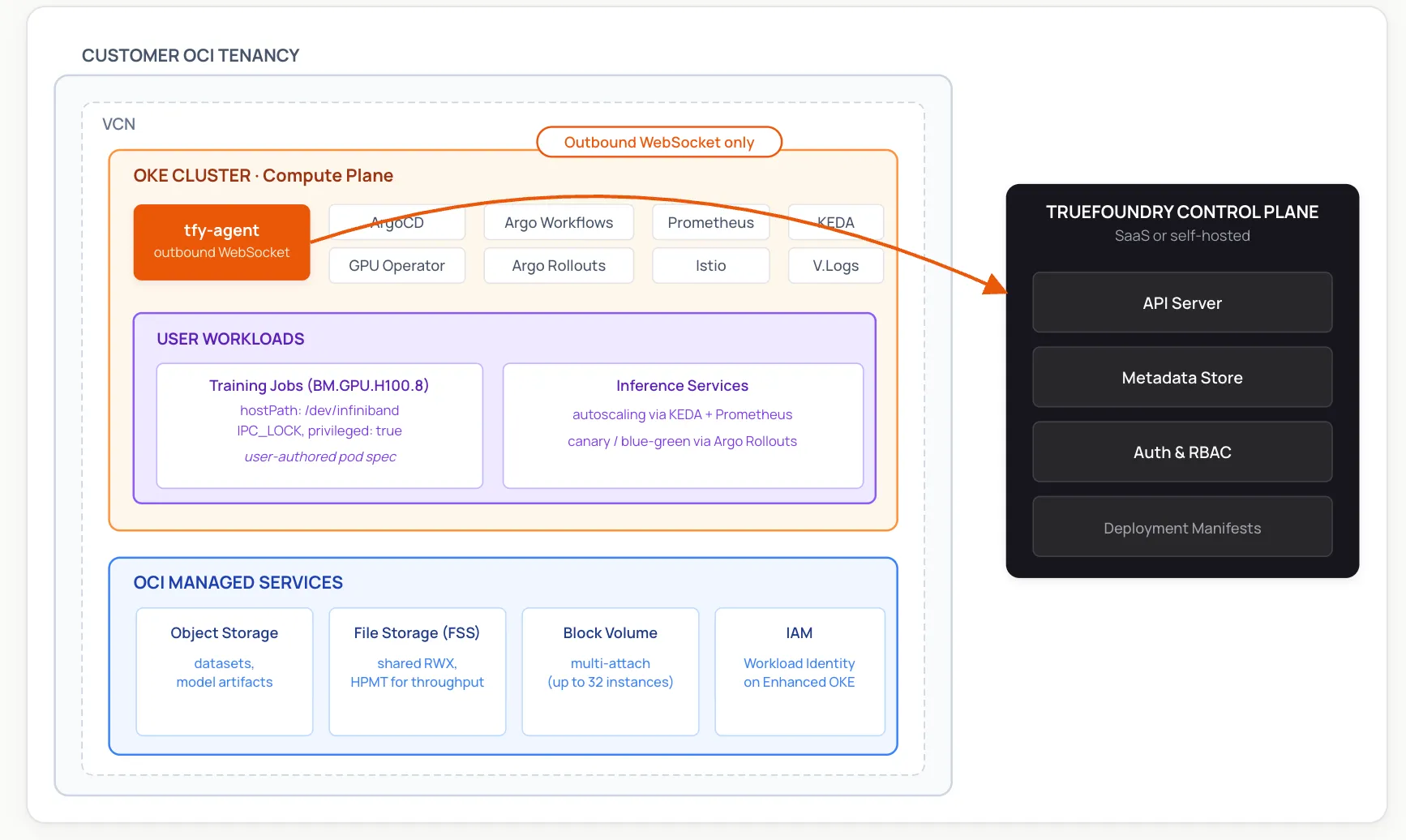
TrueFoundry uses a split-plane architecture. The Control Plane (TrueFoundry-managed or self-hosted) holds metadata, RBAC, the API server, and the deployment manifest store. The Compute Plane is one or more Kubernetes clusters in your own cloud environment — in this case, an OKE cluster on OCI bare metal. Workloads, model weights, and customer data stay in your tenancy.
The link between them is the tfy-agent, which runs on the Compute Plane cluster and opens an outbound-only WebSocket to the Control Plane. The agent pulls deployment manifests and pushes back Kubernetes resource updates. Because the connection is outbound, you don't need to open inbound ports on your VCN or expose the cluster API server to the public internet.
When TrueFoundry sets up a Compute Plane, the agent installs and manages a set of open-source addons via ArgoCD:
You can also bring your own existing instances of any of these — TrueFoundry documents the configuration needed to coexist with an existing ArgoCD, Prometheus, or Istio install.
OCI's cluster network is the differentiated networking layer that makes large-scale distributed training viable. Oracle has published internal measurements showing single-digit-microsecond latency in this fabric — as low as 2 microseconds for single-rack clusters, and typically 2.5 to 9 microseconds across multi-rack superclusters — using RoCE v2 over NVIDIA ConnectX SmartNICs. Actual numbers in production depend on cluster topology, message size, and contention; Oracle's First Principles writeup covers the underlying design.
To use RDMA effectively, two things have to be true:
oci.oraclecloud.com/rdma.local_block_id, network_block_id, and hpc_island_id — and Oracle's oci-hpc-oke quickstart shows how to use them with Kueue's topology-aware scheduling for best NCCL performance. For tightly coupled training, prefer co-locating pods within the same Local Block./dev/infiniband/ (the path naming reflects the underlying IB verbs API, even though the transport is RoCE v2 over Ethernet).The standard pod pattern from Oracle's quickstart looks like this:
spec:
  hostNetwork: true
  dnsPolicy: ClusterFirstWithHostNet
  containers:
  - name: trainer
    securityContext:
      privileged: true
      capabilities:
        add: ["IPC_LOCK"]
    volumeMounts:
    - { mountPath: /dev/infiniband, name: devinf }
    - { mountPath: /dev/shm, name: shm }
  volumes:
  - { name: devinf, hostPath: { path: /dev/infiniband }}
  - { name: shm, emptyDir: { medium: Memory, sizeLimit: 32Gi }}
These elevated privileges — privileged: true, IPC_LOCK, host networking — are specific to HPC/RDMA workloads. In production, isolate these pods to dedicated GPU namespaces with admission policies (e.g. Pod Security Admission set to privileged on the namespace, restricted elsewhere; or an OPA/Kyverno policy gating on a label) so that unrelated workloads can't inherit the same context.
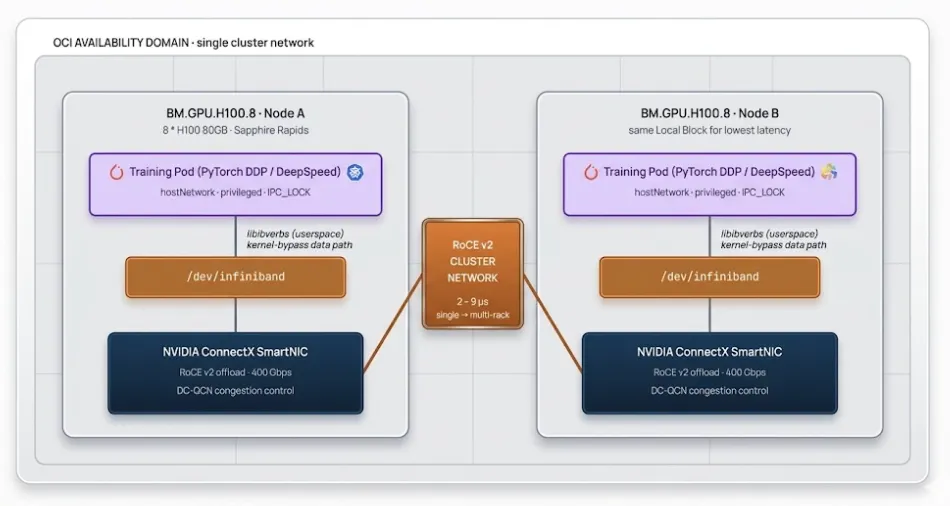
TrueFoundry's role here is to make running these training pods part of a normal deployment workflow — you author the workload, the platform pushes it through Argo Workflows, Prometheus scrapes GPU metrics from the DCGM Exporter shipped with the GPU Operator, and ArgoCD versions the manifests. Workload-level signals like NCCL counters are scraped only when the application exposes them. The RDMA-specific pieces (hostPath mounts, IPC_LOCK, topology affinity) are configured in your job spec following the standard pattern above; the platform doesn't replace those fields, it deploys whatever you specify.
For multi-node distributed training specifically, you'll typically install an operator on the cluster via its helm chart — MPI Operator for MPIJob-based runs (PyTorch DDP, DeepSpeed, NCCL), Kubeflow Training Operator for PyTorchJob/TFJob, or KubeRay for Ray-based training. TrueFoundry doesn't bundle these by default. Once installed, the platform deploys MPIJob/PyTorchJob/RayJob resources just like any other Kubernetes workload, with the same GitOps and observability story. Distributed training with RDMA on OCI is not a first-class TrueFoundry feature today — it's an implementation pattern based on Oracle's published reference manifests, with the platform handling the surrounding operational stack rather than the RDMA-specific orchestration.
For supported cluster types, OCI now recommends OKE Workload Identity over distributing long-lived API keys to pods. The mechanism works similarly to AWS IRSA or GKE Workload Identity: a Kubernetes ServiceAccount is mapped to an OCI IAM policy, and the OCI SDK exchanges the pod's projected ServiceAccount token for a short-lived OCI access token at call time. There's no static credential in the pod.
Two important constraints from Oracle's docs:
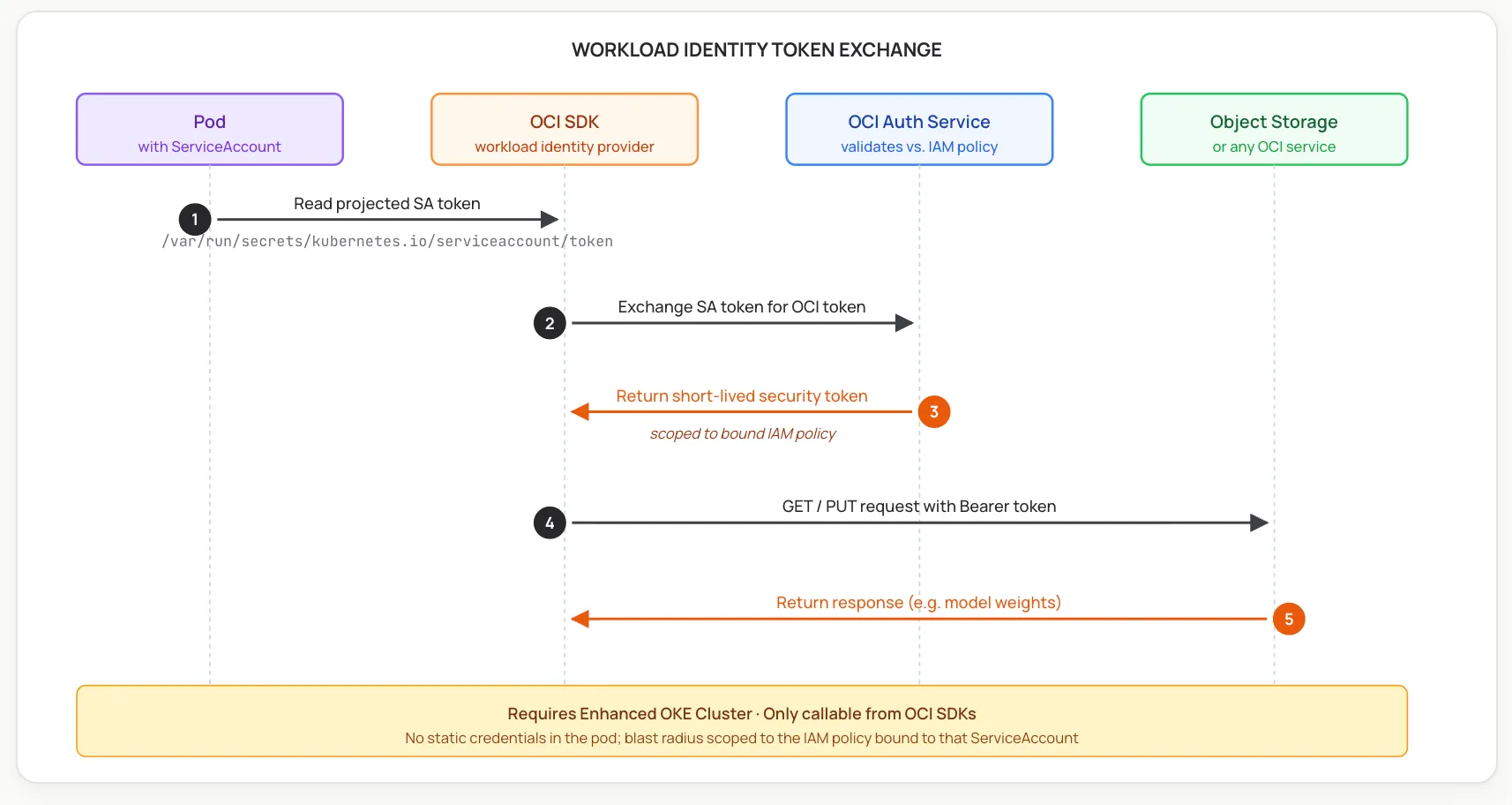
On the Kubernetes side, workloads are bound to namespace-scoped ServiceAccounts, and the platform can automate their creation as part of the deployment flow. The OCI side — the IAM policy with the request.principal.type='workload' rule and the cluster/namespace/serviceaccount selectors — is configured per Oracle's standard Workload Identity setup. Once both sides are in place, deployments that need OCI access obtain short-lived tokens transparently through the SDK.
OCI bare metal gives you several storage choices for getting model weights into VRAM. Each has trade-offs, and TrueFoundry's volume abstractions (PVCs, volume mounts, init containers) work with all of them — the right pattern depends on your workload:
The right pattern is workload-dependent. For most training runs, local NVMe (for ephemeral hot data) plus FSS (for shared checkpoints and weights) is the production setup. Block Volume multi-attach is an option for specific cases where a single immutable artifact needs to look like a local disk to many readers.
Running bare-metal GPU workloads on raw OCI primitives is doable — Oracle provides a Terraform-based HPC stack and the oci-hpc-oke quickstart — but it leaves you owning a substantial Kubernetes operational layer. The table below describes what TrueFoundry adds on top.
The pattern is consistent: OCI provides the bare-metal compute and network primitives; TrueFoundry provides the Kubernetes operational layer on top.
TrueFoundry on OCI is a Kubernetes-native platform running on Oracle's bare-metal stack. The Compute Plane is your OKE cluster, the workloads use OCI's RoCE v2 cluster network and Workload Identity through standard Kubernetes patterns, and the platform packages the open-source and CNCF-affiliated operational layer — GitOps, observability, autoscaling, GPU operator — into a managed deployment. The result is less platform-engineering overhead to operate bare-metal GPU workloads, with the OCI-specific configuration kept transparent rather than hidden.
A practical evaluation path is a reference deployment on a small OKE cluster — typically one or two BM.GPU shapes plus a CPU pool for the platform addons — to validate the architecture before scaling to a full Supercluster.
TrueFoundry AI Gateway delivers ~3–4 ms latency, handles 350+ RPS on 1 vCPU, scales horizontally with ease, and is production-ready, while LiteLLM suffers from high latency, struggles beyond moderate RPS, lacks built-in scaling, and is best for light or prototype workloads.






The latest news, articles, and resources sent to your inbox


.webp)
.webp)
.webp)
.webp)
.webp)
.png)
.png)
.png)
.png)
.png)
.png)


