



October 1, 2026
|
5 min read


احصل على وصول فوري إلى بيئة TrueFoundry مباشرة. انشر النماذج، ووجّه حركة مرور LLM، واستكشف المنصة بالكامل — بيئة الاختبار الخاصة بك جاهزة في ثوانٍ، ولا يلزم وجود بطاقة ائتمان.



Published: July 4, 2026

Blazingly fast way to build, track and deploy your models!
n8n is a powerful, open-source workflow automation platform that lets you create complex workflows using a visual, node-based interface. While n8n offers a cloud version, the ability to self host n8n gives you complete control over your data, costs, and instance performance.
With TrueFoundry's deployment platform, you can easily self host n8n in your own infrastructure without getting lost in complex Kubernetes configurations. This guide will walk you through the entire process to get your n8n self hosted instance running, from setting up storage to deploying the application.
Before you begin, ensure you have the following set up. These are essential for a smooth deployment experience.
While cloud platforms offer convenience, self-hosting your n8n instance unlocks a new level of power, control, and efficiency that is critical for businesses with serious automation goals. It’s about moving from a rented space to owning your own factory.
Here are the core advantages:
While the benefits are clear, setting up and managing a production-ready, self-hosted n8n instance from scratch can be a significant technical challenge. Developers and platform teams often face a steep learning curve and encounter several common hurdles:
PersistentVolumeClaims and ensuring the volume is correctly mounted can be tricky.These challenges often divert valuable engineering time from building automations to managing infrastructure. This is precisely where a streamlined deployment platform becomes essential
Any n8n self hosted instance requires persistent storage to save your workflows, credentials, and execution data. If the instance restarts, this volume ensures that all your data is safe. You can create this volume using either the TrueFoundry UI or our Python SDK.
For a no-code approach, you can create the required volume directly through our web interface. Follow the detailed steps in our volume creation guide.
.webp)
For a code-based, repeatable setup, you can define the volume in a Python script.
volume_deploy.py.storage_class and workspace_fqn.import logging
from truefoundry.deploy import (
DynamicVolumeConfig,
Volume,
)
logging.basicConfig(level=logging.INFO)
# Define the persistent volume for n8n data
volume = Volume(
name="n8n-volume",
# Replace with your cluster's storage class size
config=DynamicVolumeConfig(storage_class="efs-sc", size=2),
workspace_fqn="<your-workspace-fqn>", # Paste your Workspace FQN here
)
# Deploy the volume to your workspace
volume.deploy(workspace_fqn="<your-workspace-fqn>", wait=False)python volume_deploy.pyWith the storage volume ready, you can now deploy the n8n application itself. This service will run the n8n docker container and connect it to the volume you created.
service_deploy.py.host, volume_fqn, and workspace_fqn.import logging
from truefoundry.deploy import (
Image,
VolumeMount,
Service,
Port,
)
logging.basicConfig(level=logging.INFO)
service = Service(
name="n8n-svc",
image=Image(image_uri="docker.n8n.io/n8nio/n8n"),
ports=[
Port(
port=5678,
protocol="TCP",
expose=True,
app_protocol="http",
host="<your-host-name>", # e.g., n8n.your-company.com
)
],
env={}, # Add license keys or other env vars here
mounts=[
VolumeMount(
mount_path="/home/node/.n8n",
volume_fqn="<your-volume-fqn>", # Paste the FQN of the volume from Step 1
)
],
workspace_fqn="<your-workspace-fqn>", # Paste your Workspace FQN here
)
service.deploy(workspace_fqn="<your-workspace-fqn>", wait=False)host: This is the public URL where you will access n8n. Find your available host domain by following our ports and domains guide.volume_fqn: هذا هو الاسم المؤهل بالكامل (Fully Qualified Name) للمجلد الذي أنشأته في الخطوة 1. يمكنك العثور عليه في صفحة المجلد ضمن لوحة تحكم TrueFoundry.workspace_fqn: الاسم المؤهل بالكامل (FQN) لمساحة العمل التي تريد نشر الخدمة فيها.python service_deploy.py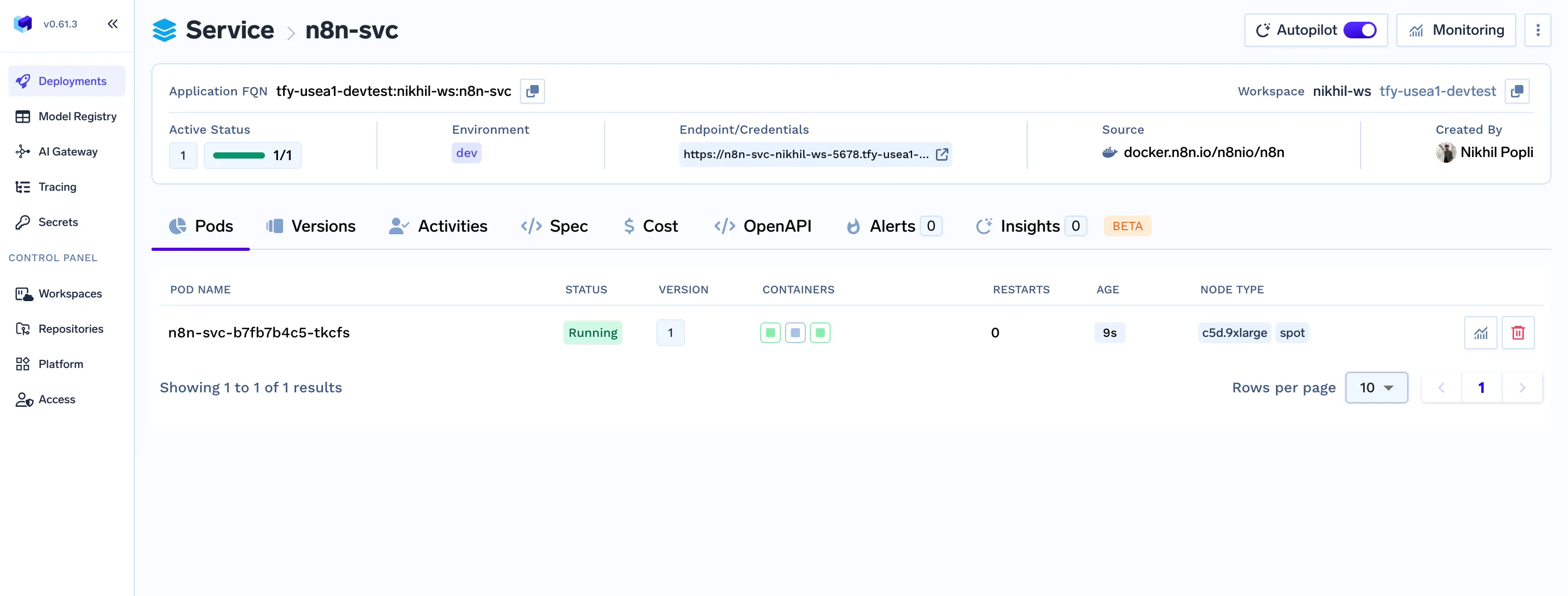
بمجرد اكتمال النشر، انتقل إلى عنوان URL للمضيف الذي قمت بتكوينه في ملف service_deploy.py . ستظهر لك شاشة إعداد n8n.
يمكنك الآن:
.webp)
أصبح مثيل n8n الخاص بك يعمل بكامل طاقته الآن على البنية التحتية الخاصة بك مع تخزين دائم، مما يضمن الحفاظ على سير عملك وبيانات الاعتماد الخاصة بك عبر أي عمليات إعادة تشغيل.
ينشر هذا الدليل إصدار المجتمع من n8n. إذا كان لديك ترخيص مؤسسي، يمكنك فتح ميزات إضافية عن طريق إضافة مفتاح الترخيص الخاص بك إلى قاموس env في service_deploy.py ملف.
يمكنك العثور على مزيد من التفاصيل حول متغيرات البيئة في وثائق n8n الرسمية.
إذا واجهت مشكلات، فإليك بعض الأمور التي يجب التحقق منها أولاً:
storage_class التي حددتها في volume_deploy.py متاحة ومتوافقة مع مجموعتك.workspace_fqn و volume_fqn صحيحة ولا تحتوي على أخطاء إملائية.تهانينا! لقد تعلمت بنجاح كيفية استضافة n8n ذاتيًا باستخدام TrueFoundry. هذا إعداد n8n المستضاف ذاتيًا لا يمنحك تحكمًا كاملاً في سير عملك وبياناتك فحسب، بل يوفر أيضًا أساسًا قابلاً للتطوير وقويًا لجميع احتياجات الأتمتة الخاصة بك.
TrueFoundry AI Gateway delivers ~3–4 ms latency, handles 350+ RPS on 1 vCPU, scales horizontally with ease, and is production-ready, while LiteLLM suffers from high latency, struggles beyond moderate RPS, lacks built-in scaling, and is best for light or prototype workloads.





أحدث الأخبار والمقالات والموارد تصلك مباشرة إلى بريدك الوارد
.png)



.png)
.png)
.png)

.png)
.png)
.png)
.png)
.png)
.png)
.png)


