November 14, 2026
|
5 min read


احصل على وصول فوري إلى بيئة TrueFoundry مباشرة. انشر النماذج، ووجّه حركة مرور LLM، واستكشف المنصة بالكامل — بيئة الاختبار الخاصة بك جاهزة في ثوانٍ، ولا يلزم وجود بطاقة ائتمان.


Blazingly fast way to build, track and deploy your models!
بناء وكيل ذكاء اصطناعي يتطلب أكثر من مجرد استدعاء نموذج. فأنت بحاجة إلى إدارة حلقة عمل الوكيل، وتنفيذ الأدوات، وتوفير بيئة تشغيل، والحفاظ على حالة الجلسة، والتعامل مع الأذونات، ومراقبة ما يقوم به الوكيل.
تتولى وكلاء Claude المُدارين التعامل مع معظم هذه البنية التحتية نيابةً عنك. بدلاً من بناء وتشغيل بيئة تشغيل الوكيل الخاصة بك، يمكنك تعريف الوكيل، وتكوين مكان تشغيله، وإنشاء جلسات له لتنفيذ المهام. تتولى بيئة التشغيل المُدارة استدعاءات النموذج وتنفيذ الأدوات، بينما يتفاعل تطبيقك مع الوكيل من خلال الأحداث.
في هذا الدليل، سنوضح لك كيفية استخدام وكلاء Claude المُدارين خطوة بخطوة بدءاً من إنشاء وكيلك الأول وتكوين بيئته، وصولاً إلى تشغيل جلسة، وإضافة الأدوات وخوادم MCP، والتعامل مع أحداث الوكيل.
إذا كنت ترغب في الحصول على الأساس المفاهيمي أولاً، راجع دليلنا حول ماهية وكلاء Claude المُدارين وكيفية عمل بنيتهم التحتية. يفترض هذا الدليل أنك مستعد للبدء في البناء.
قبل إنشاء وكيل مُدار، ستحتاج إلى:
بالنسبة لـ Python، ثبّت حزمة SDK:
ثم عيّن مفتاح واجهة برمجة التطبيقات الخاص بك كمتغير بيئة:
توفر Anthropic أيضاً ant واجهة سطر أوامر (CLI) لإدارة موارد الوكلاء المُدارين.
تقرأ مجموعة تطوير البرمجيات (SDK) المفتاح من بيئتك، لذا لا تحتاج إلى تضمينه مباشرة في كود تطبيقك.
تتوفر وكلاء Claude المُدارون حالياً من خلال واجهة برمجة تطبيقات تجريبية (بيتا) من Anthropic. يتم تحديد إصدار البيتا للوكلاء المُدارين بواسطة:
managed-agents-2026-04-01ترويسة البيتا.
عند استخدام مجموعة تطوير البرمجيات (SDK) الرسمية، فإنها تتولى التعامل مع هذه الترويسة نيابةً عنك عند الوصول إلى واجهات برمجة تطبيقات الوكلاء المُدارين.
يبدو إعداد العميل الأساسي لديك كالتالي:
في هذه المرحلة، أصبح تطبيقك جاهزاً للعمل مع واجهة برمجة تطبيقات الوكلاء المُدارين.
الخطوة التالية هي إنشاء الوكيل نفسه - وتحديد نموذج Claude الذي يستخدمه، والتعليمات التي يتبعها، والأدوات التي يمكنه الوصول إليها.
الوكيل عبارة عن ملف Markdown. يحتوي القسم التمهيدي (frontmatter) على إعدادات الوكيل، بينما يحتوي المتن على تعليمات النظام الخاصة به.
إليك مثال لوكيل يقوم بصياغة ملاحظات الإصدار من مستودع برمجيات:
يوفر agent_toolset_20260401 للمُعامل إمكانية الوصول إلى الأدوات الجاهزة من Anthropic، بما في ذلك إمكانيات مثل أوامر النظام وعمليات الملفات. يمكنك أيضاً تهيئة أدوات فردية إذا لم تكن بحاجة إلى مجموعة الأدوات الكاملة. راجع مرجع الأدوات للاطلاع على الخيارات المتاحة.
احفظ التهيئة باسم release-notes-agent.md، ثم طبقها باستخدام واجهة سطر الأوامر ant :
ant apply release-notes-agent.md
يؤدي هذا إلى إنشاء المُعامل وإرجاع مُعرّفه (ID).
المُعامل هو مورد دائم. أنت تنشئه مرة واحدة ثم تشير إلى مُعرّفه كلما بدأت جلسة تستخدمه؛ لا تحتاج إلى إعادة إنشاء المُعامل لكل مهمة.
بعد ذلك، ستقوم بإنشاء البيئة التي سيتم تنفيذ جلسات المُعامل الخاصة بك فيها.
تحدد البيئة مساحة العمل المعزولة (sandbox) التي يتم فيها تنفيذ جلسات المُعامل الخاصة بك.
أنشئ ملف environment.yaml ملف:
ثم قم بتطبيقه:
ant apply environment.yaml
يمكنك أيضاً تطبيق الوكيل والبيئة معاً:
يمنح إعداد networking: unrestricted بيئة الاختبار وصولاً غير مقيد إلى الشبكة. بالنسبة للوكلاء الذين يعملون مع أنظمة داخلية أو بيانات حساسة، استخدم إعداد شبكة أكثر تقييداً.
لديك الآن الموردان المطلوبان لتشغيل وكيل:
بعد ذلك، ستنشئ جلسة تربط بينهما.
الجلسة هي مثيل تشغيل واحد لوكيلك يعمل على مهمة محددة.
أنشئ جلسة عن طريق تمرير معرفات الوكيل والبيئة الخاصة بك:
يحدد معرف الجلسة هذا التشغيل بعينه. ستستخدمه لإرسال الرسائل، وبث الأحداث، ومواصلة التفاعل مع الوكيل.
يمكن للوكيل نفسه أن يحتوي على جلسات متعددة. على سبيل المثال، وكيل Release Notes Agent يمكنك تشغيل جلسة منفصلة لكل إصدار مع الاحتفاظ بنفس إعدادات الوكيل.
بمجرد تشغيل الجلسة، أرسل مهمة إلى الوكيل.
افتح بث الأحداث أولاً، ثم أرسل رسالة المستخدم:
خلف هذا الاستدعاء، تقوم بيئة التشغيل المُدارة بتجهيز بيئة الاختبار (sandbox) بناءً على إعدادات بيئتك، وتبدأ حلقة عمل الوكيل، وتسمح لـ Claude باختيار الأدوات وتنفيذها، ثم تبث الأحداث إلى تطبيقك.
أنواع الأحداث الثلاثة المذكورة أعلاه هي التي ستتعامل معها عادةً في البداية:
agent.message — يرسل الوكيل استجابة.agent.tool_use — يستخدم الوكيل أداة ما.session.status_idle — انتهى الوكيل من عمله الحالي.للاطلاع على القائمة الكاملة للأحداث، بما في ذلك تغييرات الحالة والأخطاء، راجع مرجع الأحداث والبث.
في هذه المرحلة، أصبح لديك وكيل مُدار يعمل بكفاءة: لقد قمت بتعريفه، وتزويده ببيئة تنفيذ، وبدء جلسة، وإرسال مهمة إليه.
بعد ذلك، سنلقي نظرة على كيفية توجيه وكيل قيد التشغيل والتعامل مع الجلسات طويلة الأمد.
You don't have to wait for an agent to finish before changing its direction.
You can send a user.interrupt event to stop the current turn, followed by a user.message with the new instruction:
The interrupt stops the model's current response and returns control to the session. If the agent is in the middle of a tool call, the interrupt can take longer to apply while that tool finishes. Once the interrupt is processed, the session returns to idle, and the following user.message starts the next turn.
This is useful for long-running tasks where you realize the agent is heading in the wrong direction. Instead of terminating the session and starting over, you can reuse the same session and redirect it with additional context.
You can also interrupt a running session without immediately sending a new instruction:
The session stays available after the interruption, so you can inspect what happened and decide what to send next.
Next, you'll want to handle what happens when your application loses its connection to a running session.
A streaming connection can disconnect while an agent is still working. That doesn't mean the session or its work is lost.
Managed Agents persists the session's event history server-side, so your application can reconnect to the same session instead of starting the task again.
The important thing is to persist the session ID when you create the session:
If your application loses its connection, use the same session_id to reconnect and continue interacting with the session.
This matters for long-running agents. A browser tab closing, a process restarting, or a temporary network failure shouldn't force the agent to start the task from scratch.
For production applications, treat the session ID as durable application state: store it somewhere your application can retrieve it after a process restart, rather than keeping it only in memory.
The event stream is only the connection between your application and the running session. The session itself continues to exist independently of that connection.
Next, we'll look at how to give your agent additional capabilities with MCP servers and tools.
The cloud sandbox is the default, and it's the reason some teams can't ship this. If data residency or compliance rules out Anthropic-hosted execution, self-hosted sandboxes let sessions run on infrastructure you control while Anthropic still operates the loop.
Note what does and doesn't move: execution comes to your infrastructure, orchestration stays with Anthropic.
For agents that should run on a cadence rather than on demand, scheduled deployments run a session on a cron schedule. A nightly triage pass or a weekly report fits here without you standing up a scheduler.
Claude Managed Agents bills on two dimensions: model tokens, plus a runtime charge of roughly $0.08 per session-hour that covers container time.
Three things worth knowing early:
Idle time is free, so a session waiting on a human doesn't accrue runtime charges. There's no batch discount, so work you'd normally batch costs the same here. And web search is billed separately from the toolset.
The session-hour charge is usually the smaller number. Tokens dominate, and how many tokens a run consumes depends on how the harness manages context rather than on anything you configure. We broke the full cost structure down in Claude Managed Agents pricing.
Two constraints tend to surface after the prototype works. The model is Anthropic's, so there's no switching to a cheaper one when your volume grows. And the loop is operated by Anthropic, so context strategy is not a dial you control.
If you're evaluating rather than committed, Claude Managed Agents alternatives covers the field.
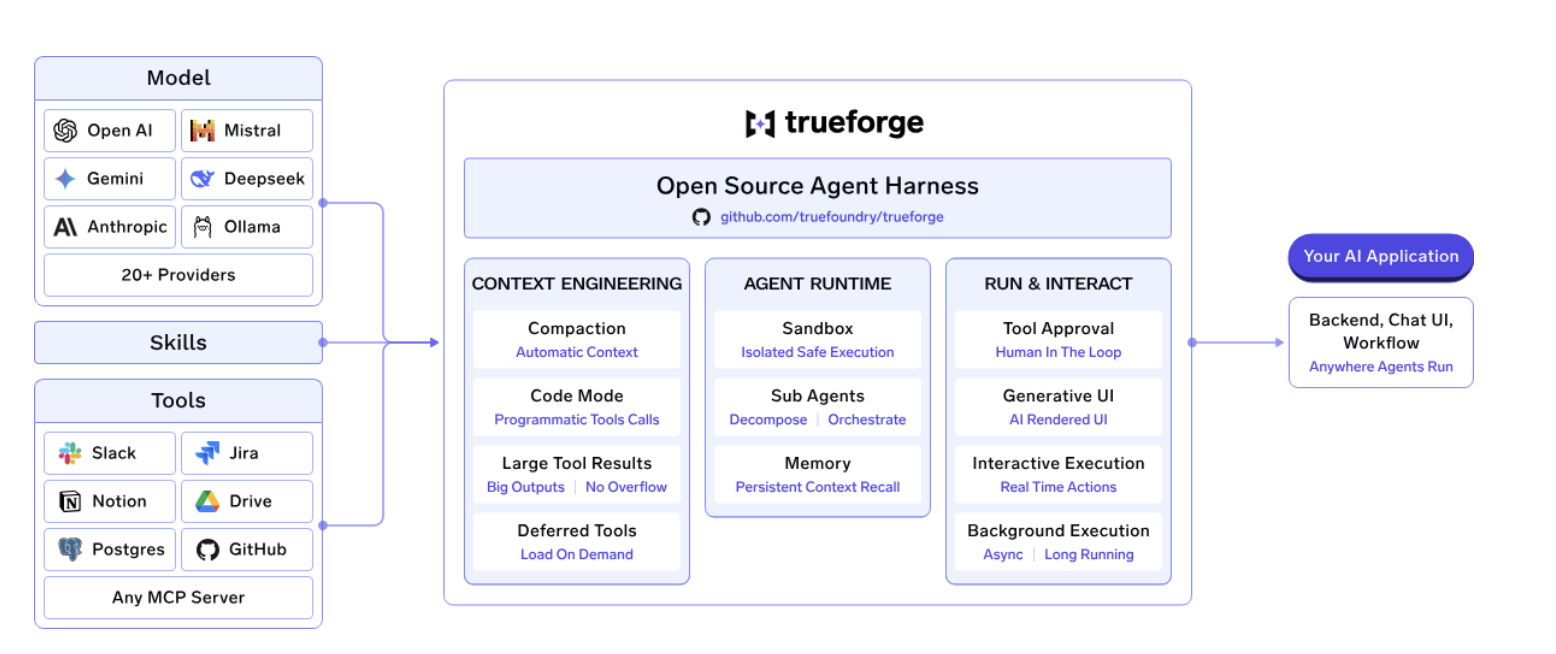
TrueForge is TrueFoundry's open-source, vendor-neutral agent harness for teams that want more control over how their agents run in production. Instead of tying the runtime to a single model provider, TrueForge lets you bring your own models, MCP servers, and infrastructure while handling the agent loop, tool execution, context management, approvals, and sandboxing.
Where a self-hosted agent like Hermes leaves much of the production infrastructure to the developer, TrueForge provides the surrounding control plane needed to operate agents across teams and environments. This includes centralized MCP access and credentials, human-in-the-loop approvals, sandboxed execution, observability, and governance.
You can run it locally with npx @truefoundry/trueforge or deploy it for a team with Docker Compose or Helm.
TrueForge also separates the agent runtime from the model layer. This means teams can switch models or route workloads to different providers without rebuilding the agent itself.Combined with TrueFoundry's AI Gateway, teams can also apply model routing and cost controls to avoid using expensive frontier models for tasks that don't require them. The result is a middle ground between a fully managed runtime and building the entire agent infrastructure yourself: an open-source agent harness with the operational controls needed to run production agents at scale.
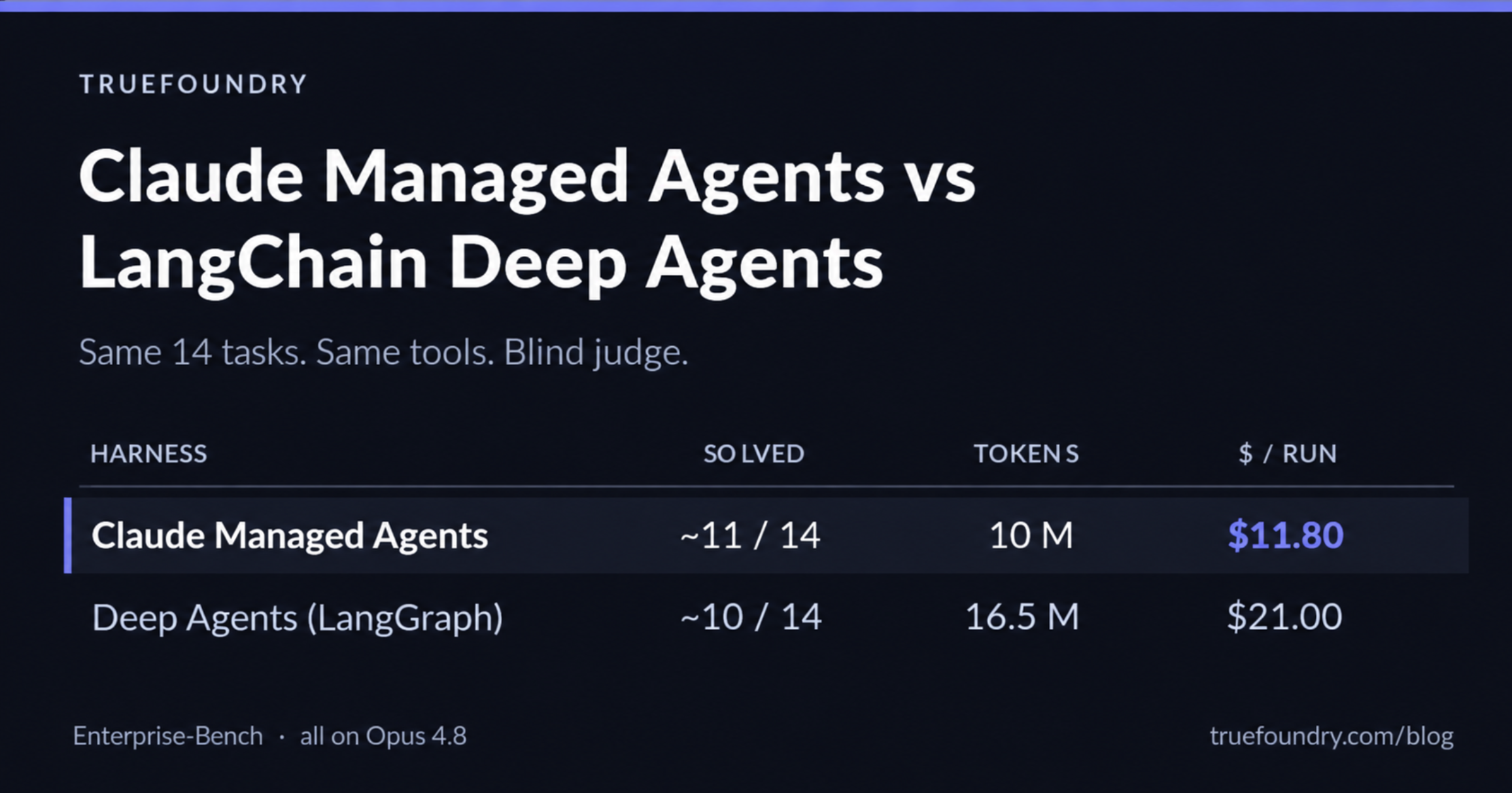
In TrueFoundry's benchmark against Claude Managed Agents, TrueForge reached roughly the same task accuracy while using about 40% as many tokens when both were run on Opus 4.8, making it about 30% cheaper per run. When the same benchmark was run with GLM-5.2 on TrueForge, it achieved the same ~11/14 task score at about $2.90 per run versus $11.80 for Claude Managed Agents, roughly 75% lower cost.
TrueFoundry also provides a second lever for reducing model costs through AI Gateway's Auto Routing. Instead of sending every request to a frontier model, Auto Routing classifies requests by complexity and routes them to different model tiers. In TrueFoundry's benchmark across 550 prompts, routing between Haiku, Sonnet, and Opus reduced cost by 69% while retaining 98% of baseline quality, and mean latency dropped from 7.6 seconds to 4.0 seconds. On production-shaped traffic, the overall cost reduction reached 80%.
These two layers address different parts of the cost equation. TrueForge reduces the overhead of running the agent itself, while model routing lets you avoid using an expensive model when the task doesn't require one. For teams running agents at scale, having both controls can matter more than the price of the model alone.
TrueForge is open source and MIT licensed, while TrueFoundry's AI Gateway adds the operational layer teams need when moving from individual agents to production: centralized model access, budgets, guardrails, credential management, and unified traces.
If you're comparing Claude Managed Agents with a more configurable architecture, TrueFoundry is worth considering when model flexibility, infrastructure control, and agent cost optimization matter alongside the agent runtime itself.
Managed Agents governs one agent's runtime very well. What it doesn't do is govern a fleet which is the problem that shows up around agent number five, when finance asks what any of this costs and security asks who approved the credentials.
An agent harness controls how an agent works. An AI Gateway controls how that agent accesses models.
For example, an organization might run agents using Claude Managed Agents or TrueForge while routing model requests through an AI Gateway.
TrueFoundry's AI Gateway sits in front of every model and MCP call an agent makes, applying centralized model access, per-team budgets, rate limits, guardrails, credential management and unified traces - across whichever agents and frameworks your teams are running. It supports 1,000+ LLMs through a single OpenAI-compatible API, adds roughly 3–4 ms of overhead, and handles 350+ RPS on a single vCPU, so it can sit in the hot path of a long-running agent without becoming the bottleneck. It runs in your own VPC, on-prem or air-gapped.
This becomes particularly useful when an organization runs agents across multiple models rather than relying on a single model provider.
Agent runtime: manages the agent loop, tools, state, and execution.
AI Gateway: تتولى إدارة الوصول إلى النماذج، والتوجيه، والسياسات، والمراقبة، وتجريد مزودي الخدمة.
يسمح هذا الفصل للفرق بتغيير النماذج أو إضافتها دون الحاجة إلى إعادة تصميم الوكيل نفسه.
س: كيف يمكن استخدام وكلاء Claude المدارة (Claude Managed Agents)؟
ج: قم بتثبيت ant CLI و Anthropic SDK، ثم حدد الوكيل في ملف markdown مع نموذجه ومطالبة النظام والأدوات، وقم بتعريف بيئة في ملف YAML لبيئة الاختبار (sandbox)، ثم أنشئ جلسة تشير إلى كليهما وقم ببث أحداثها. يتم إنشاء الوكلاء والبيئات مرة واحدة وإعادة استخدامها؛ أما الجلسات فهي مخصصة لكل مهمة. تستغرق العملية برمتها حوالي عشر دقائق.
س: هل أحتاج إلى ant CLI، أم يمكنني القيام بكل شيء من خلال SDK؟
ج: واجهة سطر الأوامر (CLI) توفر الراحة وليست إلزامية. توفر Anthropic توثيقاً لمسارات cURL و SDK الأصلية لكل خطوة في دليل البدء السريع، عبر لغات Python و TypeScript و Java و Go و C# و Ruby و PHP. ما تضيفه واجهة سطر الأوامر هو ant apply و claude-lock.json، اللذان يحافظان على إصدارات معرفات الوكيل والبيئة جنباً إلى جنب مع الكود الخاص بك بدلاً من لصقها في ملف إعدادات في مكان ما.
س: هل يمكن تشغيل وكلاء Claude المدارة على بنيتي التحتية الخاصة؟
ج: جزئياً. تتيح لك بيئات الاختبار المستضافة ذاتياً (Self-hosted sandboxes) تنفيذ الجلسات على بنية تحتية تتحكم فيها، وهو ما يكفي عادةً لمتطلبات إقامة البيانات. تظل طبقة التنسيق مع Anthropic في كلتا الحالتين، لذا فهذا لا يعادل تشغيل الحزمة بأكملها بنفسك.
س: هل يتكامل النظام مع حزمة المراقبة الحالية الخاصة بي؟
ج: طبقة البوابة (gateway) الخاصة بـ TrueFoundry متوافقة مع OpenTelemetry وتتصل بـ Grafana أو Datadog أو Prometheus أو أي أداة تستخدمها بالفعل، حيث تتبع كل طلب بدءاً من المطالبة (prompt) وصولاً إلى تنفيذ الأداة والنموذج. هذا الأمر مهم عندما تحتاج الوكلاء من أطر عمل مختلفة إلى الظهور في مكان واحد.
س: كيف يمكنني إدارة النماذج وخوادم MCP عبر عدد كبير من الوكلاء؟
ج: من خلال بوابة (gateway)، بمجرد أن تتوقف مفاتيح API الخاصة بكل فريق عن كونها قابلة للتوسع. توفر TrueFoundry AI Gateway تضع أكثر من 1000 نموذج لغوي ضخم (LLM) خلف واجهة برمجة تطبيقات واحدة متوافقة مع OpenAI، مع زمن انتقال إضافي يتراوح بين 3 إلى 4 مللي ثانية وقدرة على معالجة أكثر من 350 طلباً في الثانية (RPS) على وحدة معالجة مركزية افتراضية (vCPU) واحدة، مع توفير ميزات التحكم في الوصول المستند إلى الأدوار (RBAC)، والميزانيات، وضوابط الحماية، وتدوير بيانات الاعتماد. تخضع الوكلاء العاملون على Claude Managed Agents أو LangGraph أو أي منصة أخرى لنفس نظام الحوكمة.
إن معرفة كيفية استخدام وكلاء Claude المُدارة تعتمد بشكل أساسي على فهم أربعة عناصر والترتيب الذي تنشئها به: الوكيل، والبيئة، والجلسة، والأحداث. الإعداد سريع حقاً. أما الجوانب التي تستحق قضاء الوقت في دراستها فهي تلك التي يتجاوزها دليل البدء السريع، وهي: التعامل مع حالات انقطاع الاتصال، وتكوين الشبكة في بيئتك، وفهم أي جزء من فاتورتك يمكنك التأثير عليه فعلياً.
إذا وصلت إلى المرحلة التي يصبح فيها اختيار النموذج واستراتيجية السياق أكثر أهمية من سرعة الإعداد، فهذه هي الإشارة للانتقال إلى بيئة تشغيل مفتوحة. npx @truefoundry/trueforge لتشغيل وكيل محلياً في حوالي دقيقة، أو احجز جولة تعريفية إذا كنت تفضل رؤية ذلك مطبقاً على سير عملك الخاص.
TrueFoundry AI Gateway delivers ~3–4 ms latency, handles 350+ RPS on 1 vCPU, scales horizontally with ease, and is production-ready, while LiteLLM suffers from high latency, struggles beyond moderate RPS, lacks built-in scaling, and is best for light or prototype workloads.



أحدث الأخبار والمقالات والموارد تصلك مباشرة إلى بريدك الوارد