



October 1, 2026
|
5 min read


احصل على وصول فوري إلى بيئة TrueFoundry مباشرة. انشر النماذج، ووجّه حركة مرور LLM، واستكشف المنصة بالكامل — بيئة الاختبار الخاصة بك جاهزة في ثوانٍ، ولا يلزم وجود بطاقة ائتمان.



Published: September 11, 202612
Blazingly fast way to build, track and deploy your models!
Eight out of ten Fortune 10 companies now use Claude, and over 300,000 businesses run it in production. Two CVEs in the past year proved that a cloned repo is all it takes to exfiltrate API keys or execute code before a trust dialog even appears.
Claude ships across three interfaces — web, desktop, and CLI — and each one has a different attack surface. The web version runs in a browser sandbox, the desktop app connects to local tools, and Claude Code sits in your developers' terminals with the same permissions as their user accounts. It can read files, run bash commands, and connect to external services.
Most enterprise security guides treat these interfaces as one thing, but they are not. Governing Claude well means applying the right controls to each surface, rather than blanket policies that over-restrict developers or leave gaps. The sections below walk through how to do it.
SSO should be live before you hand Claude to a single developer — not after, and certainly not "soon."
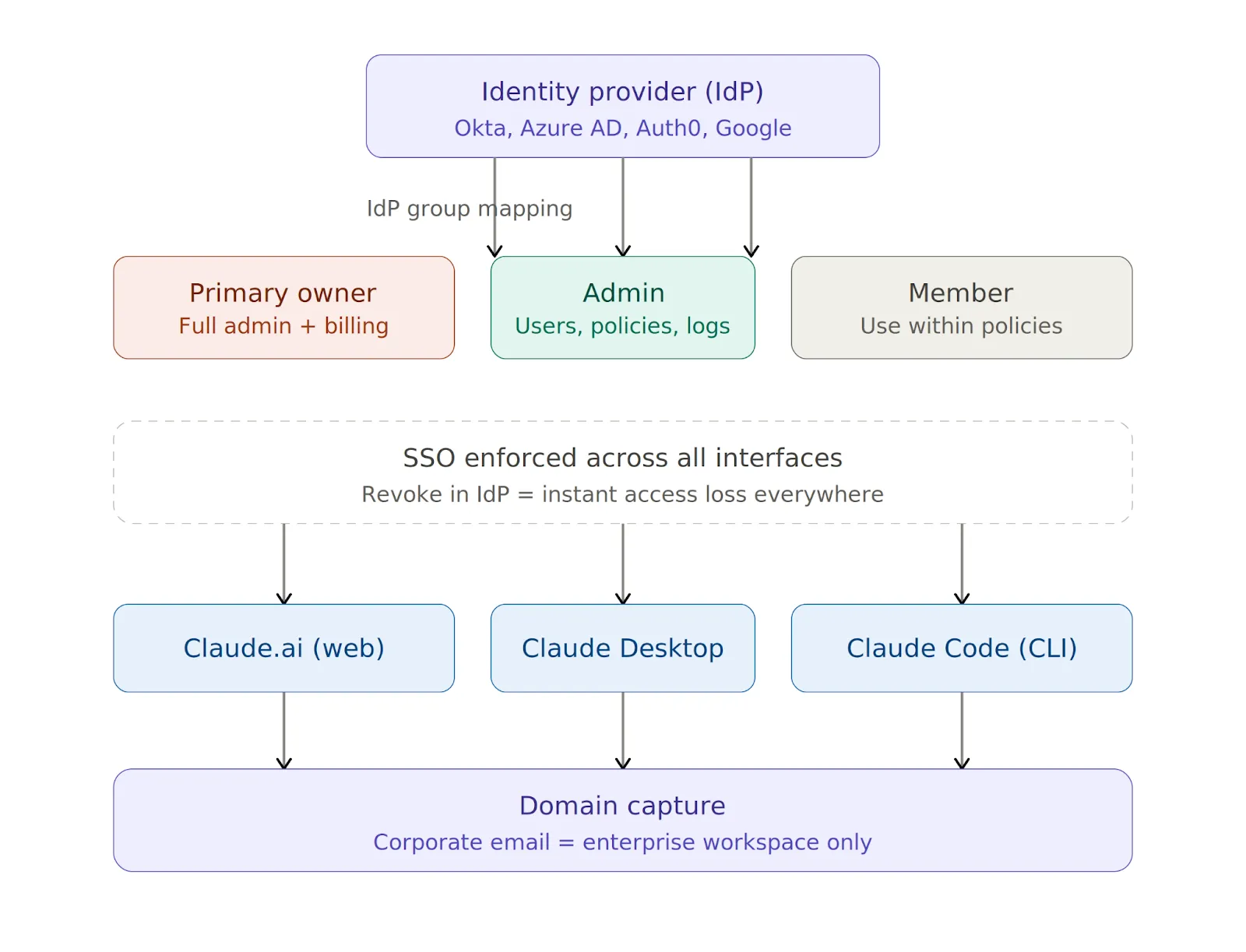
Claude supports SAML 2.0 and OIDC with Okta, Azure AD (Entra ID), Auth0, and Google Workspace, and you can manage all of it from the Claude Admin Console (see the setup guide). Three settings matter most at this stage.
Revoking someone in your IdP drops their access across web, desktop, and CLI instantly.
SSO handles interactive logins, while API keys handle everything else — Claude Code sessions, CI/CD pipelines, and any automation hitting the API outside a browser.
You should issue keys through the Admin Console because developers should never use personal keys in a corporate context. Store them in AWS Secrets Manager, HashiCorp Vault, or Azure Key Vault, rotate them quarterly, and revoke them immediately on suspected compromise or when someone leaves the team.
After identity, the next layer is model access and traffic routing. You need answers to two questions: which models can developers use, and where does their Claude traffic actually flow?
A simple allowlist in the Admin Console stops developers from switching to higher-cost or unapproved models:
{
  "allowedModels": ["claude-sonnet-4-5", "claude-haiku-4-5"]
}
Routing Claude traffic through your own LLM gateway lets you inspect, log, and govern requests at the network layer. You can set these environment variables on developer machines to get started:
export ANTHROPIC_BASE_URL=https://your-gateway.internal.corp
export HTTPS_PROXY=https://proxy.your-company.com:8080
One important detail is that these variables apply only to Claude Code and Claude Desktop. Web routing is controlled at the organization level through the Admin Console.
Setting variables on one machine is easy, but doing it across 100 machines and ensuring nobody changes them is the real challenge.
You can enforce routing policies across developers’ machines in three ways:
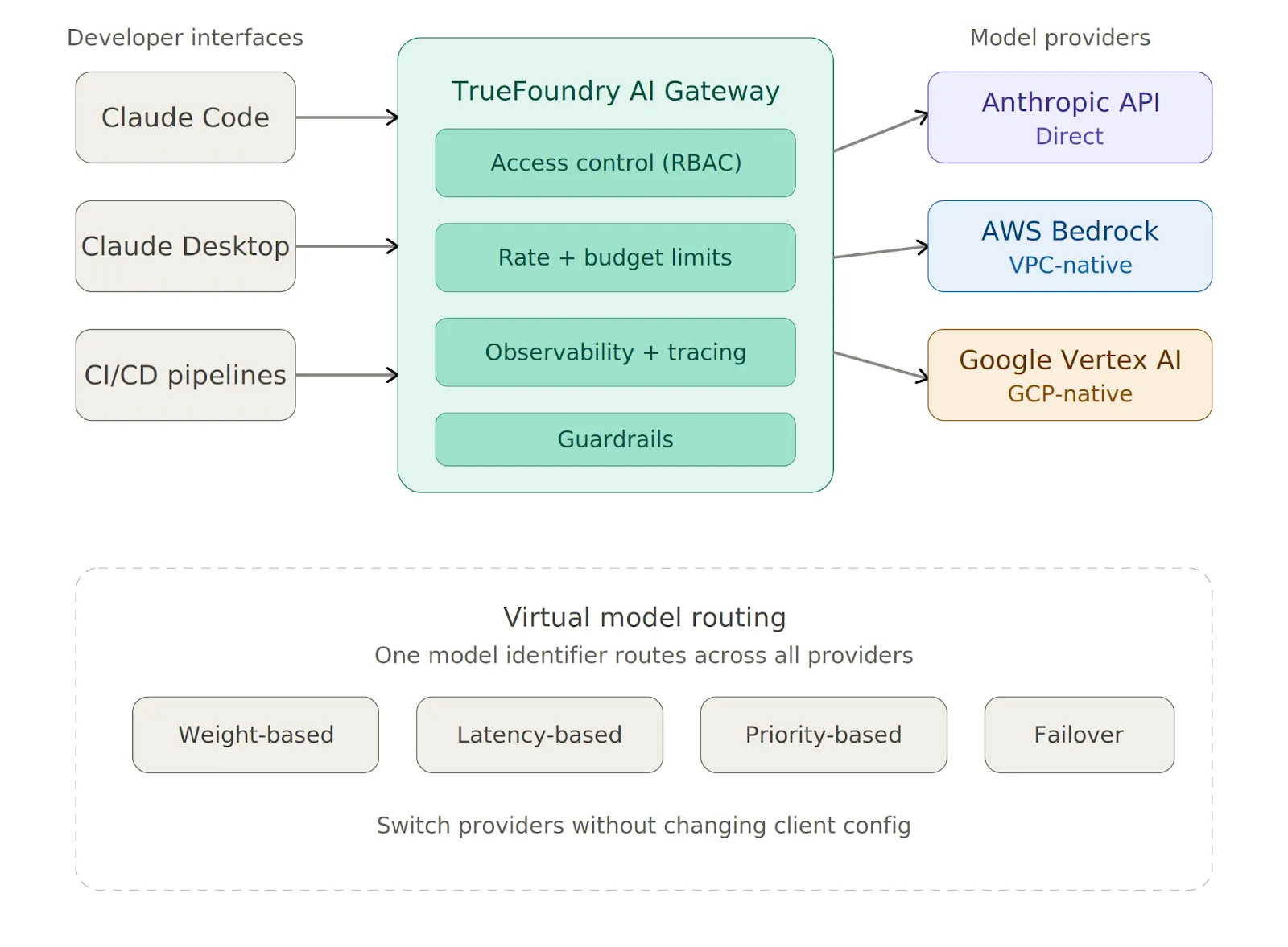
Instead of configuring each provider one by one, TrueFoundry AI Gateway gives you a single proxy layer between Claude Code and all your model providers. You can point Claude Code at it with one variable:
export ANTHROPIC_BASE_URL=https://<your-truefoundry-gateway-url>From there, you add provider accounts in the Gateway dashboard, and Claude Code reaches all of them — Anthropic, Bedrock, Vertex — via a single endpoint. Virtual Models let you create a single model identifier that routes across providers with weight-based or latency-based logic, and you can switch providers without touching any client configuration.
The Gateway also enforces rate limits, budget limits, and access control on every request before it reaches the provider.
The mistake most teams make is treating all three interfaces the same, even though they are fundamentally different in what they can touch.
The web interface has no local code execution, so the primary risks are data exfiltration through prompts and shadow IT from personal accounts. Domain capture solves the second problem.
For the first, classify Claude.ai as a third-party SaaS tool in your data loss prevention (DLP) and AI security tooling and apply the same controls you would to Google Docs or Notion. The Admin Console also lets you restrict file uploads, disable Artifacts, and control conversation retention.
The desktop app does not run arbitrary shell commands by default, but local tool integrations let developers connect Claude to scripts, file systems, and other resources. You should review each tool before approval and require explicit human confirmation before execution for anything with write access. Keeping the app current via MDM-enforced auto-update is also essential.
Claude Code has the broadest attack surface of the three interfaces. It can read .env files, SSH keys, and credentials, run arbitrary bash commands in the developer's user context, and send code and context to Anthropic's servers for processing.
The following baseline managed-settings.json blocks the most dangerous operations:
{
  "permissions": {
    "disableBypassPermissionsMode": "disable",
    "deny": [
      "Bash(curl:*)", "Bash(wget:*)",
      "Read(**/.env)", "Read(**/.env.*)",
      "Read(**/secrets/**)", "Read(**/.ssh/**)",
      "Read(**/credentials/**)"
    ],
    "ask": ["Bash(git push:*)", "Write(**)"]
  },
  "allowManagedPermissionRulesOnly": true,
  "allowManagedHooksOnly": true,
  "transcriptRetentionDays": 14
}
Here is what each key setting does:
One more thing worth emphasizing: Claude Code should never run as root under any circumstances.
Claude Code's native sandbox enforces filesystem and network isolation at the OS level, using Seatbelt on macOS and bubblewrap on Linux. Anthropic's own internal testing found that sandboxing reduces permission prompts by 84% while maintaining stronger execution boundaries. You should enable it for all developers:
{
  "sandbox": {
    "enabled": true,
    "network": { "httpProxyPort": 8080, "socksProxyPort": 8081 }
  }
}
The sandbox prevents modification of system-level files, blocks contact with domains you have not allowed, and limits the blast radius of prompt injection attacks. You should also set "allowUnsandboxedCommands": false to close the escape hatch that would otherwise let commands run outside the sandbox.
MCP servers connect Claude to external databases, APIs, and SaaS tools, and every new server a developer adds expands the attack surface. Without centralized control, you end up with credential sprawl, unvetted public servers running on developer machines, and no audit trail of which tools were called or what data returned.
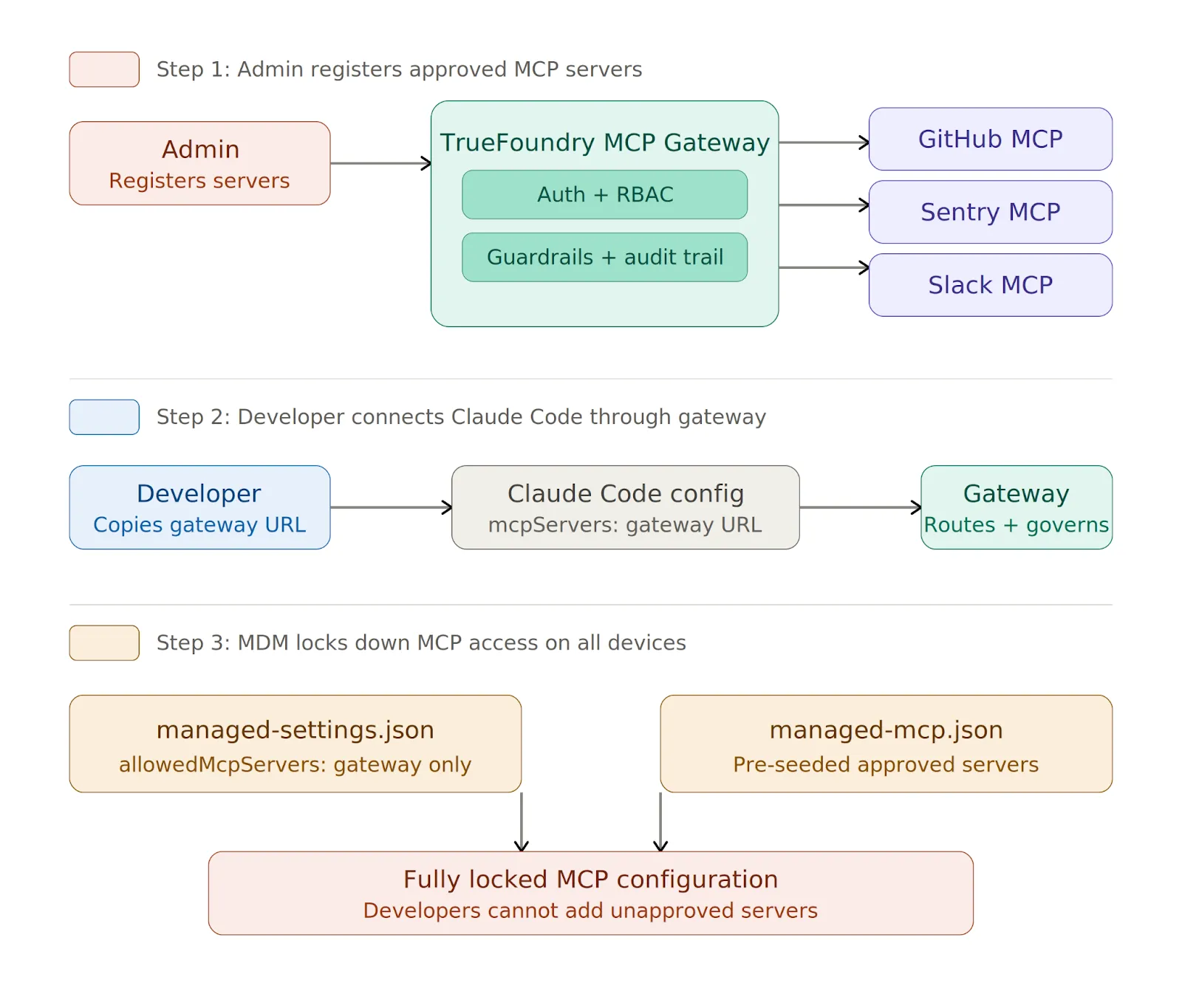
The solution is to route all MCP access through a centralized gateway and allowlist only that gateway URL.
TrueFoundry MCP Gateway handles enterprise MCP governance through a single control plane:
يمكنك تأمينه في ملف managed-settings.json:
{
  "allowedMcpServers": [
    { "serverUrl": "https://truefoundry-mcp-gateway.your-company.com/*" }
  ],
  "strictKnownMarketplaces": []
}
تمنع مصفوفة strictKnownMarketplaces الفارغة جميع عمليات تثبيت MCP التي مصدرها السوق. على الأجهزة المدارة، يمكنك نشر ملف managed-mcp.json عبر MDM لتزويد الأجهزة مسبقًا بخوادم معتمدة، وبمجرد نشره، لا يمكن للمطورين إضافة خوادم تتجاوز تلك المحددة في الملف.
قد تحتفظ Anthropic بالمدخلات والمخرجات افتراضيًا لتحسين السلامة والجودة، ولكن لديك ثلاث آليات للتحكم في الاحتفاظ.
بالنسبة لـ Claude.ai، يمكنك تعيين الاحتفاظ بحد أقصى 30 يومًا في إعدادات المؤسسة > البيانات والخصوصية. بالنسبة لـ Claude Code، استخدم إعداد transcriptRetentionDays في ملف managed-settings.json بقيمة تتراوح بين 7 و 14 يومًا كإعداد افتراضي معقول.
لأعباء العمل الخاضعة للتنظيم، يجب عليك طلب ZDR عبر فريق حسابك في Claude. يمنع ZDR شركة Anthropic من تخزين المطالبات أو المخرجات بما يتجاوز ما هو ضروري لتلبية الطلب، ولكنه يتطلب ملحقًا تعاقديًا. يجب ألا تقوم بمعالجة معلومات الصحة المحمية (PHI) أو أي بيانات أخرى منظمة حتى يتم توقيع الملحق وتأكيد تفعيله.
يجب عليك تصدير سجلات التدقيق إلى نظام SIEM الخاص بك بانتظام والاحتفاظ بها لمدة لا تقل عن 90 يومًا لـ SOC 2 أو لفترة أطول للصناعات المنظمة. ما يجب التقاطه يختلف حسب الواجهة:
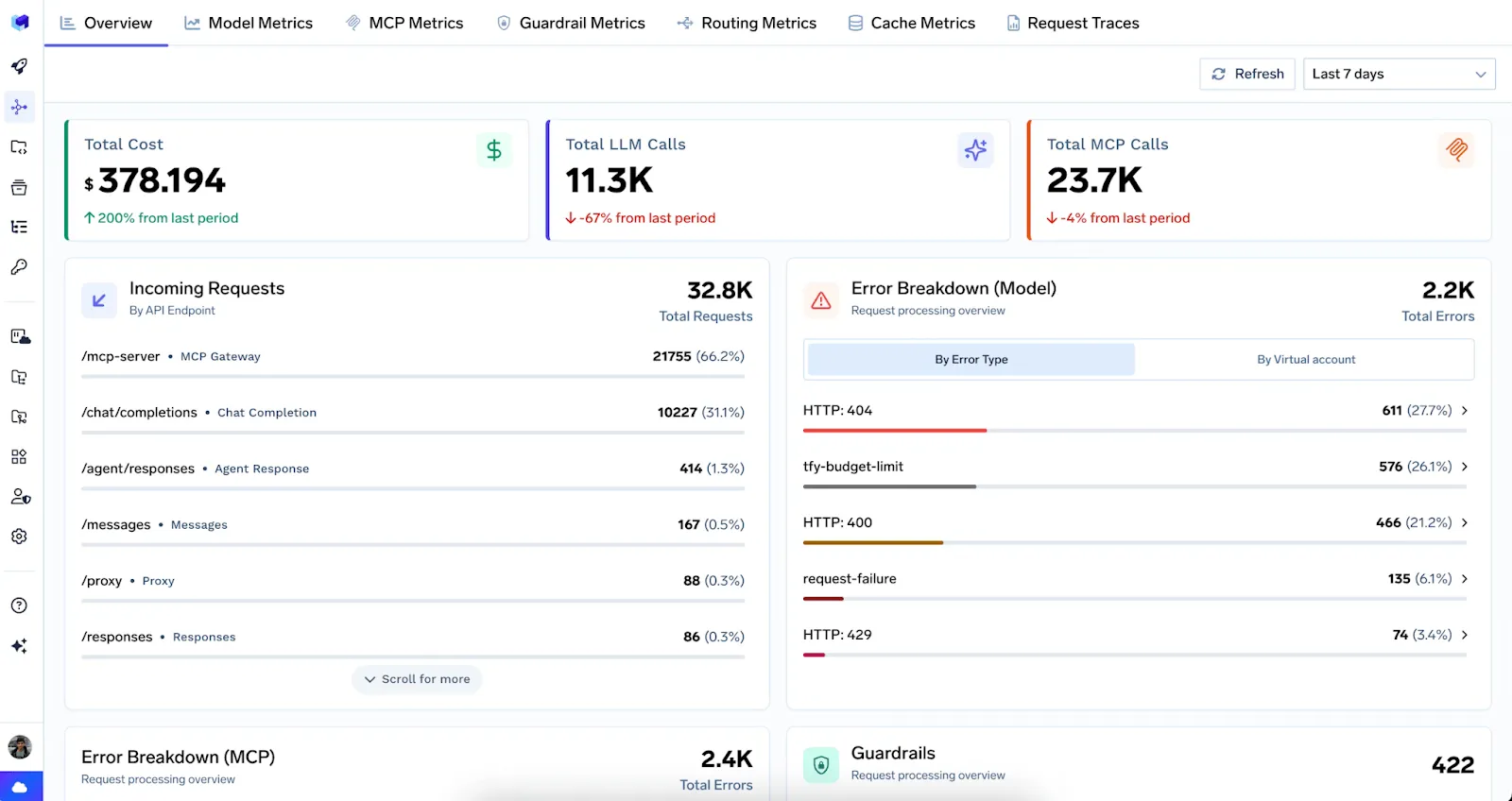
عندما يتدفق ترافيك Claude عبر TrueFoundry AI Gateway، يتم تتبع كل طلب مع إسناد كامل للمستخدم عبر طلبات LLM و MCP على حد سواء. توفر لوحة تحكم موحدة مقاييس في الوقت الفعلي، ويتم تصدير جميع التتبعات إلى Grafana أو Datadog أو Splunk عبر أوبن تليمتري (OpenTelemetry).
يمكن للمسؤولين أيضًا تكوين إعدادات OpenTelemetry بشكل أصلي في ملف الإعدادات المدارة لتصدير القياس عن بعد مباشرة من Claude Code.
فيما يتعلق بالتكاليف، حدد حدودًا شهرية صارمة للإنفاق لكل مستخدم ولكل فريق في لوحة تحكم المسؤول. بدون هذه الحدود القصوى، يمكن لخط أنابيب غير مهيأ بشكل صحيح أن يستنزف ميزانيتك بين عشية وضحاها. تعد التفاصيل لكل مستخدم ولكل نموذج مفيدة لتقارير استرداد التكاليف، واكتشاف الشذوذ، و قابلية مراقبة تكاليف الذكاء الاصطناعي.
Here's The Evaluation Framework
| Criteria | What should you evaluate ? | Priority | TrueFoundry |
|---|---|---|---|
| Identity, Access Control & Secret Protection | |||
| Central authentication | Does every model and tool request go through SSO, workload identity, service accounts, or scoped gateway keys? | Must have | ✅ Supported: SSO, workload identity, and scoped gateway keys. |
| SSO and IdP integration | Does the platform integrate with SAML, OIDC, Okta, Azure AD, or Google Workspace and sync roles from the IdP? | Must have | ✅ Supported: SAML, OIDC, IdP role sync. |
| Role-based access control | Can RBAC restrict models, providers, tools, environments, and logs by user, team, and application? | Must have | ✅ Supported: fine-grained RBAC at every resource level. |
| Virtual API keys | Can API keys be generated and scoped to individual apps with configurable expiration and access controls? | Must have | ✅ Supported: scoped virtual keys with expiration policies. |
| Provider key isolation | Can applications call models without receiving raw provider keys, and can keys be rotated without app redeploys? | Must have | ✅ Supported: centralized provider keys, zero-downtime rotation. |

تأمين Claude ليس قرارًا واحدًا بل مجموعة قرارات متراكمة — الهوية، توجيه النموذج، العزل (sandboxing)، حوكمة MCP، الاحتفاظ بالبيانات، تسجيل التدقيق، وضوابط التكلفة — يطبق كل منها بشكل مختلف حسب الواجهة. يحتاج إصدار الويب إلى ضوابط منع فقدان البيانات (DLP) والتقاط النطاق. يحتاج تطبيق سطح المكتب إلى مراجعة أداة بأداة. يحتاج Claude Code إلى ملف managed-settings.json مؤمّن يتم نشره عبر MDM مع تمكين العزل الأصلي.
القاسم المشترك بين الثلاثة هو أنه يجب عليك توجيه حركة المرور ووصول MCP عبر بوابة مركزية تتحكم فيها. نقطة نهاية واحدة، مجموعة سياسات واحدة، ومسار تدقيق واحد. بوابة TrueFoundry للذكاء الاصطناعي توفر هذه الطبقة لكل من حركة مرور LLM وحوكمة خادم MCP، مع التحكم في الوصول المدمج، وتحديد المعدل، والحواجز الوقائية، وقابلية المراقبة.
ابدأ بتسجيل الدخول الموحد (SSO) والتقاط النطاق اليوم، ثم قم بفرض الإعدادات المدارة عبر أسطولك، ووجه كل شيء عبر بوابة تتحكم فيها. نقاط الضعف الأمنية (CVEs) حقيقية، ويزداد التعرض للخطر مع كل مطور يفتح Claude Code.

TrueFoundry AI Gateway delivers ~3–4 ms latency, handles 350+ RPS on 1 vCPU, scales horizontally with ease, and is production-ready, while LiteLLM suffers from high latency, struggles beyond moderate RPS, lacks built-in scaling, and is best for light or prototype workloads.


تحافظ Anthropic على امتثال SOC 2 من النوع الثاني لواجهة برمجة تطبيقات Claude وعروضها للمؤسسات. ومع ذلك، فإن امتثال SOC 2 للنشر الذي يستخدم Claude Code يعتمد أيضًا على كيفية قيام المشغل بتكوين بنيته التحتية الخاصة به، وممارسات معالجة البيانات، والتسجيل. عادةً ما تضيف المؤسسات ضوابط الامتثال الخاصة بها فوق الأساس الذي توفره Anthropic.
يمكن نشر كلود بطريقة متوافقة مع HIPAA عندما تلبي البنية التحتية المحيطة الضمانات المطلوبة. تقدم أنثروبيك اتفاقيات شركاء الأعمال (BAAs) للعملاء من الشركات المؤهلين. يجب على المؤسسات التأكد من أن معلومات PHI (المعلومات الصحية المحمية) لا يتم تضمينها عن غير قصد في المطالبات أو تخزينها دون ضوابط مناسبة.
نعم، كلود متاح للاستخدام التجاري عبر واجهة برمجة تطبيقات Anthropic. يمكن للشركات دمج كلود في منتجاتها وخدماتها بموجب سياسات استخدام Anthropic. يتطلب الاستخدام التجاري الموافقة على شروط خدمة Anthropic، وقد تتطلب بعض حالات الاستخدام مثل المجالات عالية المخاطر مراجعة إضافية.
تسعى أنثروبيك للحصول على شهادات أمنية رائدة لبنيتها التحتية، وواجهة برمجة تطبيقات كلود للمؤسسات مدعومة بضوابط أمنية قوية. على المؤسسات التي تفكر في التوافق مع معيار ISO 27001 أن تتحقق من حالة الشهادة الحالية مباشرةً مع أنثروبيك، حيث يمكن أن يتغير نطاق الشهادة ومواعيد التجديد.
ليس كود كلود في جوهره خطرًا أمنيًا، لكن طبيعته التي تمنحه القدرة على التصرف تعني أنه يمكنه تنفيذ التعليمات البرمجية وتعديل الملفات وإجراء طلبات الشبكة، وكل ذلك ينطوي على مخاطر إذا لم يتم تحديد نطاقه بشكل صحيح. يُعد تشغيل كود كلود في بيئات معزولة، وتقييد الوصول إلى نظام الملفات، والحفاظ على مطالبات الأذونات ممارسات أساسية لتقليل التعرض للمخاطر.
نعم، توفر أنثروبيك واجهة برمجة تطبيقات (API) REST موثقة بالكامل يمكن للمطورين والشركات استخدامها للوصول إلى كلود برمجيًا. تدعم واجهة برمجة التطبيقات إنشاء النصوص، والرؤية، واستخدام الأدوات، والمحادثات متعددة الأدوار، وهي متاحة عبر مستويات متعددة من نماذج كلود.
يشير امتثال API كلود إلى مجموعة معايير الأمان والشهادات وسياسات الاستخدام التي تحكم كيفية تشغيل API كلود والوصول إليها. ويشمل ذلك SOC 2 Type II، وسياسات الاحتفاظ بالبيانات، وضوابط تصفية المحتوى، وإرشادات الاستخدام المقبول من Anthropic، وكلها تحدد معًا وضع الامتثال لأي نظام مبني على كلود.
تنشر Anthropic وثائق الامتثال الخاصة بها، ونظرة عامة على الأمان، وسياسات الاستخدام علنًا على موقعها الإلكتروني وبوابة الثقة الخاصة بها. يمكن للمطورين مراجعة هذه المواد مجانًا. يتطلب الوصول إلى تقارير الامتثال الرسمية (مثل تقارير تدقيق SOC 2) عادةً توقيع اتفاقية عدم إفشاء (NDA) وطلبها من خلال عملية مبيعات الشركات الخاصة بـ Anthropic.
واجهة برمجة تطبيقات Claude (API) عديمة الحالة بطبيعتها؛ فكل طلب API مستقل ولا يحتفظ بحالة الجلسة بين الاستدعاءات. يجب تمرير سجل المحادثة بشكل صريح في كل طلب. تبسط هذه البنية عديمة الحالة الامتثال عن طريق الحد من استمرارية بيانات المستخدم، على الرغم من أن المشغلين يظلون مسؤولين عن كيفية تخزينهم ومعالجتهم لمحتوى المحادثة على بنيتهم التحتية الخاصة.



أحدث الأخبار والمقالات والموارد تصلك مباشرة إلى بريدك الوارد
.png)



.png)

.png)
.png)
.png)

.png)
.png)
.png)
.png)
.png)
.png)
.png)


