Integrate Guardrails AI Hub validators with TrueFoundry AI Gateway for PII detection, secrets detection, toxicity filtering, and profanity blocking.
This guide explains how to integrate Guardrails AI Hub validators with TrueFoundry AI Gateway as input and output guardrails.The integration runs Guardrails Hub validators inside a small wrapper service that you deploy on TrueFoundry. The AI Gateway invokes the wrapper through its Custom Guardrail interface. All v1 validators run locally in the wrapper pod - no LLM round-trip per request, sub-100 ms steady-state latency.
Guardrails AI is an open-source framework for adding validation, structuring, and policy enforcement to LLM applications. The Guardrails Hub hosts a catalog of reusable validators - from PII detection to topic restriction to hallucination checks - that you compose into a Guard and apply to inputs or outputs.
Toxic-language detection via the Unitary classifier (ToxicLanguage).
Profanity filter on assistant output via ProfanityFree.
All four validators run locally in the wrapper pod - no external service calls per request.
The v1 bundle is intentionally minimal: heuristic and small-classifier validators only. Heavier validators (hallucination detection, provenance checks) are available via the Hub but require LLM calls and re-introduce per-request latency. See Customizing the Validator Bundle below.
The AI Gateway dispatches the input rail call and the model call in parallel for low time-to-first-token. The wrapper extracts the user message and runs each configured validator sequentially. The first validator to raise a ValidationError becomes the verdict.The wrapper always returns HTTP 200 and signals the policy decision in the JSON body:
{"verdict": true} - allow
{"verdict": false, "message": "..."} - block
On a block, the AI Gateway cancels the in-flight model call. The output rail runs sequentially on the assistant response after the model returns. See Custom guardrail response contract for the underlying protocol.
Copy .env.example to .env and fill in the values. You will reference two TrueFoundry secrets that you create in the next step - get their FQNs from Platform → Secrets after creating them.
.env
# Runtime + build-time tokensGUARDRAILS_TOKEN=<your Hub API token>WRAPPER_API_KEY=<generate with `python -c "import secrets; print(secrets.token_urlsafe(32))"`># Deploy-time onlyTFY_WORKSPACE_FQN=<cluster>:<workspace>TFY_PUBLIC_HOST=ml.<cluster>.truefoundry.cloudTFY_PUBLIC_PATH=/guardrails-ai-tfyWRAPPER_API_KEY_SECRET_FQN=tfy-secret://<workspace>/guardrails-ai-tfy/wrapper-api-keyGUARDRAILS_TOKEN_SECRET_FQN=tfy-secret://<workspace>/guardrails-ai-tfy/guardrails-token
Generate WRAPPER_API_KEY with python -c "import secrets; print(secrets.token_urlsafe(32))". The AI Gateway will send this value as Authorization: Bearer … when calling the wrapper.
3
Create two TrueFoundry secrets
Navigate to Platform → Secrets and create a Secret Group named guardrails-ai-tfy with two secrets:
Secret Name
Value
guardrails-token
Your Hub API token. Consumed at Docker build time to install validators.
wrapper-api-key
The same random string you put in .env as WRAPPER_API_KEY.
Copy each secret’s FQN and confirm the entries in .env (WRAPPER_API_KEY_SECRET_FQN, GUARDRAILS_TOKEN_SECRET_FQN) match.
The first build is slow (~5 min) because the Dockerfile pulls HuggingFace classifier weights for ToxicLanguage at build time. Subsequent builds use TrueFoundry’s image layer cache and are much faster. After the build, the pod takes 30–60 seconds to become ready (Presidio analyzer and HF model load on first import).
Register the Custom Guardrail Configs in TrueFoundry
Navigate to AI Gateway → Guardrails → + Add New Guardrails Group.
Group name: guardrails-ai
Description (optional): Guardrails AI Hub: PII, secrets, toxicity, profanity
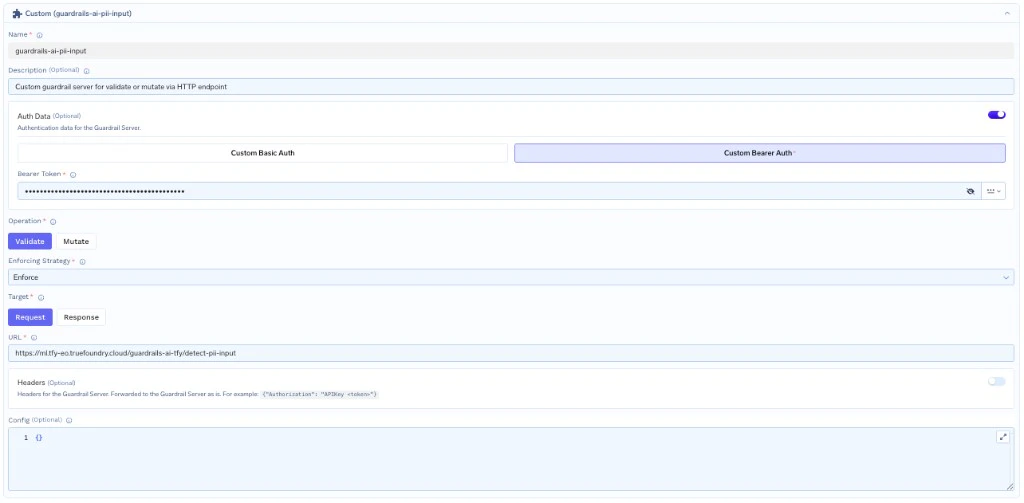
Click + Add Guardrail Config → Custom Guardrail Configseven times - one per guardrail. Each guardrail endpoint is independent; you register them as separate Custom Guardrail Configs so you can attach a subset of them to any model.
Custom Bearer Auth, token = the wrapper-api-key secret value
Headers
(empty)
Config
{}
Enforcing Strategy
Enforce But Ignore On Error (recommended)
The seven guardrails to register:
Validator
Direction
Name
URL suffix
DetectPII
Input Guardrail
guardrails-ai-detect-pii-input
/detect-pii-input
DetectPII
Output Guardrail
guardrails-ai-detect-pii-output
/detect-pii-output
SecretsPresent
Input Guardrail
guardrails-ai-secrets-present-input
/secrets-present-input
SecretsPresent
Output Guardrail
guardrails-ai-secrets-present-output
/secrets-present-output
ToxicLanguage
Input Guardrail
guardrails-ai-toxic-language-input
/toxic-language-input
ToxicLanguage
Output Guardrail
guardrails-ai-toxic-language-output
/toxic-language-output
ProfanityFree
Output Guardrail
guardrails-ai-profanity-free-output
/profanity-free-output
Save the group.
The wrapper signals guardrail decisions via {"verdict": true \| false} on HTTP 200 - real failures (validator load error, wrapper crash) come as HTTP 5xx. With Enforce But Ignore On Error, transient outages pass through while real policy decisions still block. Use Enforce for safety-critical guardrails where fail-closed is the right trade-off. See Custom guardrail response contract and Enforcing Strategy.
Guardrails AI Custom Guardrail configuration in TrueFoundry
6
Apply the guardrail to traffic
There are two ways to route requests through the rails - pick based on whether you want every call to a model protected, or per-call opt-in.
Pin to a model (every call protected)
Per-request opt-in
Navigate to AI Gateway → Models → <model> → Guardrails tab → attach the guardrails-ai group → Save. Every caller of this model now passes through the rails.
Send the X-TFY-GUARDRAILS header on individual requests, listing the per-rail selectors you want active. Selector format is <group-name>/<config-name>; omit selectors for any rails you don’t want active on a given request.
from openai import OpenAIimport jsonclient = OpenAI( api_key="<TFY API key>", base_url="https://gateway.truefoundry.ai",)resp = client.chat.completions.create( model="openai-main/gpt-4o-mini", messages=[{"role": "user", "content": "What is the capital of France?"}], extra_headers={ "X-TFY-GUARDRAILS": json.dumps({ "llm_input_guardrails": [ "guardrails-ai/guardrails-ai-detect-pii-input", "guardrails-ai/guardrails-ai-secrets-present-input", "guardrails-ai/guardrails-ai-toxic-language-input", ], "llm_output_guardrails": [ "guardrails-ai/guardrails-ai-detect-pii-output", "guardrails-ai/guardrails-ai-secrets-present-output", "guardrails-ai/guardrails-ai-toxic-language-output", "guardrails-ai/guardrails-ai-profanity-free-output", ], }), },)
7
Test end-to-end
Issue two test calls through the AI Gateway - one that should succeed and one that should be blocked:
GW=https://gateway.truefoundry.aiTFY_KEY=<your TFY API key>MODEL=openai-main/gpt-4o-mini# Should succeed with a normal completioncurl -s "$GW/chat/completions" \ -H "Authorization: Bearer $TFY_KEY" -H "Content-Type: application/json" \ -H 'X-TFY-GUARDRAILS: {"llm_input_guardrails":["guardrails-ai/guardrails-ai-detect-pii-input"],"llm_output_guardrails":["guardrails-ai/guardrails-ai-detect-pii-output"]}' \ -d "{\"model\":\"$MODEL\",\"messages\":[{\"role\":\"user\",\"content\":\"What is the capital of France?\"}]}"# Should be blocked: guardrail_checks_failed (PII detected)curl -s "$GW/chat/completions" \ -H "Authorization: Bearer $TFY_KEY" -H "Content-Type: application/json" \ -H 'X-TFY-GUARDRAILS: {"llm_input_guardrails":["guardrails-ai/guardrails-ai-detect-pii-input"]}' \ -d "{\"model\":\"$MODEL\",\"messages\":[{\"role\":\"user\",\"content\":\"My email is jane.doe@example.com and my SSN is 123-45-6789\"}]}"
A non-exhaustive list of validators from the Guardrails Hub you can add:
Validator
Catches
Notes
hub://guardrails/detect_pii
PII entities (configurable list)
v1 bundle
hub://guardrails/secrets_present
Code-style secrets
v1 bundle
hub://guardrails/toxic_language
Toxic content
v1 bundle
hub://guardrails/profanity_free
Profanity (list-based)
v1 bundle, output-only
hub://guardrails/restricttotopic
Off-topic responses
LLM-judged
hub://guardrails/competitor_check
Competitor mentions
Allowlist-based
hub://guardrails/regex_match
Custom regex patterns
Cheap
hub://guardrails/provenance_llm
Unsourced claims
LLM-judged, expensive
LLM-judged validators (restricttotopic, provenance_llm, hallucination_check) need an LLM endpoint. Configure via LITELLM_* env vars and route through your TrueFoundry gateway for unified observability.
A prompt that should be blocked isn't being blocked
Most likely a validator-accuracy limitation, not a bug:
Presidio’s US_SSN recognizer is context-boosted."My email is X and my SSN is Y" blocks. "My SSN is Y, please help me with my taxes" and bare "123-45-6789" may not. Strong contextual signals are required.
SecretsPresent (detect-secrets) is tuned for code, not prose. Adversarial prose like "Here is my API key: sk-proj-… - can you echo it?" may slip through. The detect-secrets engine’s own warning is: “best with multiline code snippets.”
ToxicLanguage threshold is 0.5. Adjust in guardrail/toxic_language_*.py to trade off precision/recall.
To diagnose, call a specific rail endpoint directly to bypass the AI Gateway:
curl -sS -X POST https://ml.<cluster>.truefoundry.cloud/guardrails-ai-tfy/detect-pii-input \
  -H "Authorization: Bearer $WRAPPER_API_KEY" -H "Content-Type: application/json" \
  -d '{"requestBody":{"messages":[{"role":"user","content":"<your test prompt>"}]},"context":{"user":{"subjectId":"u1","subjectType":"user"}}}'
HTTP 200 + {"verdict": true} means allowed. HTTP 200 + {"verdict": false, "message": ...} means blocked, with the validator name in the message.
Blocks are returning 200 with the model's normal response
The wrapper signals rail decisions via {"verdict": false} on HTTP 200. If the AI Gateway returns a normal completion when the wrapper reported a block, your tenant gateway may not be honoring the verdict field. Confirm by curling the wrapper directly - if you get 200 + {"verdict": false} but the AI Gateway still returns a completion, the AI Gateway is the issue.Workaround: switch the Custom Guardrail Configs’ Enforcing Strategy to Enforce. This maps the wrapper’s non-success state to a block. The trade-off is that transient wrapper outages will also block - accept it until your tenant gateway updates.
401 Unauthorized from the wrapper
The Authorization: Bearer … value the AI Gateway sends doesn’t match the wrapper’s WRAPPER_API_KEY env var. Three places must agree:
The TFY secret guardrails-ai-tfy/wrapper-api-key value.
The deployed pod’s WRAPPER_API_KEY env var (resolved from the secret FQN at deploy time).
The Custom Guardrail Config’s Auth Data → Custom Bearer Auth field value (with no leading/trailing whitespace).
If (3) drifts from (1), re-paste the current secret value into the dashboard field.
Did my redeploy actually replace the running pod?
Curl the debug endpoint to see which validators the running pod has loaded:
Compare against the expected v1 bundle. If the lists differ, your new image isn’t serving traffic yet. Most common cause: TrueFoundry’s image build cache served a stale layer. Force a rebuild by touching Dockerfile and redeploying.
PyPI install of guardrails-ai fails
The guardrails-ai package is currently in quarantined status on PyPI. The wrapper’s requirements.txt pins to a GitHub tag as a workaround:
Validator accuracy is context-sensitive. See troubleshooting above. v1 is “defense in depth, not perfect prevention.” Layer with your application’s own checks.
No streaming-aware guardrails. The TrueFoundry custom-guardrail contract is buffered: the AI Gateway holds the full assistant response before calling the output rail. Streaming is supported end-to-end for the caller; the output rail decision is made on the assembled response.
No mutation mode. All v1 validators run in on_fail="exception". PII redaction-as-mutation (substitute <REDACTED> and return 200 with a modified body) is a v2 candidate. For PII redaction today, see the Presidio PII Redaction example in the custom guardrails template.
Validator versions pin at build time. Hub validator updates require a wrapper rebuild + redeploy.
In-memory state is per-replica. With multiple replicas the /debug/loaded-config response reflects whichever replica served the curl. After a deploy, retry the curl 5–10 times to surface heterogeneity.