

What is Gray Swan Cygnal?
Gray Swan Cygnal is an AI safety monitoring platform that analyzes messages for policy violations and potential risks in your LLM deployments. It returns violation scores ranging from 0 to 1, where higher scores indicate greater likelihood of policy violations, along with metadata for risk assessment.Key Features of Gray Swan Cygnal
- Policy-Based Content Monitoring: Customizable rules and policies to detect violations across multiple dimensions, with built-in policies like Basic Content Safety.
- Multi-Policy Aggregation: Combine multiple policy IDs with custom rules for layered security. Earlier policies take precedence, and custom rules supplement the merged policy rules.
-
Configurable Reasoning Modes: Balance detection quality and latency with
off,hybrid, andthinkingreasoning modes.
Adding Gray Swan Cygnal
To add Gray Swan Cygnal to your TrueFoundry setup, follow these steps: Fill in the Guardrails Group Form- Name: Enter a name for your guardrails group.
- Collaborators: Add collaborators who will have access to this group.
- Gray Swan Cygnal Config:
- Name: Enter a name for the Gray Swan Cygnal configuration (e.g.,
grayswan). - Description (Optional): A description for the guardrail (e.g., “Gray Swan Cygnal for policy violation and content safety monitoring”).
- Operation: The operation type for this guardrail. Gray Swan Cygnal guardrails can only be used for Validate — requests are validated against configured policies and rules.
- Name: Enter a name for the Gray Swan Cygnal configuration (e.g.,
- Gray Swan Cygnal Authentication Data:
- API Key: The API key for Gray Swan Cygnal. This key is required to authenticate requests to the Cygnal monitoring API. You can obtain it from the Gray Swan portal. Ensure you keep this key secure, as it grants access to your Gray Swan Cygnal resources.
- Policy IDs (Optional): Custom policy IDs to use for monitoring. Rules from all policies are merged in order, with earlier policies taking precedence. If not provided, the default Basic Content Safety policy is applied. You can create and manage policies in the Gray Swan portal.
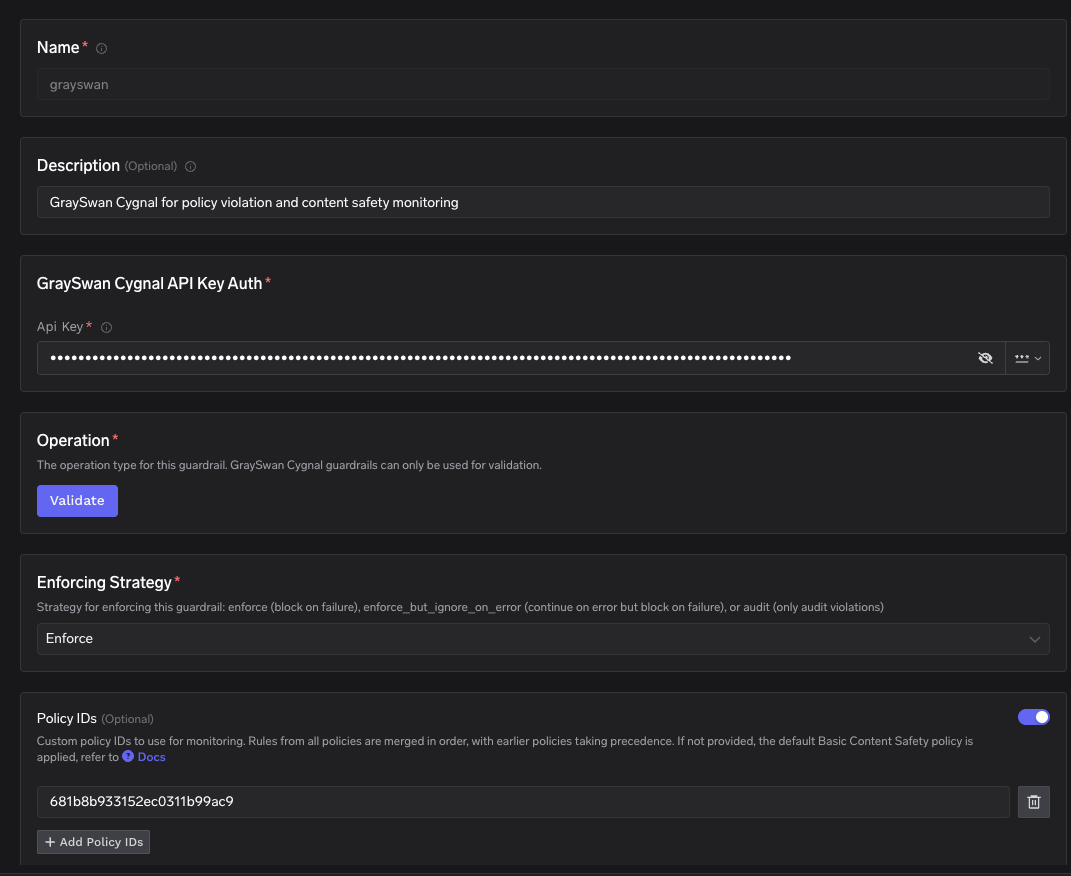
Fill in the Gray Swan Cygnal Guardrail Form
- Enforcing Strategy: Strategy for enforcing this guardrail:
- Enforce: Guardrail is applied. If a violation is detected or an error occurs during execution, the request is blocked.
- Enforce But Ignore On Error: Guardrail is applied, but if an error occurs during execution, the guardrail is ignored and the request proceeds.
- Audit: Request is never blocked. Violations are logged for review only.
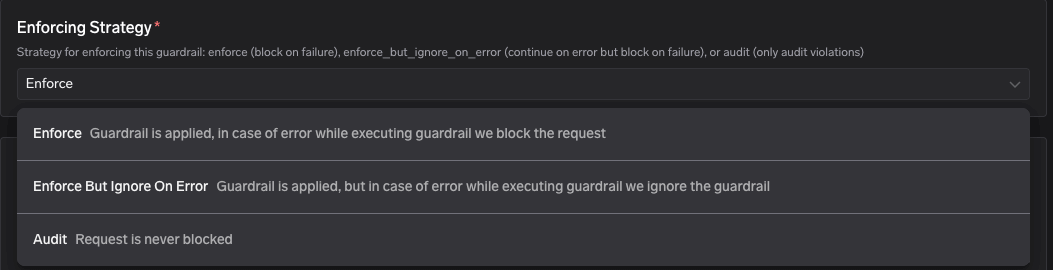
Enforcing Strategy Options
- Rules (Optional): Custom rule definitions for monitoring. Each key is a rule name and its value is the rule description. For example:
financial_advice→ “Flag content that provides specific financial recommendations”inappropriate_language→ “Detect profanity and offensive language”
- Reasoning Mode: Controls whether Cygnal uses internal reasoning steps before determining if content violates policy:
- Off (default): Fastest and lowest latency. No additional reasoning tokens. Recommended for most production use.
- Hybrid: Moderate latency increase. The model reasons as needed without a prescribed reasoning style. Good balance for higher-risk contexts.
- Thinking: Highest latency and token usage. The model performs guided internal reasoning before classification. Use when detection quality matters more than speed (e.g., offline analysis, security reviews).
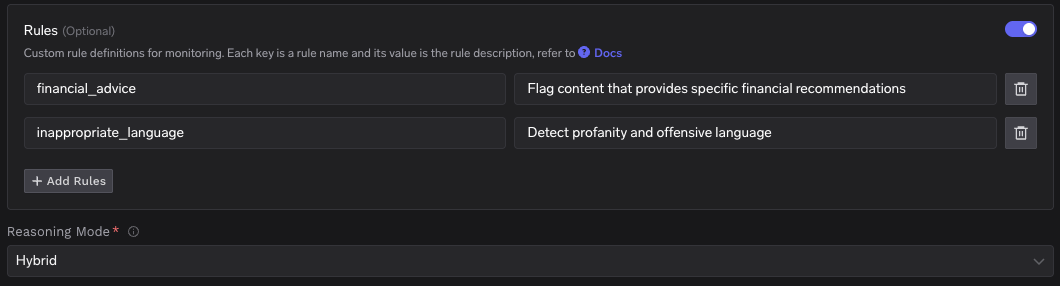
Rules and Reasoning Mode Configuration
Response Structure
The Gray Swan Cygnal monitoring API (POST https://api.grayswan.ai/cygnal/monitor) returns a response with the following structure:
Example Response: Policy Violation Detected
Example Response: Policy Violation Detected
This is an example response from Gray Swan Cygnal where policy violations are detected. The
violation score is close to 1.0, indicating high confidence that the content violates the specified policies. The violated_rules array lists the indices of specific rules that were violated.Example Response: No Violations
Example Response: No Violations
This is an example response from Gray Swan Cygnal where the content passes all policy checks. The
violation score is close to 0.0, indicating no policy violations were detected.Validation Logic
Gray Swan Cygnal returns aviolation score between 0.0 and 1.0. Policies and rules configured in the Gray Swan portal define what content is checked, but the numeric cutoff for blocking is applied on the client side by TrueFoundry.
TrueFoundry uses a default threshold of 0.5 to determine content safety:
- If the
violationscore is >= 0.5, the request is considered a policy violation — it will be blocked and a 400 error is returned. - If the
violationscore is < 0.5, the request will be allowed to proceed.
Request Logs
When a Gray Swan Cygnal guardrail triggers, you can inspect the full request flow in the TrueFoundry request logs. The logs show the guardrail evaluation call tohttps://api.grayswan.ai/cygnal/monitor, the violation result, and the downstream model request status.

Request logs showing Gray Swan Cygnal guardrail blocking a request with a 400 error