

What is Akto?
Akto is an API security and LLM observability platform that provides native guardrail capabilities for LLM deployments. It analyzes incoming requests and outgoing responses for prompt injection, policy violations, and other security threats, then blocks or allows traffic based on your configured policies.Key Features of Akto
- Prompt Injection Detection: Identifies and blocks prompt injection attempts before they reach the LLM, preventing adversarial inputs from manipulating model behavior.
- Policy Violation Monitoring: Continuously monitors LLM traffic against configurable security policies and ingests blocked events automatically for audit purposes.
- Streaming Support: Native support for streaming LLM responses, allowing guardrails to operate correctly whether the model is in streaming or non-streaming mode.
Adding Akto Integration
To add Akto to your TrueFoundry setup, follow these steps: Fill in the Guardrails Group Form- Name: Enter a name for your guardrails group.
- Collaborators: Add collaborators who will have access to this group.
- Akto Config:
- Name: Enter a name for the Akto configuration (e.g.,
akto). - Description (Optional): A description for the guardrail (e.g., “Akto guardrail for LLM security, prompt injection detection, and policy violation monitoring”).
- Operation: The operation type for this guardrail. Akto guardrails can only be used for Validate — requests are validated against your Akto security policies.
- Name: Enter a name for the Akto configuration (e.g.,
- Akto Authentication Data:
- Token: The JWT token used to authenticate requests to your Akto guardrails service. You can obtain this token from your Akto dashboard. Keep it secure, as it grants access to your Akto guardrails resources.
- Enforcing Strategy: Strategy for enforcing this guardrail:
- Enforce: Guardrail is applied. If a violation is detected or an error occurs during execution, the request is blocked.
- Enforce But Ignore On Error: Guardrail is applied, but if an error occurs during execution, the guardrail is ignored and the request proceeds.
- Audit: Request is never blocked. Violations are logged for review only.
- Base URL: The URL of your Akto guardrails service (e.g.,
https://<your-instance>-guardrails.akto.io).
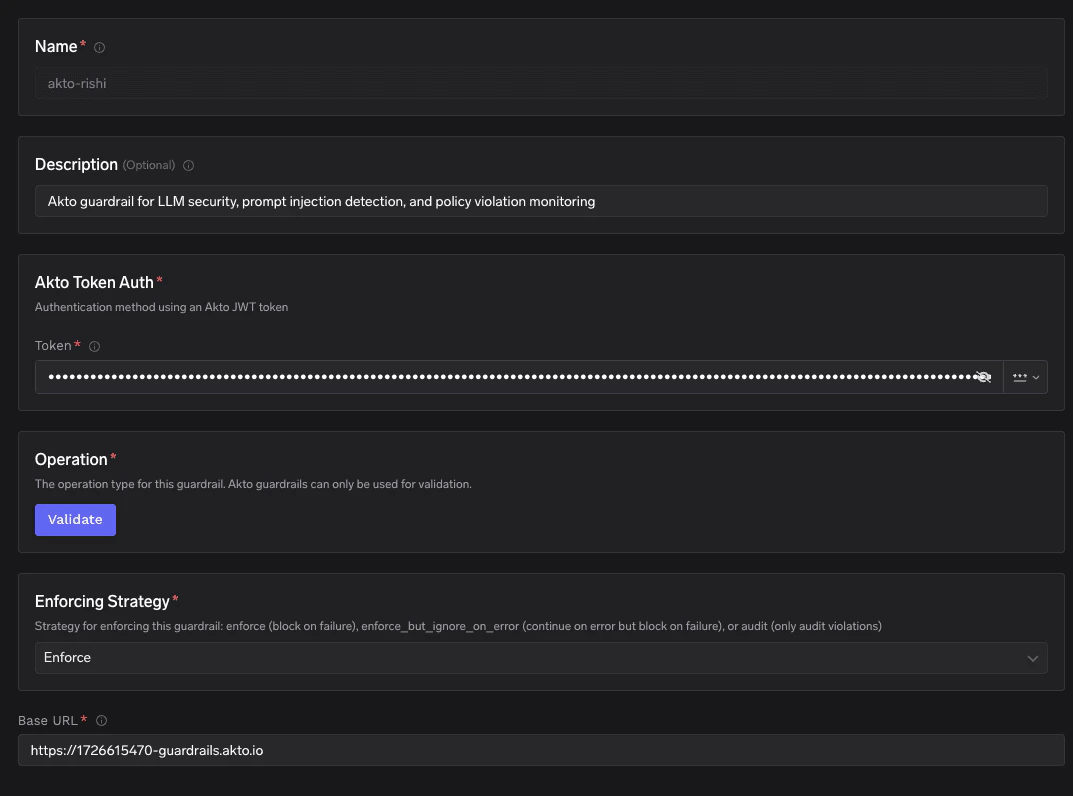
Fill in the Akto Guardrail Form
Response Structure
The Akto guardrails API (POST /api/http-proxy/truefoundry) returns a response with the following structure:
Example Response: Allowed (HTTP 200)
Example Response: Allowed (HTTP 200)
The request passed all guardrail checks. TrueFoundry proceeds to forward the request to the LLM.
Example Response: Blocked (HTTP 400)
Example Response: Blocked (HTTP 400)
The request was blocked by Akto guardrails. TrueFoundry returns a 400 error and does not forward the request to the LLM. Akto automatically ingests the blocked event for audit purposes.
Validation Logic
TrueFoundry uses the HTTP status code returned by the Akto guardrails API to determine whether to allow or block the request:- If Akto returns HTTP 200, the request is considered safe and will be forwarded to the LLM.
- If Akto returns HTTP 400, the request is considered a policy violation — it will be blocked and a 400 error is returned to the caller.
- If Akto returns HTTP 401, the request is blocked due to an authentication failure. Verify your token configuration.