Deploy the integrations/arthur-ai FastAPI wrapper on any public HTTPS host. The gateway calls it at llm_input / llm_output via the Custom Guardrail contract; the wrapper forwards traffic to Arthur GenAI Engine and returns verdict JSON on HTTP 200.

What is Arthur AI?

Arthur GenAI Engine is a SaaS platform for validating LLM prompts and completions. The wrapper calls POST /api/v2/validate and maps rule results to pass/block — it does not embed policy logic beyond the checks you configure. Arthur is validate-only. Use Operation: Validate for both input and output rails. It reports failures but does not redact or rewrite text. Default checks when config is {}:
  • Input: PromptInjectionRule + ToxicityRule
  • Output: ToxicityRule

How it works

  1. The gateway POSTs an OpenAI-shaped requestBody (input) or requestBody + responseBody (output) to your wrapper URL.
  2. The wrapper extracts user/assistant text and calls Arthur with your ARTHUR_API_KEY.
  3. The wrapper returns HTTP 200 with a policy outcome in the body. Infrastructure failures return HTTP 5xx.

Response contract

Policy blocks use 2xx + verdict: false, not HTTP 4xx. See Custom guardrail response contract.

Wrapper endpoints

GET /health — health check. GET /debug/loaded-config — bearer-gated diagnostics. All POST routes expect Authorization: Bearer <WRAPPER_API_KEY>.

Prerequisites

  • Arthur API key from the Arthur platform.
  • Public HTTPS URL for the deployed wrapper.
  • WRAPPER_API_KEY — shared secret the gateway sends as Authorization: Bearer ….

Setup

1

Clone and configure

.env
2

Deploy the wrapper

TrueFoundry:
Set TFY_WORKSPACE_FQN, TFY_PUBLIC_HOST, TFY_PUBLIC_PATH, and secret FQNs in .env. Create secrets arthur-api-key and wrapper-api-key under group arthur-guardrails-tfy in Platform → Secrets.Local:
3

Register Custom Guardrail configs

AI Gateway → Guardrails → + Add New Guardrails Group → type Custom.
  • Group name: arthur-ai
  • Add two configs — input and output.
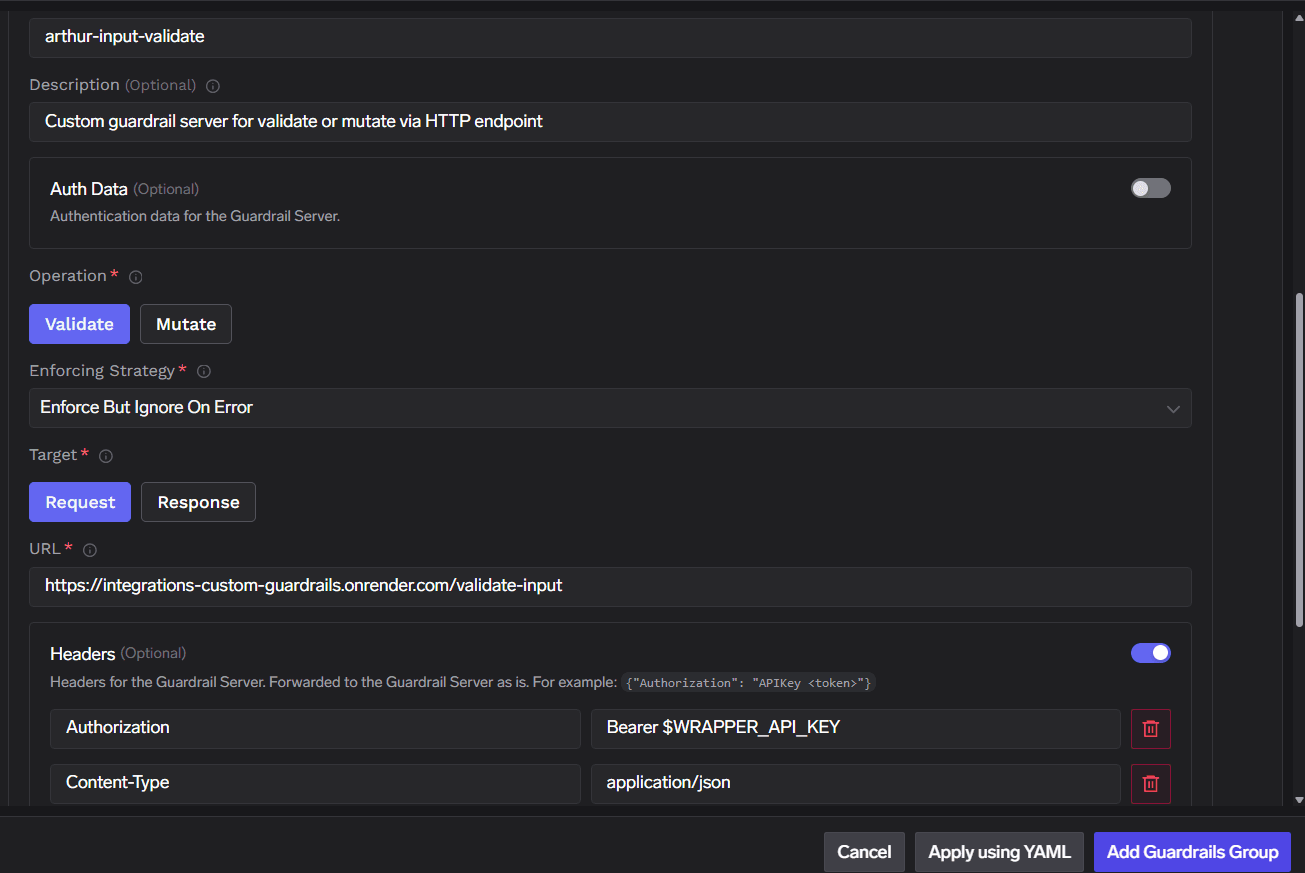
Input validate example:
TrueFoundry custom guardrail form: Validate, Request target, /validate-input URL, Authorization Bearer header

Arthur AI Custom Guardrail configuration (input validate)

Output validate:Auth Data → Custom Bearer Auth works the same as Headers if you prefer not to set headers manually.
4

Attach to traffic

Model pin: AI Gateway → Models → <model> → Guardrails → attach group arthur-ai.Per requestX-TFY-GUARDRAILS header, selector format <group>/<config-name>:

Custom config (optional)

Override defaults by setting config.checks in the dashboard:

Troubleshooting

Reference