


.webp)
October 16, 2026
|
5 min read


Obtenha acesso instantâneo a um ambiente TrueFoundry ao vivo. Implante modelos, direcione o tráfego de LLM e explore a plataforma completa — seu sandbox estará pronto em segundos, sem necessidade de cartão de crédito.



Blazingly fast way to build, track and deploy your models!
O controle de acesso baseado em funções funciona bem quando as decisões de acesso dependem da função do usuário. Os desafios surgem quando as permissões também dependem dos dados solicitados, do ambiente, do horário, da localização ou de ações anteriores dentro da sessão atual.
O ABAC avalia um conjunto mais rico de atributos a cada solicitação de acesso. Ele considera o sujeito, o recurso, a ação e o contexto antes de permitir ou negar o acesso. Isso o torna útil quando os métodos tradicionais de controle de acesso não conseguem lidar com os requisitos dinâmicos das empresas.
Este guia explica o que é ABAC, como ele funciona, como se compara ao RBAC e onde cada modelo se encaixa. Também explica como a TrueFoundry usa o controle de acesso baseado em atributos para governar agentes de IA, chamadas de modelos e acesso a ferramentas MCP em escala.
O controle de acesso baseado em atributos é um modelo de controle de acesso que avalia atributos antes de conceder ou negar acesso. Esses atributos podem descrever o usuário, o recurso, a ação, o ambiente, o dispositivo, a sessão, a pontuação de risco ou o contexto de negócios vinculado à solicitação.
O significado de ABAC é mais fácil de entender ao compará-lo com o modelo RBAC. O RBAC pergunta se o usuário pertence a uma função aprovada. O controle de acesso ABAC pergunta se uma combinação de atributos satisfaz a política.
Por exemplo, uma política pode permitir o acesso apenas quando o usuário pertence ao departamento Financeiro, possui a autorização de segurança correta, solicita acesso de leitura e se conecta a partir de um endereço IP aprovado durante o horário comercial. Se uma condição falhar, o acesso pode ser negado.
Isso torna o ABAC útil para requisitos de negócios complexos. Organizações modernas frequentemente precisam de restrições de acesso inteligentes em dados confidenciais, processos de negócios, sistemas de planejamento de recursos empresariais (ERP), registros de pacientes e fluxos de trabalho de IA que não podem ser governados apenas por funções.
O controle de acesso baseado em atributos usa quatro categorias principais de atributos para autorização. Essas categorias são atributos de sujeito, atributos de recurso, atributos de ação e atributos de ambiente. Juntos, eles criam um conjunto rico de atributos para decisões de acesso contextuais.
A TrueFoundry aplica o controle de acesso baseado em atributos na camada de gateway em todas as conexões de agentes de IA, modelos e ferramentas que suas equipes executam, avaliando o sujeito, o recurso, a ação e o ambiente.
Os atributos de sujeito descrevem a entidade que solicita o acesso. Eles podem incluir departamento, função, região, perfil do usuário, unidade de negócios, status de autenticação, autorização de segurança ou os atributos do sujeito que faz a solicitação.
Em sistemas de IA, os atributos de sujeito também podem incluir a identidade do agente, a identidade da aplicação e o usuário autenticado por trás do agente. Isso ajuda as empresas a evitar o tratamento de todos os agentes de IA como contas de serviço genéricas com amplos direitos de acesso.
Os atributos de recurso descrevem o ativo que está sendo acessado. Exemplos incluem proprietário do recurso, classificação de dados, nível do modelo, categoria da ferramenta, ambiente, nível de sensibilidade, rótulo de segurança de dados e status de produção ou homologação.
Esses atributos ajudam a proteger dados confidenciais e a melhorar a proteção de dados. Por exemplo, uma política de saúde pode permitir que agentes de suporte leiam registros internos de pacientes, enquanto bloqueia o acesso de gravação a sistemas de faturamento e atualizações de registros clínicos.
Os atributos de ação definem a operação solicitada. Exemplos comuns incluem ler, gravar, excluir, invocar, resumir, gerar, executar, exportar, aprovar ou modificar. Essas ações podem ser permitidas ou negadas independentemente das funções do usuário.
Isso é importante para agentes de IA porque a mesma ferramenta pode suportar ações seguras e arriscadas. Um agente pode resumir um registro de CRM com segurança, mas o mesmo agente pode precisar de uma autorização mais rigorosa antes de atualizar dados de clientes.
Os atributos de ambiente descrevem as condições que envolvem a solicitação. Eles podem incluir hora do dia, localização, endereço IP, postura do dispositivo, pontuação de risco, comportamento da sessão, método de autenticação e condições ambientais.
As condições ambientais tornam as políticas de acesso mais adaptáveis. Uma solicitação feita a partir de um dispositivo corporativo confiável durante o horário comercial pode ser aprovada. A mesma solicitação, vinda de um dispositivo não gerenciado em horários incomuns, pode exigir negação ou uma verificação adicional.
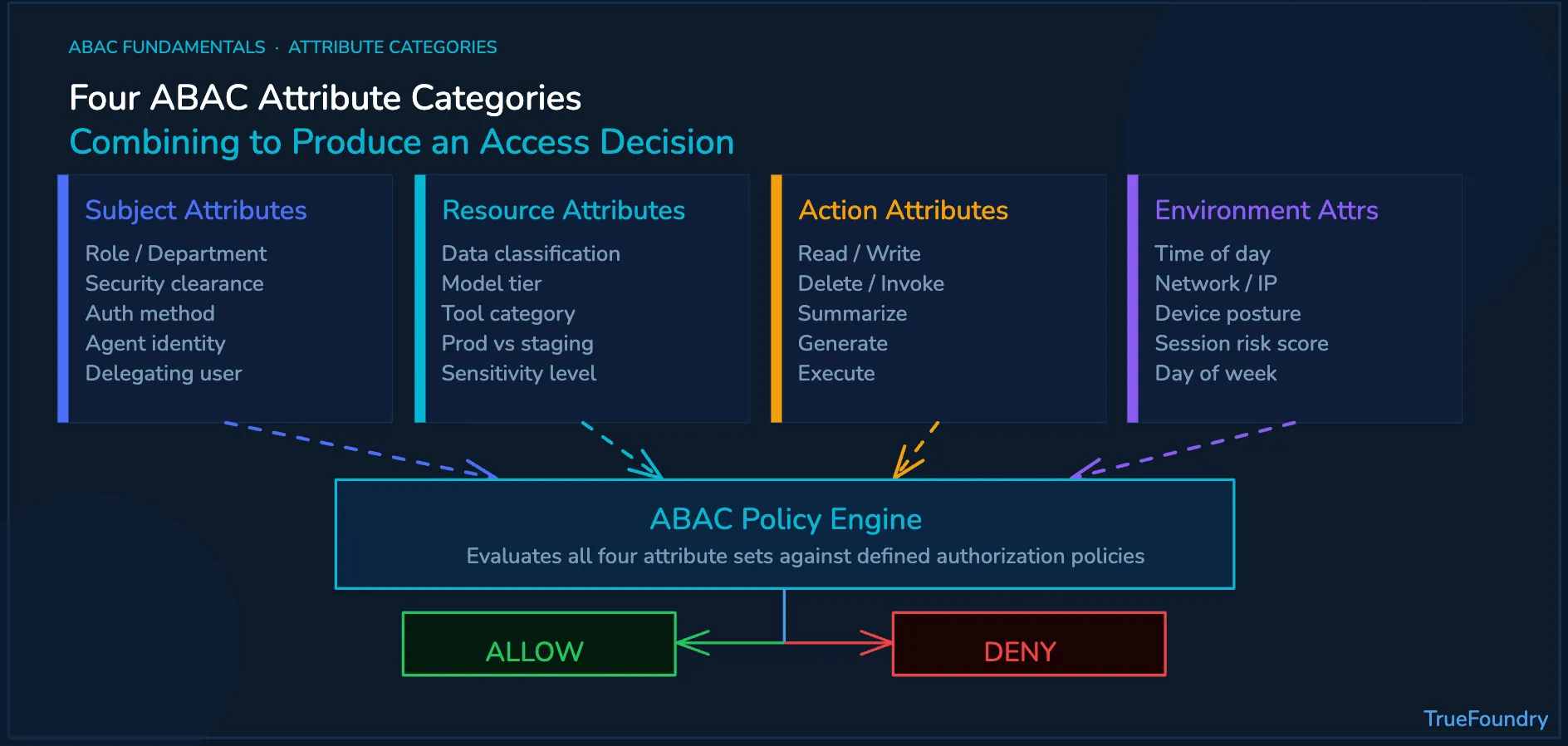
O controle de acesso baseado em atributos é uma abordagem de segurança orientada por políticas. Ele coleta atributos, avalia-os em relação às políticas ABAC e aplica a decisão final antes que o usuário ou sistema alcance o recurso protegido.
O processo geralmente começa no ponto de administração de políticas. Os administradores do sistema definem regras que descrevem quais combinações de atributos são permitidas. Essas regras podem ser expressas por meio de uma linguagem de política, como a Extensible Access Control Markup Language (XACML).
Um mecanismo de política avalia a solicitação em tempo real. Ele pode verificar informações de identidade de um diretório LDAP (Lightweight Directory Access Protocol), sinais do dispositivo, metadados de recursos, contexto da sessão e políticas de segurança antes de tomar uma decisão.
O ponto de aplicação de política implementa o resultado antes que o recurso protegido seja acessado. Em sistemas de IA corporativos, um Gateway de IA é uma camada de aplicação útil, pois as chamadas de modelo e as ações de ferramentas podem ser controladas antes da execução.
As empresas devem tratar o ABAC como um modelo de governança, não apenas como uma sintaxe de política. O objetivo é criar regras que sejam compreensíveis, aplicáveis, auditáveis e gerenciáveis à medida que o número de usuários, agentes, ferramentas e unidades de negócios aumenta.
Essas práticas recomendadas também se aplicam além da IA. Plataformas web podem usar atributos para partes do site, tipos de cookies, usuários finais, estados de consentimento e contexto do dispositivo. Sistemas corporativos usam a mesma lógica para segurança de dados e gerenciamento de acesso.
O RBAC e o controle de acesso baseado em atributos ajudam as organizações a controlar o acesso. A diferença está em como cada sistema decide se o acesso deve ser permitido. O RBAC usa funções (roles), enquanto o ABAC avalia um conjunto mais amplo de atributos no momento da solicitação.
O RBAC é mais simples de gerenciar quando as permissões se alinham claramente às funções. Por exemplo, um gerente financeiro pode precisar de acesso a aplicativos financeiros específicos. Os controles baseados em atributos tornam-se mais robustos quando o acesso depende da sensibilidade dos dados, localização, dispositivo, ação ou contexto da sessão.
Algumas empresas usam uma abordagem híbrida ARBAC quando a administração de funções e as verificações de atributos são importantes. Isso permite que as equipes mantenham funções de usuário simples enquanto adicionam controles mais refinados para recursos, ferramentas, modelos e fluxos de trabalho sensíveis.
Comparado ao controle de acesso discricionário, os modelos baseados em atributos oferecem às equipes de segurança centralizadas uma maior consistência de políticas. Comparados às políticas de controle de acesso estático, eles também criam uma experiência de usuário mais adaptável para trabalhos dinâmicos entre aplicativos, ferramentas e equipes.
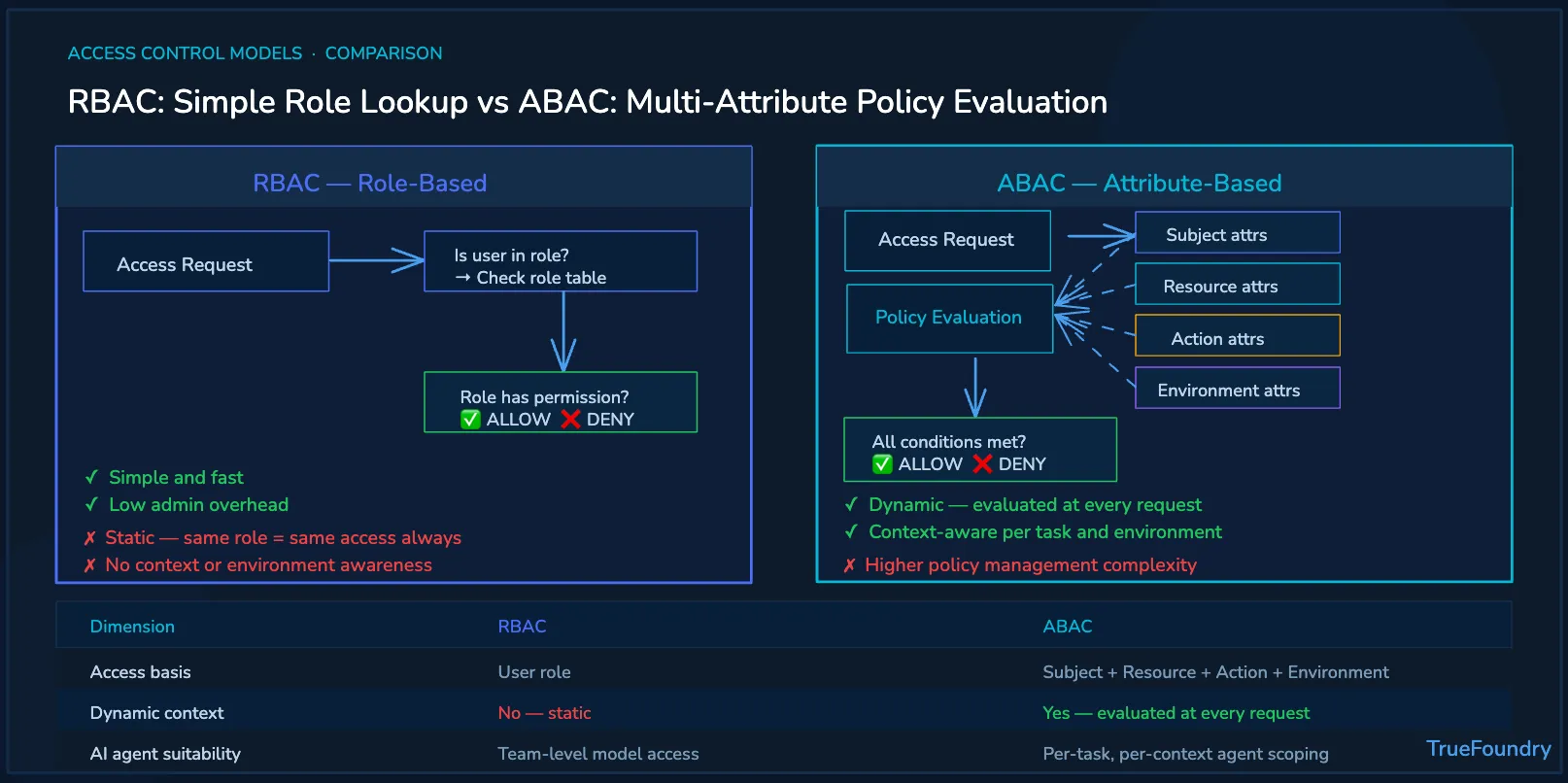
Funcionários humanos geralmente seguem funções definidas dentro da organização. Agentes de IA agem com base em tarefas, prompts, ferramentas e contexto. Essa diferença torna as funções estáticas insuficientes para muitos casos de uso de IA agente.
Por exemplo, um agente de IA de suporte ao cliente pode ler registros de CRM durante um fluxo de trabalho de serviço. O mesmo agente não deve modificar registros de faturamento sensíveis, a menos que o solicitante, a ação, o recurso e o contexto satisfaçam a política aprovada.
Sem o ABAC, as organizações geralmente enfrentam duas opções fracas. Ou elas concedem permissões excessivas aos agentes de IA e aumentam os riscos de segurança, ou restringem os agentes tanto que muitos fluxos de trabalho úteis exigem exceções manuais e atrasos operacionais.
Os controles baseados em atributos permitem que as equipes alinhem o acesso à tarefa. Um fluxo de trabalho pode aprovar acesso de leitura para clientes em uma situação, negar acesso de escrita em outra e aplicar verificações mais rigorosas quando dados sensíveis ou ferramentas de alto risco estão envolvidos.
Isso se torna importante à medida que os agentes de IA se conectam ao Model Context Protocol. As ferramentas podem alcançar sistemas internos, documentos, bancos de dados e plataformas de tickets. A MCP Gateway camada torna-se relevante quando essas chamadas de ferramenta precisam de autorização contextual.
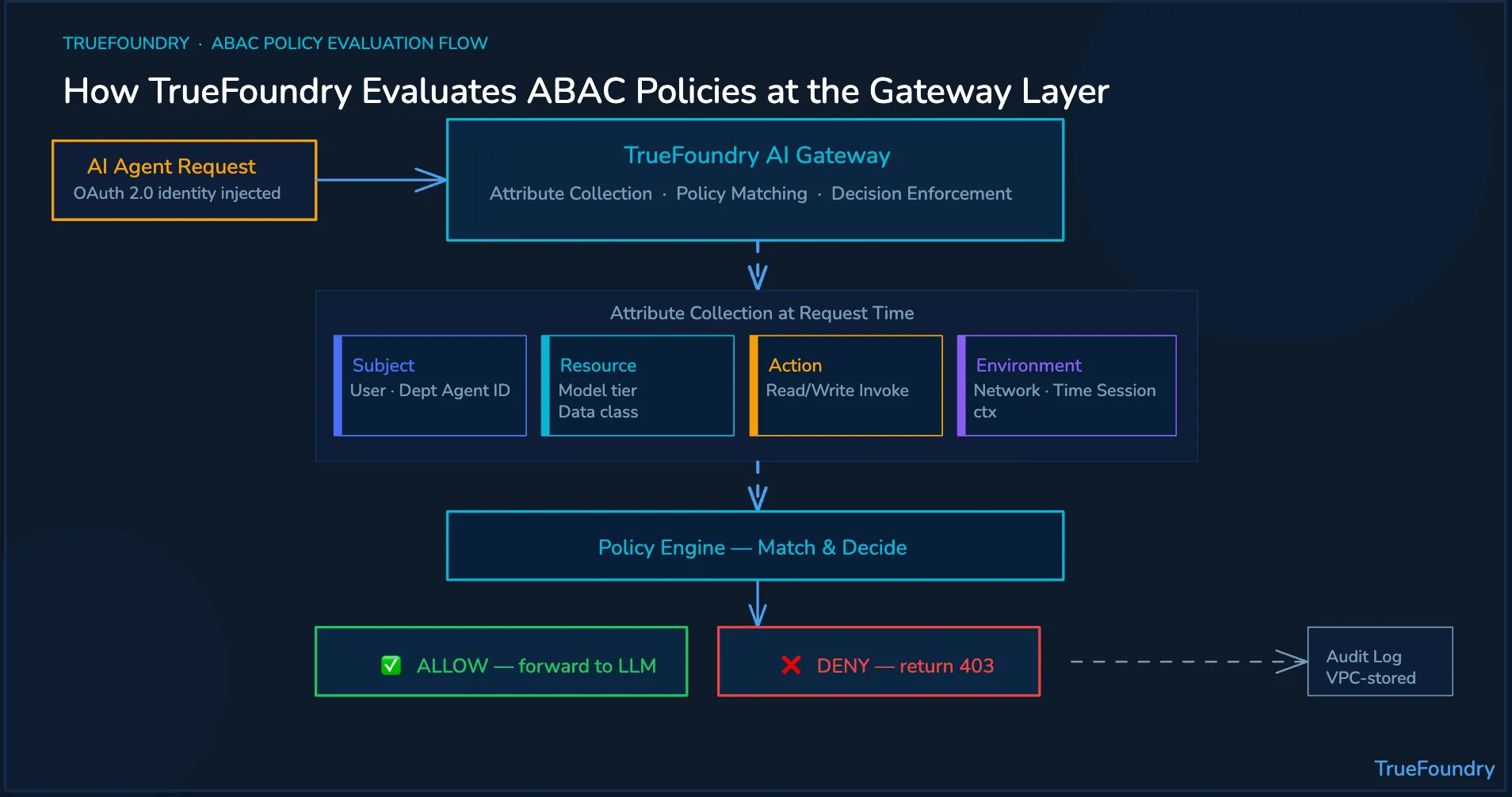
TrueFoundry aplica conceitos de controle de acesso baseado em atributos à governança de IA em produção. Isso ajuda as empresas a gerenciar o acesso a modelos, ferramentas e agentes de IA por meio de políticas contextuais aplicadas na camada de gateway.
Os atributos do sujeito podem vir de provedores de identidade corporativos. O TrueFoundry pode usar a injeção de identidade OAuth 2.0 para que cada ação do agente seja vinculada à identidade e aos atributos organizacionais do solicitante. Isso evita a dependência exclusiva de contas de serviço compartilhadas.
Os atributos de recurso e ação podem ser aplicados na camada de modelo e ferramenta. O MCP Gateway do TrueFoundry pode aplicar políticas por modelo e por ferramenta, incluindo acesso somente leitura ou leitura e gravação a ferramentas corporativas específicas.
Os atributos de ambiente podem ser avaliados por meio de controles em nível de fluxo de trabalho. O Agent Gateway ajuda as equipes a governar o contexto da sessão, o comportamento em tempo de execução, os limites de custo, o estado do fluxo de trabalho e os limites de execução aprovados para sistemas de IA agentes.
OGateway de LLM governa o acesso ao modelo, roteamento, abstração de provedor, limites de taxa e visibilidade de custos. Juntos, esses controles ajudam as empresas a aplicar políticas antes que chamadas de modelo, ações de ferramentas MCP ou fluxos de trabalho de agentes sejam executados.
As decisões de política são registradas com atributos relevantes, políticas correspondentes e resultados da decisão. Esses logs de auditoria podem permanecer dentro da VPC do cliente, o que ajuda as equipes a dar suporte a processos de revisão de conformidade interna, SOC 2 e HIPAA.
O ABAC ajuda as empresas a tomar decisões de acesso com base no contexto. O TrueFoundry ajuda a aplicar essas decisões antes que os agentes de IA chamem modelos, acessem ferramentas MCP ou ajam em sistemas corporativos.
Agende uma demonstração para ver como o TrueFoundry aplica políticas de ABAC com reconhecimento de identidade em modelos, ferramentas, agentes, orçamentos e logs de auditoria.
TrueFoundry AI Gateway delivers ~3–4 ms latency, handles 350+ RPS on 1 vCPU, scales horizontally with ease, and is production-ready, while LiteLLM suffers from high latency, struggles beyond moderate RPS, lacks built-in scaling, and is best for light or prototype workloads.





As últimas notícias, artigos e recursos enviados para sua caixa de entrada
.webp)


.png)
.png)
.png)
.png)
.png)
.png)
.png)
.png)
.png)
.png)
.png)


