


.webp)
October 8, 2026
|
5 min read


Published: July 14, 2026

Blazingly fast way to build, track and deploy your models!
Claude Code becomes significantly more powerful when connected to MCP servers. Developers can access GitHub repositories, Jira tickets, Slack workspaces, internal APIs, databases, and custom enterprise tools directly from their coding workflow.
That flexibility also introduces new governance challenges. Without centralized controls, developers can connect arbitrary MCP servers, store credentials locally, and access enterprise systems outside your organization's security policies. The moment more than a handful of engineers start using Claude Code, MCP tool access stops being a developer convenience and turns into a security question. Every engineer can wire up their own connection to GitHub, internal databases, Slack, or a production API, each with its own credentials, and nobody outside that engineer's laptop knows what's actually reachable. That's the gap an MCP gateway is meant to close: a single control point between Claude Code and every tool server it talks to, instead of governance left to whatever each developer configured on their own.
In this guide, we'll compare the best MCP gateways for Claude Code based on governance capabilities, deployment flexibility, security, and enterprise readiness.
A basic reverse proxy in front of MCP servers solves almost none of the problem enterprise teams are trying to solve. The criteria that matter:
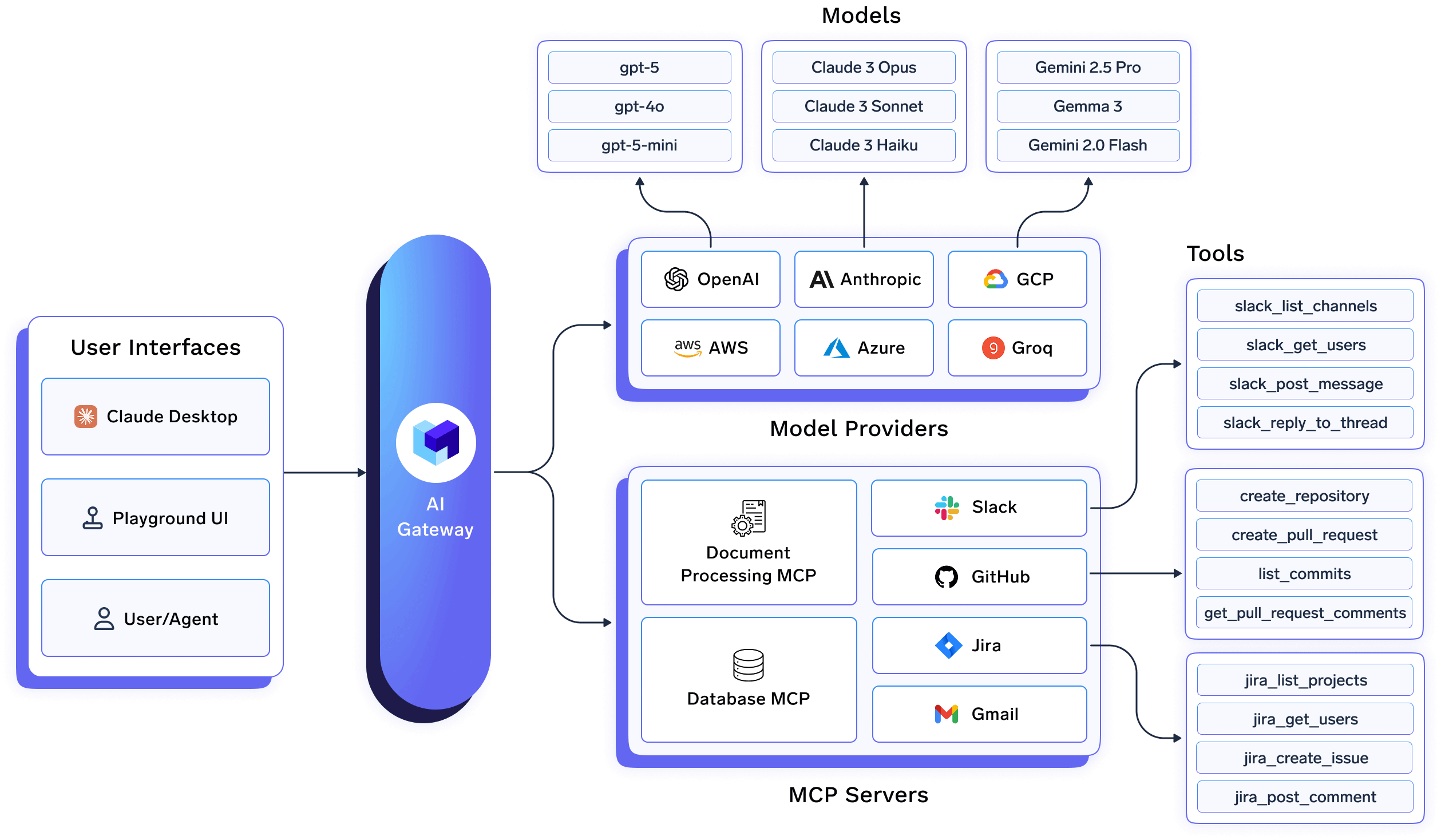
TrueFoundry is purpose-built for organizations deploying Claude Code at scale. It offers dedicated integrations for Claude Code, Claude Code Max, and Claude Desktop, making it easy for platform teams to securely manage both LLM access and MCP server governance from a single control plane.
Administrators register approved MCP servers, such as GitHub, Jira, Slack, or internal tools - once in the TrueFoundry control plane, configuring outbound authentication and access policies centrally. Developers receive ready-to-use connection URLs instead of configuring credentials or MCP servers individually, ensuring every connection follows organizational security policies.
Where TrueFoundry stands out is its policy enforcement. Rather than relying on editable local configuration files, organizations can distribute a managed-mcp.json configuration through their MDM solution, allowing only approved MCP servers to be used with Claude Code. Because enforcement happens through the gateway and managed device policies, developers can't simply add unauthorized MCP servers or bypass organizational controls.
Identity is equally streamlined. TrueFoundry integrates with enterprise identity providers such as Okta and Microsoft Entra ID, allowing developers to authenticate through SSO the first time they use Claude Code. User provisioning and access management can be automated through SCIM, eliminating the need to distribute or rotate static API keys.
Beyond MCP governance, TrueFoundry also functions as a full AI Gateway, enabling centralized model routing, observability, audit logging, and policy enforcement across 1,000+ LLMs. Organizations can deploy it as a managed SaaS offering or within their own VPC, on-premises, air-gapped, or hybrid environments to meet enterprise security and compliance requirements.
Pros
Cons
Best for: Enterprises rolling out Claude Code across multiple engineering teams that need centralized authentication, enforceable MCP governance, comprehensive auditability, and unified management of both AI models and enterprise tools.
Try TrueFoundry's MCP Gateway →
Docker's MCP Gateway runs MCP servers in isolated containers, which is its core value: each server gets its own blast radius, so a compromised or misbehaving tool can't reach across to others. It handles OAuth flows for MCP servers that need them, stores credentials through Docker Desktop instead of scattering them across config files, and organizes servers into profiles that can be exported and shared through OCI registries.
Where it runs into limits is organization-wide governance. The product is built for developer workstations and small team deployments, and features like fine-grained per-user budgets, hierarchical RBAC, and long-term audit log retention require layering additional tooling on top once a deployment moves to production at enterprise scale.
Pros: Strong container-level isolation between MCP servers, straightforward credential handling through Docker Desktop, low setup friction for teams already using Docker.
Cons: No organization-wide RBAC, centralized audit logging, or compliance-grade governance out of the box.
Best for: individual developers and small teams who want safer local MCP server isolation without needing enterprise-wide access control yet.
ContextForge is IBM's open-source registry and proxy for federating MCP servers, A2A agents, and REST or gRPC APIs behind one endpoint. It's a genuinely broad piece of infrastructure: it translates between transports (HTTP, JSON-RPC, WebSocket, SSE, stdio, streamable-HTTP), converts REST endpoints into MCP tools, and ships an admin UI for real-time configuration and log monitoring, including air-gapped deployment support. Production deployments run through a Helm chart with horizontal pod autoscaling across a Kubernetes cluster, backed by Redis for federation and caching, plus a plugin system with 40+ extensions for additional protocols and integrations.
This is the most feature-dense open-source option here, and also the one that asks the most of your team. There's no vendor-managed control plane, no Claude Code-specific setup guide, and no SSO onboarding flow out of the box; you're standing up and operating a Kubernetes-native gateway yourself, which is a reasonable trade for a platform team that wants full control and already runs infrastructure like this.
Pros: Broad protocol support (MCP, A2A, REST/gRPC), Kubernetes-native scaling, active plugin ecosystem, fully open source.
Cons: No Claude Code-specific documentation, no built-in SSO/SCIM, self-hosted and self-operated end to end.
Best for: platform engineering teams that want a protocol-agnostic, open-source MCP gateway and are comfortable running it on their own Kubernetes infrastructure.
Lasso built its MCP Gateway specifically around security rather than general governance or routing, and it shows in the architecture: a triple-gate pattern that inspects traffic at the AI layer (prompt filtering, PII detection), the MCP layer (tool authorization, parameter validation), and the API layer (rate limiting, authentication). The plugin-based design lets teams add controls incrementally, real-time scanning, token masking, guardrails, threat detection, rather than adopting one rigid security stack all at once. It also does tool reputation analysis on MCP servers themselves, evaluating behavior patterns and code before you connect to something you haven't vetted.
What it isn't is a full governance or identity platform. There's no named Claude Code integration guide, and pricing for anything beyond the open-source core isn't published.
Pros: Purpose-built security scanning across three distinct layers, supply-chain reputation checks on MCP servers, plugin-based so teams add controls incrementally.
Cons: Not a full governance or SSO platform on its own, no Claude Code-specific setup documentation, enterprise pricing not public.
Best for: security teams that want a dedicated MCP-layer security and guardrails product to sit alongside whatever routes the traffic, rather than a single all-in-one gateway.
Zapier MCP is worth including because it comes up often in Claude Code discussions, but it's solving a different problem than the other four. It's a hosted server that gives Claude access to Zapier's library of 9,000+ app integrations, so a Claude Code session can trigger actions in tools like Slack, HubSpot, or Google Sheets through Zapier's existing connectors, rather than through custom-built MCP servers.
It has real governance built in for what it does: admins install it once and grant access to only the apps and actions they allow. But it isn't a general MCP gateway for arbitrary self-hosted tool servers, there's no device-level enforcement comparable to TrueFoundry's MDM lockdown, and on the Enterprise plan it's actually disabled by default until an administrator turns it on, which is a detail worth knowing before assuming it's available out of the box.
Pros: Instant access to 9,000+ existing Zapier app integrations, admin-controlled action allowlisting, listed in Anthropic's Claude Code marketplace.
Cons: Disabled by default on Enterprise plans until an admin enables it, not designed to govern arbitrary self-hosted MCP servers, no device-level enforcement.
Best for: teams that want Claude Code to trigger actions in existing SaaS tools through Zapier's connector library, rather than teams governing custom internal MCP servers.
Q: What's the best MCP gateway for Claude Code enterprise teams?
A: For organizations that need Claude Code's MCP access locked down at the device level with SSO onboarding and audit trails, TrueFoundry is built around that specifically. Docker suits small teams that just want container isolation, ContextForge suits platform teams running their own Kubernetes-based gateway, Lasso suits teams prioritizing MCP security scanning, and Zapier MCP suits teams that want SaaS automation actions rather than custom MCP governance.
Q: Is Docker MCP Gateway suitable for enterprise deployment?
A: It's strong for developer workstations and small teams, but Docker's own documentation notes that organization-wide RBAC, centralized audit logging, and compliance-grade governance require additional tooling on top of it.
Q: Is IBM's ContextForge free?A: Yes, mcp-context-forge is open source and free, distributed via PyPI or Docker with Kubernetes deployment support through a Helm chart.
Q: Can Claude Code's MCP access actually be locked down, or is it just a config file convention?
A: With TrueFoundry, yes: a managed-mcp.json file deployed through MDM takes exclusive control over which MCP servers a device's Claude Code instance can reach, overriding whatever a developer configures locally.
Q: Can I deploy an MCP gateway for Claude Code in my own VPC or on-prem?
A: With TrueFoundry, yes. It runs in your VPC, on-prem, air-gapped, hybrid, or across multiple clouds, and no data leaves your domain, which matters for the credentials MCP servers use to reach internal systems.
TrueFoundry AI Gateway delivers ~3–4 ms latency, handles 350+ RPS on 1 vCPU, scales horizontally with ease, and is production-ready, while LiteLLM suffers from high latency, struggles beyond moderate RPS, lacks built-in scaling, and is best for light or prototype workloads.






The latest news, articles, and resources sent to your inbox


.png)
.png)




.png)


.png)
.png)
.png)
.png)


