September 23, 2026
|
5 min read

Published: March 5, 2026

Blazingly fast way to build, track and deploy your models!
Amazon SageMaker has effectively become the default operating system for machine learning within the AWS perimeter. Launched in 2017, it promised to industrialize what was then a fragmented ecosystem of custom scripts and manual server provisioning. By abstracting the underlying EC2 configuration and container orchestration, it allowed organizations to standardize their ML pipelines.
But here we are in 2026, and the value proposition of a closed-source, single-cloud managed service is under scrutiny. The complaints we hear from engineering teams are consistent: opaque pricing models that lead to month-end shock, steep learning curves for non-AWS natives, and a "walled garden" architecture that penalizes multi-cloud strategies.
This technical review looks at SageMaker not as a marketing brochure, but as a piece of infrastructure. We examine the unit economics, the operational friction, and the architectural trade-offs based on data from G2, Gartner Peer Insights, and direct operational experience. We will also evaluate whether decoupled control planes like TrueFoundry offer a viable path away from vendor lock-in.
At its core, Amazon SageMaker is a managed service wrapper around AWS compute (EC2), storage (S3/EBS), and container orchestration (EKS/ECS). It provides an end-to-end integrated development environment (IDE) and a control plane for the ML lifecycle.
Recent updates, such as the "Unified Studio" and integration with Data Lakehouses, attempt to bridge the gap between data engineering and ML operations. However, for the platform engineer, SageMaker is essentially a set of proprietary APIs used to provision ephemeral compute for training and persistent compute for inference.
Target Audience:
Operational Scope:
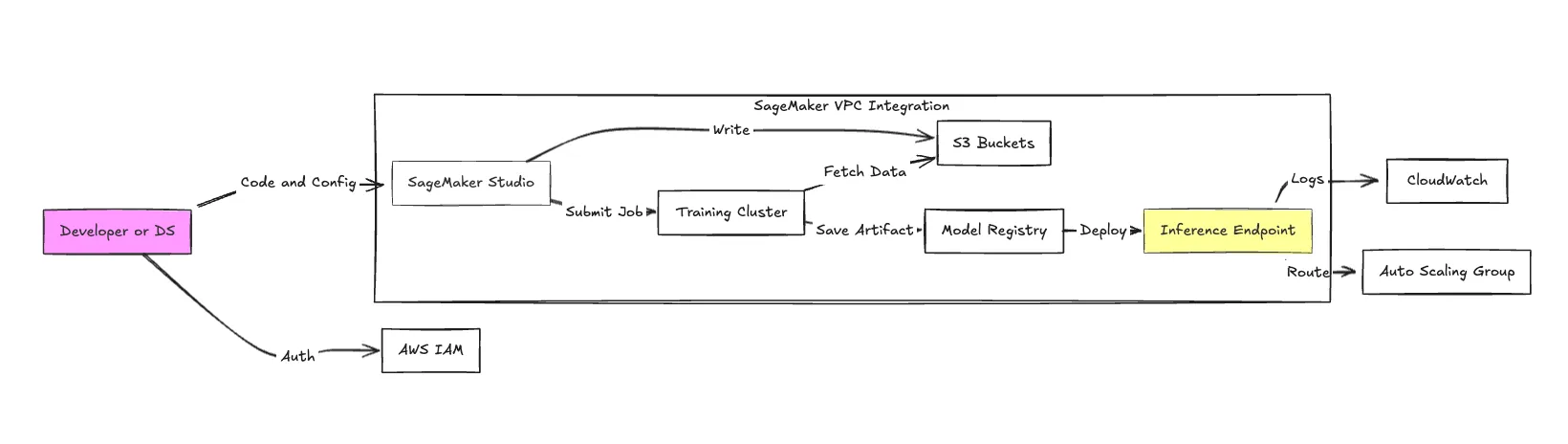
SageMaker is a monolith. While it offers dozens of sub-services, the following components constitute the core operational stack.
Studio is a web-based IDE based on JupyterLab. While it centralizes access, it introduces latency. Spinning up a "KernelGateway" app can take several minutes. It creates an abstraction layer over the underlying EC2 instance, which simplifies access but complicates utilizing local system resources for debugging.
SageMaker enables distributed training across clusters. SageMaker HyperPod is the notable feature here, designed to be resilient to hardware failures during long-running LLM training jobs. It automatically detects and replaces faulty instances—critical when renting expensive GPU clusters where a single node failure can waste days of compute time.
SageMaker offers Real-time Inference, Serverless Inference, and Asynchronous Inference.
An AutoML solution that iterates through algorithms to find the best model. While useful for rapid prototyping on tabular data, experienced engineers often find the generated code difficult to refactor or optimize for production inference constraints.
This is the "glue" layer. SageMaker Pipelines is a CI/CD service specifically for ML. It integrates tightly with the Model Registry (versioning) and Model Monitor (drift detection). The trade-off is heavy vendor coupling; migrating a SageMaker Pipeline to Airflow or Argo Workflows usually requires a complete rewrite.
Data Wrangler provides a UI for data cleaning, generating python code. The Feature Store acts as a centralized repository for features. Note that the Feature Store is backed by Glue and DynamoDB, meaning high-throughput reads can incur significant secondary costs on the database side.
Pricing is the most common friction point. SageMaker operates on a consumption-based model with a markup over raw EC2 pricing. There are no upfront fees, but cost predictability is low due to the sheer number of billable vectors.
You are billed for:
1. Notebook Instances:
A standard ml.t3. medium notebook instance costs approximately **$0.05/hour**. However, developers frequently leave these running overnight. A team of 10 developers leaving instances on for a month results in ~$360 of "waste," excluding storage costs.
2. Inference Endpoints (The Silent Budget Killer):
Inference is where costs spiral. Unlike training (which ends), endpoints run 24/7.
3. Training & Spot Instances:
Managed Spot Training can offer up to a 90% discount compared to On-Demand rates. However, Spot instances can be preempted (interrupted) by AWS at any time. If your training checkpointing logic is not robust, you lose progress.
Real-World Scenario:
A mid-sized startup training a custom LLM and hosting 5 models in production can easily see bills exceeding $25,000/month. According to AWS Pricing, data processing charges for features like Data Wrangler start at $0.14/node-hour, which scales linearly with data volume.
Key Metrics for Evaluating Gateway
| Criteria | What should you evaluate ? | Priority | TrueFoundry |
|---|---|---|---|
| Latency | Adds <10ms p95 overhead for time-to-first-token? | Must Have | ✅ Supported |
| Data Residency | Keeps logs within your region (EU/US)? | Depends on use case | ✅ Supported |
| Latency-Based Routing | Automatically reroutes based on real-time latency/failures? | Must Have | ✅ Supported |
| Key Rotation & Revocation | Rotate or revoke keys without downtime? | Must Have | ✅ Supported |
| Key Rotation & Revocation | Rotate or revoke keys without downtime? | Must Have | ✅ Supported |
| Key Rotation & Revocation | Rotate or revoke keys without downtime? | Must Have | ✅ Supported |
| Key Rotation & Revocation | Rotate or revoke keys without downtime? | Must Have | ✅ Supported |
| Key Rotation & Revocation | Rotate or revoke keys without downtime? | Must Have | ✅ Supported |

We analyzed feedback from G2, Gartner Peer Insights, and developer forums to identify the consensus.
Users appreciate the "compliance-in-a-box" nature of the platform.
Negative sentiment focuses on developer experience (DX) and billing opacity.
Note on "SageMaker Gateway": There is often confusion regarding this term. It refers to integrating Amazon API Gateway with SageMaker endpoints to expose models as public REST APIs. While powerful, it introduces another layer of latency and cost (API Gateway charges per million requests) that developers must manage.
The decision comes down to your organization's architectural philosophy and budget elasticity.
When SageMaker makes sense:
When to consider alternatives:
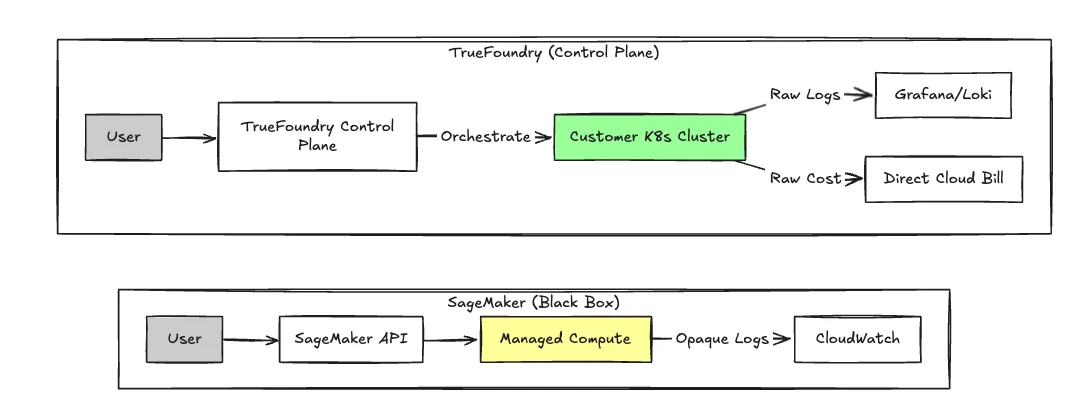
For teams finding SageMaker too rigid or expensive, TrueFoundry operates on a fundamentally different architecture. It is a Control Plane that sits on top of your own cloud account (AWS, GCP, Azure), rather than a black-box managed service.
This "Bring Your Own Cloud" (BYOC) approach allows TrueFoundry to orchestrate compute inside your VPC. You get the developer experience of a managed platform like Heroku, but the underlying unit economics of raw EC2/GKE/AKS instances.
The critical difference is where the computing happens. In SageMaker, you rent the platform's compute capabilities. In TrueFoundry, the platform orchestrates your computing functions.
Whatfix, serving over 80 Fortune 500 companies, needed to modernize its release lifecycle across diverse cloud and on-premises environments. By adopting TrueFoundry to manage their Kubernetes-based microservices, they eliminated the friction of monolithic deployments. This transition reduced their on-premise deployment time from three months to just two weeks.
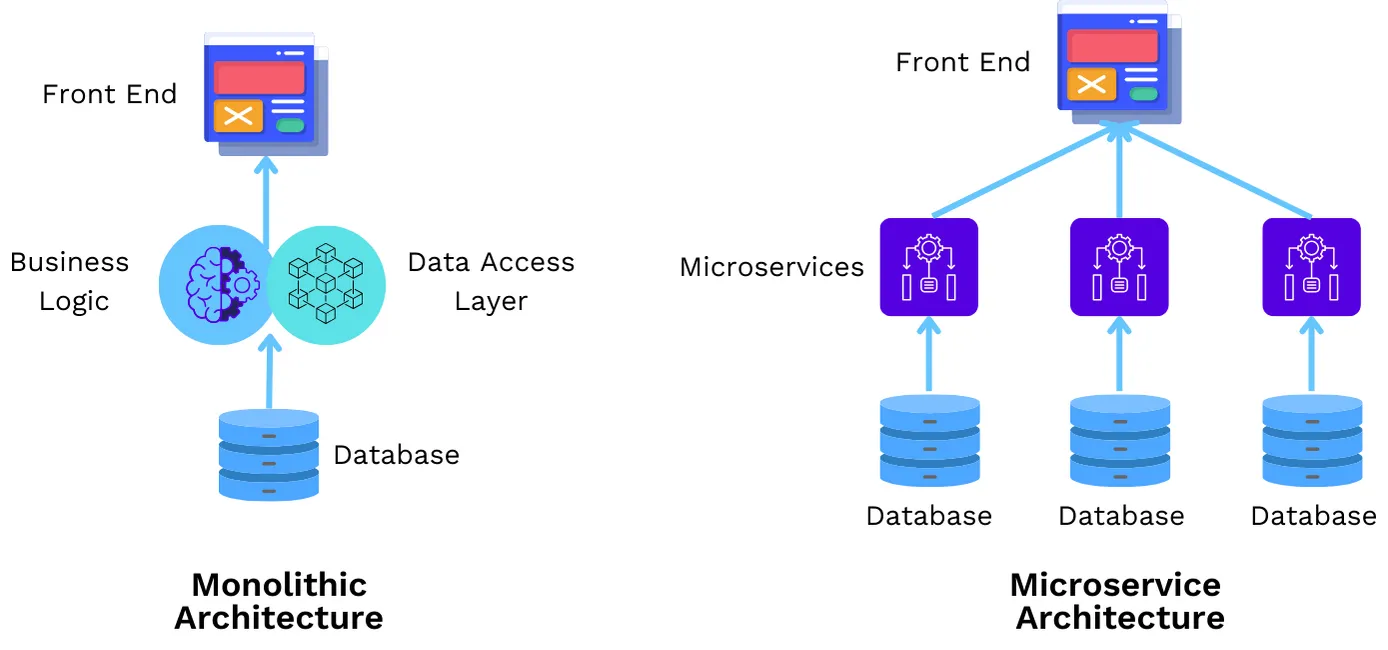
Whatfix achieved a 6x shorter release cycle, allowing a tiny DevOps team to support over 150 developers with a single pane of glass for multi-cluster management.
Read the full story: Whatfix Kubernetes Migration and On-prem Deployment Case Study
Amazon SageMaker is a robust, enterprise-grade toolkit. If your organization is legally or technically bound to AWS and you have a dedicated DevOps team to manage the billing and configuration complexities, it is a safe, standard choice.
However, for teams building modern GenAI applications where GPU scarcity and unit economics are existential risks, the "AWS tax" is hard to justify.
TrueFoundry offers the logical evolution: the usability of a managed service with the economic and architectural freedom of owning your infrastructure. If you need to deploy LLMs across AWS and GCP to find the cheapest GPUs, or if you simply want a dashboard that speaks the language of developers rather than accountants, TrueFoundry is the superior architectural choice.
Book a Demo with TrueFoundry to see how you can cut your inference costs by 40% while regaining control of your infrastructure.
TrueFoundry is the ideal alternative to AWS SageMaker because it provides total infrastructure control without the "black box" pricing. Unlike a typical fully managed service, it empowers Data Scientists to host Machine Learning Models using PyTorch or TensorFlow with minimal effort. The TrueFoundry AI Gateway eliminates the heavy lifting of orchestration while providing the scalability required for Generative AI.
SageMaker is technically mature and reliable for traditional ML. It excels in security and compliance but rates poorly on usability, debugging experience, and cost transparency compared to modern MLOps platforms.
It depends on the data. Databricks (Unified Data Analytics Platform) is superior for Spark-heavy workloads and data engineering-led ML. SageMaker is generally preferred for pure deep learning and inference tasks where the data is already prepared in S3.
Yes, it has the largest market share among public cloud ML services simply due to AWS's dominance. However, market share is shifting as "cloud-agnostic" becomes a priority for GenAI stacks.
No. OpenAI provides models as a service (API). SageMaker provides the infrastructure to train and host your own models (including open-source alternatives to OpenAI, like Llama 3 or Mistral).
They are functionally similar. Azure ML is generally considered to have a more intuitive UI and better integration with VS Code, while SageMaker offers more granular control over low-level infrastructure for advanced users.
TrueFoundry AI Gateway delivers ~3–4 ms latency, handles 350+ RPS on 1 vCPU, scales horizontally with ease, and is production-ready, while LiteLLM suffers from high latency, struggles beyond moderate RPS, lacks built-in scaling, and is best for light or prototype workloads.






The latest news, articles, and resources sent to your inbox

.png)

.png)
.png)
.png)
.png)
.png)
.png)
.png)
.png)
.png)