



October 1, 2026
|
5 min read


احصل على وصول فوري إلى بيئة TrueFoundry مباشرة. انشر النماذج، ووجّه حركة مرور LLM، واستكشف المنصة بالكامل — بيئة الاختبار الخاصة بك جاهزة في ثوانٍ، ولا يلزم وجود بطاقة ائتمان.



Published: July 4, 2026
Blazingly fast way to build, track and deploy your models!
Somebody on your team is already using Claude Code. Probably several people. The question isn't whether to allow it—that ship sailed. The question is whether you govern it before something goes wrong, or after.
Claude Code runs in your terminal with full user-level privileges. It reads files, runs bash commands, connects to MCP servers, and sends code context to Anthropic's servers for processing.
Without a usage policy, you've got API keys in Slack channels, no visibility into what the tool accesses, and no audit trail when compliance comes knocking. We've watched this happen at enough organizations to know the pattern.
Most teams adopt Claude Code bottom-up. A few developers try it, get hooked, and tell their teammates. By the time platform engineering or security gets involved, 30 people are running it with default settings and no guardrails.
Three risks show up fast at that point:
A usage policy doesn't kill productivity. It channels it. Get the policy right, and developers work faster, and you can prove what happened.
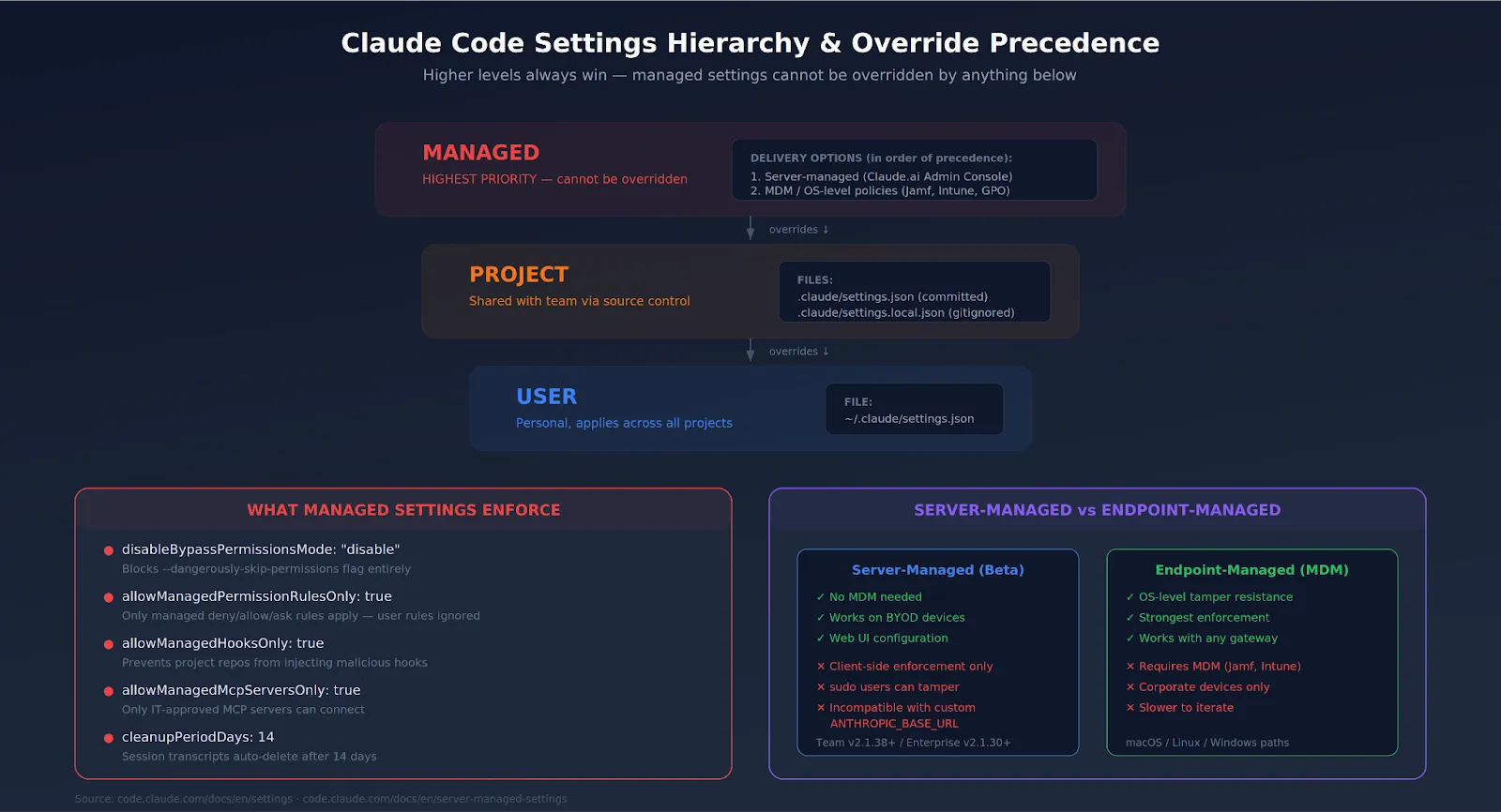
Your governance options depend entirely on which plan you're on. Here's the honest breakdown:
SSO integration takes about 2-4 hours. You verify domain ownership via DNS TXT record, upload IdP metadata to the Claude Admin Console, and connect Okta, Azure AD, or whatever SAML 2.0 provider you run. Domain capture automatically enrolls new users under your org when they sign up with a company email.
Here's the core of enterprise governance. The managed-settings.json file enforces organization-wide policies that developers cannot override. Higher-level settings always win.
You have two delivery options:
Start with a baseline policy that blocks the most dangerous operations:
{
  "permissions": {
    "disableBypassPermissionsMode": "disable",
    "deny": [
      "Bash(curl*)",
      "Bash(wget*)",
      "Read(**/.env)",
      "Read(*/.env.)",
      "Read(*/secrets/*)",
      "Read(*/.ssh/*)"
    ],
    "ask": [
      "Bash(git push:*)",
      "Write(**)"
    ]
  },
  "allowManagedPermissionRulesOnly": true,
  "allowManagedHooksOnly": true,
  "cleanupPeriodDays": 14
}
disableBypassPermissionsMode is the single most important setting. Without it, any developer can run Claude Code with --dangerously-skip-permissions and bypass every safety check you set up. Block it.
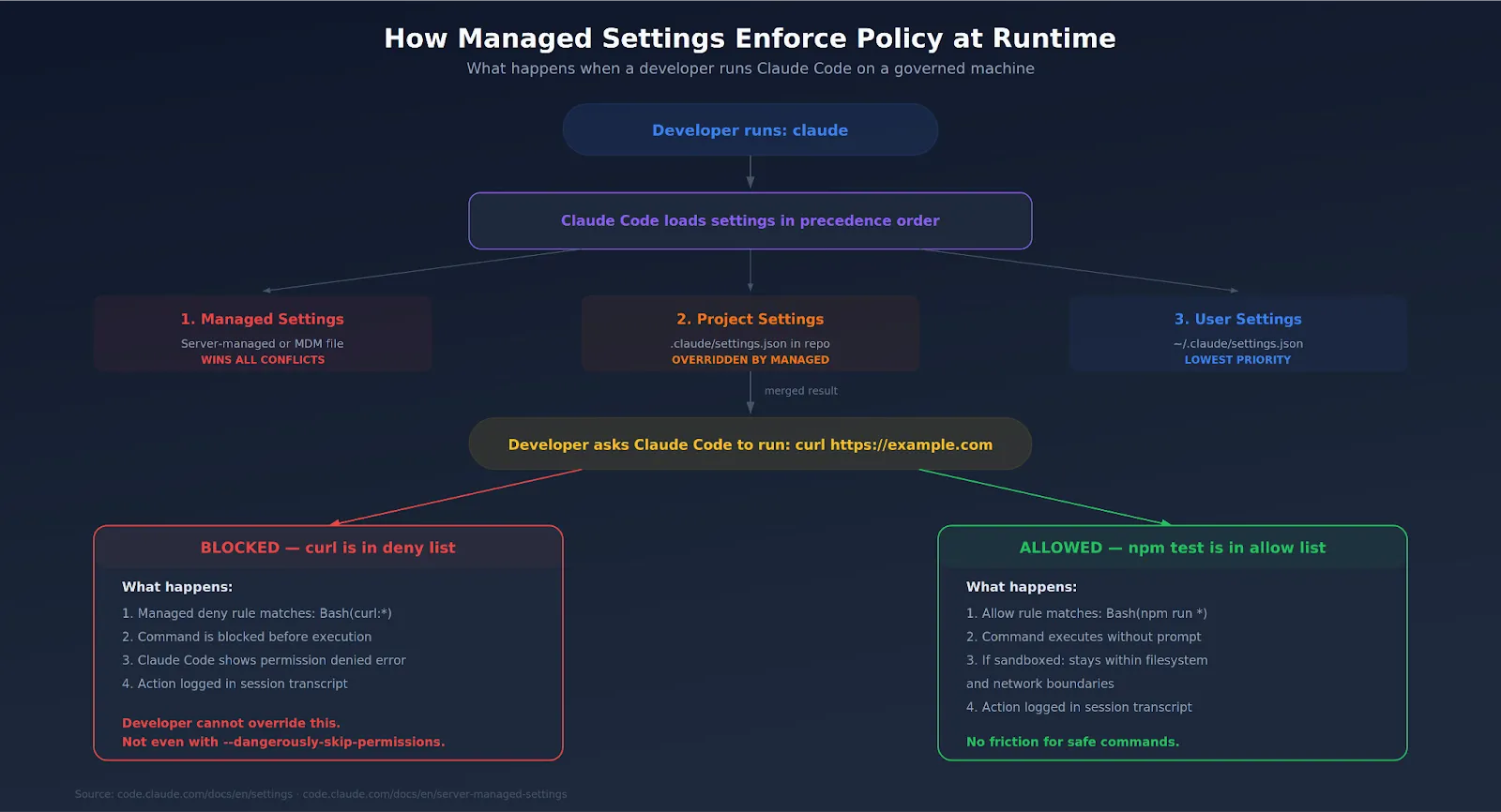
Claude Code connects to external tools through MCP servers—Slack, GitHub, databases, and internal APIs. Each connection expands the attack surface. CVE-2025-59536 showed that malicious MCP configs in a cloned repo could execute commands before the trust dialog appeared.
Your policy should include:
For organizations running MCP servers at scale, routing through a centralized MCP gateway with proper access control gives you one chokepoint for authentication, rate limiting, and audit logging across every agent-tool interaction.
Claude Code burns through tokens fast during agentic loops. A single runaway session can rack up serious costs overnight. Without limits, nobody notices until the invoice arrives.
Set boundaries at two levels:
Usage-based Enterprise plans bill all Claude Code activity at standard API rates on top of the seat fee. There's no included token allowance. Track per-developer consumption through Claude Code analytics (lines of code accepted, suggestion accept rate, usage patterns) and set alerts before caps are hit.
For more granular control, teams routing through an AI gateway can set per-team and per-project budgets, implement rate limiting, and get consolidated cost dashboards that cover both LLM and MCP usage.
Your auditor doesn't care about what Claude Code can do. They care about what it did. Two tools matter here.
The practical setup: pipe Compliance API output into Grafana, Datadog, or Splunk via OpenTelemetry. Route LLM and MCP traffic through a centralized gateway for unified tracing with user attribution. Document your review cadence. Auditors want to see that someone looks at the logs weekly—not just that the logs exist.
Here's The Evaluation Framework
| Criteria | What should you evaluate ? | Priority | TrueFoundry |
|---|---|---|---|
| Policy Model & Runtime Enforcement | |||
| Policy lifecycle | How are AI policies represented, versioned, reviewed, approved, tested, and promoted across environments? | Must have | ✅ Supported: versioned policies with review and promotion workflows. |
| Runtime enforcement | Can policy decisions block or transform requests before model, provider, or tool execution? | Must have | ✅ Supported: inline enforcement via guardrails, budgets, and RBAC. |
| Risk tiers | Can different rules apply by application criticality, data sensitivity, model risk, geography, and user role? | Should have | ✅ Supported: tiered policies by team, app, model, and deployment. |
| Exception workflow | Can temporary exceptions be requested, approved, logged, expired, and reported without weakening baseline policy? | Should have | ✅ Supported via governed configuration workflows. |

Everything above is a technical configuration. You also need an actual written policy—the thing that sits in your internal wiki, gets reviewed by legal, and gets linked in onboarding docs.
A solid Claude Code usage policy covers:
اجعلها موجزة. إذا كانت السياسة تتكون من 40 صفحة، فلن يقرأها أحد. صفحتان بقواعد واضحة وروابط لوثائق التكوين أفضل من رواية امتثال طويلة.
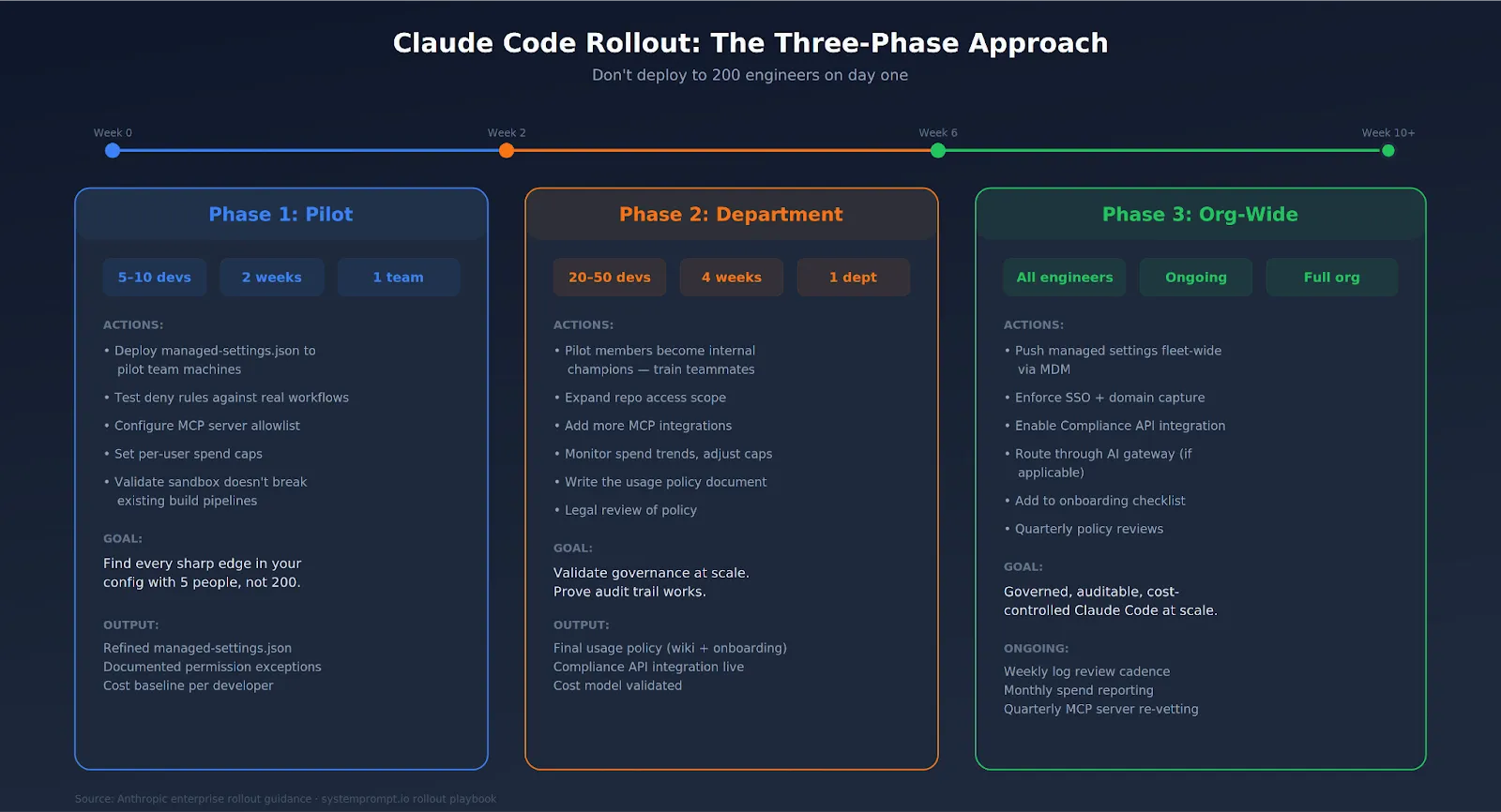
لا تنشرها لـ 200 مهندس في اليوم الأول. هكذا تكتشف أن قواعد الرفض الخاصة بك تعطل مسار بناء أحدهم بعد ظهر يوم جمعة.
سيجد الفريق التجريبي كل ثغرة في إعداداتك. دعهم يفعلون ذلك. من الأفضل أن تتعطل الأمور مع 5 أشخاص بدلاً من 200.
لم تعد حوكمة المؤسسة لـ Claude Code خيارًا. ليس عندما تعمل الأداة بصلاحيات المستخدم الخاصة بك، وترسل التعليمات البرمجية إلى خوادم خارجية، وتتصل بأدواتك الداخلية عبر MCP.
الخبر السار: قامت Anthropic ببناء أدوات حوكمة حقيقية. إعدادات مُدارة لا يمكن للمطورين تجاوزها. واجهة برمجة تطبيقات للامتثال مع وصول فوري إلى بيانات الاستخدام. تسجيل الدخول الموحد (SSO)، SCIM، حدود الإنفاق، والعزل (sandboxing). اللبنات الأساسية موجودة. مهمتك هي تجميعها في سياسة تناسب مؤسستك، ونشرها عبر MDM أو الإعدادات المدارة من الخادم، وتطبيقها من اليوم الأول—وليس بعد الحادث الأول.
TrueFoundry AI Gateway delivers ~3–4 ms latency, handles 350+ RPS on 1 vCPU, scales horizontally with ease, and is production-ready, while LiteLLM suffers from high latency, struggles beyond moderate RPS, lacks built-in scaling, and is best for light or prototype workloads.


تشير حوكمة كود كلود إلى مجموعة السياسات والضوابط وآليات الرقابة التي تضعها المؤسسات لتنظيم كيفية استخدام كود كلود داخل فرق عملها. ويشمل ذلك تحديد حالات الاستخدام المعتمدة، ووضع حدود الصلاحيات، وإنشاء سجلات التدقيق، وإدارة ضوابط الوصول، وإنشاء إجراءات تصعيد للحالات الاستثنائية.
الحوكمة بالغة الأهمية لـ Claude Code في بيئات الشركات، لأن الأداة تعمل باستقلالية كبيرة؛ فهي تستطيع الوصول إلى قواعد الأكواد البرمجية، وتنفيذ الأوامر، والتفاعل مع الخدمات الخارجية. بدون ضوابط حوكمة، تواجه المؤسسات مخاطر تشمل تسرب البيانات، والتغييرات العرضية في البنية التحتية، وانتهاكات الامتثال، والإنفاق غير المتحكم فيه على الذكاء الاصطناعي. يضمن إطار الحوكمة القوي أن يظل Claude Code أصلًا لزيادة الإنتاجية بدلاً من أن يكون عبئًا.
تتضمن المخاطر الرئيسية للحوكمة عند استخدام كود كلود الوصول غير المصرح به للبيانات من خلال أذونات الملفات الواسعة بشكل مفرط، وهجمات حقن الأوامر من المحتوى الخارجي، واستهلاك الرموز غير المتحكم فيه الذي يؤدي إلى تجاوز التكاليف، والسلوك غير المتناسق بين الفرق بسبب نقص سياسات توجيه الأوامر الموحدة، وفجوات التدقيق حيث لا يتم تسجيل أو مراجعة الإجراءات التي يتخذها كلود. تتطلب معالجة هذه المخاطر مزيجًا من الضوابط التقنية والسياسات التنظيمية.



أحدث الأخبار والمقالات والموارد تصلك مباشرة إلى بريدك الوارد
.png)



.png)
.png)
.png)

.png)
.png)
.png)
.png)
.png)
.png)
.png)


