


.png)
October 28, 2026
|
5 min read


Obtenha acesso instantâneo a um ambiente TrueFoundry ao vivo. Implante modelos, direcione o tráfego de LLM e explore a plataforma completa — seu sandbox estará pronto em segundos, sem necessidade de cartão de crédito.



Blazingly fast way to build, track and deploy your models!
Claude Agent SDK vs. LangGraph não é exatamente uma comparação de produtos. É uma comparação de duas filosofias sobre quem deve ser responsável pelo fluxo de controle de um agente.
O Claude Agent SDK lhe entrega um loop pronto. Ele já sabe como planejar, chamar uma ferramenta, ler o resultado e decidir o próximo passo, porque é o mesmo loop que executa o Claude Code. Você entra com as ferramentas e as instruções.
O LangGraph lhe entrega uma caixa de primitivas e espera que você desenhe o grafo. Nós, arestas, um esquema de estado tipado. Você define o que acontece e em qual ordem, e o framework executa tudo até que algo retorne END.
Ambas as abordagens são defensáveis. Qual delas se encaixa melhor depende de uma pergunta que a maioria das equipes responde tarde demais: seu agente realmente precisa de uma topologia personalizada ou ele só precisa funcionar?
O Agent SDK é o loop do Claude Code empacotado como uma biblioteca Python e TypeScript que você executa no seu próprio processo. Importe-o, defina suas ferramentas e aponte para uma tarefa. O loop faz o resto: planeja, chama ferramentas, lê resultados e continua até terminar ou até você interrompê-lo.
Você obtém execução de código, manipulação de arquivos, bash, navegação na web e integrações de ferramentas MCP nativamente. O que você não tem é voz sobre como o loop se comporta. A lógica de novas tentativas, a forma como ele decide o próximo passo, a ordem em que aborda um problema, tudo isso já está definido. Essa é a troca, e para a maioria dos agentes é uma boa troca, porque o loop que a Anthropic disponibilizou é melhor do que aquele que a maioria das equipes escreveria sob pressão de prazos.
A restrição que importa mais: ele é exclusivo para Claude. Cada tarefa é executada em um modelo Claude, independentemente de precisar ou não. Escrevemos sobre o custo disso em escala em nossa comparação entre o SDK e os Claude Managed Agents.
O LangGraph atua em uma camada inferior. Você declara nós, arestas e um esquema de estado compartilhado, e o framework executa o grafo até que um nó retorne END. Nada sobre o fluxo é presumido. Se você quiser um nó que se ramifique em cinco caminhos paralelos, os reúna, verifique uma condição e retorne duas vezes, você pode escrever exatamente isso.
Dois recursos fazem o trabalho pesado em produção.
Checkpointers oferecem execução durável. O estado é salvo em armazenamento persistente após cada etapa lógica, de modo que uma falha ou reinicialização retoma do último ponto de verificação em vez de começar do zero. Em um agente que roda por uma hora, essa é a diferença entre uma nova tentativa custar segundos ou custar toda a execução.
Interrupts oferecem um verdadeiro "humano no loop". Você pode pausar o grafo em um nó específico, aguardar uma pessoa e retomar com a entrada dela incorporada ao estado. Não é um callback adicionado posteriormente, é uma pausa real na execução.
Ele é agnóstico a modelos, funciona com Python e JavaScript, e se conecta ao LangSmith para rastreamento e ao LangGraph Platform para implantação. É também, de longe, a solução mais adotada neste espaço, e essa maturidade tem seu valor.
Tudo o que foi dito acima se resume a uma única pergunta. Você quer ser o autor do fluxo ou quer herdá-lo?
A explicitude do LangGraph é uma vantagem real, e ela é descartada com muita facilidade por quem vende loops opinativos. Se o seu fluxo de trabalho tem um formato que você consegue desenhar em um quadro branco, e esse formato é importante para a precisão, então codificá-lo como um grafo significa que o agente fará o que você projetou, em vez do que o modelo "sentiu vontade" de fazer. Para fluxos sensíveis a conformidade, pipelines de várias etapas com portões de validação ou qualquer situação em que "o modelo decide" seja uma resposta inaceitável, esse controle é o ponto principal.
O custo é que agora você precisa manter um grafo. Cada novo caso é um novo nó ou uma nova aresta. O esquema de estado cresce. Após seis meses, muitas equipes percebem que construíram um pequeno motor de fluxo de trabalho e passam mais tempo cuidando do grafo do que do agente.
A aposta do Agent SDK é o oposto. O modelo já é bom o suficiente para decidir a ordem das operações, então pare de especificá-la. Isso é verdade com mais frequência do que os defensores de grafos gostam de admitir, e é falso com mais frequência do que os defensores de loops gostam de admitir. Tudo depende de o seu problema ter ou não um formato obrigatório.
Seja honesto sobre o que você tem em mãos. A maioria dos agentes que realizam pesquisas, resumos, triagem de suporte ou busca de dados não precisa de uma topologia arbitrária. A maioria dos agentes que lida com dinheiro, conformidade ou ações irreversíveis precisa.
O trabalho do seu agente é aberto e o caminho não é fixo. Pesquisa, triagem, investigação, qualquer coisa em que o próximo passo correto dependa do que foi descoberto no passo anterior.
Você já está comprometido com o Claude por motivos que vão além do preço.
Você quer um agente funcionando esta semana, não uma arquitetura de fluxo de trabalho.
Você prefere depurar prompts e ferramentas do que depurar uma máquina de estados.
Seu fluxo de trabalho tem um formato obrigatório, e desviar dele é um erro de precisão, não uma preferência de estilo.
As execuções são longas o suficiente para que retomar a partir de um ponto de verificação seja realmente importante.
Você precisa que um humano aprove um ponto específico do fluxo, não apenas antes de uma chamada de ferramenta específica.
Você já está no ecossistema LangChain e o LangSmith está sendo realmente útil para você.
Existe uma lacuna entre os dois que nenhum deles preenche. A ergonomia do Agent SDK é boa, mas sua restrição de modelo não é. A neutralidade de modelo do LangGraph é boa, mas criar um grafo para um agente simples é um exagero.
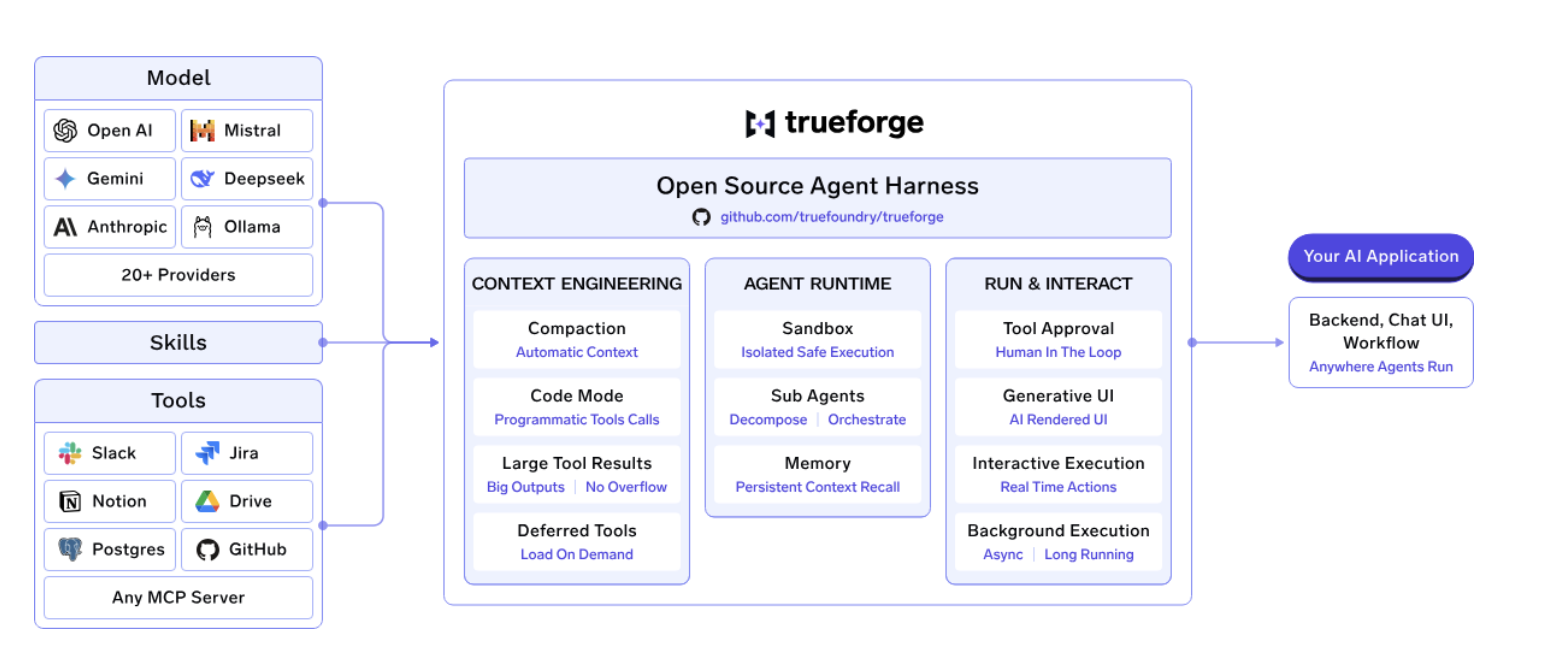
TrueForgeé a camada de tempo de execução que transforma um LLM em um agente funcional, com ferramentas MCP, habilidades, sandboxing, aprovações e subagentes integrados. É umambiente de execução de agentes de código abertocom três partes: umservidor principalque executa o loop do agente, umaAPI HTTP e SDK TypeScriptpara controlar agentes via código, e umainterface de chat com um SDK de UI Reactpara interagir com agentes a partir do navegador.
Para começar, basta um comando:npx @truefoundry/trueforgeexecuta o TrueForge localmente sem necessidade de infraestrutura adicional. Adocumentação de início rápidoorienta sobre como escolher um provedor de modelo e conectar seu primeiro servidor MCP.
Diferente de um framework onde você mesmo monta o runtime e a infraestrutura ao redor, o TrueForge inclui várias das peças necessárias para executar agentes em produção:
Um detalhe arquitetural que vale destacar é como o TrueForge lida com o sandboxing. Em vez de executar o agente inteiro dentro de um sandbox, o TrueForge trata o sandbox como uma ferramenta e provisiona um apenas quando o agente realmente precisa executar código. Isso permite que um único servidor TrueForge execute vários agentes simultaneamente, evitando a sobrecarga do sandbox em turnos que não exigem execução de código.
A arquitetura também tem um impacto direto no custo. Nobenchmark da TrueFoundryde 14 tarefas de agentes corporativos, o TrueForge e os Claude Managed Agents alcançaram praticamente a mesma precisão de tarefa quando ambos utilizaram o Opus 4.8, enquanto o TrueForge consumiu cerca de 40% menos tokens e foi aproximadamente30% mais barato por execução. Quando combinado com o GLM-5.2, o TrueForge alcançou a mesma pontuação aproximada de tarefa porUS$ 2,90 por execução, contra US$ 11,80 dos Claude Managed Agents, ou aproximadamente75% menos custo.
Todo o tempo de execução élicenciado sob MIT e de código aberto, com o código disponível norepositório do TrueForge no GitHub. Para equipes avaliando o LangGraph, a distinção importante é que o TrueForge fornece a própria camada de execução, mantendo a escolha do modelo, a infraestrutura e a implantação sob seu controle.
npx @truefoundry/trueforge você terá isso funcionando em cerca de um minuto se quiser comparar com o que está usando agora.
P: Qual é a diferença entre o Claude Agent SDK e o LangGraph?
R: O Claude Agent SDK oferece um loop de agente pré-construído que decide seu próprio próximo passo, executando apenas modelos Claude. O LangGraph fornece primitivas para você criar seu próprio fluxo de controle como um grafo de nós e arestas, com qualquer modelo. O SDK é mais rápido para obter um agente funcional; o LangGraph oferece controle exato sobre a sequência.
P: O LangGraph é exagero para um agente simples?
R: Frequentemente, sim. Se o caminho do seu agente depende do que ele descobre em vez de seguir uma sequência fixa, criar um grafo adiciona trabalho sem aumentar a precisão. O LangGraph justifica sua complexidade quando o fluxo de trabalho tem um formato obrigatório, quando as execuções são longas o suficiente para que a retomada a partir de pontos de verificação seja importante, ou quando um humano precisa aprovar em um estágio específico.
P: O LangGraph pode executar modelos Claude?
R: Sim. O LangGraph é agnóstico a modelos e funciona com Claude, GPT, Gemini, modelos abertos ou uma combinação deles, que é a principal capacidade que o Claude Agent SDK não oferece.
P: Posso executar um ambiente de agente na minha própria VPC ou on-premise?
R: Sim, com qualquer opção auto-hospedada aqui. O TrueForge é executado a partir de um único npxcomando localmente, ou via Docker Compose e Helm para implantações em equipe com Postgres, Redis, réplicas e login OIDC. A versão gerenciada da TrueFoundry também pode ser executada em infraestrutura própria, on-premise, em ambiente isolado (air-gapped) ou híbrido, para que nenhum dado saia do seu domínio.
P: Ele suporta MCP e frameworks de agentes existentes?
R: Sim. Todas as três opções utilizam MCP para acesso a ferramentas. O TrueFoundry fornece adicionalmente um Gateway MCP, um Gateway de Agente e um registro com controle de acesso em nível de ferramenta, para que agentes criados no LangGraph, CrewAI, AutoGen ou em um framework personalizado possam ser governados centralmente.
P: Como posso governar modelos e servidores MCP em vários agentes?
R: Por meio de uma camada de gateway. O TrueFoundry Gateway de IA disponibiliza mais de 1.000 LLMs por trás de uma única API compatível com OpenAI, com aproximadamente ~3–4 ms de latência adicional e mais de 350 RPS em uma única vCPU, incluindo RBAC, orçamentos, guardrails e rotação de credenciais, além de rastreamento OpenTelemetry para Grafana, Datadog ou Prometheus.
A escolha entre Claude Agent SDK e LangGraph depende de o seu agente ter um formato definido. Se o caminho é descoberto em vez de projetado, o loop fixo do SDK o levará ao objetivo mais rapidamente e você dedicará seu tempo a ferramentas e prompts em vez de configurar fluxos. Se o caminho é projetado e qualquer desvio é considerado um erro, o LangGraph é a ferramenta certa, e nenhum loop opinativo poderá substituí-lo.
Se o que te impediu de usar o SDK foi a restrição exclusiva ao Claude, e não o loop fixo, essa é a lacuna específica que o TrueForge preenche. Ele possui licença MIT e está no GitHub, enpx @truefoundry/trueforge leva cerca de um minuto.
TrueFoundry AI Gateway delivers ~3–4 ms latency, handles 350+ RPS on 1 vCPU, scales horizontally with ease, and is production-ready, while LiteLLM suffers from high latency, struggles beyond moderate RPS, lacks built-in scaling, and is best for light or prototype workloads.





As últimas notícias, artigos e recursos enviados para sua caixa de entrada
.png)
.png)
.png)
.png)
.png)
.png)

.png)
.png)
.png)
.png)


.png)


