|
5 min leestijd


Krijg direct toegang tot een live TrueFoundry-omgeving. Implementeer modellen, stuur LLM-verkeer aan en verken het volledige platform — je sandbox is binnen enkele seconden klaar, creditcard niet vereist.



De razendsnelle manier om je modellen te bouwen, volgen en implementeren!
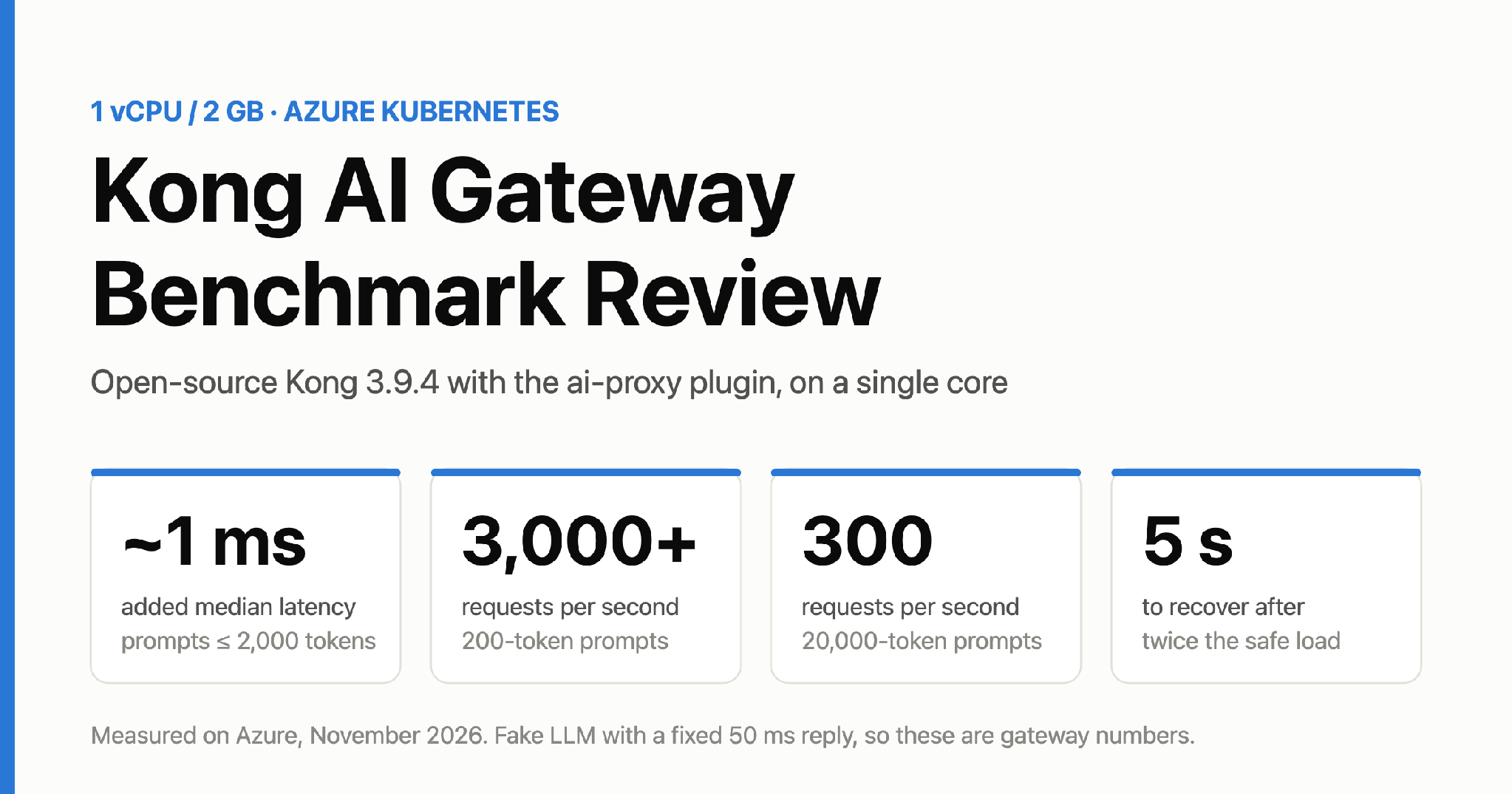
We benchmarked open-source Kong Gateway 3.9.4 with its ai-proxy plugin, the piece that turns Kong into an AI gateway, on a single vCPU and 2 GB of memory, on Azure. The short version: Kong adds about 1 ms to a normal request and handles 2,000 to 3,000+ requests per second for short prompts. CPU is what runs out, and it runs out much sooner for very long prompts. Two defaults are worth changing.
“Kong AI Gateway” is sold in three forms: open-source Kong with the AI plugins (free), a licensed AI Gateway image, and Konnect (how Kong prices them). We tested the free one: kong:3.9.4, edition community, with ai-proxy, DB-less, one nginx worker. When this post says “Kong”, it means that setup.
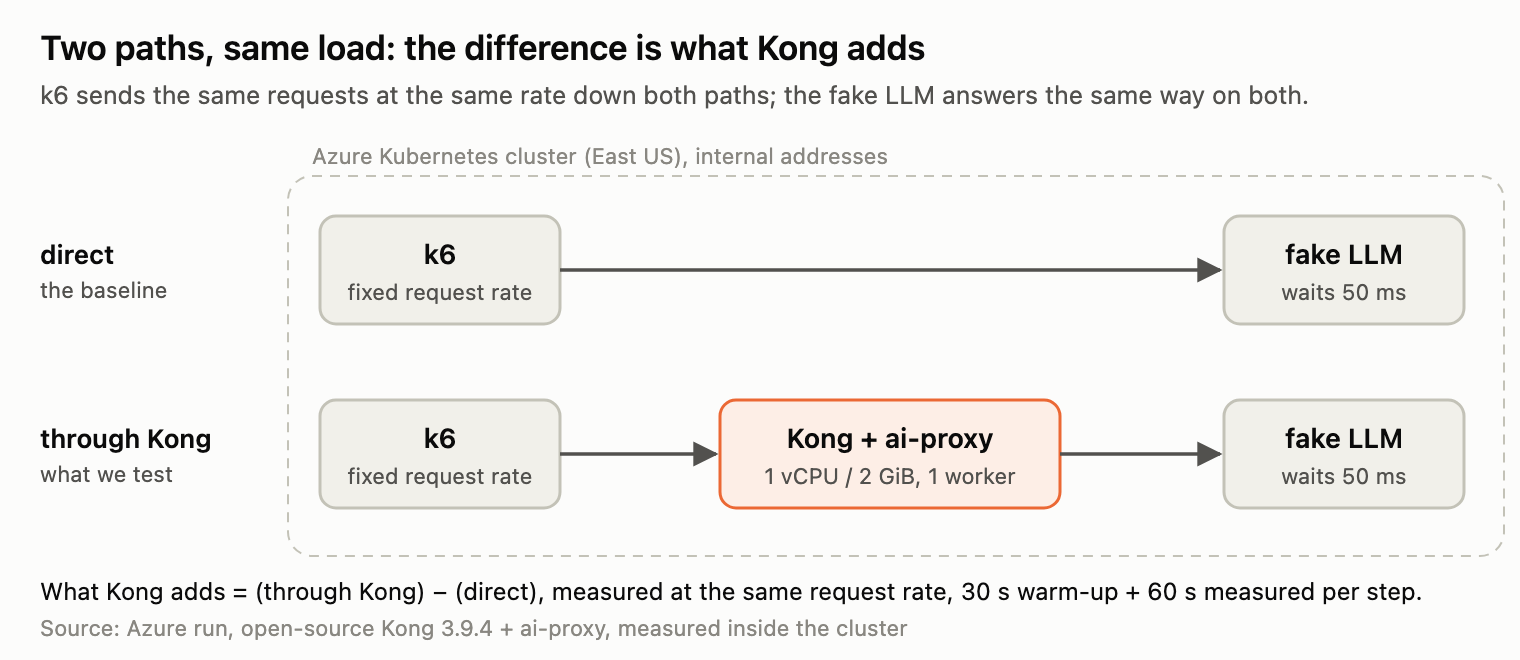
Figure 1. The two paths. k6 sends the same requests at the same rate to the fake LLM directly and through Kong; the difference is what Kong adds.
Everything runs inside one Azure Kubernetes cluster (East US) on internal addresses, so no internet hops are in the numbers. Kong is limited to 1 vCPU and 2 GiB. The fake LLM waits a fixed 50 ms, so what we measure is the gateway, not a model. The load is open loop (k6 keeps sending at a fixed rate even if Kong slows down), with a 30 s warm-up and a 60 s measured window per step.
A step passes when added p99 (Kong minus direct, same rate) is at most 100 ms and errors plus dropped requests are at most 0.1%. We ran every step twice, and medium at 1,500 and 2,000 RPS a third time, because two runs disagreed there. We report the median and say so when rounds disagree.
Kong’s own benchmark reports that, with every gateway given the same 12 CPUs, Kong’s data planes were over 228% faster than Portkey and 859% faster than LiteLLM. We don’t test other gateways, so we can’t confirm that (for how Kong and LiteLLM differ beyond speed, see Kong vs LiteLLM). We measure something different: what open-source Kong adds, in milliseconds, on one core, and where it breaks.
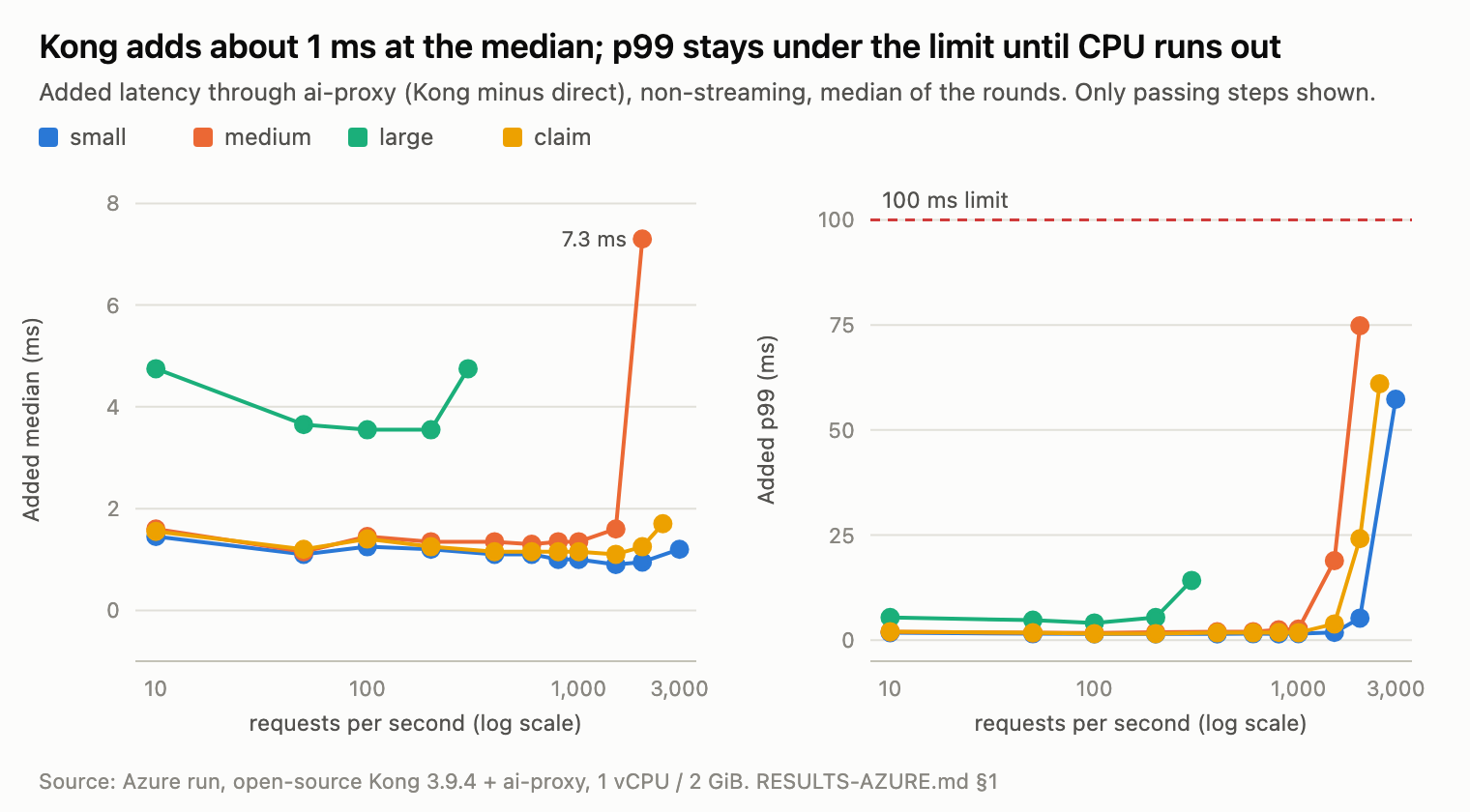
Figure 2. Added latency through ai-proxy (Kong minus direct). Left: median. Right: p99, with the 100 ms limit.
What we saw: for short prompts Kong adds 0.9 to 1.6 ms at the median, flat from 10 up to 1,500 RPS. Near the ceiling it rises (medium: about 7 ms at 2,000 RPS). The 20,000-token prompt adds 3.5 to 4.8 ms because Kong has to read and copy a 100 KB body. Added p99 stays at 1.5 to 2.7 ms up to 1,000 RPS for small, medium and claim, then climbs as CPU fills: small 5 ms at 2,000 RPS and 57 ms at 3,000; claim 24 ms and 61 ms at 2,000 and 2,500.
Why it matters: next to an LLM call that takes seconds, 1 ms is noise. The number to plan around is the rate at which the tail starts to grow, not the median.
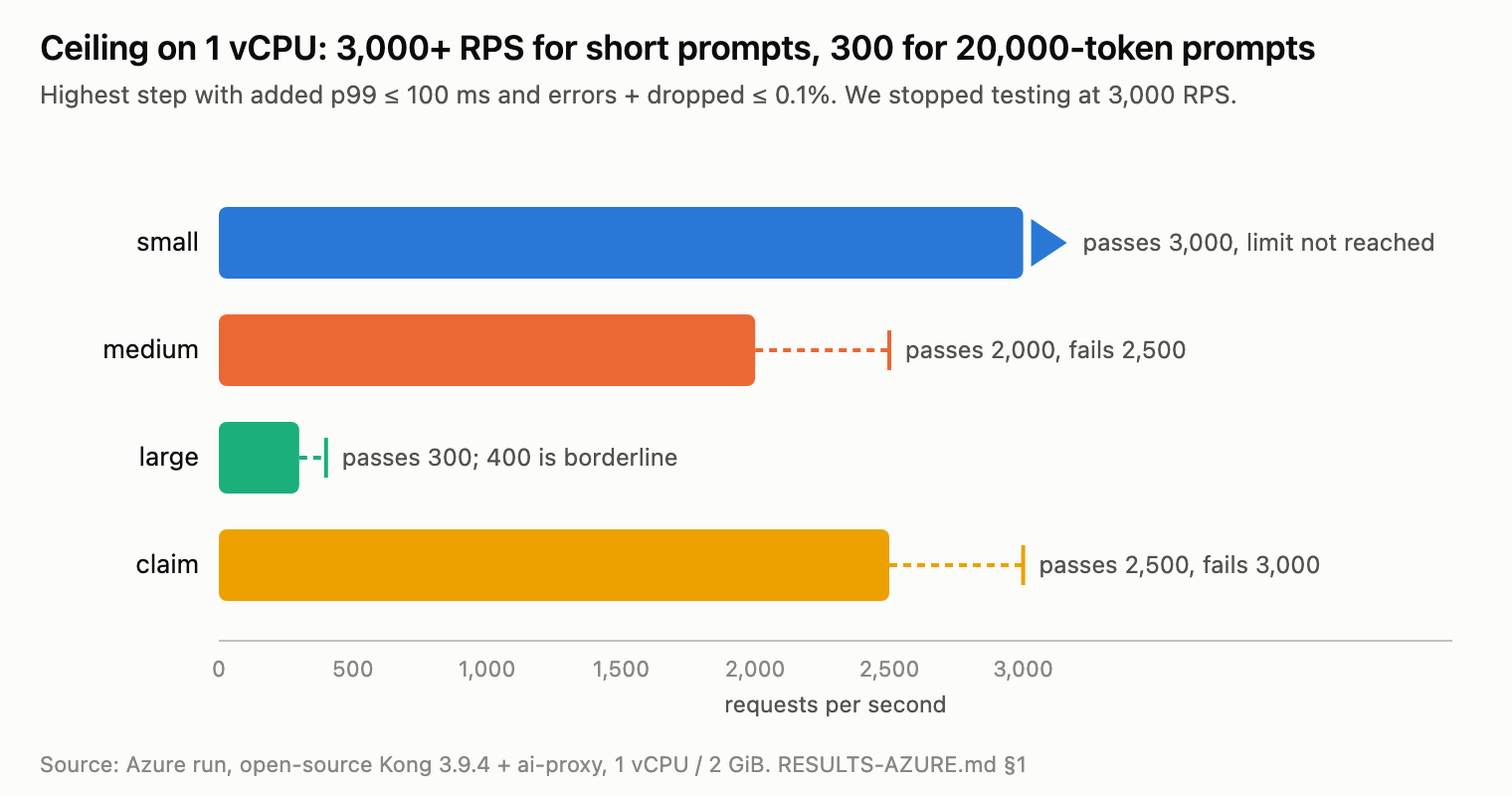
Figure 3. The highest rate that passed, per payload.
What we saw: the ceiling falls as prompts grow. Every request costs Kong CPU in proportion to the body it has to handle: about 0.26 ms of CPU per small request against about 2.6 ms per large one, roughly 10 times more. Medium at 2,000 RPS is borderline: it passed in two of three runs, with added p99 between 69 and 114 ms.
Caveats: small never failed, so “3,000+” is a floor; we stopped at 3,000 RPS. For large prompts, 300 RPS passed in every run, but 400 is borderline: it failed every time on one cluster node and mostly passed on another (added p99 94 ms against the 100 ms limit). Why it differs is a matter for further infrastructure investigation, which is out of scope for this blog for the time being. We treat 300 as the safe ceiling and 400 as the edge.
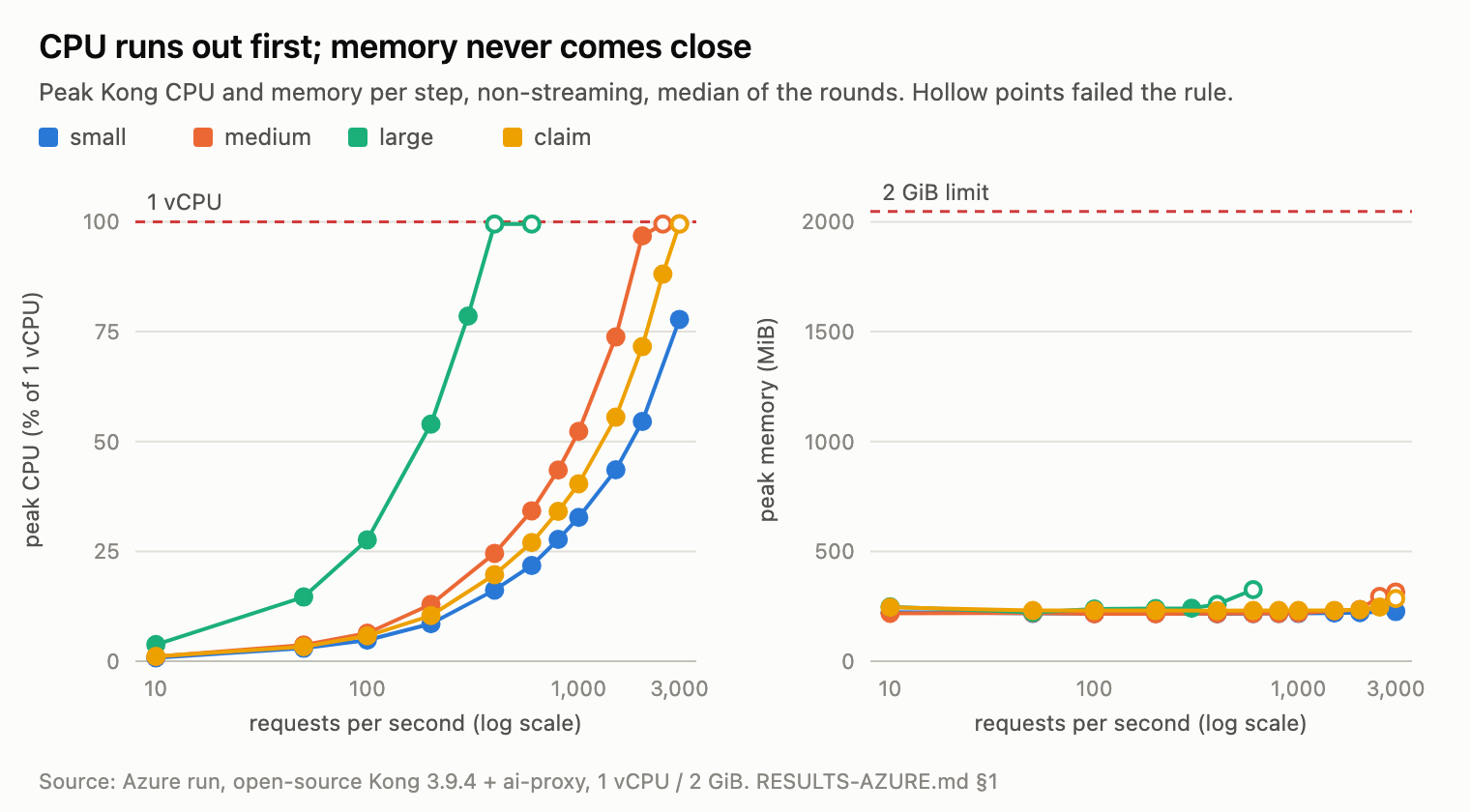
Figure 4. Peak CPU (left, % of one vCPU) and memory (right, MiB) per step. Hollow points failed the rule.
What we saw: CPU climbs steadily with load and hits the single-core limit at every failing step, with 8 to 15% of CPU time throttled there. Memory is flat: about 180 to 260 MiB at every load that passed, up to about 350 MiB when overloaded. Nothing came near the 2 GiB limit and Kong never restarted on its own.
Why it matters: size Kong by CPU and prompt length. Memory is not the constraint on this setup.
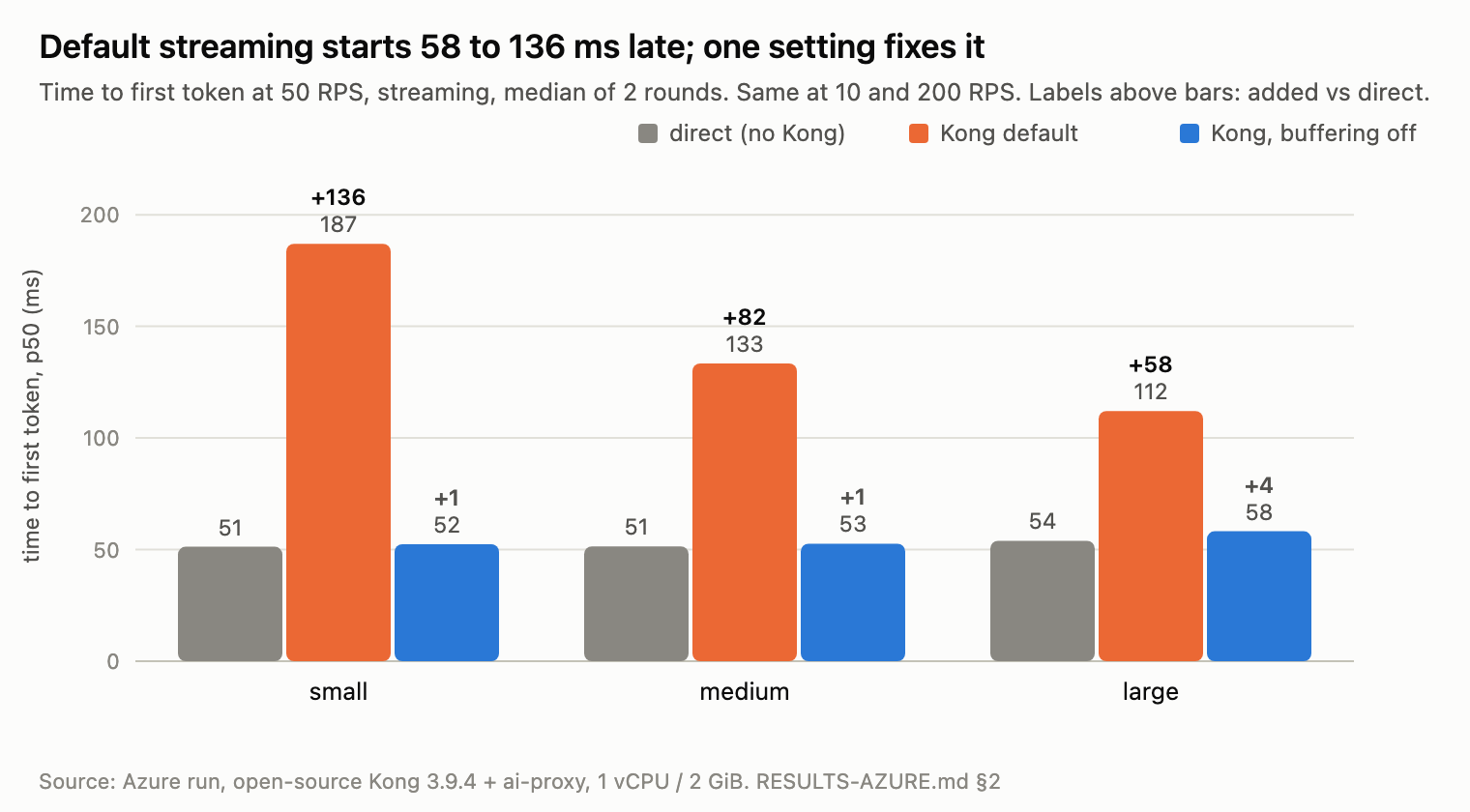
Figure 5. Time to first token at 50 RPS. The labels above the bars show what Kong adds.
What we saw: with Kong’s defaults, the first streamed token arrives 136 ms late for small prompts, 82 ms for medium and 58 ms for large (at 50 RPS; within 1 ms at 10 and 200 RPS). With response_buffering: false on the route the delay is 1 to 5 ms. The total time of the stream does not change.
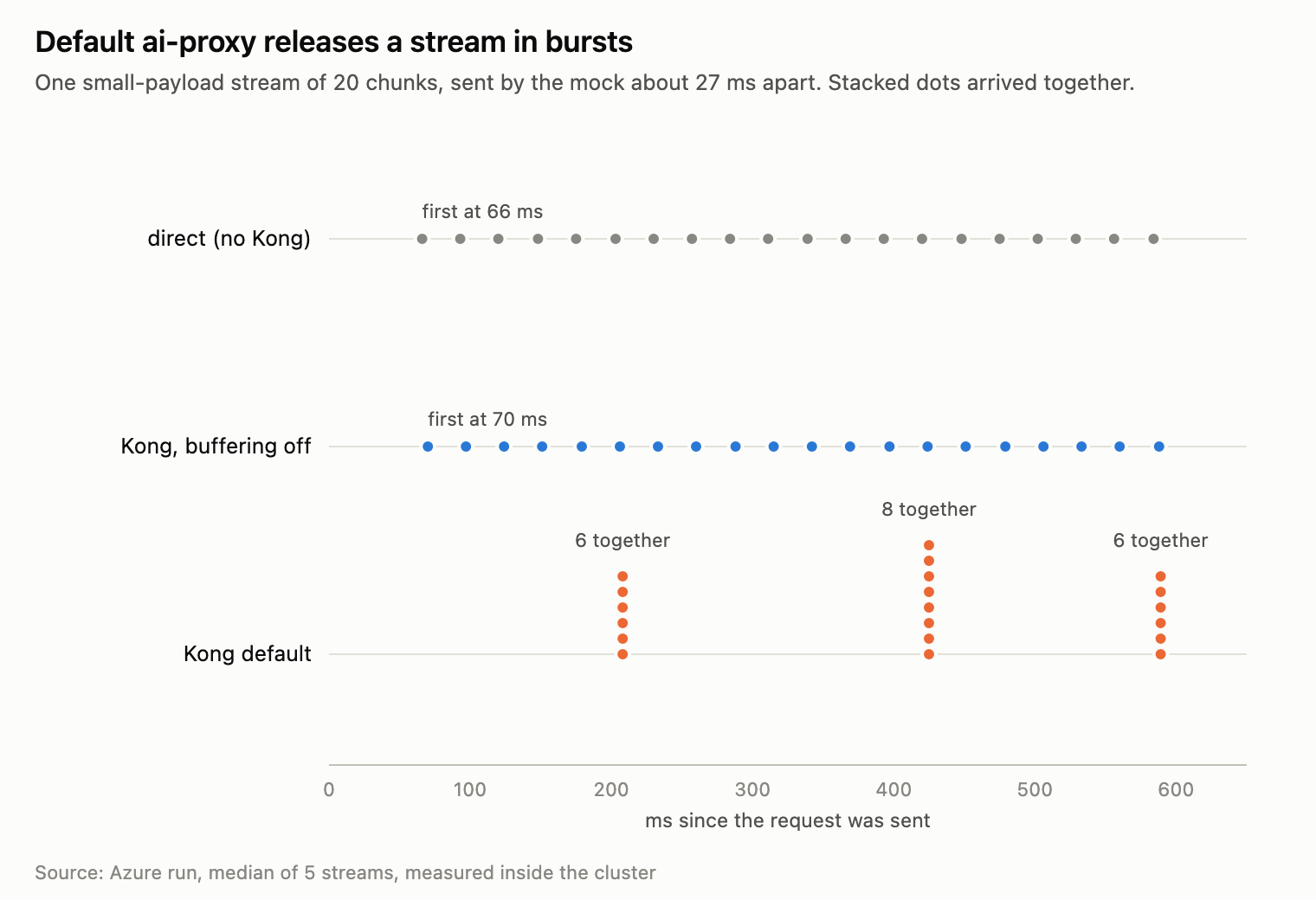
Figure 6. When each of 20 streamed chunks arrived. Stacked dots arrived together.
The reason is visible chunk by chunk. The fake LLM sends 20 chunks about 27 ms apart. Through the default route they arrive in three bursts (6, 8 and 6 chunks together). With buffering off they arrive smoothly, as they do without Kong.
The fix: set response_buffering: false on routes that stream. The delay is easy to reproduce on this setup; why the route buffers by default is outside what we tested.
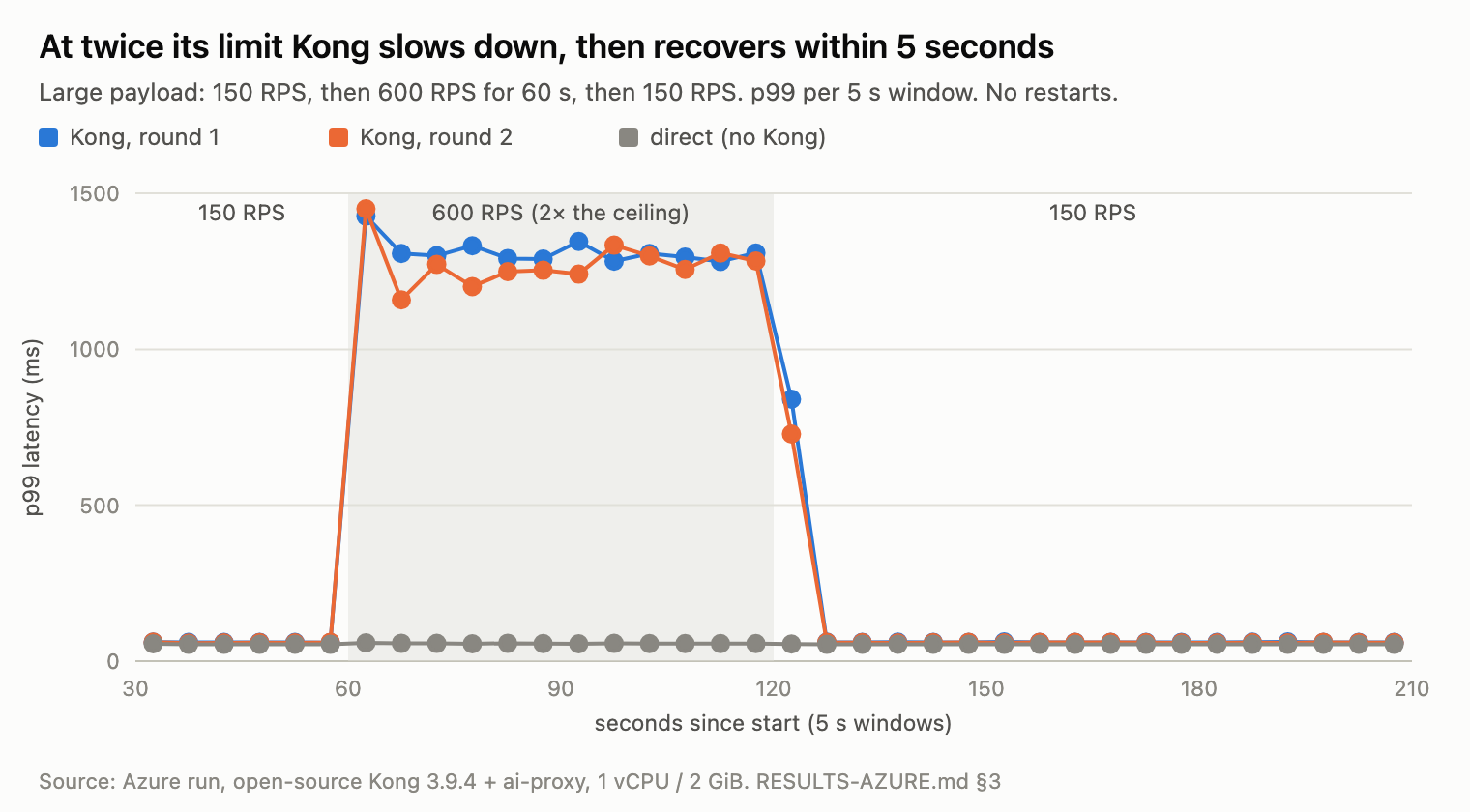
Figure 7. Large prompts at 150 RPS, then 600 RPS for 60 seconds (shaded), then 150 RPS again. Two Kong runs and the direct baseline.
What we saw: we sent 150 RPS of large prompts, then 600 RPS (twice the 300 RPS ceiling) for 60 seconds, then 150 RPS again. During the overload Kong stayed at 100% CPU and p99 rose to about 1.3 s. It returned no error responses; 27 to 33% of the requests could not be served in time and count as failures. Once the load dropped, p99 was back within 10% of normal after 5 seconds, in both rounds, with no restarts. The direct run at 600 RPS was clean, so the fake LLM was not the limit.
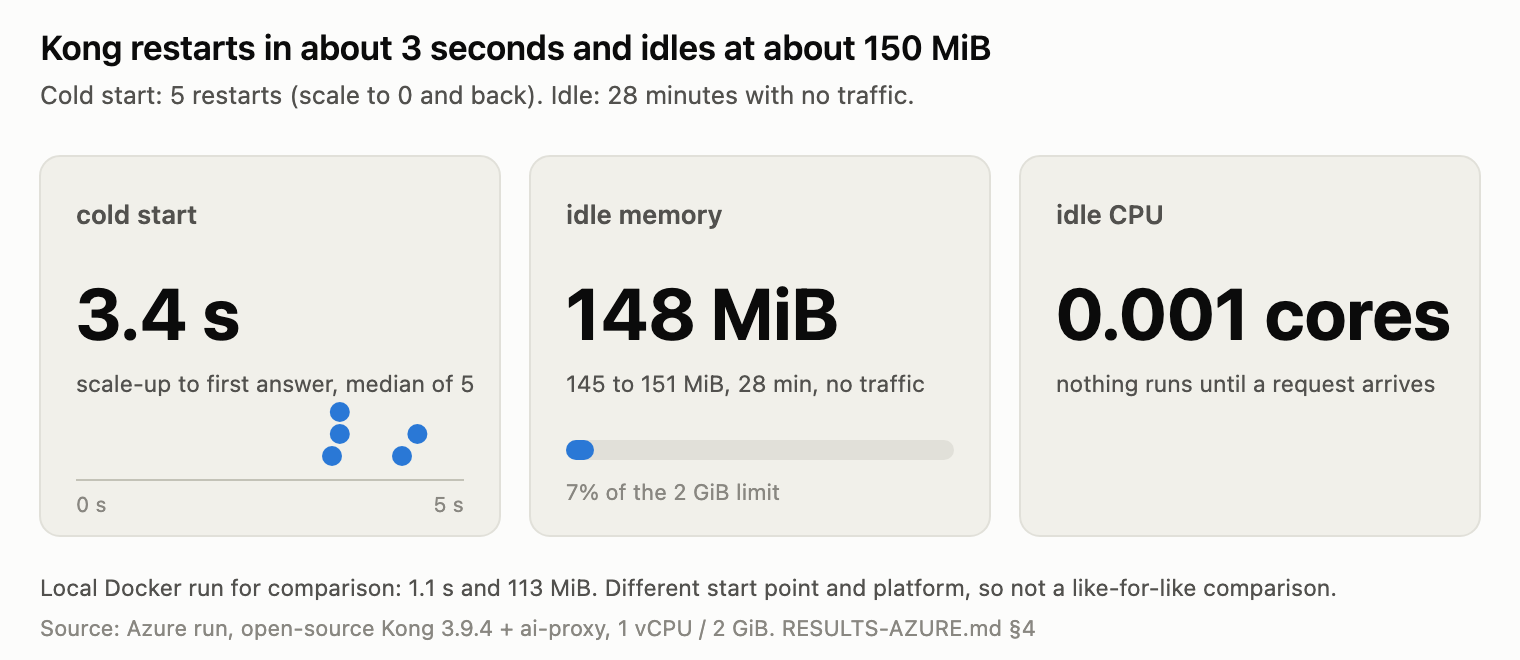
Figure 8. Restart time, idle memory and idle CPU.
What we saw: after we scaled Kong to zero and back, it answered its first request 3.4 seconds after the scale-up call (3.3 to 4.4 s over five restarts, accurate to about a second). With no traffic for 28 minutes it used 145 to 151 MiB and 0.001 cores.
Caveat: this includes Kubernetes starting the pod, so it isn’t comparable with a plain Docker start.
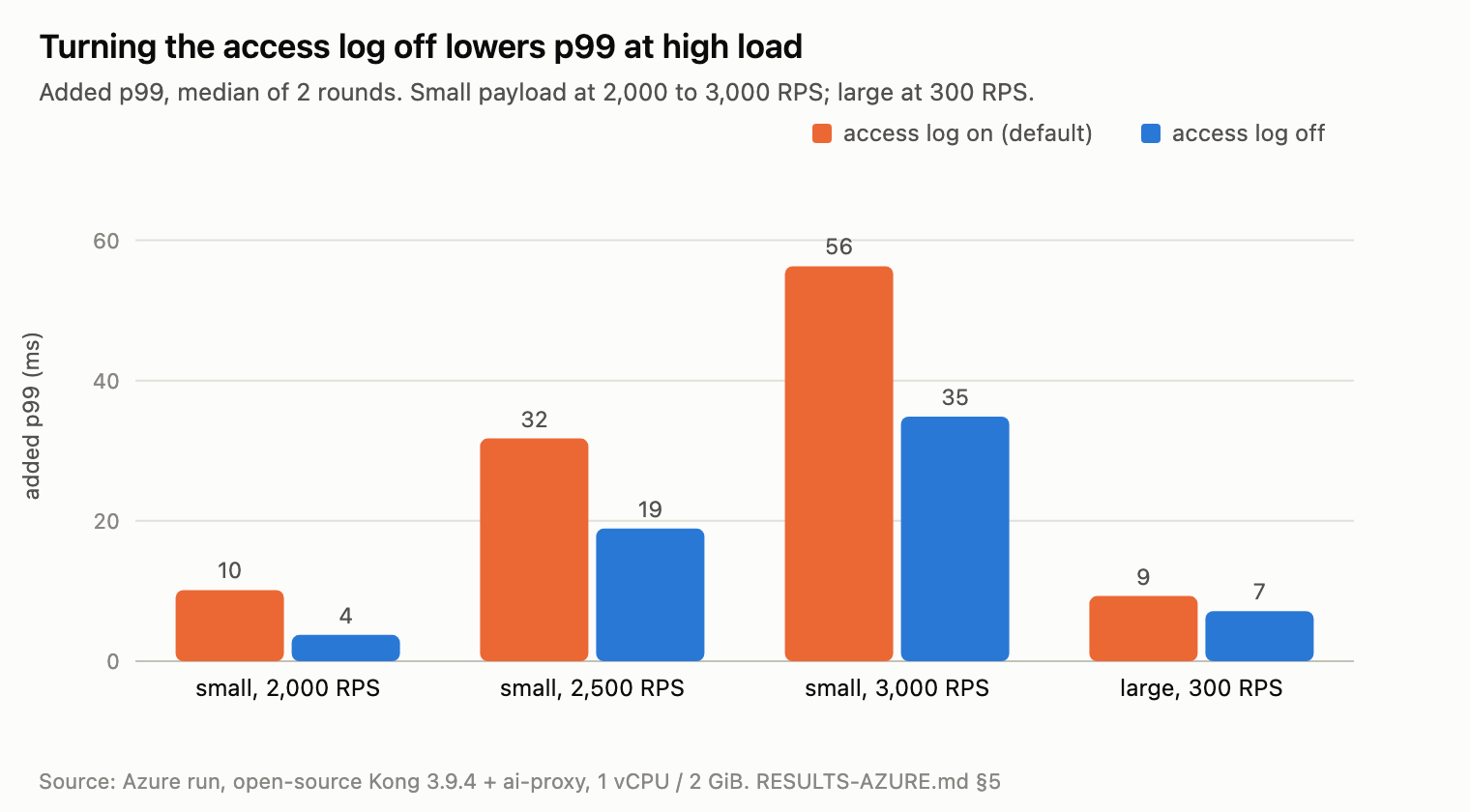
Figure 9. Added p99 with Kong’s access log on (the default) and off.
What we saw: Kong writes an access-log line per request by default. Turning it off lowered added p99 by about 6 ms at 2,000 RPS, 13 ms at 2,500 and 21 ms at 3,000 for small prompts. For large prompts at 200 to 300 RPS the gap was only 1 to 2 ms, and we did not test the log at lower rates for small prompts on Azure. This one is a trade: you lose the log.
ai-proxy has a request-size limit (max_request_body_size) that defaults to 8 KiB. Bodies above that limit get 400 request body doesn't contain valid prompts, which doesn’t mention size. The 20,000-token payload is 100 KB and fails with the default. We raised the limit to 1 MiB for every run in this post. If you send long prompts, raise it too.
Open-source Kong with ai-proxy is a light, fast AI proxy on a single core. Before you put it in front of real traffic: set response_buffering: false on routes that stream, raise max_request_body_size if prompts can be longer than a few pages, and size it by prompt length, from about 300 requests per second per core for 20,000-token prompts to 2,000 or more for short ones.
This review covers performance only. For what teams say about running Kong day to day, see Kong AI reviews: what users actually say.
TrueFoundry AI Gateway levert een latentie van ~3–4 ms, verwerkt 350+ RPS op 1 vCPU, schaalt moeiteloos horizontaal en is klaar voor productie, terwijl LiteLLM last heeft van hoge latentie, moeite heeft boven een gemiddeld aantal RPS, geen ingebouwde schaling heeft en het meest geschikt is voor lichte workloads of prototypes.






Het laatste nieuws, artikelen en bronnen in je inbox