

What is Metadata Validation?
Metadata Validation is a built-in TrueFoundry guardrail that checks the custom metadata sent with a request against a set of rules you define. It runs directly within the AI Gateway without requiring external API calls, providing fast and cost-effective validation. Metadata is passed to the AI Gateway using theX-TFY-METADATA header (see Log Custom Metadata). This guardrail lets you require that certain keys are always present, constrain their values to a regex pattern or a fixed list, and optionally reject any keys you have not explicitly allowed.
beforeRequestHook). When attached to any other hook (LLM Output, MCP Pre Tool, MCP Post Tool), it passes through without performing any checks.Key Features
- Required Keys: Ensure specific metadata keys are always present in the request.
- Value Constraints: Validate a key’s value against a regex pattern or restrict it to a fixed set of allowed values.
- Unknown Key Control: Optionally reject any metadata key that is not explicitly declared in your rules.
Adding Metadata Validation Guardrail
To add Metadata Validation to your TrueFoundry setup, follow these steps:Navigate to Guardrails
Create or Select a Guardrails Group
Add Metadata Validation Integration
Configure the Guardrail
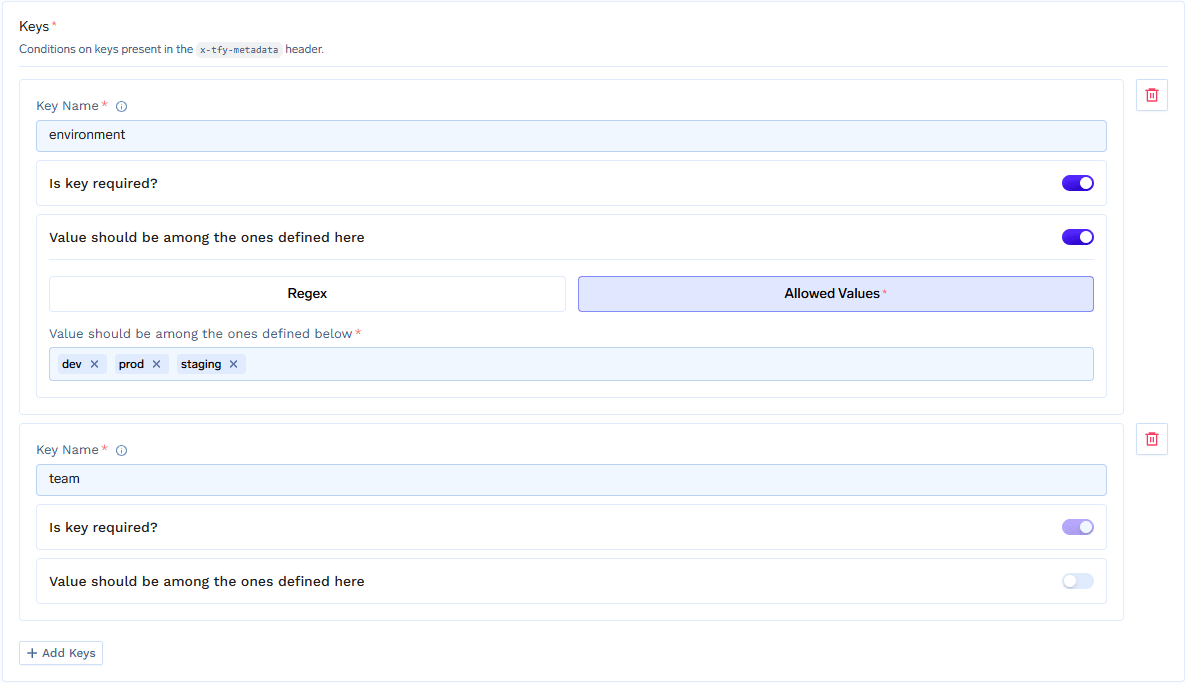
Configure Metadata Validation with per-key rules
Save the Configuration
Configuration Options
Key Rules
Each entry under Keys maps a metadata key name to a rule. There are two kinds of rules:Key must exist
Only the presence of the key is checked — any value passes. Once configured, the key must be present in the request metadata.Value must match
Validates the key’s value, with an optional requirement that the key be present:How It Works
When a request reaches the LLM Input hook, the guardrail evaluates the request metadata as follows:- If Allow unknown keys is off, every metadata key that is not declared in your rules raises an
unknown_keyviolation. Keys injected by the AI Gateway itself (for examplesubject,subjectType,tfy_agent_name, and any default gateway metadata) are exempt from this check. - For each declared key rule:
- Key must exist: a missing key raises a
missing_requiredviolation. - Value must match (required): a missing key raises a
missing_requiredviolation. - Value must match (regex): if the key is present, its value must match the pattern, otherwise a
pattern_mismatchviolation is raised. An invalid regex pattern raises aninvalid_regex_patternviolation. - Value must match (allowed values): if the key is present, its value must be in the allowed set, otherwise a
value_not_allowedviolation is raised.
- Key must exist: a missing key raises a
- If any violations are found, the verdict fails. The response handling then depends on the configured Enforcing Strategy.
Violation Reasons
Examples
Consider a guardrail with Allow unknown keys turned off and the following key rules:environment— Value must match, allowed values:prod,staging,devcustomer_id— Value must match, regex:^cust_[0-9]+$team— Key must exist
Allowed: all rules satisfied
Allowed: all rules satisfied
Blocked: missing required key
Blocked: missing required key
team:missing_required (the team key is missing).Blocked: value not allowed
Blocked: value not allowed
environment:value_not_allowed (production is not in [prod, staging, dev]).Blocked: pattern mismatch
Blocked: pattern mismatch
customer_id:pattern_mismatch (12345 does not match ^cust_[0-9]+$).Blocked: unknown key
Blocked: unknown key
debug:unknown_key (the debug key is not declared and unknown keys are not allowed).Sending Metadata
Metadata is sent using theX-TFY-METADATA header as a JSON object of string key-value pairs:
Use Cases
Example use cases
Restrict the prod gateway to production applications
Restrict the prod gateway to production applications
- The caller’s environment comes from virtual account tags. Tagging a virtual account with
env: prodmeans every request made with that account’s token carriesenv: prod. - The AI Gateway’s environment comes from default gateway metadata. Each gateway stamps every request that passes through it with its own value, for example
tfy_gateway_region: PROD.
tfy_gateway_region) and applies a Metadata Validation guardrail that requires the caller’s env to be the matching value. Because the rule only fires on the AI Gateway whose stamp it matches, the prod-environment guardrail runs only on the prod gateway:Tag each virtual account with its environment
env: prod on the accounts used by production applications and env: dev on the ones used by dev applications. These tags are injected as metadata on every request made with that account’s token.Stamp each gateway with its environment
DEFAULT_GATEWAY_METADATA on each gateway plane so it tags every request that passes through it. On the prod gateway plane’s values file:Create a Metadata Validation guardrail for the production environment
gateway-checker) with a single key rule:- Key Name:
env - Is key required?: on
- Value should be among the ones defined here: on, with Allowed Values:
prod
env is not prod.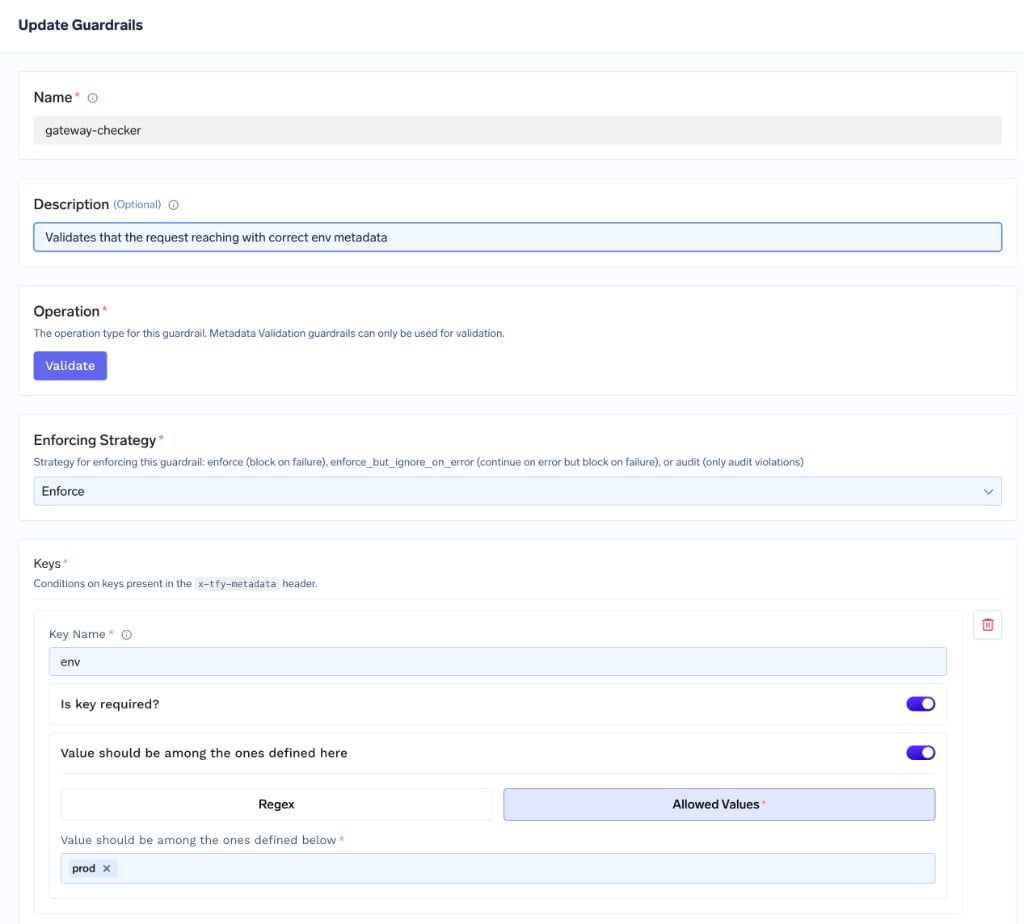
Metadata Validation guardrail requiring env=prod
Apply it with a rule that matches the production gateway
gateway-checker on the LLM Input hook only when the request carries the prod gateway’s stamp. In the rule builder, add a WITH METADATA condition of tfy_gateway_region = PROD, set APPLY ON HOOKS → LLM Input to the gateway-checker guardrail, and optionally set a Custom Error Message such as This gateway can only be accessed from prod env.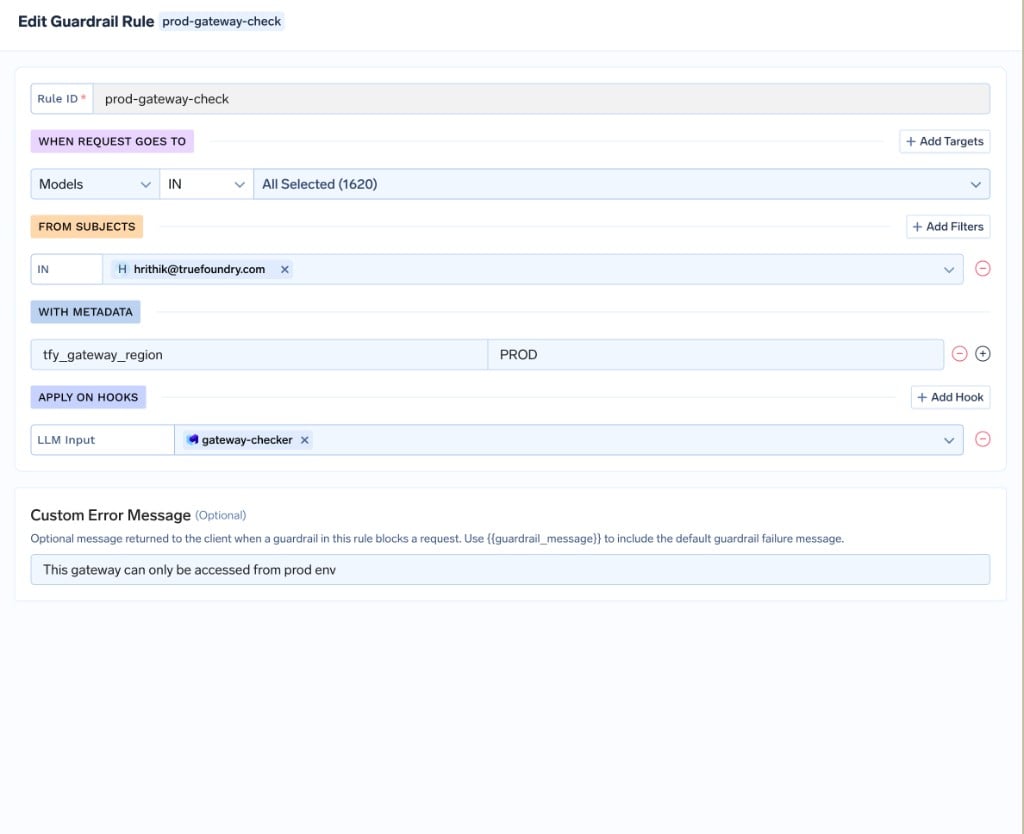
Guardrail rule applying gateway-checker only when tfy_gateway_region is PROD
tfy_gateway_region: PROD — that is, requests reaching the prod gateway — so a dev application (env: dev) calling the prod gateway is rejected, while it is unaffected on the dev gateway.Verify the behavior
env: prod in its metadata through the prod gateway — it passes. Send one with any other env value (or none) and it is blocked with your custom error message.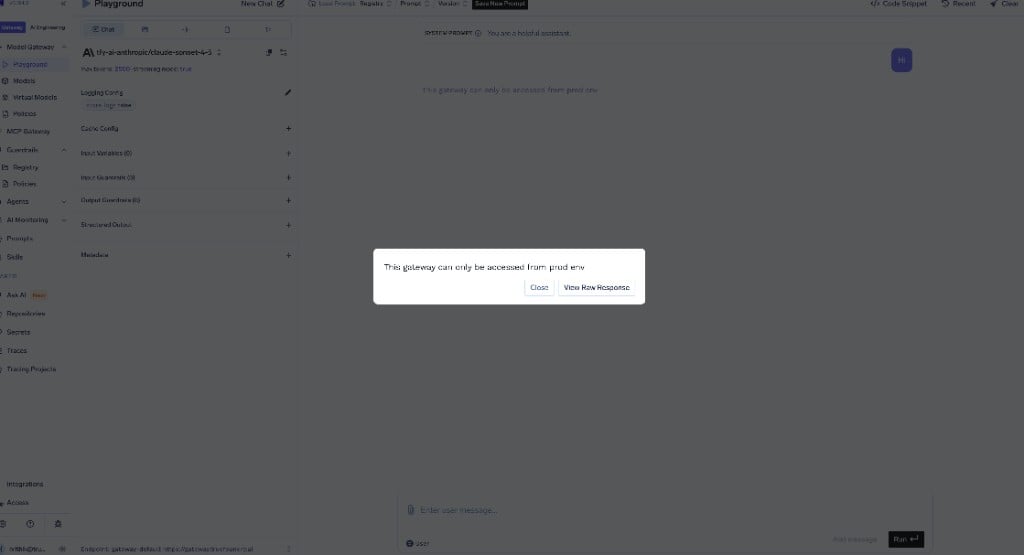
A request without env=prod is blocked on the prod gateway
env: prod tag is injected automatically — so requiring it on the prod gateway is safe. The dev gateway is intentionally left open: developers typically access it interactively with Personal Access Tokens (PATs), which do not carry the virtual account’s env tag. Enforcing the same guardrail on the dev gateway would block those legitimate users.Mandate cost-attribution metadata on every request
Mandate cost-attribution metadata on every request
team and cost_center — so no request reaches a model without them.Create a Metadata Validation guardrail with the required keys
cost-attribution) with one rule per key:- Key Name:
team— Is key required?: on (Key must exist) - Key Name:
cost_center— Is key required?: on, Value should be among the ones defined here: on, Regex:^cc-[0-9]{4}$
team, or with a cost_center that does not match the format, are rejected before reaching the model.Apply it to all requests on the LLM Input hook
when block so it applies to every request: