

Documentation Index
Fetch the complete documentation index at: https://www.truefoundry.com/llms.txt
Use this file to discover all available pages before exploring further.
What Is An Agent Harness?
An agent harness is the runtime layer around an LLM that turns it into a reliable, long-running agent. Instead of only generating text, the harness manages the full execution loop: planning, tool calling, context management, approvals, state, and observability. Most production harnesses include:- An orchestration loop (
plan -> act -> observe -> continue/stop) - Tool routing and execution (for APIs, MCP tools, and code)
- Memory and context controls for long-running tasks
- Security boundaries (sandboxing, credentials, permissions)
- Human-in-the-loop gates for sensitive actions
- Tracing, logs, metrics, and cost visibility
TrueFoundry Agent Harness
TrueFoundry Agent Harness is a managed harness built on top of the AI Gateway and MCP Gateway. You choose a model, connect MCP servers, add skills, and write instructions. TrueFoundry manages orchestration, sandbox lifecycle, tool execution, approvals, governance, and observability.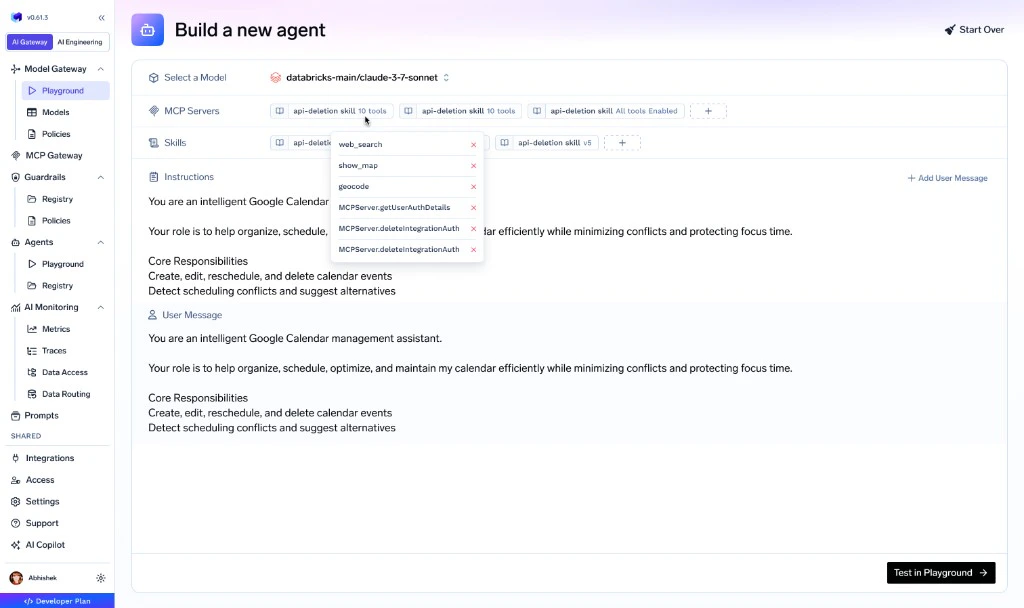
Harness Capabilities
Agent Harness combines the core capabilities needed to ship agents safely in production:Models
Use all model providers through AI Gateway, with support for advanced routing patterns.
MCP Servers
Connect governed MCP tools with centralized auth, policy controls, and approvals.
Skills
Add reusable, versioned skills to keep agent behavior stable in production.
Sandbox
Managed secure execution environment for code, files, and long-running tasks.
Subagents
Delegate complex work to isolated subagents with clean context boundaries.
Context Engineering
Understand what fills the agent’s context and how the harness keeps it within model limits.
Deferred Tool Loading
Load tool definitions on demand to reduce context overhead and improve efficiency.
Handling Large Tool Results
Safely process oversized tool outputs without losing critical information.
Human in the Loop
Pause sensitive tool calls and require explicit user approval before execution.
Ask User Questions
Request missing inputs during execution when the agent needs clarification.
Code Mode Tool Calling
Programmatically call tools from code while preserving agent control flow.
Generative UI
Generate structured UI responses that are easy to render in applications.
No Keys, Full Governance
A key difference between TrueFoundry Agent Harness and other hosted runtimes is that no API keys or credentials are ever pasted into agent definitions. Models, MCP servers, and skills are all managed through TrueFoundry’s central control plane:- Models — Provider credentials live in AI Gateway. Agents reference model names. RBAC controls who can use which models. Budgets, rate limits, and guardrails are enforced at the gateway.
- MCP Servers — Authentication (OAuth tokens, API keys) lives in MCP Gateway. Agents call tools by name. The gateway handles credential injection, token refresh, and user delegation.
- Skills — Published in the Skills Registry with full versioning and RBAC. Agents pick from a governed catalog. Platform teams control what’s available to whom.
Architecture
Agent Harness runs in the same gateway plane as model and MCP traffic, so orchestration, governance, and observability stay in one system.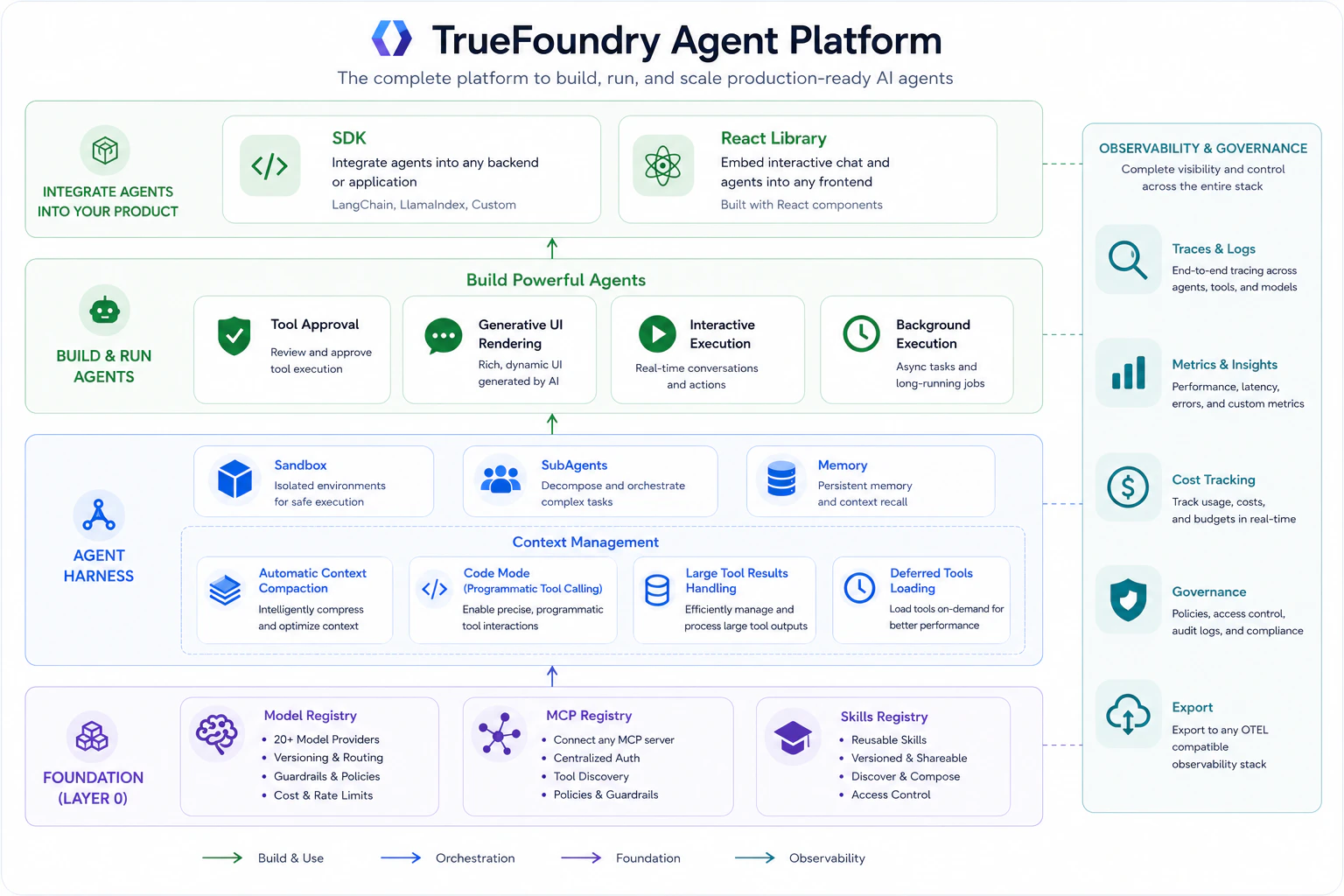
How It Compares
Claude Managed Agents and LangSmith Managed Deep Agents are both strong hosted runtimes. The differences become clear when you look at how each platform handles credential management, tool governance, and model access in practice.MCP credential management
| TrueFoundry | Claude Managed Agents | LangSmith Managed Deep Agents | |
|---|---|---|---|
| Where credentials live | MCP Gateway — centrally managed with OAuth flows, token refresh, and user-scoped delegation | Vaults — per-user credential containers. You create a vault per user, register credentials per MCP server URL, and pass vault_ids at session creation. | MCP server registration — POST /v1/deepagents/mcp-servers with raw headers arrays containing bearer tokens. |
| Multi-user credential isolation | Built into MCP Gateway. Per-user OAuth tokens managed and refreshed automatically. | You must create and manage a separate vault per end-user programmatically. | Not supported in preview. One credential set per workspace. |
| In-app auth flow | User authenticates inline in chat (OAuth popup → continue). | Not available. Developer must handle token acquisition externally and register in vault. | Not available. Static headers only (OAuth planned for future release). |
| Credential rotation | Managed by gateway (OAuth refresh) or admin updates once centrally. | PATCH the credential per vault. Must be done per-user for user-scoped tokens. | PATCH /mcp-servers/{id} replaces entire headers array. |
Tool approval and safety policies
| TrueFoundry | Claude Managed Agents | LangSmith Managed Deep Agents | |
|---|---|---|---|
| Default behavior | Tools marked as destructive at MCP Gateway layer automatically require approval. No per-agent configuration needed. | MCP tools default to always_ask. You configure per-tool policies via permission_policy in the agent JSON definition. | Configure interrupt_config per tool using {mcp_server_url}::{tool_name} keys set to true/false. |
| Granularity | Gateway-level policy. Applies uniformly to all agents using that tool — set once, enforced everywhere. | Per-agent, per-tool JSON config. Each agent definition must explicitly declare policies. | Per-agent, per-tool in agent payload. Each agent must list every tool’s interrupt preference. |
| Governance scope | Policies are org-wide. Platform team configures which tools are destructive — agent builders don’t need to think about it. | Developer responsibility. If you forget to set always_ask on a sensitive tool, it runs without confirmation. | Developer responsibility. Missed interrupt_config entries mean no approval gate. |
Model access and governance
| TrueFoundry | Claude Managed Agents | LangSmith Managed Deep Agents | |
|---|---|---|---|
| Supported models | All providers through AI Gateway | Anthropic models only (claude-opus-4-7, claude-sonnet-4-6, etc.) | Any model via {provider}:{model_id} format through init_chat_model |
| Access control | RBAC — control which teams/users can use which models. Budgets and rate limits per team. | No model-level RBAC. Any API key holder can use any model. | No model-level RBAC within the platform. |
| Cost governance | Per-user and per-team budgets, rate limits, and cost attribution enforced at gateway. | Not available at platform level. Track externally. | Not available in preview. |
| Guardrails on model calls | Gateway-level content policies, PII filters, custom guardrails applied before/after every model call. | Not available at harness level. | Not available in managed runtime. |
Deployment flexibility
| TrueFoundry | Claude Managed Agents | LangSmith Managed Deep Agents | |
|---|---|---|---|
| Deployment options | SaaS (globally distributed), self-hosted, on-prem | Managed Anthropic cloud + separate self-hosted SDK path | Managed cloud (US-only in preview) + self-host via langgraph build |
| Data residency | Deploy in your own cloud/region. Full control. | US region only during beta. EU planned post-GA. | US region only during private preview. |
| On-prem | Supported | Not supported | Not supported |
Start Building
Create an agent by choosing a model, connecting MCP servers, adding skills, and writing instructions. Then test in playground, integrate via API, monitor through traces and metrics, and ship it to users.Build From UI
Create and test a managed agent from the TrueFoundry console.
Use The API
Create sessions, stream progress, and integrate Agent Harness into your application.