

Integrate TrueFoundry with Claude Code Max
Claude Code Max can be integrated with TrueFoundry AI Gateway using a dedicated configuration pattern.Prerequisites for Claude Code Max integration
Before integrating Claude Code Max with TrueFoundry, ensure you have:- Claude Max Subscription: An active Anthropic Claude Max subscription (required for this integration flow)
- TrueFoundry Account: Create a TrueFoundry account and follow the instructions in our Gateway Quick Start Guide
When creating the Anthropic model account in TrueFoundry for this setup, leave the API key field empty. The actual Anthropic
Authorization header is sent by Claude Code (from your Max account session) and forwarded by the AI Gateway at request time. See Anthropic model integration for account setup steps.- Claude Code Installation: Install Claude Code following the official documentation
- Configure models in TrueFoundry (leave the Anthropic account API key empty)
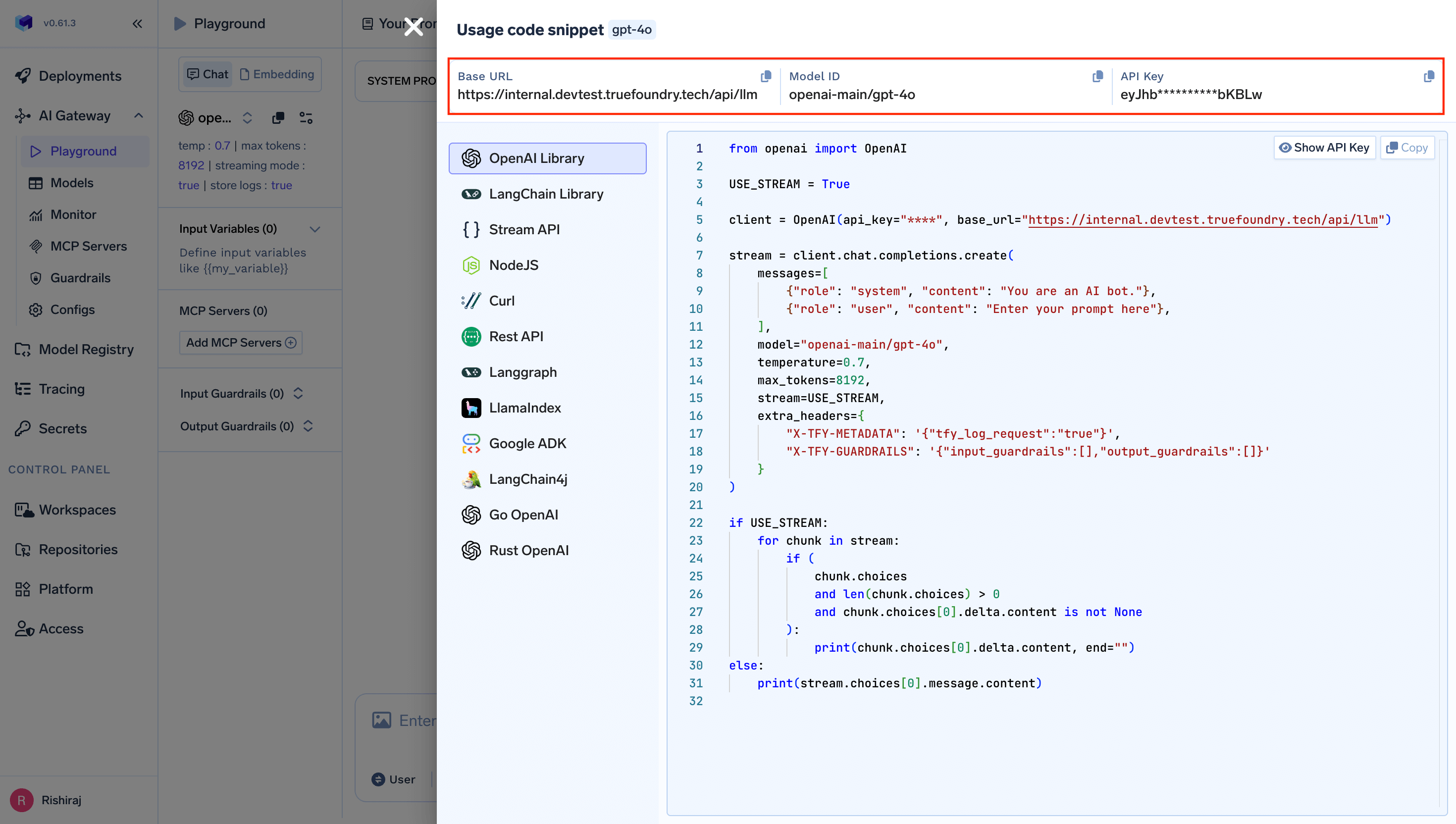
- Global:
~/.claude/settings.json - Project-specific:
.claude/settings.jsonin your project directory
- Anthropic Max includes everything in Pro, plus significantly higher usage capacity (5x or 20x vs Pro), higher output limits, priority access during high traffic, and early access to advanced features.
- You keep using your Anthropic account/session for Claude Code, while TrueFoundry handles gateway authentication independently via
x-tfy-api-key. - You get centralized governance from TrueFoundry (usage visibility, quotas/rate limits, RBAC, logs, and guardrails) without changing your day-to-day Claude Code workflow.
- You keep one consistent gateway endpoint and model abstraction, so teams can evolve routing/fallback/cost controls centrally with minimal client-side config changes.
Authorization header for Anthropic account auth.Use
x-tfy-api-key in ANTHROPIC_CUSTOM_HEADERS so the AI Gateway can authenticate separately.
- Set
ANTHROPIC_BASE_URLto your TrueFoundry AI Gateway URL. - Set
ANTHROPIC_CUSTOM_HEADERSwithx-tfy-api-key. - Start Claude Code and sign in with your Anthropic subscription account when prompted.
settings.json variant for Max subscription:
Claude Code detects model capabilities (e.g. extended thinking
effort, ToolSearch, beta tool blocks) by string-matching the model id. Make sure the value of ANTHROPIC_DEFAULT_OPUS_MODEL, ANTHROPIC_DEFAULT_SONNET_MODEL, and ANTHROPIC_DEFAULT_HAIKU_MODEL contains a recognizable Anthropic model id like claude-opus-4-7, claude-sonnet-4-6, or claude-haiku-4-5 or claude-haiku-4-5-20251001. If you’re using a TrueFoundry virtual model, ensure that the virtual model’s display name is the same as the underlying Anthropic model id (e.g. claude-haiku-4-5), so the full value your-account/claude-haiku-4-5 contains a recognizable id for Claude Code; otherwise Claude Code may attach parameters the underlying model doesn’t support and Anthropic will return 400: This model does not support the effort parameter.x-tfy-api-key authenticates to the AI Gateway. The Authorization header from Claude Code is forwarded to Anthropic only when the model account has no API key.your-truefoundry-api-keywith your TrueFoundry API keyGATEWAY_BASE_URLwith your TrueFoundry AI Gateway Base URL (how to find it)- Update the model names to match your TrueFoundry configured models in
provider-name/model-nameformat (supports Anthropic, Bedrock and Vertex AI providers)
Fall back from your Max subscription to the Anthropic API
A Claude Max subscription gives you a large monthly usage allowance (roughly 8,000 of equivalent usage depending on the tier). Used well, it covers most day-to-day Claude Code work. The problem starts when you hit the subscription limit: requests begin failing, and your session stops mid-task. You can avoid this by routing through a TrueFoundry virtual model that uses your Max subscription first and automatically falls back to the standard Anthropic API when the subscription limit is reached. Your work continues uninterrupted and overflow traffic is billed per token through the Anthropic API. The setup uses two Anthropic integrations and one virtual model per Claude model:- A subscription integration (for example
claude-pro-traffic) with no API key. TheAuthorizationheader that Claude Code sends from your Max session is forwarded to Anthropic, while TrueFoundry identifies you usingx-tfy-api-key. - A standard integration (for example
anthropic-primary) configured with an Anthropic API key for pay-as-you-go usage. - A virtual model that targets the subscription integration at priority
0and the standard integration at a lower priority as the fallback.
1
Add the Max subscription integration
Create an Anthropic provider integration for your Max subscription traffic. Leave Anthropic API Key Auth disabled so the AI Gateway forwards the 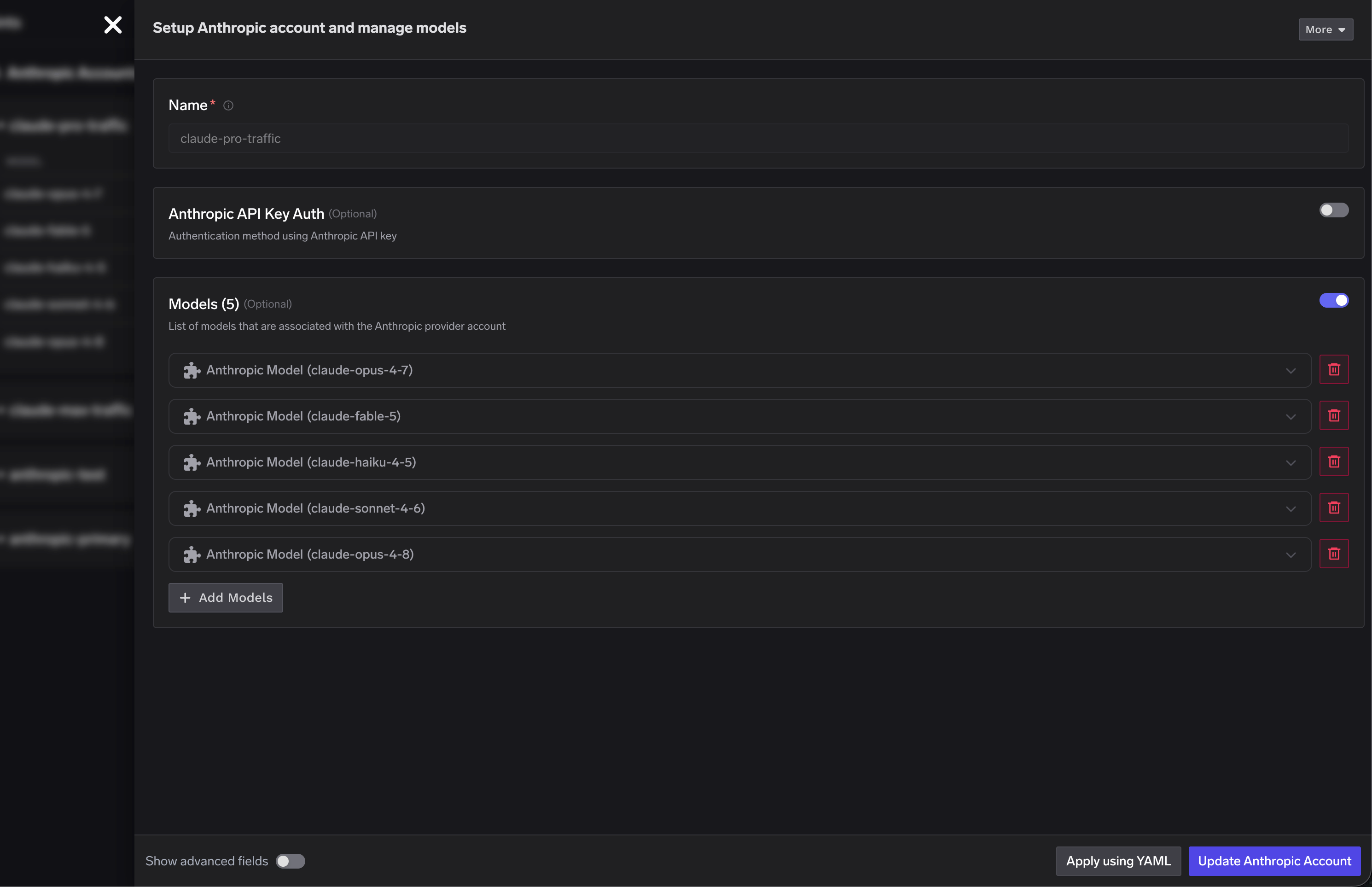
Authorization header that Claude Code sends from your Max session. Add the Claude models you want to route through the subscription.2
Add the standard Anthropic integration
Create a second Anthropic provider integration (for example
anthropic-primary) and enable Anthropic API Key Auth with a valid Anthropic API key. This integration is billed per token and serves as the fallback when the Max subscription limit is hit. See Anthropic model integration for the account setup steps.3
Create virtual models with priority-based fallback
Create a virtual model for each Claude model using priority-based routing. Set the subscription model as priority 
0 and the standard Anthropic model as the fallback priority. The AI Gateway sends each request to priority 0 first and routes to the fallback only when the subscription target is rate-limited or unavailable.claude-opus virtual model routes to claude-pro-traffic/claude-opus-4-8 first and falls back to anthropic-primary/claude-opus-4-8, and the same pattern applies to the Sonnet and Haiku models.4
Point Claude Code at the virtual models
Update
ANTHROPIC_DEFAULT_OPUS_MODEL, ANTHROPIC_DEFAULT_SONNET_MODEL, and ANTHROPIC_DEFAULT_HAIKU_MODEL in your settings.json to the virtual model names (in your-account/model-name format). Claude Code now talks to a single endpoint, while the AI Gateway handles the subscription-to-API fallback behind the scenes.For Claude Code CLI and VS Code extension usage patterns, refer to the main Claude Code integration guide.