

There are two ways to point Claude Desktop at the AI Gateway. The per-user UI below (Developer Mode → Configure third-party inference) is best for a single machine or a quick trial — but each user configures it and can change or remove it. To enforce it across a fleet, use MDM managed preferences, which push the AI Gateway configuration into the
com.anthropic.claudefordesktop domain and lock it down — the Claude Desktop equivalent of pushing managed-settings.json for Claude Code.Prerequisites
Before you configure Claude Desktop, ensure you have:- TrueFoundry account — Create a TrueFoundry account and follow Gateway quick start. You need your gateway base URL (see Gateway base URL) and a TrueFoundry API key.
- Models on the AI Gateway — Add the Claude models you plan to use via TrueFoundry (Anthropic direct, Bedrock, or Vertex). See Anthropic model integration. For Cowork, include Opus, Sonnet, and Haiku so primary chats and sub-agents can resolve cleanly (details below).
- Claude Desktop — Install from claude.com/download. For manual setup, launch the app but do not sign in until you have opened the configuration window (Anthropic recommends staying on the login screen).
Enable Developer Mode
The third-party inference UI is behind Developer Mode. macOS: Menu bar → Help → Troubleshooting → Enable Developer Mode. Windows: Application menu (top-left on the login screen) → Help → Troubleshooting → Enable Developer Mode.Open the configuration window
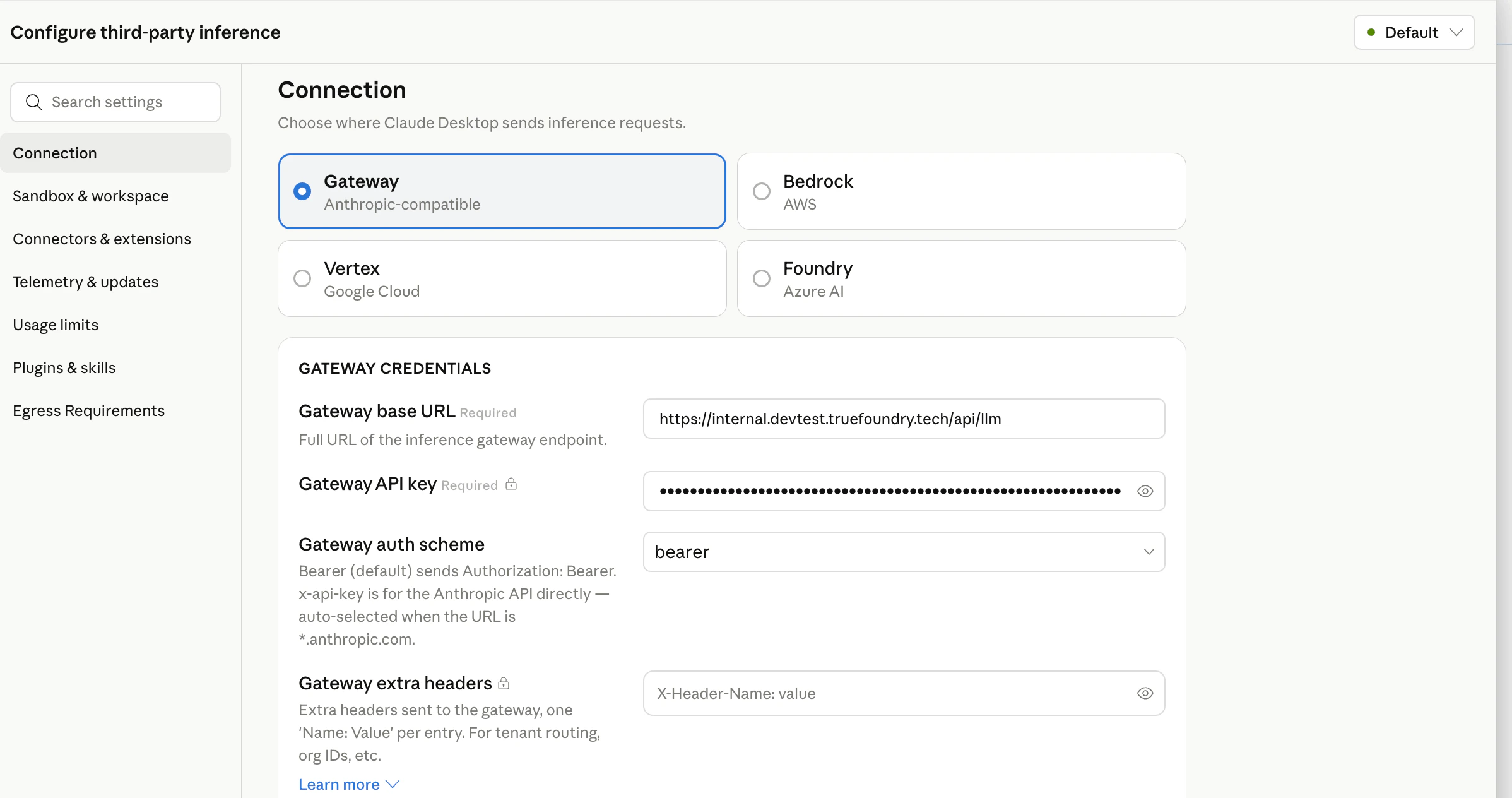
Developer → Configure third-party inference. You should see a sidebar with sections such as Connection, Sandbox & workspace, Connectors & extensions, and others. Work through Connection first, then Identity & Models as needed.Connection — point Claude Desktop at TrueFoundry
- Under Connection, choose Gateway (Anthropic-compatible).
- Set Gateway base URL to your TrueFoundry AI Gateway URL.
- Set Gateway API key to your TrueFoundry API key.
- Set Gateway auth scheme to
bearer(sendsAuthorization: Bearer <key>). Usex-api-keyonly if your deployment expects that header instead. - Gateway extra headers (optional) — one
Name: Valueper line for tenant routing or metadata, for exampleX-TFY-METADATA: {"team":"platform"}.
Identity & Models
Per Anthropic’s configuration docs, the model list forgateway inference is optional: when you leave it empty, Cowork calls the AI Gateway’s GET /v1/models endpoint and builds the picker from the response. The TrueFoundry AI Gateway exposes this endpoint, so you can rely on auto-discovery.
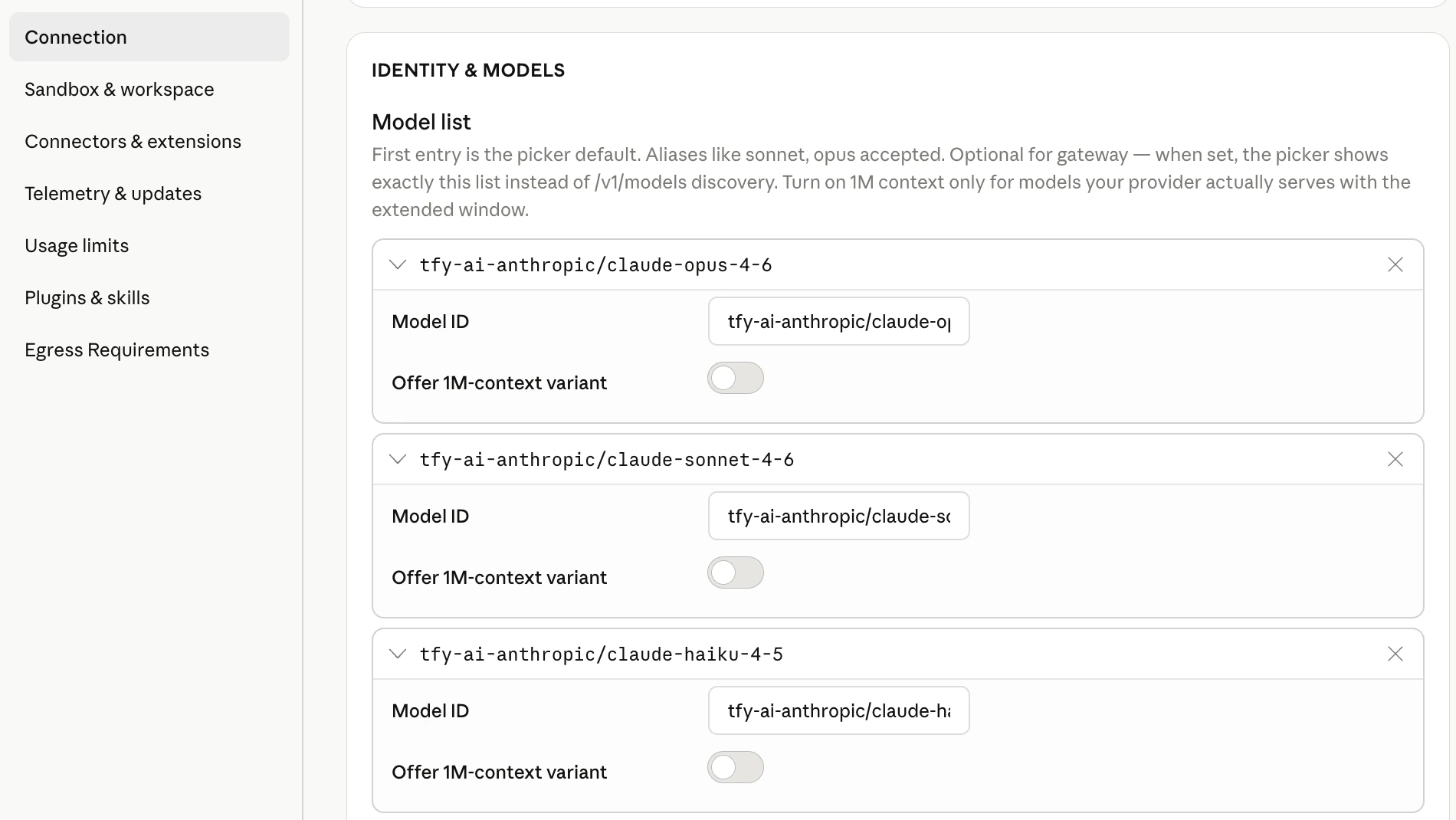
It is still recommended to set the model list explicitly. When you configure it, the picker shows exactly the models you list instead of everything /v1/models returns. That helps you:
- Pin Haiku — Cowork’s built-in Explore sub-agent is configured to use Haiku for fast, read-only work. User-dispatched sub-agents in Cowork have also been observed to route through Haiku (anthropics/claude-code#47488). If discovery returns no Haiku id or several ambiguous Haiku variants, sub-agent calls can fail or behave unpredictably. Listing
your-account/claude-haiku-4-5(or your org’s equivalent) removes that ambiguity. - Shorten the picker when discovery is noisy —
/v1/modelsmay list many ids. An explicit list is optional but handy when you want Cowork users to see only the models you intend for this deployment.
provider-account/model-id (same strings you use in the TrueFoundry playground). Example (replace tfy-ai-anthropic with your Anthropic model account name in TrueFoundry):
Apply locally and relaunch
Click Apply locally. Claude Desktop writes the configuration and relaunches. On the sign-in screen you should see the option to start in Cowork on 3P using the profile you just built.Enforce fleet-wide via MDM (managed preferences)
The per-user UI above is convenient but not enforceable. For managed fleets, Claude Desktop reads Cowork on 3P configuration from OS-native managed preferences in thecom.anthropic.claudefordesktop domain — the same class of control as pushing managed-settings.json for Claude Code. Push these keys via your MDM (Jamf, Kandji, Mosyle, Intune, Group Policy) or write and lock them with a script.
Config locations
Keys — every value is stored as a string; arrays and objects are JSON-encoded strings (see Anthropic’s Configuration reference).
Custom headers.
inferenceCustomHeaders is a JSON object attached to every inference request — use it for tenant routing or metadata (for example X-TFY-METADATA), or to carry the credential in a custom header such as X-TFY-API-KEY (the same header Claude Code sends via ANTHROPIC_CUSTOM_HEADERS). Any header emitted by a credential helper merges over these.
Example macOS plist:
TrueFoundry ships
tfy-local-ai-setup to automate this end-to-end: it runs the device-login flow as the signed-in user, writes the managed preferences above (with the token in the X-TFY-API-KEY header), immutably locks the file, and refreshes on a schedule. Run it with --claude-desktop (and --desktop-header 'Name: Value' for extra custom headers). The same binary also manages Claude Code and Codex — see Govern all AI traffic through the AI Gateway. It only configures tools that are actually installed: an explicit flag for a tool that isn’t present is skipped with a warning, and a machine with none of the three is a clean no-op (no login prompt) — so you can safely push all flags to your whole fleet.Web search
Claude Desktop’s Web Search is a server-side tool — the app doesn’t run the search itself, it asks the inference endpoint to. When Claude Desktop points at the TrueFoundry AI Gateway, there are two ways to satisfy it, and you can use both:- Provider-native passthrough — the AI Gateway forwards Anthropic’s
web_searchserver tool to whichever provider serves the model. Available for every provider that supports it. - MCP web search (recommended for consistency across providers) — search runs through an MCP server instead of the model provider, so it behaves the same no matter which model the request lands on.
Provider-native passthrough
Claude Desktop emits Anthropic’sweb_search_20250305 server tool. The AI Gateway passes it straight through to the model’s provider (the request tool and the web_search_tool_result blocks in the response, plus the num_search_queries usage counter for billing) — there’s nothing extra to configure in Claude Desktop beyond pointing it at the gateway.
The catch is that it only works when the routed model’s provider actually executes the Anthropic web-search server tool (for example, the Anthropic API). A model whose provider doesn’t run it will simply not return search results. Because that varies by provider, use the MCP option below when you want web search to work uniformly across every model in your picker.
MCP web search (consistent across providers)
Add a web-search MCP server to Claude Desktop’smanagedMcpServers. Because the search executes at the MCP server rather than the model provider, it works on every model routed through the AI Gateway.
Point a remote managedMcpServers entry at a web-search MCP server running behind the TrueFoundry MCP Gateway — for example Tavily or Exa. This keeps the search key and tool access server-side and centrally governed (auth, allow-listing, and audit through TrueFoundry) instead of shipping a vendor key to every device:
<mcp-server-name> with the slug of the server you registered on the gateway (for example tavily or exa); name is just the local label Claude Desktop shows. You can reuse the same TrueFoundry token you use for inference in headers — or point headersHelper at a script that prints it to keep the token out of the config file. toolPolicy auto-approves the server’s tools so users aren’t prompted per query. See Connect an MCP server from your IDE / client for the “Sign in with TrueFoundry” OAuth flow and the gateway MCP URL format.
Web Search returns links; Web Fetch (retrieving a page’s contents) runs on the device and is gated by the
coworkEgressAllowedHosts allowlist. If you want Claude to open the pages it finds, add those hosts to coworkEgressAllowedHosts (or set it to ["*"]). See Anthropic’s Web search and web fetch reference.managedMcpServers value through MDM managed preferences as a JSON-encoded string, alongside the connection keys above.
Disabling web search
To turn off Claude Desktop’s built-in web search — for example to block model-side web access, or to allow only the governed MCP server above — addWebSearch to disabledBuiltinTools:
"WebFetch" to the same array to also block Claude from fetching page contents. In an MDM managed-preferences profile this value is stored as a JSON-encoded string (like the other array keys above), for example "[\"WebSearch\"]".
Verify the integration
- Start a Cowork session and send a short test message.
- In TrueFoundry, open AI Gateway → Analytics (see Analytics overview) and confirm requests appear for your API key and chosen model.
- For configuration diagnostics, use Help → Troubleshooting → Copy Managed Configuration Report — it summarizes detected keys and whether gateway credentials validated (secrets redacted).
Code tab and Claude Code CLI
The Code tab inside Claude Desktop uses Claude Code on the host. Some Cowork settings do not yet mirror one-to-one into Code-tab sessions. For terminal or VS Code workflows with environment variables andsettings.json, follow Claude Code and Claude Code Max.
FAQs
Can users bring their existing claude.ai conversations into Cowork on 3P?
Can users bring their existing claude.ai conversations into Cowork on 3P?
Yes. Claude Desktop has an Import from Claude wizard that copies claude.ai conversations and projects into the local session store, so users can pick up work they started on claude.ai and continue it against the TrueFoundry AI Gateway. It also picks up Cowork and Claude Code sessions already on the machine from an earlier install.Import is off by default. Users only get the wizard once the managed configuration sets
claudeAiImport with enabled set to true (see MDM managed preferences — like the other object-valued keys it is stored as a JSON-encoded string, e.g. {"enabled":true}). Two sibling subfields tune it, and neither does anything while enabled is false: bannerBehavior (off, detect, show) decides whether new chats and tasks prompt users to import, and exportEnabled adds the export half described below. MDM delivery of this key needs Claude Desktop 1.25927.0 or later — earlier builds accept it only from a bootstrap server.On a claude.ai Team or Enterprise workspace, a workspace owner must first allow members to export their own data, under claude.ai Settings → Organization → Data and privacy → Allow members to export their own data. Personal claude.ai accounts can always export. The toggle only lets each member download their own history.Running the import — in Claude Desktop, go to Settings → Import & export → Import…. The wizard has three steps, any of which can be skipped:- Chats — either Sign in to claude.ai… and click Fetch export, or on claude.ai use Settings → Privacy → Export data and select the emailed
.zipwith Choose file…. The email download link expires after 24 hours. The sign-in path has the app authorize against claude.ai and download the export itself, so the device needs egress to claude.ai for that step — on a locked-down or air-gapped fleet, the.zippath is the one that works. - Cowork & Code — local sessions found on this machine, with a time range and the option to add another folder (a backup, or one copied from another machine). Sessions are copied, not moved.
- Review — confirm, then Import. A Duplicates step follows if an imported project name collides with an existing one, offering Merge into existing or Keep separate.
exportEnabled also set to true under claudeAiImport, Settings → Import & export offers Export…, which writes this machine’s chats, Cowork tasks, and Code sessions to a zip that the wizard can read on another device in step 2. The zip holds full conversation content — treat it as sensitive data.Full details in Anthropic’s Import history from claude.ai.