


.webp)
October 24, 2026
|
5 min read


Updated: October 15, 2026
Published: December 11, 2025
Blazingly fast way to build, track and deploy your models!
As organizations race to deploy AI-powered applications, the challenge quickly stops being “can we call an LLM?” and becomes “can we operate this system confidently?” Once you have multiple providers, multiple model versions, agents calling tools, and business logic wrapped around every request, the real risks show up in production: rising spend without clear attribution, latency regressions that are hard to pin down, and quality changes that are felt by users before they’re proven by data.
That’s where the pairing of TrueFoundry AI Gateway and Braintrust fits naturally. TrueFoundry AI Gateway is the proxy layer between your applications and model providers, built to give teams a unified interface with enterprise-grade governance and observability. Braintrust is an observability platform designed to help teams trace, evaluate, and iterate on real LLM behavior over time. Together, they create a practical loop: route all model traffic through a single control point, export rich traces automatically, and use those traces to improve quality and reliability with evidence instead of guesswork.
TrueFoundry AI Gateway is the proxy layer that sits between your applications and the LLM providers and MCP Servers. It is an enterprise-grade platform that enables users to access 1000+ LLMs using a unified interface while taking care of observability and governance. The AI Gateway is OpenTelemetry compliant and supports exporting OTEL traces, which means you can stream request-level traces to an external observability or LLM engineering backend without changing your application code paths.

Braintrust supports being used as an OpenTelemetry backend: you route traces to Braintrust, authenticate with an API key, and attach a “parent” (like a project or experiment) so traces land in the right organizational scope. Once traces are in Braintrust, they become the substrate for day-to-day engineering workflows: investigating latency and failure patterns, understanding token usage and cost drivers, and running evaluations that quantify output quality over time rather than relying on anecdotal feedback.
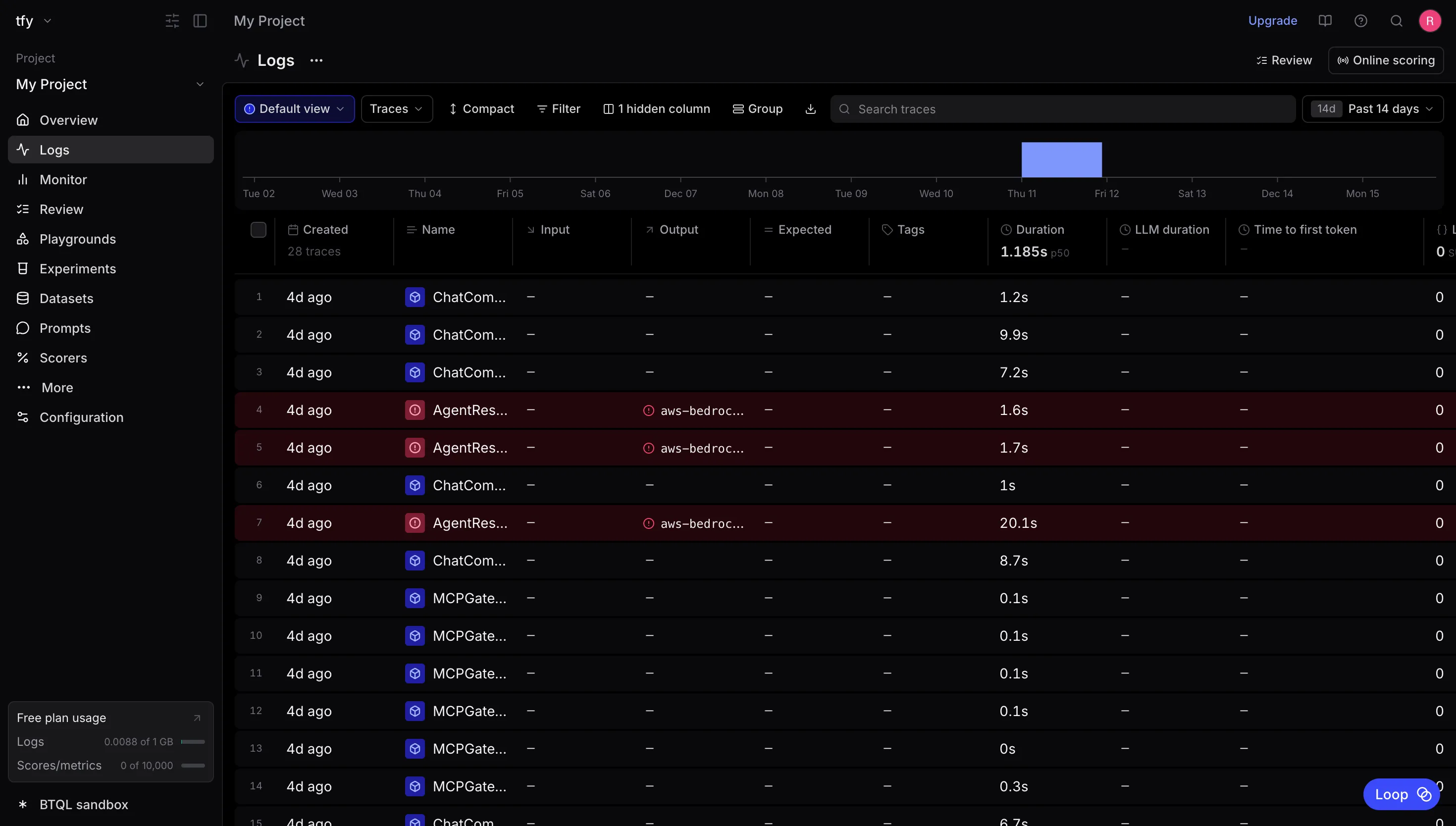
The real leverage comes when the gateway becomes the single source of truth for telemetry, and Braintrust becomes the place where that telemetry turns into engineering insight. With OTEL export enabled in TrueFoundry AI Gateway, every LLM request that flows through the gateway can automatically produce a trace that captures critical context (request metadata, model/provider selection, and timing) without custom instrumentation in each service. With Braintrust ingesting those traces, you can move from “we think this prompt change helped” to “we can prove impact on real traffic, and we can detect regressions early.”
At a high level, your application sends LLM traffic to TrueFoundry AI Gateway, which forwards the request to the selected model provider. In parallel, the gateway emits OpenTelemetry traces for those interactions and exports them to an OTEL-compatible backend. Braintrust exposes an OTEL-compatible ingestion path that accepts these traces when you provide authentication and a parent scope (project or experiment).
This means you configure the export once at the gateway layer, and then the trace stream becomes a shared asset across teams, useful for debugging, spend attribution, performance monitoring, and quality evaluation, without having to retrofit every application that calls an LLM.

To wire this up, you’ll configure the AI Gateway’s OpenTelemetry export to point at Braintrust’s trace ingestion endpoint. TrueFoundry's AI Gateway has OTEL trace export as a first-class capability, including HTTP/gRPC export options and support for passing custom headers needed by your backend. Docs here
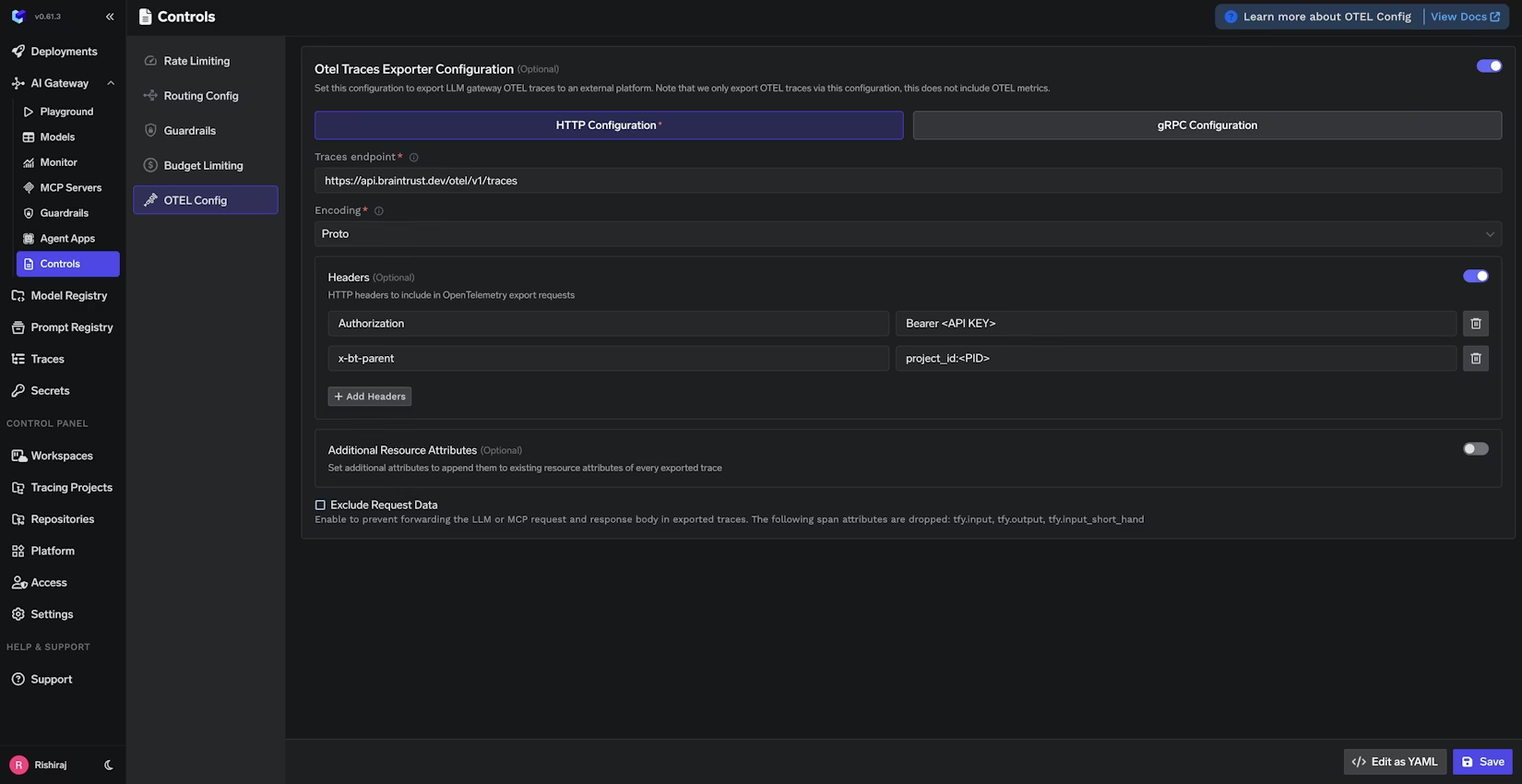
In your TrueFoundry dashboard, open the AI Gateway OTEL configuration and enable trace export. Then configure the Braintrust traces endpoint as:
https://api.braintrust.dev/otel/v1/traces
For authentication and routing, add an Authorization header using your Braintrust API key, and add the x-bt-parent header to specify the Braintrust project where traces should land, for example:
x-bt-parent: project_id:<YOUR_PROJECT_ID>
Braintrust and TrueFoundry both document this “parent” concept, and TrueFoundry also notes you can use other prefixes like project_name: or experiment_id: depending on how you want to organize traces.
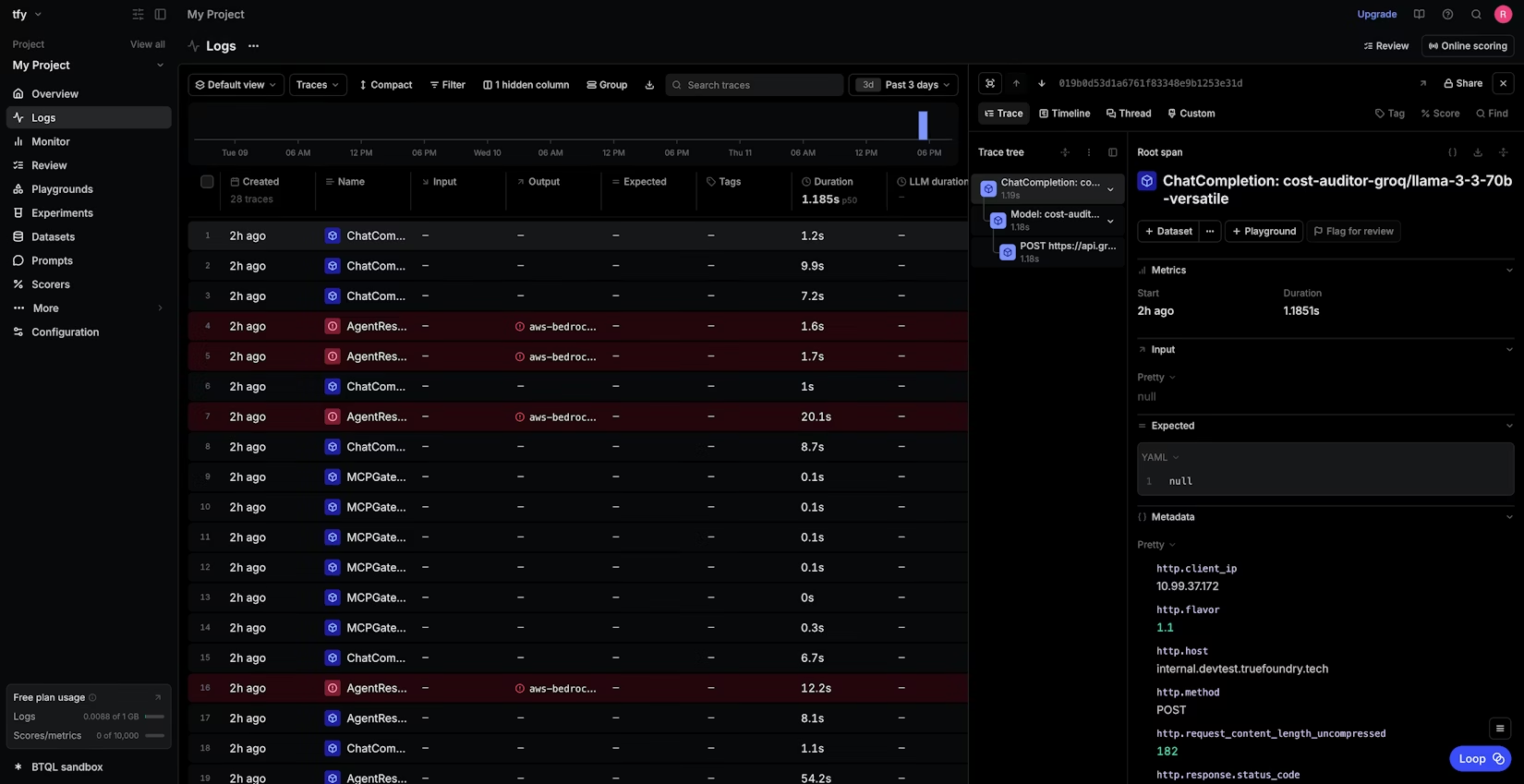
After you save the configuration, any LLM requests routed through TrueFoundry AI Gateway will begin exporting traces automatically, and you can view them inside Braintrust under your project’s logs.
Production LLM systems are inherently dynamic: providers change, prompts evolve, agent graphs grow, and user behavior shifts. The teams that win aren’t the ones who never break things, they’re the ones who can see what happened quickly, measure impact confidently, and iterate safely.
TrueFoundry AI Gateway provides the centralized control point and standards-based telemetry export. Braintrust turns that telemetry into an engineering workflow for tracing, evaluation, and continuous improvement.
TrueFoundry AI Gateway delivers ~3–4 ms latency, handles 350+ RPS on 1 vCPU, scales horizontally with ease, and is production-ready, while LiteLLM suffers from high latency, struggles beyond moderate RPS, lacks built-in scaling, and is best for light or prototype workloads.






The latest news, articles, and resources sent to your inbox


.webp)

.png)
.png)
.png)
.png)
.png)
.png)
.png)
.png)
.png)
.png)
.png)


