


.webp)
October 21, 2026
|
5 min read


Updated: October 15, 2026
Published: March 9, 2026
Blazingly fast way to build, track and deploy your models!
The sales team is panicking – there is a major healthcare conference next week. The event website lists 200 speakers -- physicians, executives, and researchers -- spread across a dozen paginated sub-pages. To build a lead list, someone needs to open the site, click a name, copy the details into a spreadsheet, open a new tab, search for that person on LinkedIn, copy the profile URL, and paste it back.
They have to do this 200 times.

For engineers, this request usually results in a quick Python script using Selenium or BeautifulSoup. You inspect the page source, find the div with the class speaker-name, and extract the text. It works perfectly for about a week. Then the website updates its frontend framework, the CSS classes change, and the script crashes.
We built the Profile Crawler accelerator to stop this cycle. It is an autonomous agent that navigates websites and extracts data based on what the page says, not how the HTML is structured.
Here is how we architected the solution using LangGraph for orchestration, Playwright for interaction, and TrueFoundry to manage the infrastructure.
The main reason scraping scripts fail is their reliance on the Document Object Model (DOM). If you tell a script to look for div.content-wrapper > h2.title, it will break the moment a developer changes a class name.
We moved to an agentic approach. We don't tell the bot where the data is located pixel-wise. Instead, we feed the rendered HTML (converted to Markdown) to an LLM. The model reads the text just like a human would. It understands that a section labeled "Keynote Speakers" contains the data we want, regardless of the underlying tags.
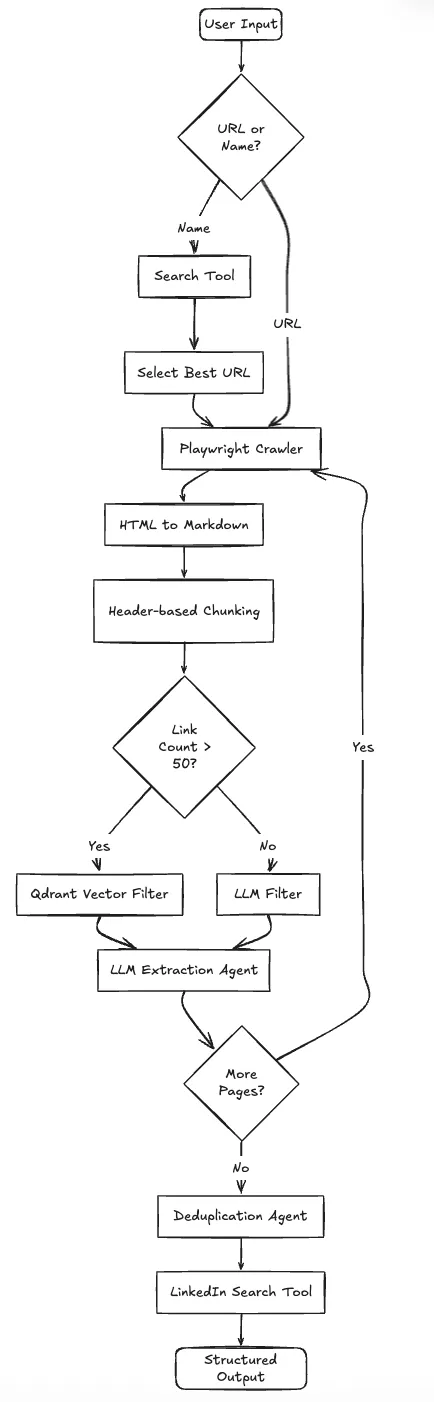
We needed a system that could handle decision-making, not just a linear script. The application needs to decide: Is this input a URL or just a company name? Did we hit a captcha? Is this page a list of people or a single bio?
We chose LangGraph to model this workflow as a state machine, especially where Langflow vs LangGraph decisions favor stateful orchestration.
The system operates in a loop rather than a straight line:
Here is the system architecture:
Running headless browsers and LLM agents in production creates operational headaches: memory leaks from Chromium, rate limits on LLM APIs, and the need for process isolation.
We deployed this on TrueFoundry to handle these specific constraints.
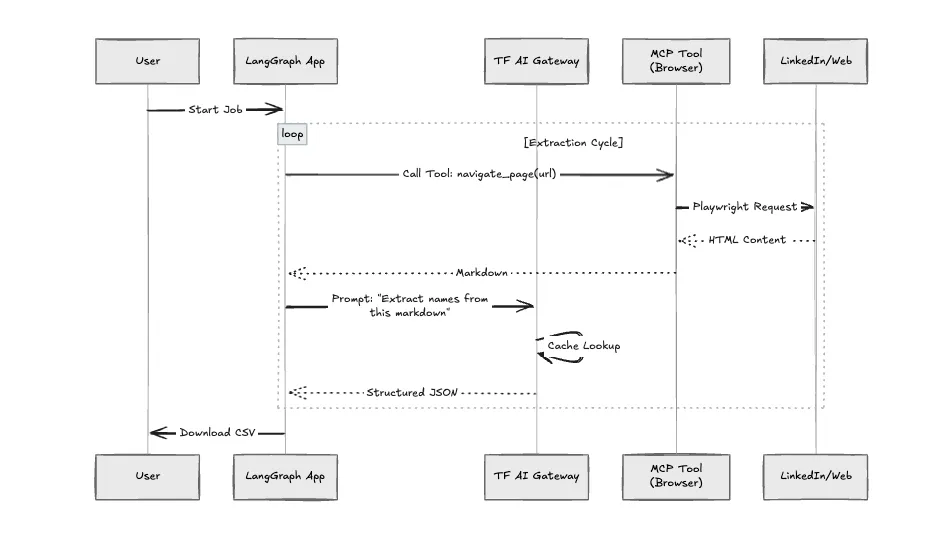
This application makes heavy use of LLMs for navigation decisions. Without governance, costs spiral quickly. We route all model calls through the TrueFoundry AI Gateway.
We structured the application using the Model Context Protocol (MCP). The "Crawler" is not just a Python function; it is an MCP Server. This allows us to sandbox the browser environment. If the browser crashes (which happens often with heavy JavaScript sites), it doesn't take down the main application logic.
We benchmarked the standard Python script approach against this architecture.
Building the happy path is easy. Making it reliable required solving three specific engineering problems:
This architecture solves the "Last Mile" of data acquisition by replacing brittle scripts with adaptive agents. By running it on TrueFoundry, we ensure the system is observable, cost-controlled, and scalable.
You can deploy this exact architecture -- including the Gateway configuration and Dockerized agents -- from the TrueFoundry application library today.
TrueFoundry AI Gateway delivers ~3–4 ms latency, handles 350+ RPS on 1 vCPU, scales horizontally with ease, and is production-ready, while LiteLLM suffers from high latency, struggles beyond moderate RPS, lacks built-in scaling, and is best for light or prototype workloads.






The latest news, articles, and resources sent to your inbox


.png)
.png)
.png)
.png)
.png)
.png)
.png)
.png)
.png)
.png)
.png)


