
September 18, 2026
|
5 min read


Published: June 14, 2026
Blazingly fast way to build, track and deploy your models!
Every engineering Slack channel we've been in over the past six months has probably had the same argument. Cursor or Copilot? The question won't go away because, from a distance, the tools look almost identical. Both write code. Both run on frontier LLMs. Both shipped agent capabilities in the past year.
Look closer, and the resemblance falls apart. Cursor is a standalone IDE—Anysphere forked VS Code and rebuilt the whole editor around AI. Copilot is an extension that plugs into whatever editor you already use. VS Code, JetBrains, Visual Studio, Neovim, Xcode, Eclipse—Copilot meets you where you are.
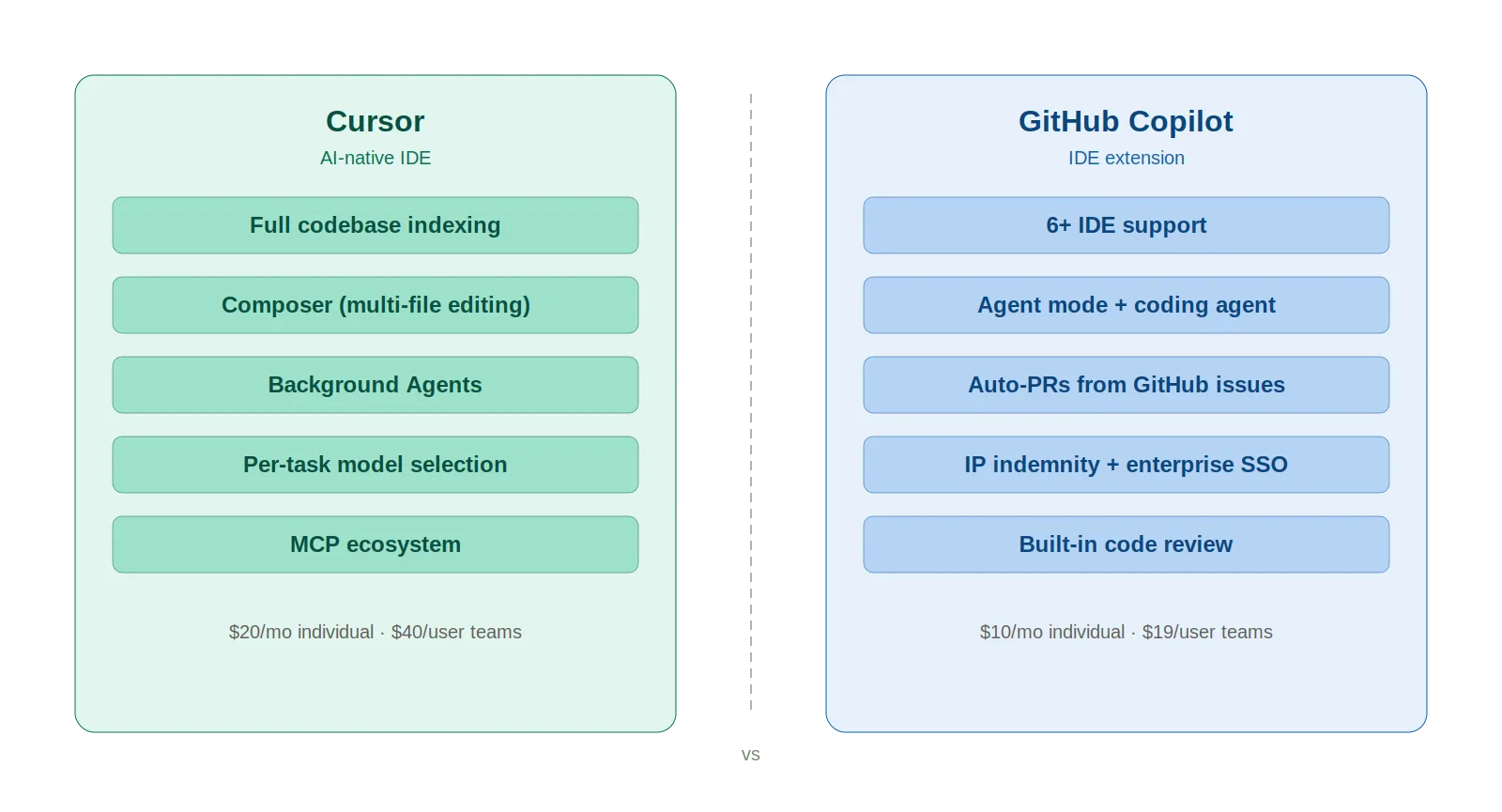
That architectural split ripples through everything. Context handling. Multi-file editing. Team scaling. Cost. We won't declare a winner here—your workflow decides that. What we will do is lay out the differences honestly enough that you can make your own call.

Cursor is an AI-first code editor from Anysphere, a YC-backed startup. VS Code fork at the core, so the interface feels immediately familiar—extensions, keybindings, settings all carry over. The difference is that AI runs through the entire product, not as a sidebar plugin.
March 2026 feature highlights:
Growth has been fast. $500 million ARR in 2025, reportedly nearing $2 billion by early 2026. Over 90% of Salesforce's developers now use it.
Copilot came out in June 2022, a GitHub and OpenAI joint project. The first version was basically autocomplete—write a comment, watch it fill in code. Clean, simple, effective. Fast forward to 2026, and it barely resembles that original product.
What you get now is a suite of tools under one name:
4.7 million paid subscribers as of January 2026, up 75% year-over-year. Satya Nadella said Copilot now represents a bigger business than GitHub was worth when Microsoft acquired it for $7.5 billion.
The structural advantage Copilot holds? IDE support. Six editors and counting. Cursor only runs in its own editor.
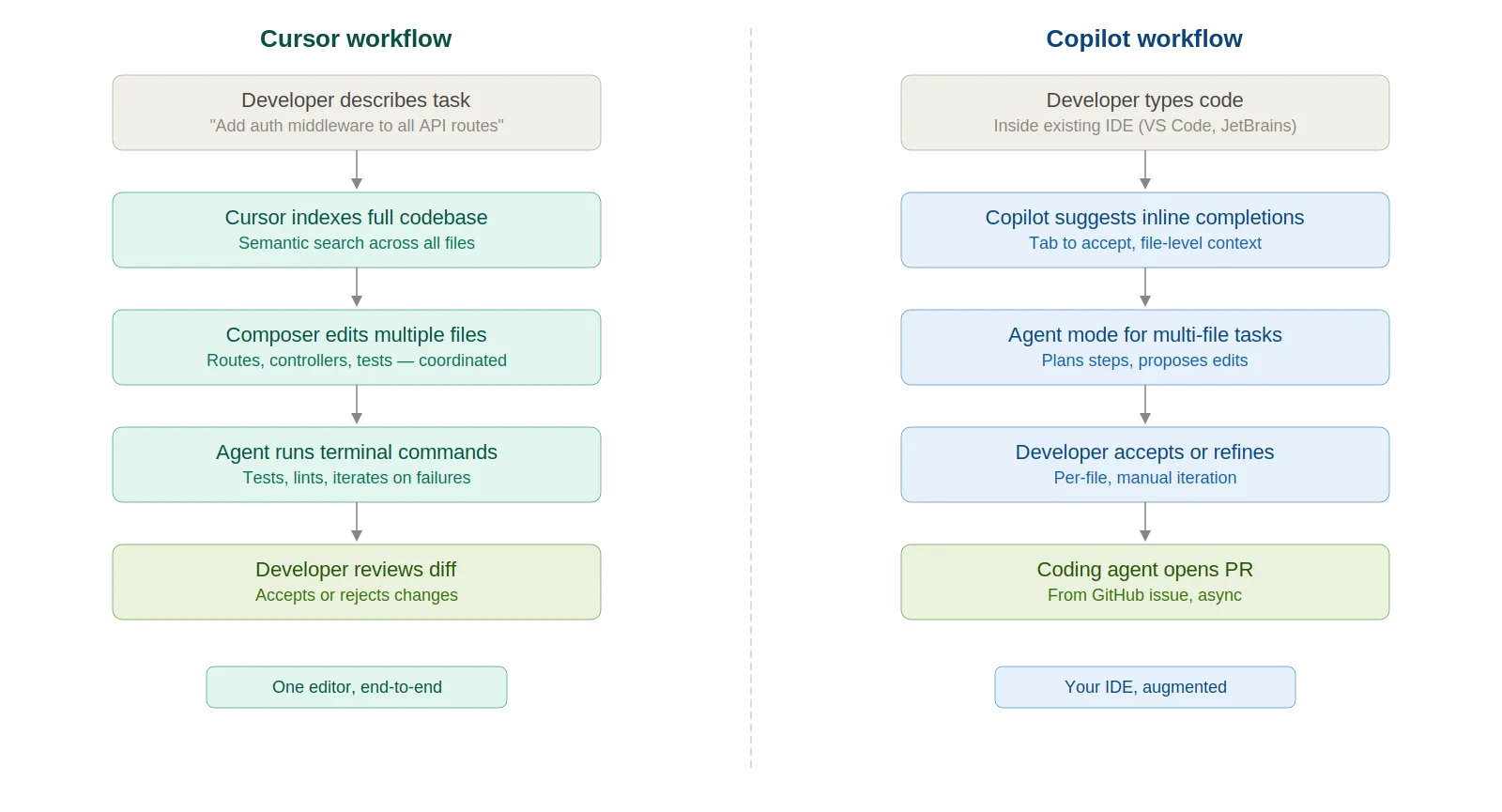

Copilot's inline autocomplete is fast and reliable for single-file work. Type a function signature, get the implementation. For boilerplate and well-trodden patterns, the speed is hard to beat.
Cursor takes a different angle. Composer accepts a natural-language description and orchestrates changes across multiple files at once—route, controller, service layer, tests—wired together automatically. Quick, focused tasks? Copilot is faster. Larger tasks that need cross-file awareness? Cursor wins.
Probably the single biggest technical gap between these two tools right now. Cursor indexes your whole codebase and builds semantic search on top. Ask "where is the auth middleware defined?" and it finds the file. You didn't have to open it first.
Copilot's context handling has gotten a lot better since 2024, to be fair. Agent mode works across files now. Copilot Spaces lets you pin relevant code, docs, and specs. But the window is still narrower—Copilot sees the active workspace and whatever you explicitly attach. Cursor sees everything it indexed. That gap shrinks with every update. It just hasn't closed yet.
Cursor's Composer was built for coordinated multi-file changes. Rename a type—every reference updates across the project. Extract a service—imports get rewired. For refactors touching 15+ files, Composer is the stronger tool today.
Copilot's agent mode handles multi-file refactors, but the experience needs more hand-holding. Sometimes it nails the scope on the first try. Sometimes it misses files or creates inconsistencies you catch in review.
Different strengths here. Cursor has the Datadog MCP integration, which lets the agent pull production logs, metrics, and traces without leaving the editor. Paste a stack trace, and it follows the code path with full project context.
Copilot's debugging story is more GitHub-native. The coding agent picks up CI failures, iterates on fixes, and automatically pushes updates to a PR. Agent mode self-heals runtime errors in a loop. If your daily workflow revolves around GitHub PRs and CI pipelines, Copilot fits more naturally.
Both handle Terraform, Kubernetes, and Helm charts. Cursor tends to do better on larger IaC codebases because it traces module references, variable files, and provider configs at the project level. Copilot is solid for quick fixes and well-scoped tasks, but doesn't traverse module chains as deeply.
Pros:
Cons:
Pros:
Cons:
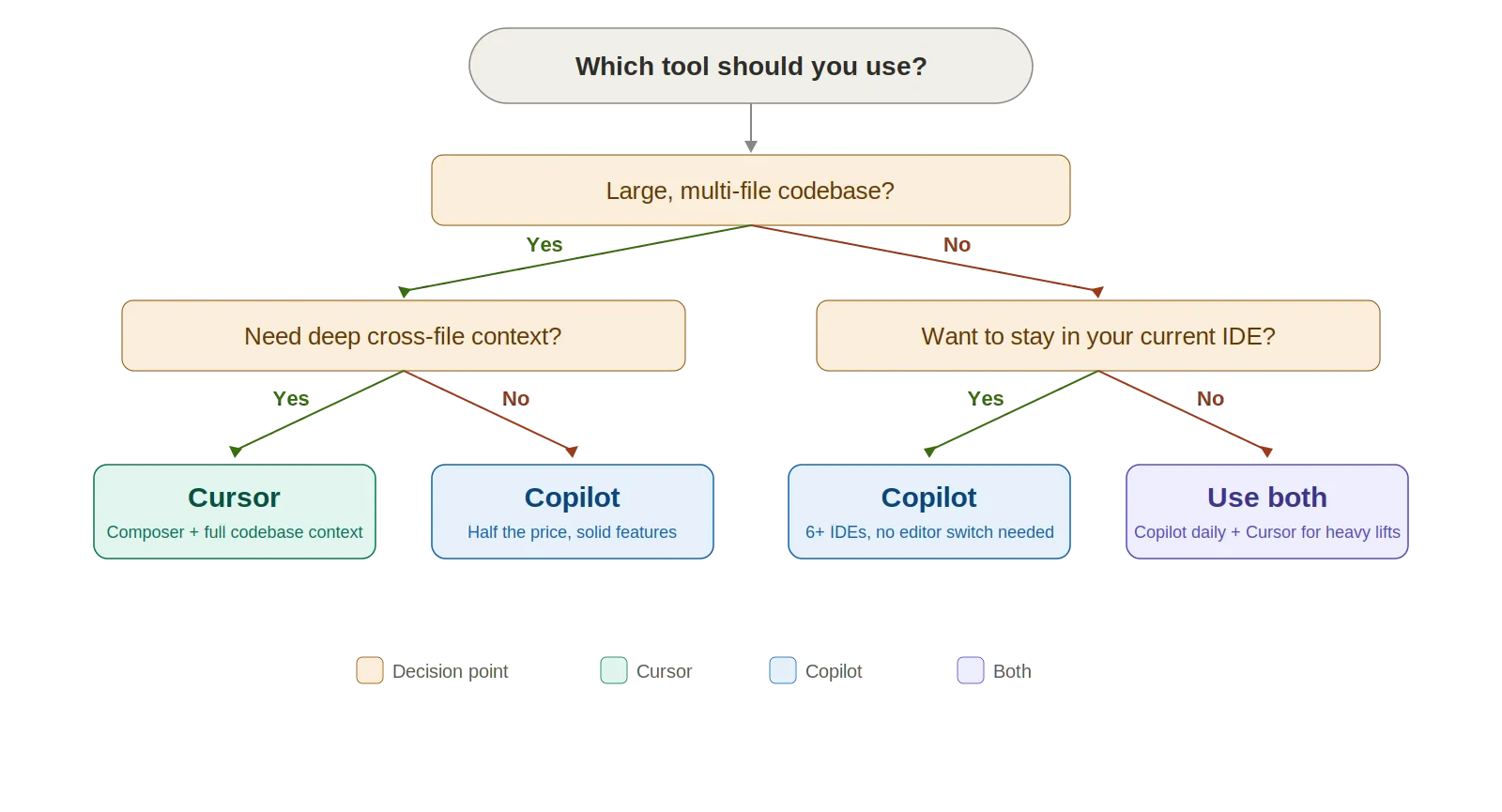
Cursor makes sense when:
Copilot makes sense when:
Here's The Evaluation Framework for Proposal Template
| Criteria | What should you evaluate ? | Priority | TrueFoundry |
|---|---|---|---|
| Gateway & Developer Experience | |||
| Unified model access | Does the platform provide one consistent interface for hosted models, self-hosted models, and provider-native requests? | Must have | ✅ Supported: unified access to 1000+ LLMs. |
| OpenAI-compatible API | Can teams keep existing OpenAI, Anthropic, or provider-compatible client code while moving traffic behind a governed gateway? | Must have | ✅ Supported: OpenAI-compatible API plus native SDK support. |
| Prompt lifecycle management | Can prompts be created, versioned, A/B tested, and reused with a built-in playground for rapid iteration? | Should have | ✅ Supported: versioned prompts, playground, and experimentation. |
| Playground and experimentation | Is there a playground UI for non-developers to test prompts, models, and tools without code? | Should have | ✅ Supported: playground with model and tool experimentation. |

Absolutely. A lot of developers already do. The common setup: Copilot running in JetBrains or VS Code for fast inline completions (quick, stays out of the way), then jumping to Cursor for complex multi-file tasks that need Composer or deeper codebase context. $30/month combined. For a developer billing $100+ an hour, even five minutes saved per day pays for both subscriptions several times over.
Cursor uses credit-based billing (changed June 2025). Each plan's credit pool equals the subscription price. "Auto" mode is unlimited. Selecting premium models like Claude Opus 4.6 burns credits faster.
Copilot uses "premium requests." Chat, agent mode, code review, and model selection all consume them. Base completions are unlimited on paid plans. Extra requests cost $0.04 each.
The math: Copilot costs about half of Cursor at every tier. Whether Cursor's deeper capabilities justify the premium depends on how you work. Heavy multi-file editing daily? The ROI is there. Mostly need fast autocomplete? Copilot gives more value per dollar.
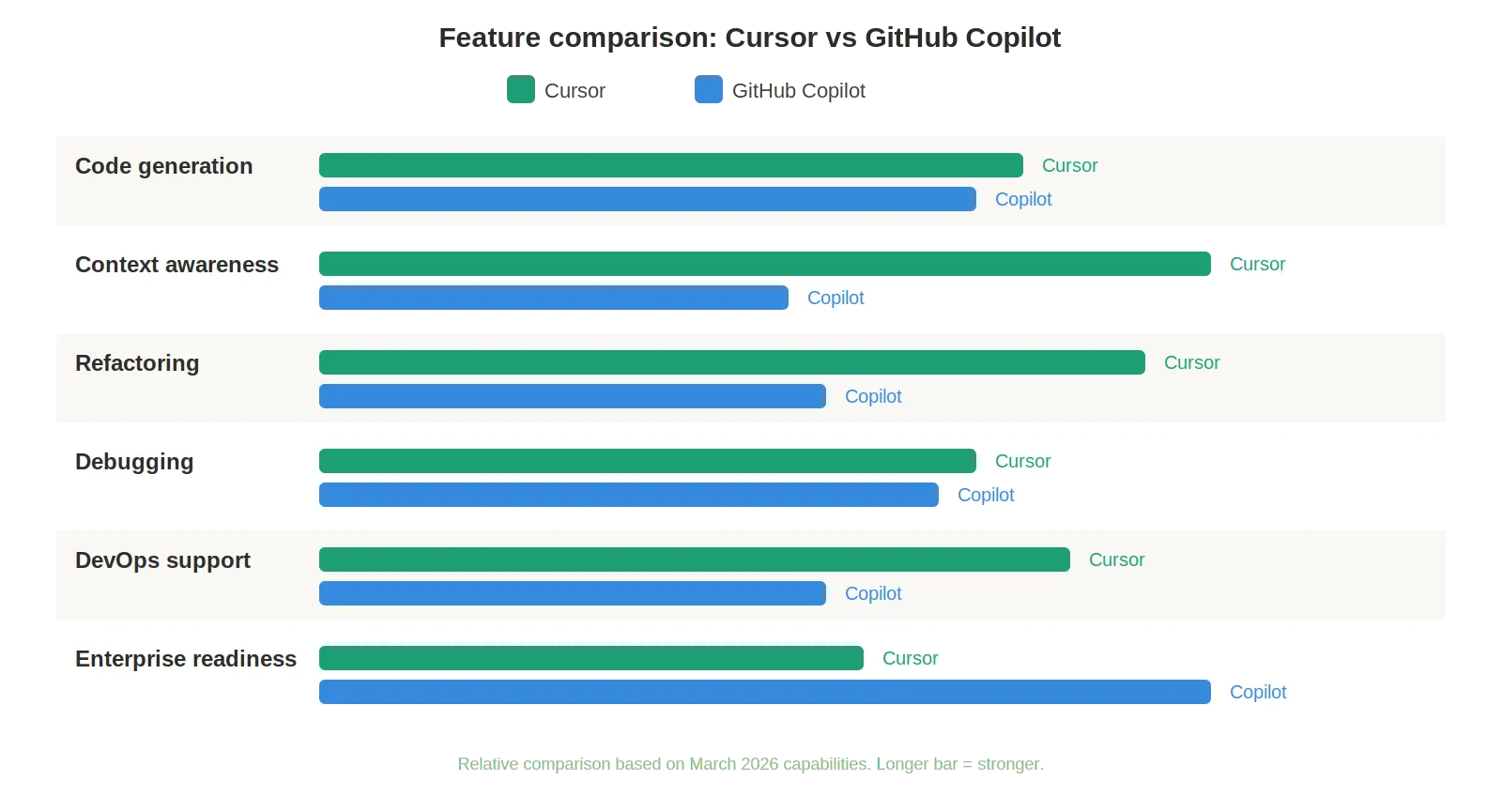
There is no single winner here, and we're skeptical of anyone who claims otherwise. Copilot is the safer bet for most teams. It costs less. Works in the IDE you already use. Free tier lets you kick the tires before committing. Enterprise controls have had years to mature. If you need to standardize one tool across a 50-person org, Copilot is the easier rollout and the lower-risk choice.
Cursor is stronger for hands-on, complex work. Codebase-wide context, Composer, Background Agents—those features give it a real edge when you're deep in a large project. Senior engineers willing to switch editors tend to get measurably more productive with it.
Honestly? A lot of developers end up running both. Copilot for the everyday coding. Cursor for the heavy lifting. That turns out to be a pretty solid split.

TrueFoundry AI Gateway delivers ~3–4 ms latency, handles 350+ RPS on 1 vCPU, scales horizontally with ease, and is production-ready, while LiteLLM suffers from high latency, struggles beyond moderate RPS, lacks built-in scaling, and is best for light or prototype workloads.




Cursor is generally considered more capable than GitHub Copilot for complex, context-aware coding tasks. Cursor's ability to index an entire codebase, use multi-file context, and perform agentic edits gives it a significant advantage for large projects. GitHub Copilot, however, excels in its tight integration with GitHub workflows, broader IDE support, and enterprise adoption making it the preferred choice for teams deeply embedded in the GitHub ecosystem.
GitHub Copilot does not yet offer the same level of customizable rules as Cursor's Rules feature. Cursor allows developers to define persistent instructions that guide the AI's behavior across sessions, such as enforcing coding standards or restricting the tools it uses. Copilot's customization is more limited, though GitHub has been expanding its configuration options through the Copilot Instructions feature.
GitHub Copilot is designed for use within GitHub's supported IDE extensions (VS Code, JetBrains, etc.) and is not directly available as a model backend within Cursor. Cursor uses its own AI infrastructure and model integrations. Developers who want both tools must run them in their respective environments rather than combining them in a single IDE.
GitHub Copilot cannot fully replace Cursor, particularly for users who rely on Cursor's deep codebase indexing, multi-file agentic edits, and flexible model selection. Copilot is a strong tool for inline completions and chat-based code assistance within the GitHub-supported editor experience, but it lacks the agentic autonomy and customization depth that Cursor provides.
GitHub Copilot's main disadvantages include limited model choice, weaker multi-file context understanding, and relatively restricted customization compared to Cursor. Cursor's disadvantages include a higher cost for power users, occasional context window limitations on very large codebases, and the fact that it is a separate application rather than a plugin for an existing IDE which can disrupt established developer workflows.
Cursor is generally better for complex, project-level coding tasks that require understanding large codebases, making multi-file edits, and performing agentic workflows. GitHub Copilot is better for straightforward completions, single-file edits, and teams that prioritize GitHub ecosystem integration and familiar IDE plugins. The right choice depends on the complexity of work and the team's existing toolchain.
As of 2026, Cursor maintains an edge over GitHub Copilot for advanced agentic coding tasks, primarily due to its superior codebase indexing, customizable rules system, and flexible model selection. GitHub Copilot has significantly improved its capabilities and remains the dominant choice by adoption volume particularly in enterprise settings but Cursor continues to lead in raw capability for complex development workflows.



The latest news, articles, and resources sent to your inbox
.png)
.png)
.png)
.png)
.png)
.png)
.png)
.png)
.png)
.png)
.png)