Blank white background with no objects or features visible.

NEW RESEARCH: 80% of AI costs are invisible at billing. 200+ leaders reveal where the money goes. Read →

Cursor integration with Truefoundry

By Rishiraj Dutta Gupta

Updated: July 31, 2025

Summarize with
Metallic silver knot design with interlocking loops and circular shape forming a decorative pattern.
Blurry black butterfly or moth icon with outstretched wings on white background.
Blurry red snowflake on white background, symmetrical frosty design with soft edges and abstract shape.

AI-assisted development tools like Cursor are accelerating software engineering by integrating Large Language Models (LLMs) directly into the coding environment. While these tools significantly enhance developer productivity, they also introduce operational challenges for organizations.

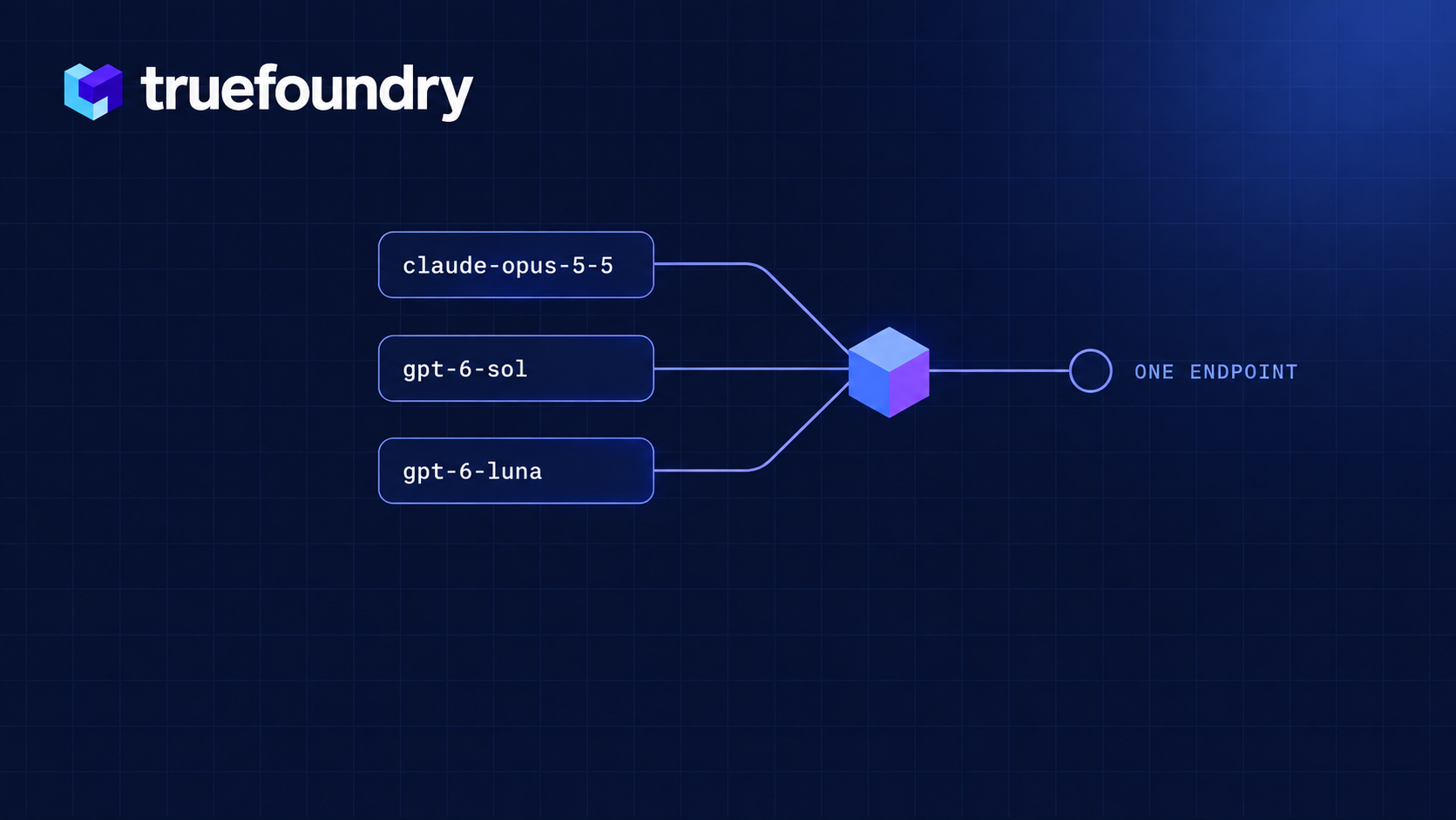
This guide outlines a strategic solution: integrating the Cursor editor with the TrueFoundry AI Gateway. This integration provides a centralized proxy for all LLM requests, enabling comprehensive monitoring, robust security, and precise cost control without disrupting developer workflows.

Core Benefits of Integrating Cursor with TrueFoundry

Integrating Cursor with the TrueFoundry AI Gateway addresses key operational and security challenges, transforming it into a manageable and secure enterprise tool.

  • Centralized Key Management: Eliminate the security risks associated with individual API keys. All developers utilize a single, managed gateway endpoint, which securely stores and rotates provider keys, significantly strengthening your organization's security posture.
  • Unified Cost Allocation and Monitoring: Gain complete visibility into your organization's AI development expenditure. The gateway tracks every request and token, allowing you to allocate costs to specific users, teams, or projects with high precision.
  • LLM Flexibility and Provider Independence: Move beyond the default model offerings. The AI Gateway allows you to route Cursor requests to any LLM, including proprietary models from providers like Anthropic, open-source models hosted via TrueFoundry, or models available through services such as Amazon Bedrock and Google Vertex AI.
Criteria What should you evaluate ? Priority TrueFoundry
Latency Adds <10ms p95 overhead for time-to-first-token? Must Have Supported
Data Residency Keeps logs within your region (EU/US)? Depends on use case Supported
Latency-Based Routing Automatically reroutes based on real-time latency/failures? Must Have Supported
Key Rotation & Revocation Rotate or revoke keys without downtime? Must Have Supported
AI Gateway Evaluation Checklist
A practical guide used by platform & infra teams

Setup Load Balance Configuration

Before configuring Cursor, create a load balancing configuration to route your requests to specific model providers. This ensures compatibility with Cursor’s internal model handling.Create a load balancing configuration like this:

name: cursor-load-balancing-config
type: gateway-load-balancing-config
rules:
  - id: cursor-gpt4o-routing
    type: weight-based-routing
    when:
      models:
        - gpt-4o
    load_balance_targets:
      - target: openai-main/gpt-4o
        weight: 100

This configuration ensures that when you use gpt-4o in Cursor, your requests will be properly routed to the target model names through the TrueFoundry Gateway.

Get TrueFoundry Gateway Configuration

Before configuring Cursor, gather your TrueFoundry Gateway details:
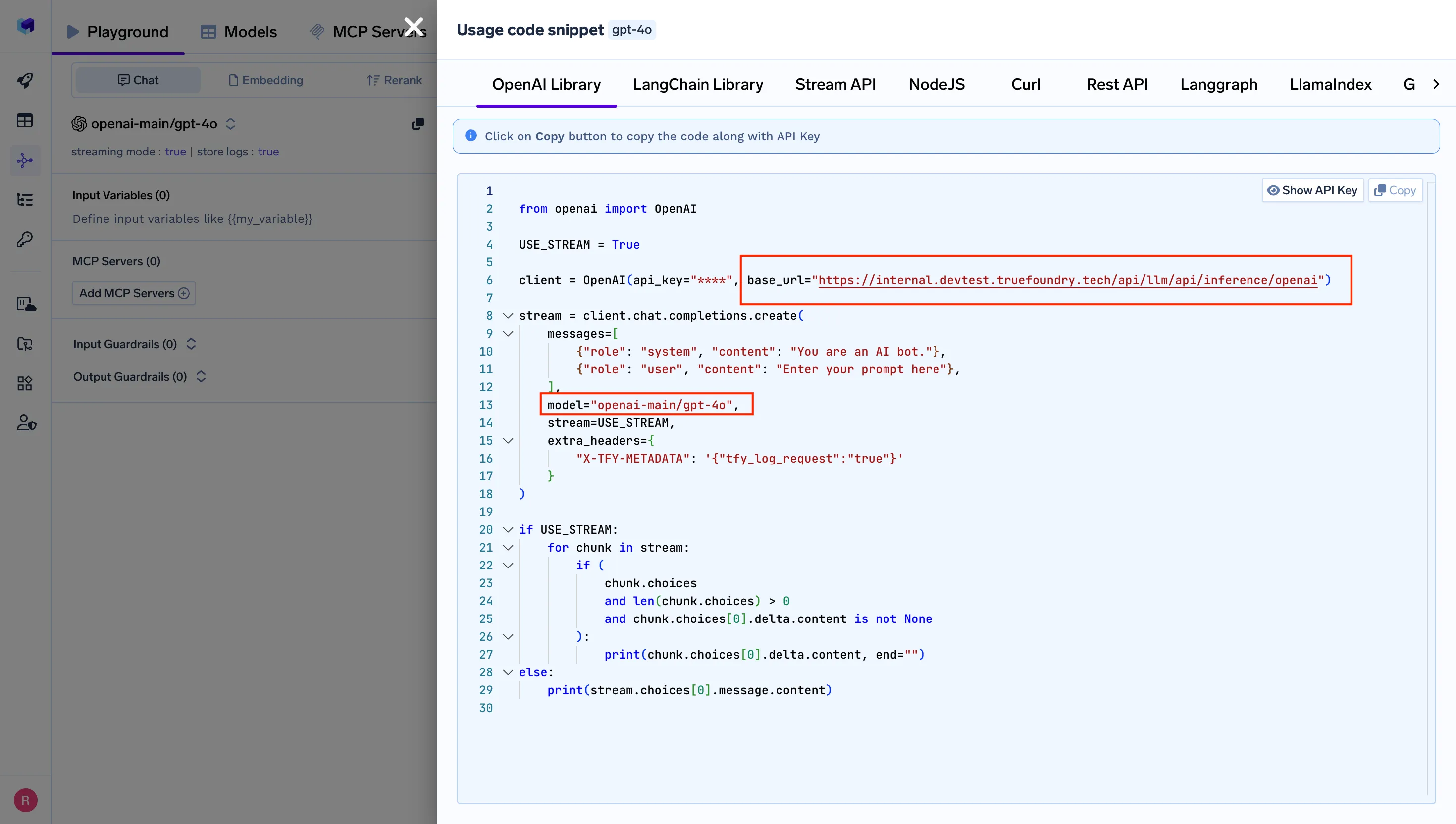
  1. Navigate to AI Gateway Playground: Go to your TrueFoundry AI Gateway playground
  2. Access Unified Code Snippet: Use the unified code snippet
  3. Copy Base URL and Model Name: You will get both the base URL and model name from the unified code snippet (ensure you use the same model name as written)


Configure Cursor with TrueFoundry Gateway

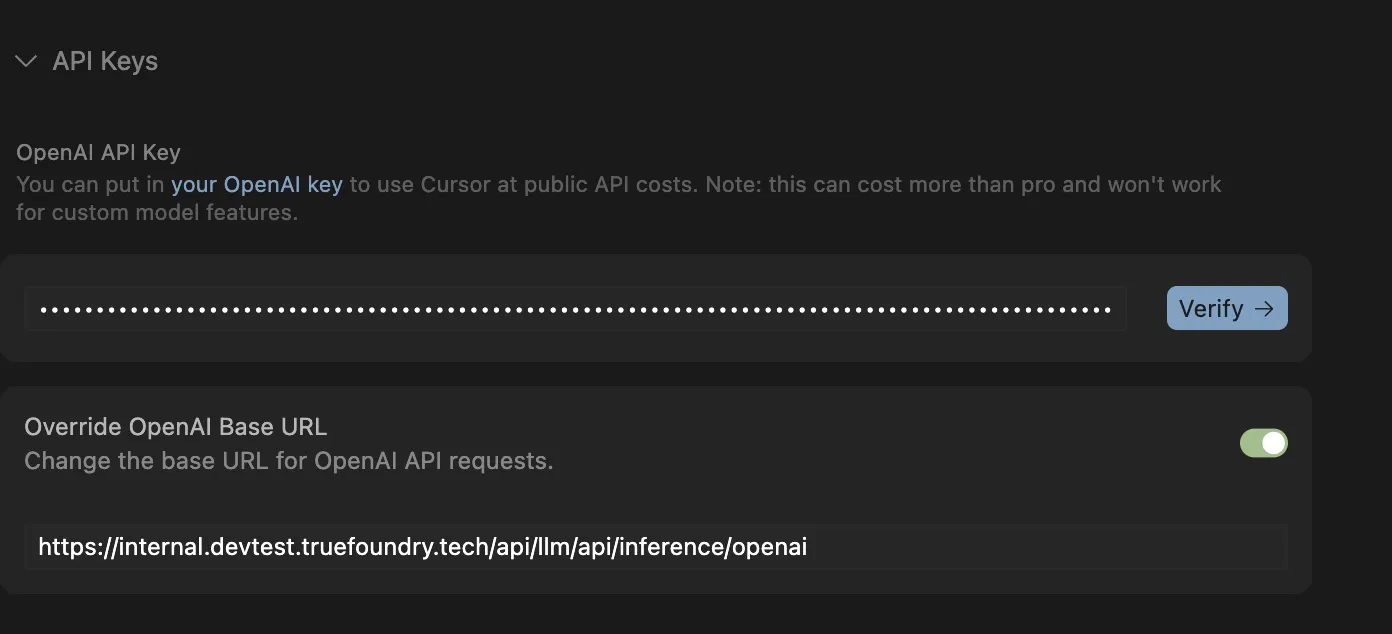
  1. Open Cursor Settings: Open Cursor Settings
  2. Navigate to Models Section: Look for Models > API section
  3. OpenAI API Keys: Your API key is the Personal Access Token (PAT) generated in the prerequisites, and the base URL is the unified URL obtained from Step 2

Configure TrueFoundry Settings:

  1. Base URL: Enter your TrueFoundry Gateway URL from the unified code snippet
  2. API Key: Paste your TrueFoundry authentication token
  3. Model Name: Use the standard model name from your load balancing configuration (e.g., gpt-4o)

Upon completion of these steps, all LLM requests from the Cursor client will be securely proxied through the TrueFoundry AI Gateway.

Key Capabilities: Observability and Governance

This integration unlocks a suite of enterprise-grade features managed from a central dashboard.

Comprehensive Observability

All requests processed by the gateway are meticulously logged, providing deep insights into usage patterns. This includes:
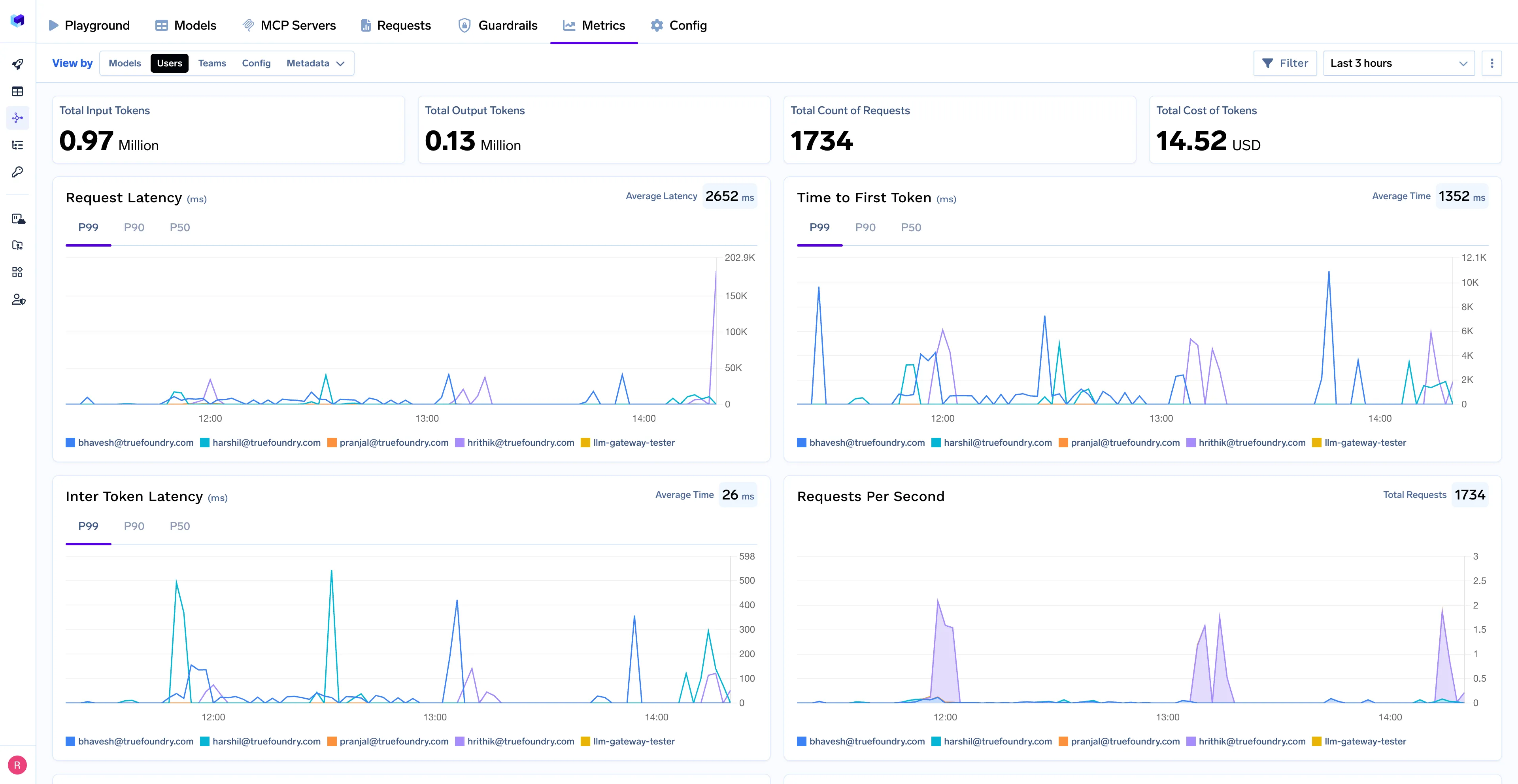
  • Detailed Request and Response Logs: Full audit trails of prompts and completions for debugging, analysis, and compliance.
  • Token Consumption Metrics: Real-time monitoring of input and output token usage.
  • Latency Analysis: Performance metrics to identify and address slow model responses.
  • Granular Cost Breakdowns: Financial data organized by request, user, team, or model.

Centralized Governance

The gateway enables the enforcement of organizational policies on all LLM interactions:

  • Fine-Grained Access Control: Manage permissions to define which users or teams can access specific LLM providers and models.
  • Budget and Rate Limiting: Implement token or request-based limits to prevent budget overruns and ensure fair resource allocation.
  • Automated Failover Logic: Configure rules to automatically redirect requests to a secondary model if the primary model is unavailable, ensuring service continuity.

Benefits for Platform Engineering Teams

For platform and infrastructure teams, this solution provides the necessary tools to manage AI development at scale.

  • Mitigate Unmonitored AI Expenditure: Consolidate all LLM costs from Cursor into a single, observable stream, eliminating financial blind spots.
  • Standardize Compliance and Security Protocols: Ensure that all AI-assisted development adheres to corporate security standards and data governance policies.
  • Enable Precise Cost Attribution: Accurately assign all LLM-related expenses to the corresponding business units or development teams for effective financial management.

Implementation Guide

By integrating Cursor with the TrueFoundry AI Gateway, organizations can balance developer productivity with enterprise requirements for security, governance, and financial oversight.

For detailed technical instructions on how to implement this integration, please consult the official documentation.

➡️ View the Official Integration Documentation

The fastest way to build, govern and scale your AI

Sign Up
Table of Contents

Govern, Deploy and Trace AI in Your Own Infrastructure

Book a 30-min with our AI expert

Book a Demo

The fastest way to build, govern and scale your AI

Book Demo

Discover More

No items found.
May 15, 2026
|
5 min read

Introducing Skills Registry: Reusable Agent Skills for Production AI Systems

No items found.
Types of AI agents governed by TrueFoundry enterprise control plane
May 15, 2026
|
5 min read

Types of AI Agents: Definitions, Roles, and What They Mean for Enterprise Deployment

No items found.
May 15, 2026
|
5 min read

OAuth at the MCP Layer: How We Solved Enterprise Token Management for AI Agents

No items found.
May 14, 2026
|
5 min read

Orchestrating Bare-Metal AI: TrueFoundry Integration with Oracle Cloud Infrastructure

No items found.
No items found.

Recent Blogs

Black left pointing arrow symbol on white background, directional indicator.
Take a quick product tour
Start Product Tour
Product Tour