.png)
March 21, 2026
|
5 min read

AIOps has gone through a few identity shifts in recent years. Dashboards and threshold alerts came first. Then ML-driven anomaly detection had its moment. Now something different is happening—engineers are dragging AI coding agents like Cursor into their incident response workflows. Sometimes it works. A lot of the time, it doesn't.
We get why the confusion exists. Infrastructure is code. Incidents usually need code-level fixes. Cursor, with its whole-codebase understanding and agentic editing, looks like it belongs in an SRE's toolkit.
Except Cursor is a coding agent. Not an AIOps system. It won't monitor your infra. Won't correlate alerts. Has zero awareness that your Kubernetes cluster is melting down unless someone explicitly tells it so.
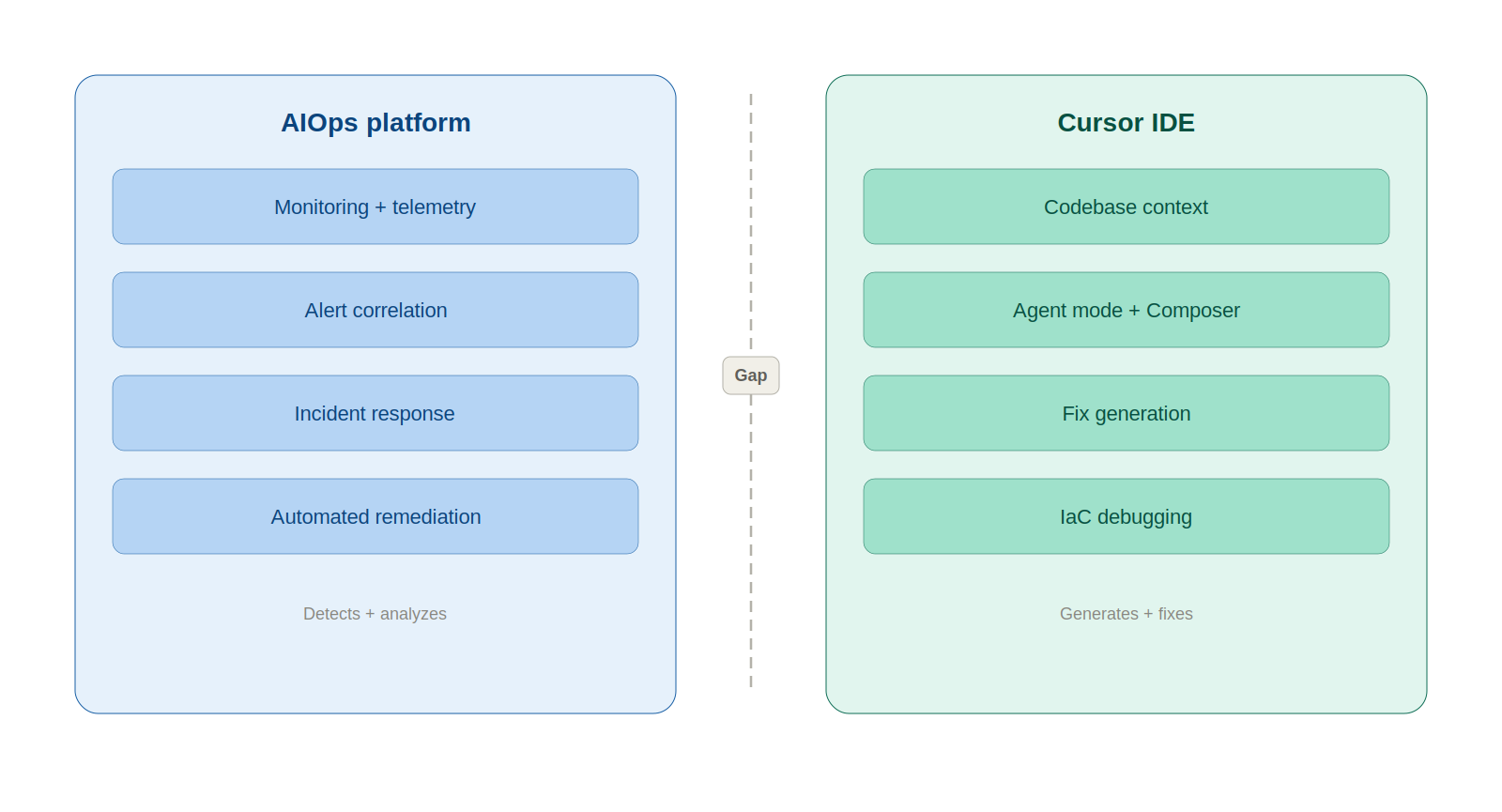
What follows is an honest breakdown of where Cursor adds real value in AIOps—and where it falls flat. If you're an SRE, DevOps engineer, or platform lead trying to figure out what actually works, this is for you.
AIOps (Artificial Intelligence for IT Operations) has been around since Gartner coined the term in 2017. Strip away the marketing, and it boils down to applying ML, NLP, and data analytics to IT operations chaos.
AIOps platforms ingest logs, metrics, and events, then do four things with that data:
The market backs this up. AIOps hit $2.23 billion in 2025, per Fortune Business Insights, with a $11.8 billion projection for 2034. Gartner expects 60% of large enterprises to treat AIOps as standard practice by 2026.
The key takeaway: AIOps is about system-level intelligence. "What is happening in my infrastructure right now?" That's the question it answers.
Cursor is an AI-first code editor—Anysphere forked VS Code and rebuilt it around AI as the foundation, not a plugin. As of March 2026, it supports GPT-5.2, Claude Opus 4.6, Gemini 3 Pro, and Grok Code, swappable per task. Key features:
Cursor crossed $500M ARR in 2025 and reportedly neared $2B by early 2026. Over 90% of Salesforce's developers use it.
Why would SREs care? Because infrastructure lives in Git. Terraform modules, Kubernetes manifests, CI/CD pipelines—when something breaks at 3 AM, the fix is almost always a code change. Cursor reads code at the project level, not just the open file. For an on-call engineer knee-deep in YAML at 3 AM, that context matters.
Helpful, though, is not the same as sufficient.
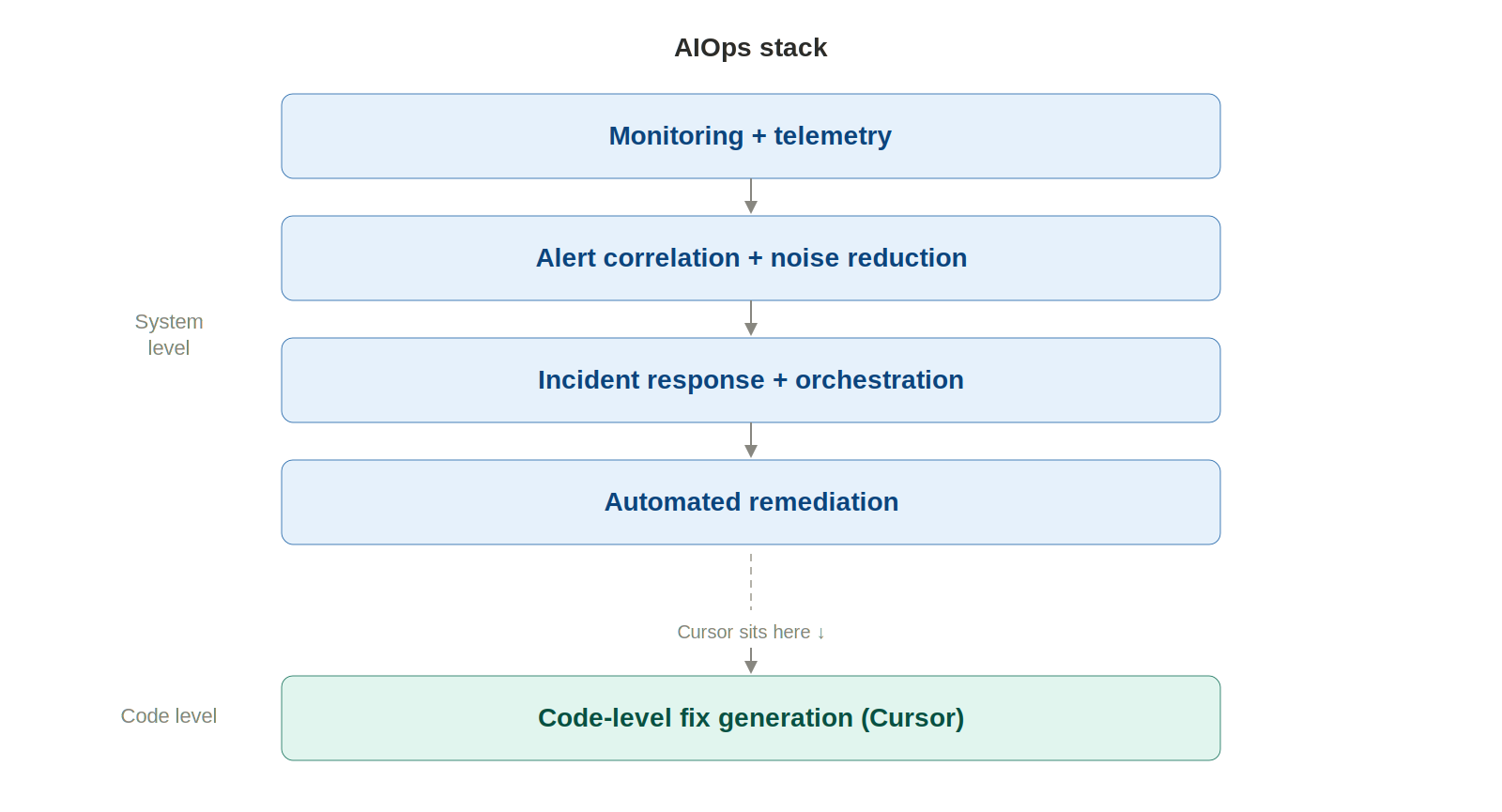
Cursor won't replace AIOps tools. What it does well is fill specific holes in the incident response workflow that AIOps platforms don't touch. Five use cases stand out:
Paste error logs into the agent. Cursor reads the stack trace, finds relevant files across the codebase, and narrows down the root cause with full project context. With the Datadog Cursor extension connected via MCP, it pulls logs, metrics, and traces right from the IDE. No browser needed. The time between "I see an alert" and "I understand the code path" drops from minutes to seconds.
Every team has runbooks. Almost every team's are outdated. Cursor drafts runbooks grounded in what the codebase actually looks like right now—real file paths, real config values, real commands. Even better, it updates existing runbooks by flagging stale references and outdated commands. Still needs human review, but the maintenance burden drops considerably.
Tell the agent what went wrong, point it at deployment files, and you get rollback scripts, config patches, hotfix code. The PagerDuty MCP plugin lets engineers pull incident context and on-call schedules straight into the editor. A common pattern: engineer spots a bad deployment, pivots to Cursor, has a draft rollback PR in minutes.
Cursor traces Terraform resource definitions through module references, variable files, and provider configs. It catches YAML indentation errors, missing labels, and misconfigured resource limits that file-level linters miss. StackGen's MCP integration brings IaC generation and SRE remediation workflows into the editor, grounded in the team's actual infrastructure standards.
"Write a Bash script to rotate secrets across dev, staging, and prod." Done on the first attempt. "kubectl command chain to cordon, drain, and uncordon a node safely." Right sequence, right flags. Small wins individually; hours recovered weekly.
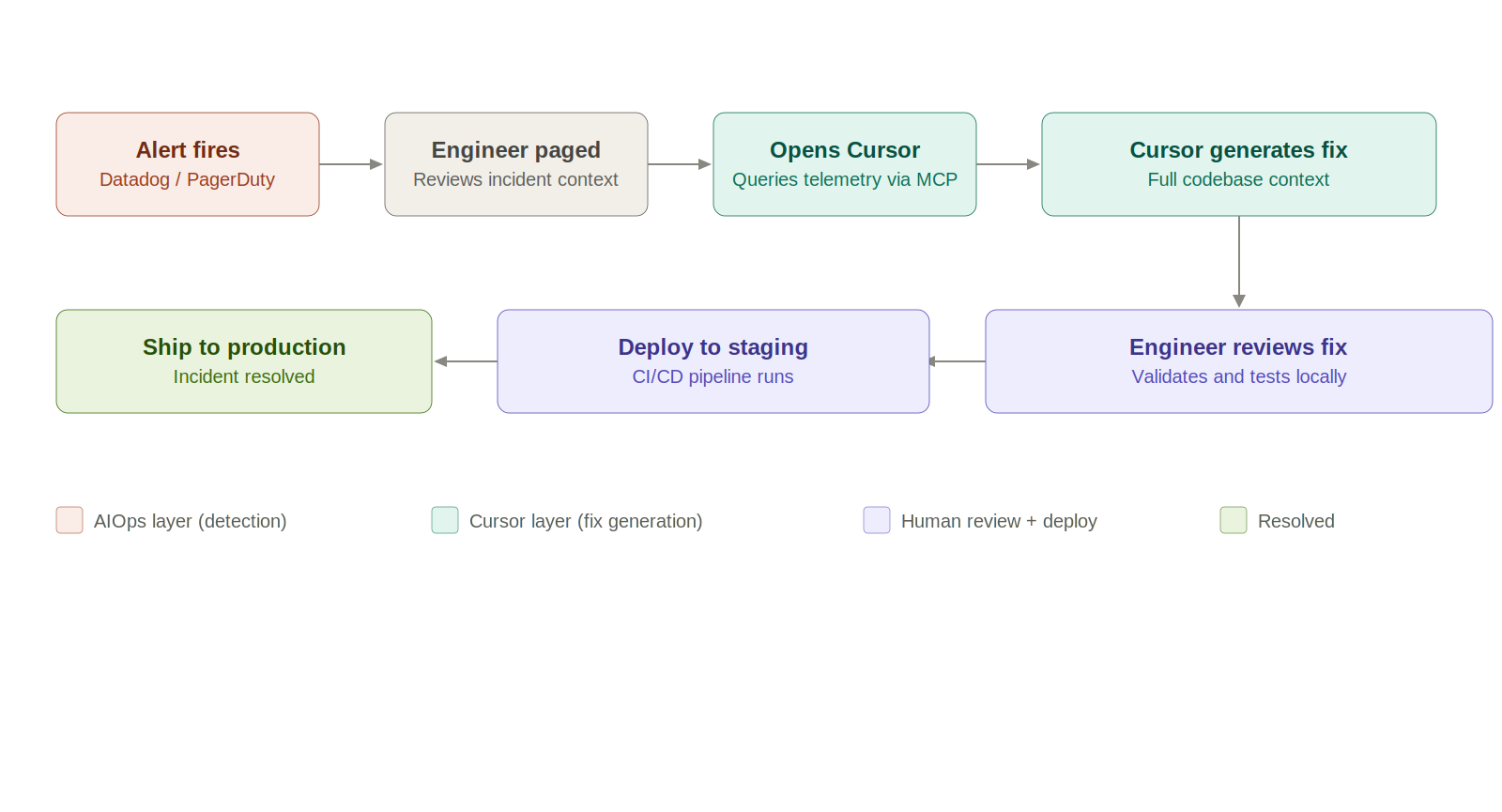
The limitations are real. At a glance:
Cursor helps you fix problems. It won't tell you what the problem is.
AIOps tells you what broke. Cursor tells you how to fix it. Different jobs entirely.
The missing piece? The handoff between detection and resolution. MCP is chipping away at this—Datadog's and PagerDuty's MCP servers let Cursor query telemetry and incident data. But most integrations are still in preview. The data traversal is engineer-directed, not autonomous. Safety guarantees for AI-generated infrastructure changes in prod? Nonexistent.
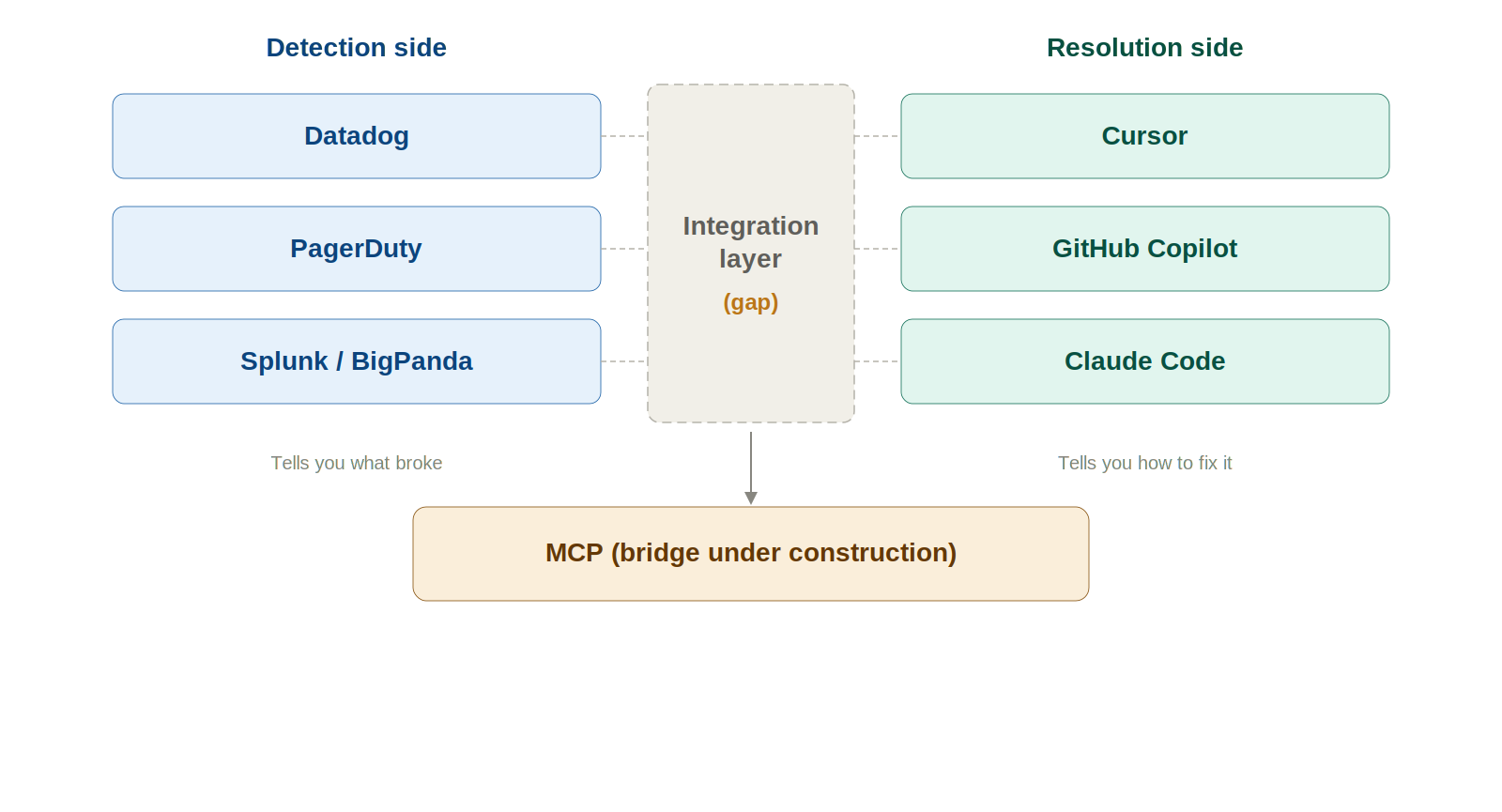
Four problems surface when you move beyond one engineer experimenting:
Six guardrails that matter:
The detection-to-resolution gap won't stay this wide. Four trends to watch:
TrueFoundry's AI Gateway provides the observability, governance, and routing layer that production LLM deployments need. As AI agents take on bigger roles in ops workflows, that gateway layer becomes foundational—rate limits, token cost tracking, model fallbacks, audit trails for every AI-driven action.

Cursor speeds up the things SREs already do—tracing code, writing rollbacks, refreshing runbooks, grinding through toil. It belongs in the toolkit.
What it can't do: detect anomalies, correlate alerts, watch your infra, manage incident lifecycles. Use it as the execution layer—the tool you grab after AIOps tells you what's broken. Pair it with Datadog, PagerDuty, and MCP. Always keep a human between the AI-generated fix and production.
Use both. Don't swap one for the other.
1. Can Cursor replace tools like Datadog or PagerDuty, which are AIOps tools?
The answer is a definitive "no," as they solve different problems. Datadog, PagerDuty, or other AIOps tools are primarily used to identify problems in real-time, whereas Cursor, being an AI coding agent, runs within the codebase. It aids developers in debugging, understanding, and even generating code to fix a problem once identified. In other words, Datadog tells you what’s broken and where, whereas Cursor tells you how to fix the problem.
2. How are AI coding agents used in incident response?
AI coding agents, which include Cursor, are increasingly being used during the triage and resolution phases of an incident. Developers enter the relevant logs, stack traces, or error messages, which are then used by the AI coding agents to scan the entire codebase to identify the most probable cause of the incident. In addition to this, AI coding agents are used to generate scripts to roll back code, generate hotfixes, update or create runbooks based on the current code, suggest fixes to the infrastructure, or even automate commands.
3. What is the difference between AIOps tools and AI coding agents?
The difference between AIOps tools and AI coding agents lies in the intelligence they provide. AIOps tools, which include Datadog, PagerDuty, etc., analyze telemetry data to identify anomalies, correlate alerts, and predict failures in a distributed system. On the other hand, AI coding agents, which include Cursor, work within the codebase to help developers understand the application’s logic, dependencies, and configuration to generate code.
In other words, AIOps tools provide intelligence to identify problems, whereas AI coding agents provide intelligence to fix problems. AIOps answers "What is happening in production?" AI agents answer "What change do we need to make to fix it?" We need both to get a full answer to the question of "What happened?" which is part of a full incident response cycle.
4. Is it safe to use AI-generated fixes in production systems?
It is not safe to use AI-generated fixes in production systems without careful controls in place. There is a risk of "correct" but logically wrong or unsafe code being generated by the AI. In infrastructure-related areas such as Terraform or Kubernetes, small changes can have big blast radii. Some best practices to mitigate this risk are to ensure validation is performed, to stage changes, to have a person review changes, to have audit logs of changes made by the AI, etc. It is best to treat the AI as a copilot, not a solo operator in a production system.
5. How does MCP (Model Context Protocol) integrate AIOps and AI agents?
MCP is a protocol that enables a bridge between systems and tools, specifically between AIOps tools and AI coding tools such as Cursor. It enables the AI to directly query external systems such as Datadog, PagerDuty, or Slack to get relevant context such as logs, incidents, alerts, etc. It reduces the need to manually switch tools, copy, and paste data, which is a common problem in software development today. It enables the AI to work directly with the context of the production system, which is a big advantage, but in a development environment. However, most integrations today are engineer-driven, read-only, meaning the AI is not acting on the systems, but is instead using the data it can get to assist in a problem resolution.
6. What are the biggest risks of using AI in DevOps or AIOps workflows?
There are a variety of risks, but the major ones are related to over-reliance on the technology in a high-stakes environment, such as hallucinated fixes, code that looks perfect but is solving the wrong problem, etc. Lack of system awareness: AI systems lack an intrinsic understanding of the current state of a system in real-time, unless made available to them.
Security risks: Access to configs, secrets, or IAM policies might be mismanaged
Lack of intrinsic auditability: Many tools lack the capability to track the changes made by the AI and the reasons behind them
Over-automation: Skipping validation or human review might cause issues in production systems
To mitigate this, teams require guardrails, observability, and governance layers around the usage of AI, rather than just models.
Blazingly fast way to build, track and deploy your models!
TrueFoundry AI Gateway delivers ~3–4 ms latency, handles 350+ RPS on 1 vCPU, scales horizontally with ease, and is production-ready, while LiteLLM suffers from high latency, struggles beyond moderate RPS, lacks built-in scaling, and is best for light or prototype workloads.



The latest news, articles, and resources sent to your inbox
© 2025 All rights reserved.


.png)