November 5, 2026
|
5 min read


احصل على وصول فوري إلى بيئة TrueFoundry مباشرة. انشر النماذج، ووجّه حركة مرور LLM، واستكشف المنصة بالكامل — بيئة الاختبار الخاصة بك جاهزة في ثوانٍ، ولا يلزم وجود بطاقة ائتمان.



Blazingly fast way to build, track and deploy your models!
نظام RBAC في Kubernetes هو نمط التخويل الذي يحدد ما إذا كان الطلب الموثق إلى خادم واجهة برمجة التطبيقات (API server) مسموحاً به أم لا. يأتي هذا النظام ضمن مجموعة واجهة برمجة التطبيقات rbac.authorization.k8s.io/v1 ويتم تفعيله في جميع المجموعات (clusters) المُدارة تقريباً.
المصادقة والتخويل خطوتان منفصلتان. يقوم خادم واجهة برمجة التطبيقات أولاً بتحديد هويتك – سواء من خلال شهادة العميل، أو رمز OIDC، أو رمز ServiceAccount، أو هوية IAM السحابية – ثم يسأل نظام RBAC عما إذا كان مسموحاً لهذه الهوية بتنفيذ هذا الفعل على هذا المورد. لا يحدد نظام RBAC الهوية أبداً، بل يحدد الصلاحيات فقط.
تتطابق قاعدة RBAC مع مجموعة صغيرة من حقول الطلب:
هناك خاصيتان تهمان أكثر من أي تفصيل في الصيغة.
نظام RBAC تراكمي. لا يوجد خيار للرفض (deny). إذا منحتك أي عملية ربط صلاحية ما، فستحصل عليها، والطريقة الوحيدة لإزالتها هي إزالة كل عملية ربط تمنحها. ومن هنا تأتي الشكوى المعتادة: "لقد أزلت دور المسؤول الخاص بهم ولكن لا يزال بإمكانهم حذف الـ pods".
نظام RBAC يرفض افتراضياً. أي فعل لم يتم منحه يُرفض تلقائياً. لذا، فإن الخطر العملي لا يكمن تقريباً في فقدان قاعدة ما، بل في وجود قاعدة أوسع بكثير مما كان مقصوداً.
الـ Role هو كائن مرتبط بنطاق اسمي (namespaced). يمنح صلاحيات على الموارد الموجودة داخل نطاق اسمي معين، وفقط داخل النطاق الذي يقع فيه.
apiVersion: rbac.authorization.k8s.io/v1
kind: Role
metadata:
  name: pod-reader
  namespace: team-alpha
rules:
  - apiGroups: [""]              # "" is the core API group
    resources: ["pods", "pods/log"]
    verbs: ["get", "list", "watch"]
الـ ClusterRole ليس مرتبطاً بنطاق اسمي. إنه موجود مرة واحدة للمجموعة (cluster) بأكملها ويعبر عن ثلاثة أشياء لا يمكن للـ Role القيام بها:
apiVersion: rbac.authorization.k8s.io/v1
kind: ClusterRole
metadata:
  name: node-viewer
rules:
  - apiGroups: [""]
    resources: ["nodes"]          # cluster-scoped
    verbs: ["get", "list", "watch"]
  - nonResourceURLs: ["/healthz"]
    verbs: ["get"]
عادةً ما يُطرح السؤال حول الفرق بين Role و ClusterRole في Kubernetes وكأنه يتعلق بالصلاحيات، بينما هو في الواقع يتعلق بـ النطاق وإعادة الاستخدام:
هناك أربعة أدوار عنقودية (ClusterRoles) افتراضية يجدر بك معرفتها قبل كتابة أدوارك الخاصة: view (قراءة معظم الموارد ذات النطاق المخصص لمساحة الأسماء، مع استبعاد الأسرار (Secrets) بشكل متعمد)، edit (قراءة/كتابة معظم الموارد، بما في ذلك الأسرار (Secrets))، admin (تعديل وإنشاء الأدوار وربط الأدوار في مساحة الأسماء)، و cluster-admin (* على *، في كل مكان).
تعد view و edit و admin عبارة عن أدوار عنقودية مجمعة (aggregated ClusterRoles): يقوم المتحكم بملء قواعدها من أي دور عنقودي (ClusterRole) يحمل تصنيفاً يطابق قاعدة التجميع الخاصة به. هذه هي الطريقة المدعومة لتوسيع نطاقها لتشمل تعريفات الموارد المخصصة (CRDs) الخاصة بك.
لا يمنح الدور (Role) أو الدور العنقودي (ClusterRole) أي صلاحيات بمفرده. بل يقوم الربط (binding) بإلحاقه بالكيانات (subjects).
يعد RoleBinding محدداً بنطاق مساحة الأسماء ويمنح مرجع دوره (roleRef) للكيانات التابعة له داخل مساحة الأسماء الخاصة به.
apiVersion: rbac.authorization.k8s.io/v1
kind: RoleBinding
metadata:
  name: alpha-pod-readers
  namespace: team-alpha
subjects:
  - kind: Group
    name: team-alpha-engineers
    apiGroup: rbac.authorization.k8s.io
roleRef:
  kind: Role
  name: pod-reader
  apiGroup: rbac.authorization.k8s.io
أهم ما يجب معرفته حول RoleBinding في Kubernetes هو أن مرجع دوره (roleRef) قد يشير إلى ClusterRole، وتبقى الصلاحيات محصورة ضمن مساحة أسماء RoleBinding. حدد الإمكانية مرة واحدة، ثم امنحها لمساحة أسماء تلو الأخرى:
apiVersion: rbac.authorization.k8s.io/v1
kind: RoleBinding
metadata:
  name: alpha-viewers
  namespace: team-alpha
subjects:
  - kind: ServiceAccount
    name: reporting
    namespace: team-alpha
roleRef:
  kind: ClusterRole
  name: view                     # scoped to team-alpha by this binding
  apiGroup: rbac.authorization.k8s.io
يعد ClusterRoleBinding يزيل ذلك الحد، حيث يمنح الدور العنقودي (ClusterRole) في كل مكان – في كل مساحة أسماء، بالإضافة إلى جميع الموارد ذات النطاق العنقودي المشمولة في الدور.
ثلاث قواعد غالباً ما يقع فيها المستخدمون في حيرة:
يتعرف نظام RBAC على ثلاثة أنواع من الموضوعات، وما يميز بينها هو مصدرها.
لا يوجد مورد باسم User – فلا يمكنك تنفيذ أمر kubectl create user. يقوم Kubernetes بمطابقة اسم المستخدم وقائمة المجموعات التي يؤكدها المصادق (authenticator) مع عمليات الربط كنصوص عادية، لذا أي خطأ مطبعي في اسم الموضوع لن يمنح أي صلاحيات بصمت، دون ظهور أي خطأ عند التطبيق.
حسابات الخدمة (ServiceAccounts) هي الهوية التي تستخدمها أعباء العمل الخاصة بك. أي Pod لا يحدد حساباً معيناً يعمل باستخدام الحساب الافتراضي لمساحة الاسم، والذي لا يمتلك أي صلاحيات ولكن يتم تحميل رمزه المميز (token) والمصادقة به – لذا اضبط automountServiceAccountToken: false في أي مكان لا يحتاج فيه الـ Pod للاتصال بخادم API.
يقوم Kubernetes أيضاً بإنشاء مجموعات يجب ألا تستخدمها في الربط إلا بحذر شديد: system:authenticated (لكل هوية مصادق عليها)، و system:serviceaccounts (لجميع حسابات الخدمة على مستوى العنقود)، و system:masters، التي يربطها الإعداد الافتراضي مباشرة بصلاحية cluster-admin.
التوجيهات الرسمية مختصرة، وتتمحور جميعها تقريباً حول النطاق (scope).
فضل استخدام Roles الخاصة بمساحات الأسماء. ابدأ دائماً باستخدام Role و RoleBinding. استخدم ClusterRole فقط عندما يكون المورد مرتبطاً فعلياً بالعنقود بالكامل أو إذا كنت ترغب في تعريف واحد قابل لإعادة الاستخدام – وحتى في هذه الحالة، اربطه باستخدام RoleBinding ما لم يكن الموضوع يحتاج حقاً إلى الوصول لكل مساحات الأسماء.
لا تمنح صلاحية cluster-admin لأحد. إن استخدام * على * يشمل كائنات RBAC نفسها، مما يتيح للحاصل على الصلاحية منح نفسه أي شيء بشكل دائم. احتفظ بهذه الصلاحية فقط لحالات الطوارئ القصوى.
تجنب استخدام الرموز العامة (wildcards). إن استخدام resources: ["*"] يشمل تلقائياً تعريفات الموارد المخصصة (CRDs) التي قد تُثبت لاحقاً، كما أن verbs: ["*"] تتضمن صلاحية deletecollection. قم بتحديد الموارد والأفعال بدقة.
قم بربط المجموعات (Groups) وليس المستخدمين الأفراد. إنشاء ربط لكل مستخدم على حدة سيسبب مشكلة عند مغادرة الموظفين. قم بربط مجموعات مزود الهوية (IdP) الخاصة بك داخل العنقود (Cluster)، بحيث لا تحتاج إلى تعديل ملفات YAML عند تغير أعضاء الفريق.
تعامل مع صلاحية list على الأسرار (Secrets) على أنها صلاحية قراءة كاملة لها. بما أن أمر list يعيد محتوى الكائنات بالكامل، فهو لا يقل خطورة عن get. كما أن قراءة الأسرار تكشف بيانات اعتماد حساب الخدمة (ServiceAccount) الخاص بذلك النطاق (namespace).
تعرف على أفعال التصعيد (escalation verbs). تسمح صلاحية create على الـ pods للمستخدم بتشغيل pod بأي حساب خدمة (ServiceAccount) داخل النطاق ووراثة صلاحياته. أما escalate و bind فيقومان بإزالة القيود التي تمنعك من منح صلاحيات لا تملكها أصلاً، بينما تتيح لك impersonate تقمص هوية مستخدم آخر.
قم بالتدقيق باستخدام الأدوات المخصصة، وليس عبر قراءة ملفات YAML. بما أن الصلاحيات تراكمية وتأتي من عدة روابط، فإن خادم واجهة برمجة التطبيقات (API server) هو الوحيد الذي يمتلك الإجابة الدقيقة:
kubectl auth can-i delete pods --namespace team-alpha
kubectl auth can-i --list --namespace team-alpha
kubectl auth can-i list secrets \
--as=system:serviceaccount:team-alpha:reporting -n team-alpha
يتطلب استخدام --as صلاحية تقمص الهوية (impersonation)، والتي يمتلكها المسؤولون عادةً. طبق ملفات RBAC باستخدام kubectl auth reconcile، حيث تقوم بدمج القواعد والمواضيع بدلاً من استبدالها بالكامل.
استخدام ClusterRoleBinding في حين أن RoleBinding يكفي للغرض المطلوب. هذا هو الخطأ الأكثر شيوعاً؛ حيث يحتاج شخص ما إلى صلاحية العرض (view) في نطاقه الخاص، وبما أن ClusterRole موجود بالفعل، يتم استخدام ClusterRoleBinding لأنه أقصر بسطر واحد، لكنه يمنح صلاحية القراءة عبر جميع النطاقات، بما في ذلك النطاقات التي تحتوي على الأسرار (Secrets).
Assuming namespaces isolate more than they do. A namespace is the scoping unit for RBAC and nothing else – not a network, node, or resource boundary. “They only have access to their namespace” is a claim about the API server, not the cluster.
Binding to system:authenticated for convenience. It looks like “everyone on the team.” It means every identity that can authenticate, including every ServiceAccount in every namespace.
Believing cluster RBAC covers the platform running on the cluster. A data scientist with zero Kubernetes permissions may still deploy a service, call a model, or read a secret, because those actions go through a platform API that cluster RBAC never sees.
Kubernetes RBAC answers one question precisely: who may perform this verb on this Kubernetes object? It has no opinion about a second question that matters just as much on an AI platform: who may deploy this model, use this provider account, call this MCP tool, or read this secret group? Those are not Kubernetes objects. They live in a control plane, reached through a platform API, and no Role or RoleBinding governs them.
TrueFoundry is Kubernetes-native – the compute plane is one or more of your own EKS, GKE, AKS, OpenShift, or on-prem clusters, connected outbound to the control plane by a lightweight tfy-agent. Both layers are present at once, so it pays to be exact about which is which.
The two models share a vocabulary, and not by coincidence. In TrueFoundry’s key concepts, a Cluster is an actual Kubernetes cluster and a Workspace is a Kubernetes namespace. Grant someone Workspace Member and you are scoping them to the same object a RoleBinding would.
What you are not doing is writing a RoleBinding. Platform roles and cluster RBAC objects are configured independently, in different places, and the docs describe no mechanism that generates, syncs, or translates one into the other. Two layers, one shared boundary. The docs draw the same line for audit: platform audit logs cover platform activity and explicitly do not replace infrastructure-level audit logs from Kubernetes or your cloud.
The model is subject + resource + role = role binding, which will look familiar. A subject is a user, team, virtual account, or agent; a resource is a cluster, workspace, repository, secret group, provider account, or MCP server. Grants start from the resource – open its three-dot menu and choose Access Control:

Then pick subjects and a role. The drawer lists the actions each role includes:
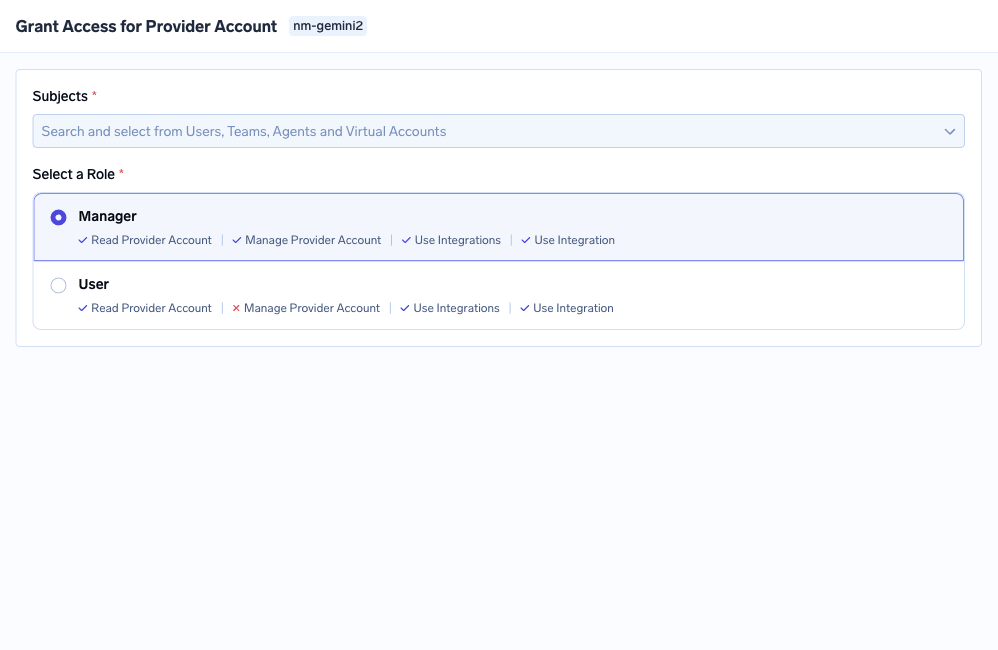
The roles offered depend on the resource type: Cluster Admin / Member / Viewer on a cluster, Workspace Admin / Member / Viewer on a workspace, Manager / User / Approver on an MCP server. Underneath, permissions are keys shaped resource:Action – cluster:ReadCluster, workspace:ManageWorkspace, secret-group:ReadData. Same rule shape as Kubernetes, different objects:
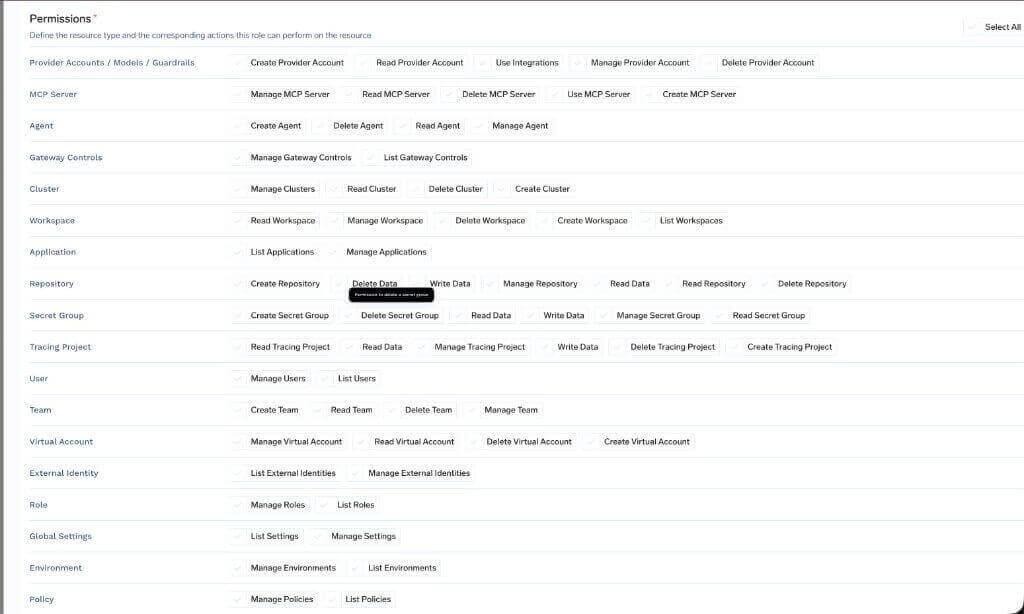
Tenant-wide roles are the platform analogue of a ClusterRoleBinding and carry the same warning. Admin and Read-Only Member cannot be edited. Member, the editable baseline every user gets, is deliberately thin – cluster:ReadCluster, user:ListUsers, agent:CreateAgent and a few more – reaching no individual workspace, model, or MCP server.
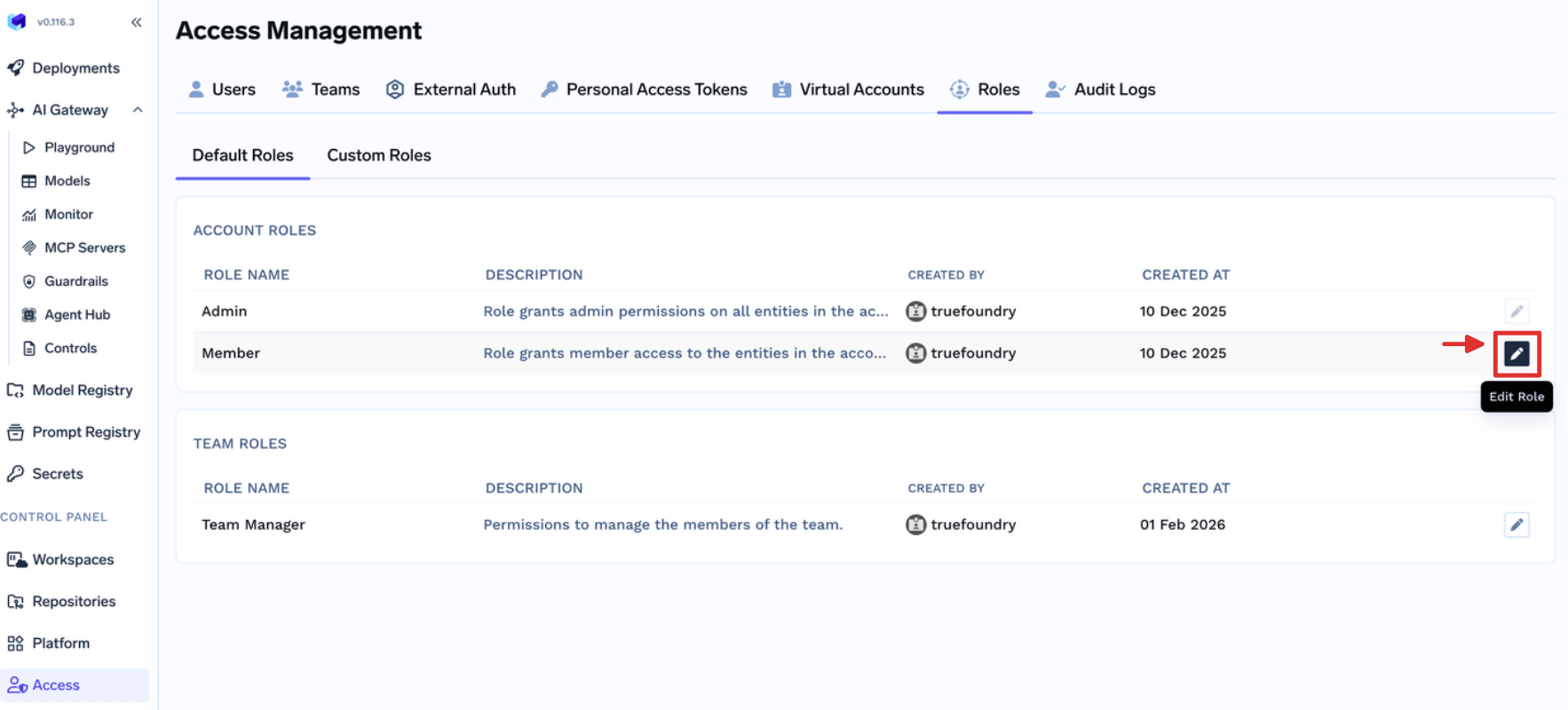
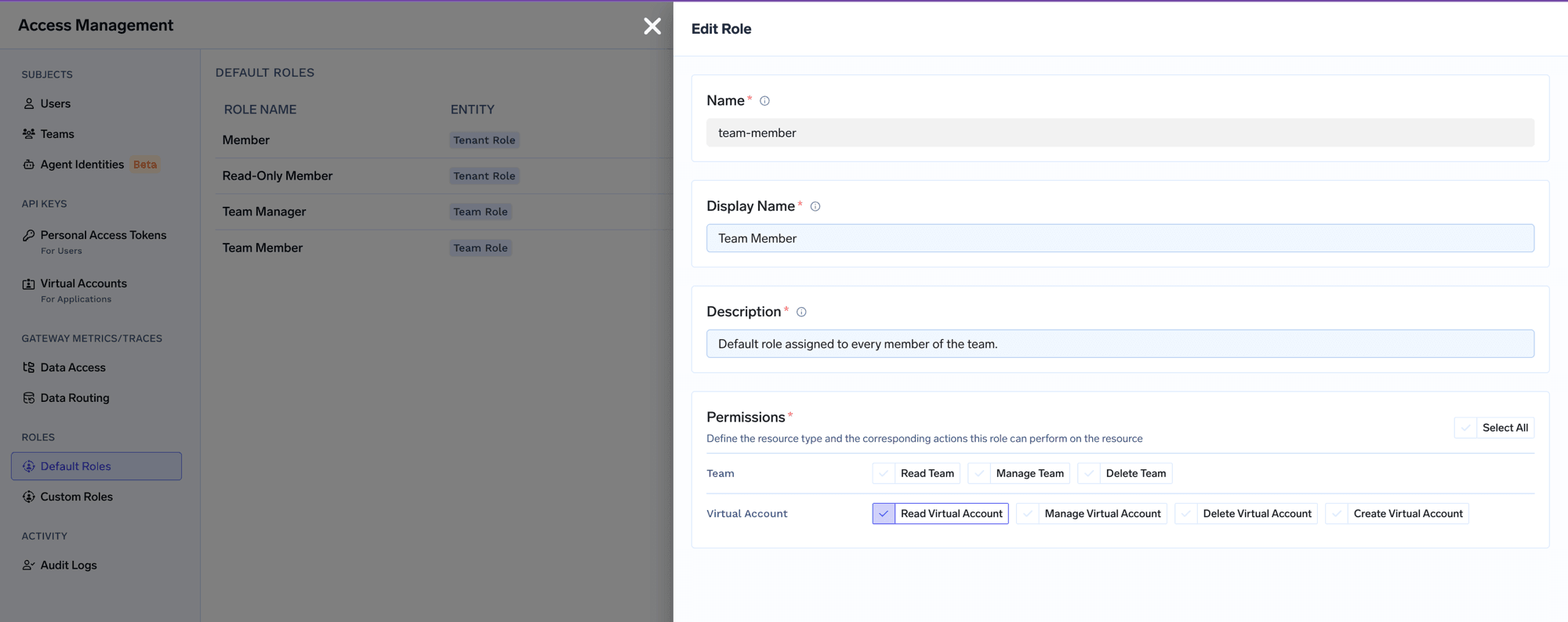
Team roles parallel a RoleBinding scoped by ownership: Team Member carries virtual-account:ReadVirtualAccount, limited to Virtual Accounts owned by teams the user belongs to.
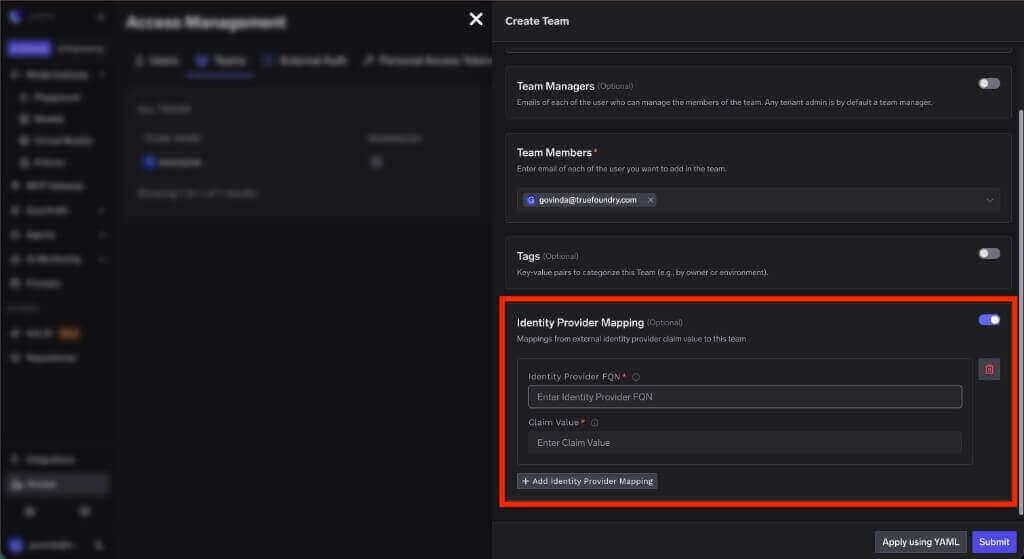
And the best practice about binding groups rather than users carries over intact. An IdP claim value maps to a TrueFoundry team, so the same directory group that drives your cluster bindings drives platform membership:
A realistic ask: let the ML team ship to their own namespace and stand up an MCP server, without making anyone a cluster admin or a tenant admin.
In Kubernetes. The namespace is ml-prod. Bind edit into that one namespace with a RoleBinding whose subject is the IdP-backed group:
apiVersion: rbac.authorization.k8s.io/v1
kind: RoleBinding
metadata:
  name: ml-team-edit
  namespace: ml-prod
subjects:
  - kind: Group
    name: ml-engineers
    apiGroup: rbac.authorization.k8s.io
roleRef:
  kind: ClusterRole
  name: edit
  apiGroup: rbac.authorization.k8s.io
Verify it, and check the blast radius in the negative direction too:
# --as-group must be paired with --as
kubectl auth can-i create deployments -n ml-prod \
  --as=priya --as-group=ml-engineers
kubectl auth can-i create deployments -n payments \
  --as=priya --as-group=ml-engineers
Note that edit includes Secrets in that namespace. If the team should not read them, bind a narrower custom ClusterRole.
In the platform. None of that lets anyone create an MCP server, because MCP servers are not Kubernetes objects. The instinct is to hand out Admin. Instead build a custom role from Access > Custom Roles holding exactly mcp-server:CreateMcpServer:
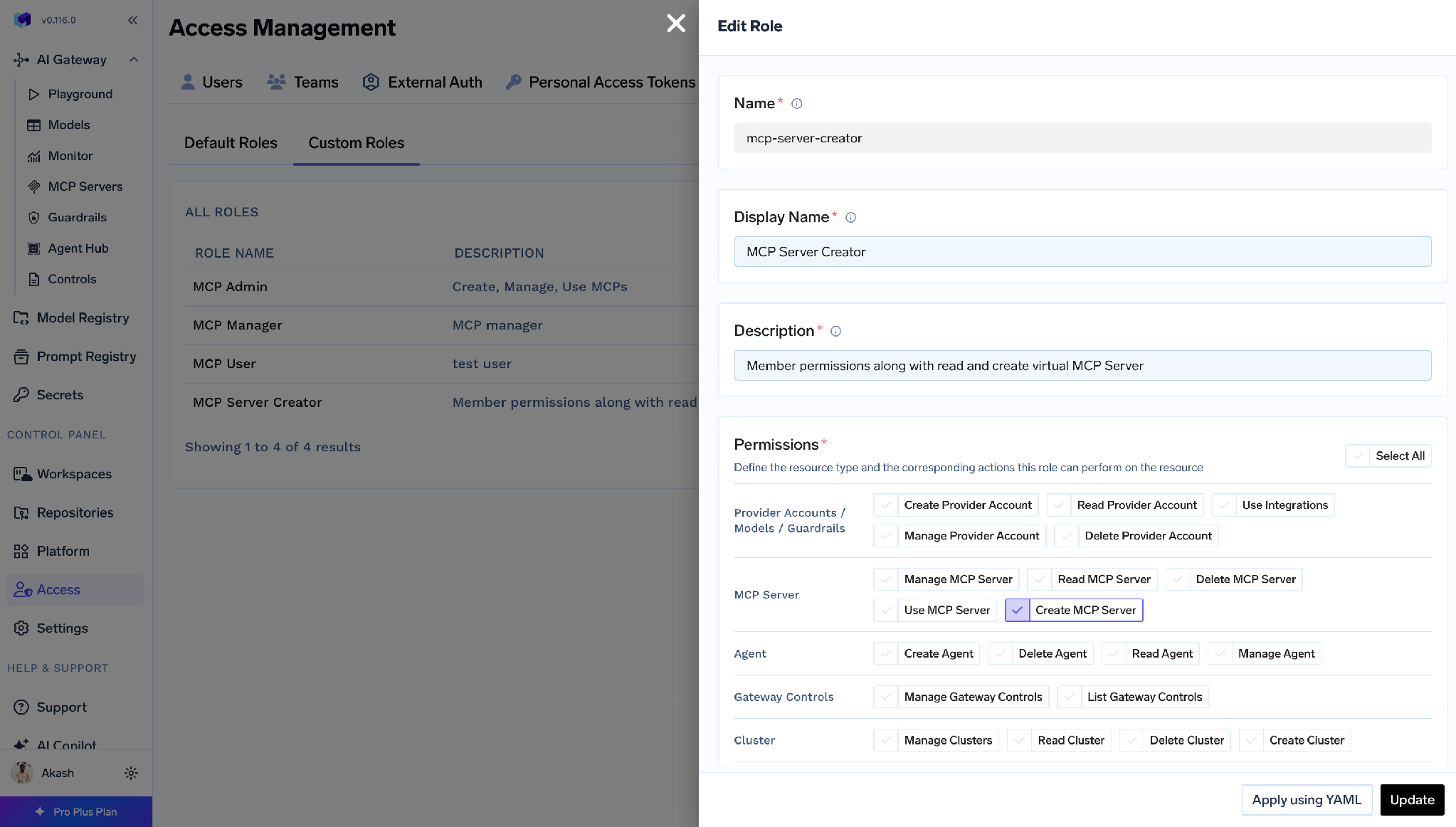
Then assign it from Access > Users or Access > Teams.
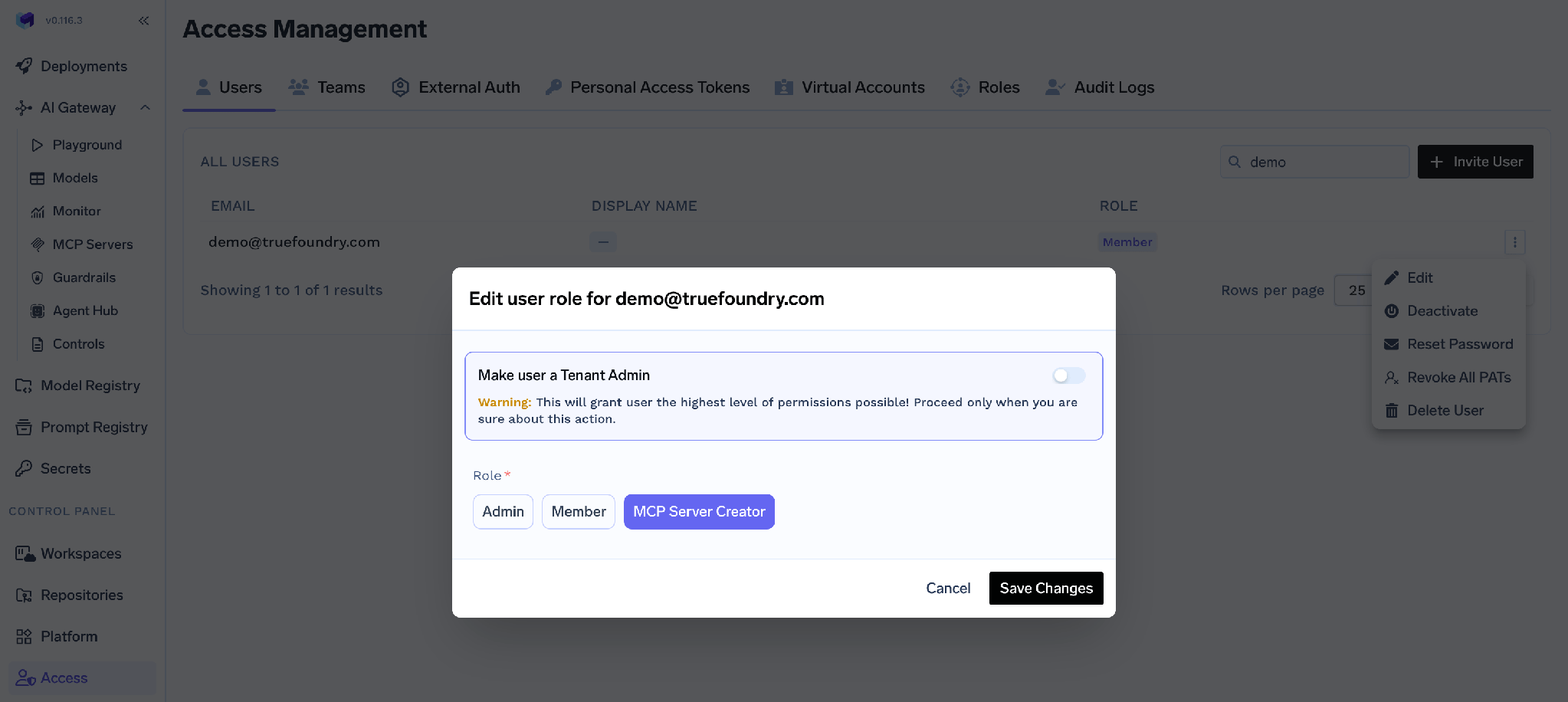
The behaviour mirrors Kubernetes precisely. Create MCP Server allows creating a new server and grants nothing on existing ones – exactly as create on a Kubernetes resource grants nothing on objects that already exist. The owner then grants themselves MCP Server Manager from that server’s own Access Control page, and MCP access control governs which tools the agent may call.
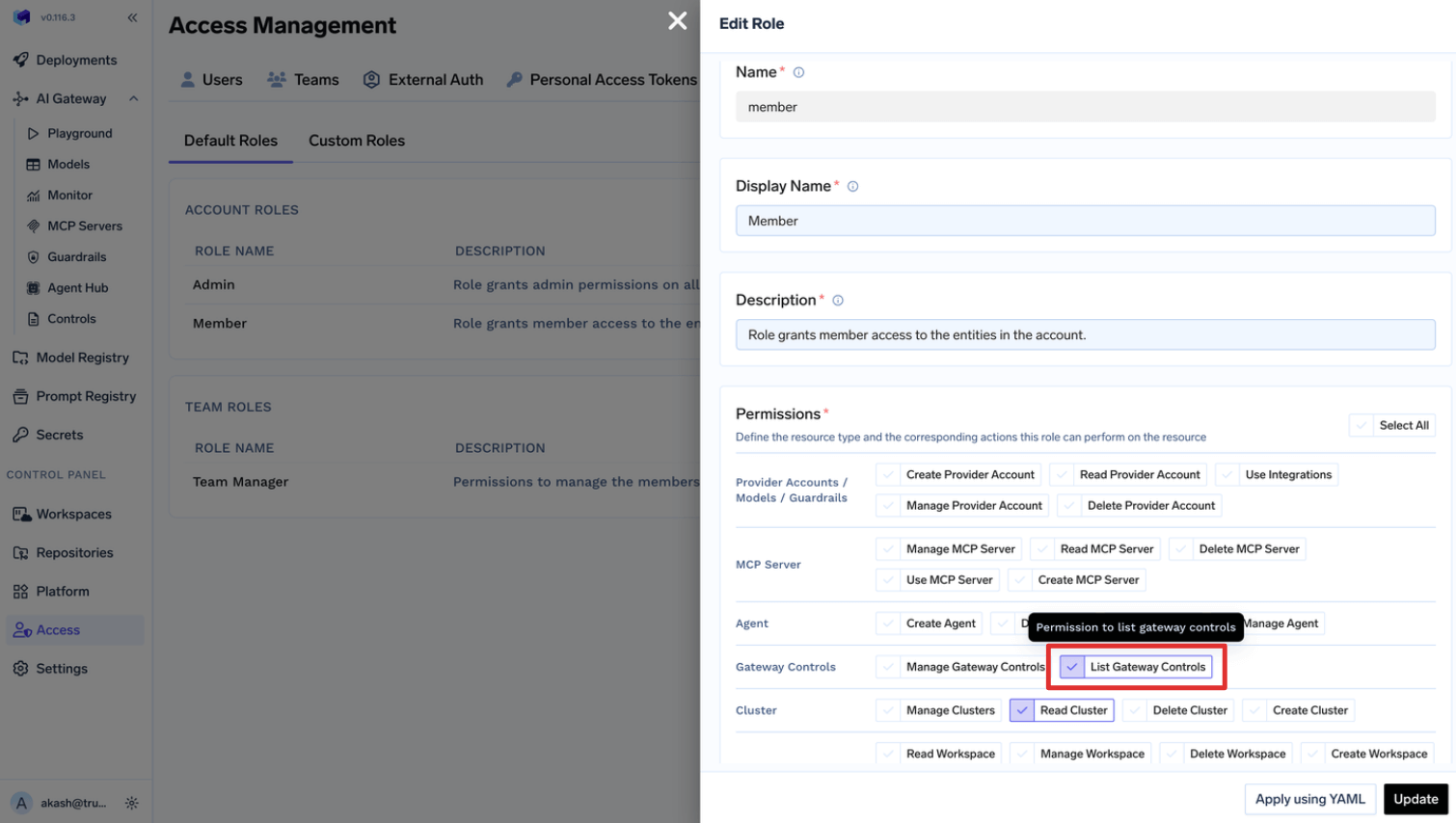
One more parallel: custom-role permissions apply across all resources of the selected type, the way a ClusterRoleBinding applies across all namespaces. For one resource, use that resource’s Access Control page. The same holds when widening the baseline – adding gateway-controls:ListGatewayControls to Member gives it to every user:
The platform’s own agent is a Role vs ClusterRole case study. tfy-agent needs a ClusterRole and ClusterRoleBinding to run informers, because Kubernetes informers cannot watch a subset of namespaces – so it is read-only and filters client-side. tfy-agent-proxy, which actually writes, is the one you can narrow: config.allowedNamespaces switches it to per-namespace RoleBindings, and tfyAgentProxy.clusterRole.strictMode: true cuts it to a minimum permission set. That is the general rule in miniature.
Grants combine on both layers, and removing one does not remove the other. In Kubernetes, effective access is the union of every matching binding. In TrueFoundry, a subject can hold access directly and inherit it from a team. Check every source before concluding a removal failed.
Editing a platform default team role changes it for every team. Team Member and Team Manager are edited under Access > Default Roles، وهذا التعديل عالمي. فإضافة virtual-account:ManageVirtualAccount لتمكين فريق واحد من استرداد الرموز يمنح هذا الصلاحية لجميع الفرق. وتواجه Kubernetes المخاطرة نفسها ولكن بصورة مختلفة: فتعديل ClusterRole مشترك يؤدي إلى تغييره في كل عملية ربط تشير إليه.
معظم مشكلات التحكم في الوصول (RBAC) في Kubernetes تتعلق بالنطاق لا بالصياغة. هناك نوعان من الكائنات يحددان الصلاحيات ونوعان يمنحانها؛ وتكمن المهارة في اختيار النطاق الأضيق عندما يكون النطاق الأوسع أسهل في الكتابة. ابدأ بـ Role على مستوى مساحة الأسماء (Namespace)، واستخدم ClusterRole مرتبطاً بـ RoleBinding عند الحاجة لإعادة الاستخدام، ولا تلجأ إلى ClusterRoleBinding إلا عندما يحتاج الكيان فعلياً إلى الوصول إلى العنقود (Cluster) بأكمله. اربط المجموعات، وتجنب استخدام الرموز البديلة (wildcards)، وتحقق من الصلاحيات باستخدام أمر kubectl auth can-i.
ما يسهل إغفاله هو أن كل هذا يجيب على سؤال واحد فقط. فكل ما تقوم به فرقك عبر واجهة برمجة تطبيقات المنصة – مثل نشر نموذج، أو استدعاء أداة MCP، أو قراءة مجموعة أسرار – يظل غير مرئي لنظام RBAC الخاص بالعنقود ويحتاج إلى معالجة مستقلة.
في TrueFoundry، تمثل هذه الطبقات طبقتين فوق البنية التحتية نفسها: تتشاركان الحدود لأن مساحة العمل (workspace) هي مساحة أسماء (namespace)، يتم تكوينها بشكل مستقل لأنها تحكم كائنات مختلفة. يحتاج مهندس المنصة إلى كليهما. وتكمن المشكلة في افتراض أن أحدهما يغطي الآخر.
TrueFoundry AI Gateway delivers ~3–4 ms latency, handles 350+ RPS on 1 vCPU, scales horizontally with ease, and is production-ready, while LiteLLM suffers from high latency, struggles beyond moderate RPS, lacks built-in scaling, and is best for light or prototype workloads.

هو نمط التفويض الذي يقرر هل يجوز لهوية موثَّقة تنفيذ فعل على مورد عبر API server. تكتب الأذونات في Role (ضمن namespace) أو ClusterRole (على مستوى العنقود)، ثم تربطها بالجهات المعنية عبر RoleBinding (لذلك الـ namespace فقط) أو ClusterRoleBinding (على مستوى العنقود). والقواعد تراكمية بلا منع صريح، وكل ما لم يُمنح يُرفض.
Role مرتبط بـ namespace ولا يمنح أذونات إلا على الموارد الواقعة داخل namespace الخاص به. أما ClusterRole فنطاقه العنقود كله، ويمكنه إضافةً إلى ذلك منح أذونات على الموارد ذات نطاق العنقود مثل العُقد ووحدات التخزين الدائمة، وعلى عناوين URL غير المرتبطة بموارد مثل /healthz. والفرق العملي هو إعادة الاستخدام: يُعرَّف ClusterRole مرة واحدة ويمكن ربطه بأي namespace بواسطة RoleBinding.
نعم، وهذا هو النمط الموصى به. تبقى الأذونات محصورة في namespace الخاص بـ RoleBinding، فتعرّف القدرة مرة واحدة وتمنحها فريقاً بعد فريق. والعكس غير مسموح: لا يمكن لـ ClusterRoleBinding أن يشير إلى Role أبداً.
نعم. تعمل TrueFoundry في VPC الخاصة بك أو محلياً أو في بيئة معزولة عن الشبكة أو هجينة، فلا تغادر التعليمات والردود نطاقك أبداً حتى وأنت توجّه الطلبات عبر مزوّدين كثيرين.
نعم. تتضمن MCP Gateway وAgent Gateway وMCP & Agents Registry مع تحكم في الوصول على مستوى الأدوات. ويمكن حوكمة الوكلاء المبنيين على LangGraph أو CrewAI أو AutoGen أو إطار عمل مخصص مركزياً.
نعم. البوابة متوافقة مع OpenTelemetry وتتكامل مع Grafana أو Datadog أو Prometheus أو حزمتك المفضلة. فهي تتتبع كل طلب من المطالبة إلى تنفيذ الأداة والنموذج، لتحصل على تسجيل موحد دون الحاجة إلى تغيير ما تستخدمه حاليًا.



أحدث الأخبار والمقالات والموارد تصلك مباشرة إلى بريدك الوارد