


October 22, 2026
|
5 min read


Obtenha acesso instantâneo a um ambiente TrueFoundry ao vivo. Implante modelos, direcione o tráfego de LLM e explore a plataforma completa — seu sandbox estará pronto em segundos, sem necessidade de cartão de crédito.



Blazingly fast way to build, track and deploy your models!
À medida que os agentes de voz migram das demonstrações para a produção, as equipes encontram um obstáculo familiar. A fala é a parte mais difícil da pilha tecnológica de se acertar, especialmente em mercados onde as pessoas não falam apenas um idioma de cada vez. Um cliente na Índia pode iniciar uma chamada em hindi, mudar para o inglês no meio da frase e disparar um número de pedido em uma mistura confusa de códigos. A maioria dos modelos de conversão de fala em texto tropeça exatamente nisso. E mesmo quando você encontra um que funciona, você acaba tendo que conectar mais um provedor ao seu gateway, gerenciar outra chave de API e torcer para que seus controles de registro e acesso sejam suficientes para cobri-lo.
A pergunta que toda equipe de voz acaba fazendo é: como conectar um modelo de fala especializado à sua plataforma sem transformá-lo em um projeto de engenharia único?
Na TrueFoundry, nosso objetivo é fazer com que cada modelo, não importa quão especializado, seja tratado como um cidadão de primeira classe no seu gateway. É por isso que estamos empolgados em trazer o Ringg.AImodelo de conversão de fala em texto Parrot para o TrueFoundry AI Gateway. Com uma única configuração de Custom Endpoint, suas equipes podem chamar o Parrot da mesma forma que chamam qualquer outro modelo no gateway, com a mesma autenticação, os mesmos controles de acesso e a mesma visibilidade centralizada.
O TrueFoundry AI Gateway é a forma como desenvolvedores e equipes de plataforma gerenciam, monitoram e escalam suas aplicações de IA a partir de um único lugar. Ele oferece acesso unificado a centenas de modelos, roteamento inteligente, chaves virtuais e observabilidade completa, tudo por trás de uma única API.
À medida que as pilhas de IA crescem, o verdadeiro desafio não é acessar um modelo. É a desorganização que vem depois. Cada novo provedor traz seu próprio SDK, suas próprias chaves e sua própria maneira de fazer as coisas. O Gateway coloca ordem nisso. Ele atua entre suas aplicações e seus modelos como um ponto de controle único, para que adicionar uma nova capacidade não signifique espalhar credenciais e códigos personalizados por toda a sua base de código. É isso que o torna o lar natural para um modelo especializado como o Parrot: você obtém o modelo de fala de que precisa sem abrir mão da consistência na qual você já confia.
O Parrot é o modelo de conversão de fala em texto da Ringg.AI, criado especificamente para agentes de voz em tempo real. Enquanto os modelos de transcrição de uso geral são treinados principalmente com áudio limpo e em um único idioma, o Parrot foi projetado para a forma como as pessoas realmente falam, com forte suporte para hindi, inglês e a fala com mistura de códigos que domina as conversas reais.
Esse foco é importante. Um agente de voz é tão bom quanto seus ouvidos. Se a transcrição perde uma palavra ou confunde a alternância entre idiomas, cada etapa subsequente, desde a detecção de intenção até a geração de resposta, herda o erro. Ao lidar com a fala confusa do mundo real com precisão e em tempo real, o Parrot oferece aos agentes de voz uma base confiável sobre a qual construir. É a diferença entre uma demonstração que funciona em uma sala silenciosa e um agente que se sustenta em uma chamada real com um cliente.
Os pontos fortes do Parrot aparecem nos detalhes que fazem os modelos gerais tropeçarem. Ele normaliza a saída em Devanagari para que a transcrição seja limpa o suficiente para que um LLM possa raciocinar diretamente sobre ela. Ele lida com sequências alfanuméricas, como números de pedidos e IDs, com mais precisão do que as opções típicas do mercado, e tem um desempenho melhor no reconhecimento de nomes próprios e entidades nomeadas. E faz tudo isso enquanto se classifica entre os mais rápidos modelos de conversão de fala em texto disponíveis.
Por exemplo, o Parrot lida com uma frase como "अभी तो I am taking hydroxychloroquine sulfate" de forma limpa, transcrevendo corretamente a alternância entre hindi e inglês, o Devanagari normalizado e o nome do medicamento em uma única passagem.
Trazer o Parrot para o TrueFoundry AI Gateway significa que você não precisa mais tratar a fala como um serviço separado e improvisado. O Parrot torna-se apenas mais um endpoint no seu gateway, regido pelas mesmas regras que todo o resto.
O benefício é uma separação clara de responsabilidades. Sua chave de API do Ringg.AI reside dentro do gateway e é enviada do gateway para a Ringg em cada solicitação. Suas aplicações nunca a veem. Seu cliente mantém apenas um Chave de API da TrueFoundry e se comunica com o gateway. Isso significa que você pode rotacionar credenciais, gerenciar quem tem permissão para usar o Parrot e auditar o uso a partir de um único painel, sem precisar alterar o código da aplicação. Você configura o Parrot uma única vez como um Custom Endpoint, define o controle de acesso para os usuários e equipes corretos, e ele fica disponível em toda a sua organização com a governança que você já espera.
O Parrot se conecta ao Gateway através de Custom Endpoints, o mecanismo da TrueFoundry para colocar qualquer API HTTPS atrás do caminho de proxy do gateway. O diagrama abaixo mostra o fluxo de ponta a ponta.
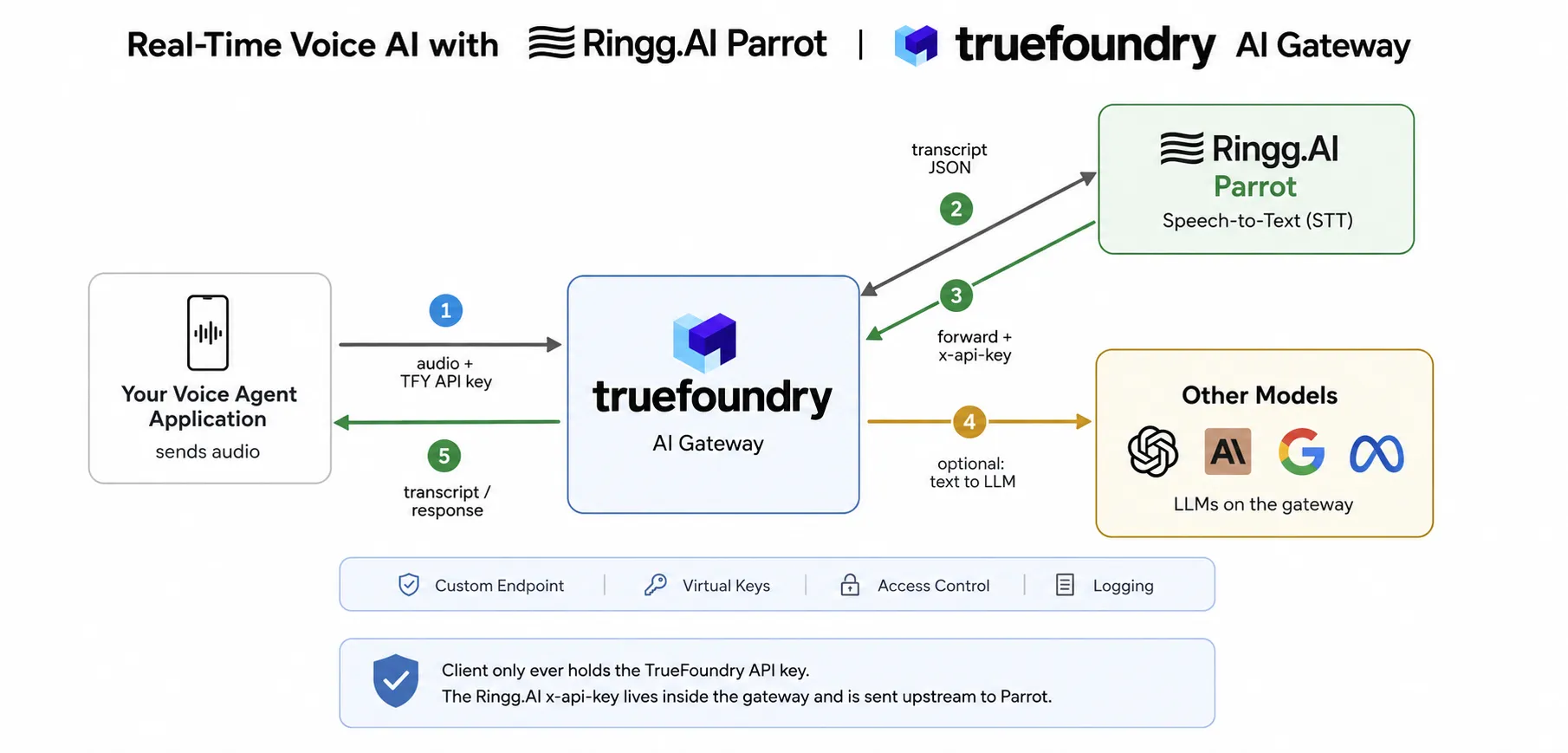
O fluxo em camadas funciona da seguinte forma:
1. Sua aplicação de voz envia um arquivo de áudio para o AI Gateway da TrueFoundry usando uma requisição multipart form, autenticada apenas com uma chave de API da TrueFoundry.
2. O Gateway encaminha a requisição para o Ringg.AI Parrot, anexando o cabeçalho x-api-key que ele mantém internamente. Parâmetros opcionais, como idioma e enable_cap_punc, são repassados.
3. O Parrot transcreve a fala e retorna a transcrição em formato JSON para o Gateway.
4. Opcionalmente, a transcrição pode ser encaminhada para qualquer LLM já presente no gateway, permitindo que um único painel de controle cubra tanto as etapas de fala quanto as de raciocínio do seu agente de voz.
5. O Gateway retorna a transcrição ou a resposta subsequente para sua aplicação, com a requisição completa registrada para fins de visibilidade.
Como a integração utiliza Custom Endpoints, não há sidecars, trocas de SDK ou gerenciamento de credenciais por modelo na sua aplicação. O gateway faz o proxy da requisição, injeta a chave upstream e registra a chamada.
A configuração é mais parecida com acionar um interruptor do que com um projeto de engenharia. No painel da TrueFoundry, vá para AI Gateway → Modelos → Endpoints Personalizados e:
1. Crie uma conta de provedor de Endpoint Personalizado. Dê a ela um nome exclusivo, que se tornará o providerAccountName na sua URL de chamada. Deixe a Autenticação de Cabeçalho (Header Auth) desativada.
2. Adicione um endpoint de STT da Ringg.AI. Defina o nome de exibição (isso se tornará o endpointName), defina a URL Base como https://prod-api.ringg.ai/stt/v1/transcriptions, habilite Cabeçalhos Personalizados e adicione x-api-key com sua chave da Ringg.AI.
3. Defina o controle de acesso para os usuários e equipes que devem usar este endpoint e, em seguida, salve.
Após salvar, você chama o Parrot através do caminho de proxy do gateway: {GATEWAY_BASE_URL}/proxy-api/{providerAccountName}/{endpointName}. Observe o escopo de suporte atual: apenas solicitações HTTPS e não baseadas em streaming são suportadas atualmente, com mais cobertura sendo adicionada conforme a solicitação dos clientes.
A IA de Voz não precisa de um caminho de integração separado para cada modelo. Com o Ringg.AI Parrot no TrueFoundry AI Gateway, você obtém conversão de fala em texto criada para conversas reais e com mistura de idiomas, conectada à mesma API unificada, controles de acesso e observabilidade que você já usa para o restante da sua stack. Para saber mais, consulte a referência de integração da Ringg.AI na documentação da TrueFoundry e a página do modelo Parrot STT para começar a desenvolver.
TrueFoundry AI Gateway delivers ~3–4 ms latency, handles 350+ RPS on 1 vCPU, scales horizontally with ease, and is production-ready, while LiteLLM suffers from high latency, struggles beyond moderate RPS, lacks built-in scaling, and is best for light or prototype workloads.





As últimas notícias, artigos e recursos enviados para sua caixa de entrada
.webp)


.png)
.png)
.png)
.png)
.png)
.png)
.png)
.png)
.png)
.png)
.png)


