

simple, medium, or complex and sends it to the target you configured for that tier. Your application calls one virtual model name, and the AI Gateway picks the model that serves each request.
Other routing strategies decide based on weights, priorities, or measured latency. Auto Routing decides based on the content of the request.
Up to 95% lower cost
Opus-level accuracy
Up to 40% faster
Requirements and availability
Auto Routing is generally available on all tenants. You do not need to request access. New virtual models still default to weight-based routing, so select Auto Routing when you create or edit one. The AI Gateway rejects the virtual model on save unless it meets these conditions:- Model types are limited to
chat,completion, andresponses. Embedding, image, audio, rerank, and moderation are not supported. - Each model appears only once. A model can be the target of only one tier, and only once within it.
- The classifier model is a catalog chat model for LLM classification, or a catalog
decisionmodel in a TypeSafe account for decision model classification. A virtual model cannot be a classifier.
How a request is routed
Filter targets by metadata
metadata_match, the AI Gateway drops non-matching targets first. Classification and escalation consider only the remaining targets.Check the conversation pin
Classify the request
simple, medium, or complex. If the conversation is pinned to a higher tier, it stays on that tier. A conversation pinned to complex skips classification.Build the target chain
Send the request
Update the conversation pin
Complexity tiers
There are three tiers, ordered from cheapest to most capable.Classification strategies
There are three strategies:- Heuristic (default): free and runs in-process.
- Decision model classifier: calls a TypeSafe decision model, such as Jev, with a built-in tier rubric.
- LLM classifier: calls a chat model you choose, at the cost of one model call per classified turn.
complex skips classification, because there is no higher tier.
What text gets classified
All three strategies read the same two pieces of text from the request body:- The last user message: the current turn.
- The last system or developer message: used as context. This includes the top-level
systemfield on Anthropic/messagesrequests and the top-levelinstructionsfield on/responsesrequests.
Heuristic classification (default)
The heuristic classifier checks the prompt for a fixed set of signals and picks a tier. It needs no configuration and applies whenclassification_strategy is not set.
Signals the heuristic uses
Signals the heuristic uses
complex, regardless of other signals.Empty prompts. A request with no classifiable text routes to simple.The signals and keyword lists are fixed. If they do not reflect how difficulty shows up in your traffic, use the decision model classifier.Examples
Examples
Decision model classification
The AI Gateway classifies the request by calling a TypeSafe decision model, such as Jev, with a built-in tier rubric. In the dashboard, this is Decision Model. To set it up, add a native TypeSafe model account and a model with Model Types set to Decision. Reference the model by its catalog FQN, such asmy-typesafe-account/jev.
/v1/systemone with the user text in state.request and the system context, if any, in state.context. It sends one choice question named tier with the options simple, medium, and complex, and reads the tier from answers.tier.choice. You do not write question JSON or classifier instructions. The tier rubric is fixed.
timeout_ms must be a positive integer. On a timeout, error, non-2xx response, or unusable tier, the configured fallback strategy applies. Conversation pinning and escalation work the same as with the other classifiers.
decision. A decision model such as Jev, accessed through OpenRouter or Custom Endpoints, cannot be the classifier. The virtual model that serves your application still declares chat, completion, or responses. decision applies only to the classifier model.LLM classification
The AI Gateway classifies the request by calling a chat model you choose. In the dashboard, this is LLM Based, and the optional Classifier Prompt field setsinstructions. LLM Based is listed only if a virtual model in your tenant already uses it.
fallback_strategy is required when classification_strategy.type is llm-classifier. The dashboard pre-fills the heuristic fallback, so this affects only configs written by hand or sent through the API. A config without it is rejected with must have required property 'fallback_strategy'.{"type": "heuristic"} matches the previous implicit behavior. Add it to existing configs to keep them working. classification_strategy itself is still optional and defaults to the heuristic strategy.How the classifier call works
How the classifier call works
- The classifier receives the request’s system context and user text, plus a short instruction block that describes the three tiers (or your
instructionsoverride). - The reply is constrained to a JSON schema (
{"tier": "simple" | "medium" | "complex"}) and capped at 256 output tokens. If a model ignores the schema and answers in prose, the AI Gateway uses the first tier name it finds. - After
timeout_ms(default2000), the call is abandoned and the fallback strategy applies.
Fallback when the classifier fails
If the classifier times out, errors, returns a non-2xx status, or returns nothing usable, the configured fallback strategy picks the tier and the request continues. Invalid classifier configuration, such as an unresolved model or the wrong provider account, is a separate case. See Validation errors.llm-classifier uses the same fallback_strategy options. The field is required for both model-based strategies, and the dashboard pre-fills Heuristic Fallback. For static, default_tier is required, and the dashboard pre-fills medium.
Use heuristic to keep classifying by content during a classifier outage. Use static to send all requests to one tier: default_tier: complex keeps quality at higher cost, and default_tier: simple keeps cost low at lower quality.
Escalation and fallback
Auto Routing builds an ordered chain of targets, so a request is still served when its tier has no usable target. For a request classified into tierT, the order is:
- Targets in tier
T, in the order you declared them. - Targets in higher tiers, one tier at a time.
- Targets in lower tiers, one tier at a time.
simple tries simple, then medium, then complex. A request classified as complex tries complex, then medium, then simple. The request fails only after every target fails.
Each target uses its own retry_config, fallback_status_codes, and fallback_candidate settings, the same as in the other routing strategies.
Conversation pinning
Auto Routing keeps a multi-turn conversation on the same tier and target. You do not need to configuresticky_routing, add a conversation header, or set a TTL.
- The first turn is classified as usual. After a successful response, the AI Gateway records the tier and target.
- Each later user turn is classified again.
- If the new turn is harder, the conversation moves up to the higher tier. The pin updates after a successful response.
- If the new turn is easier, the conversation stays on its current tier. A short follow-up such as “thanks” does not move it to a cheaper model.
- Once a conversation reaches
complex, later turns skip classification.
/completions and /responses with a string input, have no conversation, so each one is classified on its own.Benchmark results
We ran the heuristic and the decision model classifier with Jev on the same prompts and compared each one with sending every request to Claude Opus 5.5.

Cost saved on each workload. Pass rates are in the tables below.
Results by workload
- Graded benchmarks
- RouterArena
- Production-style traffic
Results by dataset
Results by dataset
Jev classifier overhead
We sent each benchmark prompt to Jev three times, outside of routing, for 3,924 calls.Quality on hard prompts
The two classifiers differ most as prompts get harder. On RouterArena’s easy prompts, both pass about as often as Opus 5.5. On medium and hard prompts, the heuristic still sends almost everything to Haiku 5.5, while Jev sends more of them to Sonnet and Opus. On medium prompts, Jev passes 84% and the heuristic 79%, against 88% for Opus 5.5. Hard prompts are hard for every model: Opus 5.5 passes 57%, Jev 35%, and the heuristic 29%. The hard set has only 49 prompts, so treat the gap there as a direction, not a precise figure.

RouterArena pass rate by difficulty label, with Opus 5.5 on every request for reference.
Which classifier to choose
Configure in the dashboard
You configure Auto Routing on a virtual model. See Create a virtual model for the full setup.Create the virtual model and choose Auto Routing
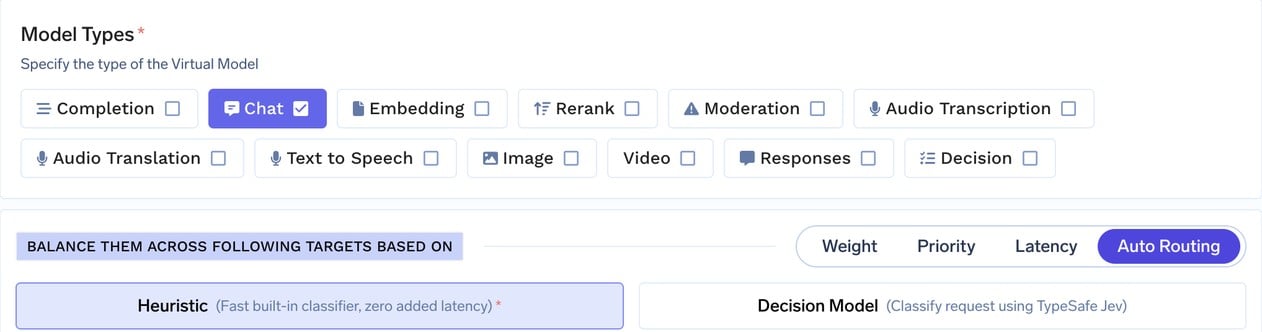
Creating a virtual model with Auto Routing selected
Pick a classification strategy
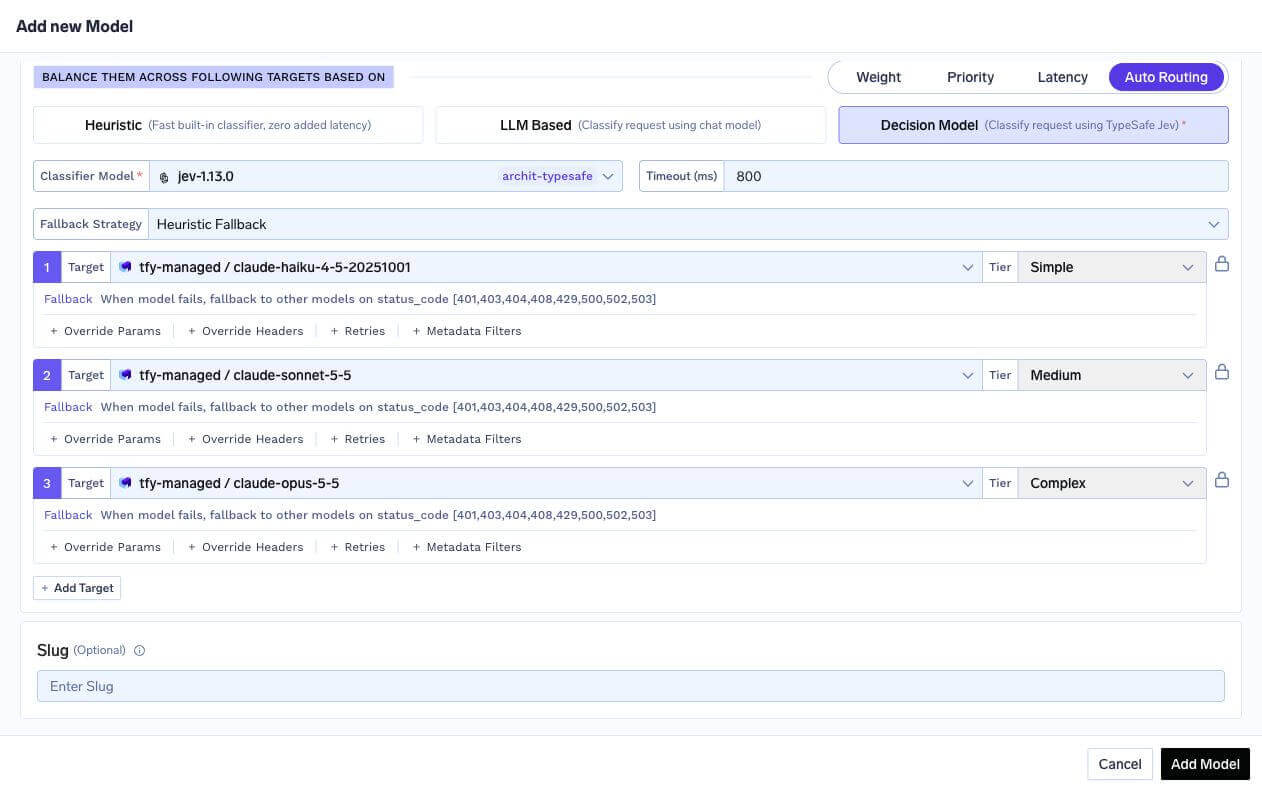
Decision Model classifier set to TypeSafe Jev, with an 800 ms timeout, heuristic fallback, and a target for each complexity tier
llm-classifier through the API or tfy apply. See LLM classification.Add targets and assign tiers
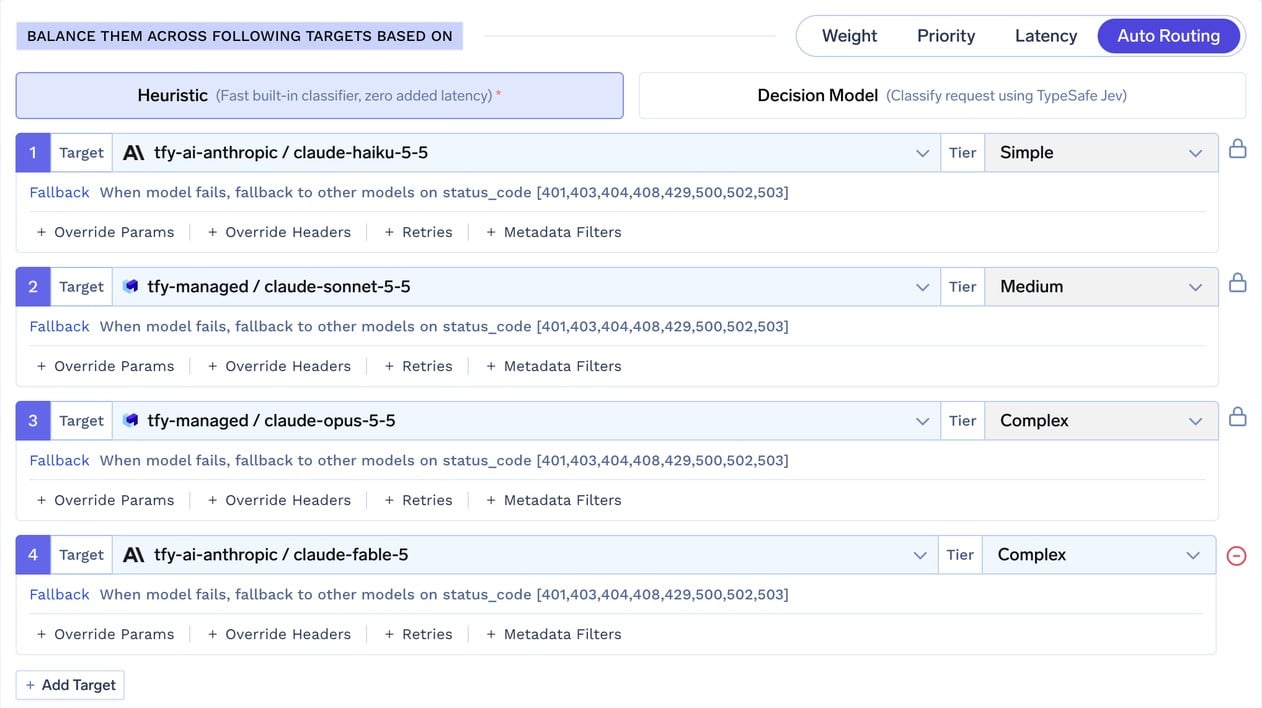
A target for each tier, plus a second Complex target added with + Add Target
Configuration reference
Examples
Three-tier chat model with the heuristic classifier
Three-tier chat model with the heuristic classifier
Decision model classifier with a static fallback to complex
Decision model classifier with a static fallback to complex
complex tier, so quality holds and cost rises only during the outage.Retries and a second complex target
Retries and a second complex target
A different prompt for each tier
A different prompt for each tier
Observability
Which tier served the request
Every response includes anx-tfy-applied-rules header. For Auto Routing, it contains a complexity block with the served tier and how it was chosen, and the full target chain in routing_model_order:
cause shows how the tier was chosen:
reason shows why each target in routing_model_order is in its position:
x-tfy-resolved-model response header also returns the model that served the request.
The Cost savings column in Metrics Overview estimates how much Auto Routing saved compared with sending every request to the complex tier. See Cost Savings.
Metrics
Each routing decision increments a counter that shows your tier mix and how often requests escalate.decided_tier: the tier assigned to the current turn, before target fallback. For acomplexpin that skips classification, this iscomplex.resolved_tier: the tier after the conversation pin is applied. It differs fromdecided_tieronly whencauseissession_pin.
resolved_tier or the complexity.tier value in the response header. When a target is rate-limited, over budget, or fails and the request moves to another tier, only resolved_model in the header and x-tfy-resolved-model show the model that served it. See Prometheus and Grafana integration for scraping setup.
Traces and logs
- Each LLM classifier call creates a
ComplexityBasedRouting: LLMClassifierspan, with the classifier’s chat completion span nested under it. This separates classifier latency from the served model’s latency. - Each decision model classifier call creates a
ComplexityBasedRouting: DecisionClassifierspan, with the System One request nested under it. The span recordstfy.complexity.tierand, when returned,tfy.complexity.confidence. - The request span includes
tfy.complexity.tier,tfy.complexity.cause, and, for heuristic decisions,tfy.complexity.score. - The AI Gateway logs each decision with the tier, cause, matched signals, and resolved model. Use these logs to see why a request landed on its tier.
Validation errors
The AI Gateway rejects these configurations with a400 when you save the virtual model:
FAQ
How much can I save?
How much can I save?
complex tier. See Cost Savings. To see the share of traffic on each tier, break down ai_gateway_complexity_routing_decisions_total by resolved_tier, and compare per-model cost in Model Metrics.Can I use Auto Routing in the tenant-level Routing Config YAML?
Can I use Auto Routing in the tenant-level Routing Config YAML?
Can I use it for embeddings, images, or audio?
Can I use it for embeddings, images, or audio?
Can I customize how the heuristic classifies requests?
Can I customize how the heuristic classifies requests?
Do LLM and decision model classifier calls count toward usage and cost?
Do LLM and decision model classifier calls count toward usage and cost?
timeout_ms. Conversations pinned to complex make no further classifier calls.What happens if the classifier is down?
What happens if the classifier is down?
fallback_strategy picks the tier: the heuristic, or a fixed default_tier if you chose static.Can I configure only two tiers, such as simple and complex?
Can I configure only two tiers, such as simple and complex?
simple, medium, and complex. Configs applied through the API or tfy apply are not checked. A request classified into a tier with no target goes to the next tier up, then down. Give every tier a target so cost and quality stay predictable.What if the classified tier has no usable target?
What if the classified tier has no usable target?
resolved_model in the x-tfy-applied-rules header and x-tfy-resolved-model show the model that served it. The tier fields and metric labels still show the classified tier.Can a conversation switch models partway through?
Can a conversation switch models partway through?
Do unhealthy-target cooldowns apply?
Do unhealthy-target cooldowns apply?
Does it work with streaming?
Does it work with streaming?
Does it work with the Anthropic Messages API and the Responses API?
Does it work with the Anthropic Messages API and the Responses API?
chat virtual model serves /chat/completions, /messages, and /responses, and a responses virtual model serves /responses. The top-level system prompt (system or instructions) is used as classification context, and multi-turn conversations are pinned the same way. A /responses follow-up with previous_response_id goes to the backend that served the original response, but the classifier still runs and is billed.Next steps
- Virtual Models overview: other routing strategies, per-target options, and health detection.
- Create a virtual model: step-by-step setup.
- Analytics: compare cost and latency per target.