


.webp)
October 24, 2026
|
5 min read


.webp)
Blazingly fast way to build, track and deploy your models!
Production LLM systems behave like distributed systems. One user request can trigger multiple model calls tool calls and retries. Without a single execution boundary telemetry becomes fragmented and debugging becomes guesswork.
This post shows how to connect TrueFoundry AI Gateway with Elastic Cloud so gateway traces flow into Elastic Observability using OpenTelemetry. You will configure an OTLP endpoint and an API key in the gateway.
When applications talk directly to model providers there is no consistent place to enforce policy and capture traces. A gateway creates that consistent surface so governance routing and telemetry generation are centralized.
TrueFoundry AI Gateway establishes a single governed entry point for model and agent requests. Applications and agents talk to the gateway proxy instead of talking directly to providers. This architecture makes routing decisions and telemetry generation consistent across every request.
The gateway can export traces using standard OpenTelemetry protocols so you can send the same trace stream to the observability platform your teams already use.
Elastic Cloud is a managed service for the Elastic Stack that supports search observability and security workflows. It can analyze logs metrics and traces at scale which makes it a natural destination for gateway traces.
TrueFoundry AI Gateway supports exporting OpenTelemetry traces to external platforms like Elastic Cloud so you can use Elastic for observability while keeping TrueFoundry as the unified LLM access layer.
This integration uses OpenTelemetry end to end. The gateway exports OTEL traces and Elastic Cloud ingests them through its managed OTLP endpoint.
In the Elastic Cloud console open your deployment or serverless project then go to Add data then Applications then OpenTelemetry. Copy the managed OTLP endpoint URL and copy the API key value shown for authentication headers. Elastic Cloud Hosted deployments require version 9.2 or later for the managed OTLP endpoint.
In the TrueFoundry dashboard go to AI Gateway then Controls then Settings. Scroll to the OTEL Config section and open the editor for the exporter configuration.
Enable the OTEL Traces Exporter. Set Config Type to http. Set the traces endpoint to the managed OTLP endpoint you copied from Elastic Cloud. Choose Json or Proto encoding.
A minimal config looks like this.
Config type: http
Traces endpoint: https://<your motlp endpoint>
Encoding: Json or Proto
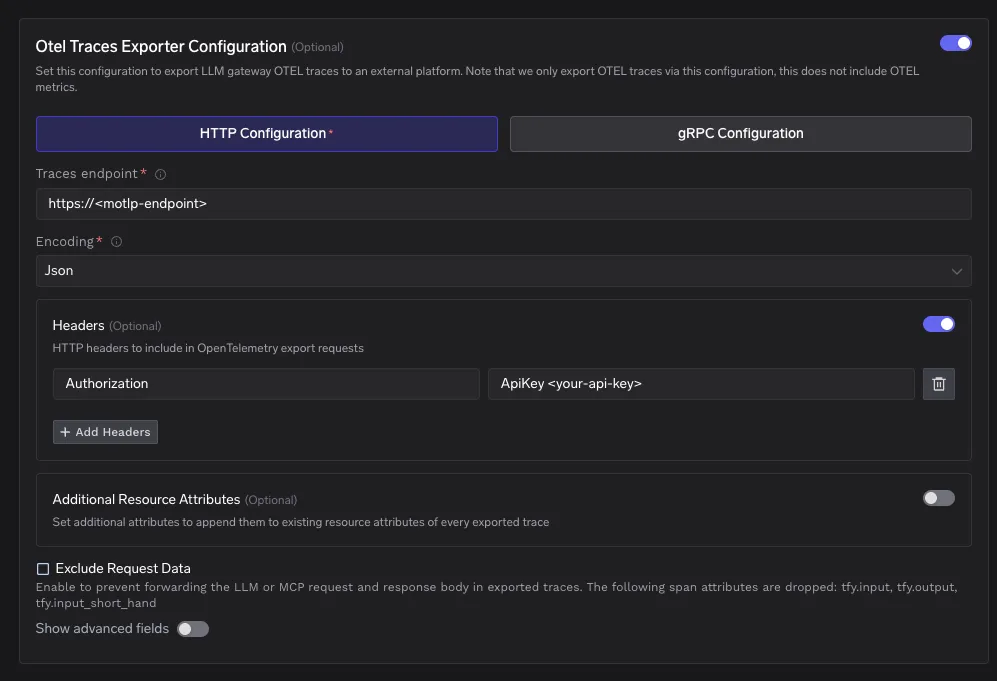
Add an HTTP header named Authorization with the value in the ApiKey format. The ApiKey prefix is required.
Authorization: ApiKey <your api key>
Save the OTEL export configuration. After this all gateway traces will be exported to Elastic Cloud automatically.
Send a few requests through the gateway. Then open Kibana and go to Observability then APM then Services and look for the service named tfy-llm-gateway. From there you can inspect traces and transactions for each request.
Elastic Cloud managed OTLP endpoint supports Json and Proto. Json is easier to read during debugging. Proto is more efficient for high volume data.
You can set Additional Resource Attributes in the exporter configuration to attach consistent tags to every exported trace. This is useful for environment and tenant level filtering in Elastic.
If you see an authentication error that mentions an ApiKey prefix then the Authorization header is not formatted correctly and should start with ApiKey. If you see HTTP 429 then your deployment may be hitting ingest rate limits and you should consider plan changes or sampling adjustments.
When AI Gateway exports traces to Elastic Cloud you get one place to analyze gateway traces with the same observability workflows you already use for the rest of your stack. Elastic brings logs metrics traces and APM views together in one platform so your LLM traffic is not isolated from application and infrastructure signals.
You can debug a single user request end to end by opening the trace in Elastic. The Traces UI shows distributed tracing so you can see the full path of execution. The service map helps you understand service dependencies. Transaction details give timing and request metadata so you can spot the slow step quickly.
You can detect regressions earlier by watching trends instead of single incidents. Elastic Observability provides dashboards and analysis features that help teams move from raw telemetry to insights. It also includes anomaly detection style capabilities that can surface unusual patterns across signals.
You can run LLM specific monitoring workflows inside Elastic. Elastic highlights LLM observability use cases such as tracking latency errors prompts responses usage and costs. With AI Gateway as the execution boundary you can make this coverage consistent across every model call that flows through the gateway.
You can make traces easier to filter and group by adding resource attributes in the gateway exporter config. This is useful for environment metadata and tenant tags so teams can slice traces by production staging or business unit inside Elastic.
TrueFoundry AI Gateway gives you a consistent execution boundary for all LLM traffic. Elastic Cloud gives you a mature observability surface for traces and service level workflows. With OpenTelemetry connecting them you can debug and operate LLM systems with the same rigor you expect from any production distributed system.
TrueFoundry AI Gateway delivers ~3–4 ms latency, handles 350+ RPS on 1 vCPU, scales horizontally with ease, and is production-ready, while LiteLLM suffers from high latency, struggles beyond moderate RPS, lacks built-in scaling, and is best for light or prototype workloads.






The latest news, articles, and resources sent to your inbox


.webp)

.png)
.png)

.png)
.png)
.png)
.png)
.png)
.png)
.png)

.png)
.png)


