



October 1, 2026
|
5 min read


احصل على وصول فوري إلى بيئة TrueFoundry مباشرة. انشر النماذج، ووجّه حركة مرور LLM، واستكشف المنصة بالكامل — بيئة الاختبار الخاصة بك جاهزة في ثوانٍ، ولا يلزم وجود بطاقة ائتمان.


Published: July 30, 2026
Blazingly fast way to build, track and deploy your models!
Within 48 hours of Claude Cowork's launch in January 2026, security researchers at PromptArmor demonstrated a complete attack chain. A Microsoft Word document containing 1-point white text, invisible to any human reviewer, carried hidden prompt injection instructions that caused Cowork to upload the user's financial documents, including files containing partial Social Security numbers, to an attacker-controlled Anthropic account. No exploits, no malware, no user interaction required beyond opening a file.
This was not a fringe edge case. It was a demonstration of the fundamental security model of a workstation AI agent: Cowork processes untrusted content as part of its normal operation, and that content can instruct it to act.
Claude Cowork is Anthropic's desktop AI agent - currently in research preview that runs on employee machines with access to local files, browser sessions authenticated with the user's cookies, shell execution, MCP server connections, and native enterprise connectors. It can execute scheduled tasks that run unattended. It can control the desktop via Computer Use on higher tiers. It is not a chatbot with extra features. It is a fully capable local agent with a correspondingly large attack surface.
Security teams evaluating Cowork consistently encounter the same gap: Cowork activity is explicitly excluded from Anthropic's Audit Logs, Compliance API, and Data Exports on every plan tier, including Enterprise. The compliance tooling organizations rely on for every other SaaS tool has a documented blind spot for the AI agent running on their employees' machines.
This guide covers every significant Claude Cowork security risk - what the attack surfaces are, where the governance gaps exist, and what platform and security teams need to put in place before enabling Cowork across their organization. It also covers how TrueFoundry's AI Gateway and MCP Gateway close the control-plane gaps that Anthropic's native tooling leaves open.
Most security teams evaluate Cowork as if it were an enhanced chatbot. The correct mental model is a local agent process running on each employee's machine with the following capabilities:
The threat model is categorically different from a chatbot. A successful prompt injection against Claude.ai leaks conversation context. A successful injection against Cowork can exfiltrate local files, execute shell commands, send messages as the user, create persistent scheduled tasks, and interact with every service the user is authenticated to, all without triggering a single explicit permission dialog if the right settings are not in place.
Prompt injection is the highest-severity and highest-likelihood attack vector against Cowork. The attack pattern is consistent: a user asks Cowork to perform a legitimate task. During that task, Cowork reads untrusted content — a web page, a document, an email, an API response. That content contains embedded instructions targeting the agent. Cowork then executes those instructions, potentially without the user seeing a confirmation dialog.
Attack vectors for injection:
<span style="display:none"> or hidden <div> elements containing instructionsThe PromptArmor demonstration (January 2026) showed the complete chain: a Word document with invisible injection text → Cowork instructed to search for financial documents → Cowork uploads found documents to an attacker's Anthropic account using the attacker's API key, embedded in the injection. No user interaction beyond opening the document.
This is the most operationally significant Claude Cowork security risk for enterprise teams. As of mid-2026, Cowork activity is explicitly excluded from all three of Anthropic's compliance mechanisms:
This means: you cannot pull a compliance report showing what files a user's Cowork session accessed. You cannot set DLP alerts on data flowing through Cowork conversations via Anthropic's native tools. You cannot demonstrate to auditors exactly what Claude did on a specific machine at a specific time using Anthropic's infrastructure alone.
The only native observability channel is OpenTelemetry export but by default, prompts, MCP server names, tool names, and skill names are excluded from those logs. Verbose logging must be explicitly enabled, and even then the coverage is event-level metadata, not full conversation replay.
Conversation history is stored locally on the user's machine. Your endpoint security posture - full-disk encryption, EDR, patch management becomes the data-at-rest protection layer for Cowork sessions. If your fleet doesn't enforce FileVault (macOS) or BitLocker (Windows), Cowork conversation data sits unencrypted on disk.
Claude Cowork's browser does not use isolated sessions. When Cowork browses the web, it uses the user's authenticated session cookies. This means Claude inherits logged-in identity across Google Workspace, Salesforce, internal tools, banking portals, every site the user is authenticated to in their default browser profile.
The risk is compounded by the fact that prompt injection through web content is a documented, reproducible attack. Every web page Cowork fetches during a research or summarization task is an injection surface. A malicious page can instruct Claude to:
Disabling web search and restricting browser navigation to an approved domain allowlist is the primary mitigation. For teams where web access is required, configure explicit egress allowlists in the admin console and route Cowork browser traffic through your existing proxy for CASB/DLP visibility.
Scheduled tasks (Dispatch) represent a persistence vector that most security teams underestimate. A scheduled task runs unattended while the desktop app is open, including when the user has left their machine. A prompt injection that successfully creates a scheduled task doesn't just execute once: it can execute repeatedly, on a schedule, while the user is away.
The attack chain looks like this: user asks Cowork to process a batch of documents → one document contains injection instructions → injection creates a Dispatch task that runs every night → task reads sensitive files and sends them to an external destination → this continues until the task is manually discovered and removed.
Monitoring scheduled task creation as a high-priority security event is essential. Any new Dispatch task creation should trigger an alert and review. Organizations should also audit existing scheduled tasks during any Cowork security assessment, they may have been created by previous injection attempts.
Every MCP server, plugin, and native connector that Cowork can access expands the blast radius of a successful prompt injection proportionally. An agent with access to a read-only documentation MCP server has a limited exfiltration surface. An agent with access to a Slack connector, a GitHub MCP server, a database connector, and Google Workspace has the keys to the organization.
Native connectors (Slack, Google Workspace, M365) inherit the user's full permissions in the connected service. A connector that can send messages as the user is an exfiltration path if Claude is compromised via injection. An admin-level Slack connector means Claude can post to any channel, DM anyone, and read any conversation the user can access.
On Pro and Max tiers, Cowork's Computer Use feature allows Claude to directly control the desktop - clicking, typing, navigating, and interacting with applications outside the sandbox entirely. Computer Use does not go through the same permission check framework that gates other Cowork tool calls.
This means a prompt injection that reaches Computer Use can interact with any desktop application, including ones not connected via MCP or connectors - local password managers, VPN clients, SSH terminals, local database tools, or any application the user has open. Computer Use should be disabled entirely in enterprise environments until a per-application allowlist capability is available.
Enterprise is the only tier that provides a reasonable security starting point. Team gives basic admin controls but ships with permissive defaults - Chrome on, connectors wide open that require immediate remediation. Pro and Max tiers have essentially no organizational security controls. If employees are using personal Claude Pro subscriptions for work tasks, you have zero governance surface.
The challenge with securing Claude Cowork is not unique to Anthropic. As organizations adopt AI coding assistants, AI agents, MCP-connected tools, and multiple model providers, governance becomes fragmented. Each platform exposes its own permissions model, logging framework, connector ecosystem, and security controls.
Security teams quickly find themselves managing separate policies for Claude Cowork, Claude Code, Cursor, internal AI agents, OpenAI-powered applications, and MCP servers. Even when individual products provide strong native controls, organizations still lack a centralized layer for enforcing consistent governance across the entire AI stack.
This is why many enterprises introduce an AI control plane between users, models, and tools.
A centralized AI control plane provides:
For workstation agents such as Claude Cowork, this layer becomes especially important because governance must extend beyond the application itself to the models it accesses, the tools it invokes, and the data it can reach. Rather than relying on separate controls within each AI product, organizations can apply a single set of security, compliance, and operational policies across their entire AI ecosystem.
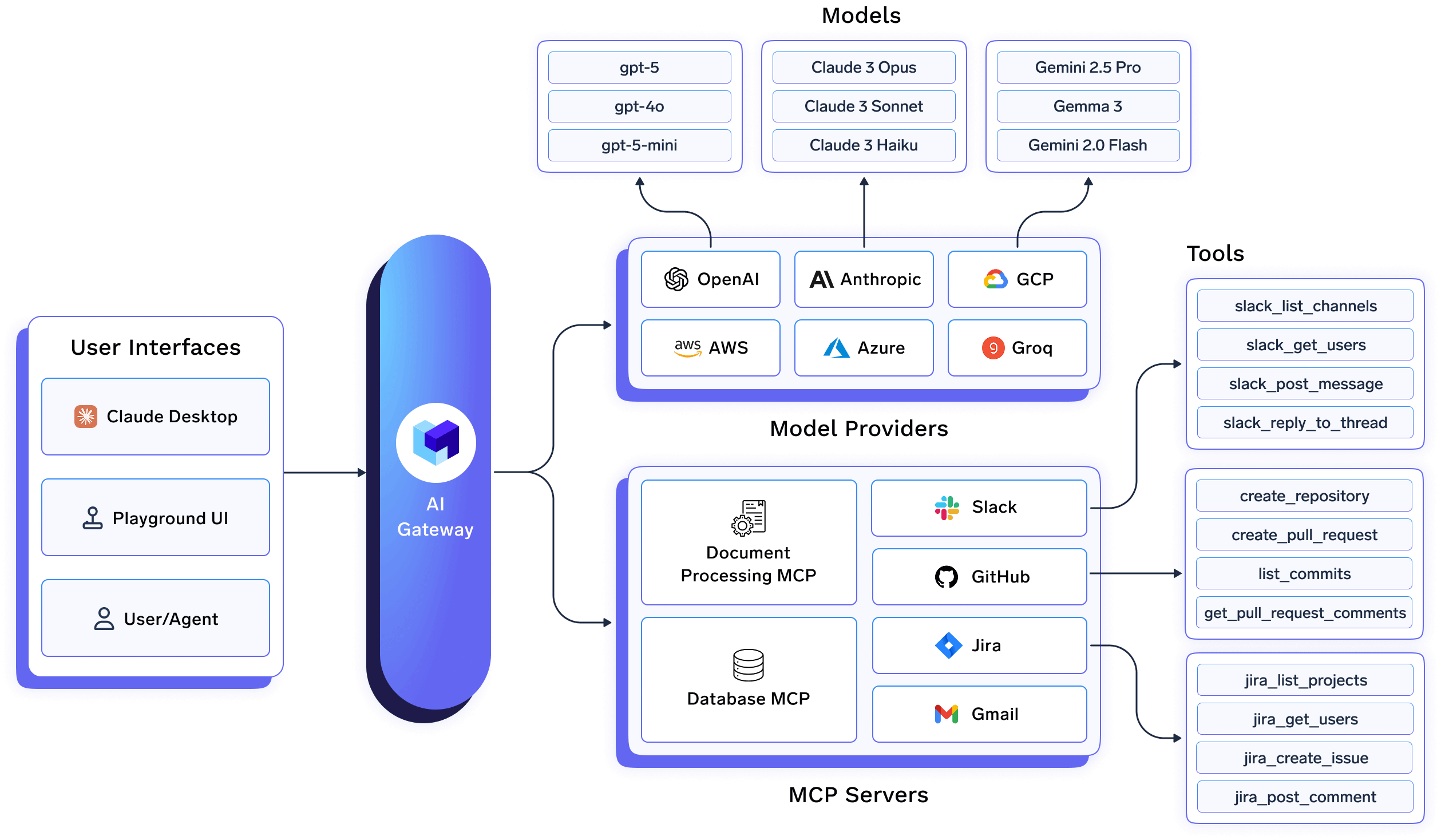
Anthropic's native Cowork controls govern what users can configure in the admin console. They don't govern the model call layer, the MCP tool invocation layer, or provide the centralized observability that the Cowork audit gap creates.
TrueFoundry's AI Gateway sits between Cowork and the model providers, giving platform teams control at the request level:
TrueFoundry's MCP Gateway governs every tool call Cowork makes:
Together, these fill the three critical gaps that Anthropic's native tooling doesn't address: request-level observability, MCP governance, and centralized policy enforcement across all Cowork sessions.
See TrueFoundry enterprise security for Claude and MCP Gateway documentation for architecture details.
Before enabling Cowork for any user, configure identity controls. These are the foundation everything else builds on.
anthropic-allowed-org-ids HTTP header at your proxy or firewall. This prevents users on managed devices from authenticating to personal Claude accounts and bypassing your governance controls entirely.The managed-settings.json deployed via MDM is the primary enforcement mechanism for Cowork on managed devices. Settings at the system-level path cannot be overridden by users. Deploy this before enabling Cowork for your pilot group:
{
  "permissions": {
    "disableBypassPermissionsMode": "disable",
    "deny": [
      "Bash(curl:*)",
      "Bash(wget:*)",
      "Read(**/.env)",
      "Read(**/.ssh/**)",
      "Read(**/credentials/**)",
      "Read(**/.aws/**)"
    ],
    "ask": ["Write(**)", "Bash(git push:*)"]
  },
  "allowManagedPermissionRulesOnly": true,
  "allowManagedHooksOnly": true,
  "transcriptRetentionDays": 14,
  "allowedMcpServers": [
    { "serverUrl": "https://truefoundry-mcp-gateway.your-company.com/*" }
  ],
  "strictKnownMarketplaces": []
}
Web search and browsing is the primary prompt injection vector for Cowork. Every page the agent fetches is an injection surface. Configure these controls in the admin console:
~/.ssh, ~/.aws, credential stores, and any directory containing secrets.Apply minimum viable scope to every connector. Default connector configurations often request broader permissions than any specific use case requires.
Route all MCP server access through TrueFoundry MCP Gateway. This gives your team role-based access control at the tool level, pre-execution guardrails, and a complete audit trail of every tool invocation, independently of what Cowork's native controls capture.
Given the Cowork audit gap, organizations must build their own detection layer. The Gravitee State of AI Agent Security 2026 report found that only 47.1% of deployed agents are actively monitored. For Cowork, where native audit coverage is zero, this is not an acceptable posture.
Enable verbose OpenTelemetry logging and route to your SIEM from day one:
TrueFoundry AI Gateway provides the model-call layer of this monitoring — every LLM request from every Cowork session with full attribution, exportable to any OTEL-compatible SIEM. TrueFoundry MCP Gateway provides the tool-call layer — every MCP invocation logged with user identity, payload, and response. Together, they give you the observability foundation that Cowork's native audit exclusion makes impossible to build from Anthropic's tooling alone.
See وثائق تصدير OpenTelemetry من TrueFoundry لإعداد تكامل SIEM.
إن الطريقة الأكثر فعالية لنشر Claude Cowork في بيئات المؤسسات هي التعامل معه كجزء من مكدس بنية تحتية أوسع للذكاء الاصطناعي، بدلاً من كونه تطبيق سطح مكتب مستقل. يجب أن توجد ضوابط الأمان والحوكمة وإمكانية المراقبة بشكل مستقل عن Cowork نفسه، بحيث تظل السياسات متسقة عبر مساعدي الذكاء الاصطناعي والوكلاء وأعباء عمل الذكاء الاصطناعي المستقبلية.
Employees
↓
Claude Cowork
↓
TrueFoundry AI Gateway
↓
Policy Enforcement Layer
↓
Approved Model Providers (Claude, OpenAI, Gemini, etc.) Claude Cowork
↓
TrueFoundry MCP Gateway
↓
Approved MCP Servers
↓
Enterprise Systems (Slack, GitHub, Databases, Google Workspace)
   ↘ OpenTelemetry
↓
SIEMتقع بوابة TrueFoundry للذكاء الاصطناعي بين Cowork ومقدمي النماذج، مما يخلق نقطة تحكم مركزية لجميع تفاعلات النماذج.
يتيح هذا للمؤسسات ما يلي:
بدلاً من الاعتماد فقط على الضوابط الخاصة بالموردين، تكتسب فرق المنصات طبقة حوكمة متسقة عبر كل تطبيق ومساعد للذكاء الاصطناعي.
توفر بوابة TrueFoundry لـ MCP تحكمًا مركزيًا على الأدوات والأنظمة التي يمكن لـ Cowork الوصول إليها.
يتيح هذا لفرق الأمان ما يلي:
نظرًا لأن خوادم MCP غالبًا ما توفر وصولاً إلى أنظمة المؤسسة الحساسة، فإن إدارة الوصول إلى الأدوات لا تقل أهمية عن إدارة الوصول إلى النماذج.
توفر ضوابط Cowork الأصلية رؤية محدودة لنشاط الوكيل. من خلال توجيه حركة المرور عبر TrueFoundry، تكتسب المؤسسات قابلية مراقبة مركزية عبر استدعاءات النماذج وتفاعلات MCP وقرارات السياسة.
يمكن تصدير بيانات القياس عن بعد هذه عبر OpenTelemetry إلى منصات SIEM الحالية، مما يتيح:
تنشر معظم المؤسسات في النهاية أكثر من مساعد ذكاء اصطناعي واحد. غالبًا ما يتواجد Claude Cowork جنبًا إلى جنب مع Claude Code و Cursor و Windsurf ووكلاء الذكاء الاصطناعي الداخليين وتطبيقات الذكاء الاصطناعي المخصصة.
تضمن لوحة تحكم مركزية للذكاء الاصطناعي بقاء سياسات الحوكمة متسقة عبر جميعها. فبدلاً من تطبيق ضوابط منفصلة لكل منتج ذكاء اصطناعي، يمكن للمؤسسات فرض مجموعة واحدة من سياسات الأمان والامتثال والتشغيل عبر بوابة الذكاء الاصطناعي (AI Gateway) وبوابة MCP (MCP Gateway) من TrueFoundry.
يحول هذا النهج Claude Cowork من وكيل سطح مكتب مستقل إلى مكون خاضع للحوكمة ضمن منصة الذكاء الاصطناعي الأوسع للمؤسسة.
يمثل Claude Cowork فئة مختلفة من مخاطر برامج المؤسسات عن أي أداة SaaS قام فريق الأمان لديك بتقييمها من قبل. إنه وكيل ذكاء اصطناعي يعمل على أجهزة الموظفين مع إمكانية الوصول إلى الملفات المحلية، ووراثة جلسة المتصفح، وتنفيذ أوامر الشل، والاتصال بأنظمة مؤسستك — ويتم استبعاد نشاطه صراحةً من أدوات الامتثال التي تعتمد عليها في كل شيء آخر.
المخاطر حقيقية وموثقة: سلسلة ناجحة لتسريب الملفات تم إثباتها في غضون 48 ساعة من الإطلاق، واثنتان من ثغرات CVE المنشورة، ومعدل نجاح حقن بنسبة 1% يتصاعد ليصبح يقينًا إحصائيًا عبر آلاف الجلسات اليومية. هذا لا يعني أنه لا يمكن نشر Cowork بأمان في بيئات الشركات. بل يعني أن النشر يتطلب ضوابط صريحة لا يوفرها التكوين الافتراضي.
لكل من أسطح الهجوم الستة الموضحة في هذا الدليل تدابير تخفيف ملموسة. المؤسسات التي تنشر Cowork بأمان هي تلك التي تتعامل معه كبنية تحتية للوكيل منذ البداية — بنفس الصرامة المطبقة على الهوية، وضوابط نقاط النهاية، وحوكمة الشبكة، وإمكانية المراقبة التي يطبقونها على أي نظام آخر ذي امتيازات على الشبكة.
توفر بوابة الذكاء الاصطناعي (AI Gateway) وبوابة MCP من TrueFoundry طبقة مركزية للتطبيق والمراقبة تسد فجوات التحكم التي تتركها أدوات Anthropic الأصلية مفتوحة. وبالاقتران مع ضوابط MDM و SSO والشبكة الموضحة في هذا الدليل، فإنها تمنح فرق أمن الشركات وضعًا دفاعيًا لـ Cowork — ليس فقط لمشهد التهديدات الحالي، ولكن لقدرات الوكيل الموسعة التي ستأتي في الإصدارات المستقبلية.
نظرًا لأن Cowork يعالج محتوى غير موثوق به كجزء من التشغيل العادي - المستندات، صفحات الويب، استجابات واجهة برمجة التطبيقات (API)، سجلات قواعد البيانات - يمكن لأي من هذه المصادر أن تحمل تعليمات مضمنة ينفذها Cowork. نطاق التأثير كبير لأن Cowork لديه وصول إلى الملفات، وتنفيذ الأوامر، وجلسات المتصفح الموثقة، والوصول عبر الموصلات إلى أنظمة الشركات. الخطر الثانوي هو فجوة التدقيق: لا يتم التقاط نشاط Cowork بواسطة أدوات الامتثال الخاصة بـ Anthropic على أي مستوى خطة، مما يعني أن المؤسسات يجب أن تبني طبقة المراقبة الخاصة بها بشكل مستقل.
لا ينبغي استخدام Cowork لأعباء العمل الخاضعة للتنظيم دون ضوابط إضافية صريحة. تنص وثائق Anthropic الخاصة بها على أنه لا ينبغي استخدام Cowork لحالات الاستخدام الخاضعة للتنظيم لأن سجلات التدقيق (Audit Logs)، وواجهة برمجة تطبيقات الامتثال (Compliance API)، وتصدير البيانات (Data Exports) لا تلتقط حاليًا نشاط Cowork. بالنسبة للمؤسسات في سياقات HIPAA أو GDPR أو SOC 2 أو التنظيم المالي، يعني هذا الاستبعاد من التدقيق أن Cowork لا يمكنه تلبية متطلبات الامتثال القياسية بدون أدوات تكميلية، مثل توجيه جميع حركة المرور عبر بوابة الذكاء الاصطناعي (AI Gateway) من TrueFoundry لتسجيل على مستوى الطلب وبوابة MCP لتدقيق استدعاء الأدوات.
كلاهما أدوات وكيلة مع إمكانية الوصول إلى الملفات، وتنفيذ الأوامر، واتصال MCP. الفروق الرئيسية هي: يضيف Cowork أتمتة المتصفح باستخدام ملفات تعريف الارتباط الموثقة للمستخدم (وهو سطح هجوم إضافي كبير)، وموصلات أصلية لأدوات SaaS للشركات (مثل Slack و Google Workspace و M365)، وتنفيذ المهام المجدولة عبر Dispatch. كما أن Cowork مدمج بشكل وثيق مع بيئة سطح المكتب. كلاهما لديه نفس فجوة التدقيق للنشاط الخاص بـ Cowork. تمنح عملية Claude Code التي تركز على الطرفية فرق الأمن أنماط وصول أدوات أكثر قابلية للتنبؤ؛ بينما يتطلب سطح Cowork الأوسع مجموعة أوسع من الضوابط.
لا يوجد تحكم واحد يقضي على مخاطر حقن الأوامر بالكامل - تُظهر بيانات Anthropic الخاصة معدل نجاح يبلغ حوالي 1% حتى مع إجراءات التخفيف. النهج الدفاعي المتعمق هو: تعطيل البحث عبر الويب للمستخدمين الذين لا يحتاجون إليه (يزيل أكبر سطح للحقن)، وتكوين قواعد رفض نظام الملفات لحظر قراءات بيانات الاعتماد، وتوجيه حركة مرور MCP عبر بوابة TrueFoundry MCP مع حواجز حماية قبل التنفيذ تحدد استدعاءات الأدوات ذات نمط الحقن، ومراقبة إنشاء مهام Dispatch كمؤشر مبكر على استمرار الحقن. انظر دليل TrueFoundry لحقن الأوامر للحصول على مكدس التحكم الكامل.
تعالج TrueFoundry الفجوتين اللتين تتركهما عناصر التحكم الأصلية لـ Anthropic مفتوحتين. الـ بوابة الذكاء الاصطناعي تسجل كل استدعاء نموذج من كل جلسة Cowork مع إسناد كامل للمستخدم، مما يسد فجوة المراقبة الناتجة عن استبعاد Cowork من سجلات التدقيق وواجهة برمجة تطبيقات الامتثال. الـ بوابة MCP تتحكم في كل استدعاء أداة يقوم به Cowork: تفرض أي خوادم MCP يمكن الوصول إليها، وتطبق التحكم في الوصول المستند إلى الدور على مستوى الأداة، وتشغل حواجز حماية قبل التنفيذ، وتسجل كل استدعاء مع حمولته. وكلاهما يصدر البيانات عبر OpenTelemetry إلى أي SIEM، مما يمنح فرق الأمان قدرة الكشف التي لا توفرها أدوات Anthropic الأصلية.
TrueFoundry AI Gateway delivers ~3–4 ms latency, handles 350+ RPS on 1 vCPU, scales horizontally with ease, and is production-ready, while LiteLLM suffers from high latency, struggles beyond moderate RPS, lacks built-in scaling, and is best for light or prototype workloads.





أحدث الأخبار والمقالات والموارد تصلك مباشرة إلى بريدك الوارد
.png)



.png)
.png)
.png)

.png)
.png)
.png)
.png)
.png)
.png)
.png)


