


.png)
October 27, 2026
|
5 min read


احصل على وصول فوري إلى بيئة TrueFoundry مباشرة. انشر النماذج، ووجّه حركة مرور LLM، واستكشف المنصة بالكامل — بيئة الاختبار الخاصة بك جاهزة في ثوانٍ، ولا يلزم وجود بطاقة ائتمان.



Blazingly fast way to build, track and deploy your models!
Picking the best open source agent harness is a different problem from picking a harness generally. Once the hosted platforms are off the table, cost per run stops deciding it, because everything here is free to download.
What decides it instead is duller and more consequential. What does the license actually let you do. Who gets to change the project's direction. Whether anyone will still be shipping it in two years. And how far it carries you toward production before you start writing infrastructure yourself.
Those questions split projects that look identical on a feature table. A terminal coding agent maintained by one company is not a substitute for a harness that ships an API and an embeddable UI, even when both tick the same boxes for model support and MCP.
Below are five open source harnesses running in production in 2026, the criteria that actually separate them, and who each one suits.
Every project here runs an agent loop, calls MCP tools, and streams output. Table stakes. These six things are what matter once you're picking something to build a company on.
What the license actually permits. Permissive licenses aren't interchangeable. MIT is short and generous but says nothing about patents. Apache 2.0 adds an express patent grant and asks you to state your changes. Some projects ship under source-available terms that block resale outright. If you're embedding a harness in something you sell, send this to legal rather than skimming the README badge.
Governance and bus factor. Almost everything in this category is maintained by one company, which means it can pivot, relicense, or quietly stop shipping when that company's priorities move. The practical hedge isn't a promise, it's a contributor base big enough that a fork stays alive. Ask who has commit rights and how many of them don't work for the sponsor.
Model neutrality, and whether local counts. They're all provider-agnostic on paper. The question is whether local models through Ollama or vLLM are a supported path or a community workaround, because that's what decides if you can run the thing air-gapped at all.
Surface area past the CLI. A terminal agent is perfect for one developer. Shipping an agent to a team, or putting one inside your product, needs an HTTP API, an SDK, and ideally a UI you can theme. Several excellent harnesses stop at the terminal, and that's a ceiling you'll hit hard if your use case is a product feature.
How extensions work. Tools, skills, subagents, custom providers. This is where your team will spend its time, so whether extensions are TypeScript modules, MCP servers, YAML, or Python classes decides how many of your engineers can contribute.
The path to production. Running locally is the easy part. Running for a team means multi-user auth, session persistence, horizontal scaling, and some story for upgrades. Look for a documented Docker Compose or Helm path, not just an install one-liner.
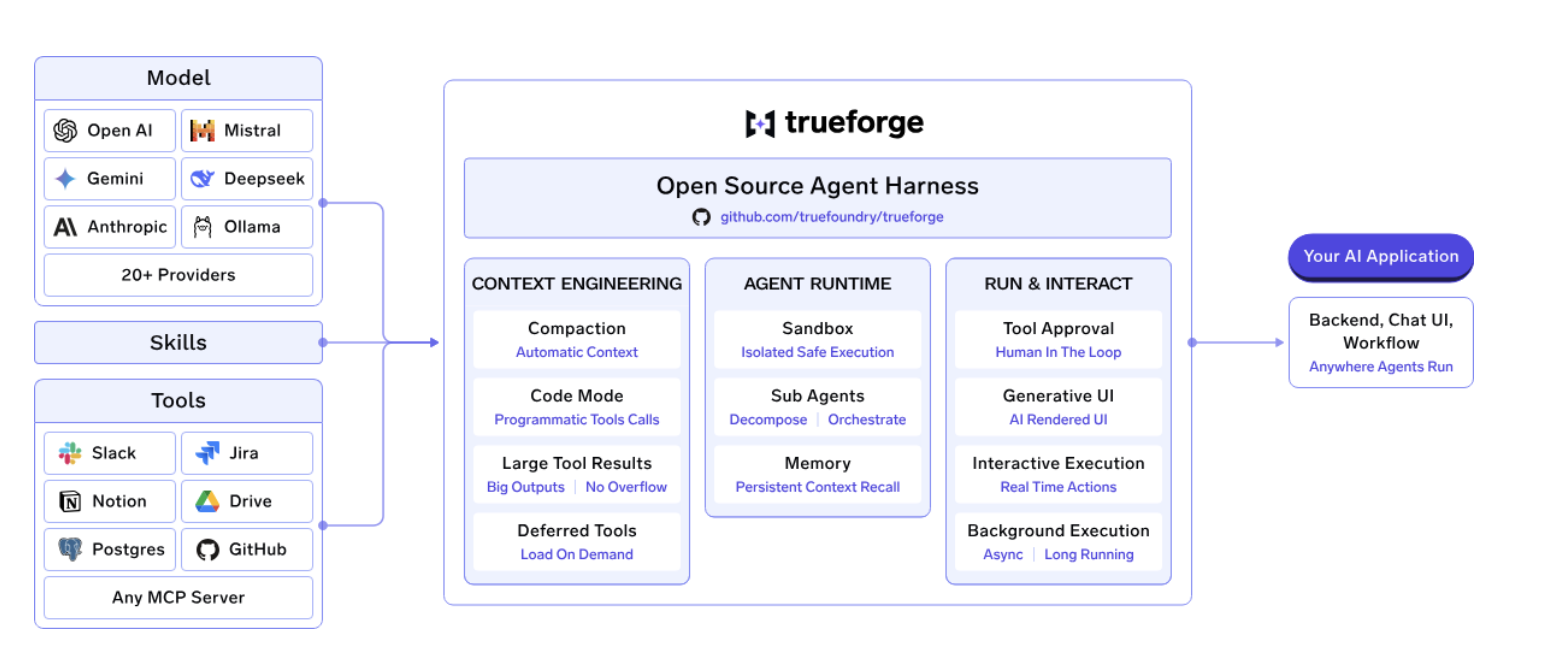
TrueForge is the MIT-licensed harness we open-sourced in August 2026, and the same runtime behind our own AskTFY agent. We built it because we wanted managed-agent ergonomics without handing the model decision to a vendor, and nothing open source covered the whole surface.
It ships as three pieces rather than one. A core server runs the agent harness loop: streaming, approval gates on sensitive actions, subagent delegation, compaction, and sessions that survive reconnects. An HTTP API with a TypeScript SDK (@truefoundry/trueforge-sdk) gives your code everything the UI can do. And a chat UI with its own SDK (@truefoundry/trueforge-ui) is there to use as-is, theme, or embed. That third piece is what separates it from most of this list, which stops at the terminal.
The design choice that moves your bill most: TrueForge treats the sandbox as a tool. It spins one up only when the agent actually needs to run code, instead of wrapping the whole session in a container. One server handles many agents at once, and turns that never touch code stay cheap. Around that sit deferred tool loading, Code Mode for chaining MCP calls inside a single sandbox script, large tool response offloading, and generative UI that answers with real charts and forms.
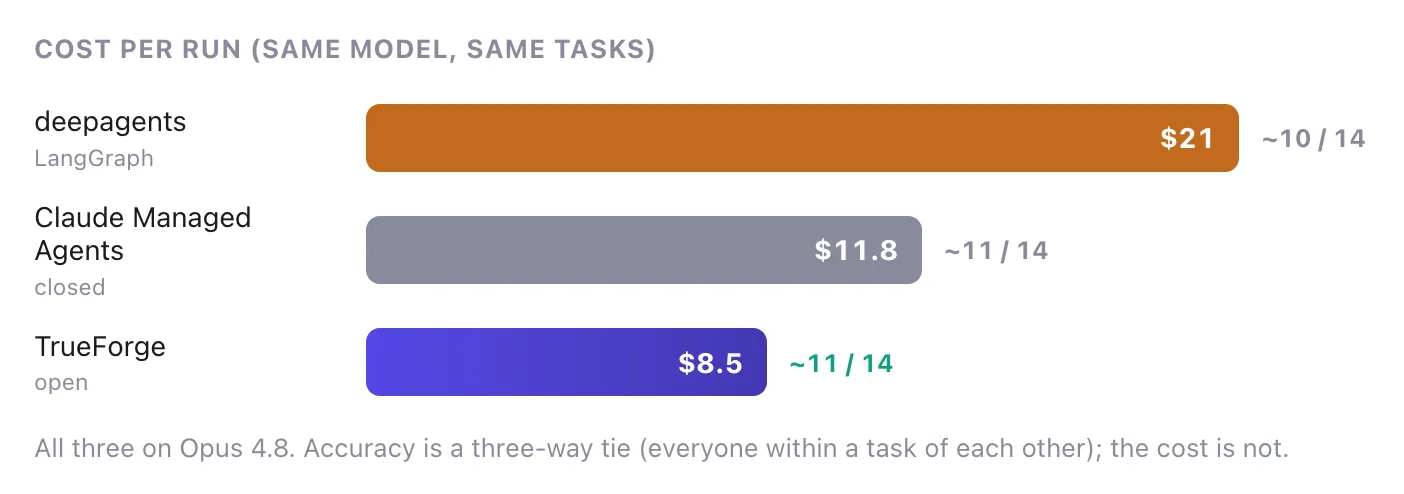
On DevRev's Enterprise-Bench, which is 14 cross-system tasks over three MCP servers with a fresh session each time and a blind LLM judge, TrueForge on Opus 4.8 solved the same tasks as Claude Managed Agents at $8.5 per run against $11.8, on 3.8M tokens against 10M. Swapping to GLM-5.2 took it to $2.9 per run. Against deepagents on the same model it used under a quarter of the tokens.
It's MIT-licensed, maintained by us, and developed in the open. The strengths are those three surfaces, on-demand sandboxing, a documented path from npx all the way to Helm with Postgres, Redis, replicas and OIDC, and published benchmark numbers you can check. The obvious weakness is age. It's the youngest project here, so the third-party extension ecosystem is thin compared to what opencode has.
Best for: Teams putting agents inside a product, or running them for an organization, especially when the loop has to stay in your own infrastructure.
Try it in 60 seconds: npx @truefoundry/trueforge or star it on GitHub.
opencode is the most-starred open source coding agent of 2026, and it's become the default answer for developers who want the Claude Code experience without the Claude requirement. MIT-licensed, model-agnostic, and shipping as a terminal TUI, a desktop app for macOS, Windows and Linux, and an IDE extension.
It's a full harness, not a chat wrapper. Tool loop, LSP integration, session management, and separate plan and build modes. Point it at Claude, GPT, Gemini, GLM, or a local Ollama model, or use OpenCode Zen for a curated list someone else has benchmarked.
The community is the real asset. With 900 contributors, whatever integration you need usually exists before you think to build it.
We'll say the obvious thing: on adoption, opencode is well ahead of us and it isn't close. Where it stops is embedding. It's built around coding workflows rather than general business agents, and there's no UI SDK for putting it inside your own product.
Best for: Developer-facing coding work, where ecosystem breadth and polish beat embeddability.
Pi, from Earendil Works, started the minimal-core school in 2026 and then grew faster than anything else in the category. Its CLI ships four tools. Read, Write, Edit, Bash. Everything else lives in layers you add yourself: TypeScript extensions, custom tools, custom providers, prompt templates, skills, themes, packages.
A lazy-loading skill system injects instructions only when a task needs them, which keeps context lean without leaning on compaction. It's BYOK, provider-agnostic, handles local and custom models, and comes with compaction, JSON/RPC modes, and an SDK.
Pi is right if you'd rather build up from a small core than trim down somebody else's opinions. It's wrong if you want batteries included, and it makes no apology for that.
MIT-licensed, maintained by Earendil Works. The core is the smallest and most auditable here, the TypeScript extension model is a pleasure to work in, and it's token-efficient by design. It's also terminal-first with no embeddable UI, and batteries very much not included.
Best for: Teams who want to shape a harness around their own workflow and have the TypeScript capacity to do it.
OpenHands, formerly OpenDevin, is the most mature autonomous coding agent in open source. Its event-stream architecture moves through four states per loop. The agent reasons, emits an action, the environment executes it, the environment returns an observation. Every session gets its own Docker sandbox.
Always-on Docker costs more per session than provisioning on demand, and it's still the right call for what OpenHands does. When an agent is working a repository with nobody watching, isolation isn't overhead to optimize away. It's the point.
It is narrow, though. Cross-system business work spanning a CRM, a tracker and a document store isn't what it's tuned for.
Venture-backed with a large contributor base. Deepest track record for unattended repository work and the most rigorous sandboxing here, at the cost of per-session Docker expense and a narrow remit outside software engineering.
Best for: Teams pointing an agent at a codebase and letting it run.
deepagents is LangChain's opinionated harness on top of LangGraph. Where create_agent is a minimal loop, deepagents is the everything-included version: planning tools, a virtual filesystem, subagent delegation, context engineering, persistent memory, skills, sandboxed execution, human-in-the-loop. Model-agnostic, and production-ready with streaming, persistence and checkpointing.
If LangChain is already in your stack, that integration saves real money, because observability, evaluation and deployment tooling all connect without glue code. That's not a small thing and we won't pretend otherwise.
The cost is weight. All that bundled machinery rides along on every turn, and deepagents re-reads its accumulated context step after step instead of compacting it. On Enterprise-Bench with Opus 4.8 it burned 16.5M tokens at $21 per run for roughly 10 of 14 tasks, the most expensive configuration we measured. Free to download, expensive to operate.
Vendor-maintained by LangChain. The surrounding ecosystem is the deepest here and the documentation is excellent. The token consumption is the highest of anything we benchmarked.
Best for: Teams with LangGraph already load-bearing in production.
The license costs nothing. Operating the thing is where the money goes, and that's the mistake we see most often.
Across the three harnesses we benchmarked on identical tasks, accuracy was a three-way tie, because the model sets the ceiling on what's possible. The harness sets the price of getting there, and the spread was wide. Same Opus 4.8, same tasks: $8.5 per run on one harness, $21 on another. The difference comes down to how much scaffolding rides along every turn, how many tool calls the loop plans, and whether the harness compacts history or replays it.
So compare tokens per run, not stars per repo. The methodology is in our Enterprise-Bench writeup.
The other cost is operational, and it arrives later. Self-hosting is clean until you're running a lot of agents. Then model and MCP keys are scattered across three teams, nobody can cap spend, and answering one audit question means stitching together logs from every agent you run. That's where a governed layer starts paying for itself. TrueFoundry's Agent Harness runs the same open source TrueForge runtime with the AI Gateway in front of it: 1,000+ LLMs behind one OpenAI-compatible API at roughly ~3–4 ms of added latency and 350+ RPS on a single vCPU, plus RBAC, budgets, guardrails and unified traces. Same harness underneath, so moving is a deployment change and not a migration.
Q: What is the best open source agent harness?
A: For teams putting agents inside a product or running them across an organization, TrueForge is the strongest option, because it's MIT-licensed, model-neutral, and ships an HTTP API, a TypeScript SDK and an embeddable UI alongside the agent loop. For developer coding workflows, opencode is the better pick, and its ecosystem and terminal experience are hard to beat.
Q: What is an agent harness?
ج: "حاضنة الوكيل" (Agent harness) هي طبقة وقت التشغيل التي تحيط بنموذج لغوي ضخم (LLM) لتحوله إلى وكيل موثوق يعمل لفترات طويلة. فهي تدير حلقة التنفيذ، واستدعاء الأدوات، والسياق، والبيئة المعزولة (sandboxing)، والموافقات، وحالة الجلسة؛ لأن النموذج بمفرده يمكنه التفكير، لكنه لا يستطيع التصرف أو التنفيذ أو تذكر أي شيء عبر مراحل العمل المختلفة.
س: هل تعتبر حاضنات الوكلاء مفتوحة المصدر جاهزة للاستخدام في بيئات الإنتاج؟
ج: نعم، العديد منها جاهز. فأنظمة TrueForge وopencode وOpenHands وdeepagents تعمل جميعها في بيئات الإنتاج اليوم. الجاهزية ليست هي العامل الفاصل، بل نطاق العمل هو الأساس. فبعضها عبارة عن أدوات طرفية لمطور واحد، بينما يوفر البعض الآخر واجهة برمجة تطبيقات (API)، واستمرارية للجلسات، ومساراً للنشر متعدد المستخدمين، وهو ما تحتاجه المؤسسات.
س: ما هي حاضنات الوكلاء مفتوحة المصدر التي تدعم النماذج المحلية؟
ج: جميع الخيارات الخمسة محايدة تجاه النماذج. توفر opencode المسار الأكثر مباشرة عبر Ollama للتطوير المحلي. أما TrueForge فتصل إلى النماذج المحلية عبر أي نقطة نهاية متوافقة مع OpenAI، بما في ذلك vLLM وOllama، لذا فإن النشر في بيئة معزولة (air-gapped) يعمل بنفس كفاءة النشر السحابي.
س: هل يمكنني تشغيل حاضنة وكلاء داخل سحابة خاصة افتراضية (VPC) أو على خوادمي الخاصة (on-prem)؟
ج: نعم، وهذا هو السبب الرئيسي لاختيار الحلول مفتوحة المصدر. تعمل TrueForge من خلال أمر npx محلياً، أو عبر Docker Compose وHelm لنشرها على مستوى الفرق مع دعم Postgres وRedis والنسخ المتماثل وتسجيل الدخول عبر OIDC. كما أن النسخة المدارة من TrueFoundry يمكن تشغيلها ذاتياً، أو على خوادم خاصة، أو في بيئات معزولة، أو في بيئات هجينة، مما يضمن عدم خروج بياناتك من نطاقك الخاص.
س: كيف يمكنني إدارة النماذج وخوادم MCP عبر العديد من الوكلاء؟
ج: من خلال طبقة بوابة (Gateway). تضع بوابة الذكاء الاصطناعي من TrueFoundry أكثر من 1000 نموذج لغوي خلف واجهة برمجة تطبيقات واحدة متوافقة مع OpenAI، مع ميزات التحكم في الوصول المستند إلى الأدوار (RBAC)، والميزانيات، وضوابط الأمان، وتدوير بيانات الاعتماد، بالإضافة إلى بوابة MCP للتحكم في الوصول على مستوى الأدوات، وتتبع OpenTelemetry إلى Grafana أو Datadog أو Prometheus.
يعتمد اختيار أفضل بيئة تشغيل وكلاء مفتوحة المصدر لفريقك على ما تقوم ببنائه أكثر بكثير من اعتماده على قائمة الميزات. هل تبحث عن أداة طرفية للمطورين؟ كل من opencode و Pi خياران ممتازان ويمكنك الاختيار بينهما حسب تفضيلك الشخصي. هل تحتاج إلى تبعية برمجية يجب أن تجتاز مراجعة معمارية؟ حينها ستكون الرخصة والجوهر القابل للتدقيق أكثر أهمية من عدد الميزات. أما إذا كنت تبني منتجاً أو وكيلاً يخدم مؤسسة بأكملها، فأنت بحاجة إلى واجهة برمجة تطبيقات (API)، ومجموعة تطوير برمجيات (SDK)، ومسار نشر حقيقي، وهنا تضيق الخيارات بسرعة.
هذه الحالة الأخيرة هي التي صممنا TrueForge من أجلها. فهي مرخصة برخصة MIT، وتعمل على أي نموذج ضمن بنيتك التحتية الخاصة، و npx @truefoundry/trueforge تجعلها جاهزة للعمل في حوالي دقيقة واحدة. المستودع متاح على GitHub.
TrueFoundry AI Gateway delivers ~3–4 ms latency, handles 350+ RPS on 1 vCPU, scales horizontally with ease, and is production-ready, while LiteLLM suffers from high latency, struggles beyond moderate RPS, lacks built-in scaling, and is best for light or prototype workloads.





أحدث الأخبار والمقالات والموارد تصلك مباشرة إلى بريدك الوارد
.png)
.png)
.png)


.png)
.png)
.png)
.png)
.png)
.png)
.png)
.png)


