

The Challenge: Multi-Cloud MCP Server Access
Consider an organization with the following infrastructure:- AWS: Internal analytics MCP server, customer data tools
- Azure: Microsoft 365 integration MCP server, Azure DevOps tools
- GCP: BigQuery MCP server, Google Workspace tools
- On-premises: Legacy systems MCP server, sensitive data tools
- Applications in AWS need to access MCP servers in Azure, GCP, and on-premises
- Applications in Azure need to access MCP servers in AWS, GCP, and on-premises
- Network isolation must be maintained—direct cross-cloud connections are not allowed
- A single control plane should manage all MCP server registrations and access policies
- Users should have a unified experience regardless of where MCP servers are deployed
Federated Gateway Architecture
The TrueFoundry Federated MCP Gateway solves this challenge by deploying gateway planes in each cloud environment, with all gateway planes connected to a central control plane.Key Components
Network Topology
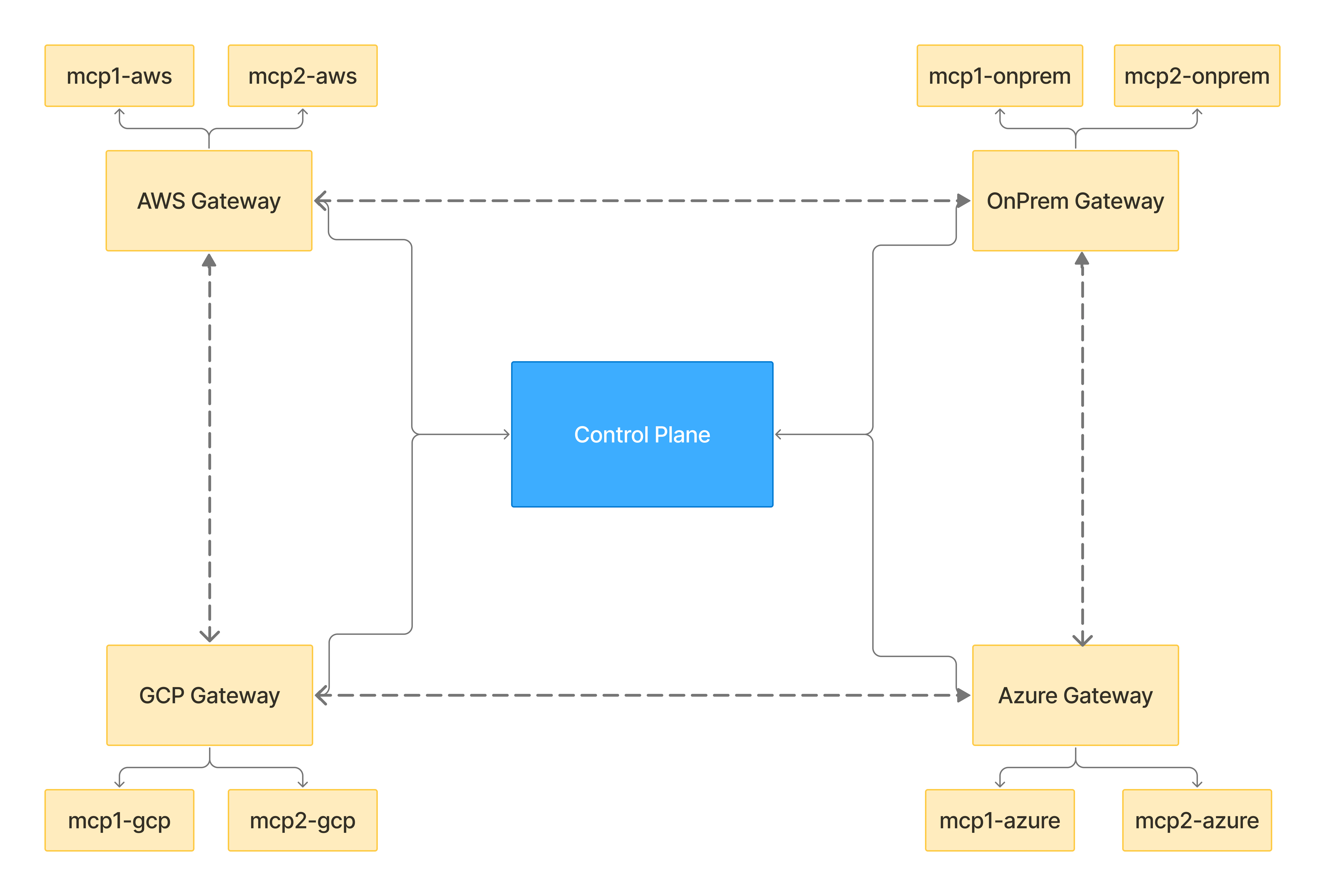
Each gateway plane has network access only to MCP servers within its own environment. Cross-environment access is achieved through gateway-to-gateway proxying.
How Federated Routing Works
When an MCP server is registered in the TrueFoundry control plane, you specify a proxy URL that indicates which gateway plane can directly access that MCP server. The control plane syncs this information to all gateway planes, enabling intelligent request routing.Proxy URL Configuration
When registering an MCP server, you configure:
For example:
mcp-analytics(deployed in AWS) → Proxy URL:https://aws-gw.example.commcp-m365(deployed in Azure) → Proxy URL:https://azure-gw.example.commcp-bigquery(deployed in GCP) → Proxy URL:https://gcp-gw.example.com
Request Flow: Cross-Cloud Access
Let’s trace a request from an application in AWS accessing an MCP server deployed in Azure. Scenario: An AI agent running in AWS needs to call a tool onmcp-m365 (deployed in Azure).
1
Application sends request to local gateway
The application in AWS sends a tool call request to its local gateway plane (
aws-gw.example.com). The request includes the MCP server identifier (mcp-m365) and authentication credentials.2
AWS Gateway looks up MCP server configuration
The AWS Gateway retrieves the configuration for
mcp-m365 from its synced configuration. It sees that the proxy URL is azure-gw.example.com, which is different from itself.3
AWS Gateway proxies request to Azure Gateway
Since the proxy URL doesn’t match its own URL, the AWS Gateway forwards the request to the Azure Gateway (
azure-gw.example.com). The request includes all necessary authentication and context.4
Azure Gateway receives and evaluates request
The Azure Gateway receives the proxied request and looks up the configuration for
mcp-m365. It sees the proxy URL is azure-gw.example.com, which matches its own URL.5
Azure Gateway forwards to MCP server
Since the proxy URL matches its own URL, the Azure Gateway knows it should handle this request directly. It forwards the request to the actual MCP server (
mcp-m365) running in Azure.6
Response flows back through the chain
The MCP server processes the request and returns the response. The response flows back through Azure Gateway → AWS Gateway → Application.
Proxy URL Matching Logic
Each gateway plane uses the following logic when handling a request:The proxy URL matching is what enables the “hop” behavior. A gateway receiving a proxied request will check if it’s the final destination before forwarding to the MCP server.
Configuration Guide
Step 1: Deploy Gateway Planes in Each Environment
Deploy a TrueFoundry AI Gateway Plane in each cloud environment where you have MCP servers.- AWS
- Azure
- GCP
- On-premises
Deploy the AI Gateway plane in your AWS environment with a publicly accessible URL:Ensure the AI Gateway has network access to:
- All MCP servers within AWS VPC
- The central control plane
- Other gateway planes (Azure, GCP, on-premises)
For detailed gateway plane deployment instructions, see Gateway Plane Architecture and Deploy Gateway Plane.
Step 2: Configure Inter-Gateway Connectivity
All gateway planes must be able to communicate with each other. Configure your network to allow:Step 3: Register MCP Servers with Proxy URLs
When registering MCP servers in the TrueFoundry control plane, specify the proxy URL for each server.1
Navigate to MCP Registry
Go to AI Gateway > MCP Servers in the TrueFoundry UI.
2
Add a new MCP server
Click Add MCP Server and fill in the details:
3
Repeat for all MCP servers
Register all MCP servers across all environments, ensuring each has the correct proxy URL pointing to its local gateway plane.
Step 4: Configure Applications to Use Local Gateway
Applications should always connect to their local gateway plane. The AI Gateway handles all cross-cloud routing automatically.Authentication in Federated Setup
All standard authentication methods work in the federated setup. The authentication token is passed through the entire proxy chain.Token Flow in Proxied Requests
TrueFoundry API Key / PAT
TrueFoundry API Key / PAT
The Personal Access Token is validated at each gateway in the chain. Both gateways verify the token and check access control policies before forwarding the request.
Identity Provider Token
Identity Provider Token
JWTs from a configured Identity Provider are validated at each gateway using the provider’s JWKS, issuer, and allowed audiences. The token’s resolved TrueFoundry identity (user or virtual account) is used for access control.
OAuth2 Outbound Authentication
OAuth2 Outbound Authentication
For MCP servers requiring OAuth2 (like Slack or GitHub), the remote gateway retrieves the user’s OAuth token from the control plane and uses it to authenticate with the MCP server.
Access control policies are enforced at both the local and remote gateways. A user must have permission to access the MCP server at both gateways for the request to succeed.
Observability and Monitoring
The federated setup provides full observability across all gateway planes.Request Tracing
Each request includes trace context that flows through the entire proxy chain. You can view:- End-to-end latency (including inter-gateway hops)
- Which gateway planes handled the request
- Time spent at each hop
- MCP server response time
Metrics
All gateway planes report metrics to the central control plane:Audit Logging
All requests are logged with complete audit trail:Best Practices
Gateway Placement
Gateway Placement
- Deploy gateway planes as close as possible to the MCP servers they serve
- Use dedicated gateway instances for high-traffic MCP servers
- Consider deploying multiple gateway replicas for high availability
Network Configuration
Network Configuration
- Use private connectivity (VPC peering, ExpressRoute, Cloud Interconnect) between clouds when possible
- Ensure low-latency connections between gateway planes
- Configure appropriate timeouts for inter-gateway communication
Security
Security
- Use mutual TLS for all gateway-to-gateway communication
- Implement network segmentation—MCP servers should only be accessible from their local gateway
- Regularly rotate certificates and credentials
Monitoring
Monitoring
- Set up alerts for inter-gateway communication failures
- Monitor proxy latency and set thresholds for acceptable performance
- Track cross-cloud traffic for cost optimization
FAQ
Does proxying add significant latency?
Does proxying add significant latency?
Inter-gateway proxying adds latency based on the network distance between gateways. For same-region gateways, expect 5-20ms additional latency. For cross-region (e.g., US to Europe), expect 50-150ms additional latency. The AI Gateway is optimized to minimize overhead.
Can I have multiple gateways in the same cloud?
Can I have multiple gateways in the same cloud?
Yes, you can deploy multiple gateway planes in the same cloud for different purposes (e.g., production vs. staging, or different VPCs). Each gateway has its own URL and can serve as a proxy destination for specific MCP servers.
How does configuration sync work across gateways?
How does configuration sync work across gateways?
All gateway planes subscribe to the central control plane via NATS. When you register or update an MCP server (including its proxy URL), the configuration is synced to all gateway planes within seconds. See Gateway Plane Architecture for details.
Can applications access multiple MCP servers in different clouds in a single session?
Can applications access multiple MCP servers in different clouds in a single session?
Yes. An application connects to its local gateway once and can access any MCP server regardless of where it’s deployed. The AI Gateway handles all routing transparently. Each tool call is routed to the appropriate gateway based on the MCP server’s proxy URL.
How are errors handled in the proxy chain?
How are errors handled in the proxy chain?
Errors are propagated back through the chain with full context. If the remote MCP server returns an error, it’s passed back to the application. If there’s a network error between gateways, the application receives a gateway error with details about which hop failed.