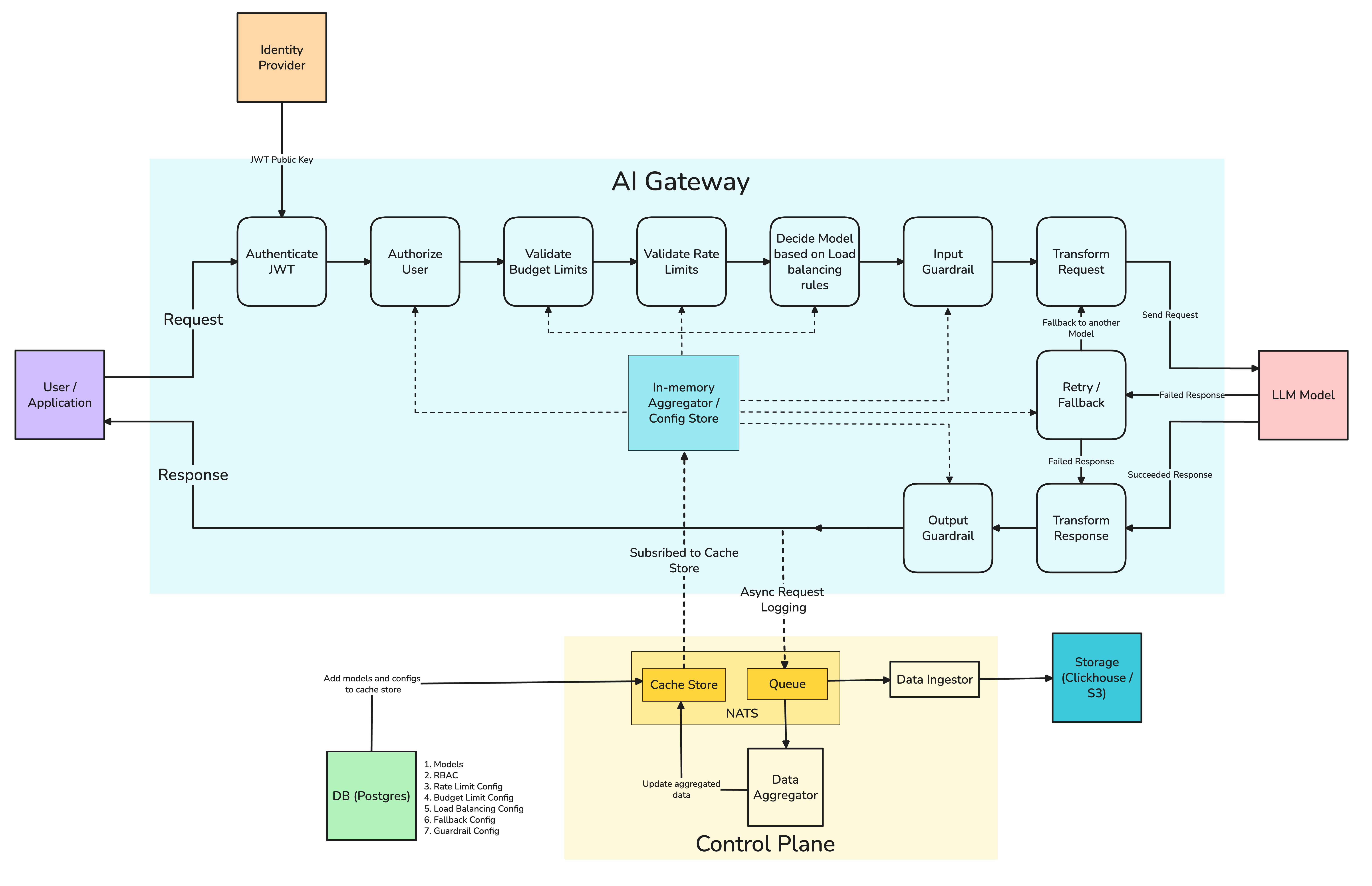
Architecture of the TrueFoundry AI Gateway, designed for high availability, low latency, and scalable LLM integration in production environments.
The AI Gateway plane comprises of one or more deployments of the TrueFoundry AI Gateways.The AI Gateway is like a proxy between your application and the LLM provider. It lies in the critical path of production traffic, and hence needs to be highly available and performant. TrueFoundry AI Gateway has been designed to be a low-latency, and high throughput AI Gateway.The AI Gateway is written using the Hono framework which is ultra-fast, minimalistic, and is designed for the edge. The architecture of AI Gateway is based on the following principles:
There are no external calls in the pathway of executing a request from the client to the LLM provider (unless we are using cache).
All checks for rate and budget limits, load balancing, authentication, and authorization are done in memory.
The logs and metrics are written to a queue in an async manner.
The AI Gateway never fails a request even if the external queue is down.
The AI Gateway is designed to be horizontally scalable and CPU bound so that it scaled nicely as number of requests increases.
It has a control plane, and proxy separation so that multiple AI Gateways can be deployed cross-region and configuration can be managed from a single place.
The AI Gateway plane is completely stateless, and subscribes to the control plane queue to fetch the configuration. If the queue is down, the AI Gateway will try to fetch the configuration from the control plane backend service via HTTP request.
TrueFoundry AI Gateway Architecture
The key components in the above diagram are:
Global Autentication/Licensing Server: This is a global licensing/authentication server. It is used to authenticate every user who logs into the control plane. In case, you are installing the control plane on your end, the Global Authentication server remains within TrueFoundry.
The only information that flows to global licensing/authentication server is the emails of the employees logging into the control plane, and the number of requests flowing through the AI Gateway.
Control Plane: This is the control plane that manages the configuration for the AI Gateway like models, virtual models, users, teams, virtual accounts, rate and budget limiting config, legacy routing configuration, and related settings. The configuration is synced to the AI Gateway via the NATS queue.
Gateway Plane: The AI Gateway plane handles all the requests from the users/applications to the LLM/MCP servers.
Here’s how an LLM request flows through the AI Gateway:The key steps in the request flow are:
1
User makes a request to the AI Gateway
The user will make a request to the AI Gateway with a valid JWT key, and in the OpenAI-compatible API format.
2
AI Gateway validates the request
The AI Gateway will validate the request to check if the JWT token is valid. It also validates if the user has access to the model. The AI Gateway subscribes to all the authorization rules and updates from control plane, and performs in-memory checks to ensure that the request is authenticated and authorized.
3
AI Gateway checks for rate and budget limiting rules
The AI Gateway will check for rate and budget limiting rules to ensure that the user is not exceeding any of the threshold limits.
4
AI Gateway selects the model based on the load balancing rules
AI Gateway then checks the load balancing rules to select the appropriate model for the request.
5
Router/Adapter translates the request to the appropriate model
Since the AI Gateway unifies the API of different LLM providers, it needs to translate the request to the format expected by the target LLM model. It then forwards the translated request to the model.
6
Handle Response from the model
If the model responds with a successful response, the response is forwarded to the user. The request data is sent for logging and metrics collection to the queue in an async manner. If the model responds with an error, the AI Gateway will check if any fallback model is configured. It will then retry the request to the fallback model.
7
Log the request and response
The request and response will be stored in the queue from where it is picked by the backend service and written to blob storage. The aggregation service calculates the metrics required for rate and budget limiting. The metrics are sent back to the queue to which the AI Gateway subscribes. Hence, all the AI Gateway pods refresh the updated rate and budget limits, and latency metrics in an async way.
The AI Gateway has been benchmarked to handle 250 RPS on a single pod with 1 CPU and 1 GB of RAM. The key results of the benchmark are:Benchmarking Results:
High Scalability: TrueFoundry AI Gateway can scale without any degradation in performance until about 350 RPS with 1 vCPU & 1 GB machine before the CPU utilisation reaches 100%, and latencies start to get affected. With more CPU or more replicas, the AI Gateway can scale to tens of thousands of requests per second.
Minimal Overhead: TrueFoundry AI Gateway is continuously optimized and benchmarked to add as little latency as possible.
RPS
Tracing Disabled
Tracing Enabled (w/o Request Logs)
Complete Tracing
200 - 220
+7 ms
+7 ms
+8 ms
350 - 370
+7 ms
+7 ms
+12 ms
There is minimal overhead on the AI Gateway even after applying multiple authorization rules, load balancing, and rate and budget limiting configs.
NATS is used as the message broker between the control plane and the AI Gateway pods. The control plane publishes all updates to this queue which is instantly propagated to all the AI Gateway pods. This data includes the users, authorization data between users and models, the load-balancing configs, and the aggregated data for each segment and model for the AI Gateway to perform ratelimiting with in-memory checks. NATS also serves as a cache to store the data temporarily since it provides key-value store with TTL functionality.After every request that passes through the AI Gateway, the AI Gateway pod publishes an event to NATS containing the input tokens, output tokens, latency, cost, model name, etc. The control plane has an aggregator service that subscribes to NATS for all these updates. It then calculates aggregates of latency per model, total cost per user, model, team or any other custom segment defined by the user in the load-balancing / rate and budget limiting configs. The aggregated data is then again published to NATS by the aggregator service. The AI Gateway pods subscribe to NATS for this aggregated data. The aggregated data is updated in the in-memory store of the AI Gateway pods, using which all the checks for rate and budget limiting, and load-balancing are performed.
How does the AI Gateway enforce rate limiting?
TrueFoundry AI Gateway uses the Sliding Window Token Bucket algorithm to enforce rate limiting. Since the minimum unit of rate limiting is on a per-minute window for LLM traffic, the AI Gateway maintains a sliding window of 60 seconds to track the number of requests. The AI Gateway also maintains a token bucket for each user, model, team, or any other custom segment defined by the user in the load-balancing / rate and budget limiting configs for every 5 seconds. So to calculate the counter in the last 50 seconds, it sums up the tokens in the last 12 buckets. The older buckets are removed from the sliding window.
How is the AI Gateway updated about the configuration changes in control plane?
The AI Gateway uses the control plane to fetch all the configuration data for models, users, virtual accounts, ratelimiting, routing configs, SSO configuration when it starts up. It also subscribes to the NATS queue to remain updated about any configuration changes realtime. If the NATS queue is down for some reason and the AI Gateway cannot connect to it, it also tries to get the configuration from the control plane backend service via HTTP request. If this also fails, the AI Gateway will not startup and the readiness probe of gateway pods will fail - which will instruct Kubernetes to not direct any traffic to the AI Gateway pod. Getting the configuration from control plane via the REST API call is implemented as an additional fail-safe mechanism in case the control plane is up partially.If NATS queue is up, the AI Gateway will sync configs in realtime. If NATS queue is down, and backend service is up, the sync will happen only at startup and no further sync will happen till NATS comes back online. Once it comes back up, all configuration will be automatically synced to Gateway and it will be fully reconciled with th control-plane configuration.
Will AI Gateway continue to work if control plane is down?
The AI Gateway continues to work with whatever configuration it has already fetched from the control plane and doesn’t go down even if the control plane is down. Once control plane is back up, all the configuration that hasn’t synced automatically syncs up with the AI Gateway. If the AI Gateways pods restart while the control plane is down and both NATS and backend service are down in the control plane, the AI Gateway pod that has restarted will not startup. We recommend to keep multiple pods of AI Gateway in a deployment so that the chances of all of them restarting when the control plane is down are minimal. The AI Gateway pods’ readiness probe succeeds only when all configuration has been synced from the control plane - before that, no traffic is directed by Kubernetes to the AI Gateway pod.
Is there a chance of configuration drift between control plane and AI Gateway?
We use NATS with at least once guarantee. The payload in NATS is idempotent - which means that the entire state of configuration is published from the control plane to NATS. So publishing the same payload multiple times has no impact on the state of the configuration and hence AI Gateway functionality.However, in some failure scenarios, its possible that AI Gateway misses one of the updates from the control plane. To mitigate this case further, the control plane publishes the entire configuration every 10 mins. This makes sure that all AI Gateways are synced every 10 mins even if one intermediate update was missed. This ensures eventual consistency and makes sure that there is no configuration drift between control plane and AI Gateway.
How does authentication and authorization work in the AI Gateway?
The AI Gateway syncs the SSO configuration from the control plane via NATS. Once the AI Gateway knows the Issuer URl, we download the public keys to verify the JWT token and cache them in the AI Gateway pod. Every request that hits the AI Gateway is verified using the public key cached and hence doesn’t require any external calls to verify the JWT token. For authorization, the entire map of users, models and their associations are kept in memory in the AI Gateway pod. The authorization check is done in memory and hence doesn’t require any external calls. Since users and models are essentially small strings, this doesn’t take any significant memory and the authorization checks are very fast.
How to configure forward proxy for air-gapped clusters?
In air-gapped environments where the AI Gateway cannot directly access the internet, you can configure a forward proxy to enable external connectivity. The forward proxy acts as an intermediary that routes all external requests (model calls, MCP requests, guardrails) from the AI Gateway to the internet.
Air-gapped Environment with Forward Proxy Architecture