



November 5, 2025
|
5 min read


احصل على وصول فوري إلى بيئة TrueFoundry مباشرة. انشر النماذج، ووجّه حركة مرور LLM، واستكشف المنصة بالكامل — بيئة الاختبار الخاصة بك جاهزة في ثوانٍ، ولا يلزم وجود بطاقة ائتمان.



Published: July 4, 2026
Blazingly fast way to build, track and deploy your models!
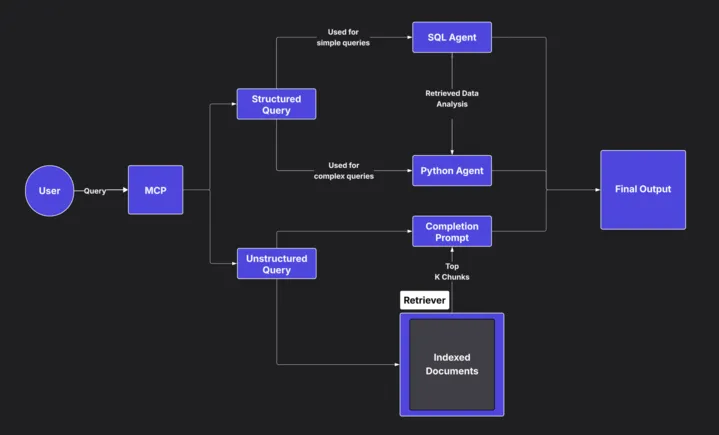
In modern enterprises, data lives in silos. CRM records, sales numbers, or logs are structured and live in databases; research reports, customer feedback, and field notes are unstructured and live in document stores. To make sense of both, teams often spend hours building connectors, pipelines, and analysis scripts.
But what if you could unify all that with one layer — a Model Control Plane (MCP) — and query everything with natural language?
Welcome to the new way of working with data: querying structured and unstructured sources through MCP tools.
A Model Control Plane (MCP) acts as a bridge between your AI agent and the external tools or data systems it interacts with. You can think of MCP as the “operating system” for your AI tools — it defines what the AI can access, how, and under what context.
Each MCP connects to a specific capability — it could be a database connector, a document retriever, or even a code executor.
For example: -
Once these are wired together, you can literally ask: > “List top 5 HCPs by priority rating and summarize their oncology focus from our internal reports.”
The system automatically:
1. Generates SQL to query the database for top HCPs.
2. Fetches oncology-focused reports via RAG.
3. Combines and summarizes both.
Let’s walk through how this works using the Sales Rep-Co Accelerator setup as an example.
You start by deploying the Sales Rep-Co service as an MCP on TrueFoundry.
You will need access to the demo tenant of Truefoundry
- Ensure the service is active and the pod is running.
- Resume if paused, or restart via Endpoint/Credentials if in auto-shutdown.
- If not deployed, you can spin it up from the TrueFoundry UI or locally using the provided configuration.
Once deployed, you’ll have an endpoint like: https://tfy-eo.truefoundry.cloud/deployments/{deployment_id}?tab=pods
Inside TrueFoundry’s AI Gateway, go to: > AI Gateway → MCP Servers → + (Add MCP)
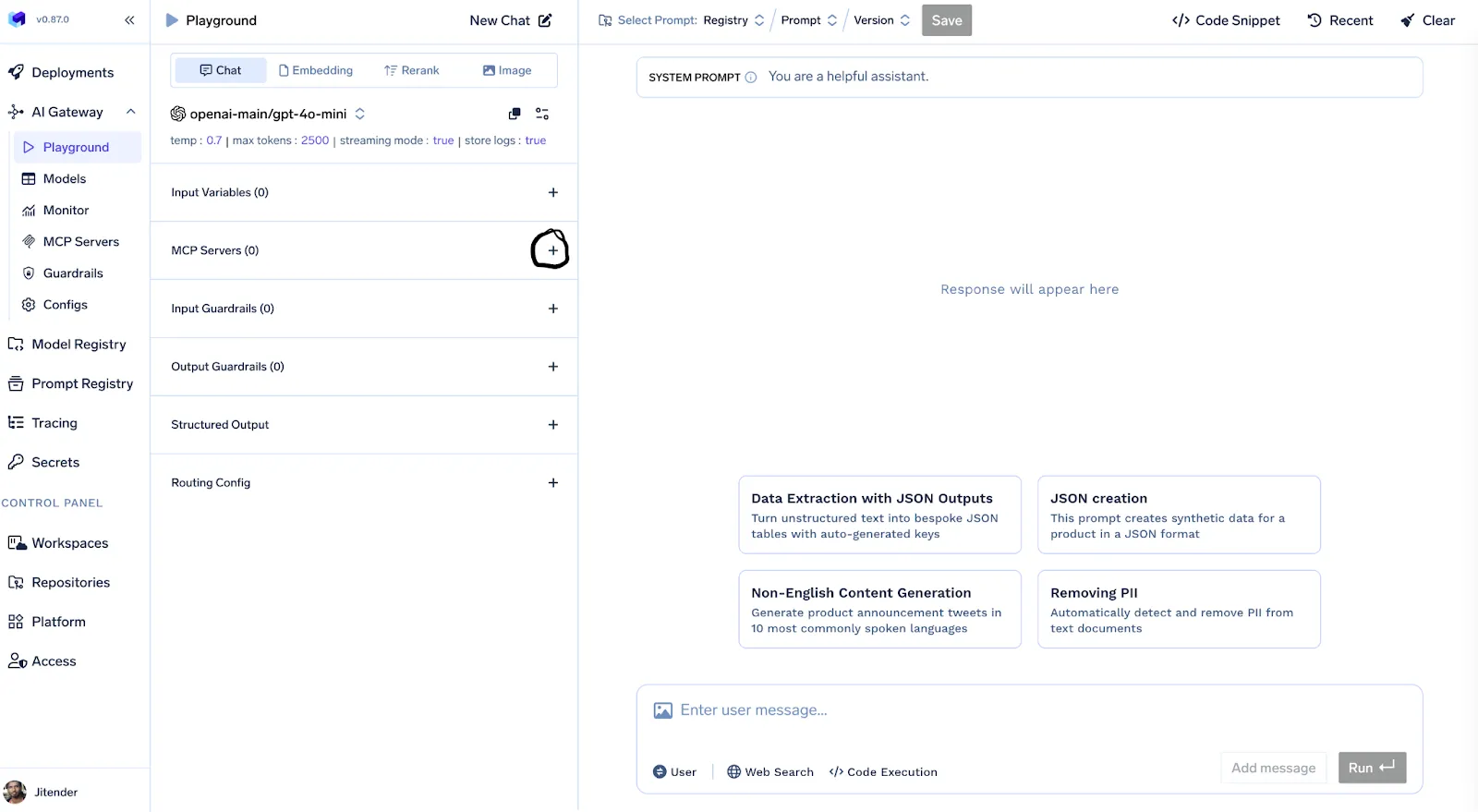
Find or add your sales-repco-accelerator MCP.
Once connected: - Toggle it on - Click Enable All Tools .
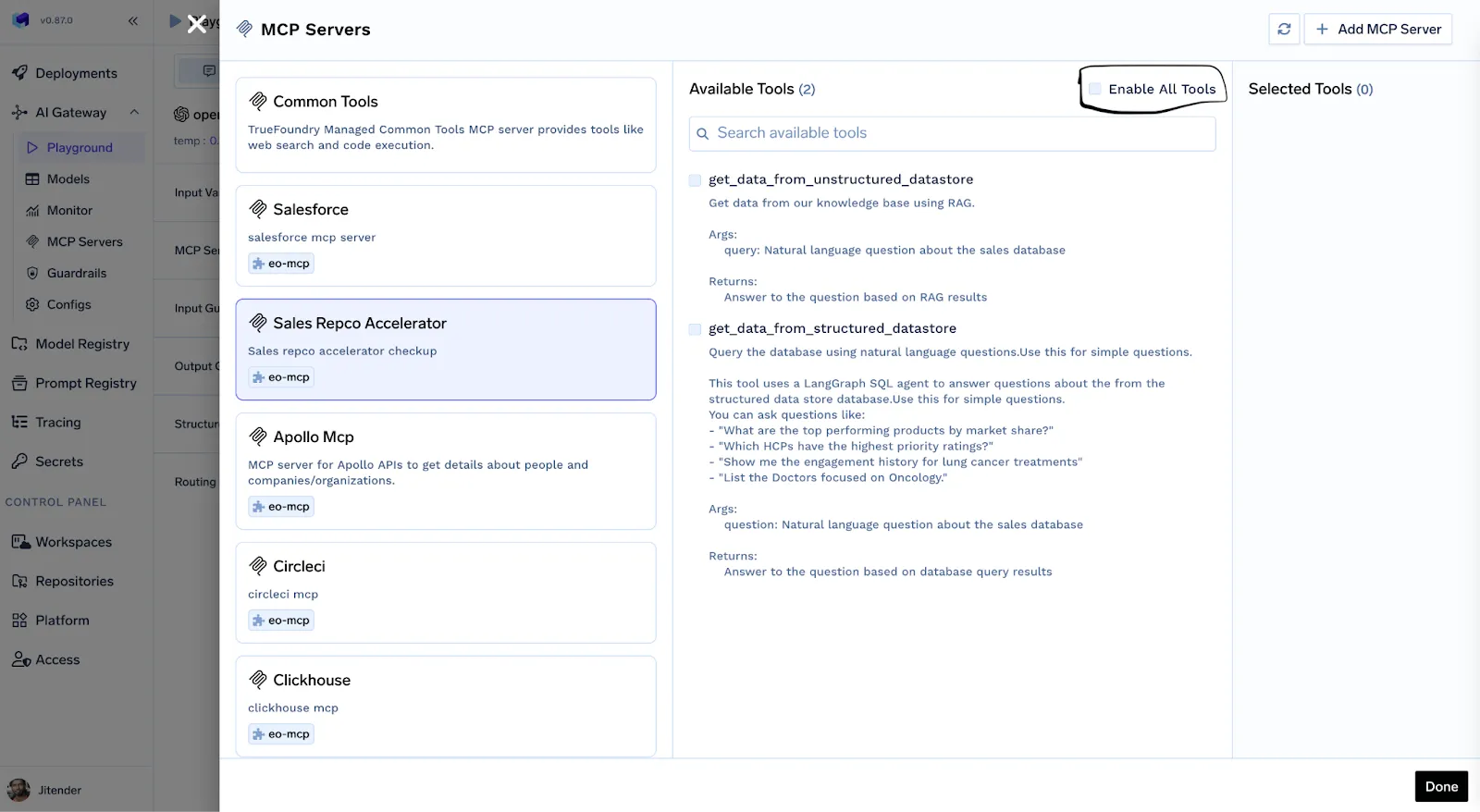
Your MCP now has access to structured (SQL) and unstructured (docs) tools.
With your MCP active and connected, you can query structured and unstructured data together — all through natural language.
Here are some examples:
Query
What Happens Under the Hood
What are the top 5 HCPs by priority rating?
Text-to-SQL queries the structured HCP database.
List the Doctors focused on Oncology and draft a short summary referencing the report on Metastatic Organotropism.
SQL fetches doctor details → RAG fetches and summarizes report text → Drafts an email response.
Analyze the distribution of HCP priority ratings in the oncology department.
SQL + Python code executor generates and visualizes insights.
You can even extend this setup by adding more MCP tools for analytics, visualization, or custom APIs.
Traditional enterprise data access workflows require: - ETL pipelines, - BI dashboards, - Manual coordination between analysts and business users. With MCP-based querying: - You reduce tool-switching. - You query everything through one interface. - You bridge structured and unstructured data natively. This is more than just convenience — it’s how data-driven decision-making should work.
As teams build more MCPs — for analytics, RAG, CRM, and even external SaaS tools — a multi-agent ecosystem starts to emerge. Each agent specializes in its domain (e.g., SQL expert, summarizer, email drafter), and the AI Gateway orchestrates them through MCPs. We’re moving towards a world where your enterprise data systems are not static dashboards but living, querying, reasoning entities.
By combining structured queries (SQL), unstructured retrieval (RAG), and execution logic (Python) inside an MCP, you enable an agent to answer complex, cross-domain questions instantly. Whether you’re a data scientist, sales leader, or enterprise architect — building an MCP layer on top of your data systems is the first step towards truly intelligent data access.
TrueFoundry AI Gateway delivers ~3–4 ms latency, handles 350+ RPS on 1 vCPU, scales horizontally with ease, and is production-ready, while LiteLLM suffers from high latency, struggles beyond moderate RPS, lacks built-in scaling, and is best for light or prototype workloads.





أحدث الأخبار والمقالات والموارد تصلك مباشرة إلى بريدك الوارد


.png)



.png)
.png)
.png)

.png)
.png)
.png)
.png)
.png)
.png)
.png)


