



October 1, 2026
|
5 min read


احصل على وصول فوري إلى بيئة TrueFoundry مباشرة. انشر النماذج، ووجّه حركة مرور LLM، واستكشف المنصة بالكامل — بيئة الاختبار الخاصة بك جاهزة في ثوانٍ، ولا يلزم وجود بطاقة ائتمان.



Published: July 4, 2026
.webp)
Blazingly fast way to build, track and deploy your models!
MCP is defined as "USB-C for AI applications." MCP provides a consistent protocol for linking AI models with external tools.
With MCP, AI applications like Claude or ChatGPT aren’t limited to just generating text. They can connect directly to data sources (such as local files or databases), tools (like search engines or calculators), and structured workflows (specialized prompts or automations).
When there is no protocol like MCP, each AI application has to integrate with every external tool separately. This makes the process very complex, time-consuming, and costly
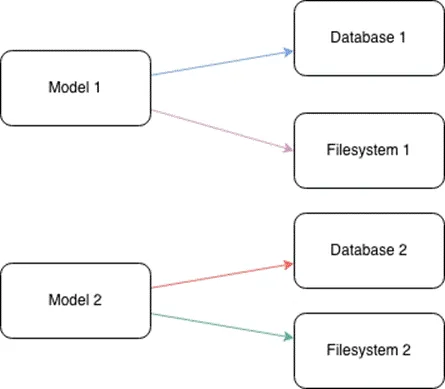
When we have multiple AI applications and many tools, the number of required integrations becomes extremely large
MCP solves the M × N integration problem by transforming it into an M + N model through a standardized connection protocol. Each AI application integrates once on the MCP client side, and each tool or data source integrates once on the MCP server side.
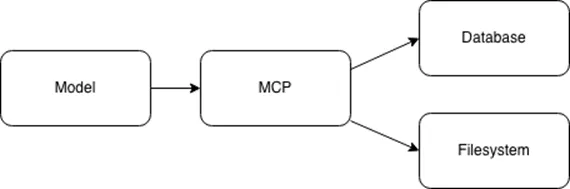
Similar to the client–server model in the HTTP protocol, MCP also follows a client–server architecture.

Although MCP can connect to many different tools, there are common tools that are shared across multiple AI applications. Below are the main categories of tools commonly used across AI systems:
After understanding the key concepts and terminology of MCP, we can now look at its architecture.
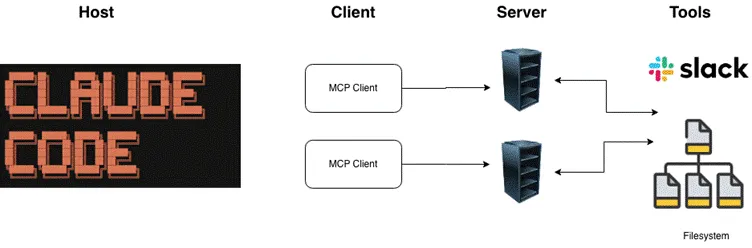
The Model Context Protocol (MCP) is built on a client–server architecture that enables AI models to interact with external tools and services.
The Host is the environment where end users directly interact with the AI application (e.g., Claude Desktop, Cursor).
The Host is responsible for:
The Client is a component inside the Host that manages the connection to a specific MCP Server.
Key characteristics:
Server
The Server is an external program or service that provides capabilities to the AI model via the MCP protocol.
The Server is responsible for:
Install fastmcp
pip install fastmcp
Basic MCP Server: Weather Tool
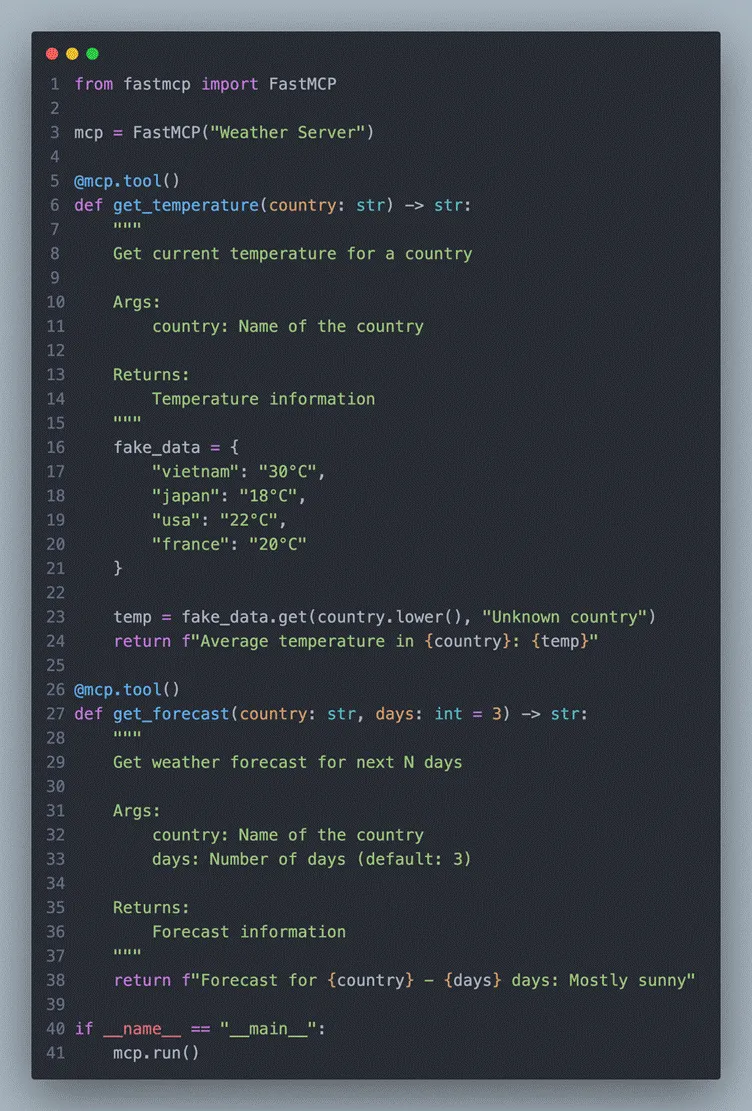
That’s it! FastMCP handles everything, including:
Connecting to Claude Code
claude mcp add weather --command python --args /full/path/to/get_weather.py
Restart Claude Code → the MCP servers will automatically connect.
Now you can ask Claude things like:
Claude will automatically invoke the tools from your MCP servers seamlessly.
Basedon the Claude docs (https://code.claude.com/docs/en/mcp), setting up
MCPin Claude Code is pretty straightforward — just run
claude mcp add
andit handles the configuration for you automatically
Tolist and verify all configured MCP servers in Claude Code, try to run:
claude mcp list
1. Serena MCP
Link: https://github.com/oraios/serena
I’ve been experimenting with an AI-driven workflow and plugged Serena MCP straight in (just using Sonet 4.5).
Honestly, it feels kind of “wow.” Instead of dumping a bunch of files on the AI and hoping it figures things out, it actually reads the codebase like a senior dev on the team.
Why it works so well?
بشكل عام: رموز أقل، سياق أوضح، فهم أعمق بكثير للكود.
إذا كنت تبني وكلاء برمجة، فعليك تجربته. سيبدأ الأمر حقًا وكأن الذكاء الاصطناعي هو زميلك في الفريق.
2. بروتوكول السياق النموذجي للتفكير المتسلسل (MCP)
الرابط: https://github.com/modelcontextprotocol/servers/tree/main/src/sequentialthinking
3. استخدام الوكلاء الفرعيين المتخصصين
الرابط: https://github.com/wshobson/agents
هذا نظام شامل وجاهز للإنتاج، مصمم للاندماج مع Claude Code وتوسيع قدراته بشكل كبير.
يجمع بين:
لكل وكيل دور محدد بوضوح — مثل تصميم بنية الواجهة الخلفية، وتطوير الواجهة الأمامية، وتحسين البنية التحتية السحابية، والاختبار الآلي، وMLOps، والمزيد — وكلها مُكوّنة وفقًا لأفضل الممارسات الحديثة.
التثبيت:
git clone https://github.com/wshobson/agents.git ~/.claude/agents
TrueFoundry AI Gateway delivers ~3–4 ms latency, handles 350+ RPS on 1 vCPU, scales horizontally with ease, and is production-ready, while LiteLLM suffers from high latency, struggles beyond moderate RPS, lacks built-in scaling, and is best for light or prototype workloads.





أحدث الأخبار والمقالات والموارد تصلك مباشرة إلى بريدك الوارد
.png)



.png)
.png)
.png)

.png)
.png)
.png)
.png)
.png)
.png)
.png)


