



October 1, 2026
|
5 min read


احصل على وصول فوري إلى بيئة TrueFoundry مباشرة. انشر النماذج، ووجّه حركة مرور LLM، واستكشف المنصة بالكامل — بيئة الاختبار الخاصة بك جاهزة في ثوانٍ، ولا يلزم وجود بطاقة ائتمان.



Published: July 4, 2026
Blazingly fast way to build, track and deploy your models!
You probably don’t think much about your cursor, but it can affect your digital security more than you know. Every time you click links or enter information, your cursor interacts with websites and apps, and this can create risks if you’re not careful. This guide is designed for DevSecOps teams, security engineers, and developers who need a clear picture of what happens to their code: what cursor security is, how Cursor works, the types of data it handles, past vulnerabilities, key risks, and best practices to use it safely.
.webp)
AI-powered IDEs have quickly evolved from “nice-to-have” tools to core development infrastructure, often faster than security teams can adapt. Cursor, by Anysphere, is a leading example: a VS Code–based editor with deep AI integration that can generate, refactor, and even execute code or external actions.
Cursor is no longer niche. By mid-2025, reports highlighted its rapid growth, placing its revenue around $500M ARR [Source]. Cursor itself states it’s used by “tens of thousands of enterprises,” with customers publicly named in its Enterprise launch post [Source]. NVIDIA’s CEO has also publicly acknowledged widespread use of AI coding tools, including Cursor, within NVIDIA. [Source] This growth has been largely organic, driven by viral adoption, developer communities, and a generous freemium model.
What makes Cursor unique is its approach: you’re no longer just writing code manually; you’re directing an AI agent that reads, writes, and executes code for you, a trend often called “vibe coding.”
However, embedding agentic AI into the IDE introduces new security challenges. Unlike traditional editors, Cursor operates in a cloud-connected, semi-autonomous environment where code continuously interacts with external systems.
For enterprises, these risks are high-stakes. With large-scale adoption and emerging vulnerabilities like CVE-2025 exploits, understanding how Cursor handles security is essential.
Before diving into cursor security infrastructure, it’s important to understand the Cursor engine. Cursor isn’t just a static IDE; it’s a collection of high-autonomy agents working together. In security terms, every feature of Cursor represents a security “ask”, which is also a potential exposure. Here’s how Cursor’s primary capabilities translate into an attack surface.
Cursor predicts code inline as you type. Small snippets of your active file are encrypted and sent to Cursor’s servers, where a custom LLM generates completions in under a second.
Security Risk: For organizations, this requires absolute zero data retention (ZDR), ensuring that millions of queries per second are processed in-memory only and never written to permanent logs. Any lapses could expose sensitive code.

Cursor can collaborate to build features or fix bugs. It uses agentic reasoning to search your indexed codebase and combine snippets into rich prompts for the AI model.
Security Risk: Despite improvements over snippet-based AI, indirect prompt injection is possible. Malicious instructions hidden in third-party libraries, README files, or comments could "poison" the agent, causing it to execute unauthorized tasks or leak internal logic to an external URL.
Cursor refactors targeted blocks of code in a precise, surgical manner. The selected code and instructions are sent to the model, which returns a diff that is applied directly to your file.
Security Risk: Rapid AI refactors can introduce subtle security flaws, especially under reviewer fatigue. Examples include unvalidated inputs, hardcoded secrets, or logic errors hallucinated by the AI. Developers must carefully inspect edits before accepting them.
.webp)
BugBot reviews Pull Requests and suggests fixes, requiring read/write access to your private GitHub repositories.
Security Risk: Your CI/CD pipeline now depends partially on Cursor’s cloud infrastructure. BugBot must be treated as a privileged entity, and its permissions should be strictly scoped to minimize risk.
Cursor offloads long-running tasks to background agents, such as running full test suites on isolated Ubuntu-based VMs in Cursor’s AWS cloud.
Security Risk: This introduces remote code execution into the threat model. Cloud tenant isolation and VM security are critical because proprietary code moves from your local machine to Cursor-managed cloud environments.
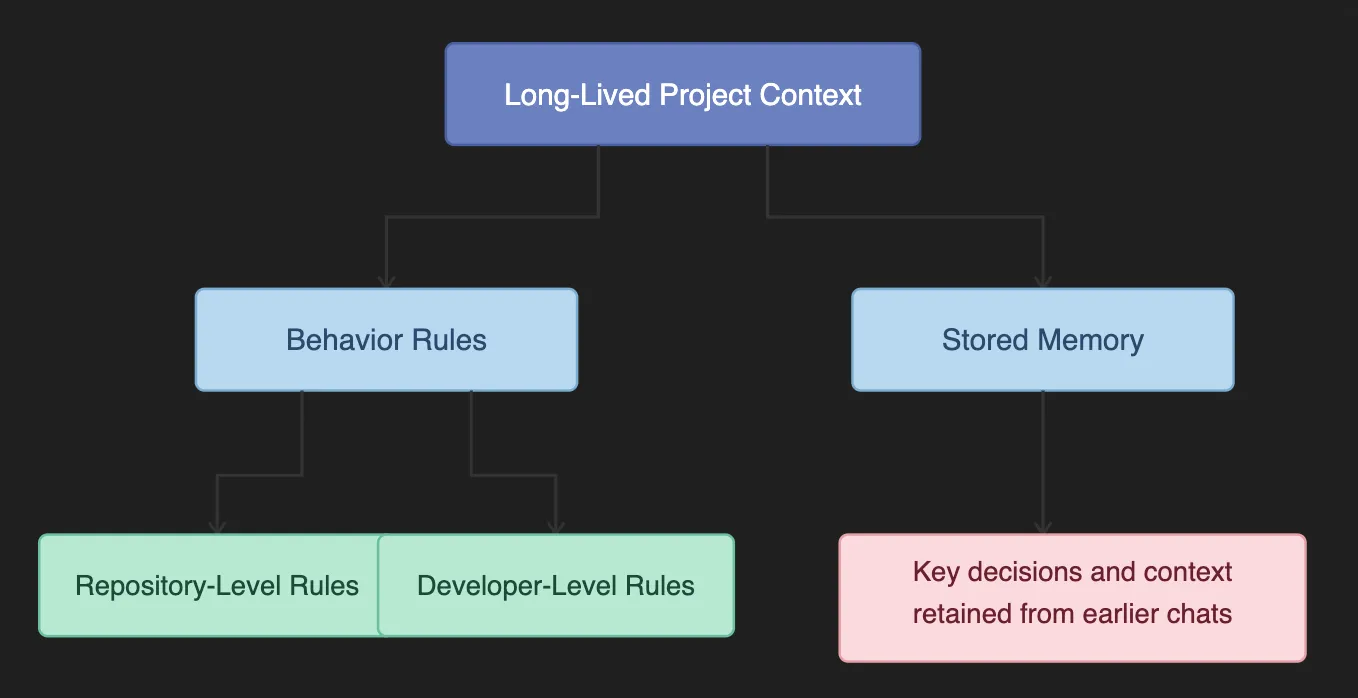
Cursor remembers project-specific style guides and past architectural decisions. It injects instructions from .cursorrules files and “memories” into the context of every prompt.
Security Risk: A compromised .cursorrules file in a shared repository could inject persistent, invisible biases into the AI. For example, attackers could force the AI to consistently use a malicious library for encryption across the team’s IDEs.
Cursor can “understand” and search your entire project based on semantic meaning, not just keywords. It uses Merkle Tree synchronization to map code into embeddings stored in a remote vector database (Turbopuffer).
Security Risk: Sensitive logic or secrets (like .env files) could be unintentionally vectorized if they aren’t excluded with .cursorignore. This exposes critical information to remote storage.
Now that you understand Cursor’s capabilities and attack surface, the next step is to examine where your data goes, how it is processed, and the multi-layered infrastructure Cursor uses to keep your code safe.
Cursor integrates tightly with your IDE, bringing AI-driven automation to your development workflow. While this enables speed and flexibility, many developers treat their IDE as a black box.
If you’re a CISO, security engineer, or senior AI developer, one key question arises:
“Where exactly does my code go?”
Cursor addresses this through a three-tiered architecture that creates a clear chain of custody- from your local machine, through Cursor’s cloud orchestration, to AI inference, and back:
.webp)
The Cursor client, a fork of VS Code, keeps your most sensitive data anchored locally and performs all critical pre-processing before anything leaves your environment. It indexes your code, creates local embeddings, maintains a Merkle tree of file hashes, and performs semantic searches to select only the relevant snippets to send to the cloud. Cursor also respects .cursorignore and .gitignore rules, filtering out sensitive files, secrets, or PII.
From a security perspective, this ensures data minimization, only a narrow subset of code ever leaves your machine, and pre-transmission filtering, making the client the strongest boundary for protecting your source code.
The Cursor backend acts as a secure orchestration layer, assembling AI prompts without storing your source code. Hosted primarily on AWS, this “Cursor Gateway” combines user queries with the snippets selected on the client and persistent project instructions (like .cursorrules). It applies prompt engineering, routing logic, and safety controls, and even user-supplied API keys pass through for governance.
In Privacy Mode, all code is processed in-memory with zero-retention logging, and no long-term storage occurs. The Gateway represents the last Cursor-controlled boundary before data reaches third-party LLM providers.
Inference occurs through third-party LLM providers such as OpenAI, Anthropic, or Google. These models receive the final assembled prompt, process it, and stream the output back through the backend to the client.
For enterprise customers, Zero Data Retention (ZDR) agreements ensure that code is not stored beyond the inference window, prompts are not used for training, and no secondary retention occurs. Selecting compliant providers and enforcing contractual guarantees is critical to maintaining enterprise security and compliance.
.webp)
Cursor interacts with multiple types of data, each flowing through different tiers and carrying unique security considerations. The table below summarizes the key data types, their primary tiers, examples, and security notes.
Cursor’s AI capabilities bring powerful automation, but they also introduce new security challenges. Here, have a look at the seven major security risks with Cursor:
Attackers can craft prompts designed to trick Cursor’s AI into executing unintended commands or modifying critical project files. Since these actions may run directly in your terminal or file system, exploitation can result in code corruption or even full environment compromise.
Cursor uses project and conversational context to enhance AI suggestions. If this context is poisoned, for example, with misleading snippets or instructions, it can carry over to other projects. This may introduce logic errors, security vulnerabilities, or the accidental leakage of sensitive information.
Rules files govern how Cursor agents behave, including triggers and execution parameters. A tampered rules file can hide malicious instructions, granting attackers persistent access or the ability to run arbitrary code whenever the file is loaded.
Auto-run mode allows agents to perform commands without human approval. While convenient, it removes critical review steps, increasing the risk of unsafe scripts executing unnoticed and potentially introducing malware or compromising the development environment.
AI-generated outputs can accidentally include API keys, authentication tokens, or login credentials. If these secrets are exposed in logs, version control, or shared environments, attackers could gain direct access to sensitive systems and data.
Cursor can install packages automatically as part of AI workflows. Malicious or compromised packages from public registries can contain obfuscated scripts that exfiltrate data, deploy malware, or execute unauthorized commands on installation.
When multiple agents share the same namespace, a malicious actor can create a spoofed agent that impersonates a trusted one. This can hijack Cursor’s agent system, allowing attackers to execute unauthorized commands or exfiltrate sensitive information.
.webp)
In 2025, researchers identified two high-profile vulnerabilities in how Cursor handles MCP servers, highlighting the real-world risks of agentic AI in IDEs.
The first, CurXecute (CVE-2025-54135), demonstrated the dangers of indirect prompt injection. Researchers found that Cursor allowed certain files to be created within a workspace without requiring user approval.
This meant that an attacker could craft a malicious message, such as a Slack notification monitored by the AI agent, that would trick the AI into writing a harmful .cursor/mcp.json file. Because older versions of Cursor did not prompt for confirmation when creating new files, this flaw could be exploited to achieve Remote Code Execution (RCE) simply by sending a text message.
The second vulnerability, MCPoison (CVE-2025-54136), took advantage of a trust-validation flaw in Cursor’s handling of MCP server approvals. In earlier versions, once a server was approved, Cursor would trust that server indefinitely. An attacker could initially commit a benign configuration to a shared repository and wait for it to be approved.
Later, they could silently replace the command with a malicious payload, such as a reverse shell. Since the server name remained unchanged, Cursor would not prompt the user again for approval, enabling stealthy execution of malicious commands.
Together, these vulnerabilities underscore the importance of strict approval workflows, monitoring configuration files, and maintaining up-to-date versions of AI-enabled IDEs.
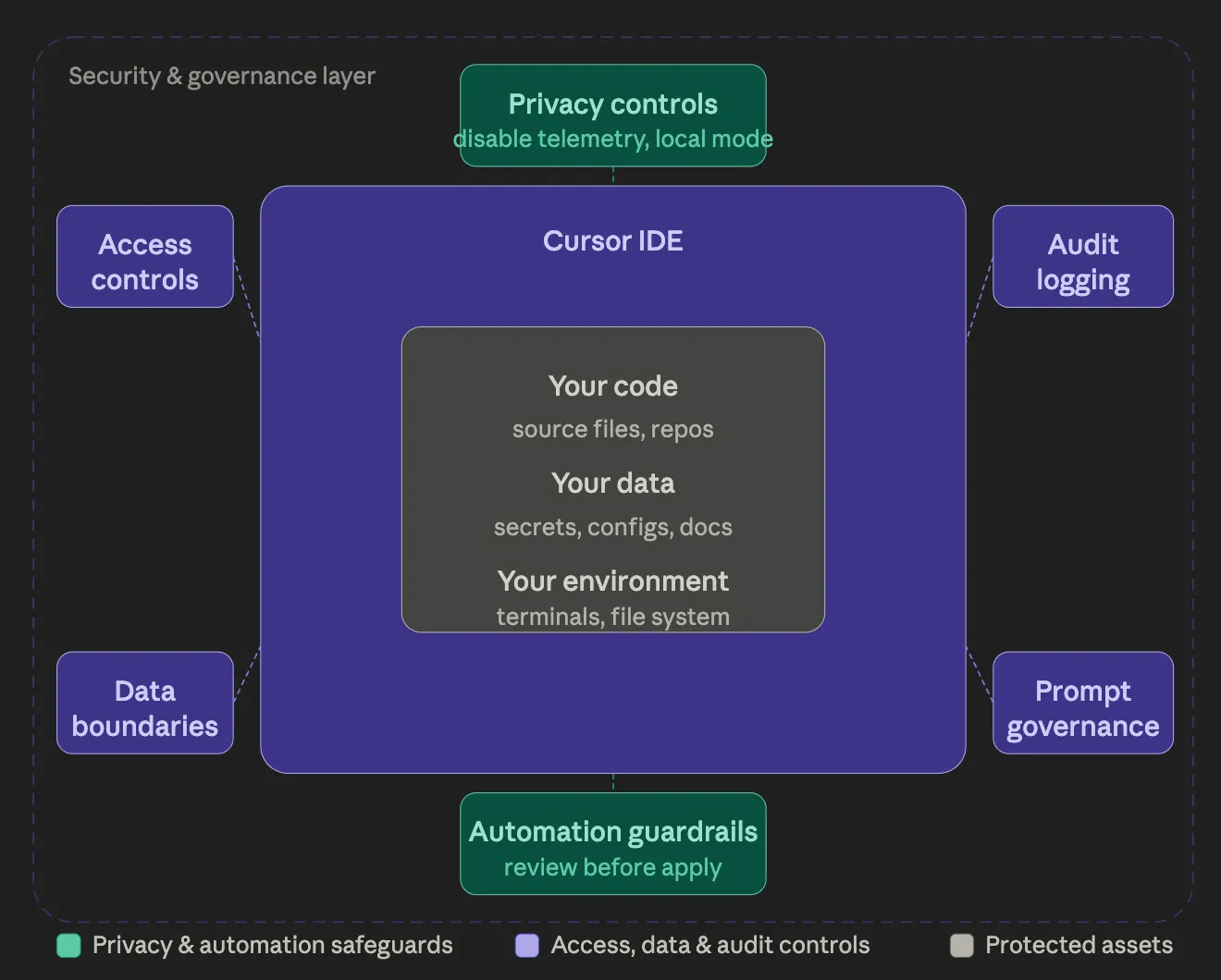
Securing Cursor means layering controls to prevent mistakes, misleading suggestions, or unexpected behavior from turning into incidents. Each layer adds human oversight, limits autonomous actions, and improves visibility. Here, have a look:
These are the essential steps that every developer should implement from day one:
إذا طبقت الفرق هذه الخطوات الأساسية الثلاث، فإنها تخفف معظم المخاطر الواضحة على المستوى الفردي.
بمجرد استخدام Cursor من قبل عدة مطورين في فريق، يصبح الاتساق والممارسات القابلة للتطبيق ضرورية:
عند نطاق معين، الاعتماد على عبارة "يرجى تكوين هذا بشكل صحيح" غير كافٍ. ضوابط مركزية مثل بوابة ذكاء اصطناعي مطلوبة للرؤية والتوجيه والضوابط القابلة للتطبيق.
ضع شيئًا في المنتصف
بمجرد استخدام Cursor عبر الفرق، تحتاج إلى مكان مركزي لرؤية والتحكم فيما تفعله الوكلاء. النمط الأبسط هو توجيه حركة مرور النماذج والأدوات عبر طبقة بوابة، بدلاً من السماح لكل جهاز كمبيوتر محمول بالتحدث مباشرة إلى المزودين و خوادم MCP.
على سبيل المثال، بوابة TrueFoundry للذكاء الاصطناعي مصممة كوكيل بين التطبيقات ومزودي نماذج اللغة الكبيرة (LLM)، ويمكنها أيضًا أن تكون بين التطبيقات وخوادم MCP، بحيث يمكن للفرق توحيد التوجيه وإضافة الحوكمة في مكان واحد. عمليًا، يمنح هذا فرق الأمان نقطة تحكم واضحة لأمور مثل مراقبة الطلبات، وتطبيق السياسات، والضوابط التي تتحقق من صحة الطلبات والاستجابات أو تحولها.
هذا مهم لأن معظم أدوات أمان التطبيقات (SAST/DAST/SCA) لا ترى الكود إلا بعد كتابته. تمنحك البوابة رؤية لاستخدام الذكاء الاصطناعي أثناء حدوثه، وهو المكان الذي تبدأ فيه عادةً حقن الأوامر، والاستخدام غير الآمن للأدوات، وانتهاكات السياسات.
حدود مهمة: تتحكم نقطة التحكم هذه في حركة مرور النماذج/الأدوات، لكنها لا تمنع تلقائيًا الإجراءات المحلية (مثل تشغيل أوامر الطرفية) ما لم يفرض بيئتك وإعداداتك هذه القيود بشكل منفصل.
توحيد سياسات الهوية والبيانات: إذا كان Cursor مستخدمًا على نطاق واسع، فيجب أن يخضع لنفس القواعد التي تخضع لها أدوات التطوير الأخرى. يقلل تسجيل الدخول الموحد (SSO)، والإعدادات المتسقة، وسياسات عدم الاحتفاظ بالبيانات من التخمين ويجعل عمليات التدقيق أسهل.
في هذه المرحلة، يتوقف Cursor عن كونه "مجرد محرر" ويصبح جزءًا من البنية التحتية للتطوير لديك.
يبدو Cursor قويًا لأنه يزيل الاحتكاك، وهذا هو هدفه. لكن الاحتكاك موجود لسبب، خاصة عندما يتعلق الأمر بتنفيذ الأوامر أو إدارة التبعيات. الفرق التي تستخدم Cursor بأمان لا تحارب هذا الاحتكاك، ولا تثق بالذكاء الاصطناعي بشكل أعمى. إنهم يتركون الذكاء الاصطناعي يتولى التفكير والصياغة، بينما يظل البشر مسؤولين عن الموافقة والمساءلة.
النموذج الذهني بسيط وفعال: الذكاء الاصطناعي يقترح، لكن البشر يقررون.
مع تزايد قدرة أدوات التطوير على العمل كوكلاء، لن يكون النجاح حليف أولئك الذين يتحركون بأسرع ما يمكن بأي ثمن. بل سيكون حليف الفرق التي تتحرك بسرعة ووعي، موازنة بين السرعة والرقابة المتعمدة والأمان.
قم بتأمين وإدارة سير عمل الذكاء الاصطناعي الخاص بك باستخدام بوابة TrueFoundry للذكاء الاصطناعي. احجز عرضًا توضيحيًا.
يقدم Cursor مخاطر أمنية مثل حقن الأوامر، والتشغيل التلقائي للوكيل، والتعرض من خلال عمليات التكامل مع جهات خارجية. هذه المخاطر حقيقية ولكن يمكن إدارتها عند تطبيق الضوابط المناسبة وإعدادات الخصوصية والإشراف البشري. يجب على فرق المؤسسات التعامل مع Cursor كجزء من بنيتها التحتية الأمنية.
يمكن أن يكون Cursor آمنًا للخصوصية إذا تم تمكين وضع الخصوصية. على نطاق معين، الاعتماد على مجرد توجيهات "يرجى التكوين بشكل صحيح" غير كافٍ. هناك حاجة إلى ضوابط مركزية مثل بوابة الذكاء الاصطناعي لضمان الرؤية والتوجيه وحواجز الحماية القابلة للتطبيق. يتم حماية الملفات الحساسة، وتُستخدم قواعد مثل .cursorignore. بدون هذه الإجراءات، قد تغادر مقتطفات التعليمات البرمجية البيئة المحلية، مما قد يؤدي إلى كشف معلومات حساسة أو خاصة.
قد يسجل Cursor بيانات قياس عن بعد (telemetry) بحد أدنى، والتي قد تتضمن معرفات الشبكة مثل عناوين IP لأغراض التشخيص أو التحليلات. تساعد سياسات الخصوصية للمؤسسات ووضع الخصوصية في الحد من التعرض، ولكن يجب على المستخدمين افتراض أن بعض البيانات الوصفية على مستوى الشبكة قد تكون مرئية لمقدمي الخدمة.
يُعد وضع الخصوصية فعالاً في تقليل الاحتفاظ بالتعليمات البرمجية خارج الجلسة المحلية، مما يقلل من التعرض لخوادم الذكاء الاصطناعي. بينما يعزز هذا الوضع الخصوصية، فإن دمجه مع حماية ملفات dotfile، و.cursorignore، وعمليات التكامل المحكمة يضمن أمانًا شاملاً للمشاريع الحساسة.
TrueFoundry AI Gateway delivers ~3–4 ms latency, handles 350+ RPS on 1 vCPU, scales horizontally with ease, and is production-ready, while LiteLLM suffers from high latency, struggles beyond moderate RPS, lacks built-in scaling, and is best for light or prototype workloads.





أحدث الأخبار والمقالات والموارد تصلك مباشرة إلى بريدك الوارد
.png)



.png)
.png)
.png)

.png)
.png)
.png)
.png)
.png)
.png)
.png)


