


Obtenha acesso instantâneo a um ambiente TrueFoundry ao vivo. Implante modelos, direcione o tráfego de LLM e explore a plataforma completa — seu sandbox estará pronto em segundos, sem necessidade de cartão de crédito.


What is AI automation, and why is it used?

.webp)
AI automation is becoming a major part of how modern businesses and digital systems operate. From customer service chatbots to automated data processing in enterprises, AI is quietly handling tasks that once required manual effort.
In simple terms, AI automation combines artificial intelligence with automation to perform tasks with minimal human involvement. It does not just follow fixed rules, it can also learn, adapt, and make decisions within defined boundaries.
In this guide, you’ll understand what AI automation is, how it works, and why it is widely used today.
H2: What is AI automation?
AI automation is the use of artificial intelligence to automate tasks, processes, or workflows that normally require human effort. It goes beyond traditional automation by adding intelligence, meaning it can handle variation, interpret data, and make basic decisions.
Traditional automation follows fixed instructions. For example, if this happens, do that. But AI automation can understand patterns and adjust actions based on changing inputs.
In simple terms, AI automation helps machines not only do tasks, but also decide how to do them in certain situations.
For example:
- A system can automatically sort customer emails based on intent
- A chatbot can answer queries without human support agents
- A financial tool can detect unusual transactions and flag fraud
- A system can summarize reports instead of just storing data
This makes AI automation much more flexible and powerful than older rule-based systems.
H2: Why is AI automation used?
AI automation is used because it helps organizations do more work with greater speed and consistency while reducing the burden of manual effort.
Increased efficiency: AI can process large volumes of tasks much faster than humans, especially when the work is repetitive or time-sensitive. This reduces turnaround time and allows employees to focus on higher-value responsibilities.
Improved accuracy: AI systems apply rules and patterns consistently, which helps reduce common human errors such as missing data, incorrect routing, or inconsistent responses across tasks.
Cost savings: By reducing manual processing, rework, and error correction, AI automation helps lower operational costs over time and improves resource utilization.
Better customer experience: AI enables faster responses, more consistent service, and personalised interactions across channels like chat, email, and support systems, improving overall user satisfaction.
Scalability and flexibility: AI automation can handle increasing workloads without requiring proportional increases in staffing. It also adapts better to changing inputs compared to rigid, rule-based systems.
H2: How does AI automation work?
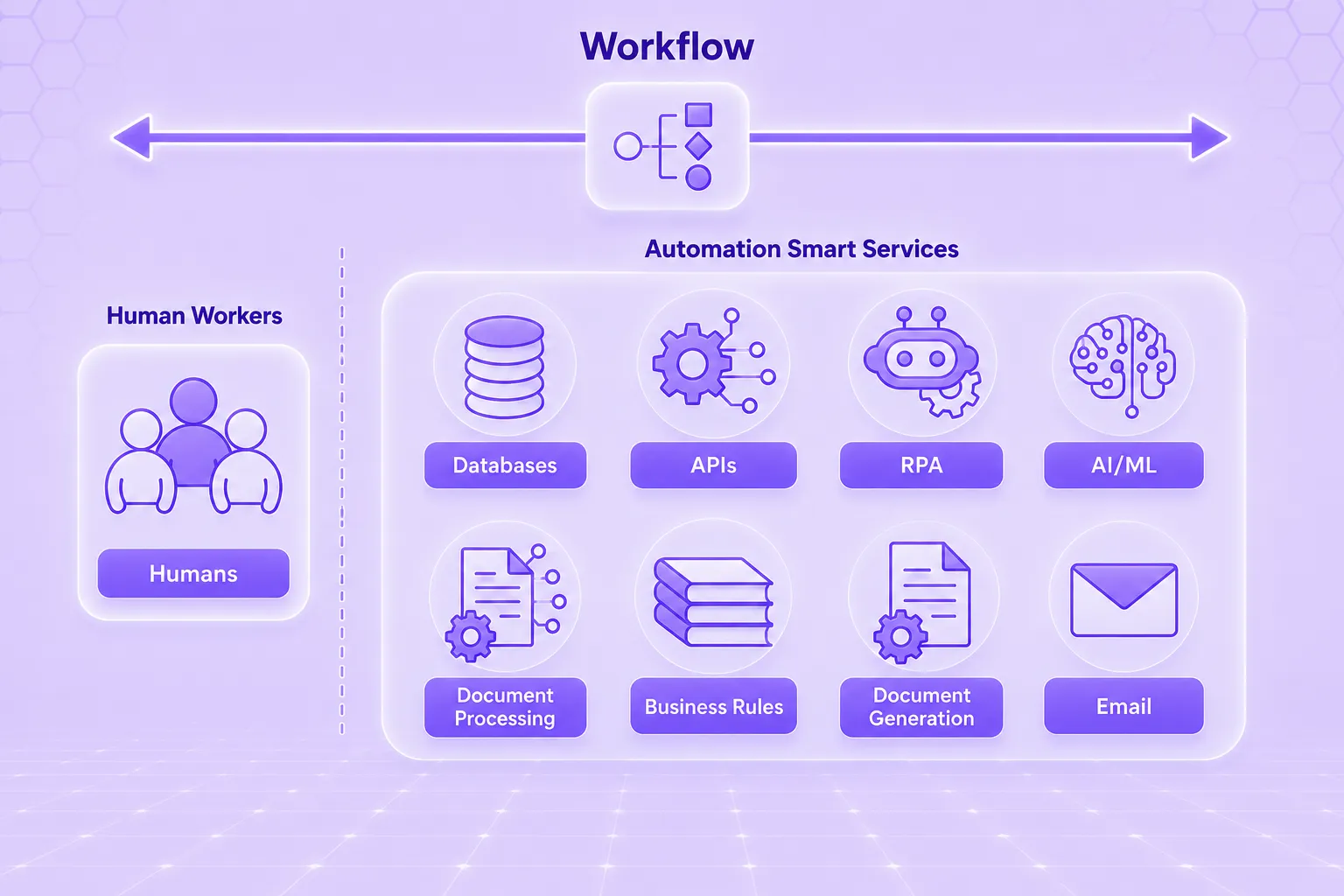
Alt text: AI automation workflow
AI automation works by combining data intake, AI-driven interpretation, and workflow execution into a single system that can process tasks end-to-end with minimal human input.
The process starts when information enters the system from different sources such as emails, online forms, chat conversations, scanned documents, transactions, images, voice inputs, or enterprise applications. Instead of treating all inputs the same way, the AI layer first interprets what the data means.
Using techniques like machine learning, natural language processing, optical character recognition, or computer vision, the system extracts key details, identifies intent, classifies the request, and detects patterns or anomalies. This step is what allows the system to move beyond simple rule-matching and understand context.
Once the analysis is complete, the workflow engine takes over and carries out the required action. This could include updating records in a CRM, assigning or routing tickets, generating summaries or reports, sending notifications, initiating approvals, or escalating complex cases to human agents when needed. In more advanced setups, the system also logs outcomes and feedback to continuously improve future decisions and performance.
In simple terms, traditional automation follows fixed instructions step by step, while AI automation adds interpretation and decision-making support. This combination is what enables it to handle varied, dynamic, and real-world business scenarios more effectively.
H2: What kinds of tasks are best suited for AI automation?
AI automation is best for repetitive, variable tasks and decisions that need speed, scale, and context, especially when manual work becomes slow or inconsistent.
High-volume, repeatable tasks with variation are well-suited for AI automation because they occur frequently and require consistent handling, even when each input is slightly different.
Unstructured data processing tasks such as emails, documents, chats, and call transcripts are ideal, as AI can extract meaning, identify intent, and convert them into structured outputs.
Prediction- and policy-driven decisions work well with AI automation when outcomes can be guided by historical data, probabilities, or clearly defined business rules.
Human-in-the-loop workflows are suitable when tasks require oversight for risk, compliance, or exceptions, allowing AI to handle routine work while humans review critical cases.
Anti-patterns (when not to use AI automation) include tasks that require full human judgment, highly sensitive or irreversible decisions, or scenarios where simple rule-based automation is already sufficient.
Also read: What Is Risk Mitigation?
H2: What are the examples of AI automation?
AI automation is widely used across industries to streamline workflows, reduce manual effort, and improve decision-making. Here are some of the examples of AI automation:
AI automation for sales
AI automation helps sales teams by identifying high-quality leads, predicting customer intent, and prioritizing prospects. It also updates CRM systems, drafts follow-up messages, and recommends the next best actions to improve conversions.
AI automation for service
In customer service, AI automation handles ticket routing, resolves common queries, and provides instant responses. It also supports human agents by summarizing cases and suggesting solutions based on past interactions.
AI automation for marketing
AI automation improves marketing performance by personalizing campaigns, segmenting audiences, and optimizing ad targeting. It can also generate content variations and analyze campaign results in real time.
AI automation for commerce
In commerce and e-commerce, AI automation manages product recommendations, dynamic pricing, inventory tracking, and order updates. It helps create smoother and more personalized shopping experiences.
AI automation for IT
In IT operations, AI automation monitors systems, detects anomalies, and triggers alerts before issues escalate. It also assists with incident resolution, routine troubleshooting, and access management tasks.
AI automation for the automotive industry
In the automotive sector, AI automation supports predictive maintenance, quality inspection, and supply chain optimization. It also enhances connected vehicle systems by monitoring performance and safety signals.
AI automation for the manufacturing industry
In manufacturing, AI automation improves efficiency by detecting defects, monitoring equipment health, and optimizing production lines. It helps reduce downtime and maintain consistent quality standards.
AI automation for the healthcare industry
In healthcare, AI automation assists with patient scheduling, medical documentation, and report generation. It also supports diagnostics, billing workflows, and large-scale patient data management.
Also read: What is Agent Evaluation?
H2: What are strategies for implementing AI automation?
Successful AI automation begins with clear use cases, strong data, and phased implementation. It works best when treated as a business capability rather than just a software tool.
Unify the search experience
AI automation should start by bringing information from different systems into one unified search layer. This helps users quickly find relevant data across documents, tools, and databases without switching between multiple platforms.
Empower your employees
AI automation works best when it supports employees rather than replacing them. It can assist with drafting content, summarizing information, and handling repetitive tasks so teams can focus on higher-value work and decision-making.
Introduce AI in software development and ops
AI can be applied in development and operations to automate code generation, testing, bug detection, and system monitoring. This improves software quality and speeds up deployment cycles while reducing manual effort in routine tasks.
Introduce AI in analytics
AI automation helps transform raw data into insights by identifying patterns, generating reports, and predicting trends. This allows faster and more informed decision-making without relying entirely on manual data analysis.
Automate customer service
Customer service is one of the most effective areas for AI automation. It can handle common queries, route tickets, and provide instant responses while escalating complex issues to human agents when needed.
Automate supply chain management
AI automation improves supply chain efficiency by tracking inventory, forecasting demand, detecting delays, and optimizing logistics. This helps reduce disruptions and ensures smoother operations across the entire network.
H2: Traditional Automation (RPA) vs AI automation
Traditional automation, often including RPA, is designed to follow predefined rules. It works best when tasks are repetitive, structured, and stable. If the input changes too much, the automation may fail or need to be reconfigured.
AI automation goes further. It can understand language, interpret messy data, detect patterns, and support decisions. That makes it useful for tasks involving variability, ambiguity, and unstructured information.
A simple way to think about the difference is this: RPA is best when the system already knows exactly what to do every time. AI automation is better when the system needs to interpret what it is seeing before deciding what to do next.
That does not mean AI automation replaces RPA. In many real-world workflows, they work together. AI handles understanding, prediction, or classification, while RPA or workflow tools execute the downstream actions. This combination is often more effective than either approach alone.
H2: What are the challenges of AI Automation and how to overcome them?
AI automation delivers strong benefits, but success depends on managing a few key challenges effectively.
Poor data quality: AI systems rely heavily on accurate, complete, and consistent data. When data is messy or biased, outputs become unreliable and misleading.
Focus on data cleaning, standardisation, and strong governance before scaling automation. Start with use cases where data is already trustworthy.
Integration with existing systems: Many organisations run on legacy tools that do not easily connect with modern AI platforms, slowing down implementation.
Use APIs, integration-friendly platforms, and a phased rollout approach instead of attempting full system replacement.
Lack of internal expertise: Teams may lack experience in deploying, managing, or optimising AI automation systems effectively.
Invest in training, build internal capabilities gradually, and begin with small pilot projects to gain experience.
Security and privacy concerns: AI systems often process sensitive business or customer data, creating risks around compliance and data protection.
Implement strong access controls, encryption, and clear governance policies aligned with regulatory requirements.
Unclear ROI and over-hype: Organisations sometimes adopt AI automation without clearly defined goals, leading to poor measurement of success.
Set clear KPIs such as cost savings, time reduction, or accuracy improvement before implementation.
H2: Conclusion
AI automation uses artificial intelligence to handle tasks beyond simple rules by understanding data, making decisions, and triggering actions with minimal human effort.
It is widely used to improve efficiency, accuracy, cost savings, customer experience, and scalability, especially in high-volume, data-heavy, and decision-based workflows with human oversight.
Successful adoption depends on strong data, clear processes, and careful implementation. When done well, it makes operations faster, smarter, and more adaptable, not just automated.
H2: FAQ
What are the three main AI automations?
The three main AI automations are process automation, decision automation, and cognitive automation. Process automation handles repetitive workflows, decision automation supports predictive choices, and cognitive automation deals with understanding unstructured data like text, images, and speech.
What is a real-life example of AI automation?
A common example is customer support systems that automatically read queries, identify intent, route tickets, and generate responses. Another example is fraud detection in banking, where AI flags suspicious transactions in real time for review or blocking.
What are the top AI automation tools?
Popular AI automation tools include UiPath, Automation Anywhere, Microsoft Power Automate, Zapier with AI features, and ServiceNow. These platforms help automate workflows, integrate systems, and add AI-driven decision-making to business processes across industries.
What are the benefits of AI automation?
AI automation improves efficiency, reduces manual effort, increases accuracy, and lowers operational costs. It also enhances customer experience, enables faster decision-making, and allows businesses to scale operations without a proportional increase in workforce or resources.
How to assess readiness for AI automation and adoption?
Readiness is assessed by evaluating data quality, process maturity, and system integration capability. Organisations should also check team skills, define clear goals, and start with low-risk use cases to validate value before scaling AI automation.
Govern, Deploy and Trace AI in Your Own Infrastructure


- © 2022 ENSEMBLE Tecnologias



Assine nossa newsletter
As últimas notícias, artigos e recursos enviados para sua caixa de entrada


