



October 29, 2026
|
5 min read


Blazingly fast way to build, track and deploy your models!
Bifrost shows up on almost every “AI gateway” shortlist in 2026, usually next to the words fastest and open source. Neither claim survives a straight read of the vendor’s own numbers, so we checked it the hard way: benchmarked it ourselves on a locked-down 1 vCPU box.
This piece covers what Bifrost’s performance claims hold up to under real measurement — on a fixed 1 vCPU / 2 GB harness, the same standard we hold every gateway in this comparison to.
This is the section every “fastest gateway” claim has to answer to.
The vendor’s number: ~5,000 RPS at ~11 microseconds of average overhead — on a t3.xlarge (4 vCPU), against a mocked upstream. Before comparing that to anything, read what it actually measures. Per Bifrost’s own source, the microsecond figure is taken without HTTP request handling and JSON marshalling — so it’s time spent inside the gateway’s internal pipeline, not net latency added to a caller’s request. The same source puts it at 59 µs on a t3.medium, so it already degrades roughly 5x on a smaller box. It’s also an average, not a percentile, on 4x the compute most teams actually give a gateway container.
None of that makes the number dishonest; it just answers a different question than “what does my p99 look like?” Everything below is the other number: end-to-end added latency for real, documented payload sizes, with marshalling and HTTP included — the full tax a caller pays for the gateway being in the path. Microseconds and milliseconds are both true here, because they are measuring different things.
We built a fixed harness — 1 vCPU, 2 GB RAM, open-loop load, the same standard we hold every gateway in this comparison to — and measured Bifrost directly, across three payload sizes: small (200 input / 100 output tokens), medium (2,000/500), and large (20,000/1,000). The mock upstream behind Bifrost was pinned too, so any slowdown is Bifrost’s, not a flaky test double: 50 ms “thinking” time + 50 ms to first token for non-streaming calls, and a fixed 500 ms stream span for streaming calls — that’s the ~55 ms and ~530–627 ms floors you’ll see in the charts below, present at every payload size.
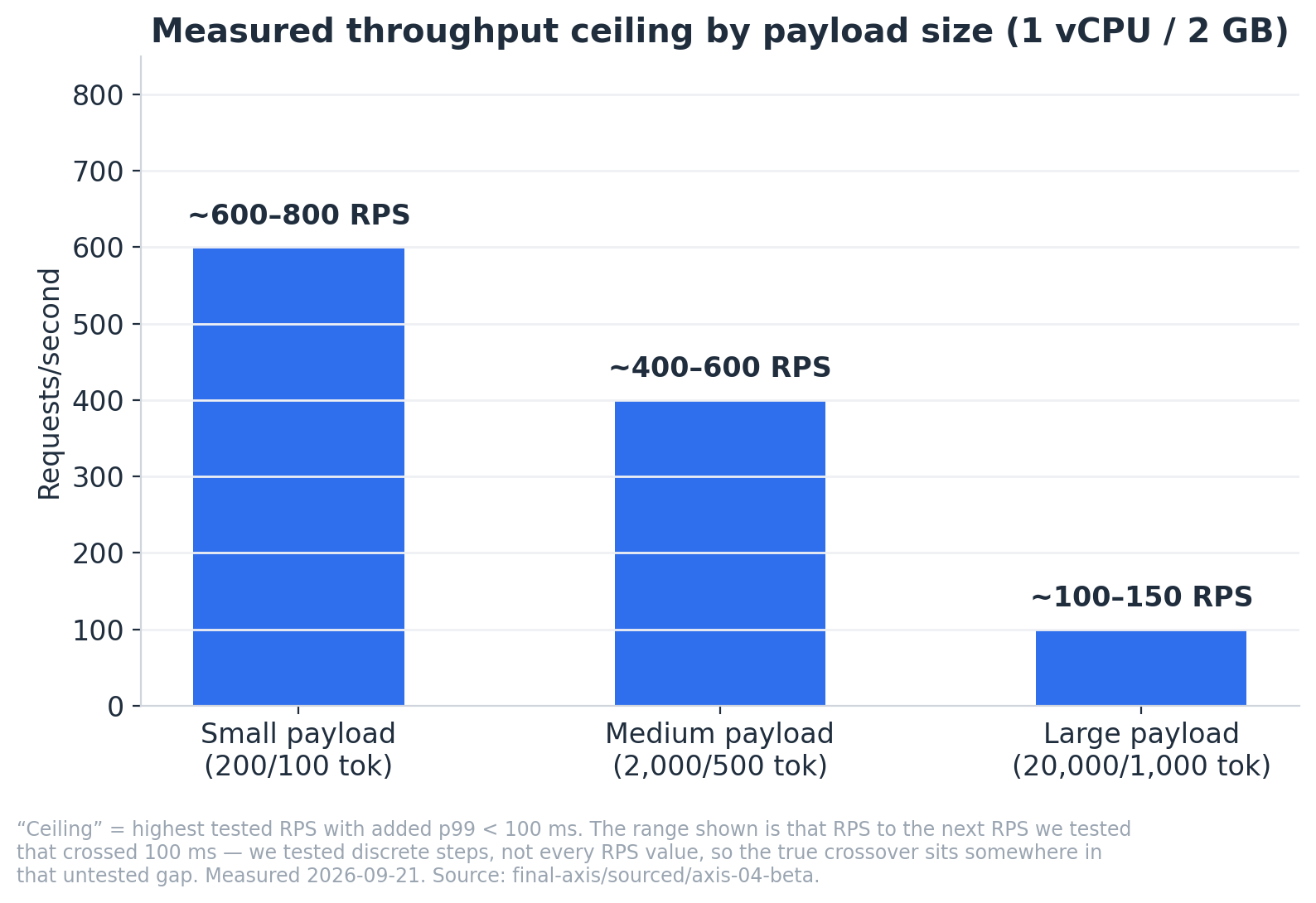
Real throughput ceilings, at a 100ms added-latency budget: ~600–800 RPS for small payloads, ~400–600 for medium, ~100–150 for large. Those are ranges, not exact numbers, on purpose — we tested discrete RPS steps, not every value, so each ceiling is really “the last RPS we confirmed was fine, up to the next one we confirmed wasn’t.” Below the low end of those ranges, the median request pays 2–6 ms for the gateway. That median is the friendliest number in this section and the least useful one for capacity planning: it barely moves with load — 2.1 to 3.1 ms for small across a 60x range of offered traffic — so it stays reassuring right up to the point the gateway falls over. The number that actually moves is the p99. Added p99 climbs from +5.6 ms (small), +7.5 ms (medium) and +15.2 ms (large) at 10 RPS to +60 ms for small at 600 RPS, +75 ms for medium at 400, and +41 ms for large at just 100 — and then crosses the 100 ms budget at the very next step we tested in all three cases. Above the high end, none of the three payload sizes degrade gracefully, and each breaks differently. Here’s each payload side by side, gateway against its own real direct-to-mock measurement (not a single approximate baseline shared across sizes — small, medium, and large each have a genuinely different ~55–62 ms direct floor, and the chart shows the actual number for each):
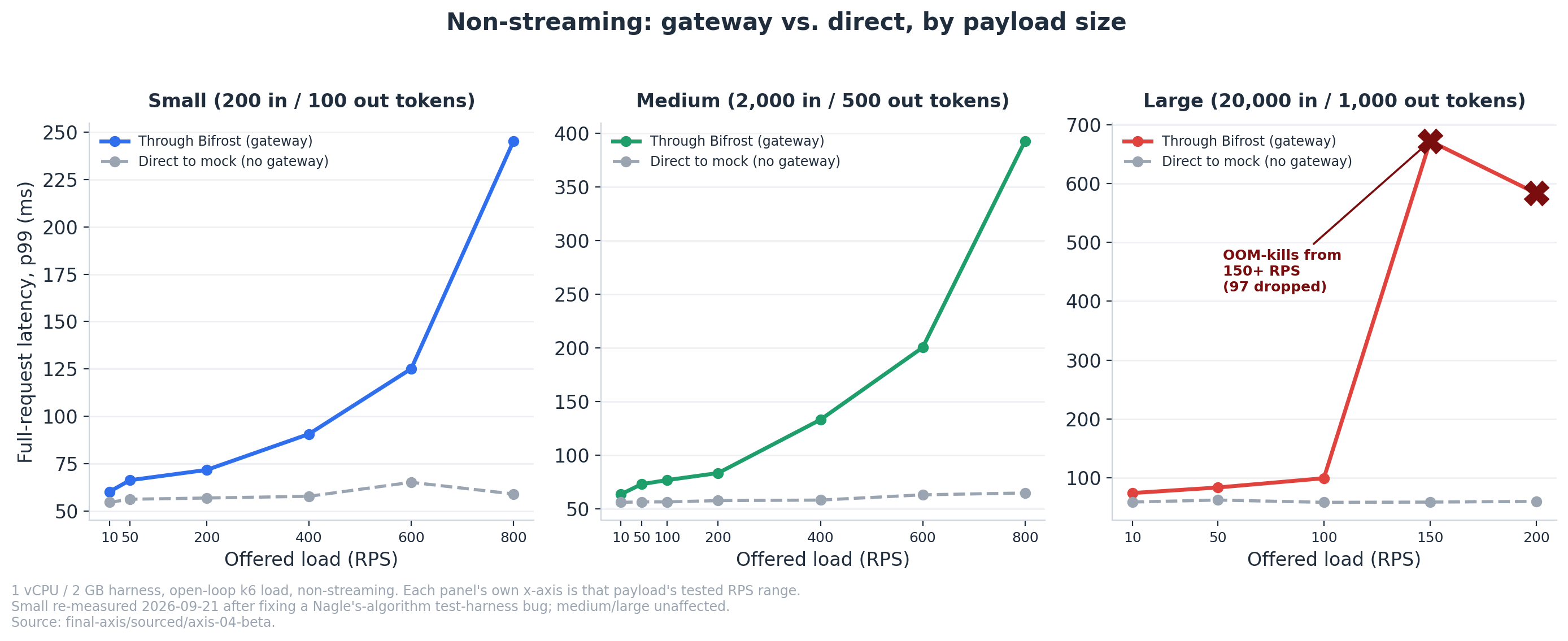
Small and medium follow the same shape — flat, then a climbing p99 tail — just at different RPS. Small’s climb starts around 400–600 RPS; medium’s starts earlier per-request but its harder wall is further out (400+ RPS) because its 2,000-token input keeps per-request cost higher throughout. Large doesn’t climb gradually at all: it’s flat from 10 to 100 RPS, then falls off a cliff at 150 RPS, where the pod starts getting OOM-killed mid-run (61 dropped requests at 150 RPS, 97 more at 200). That’s not a queueing knee like small/medium — it’s a hard resource wall, and it shows up as a near-vertical jump rather than a curve.
Streaming hits the same wall, just faster, because every open stream holds its buffers in memory for longer — same treatment, gateway vs. direct, per payload:
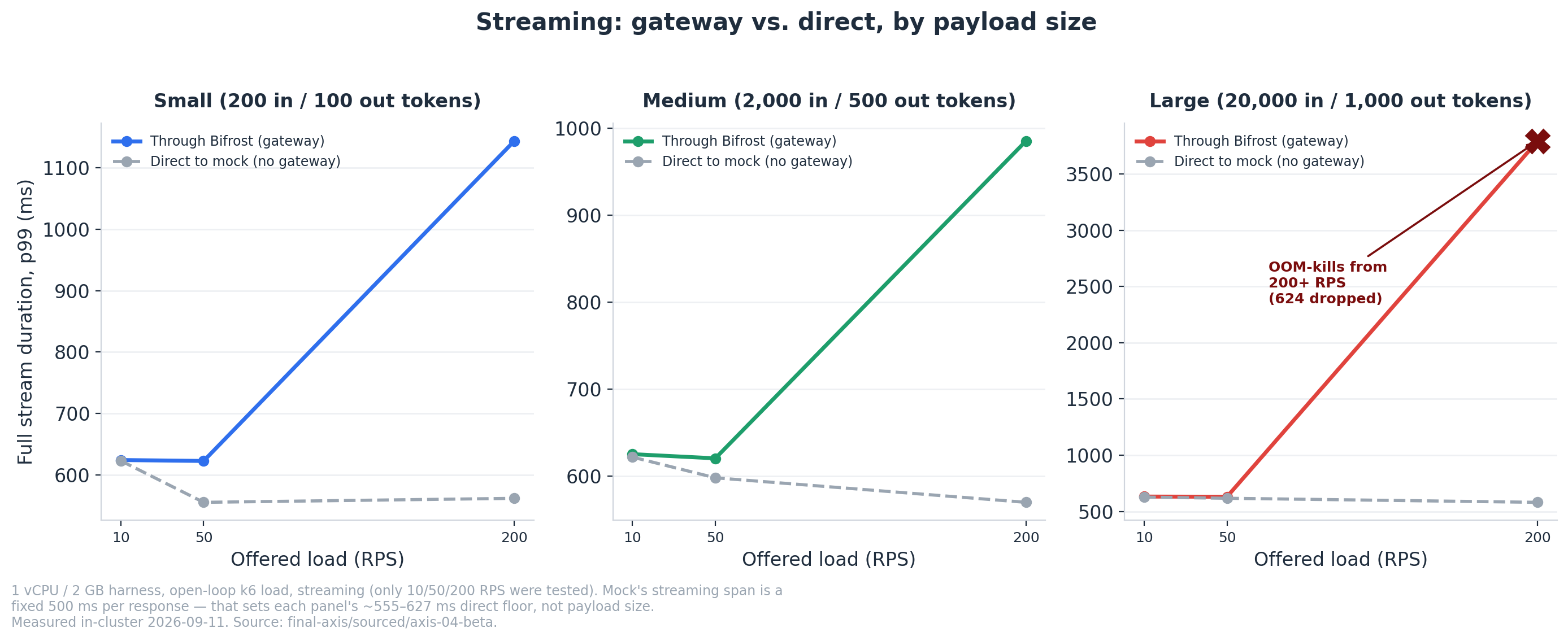
Small and medium streaming both track their own ~555–627 ms direct floor closely through 50 RPS, then start climbing by 200 RPS (small p99 hits ~1.14 s, medium ~985 ms — both queueing, not OOM). Large streaming doesn’t get that gradual climb either: by 200 RPS it’s OOM-collapsing mid-run, taking 624 of 12,001 streams down with it and ballooning p99 to ~3.8 seconds. If your workload streams large documents, 200 RPS on one vCPU isn’t a “slower” tier — it’s a “falls over” tier.
Full stream duration isn’t the number that matters if your UI just needs the first token to show up, though — so we measured that separately, with a paired async probe that times the real first-content-token, not k6’s TTFB (which is invalid for SSE here, since the mock flushes headers before any token exists):
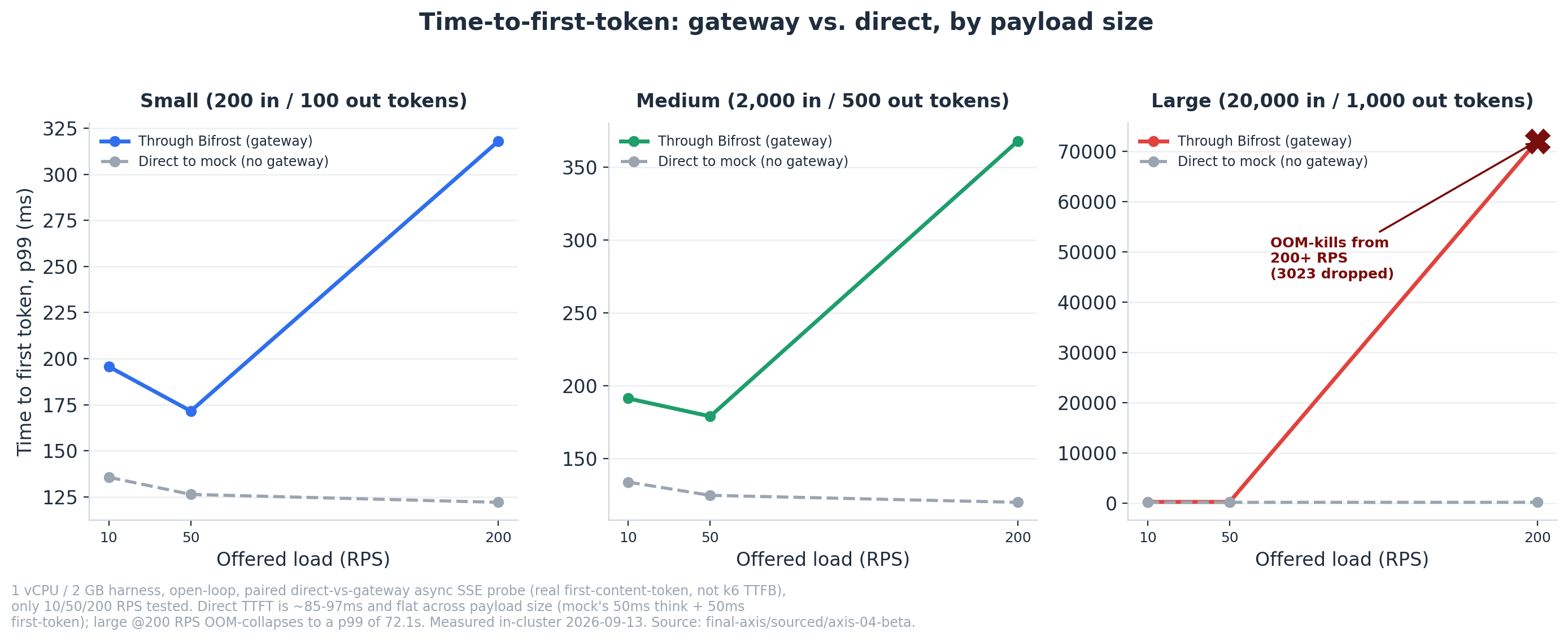
Direct TTFT is ~85–97 ms and flat across all three payload sizes — confirmation that input length doesn’t move first-token time, so everything above that floor is Bifrost’s own per-request streaming setup cost. That added cost is ~27–46 ms and size-independent at 10–50 RPS (large @10 RPS adds +46 ms, small @10 RPS adds +43 ms — same order, different payload). At 200 RPS small and medium’s medians still hold (+57 to +71 ms), but the tail blows up — added p99 hits +196 to +248 ms — and 10–13% of gateway streams fail outright, the same queueing knee visible in the full-stream chart above. Large @200 RPS doesn’t have a tail problem, it has a collapse: only 128.8 of 200 offered RPS gets served, TTFT p99 balloons to 72.1 seconds, and 3,023 of 12,001 streams fail — the OOM wall, seen this time from the first-token side instead of the full-response side.
And under a deliberate overload burst, Bifrost’s two modes both stayed memory-safe: “blocking” serves everyone eventually (slowest request waited ~5 seconds), “drop” fails fast with a clean 503.
The large-payload ceiling has a different cause entirely from small/medium’s. It’s not CPU — and the clearest way to see that is to look at memory and CPU separately, broken out by payload size and offered load, not just as a single peak number per payload:
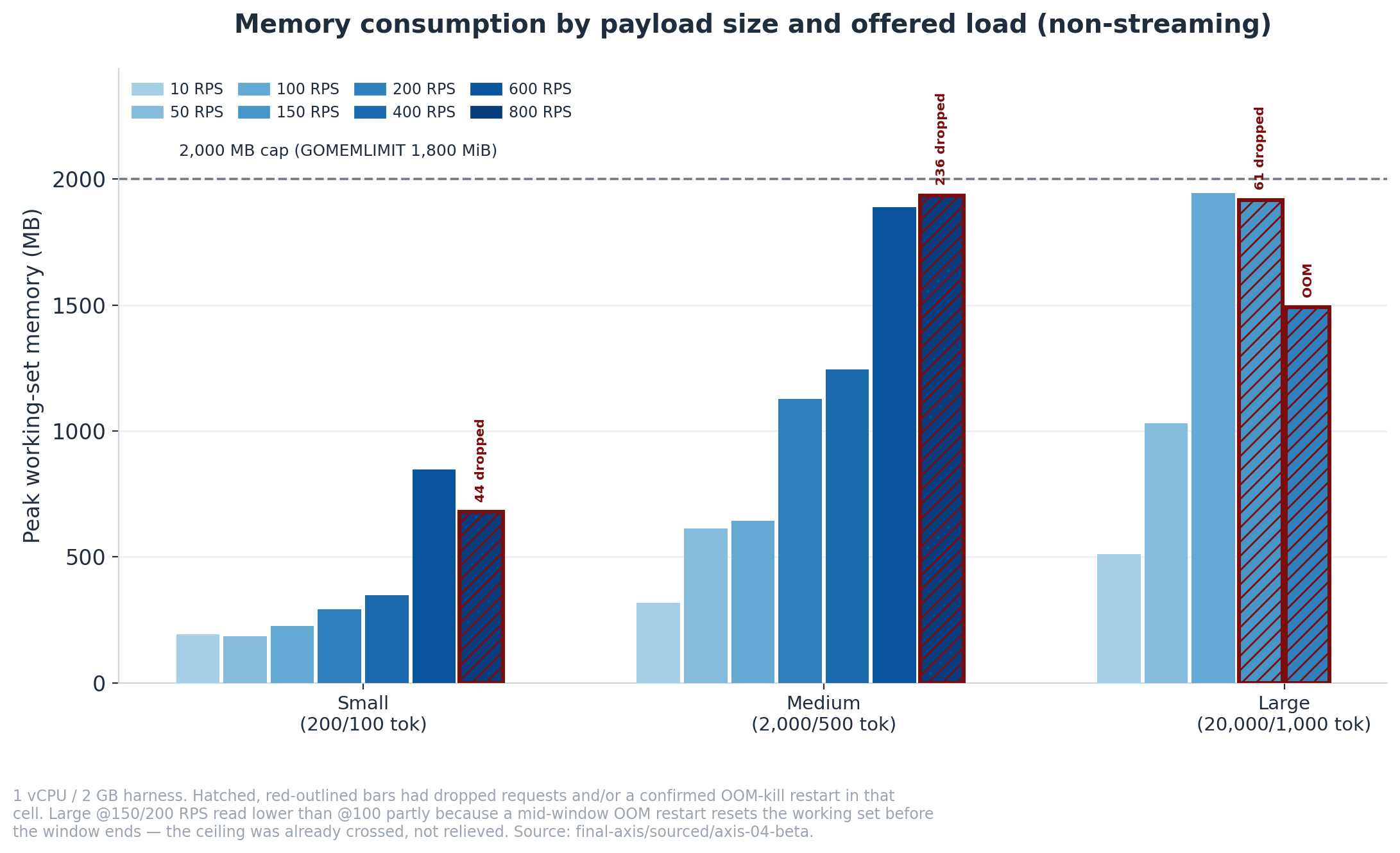
Small and medium climb gradually and never get close to the 2,000 MB cap even at their highest tested RPS (848 MB and 1,935 MB respectively). Large is a different story: it’s already at 1,944 MB — 97% of the cap — by 100 RPS, a full 50–700 RPS before its measured “ceiling.” The bars outlined and hatched in red (large @150, @200) actually read lower than the 100 RPS bar, which looks like recovery but isn’t — a mid-window OOM-kill restarts the pod and resets the working-set counter before the measurement window ends, so those bars undercount the real peak, not overcount it.
CPU tells the opposite story, which is exactly the point:
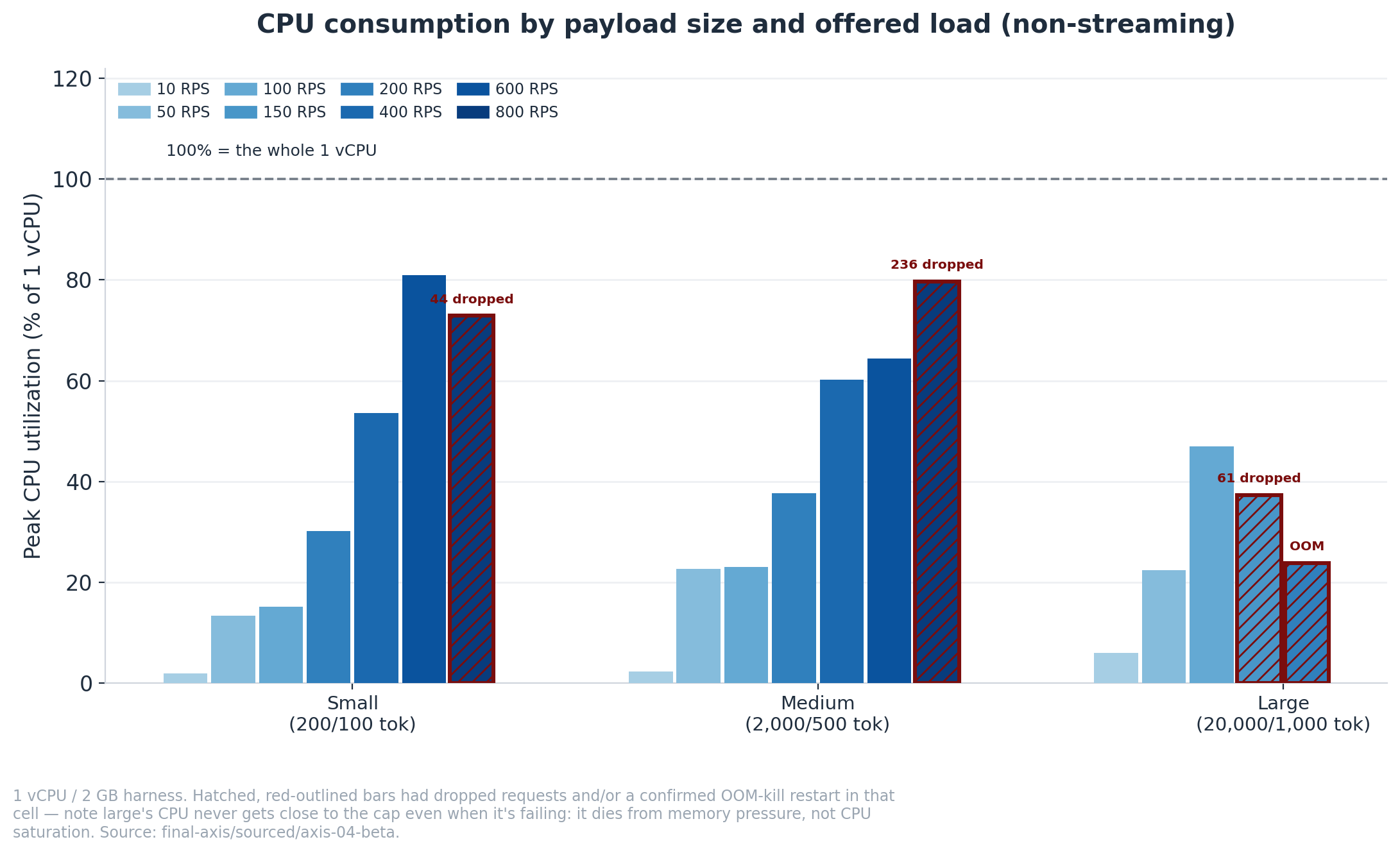
Small and medium both climb into the 73–80% range at their highest RPS — genuinely CPU-bound, pushing the single vCPU hard. Large never does: even in the cells where it’s actively dropping requests and getting OOM-killed (outlined and hatched in red), its peak CPU tops out at 37% and 24%. Large isn’t failing because the CPU ran out of room — it’s failing because the memory did, while the CPU had capacity to spare. If your workload is long documents, that’s the number to plan around, not vCPU count.
An exact-match hit turns a ~59 ms call into ~4 ms. Semantic caching — catching a differently-worded repeat of the same question — costs a real embedding tax but still beats a fresh call by half:
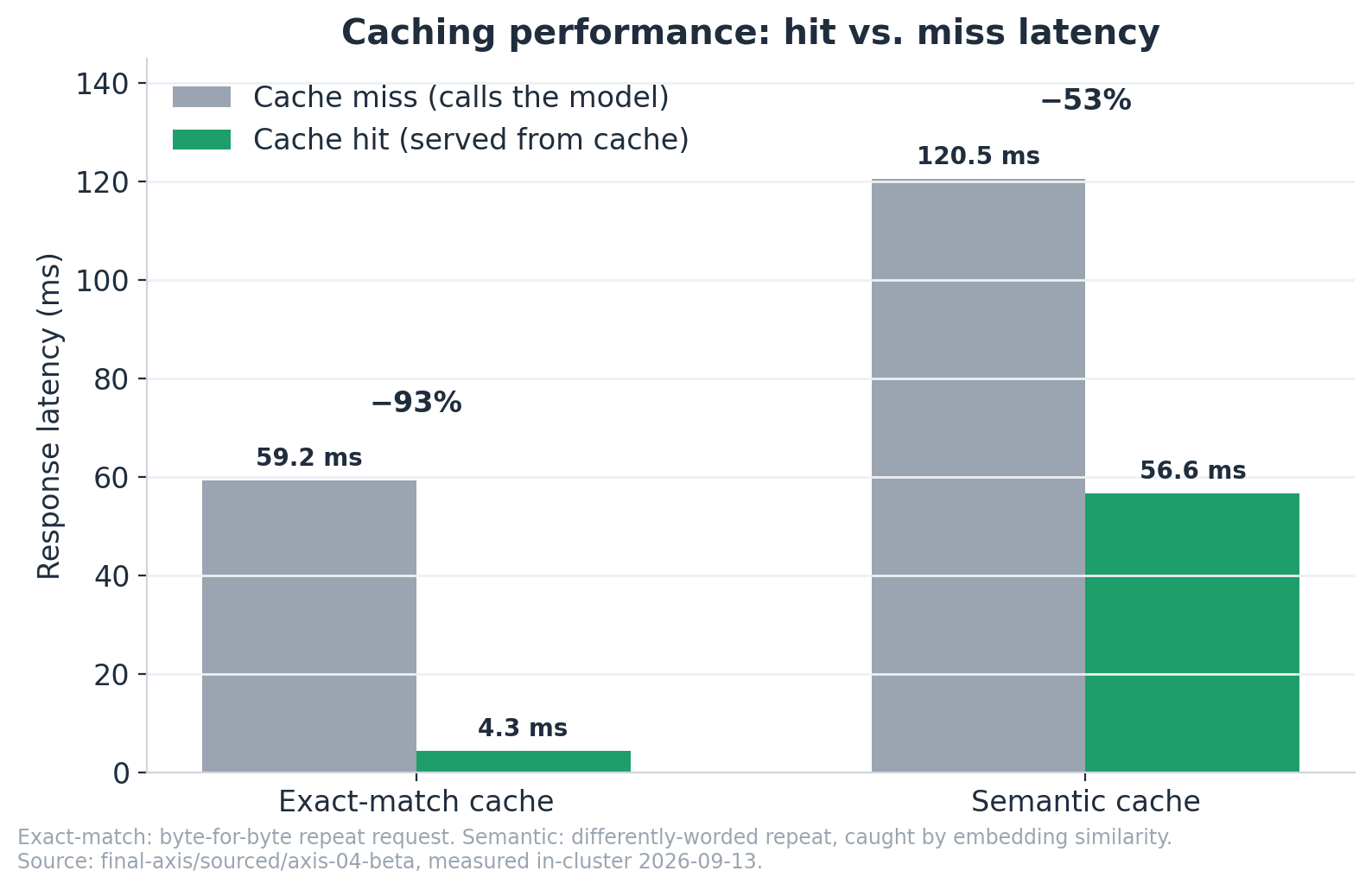
Neither result is surprising on its own — caching is supposed to be faster than calling the model, and it is. The numbers here are just the hands-on measurement of exactly how much faster: 93% for an exact-match hit, 53% for a semantic hit once the embedding cost is paid.
Two more numbers before moving on: cold start is a median 8.7 seconds, and 8.2 of those seconds is a mandatory catalog re-download on every restart in a typical containerized setup — fixable with persistent storage, not independently re-tested here.
One transparency note on the numbers above: on the small-payload cell specifically, we caught and fixed a bug in our own test rig (a Nagle’s-algorithm networking interaction that was making our baseline noisy) — after fixing it, Bifrost’s small-payload ceiling actually moved up, from ~400 to ~600–800 RPS. Mentioning it because it’s the kind of thing that’s easy to get wrong benchmarking any gateway, Bifrost included, and we’d rather show our work than hide the correction.
On a single box, Bifrost’s overhead is genuinely low at the median: 2–6 ms on top of a ~55 ms upstream call, flat across payload sizes and almost flat across load. That is the defensible version of the “fastest gateway” claim, and it is worth something — as a share of a real LLM call, it rounds to noise. The tail is a different story. Added p99 is load-sensitive, reaching +41 to +75 ms at the ceilings we measured, and large payloads don’t gradually slow down so much as stop: OOM-killed at 150 RPS, dropping requests. Caching does work as advertised (93% and 53% latency cuts, measured). The vendor’s 5,000 RPS figure describes a bigger machine and a different workload than most teams run. So for a single node: median speed isn’t the problem — tail latency under load, and memory headroom on document-heavy traffic, are.
The harder question is what happens when you run more than one node. A production gateway has to scale out, scale back in, and survive a pod dying without anyone noticing. On the open-source version, that’s where it gets difficult. Configuration changes don’t propagate live across replicas; the documented pattern is a shared config file plus a restart. So every routing change, key rotation or budget update turns into a coordinated rollout across your gateway pods rather than a setting you flip. Add an admin dashboard that is open to anyone who can reach it until the first admin account is created, and the open-source version is best suited to a single node you watch closely, not a fleet.
Bifrost Enterprise closes much of that gap: its gRPC mesh broadcasts config changes to every replica within seconds, with no restart. But even Enterprise is still infrastructure you deploy, scale, patch and monitor yourself. Buying the license doesn’t hand the operational load to someone else.
So the real decision is less “is Bifrost fast?” and more “who is going to run it?” A team with dedicated platform/DevOps capacity, or with strict requirements to keep everything in its own environment, can run Bifrost well, ideally on Enterprise if it needs more than one replica. A small team that just needs a reliable gateway in front of its LLM calls will usually get more out of a managed offering than out of owning gateway operations itself.
TrueFoundry AI Gateway delivers ~3–4 ms latency, handles 350+ RPS on 1 vCPU, scales horizontally with ease, and is production-ready, while LiteLLM suffers from high latency, struggles beyond moderate RPS, lacks built-in scaling, and is best for light or prototype workloads.




Bifrost is an open-source AI gateway — a single Go process that sits between your applications and your LLM providers, exposing one OpenAI-compatible API across 28 built-in provider adapters. It is Apache-2.0 licensed and self-hosted: you run it yourself, bring your own provider keys and pay the providers directly, so the gateway takes no per-token cut. A paid Enterprise edition adds clustering, identity, guardrails and audit. It’s built by Maxim AI — legal entity H3 Labs Inc., founded in 2023 by Vaibhavi Gangwar and Akshay Deo, operating in the United States and India — with the open-source core at github.com/maximhq/bifrost and Enterprise sold through sales with no published price.
Bifrost’s own benchmark claims ~5,000 RPS at microsecond overhead on a 2–4 vCPU instance, but that figure is narrower than it looks: per the vendor’s own source it excludes HTTP request handling and JSON marshalling, making it internal-pipeline time rather than net latency added to your request. On a standardized 1 vCPU / 2 GB box, measuring the full end-to-end tax for documented payload sizes, you get two very different answers depending on which percentile you ask about. The median request pays 2–6 ms, and it stays there across almost the whole tested range. The p99 is the number to plan with: it grows with load, reaching +60 ms for small payloads at 600 RPS, +75 ms for medium at 400, and +41 ms for large at just 100 — those being the last steps where added p99 stayed inside a 100 ms budget. Push one step further and it crosses hard in all three cases (+186 ms small at 800 RPS, +137 ms medium at 600, +614 ms large at 150, the last two shedding requests as well). So: single-digit milliseconds typically, tens of milliseconds at the tail under real load, and a cliff rather than a slope just past it. Both the vendor’s microseconds and our milliseconds are accurate — they measure different things, and the milliseconds are the ones your users feel.
On a standardized 1 vCPU / 2 GB box, the last load steps where added p99 latency stayed under 100 ms were ~600 RPS for small payloads (200 in / 100 out tokens), ~400 for medium (2,000/500) and ~100 for large (20,000/1,000). The next step up failed in all three cases. Bifrost’s own benchmark claims ~5,000 RPS, but on a t3.xlarge — four times the compute — against a mocked upstream. Throughput scales with cores for small and medium traffic; for large payloads memory becomes the binding constraint long before CPU does, so adding vCPUs alone won’t move that ceiling.
It’s accurate, but it measures something narrower than most readers assume. Per Bifrost’s own source, the figure excludes HTTP request handling and JSON marshalling — so it’s time spent inside the gateway’s internal pipeline, not the net latency added to a caller’s request. It’s also an average rather than a percentile, taken on a t3.xlarge; the same source reports 59 µs on a t3.medium, roughly 5x worse on a smaller box. Measuring the full end-to-end cost on 1 vCPU, we got 2–6 ms at the median. Both numbers are true; they answer different questions.
More than you would guess, and memory — not CPU — is the constraint that actually bites. On a 2 GB box, small and medium payloads never came close to the cap (848 MB and 1,935 MB at their highest tested load). Large payloads hit 1,944 MB, or 97% of the cap, at just 100 RPS, then got OOM-killed at 150. In those failing cells CPU was only at 24–37% — there was processor headroom to spare while memory ran out. Size your deployment on concurrent requests multiplied by context length, not on vCPU count.
It doesn’t gradually slow down — it stops. Large-payload latency is flat from 10 to 100 RPS, then falls off a cliff at 150 RPS, where added p99 jumps to +614 ms and 61 requests are dropped as the pod is OOM-killed mid-run. Streaming is worse: at 200 RPS with large payloads, time-to-first-token p99 reached 72.1 seconds and 3,023 of 12,001 streams failed outright. For document-heavy workloads, treat the tier above the ceiling as “falls over,” not “slower.”
Cold start is a median 8.7 seconds, and about 8.2 of those seconds is Bifrost re-downloading the model pricing catalogue from the vendor — which it does on every restart in a typical containerized setup, because the container starts with no cached copy. Mounting persistent storage for the catalogue, or pointing it at a local copy, removes almost all of the startup time. Worth knowing if you autoscale, since every new pod pays the full cost before serving traffic.
Not in steady state. Configuration is loaded into memory at boot and the inference path doesn’t read the database, which is a genuinely good architectural decision. We tested it rather than taking it on trust: we pulled PostgreSQL out from under a running single-node OSS instance and inference continued with zero errors and no measurable latency change, while /health correctly returned 503 during the outage and recovered within ~350 ms of the store coming back. The caveat is the flip side of the same design — because config lives in memory, OSS replicas don’t pick up each other’s config changes without a restart.
An exact-match cache hit turns a ~59 ms call into ~4 ms, a 93% reduction. Semantic caching — catching a differently-worded repeat of the same question — pays a real embedding cost but still comes in about 53% faster than a fresh call. This is the one area where Bifrost’s marketing undersells the product rather than overselling it.
The core gateway’s performance envelope is well-understood and predictable up to its measured ceilings. Large payloads specifically hit a hard memory wall (not a CPU wall) above ~150 RPS on a 1 vCPU / 2 GB box, so plan capacity around memory, not vCPU count, if your workload is long documents.
Yes, but the replicas don’t share live configuration. On Bifrost OSS the documented pattern is a shared config file plus a restart, so a change made on one replica doesn’t reach the others until they restart. That makes scaling up and down, and rolling out config changes, a coordinated operation across all your gateway pods.
For multi-node deployments, the biggest operational difference is config propagation. Enterprise uses a gRPC mesh that broadcasts config changes to every replica within seconds, with no restart; OSS relies on a shared file and a restart. Either way, you still deploy, scale and operate the gateway infrastructure yourself.
It depends on who will operate it. Teams with dedicated platform/DevOps capacity, or strict data-residency requirements, can self-host Bifrost well. Smaller teams without that capacity usually get more value from a managed gateway, because the hard part of running Bifrost in production is operating a synchronized fleet of gateway pods, not raw speed.



The latest news, articles, and resources sent to your inbox
.webp)
.png)
.png)
.png)
.png)
.png)
.png)
.png)


.png)
.png)
.png)


