



October 1, 2026
|
5 min read


احصل على وصول فوري إلى بيئة TrueFoundry مباشرة. انشر النماذج، ووجّه حركة مرور LLM، واستكشف المنصة بالكامل — بيئة الاختبار الخاصة بك جاهزة في ثوانٍ، ولا يلزم وجود بطاقة ائتمان.



Published: September 11, 2026
Blazingly fast way to build, track and deploy your models!
AIOps has gone through a few identity shifts in recent years. Dashboards and threshold alerts came first. Then ML-driven anomaly detection had its moment. Now something different is happening—engineers are dragging AI coding agents like Cursor into their incident response workflows. Sometimes it works. A lot of the time, it doesn't.
We get why the confusion exists. Infrastructure is code. Incidents usually need code-level fixes. Cursor, with its whole-codebase understanding and agentic editing, looks like it belongs in an SRE's toolkit.
Except Cursor is a coding agent. Not an AIOps system. It won't monitor your infra. Won't correlate alerts. Has zero awareness that your Kubernetes cluster is melting down unless someone explicitly tells it so.
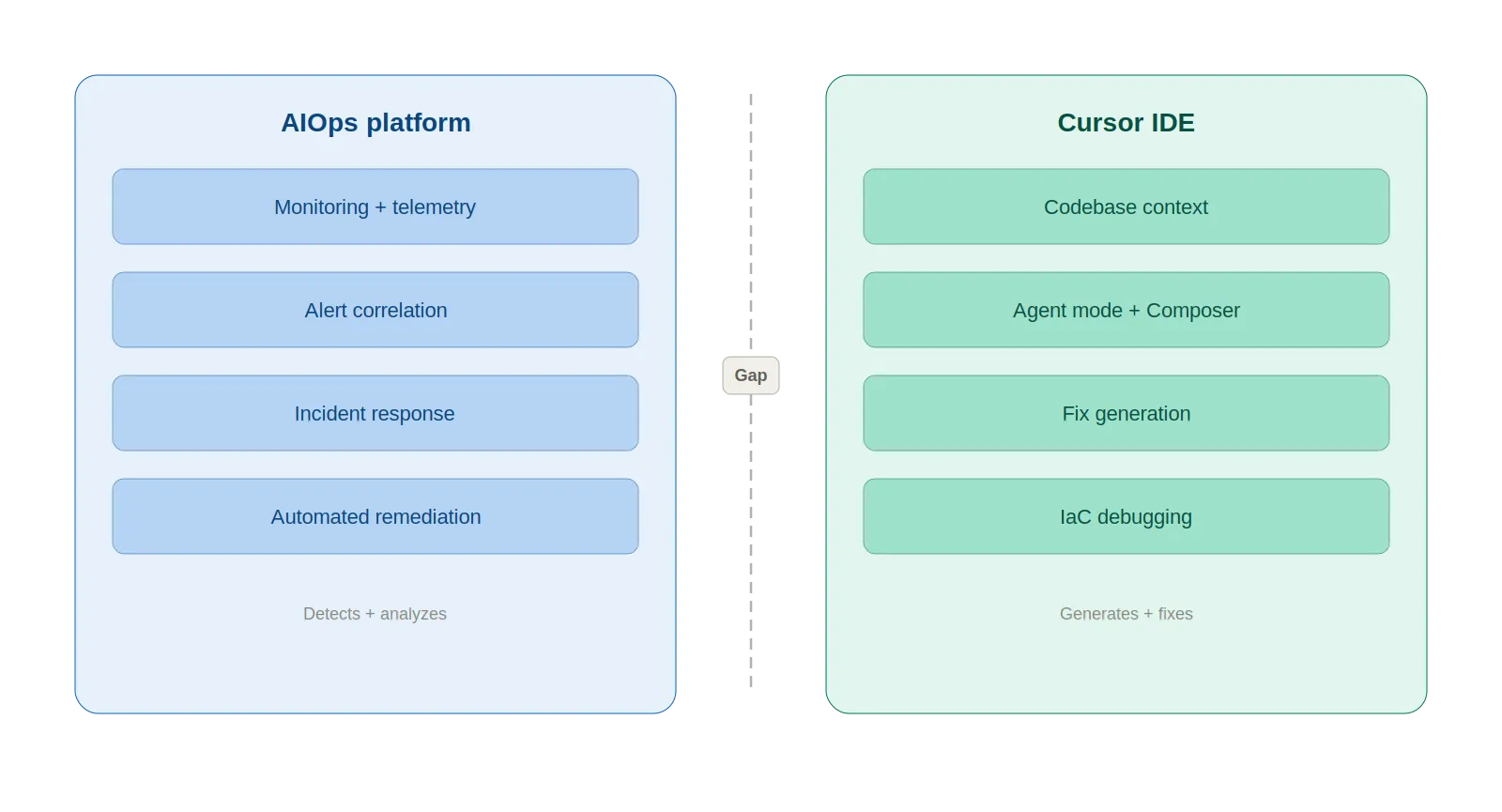
What follows is an honest breakdown of where Cursor adds real value in AIOps—and where it falls flat. If you're an SRE, DevOps engineer, or platform lead trying to figure out what actually works, this is for you.
AIOps (Artificial Intelligence for IT Operations) has been around since Gartner coined the term in 2017. Strip away the marketing, and it boils down to applying ML, NLP, and data analytics to IT operations chaos.
AIOps platforms ingest logs, metrics, and events, then do four things with that data:
The market backs this up. AIOps hit $2.23 billion in 2025, per Fortune Business Insights, with a $11.8 billion projection for 2034. Gartner expects 60% of large enterprises to treat AIOps as standard practice by 2026.
The key takeaway: AIOps is about system-level intelligence. "What is happening in my infrastructure right now?" That's the question it answers.
Cursor is an AI-first code editor—Anysphere forked VS Code and rebuilt it around AI as the foundation, not a plugin. As of March 2026, it supports GPT-5.2, Claude Opus 4.6, Gemini 3 Pro, and Grok Code, swappable per task. Key features:
Cursor crossed $500M ARR in 2025 and reportedly neared $2B by early 2026. Over 90% of Salesforce's developers use it.
Why would SREs care? Because infrastructure lives in Git. Terraform modules, Kubernetes manifests, CI/CD pipelines—when something breaks at 3 AM, the fix is almost always a code change. Cursor reads code at the project level, not just the open file. For an on-call engineer knee-deep in YAML at 3 AM, that context matters.
Helpful, though, is not the same as sufficient.
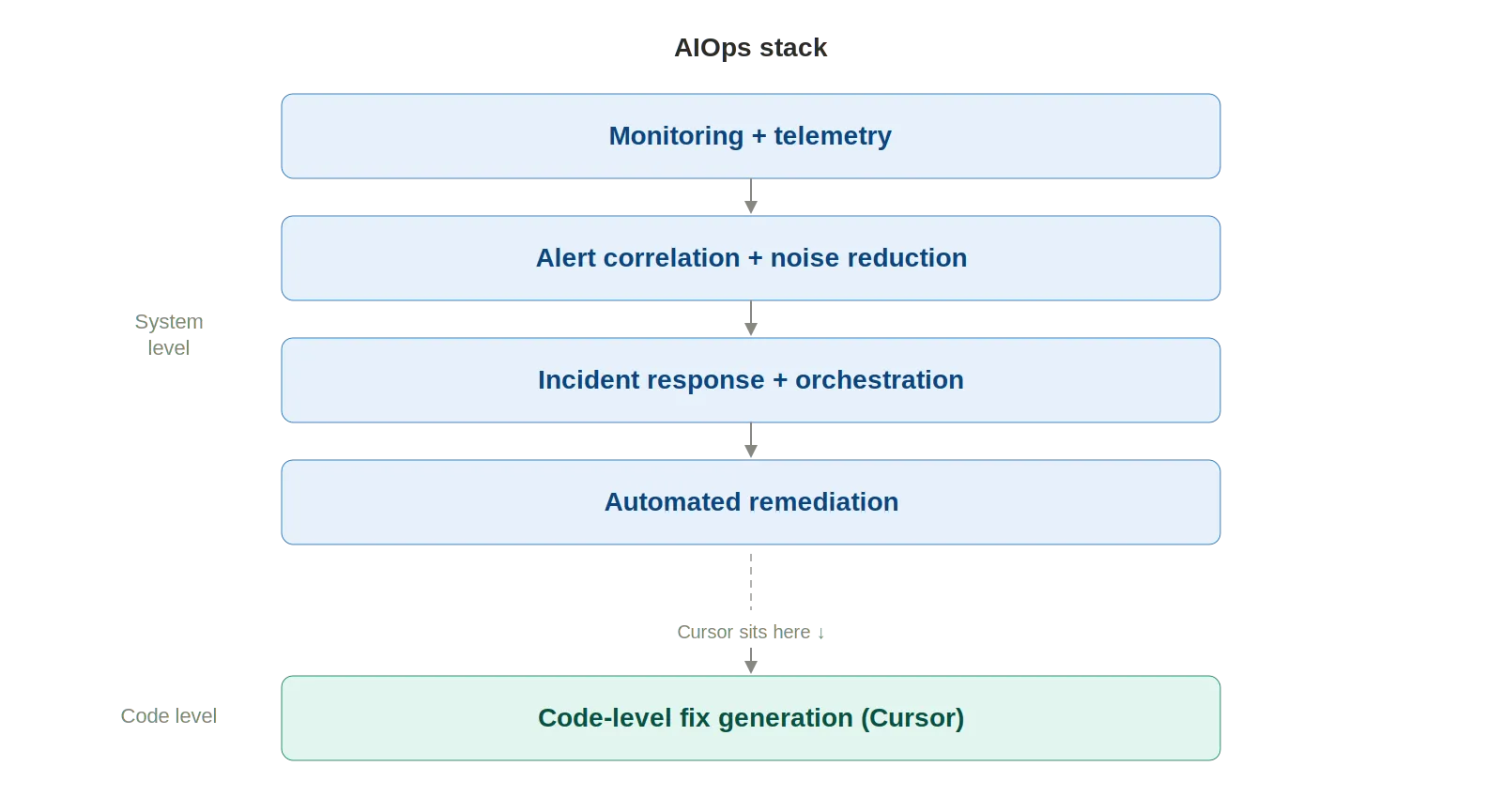
Cursor won't replace AIOps tools. What it does well is fill specific holes in the incident response workflow that AIOps platforms don't touch. Five use cases stand out:
Paste error logs into the agent. Cursor reads the stack trace, finds relevant files across the codebase, and narrows down the root cause with full project context. With the Datadog Cursor extension connected via MCP, it pulls logs, metrics, and traces right from the IDE. No browser needed. The time between "I see an alert" and "I understand the code path" drops from minutes to seconds.
Every team has runbooks. Almost every team's are outdated. Cursor drafts runbooks grounded in what the codebase actually looks like right now—real file paths, real config values, real commands. Even better, it updates existing runbooks by flagging stale references and outdated commands. Still needs human review, but the maintenance burden drops considerably.
Tell the agent what went wrong, point it at deployment files, and you get rollback scripts, config patches, hotfix code. The PagerDuty MCP plugin lets engineers pull incident context and on-call schedules straight into the editor. A common pattern: engineer spots a bad deployment, pivots to Cursor, has a draft rollback PR in minutes.
Cursor traces Terraform resource definitions through module references, variable files, and provider configs. It catches YAML indentation errors, missing labels, and misconfigured resource limits that file-level linters miss. StackGen's MCP integration brings IaC generation and SRE remediation workflows into the editor, grounded in the team's actual infrastructure standards.
"Write a Bash script to rotate secrets across dev, staging, and prod." Done on the first attempt. "kubectl command chain to cordon, drain, and uncordon a node safely." Right sequence, right flags. Small wins individually; hours recovered weekly.
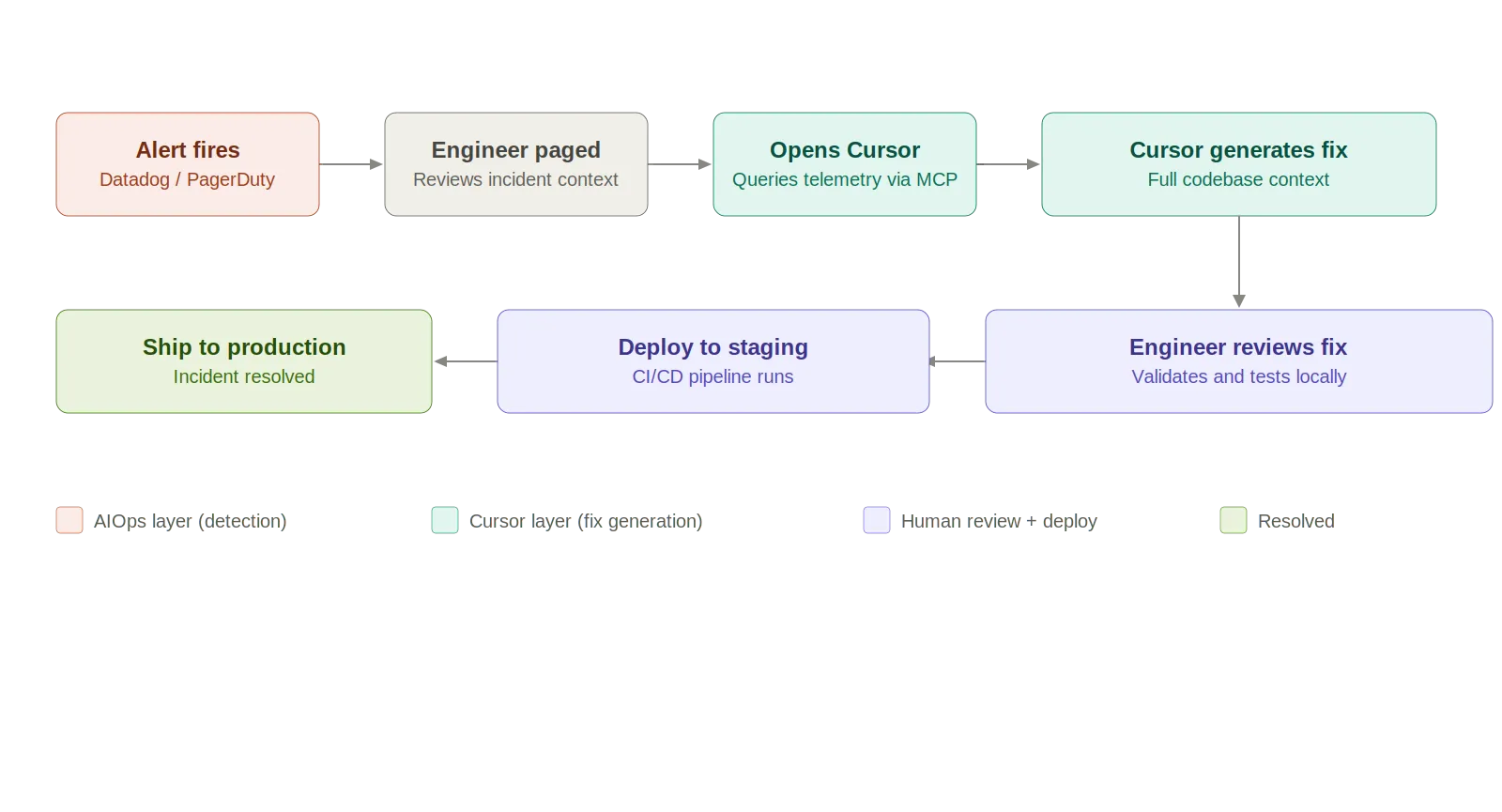
The limitations are real. At a glance:
Cursor helps you fix problems. It won't tell you what the problem is.
AIOps tells you what broke. Cursor tells you how to fix it. Different jobs entirely.
The missing piece? The handoff between detection and resolution. MCP is chipping away at this—Datadog's and PagerDuty's MCP servers let Cursor query telemetry and incident data. But most integrations are still in preview. The data traversal is engineer-directed, not autonomous. Safety guarantees for AI-generated infrastructure changes in prod? Nonexistent.
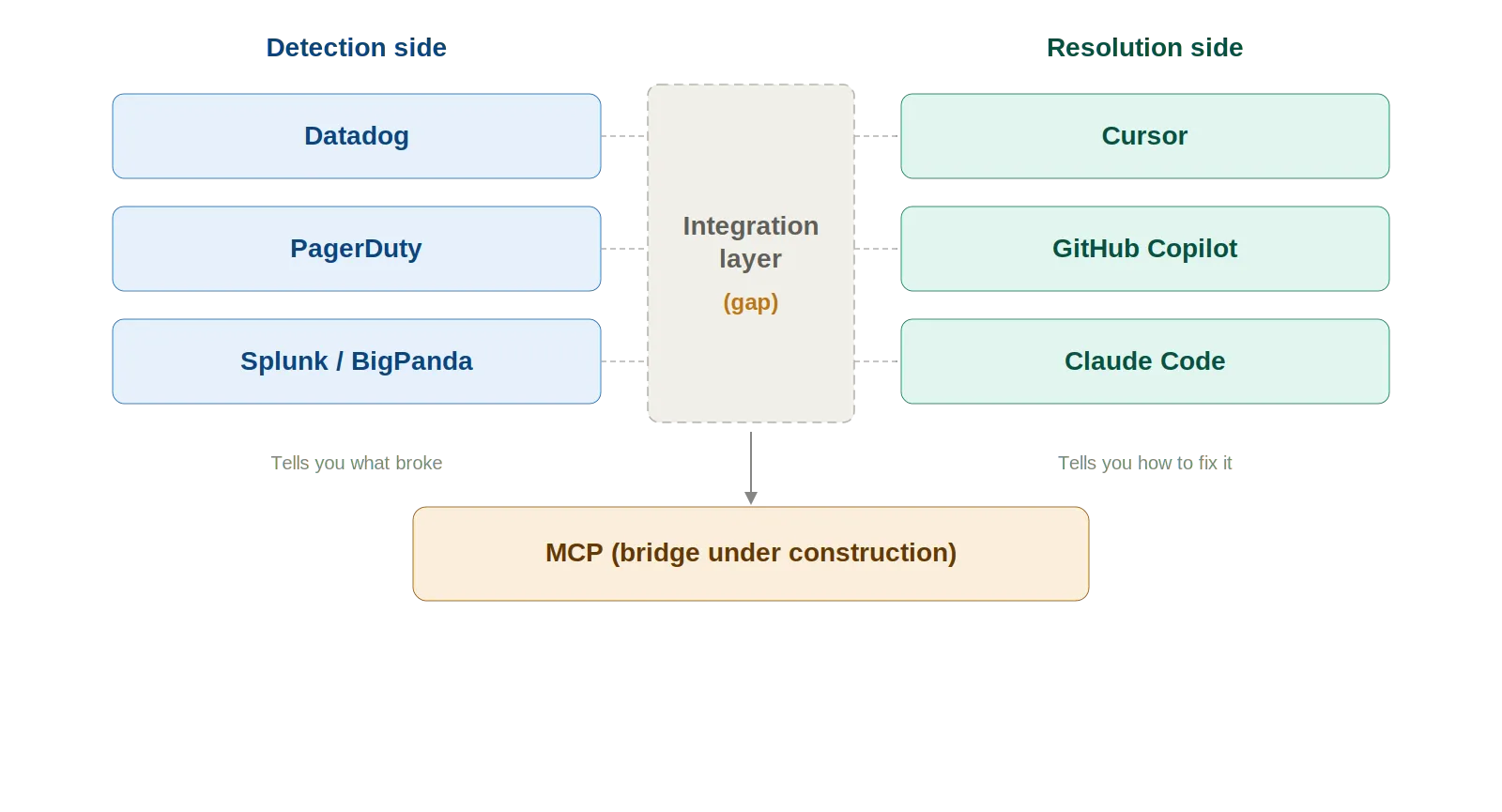
Four problems surface when you move beyond one engineer experimenting:
Six guardrails that matter:
The detection-to-resolution gap won't stay this wide. Four trends to watch:
TrueFoundry's AI Gateway provides the observability, governance, and routing layer that production LLM deployments need. As AI agents take on bigger roles in ops workflows, that gateway layer becomes foundational—rate limits, token cost tracking, model fallbacks, audit trails for every AI-driven action.

Cursor speeds up the things SREs already do—tracing code, writing rollbacks, refreshing runbooks, grinding through toil. It belongs in the toolkit.
What it can't do: detect anomalies, correlate alerts, watch your infra, manage incident lifecycles. Use it as the execution layer—the tool you grab after AIOps tells you what's broken. Pair it with Datadog, PagerDuty, and MCP. Always keep a human between the AI-generated fix and production.
استخدم كليهما. لا تستبدل أحدهما بالآخر.
1. هل يمكن لـ Cursor أن يحل محل أدوات مثل Datadog أو PagerDuty، وهي أدوات AIOps؟
الإجابة هي "لا" قاطعة، لأنها تحل مشكلات مختلفة. تُستخدم أدوات Datadog أو PagerDuty أو غيرها من أدوات AIOps بشكل أساسي لتحديد المشكلات في الوقت الفعلي، بينما يعمل Cursor، كوكيل برمجة بالذكاء الاصطناعي، ضمن قاعدة التعليمات البرمجية. يساعد المطورين في تصحيح الأخطاء وفهمها وحتى إنشاء تعليمات برمجية لإصلاح مشكلة بمجرد تحديدها. بمعنى آخر، يخبرك Datadog ما هو المعطل وأين، بينما يخبرك Cursor كيف تصلح المشكلة.
2. كيف تُستخدم وكلاء البرمجة بالذكاء الاصطناعي في الاستجابة للحوادث؟
يُستخدم وكلاء البرمجة بالذكاء الاصطناعي، والتي تشمل Cursor، بشكل متزايد خلال مراحل الفرز والحل للحوادث. يدخل المطورون السجلات ذات الصلة، أو تتبعات المكدس، أو رسائل الخطأ، والتي تُستخدم بعد ذلك بواسطة وكلاء البرمجة بالذكاء الاصطناعي لمسح قاعدة التعليمات البرمجية بأكملها لتحديد السبب الأكثر احتمالاً للحادث. بالإضافة إلى ذلك، تُستخدم وكلاء البرمجة بالذكاء الاصطناعي لإنشاء نصوص برمجية للتراجع عن التعليمات البرمجية، وإنشاء إصلاحات عاجلة، وتحديث أو إنشاء أدلة تشغيل بناءً على التعليمات البرمجية الحالية، واقتراح إصلاحات للبنية التحتية، أو حتى أتمتة الأوامر.
3. ما الفرق بين أدوات AIOps ووكلاء البرمجة بالذكاء الاصطناعي؟
يكمن الفرق بين أدوات AIOps ووكلاء البرمجة بالذكاء الاصطناعي في الذكاء الذي توفره. تحلل أدوات AIOps، والتي تشمل Datadog وPagerDuty وما إلى ذلك، بيانات القياس عن بعد لتحديد الشذوذ، وربط التنبيهات، والتنبؤ بالأعطال في نظام موزع. من ناحية أخرى، تعمل وكلاء البرمجة بالذكاء الاصطناعي، والتي تشمل Cursor، ضمن قاعدة التعليمات البرمجية لمساعدة المطورين على فهم منطق التطبيق، والتبعيات، والتكوين لإنشاء التعليمات البرمجية.
بمعنى آخر، توفر أدوات AIOps الذكاء لتحديد المشكلات، بينما توفر وكلاء البرمجة بالذكاء الاصطناعي الذكاء لإصلاح المشكلات. تجيب AIOps على سؤال "ماذا يحدث في بيئة الإنتاج؟" وتجيب وكلاء الذكاء الاصطناعي على سؤال "ما التغيير الذي نحتاج لإجرائه لإصلاحه؟" نحن بحاجة إلى كليهما للحصول على إجابة كاملة لسؤال "ماذا حدث؟" وهو جزء من دورة استجابة كاملة للحوادث.
4. هل من الآمن استخدام الإصلاحات التي يولدها الذكاء الاصطناعي في أنظمة الإنتاج؟
ليس من الآمن استخدام الإصلاحات التي يولدها الذكاء الاصطناعي في أنظمة الإنتاج دون وجود ضوابط دقيقة. هناك خطر من أن يولد الذكاء الاصطناعي تعليمات برمجية "صحيحة" ولكنها خاطئة منطقياً أو غير آمنة. في المجالات المتعلقة بالبنية التحتية مثل Terraform أو Kubernetes، يمكن أن يكون للتغييرات الصغيرة تأثيرات واسعة النطاق. من أفضل الممارسات للتخفيف من هذا الخطر ضمان إجراء التحقق، وتجهيز التغييرات، ومراجعة التغييرات من قبل شخص، ووجود سجلات تدقيق للتغييرات التي أجراها الذكاء الاصطناعي، وما إلى ذلك. من الأفضل التعامل مع الذكاء الاصطناعي كمساعد طيار، وليس كمشغل منفرد في نظام إنتاج.
5. كيف يدمج بروتوكول سياق النموذج (MCP) أدوات AIOps ووكلاء الذكاء الاصطناعي؟
MCP هو بروتوكول يتيح جسرًا بين الأنظمة والأدوات، وتحديداً بين أدوات AIOps وأدوات البرمجة بالذكاء الاصطناعي مثل Cursor. يمكّن الذكاء الاصطناعي من الاستعلام مباشرة عن الأنظمة الخارجية مثل Datadog أو PagerDuty أو Slack للحصول على السياق ذي الصلة مثل السجلات والحوادث والتنبيهات وما إلى ذلك. يقلل من الحاجة إلى التبديل اليدوي بين الأدوات ونسخ ولصق البيانات، وهي مشكلة شائعة في تطوير البرمجيات اليوم. يمكّن الذكاء الاصطناعي من العمل مباشرة مع سياق نظام الإنتاج، وهو ميزة كبيرة، ولكن في بيئة تطوير. ومع ذلك، فإن معظم عمليات التكامل اليوم يقودها المهندسون، وهي للقراءة فقط، مما يعني أن الذكاء الاصطناعي لا يتصرف على الأنظمة، بل يستخدم البيانات التي يمكنه الحصول عليها للمساعدة في حل المشكلات.
6. ما هي أكبر مخاطر استخدام الذكاء الاصطناعي في سير عمل DevOps أو AIOps؟
هناك مجموعة متنوعة من المخاطر، لكن الرئيسية منها تتعلق بالاعتماد المفرط على التكنولوجيا في بيئة عالية المخاطر، مثل الإصلاحات الوهمية، والتعليمات البرمجية التي تبدو مثالية ولكنها تحل المشكلة الخاطئة، وما إلى ذلك. نقص الوعي بالنظام: تفتقر أنظمة الذكاء الاصطناعي إلى فهم جوهري للحالة الحالية للنظام في الوقت الفعلي، ما لم يتم توفيرها لها.
مخاطر أمنية: قد تُدار صلاحيات الوصول إلى التكوينات أو الأسرار أو سياسات IAM بشكل خاطئ
نقص قابلية التدقيق الجوهرية: تفتقر العديد من الأدوات إلى القدرة على تتبع التغييرات التي أجراها الذكاء الاصطناعي والأسباب الكامنة وراءها
الأتمتة المفرطة: قد يؤدي تخطي التحقق أو المراجعة البشرية إلى حدوث مشكلات في أنظمة الإنتاج
للتخفيف من ذلك، تحتاج الفرق إلى حواجز حماية، وقابلية للمراقبة، وطبقات حوكمة حول استخدام الذكاء الاصطناعي، بدلاً من مجرد النماذج.
TrueFoundry AI Gateway delivers ~3–4 ms latency, handles 350+ RPS on 1 vCPU, scales horizontally with ease, and is production-ready, while LiteLLM suffers from high latency, struggles beyond moderate RPS, lacks built-in scaling, and is best for light or prototype workloads.





أحدث الأخبار والمقالات والموارد تصلك مباشرة إلى بريدك الوارد
.png)



.png)
.png)
.png)

.png)
.png)
.png)
.png)
.png)
.png)
.png)


