



October 1, 2026
|
5 min read


احصل على وصول فوري إلى بيئة TrueFoundry مباشرة. انشر النماذج، ووجّه حركة مرور LLM، واستكشف المنصة بالكامل — بيئة الاختبار الخاصة بك جاهزة في ثوانٍ، ولا يلزم وجود بطاقة ائتمان.



Published: July 4, 2026
Blazingly fast way to build, track and deploy your models!
Claude Code ships locked to Anthropic's API by default. That's fine for solo developers but the moment you have a team, you need cost controls, usage visibility, and access to models beyond Anthropic's catalog. That's exactly what an AI gateway gives you.
LiteLLM is the most popular open-source option for this. Point Claude Code at a LiteLLM proxy and you can route to Bedrock, Vertex AI, Azure OpenAI, or any provider without touching how Claude Code behaves in the terminal. But LiteLLM's self-managed architecture creates real overhead at scale, and its enterprise feature gaps show up fast.
This guide covers both paths: how to set up Claude Code with LiteLLM today, and when switching to TrueFoundry AI Gateway makes more sense for your team.
Claude Code exposes a single environment variable - ANTHROPIC_BASE_URL that redirects all its API traffic to any endpoint that speaks the Anthropic Messages API. Set that variable to a gateway URL and every request Claude Code makes flows through your infrastructure instead of going directly to api.anthropic.com.
That one variable unlocks four things individual API keys can't give you:
.bash_profile files on developer laptops. The gateway holds provider credentials; developers authenticate to the gateway with scoped virtual keys.The question isn't whether to use a gateway. It's which one.
The mechanism is the same regardless of whether you're using LiteLLM, TrueFoundry, or any other Anthropic-compatible proxy. Two environment variables control everything:
# The gateway URL — must serve the Anthropic Messages API (/v1/messages)
export ANTHROPIC_BASE_URL="https://<your-gateway-url>"

# Your gateway's authentication token (NOT your Anthropic API key)
export ANTHROPIC_AUTH_TOKEN="<your-gateway-key>"
For persistent configuration across sessions, write these into Claude Code's settings.json:
{
  "env": {
    "ANTHROPIC_BASE_URL": "https://<your-gateway-url>",
    "ANTHROPIC_AUTH_TOKEN": "<your-gateway-key>"
  }
}
The settings file lives at ~/.claude/settings.json (user-global) or .claude/settings.json at the root of your project (team-shared). For team deployments, the project-level file is the right choice - it ensures every developer on the project uses the same gateway configuration without any per-machine setup.
From this point on, Claude Code has no idea it's talking to a gateway rather than Anthropic directly. Everything - streaming, tool use, model aliases, multi-turn conversations - works exactly as before.
LiteLLM runs as a local or self-hosted proxy that translates the Anthropic Messages API into whatever format each upstream provider expects. Here's the standard setup.
pip install litellm[proxy]Create a litellm-config.yaml that defines your model list. A minimal configuration with Anthropic direct and AWS Bedrock as a fallback looks like this:
model_list:
  - model_name: claude-opus-4-6
    litellm_params:
      model: anthropic/claude-opus-4-6
      api_key: os.environ/ANTHROPIC_API_KEY

  - model_name: claude-sonnet-4-6
    litellm_params:
      model: anthropic/claude-sonnet-4-6
      api_key: os.environ/ANTHROPIC_API_KEY

  - model_name: claude-haiku-4-5
    litellm_params:
      model: anthropic/claude-haiku-4-5-20251001
      api_key: os.environ/ANTHROPIC_API_KEY

litellm_settings:
  master_key: os.environ/LITELLM_MASTER_KEY
Export your keys and start the proxy:
export ANTHROPIC_API_KEY="sk-ant-..."
export LITELLM_MASTER_KEY="sk-1234567890"

litellm --config litellm-config.yaml
# Proxy running on http://0.0.0.0:4000
export ANTHROPIC_BASE_URL="http://localhost:4000"
export ANTHROPIC_AUTH_TOKEN="sk-1234567890"   # your LITELLM_MASTER_KEY
Or for permanent team configuration in .claude/settings.json:
{
  "env": {
    "ANTHROPIC_BASE_URL": "http://localhost:4000",
    "ANTHROPIC_AUTH_TOKEN": "sk-1234567890",
    "ANTHROPIC_MODEL": "claude-sonnet-4-6"
  }
}
Run claude in your terminal. Claude Code connects through LiteLLM, and LiteLLM forwards the request to Anthropic (or whichever provider you've configured).
The main reason teams add LiteLLM is to route to AWS Bedrock (for VPC-resident inference) or Google Vertex AI (for GCP-native workflows). Add providers to your model list:
model_list:
  # Primary: Anthropic direct
  - model_name: claude-sonnet-4-6
    litellm_params:
      model: anthropic/claude-sonnet-4-6
      api_key: os.environ/ANTHROPIC_API_KEY

  # Fallback: Bedrock
  - model_name: bedrock-claude-sonnet
    litellm_params:
      model: bedrock/us.anthropic.claude-sonnet-4-5-20250929-v1:0
      aws_region_name: us-east-1

  # Alternative: Vertex AI
  - model_name: vertex-claude
    litellm_params:
      model: vertex_ai/claude-3-5-sonnet@20241022
      vertex_project: your-gcp-project
      vertex_location: us-central1
Note on Bedrock and experimental headers: Claude Code attaches anthropic-beta experimental headers on every request. Bedrock doesn't accept all of them and can return a 400 invalid beta flag error. Set CLAUDE_CODE_DISABLE_EXPERIMENTAL_BETAS=1 in your ~/.claude/settings.json env block when routing through Bedrock.
LiteLLM works well for individual developers and small teams. As organizations grow, several gaps become significant:
Latency overhead. LiteLLM adds measurable proxy overhead under concurrent load. For Claude Code sessions, where a single coding task generates dozens of sequential API calls - this accumulates. At high RPS, LiteLLM struggles without horizontal scaling that requires manual Kubernetes configuration.
No native RBAC. LiteLLM's virtual key system is basic. Enforcing that Team A can only access Claude models while Team B can use any provider, or that a contractor's key expires after 30 days, requires custom middleware on top of LiteLLM.
Self-managed infrastructure burden. LiteLLM is open source. Every upgrade, Postgres migration, Redis cache configuration, and SSL certificate is your team's responsibility. For platform teams already stretched thin, this becomes a meaningful maintenance tax.
Budget enforcement is limited. LiteLLM supports budget limits per key, but proactive per-developer caps with real-time alerting before the limit is hit require additional tooling.
Compliance gaps. SOC 2, HIPAA, and GDPR-regulated workloads need audit logs, immutable request history, and data residency controls. These are not built into LiteLLM's open-source tier.
For teams running LiteLLM in production and bumping into these limits, the LiteLLM alternatives post covers the full landscape. The short version: TrueFoundry AI Gateway is purpose-built for the enterprise use case LiteLLM was never designed for.
TrueFoundry AI Gateway is a drop-in Anthropic-compatible endpoint. The same ANTHROPIC_BASE_URL mechanism that connects Claude Code to LiteLLM connects it to TrueFoundry - no changes to how Claude Code works, no new SDK, no client-side rewrites.
The difference is what happens at the gateway layer. TrueFoundry runs in your VPC, handles ~3–4 ms of gateway overhead at 350+ RPS on a single vCPU, and ships with RBAC, budget enforcement, audit logging, and multi-provider routing out of the box not as add-ons requiring custom configuration.
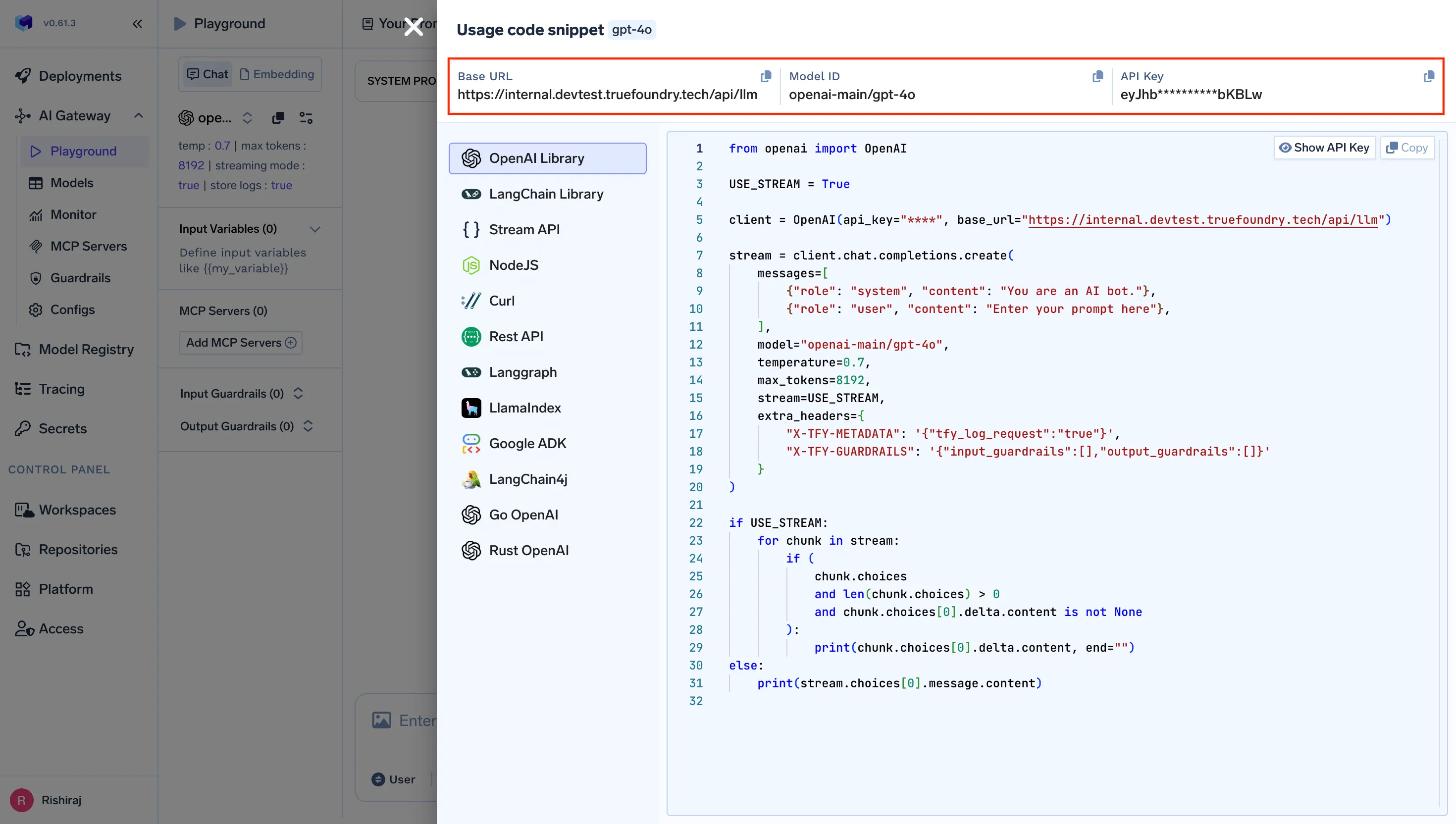
Log into your TrueFoundry control plane. Navigate to AI Gateway → Virtual Keys and create a scoped key for your team or project. You'll get:
https://<your-org>.truefoundry.cloud/api/llm/v1
export ANTHROPIC_BASE_URL="https://<your-org>.truefoundry.cloud/api/llm/v1"
export ANTHROPIC_AUTH_TOKEN="<your-truefoundry-virtual-key>"
للتكوين الدائم على مستوى المشروع، أضف إلى .claude/settings.json:
{
  "env": {
    "ANTHROPIC_BASE_URL": "https://<your-org>.truefoundry.cloud/api/llm/v1",
    "ANTHROPIC_CUSTOM_HEADERS": "Authorization: Bearer <your-virtual-key>\nx-tfy-provider-name: <your-provider-name>",
    "ANTHROPIC_MODEL": "anthropic/claude-sonnet-4-6"
  }
}
شغّل claude - يتدفق Claude Code الآن عبر TrueFoundry. يتم تسجيل كل طلب وتحديده وتخضع للسياسات التي حددتها على هذا المفتاح الافتراضي.
على عكس تهيئة ملف YAML الخاص بـ LiteLLM، يتم إعداد مزود الخدمة في TrueFoundry ضمن لوحة تحكم البوابة. أضف حسابك في Anthropic، اربط بيانات اعتماد AWS Bedrock أو Google Vertex، وحدد أسماء النماذج المستعارة، كل ذلك من واجهة مستخدم يديرها فريق النظام الأساسي لديك مركزيًا.
أسماء النماذج المستعارة المضمنة في Claude Code (opus، sonnet، haiku) تتوافق بسلاسة مع نماذج TrueFoundry الافتراضية. قم بإعداد الربط مرة واحدة في لوحة التحكم، وكل مطور يستخدم المشروع .claude/settings.json يحصل على توجيه النموذج الصحيح تلقائيًا، دون الحاجة لتعديل متغيرات البيئة على الأجهزة الفردية.
بمجرد أن يتم توجيه Claude Code عبر TrueFoundry، تتوفر خمس إمكانيات لا توجد مع الوصول المباشر إلى Anthropic أو LiteLLM الأساسي:
التحكم في التكاليف. حدد ميزانيات يومية للرموز لكل مطور أو لكل فريق مباشرة على المفاتيح الافتراضية. تفرض البوابة الحدود بشكل استباقي - الطلبات التي تتجاوز الميزانية تُرجع خطأ قبل أن تتسبب في أي تكلفة، بدلاً من إعلامك بعد وصول الفاتورة.
قابلية المراقبة. يتم تتبع كل طلب من Claude Code من البداية إلى النهاية: من هو المطور الذي أرسله، وأي نموذج قام بمعالجته، وكم عدد الرموز التي استُهلكت، وما هي تكلفته. TrueFoundry متوافق مع OpenTelemetry ويتكامل مع Grafana أو Datadog أو Prometheus دون الحاجة إلى أدوات إضافية.
الأمان والحوكمة. تحل المفاتيح الافتراضية محل مفاتيح Anthropic API الخام على أجهزة المطورين. عندما يغادر مهندس المؤسسة، يمكنك إلغاء مفتاحه من مكان واحد. لا تغادر بيانات اعتماد Anthropic الأساسية أبدًا مدير الأسرار الخاص بالبوابة. بالنسبة للمؤسسات التي تتطلب دمج Claude Code مع SSO والتكوين المفروض بواسطة MDM، فإن بوابة TrueFoundry هي طبقة التنفيذ.
الوصول متعدد المزودين. يتصل Claude Code بنقطة نهاية واحدة. خلف نقطة النهاية هذه، تقوم TrueFoundry بالتوجيه إلى Anthropic مباشرة، أو AWS Bedrock، أو Google Vertex AI، أو Azure OpenAI، أو النماذج المحلية، بناءً على السياسات التي تحددها. قم بتبديل المزودين دون الحاجة لتعديل أي جهاز مطور.
الموثوقية. يتعامل التوجيه الاحتياطي التلقائي مع حدود معدل Anthropic بشفافية. إذا أعاد المزود الأساسي رمز 429 أو 503، تعيد البوابة المحاولة باستخدام خيار احتياطي مُكوّن قبل أن يرى Claude Code أي خطأ. بالنسبة لسير عمل المطورين الذي لا يحتمل الانقطاع، هذا هو الفرق بين إزعاج بسيط وتعطيل لـ "سبرينت" (دورة عمل).
LiteLLM هو وكيل ممتاز للمطورين الأفراد أو الفرق الصغيرة التي تجري التجارب. TrueFoundry مصمم للسيناريو حيث يكون Claude Code أداة على مستوى الفريق ويحتاج فريق المنصة إلى إدارته دون الحاجة لبناء طبقة الحوكمة هذه بأنفسهم.
ثبّت LiteLLM باستخدام pip install litellm[proxy]، ثم اكتب litellm-config.yaml يحدد نماذجك، وابدأ تشغيل الوكيل باستخدام litellm --config. ثم قم بتعيين ANTHROPIC_BASE_URL=http://localhost:4000 و ANTHROPIC_AUTH_TOKEN إلى مفتاح LiteLLM الرئيسي الخاص بك قبل تشغيل claude. يتم تغطية الإعداد الكامل في القسم المفصل خطوة بخطوة أعلاه.
نعم. بوابة TrueFoundry AI تعرض نقطة نهاية متوافقة مع Anthropic، لذا فإن التبديل من LiteLLM إلى TrueFoundry هو تغيير سطر واحد: قم بتحديث ANTHROPIC_BASE_URL إلى عنوان URL لبوابة TrueFoundry الخاصة بك واستبدل رمز المصادقة. لا يرى Claude Code أي فرق. ما يتغير هو كل شيء خلف البوابة - المراقبة، وضوابط التكلفة، والتحكم في الوصول المستند إلى الدور (RBAC)، والبنية التحتية المدارة.
حوالي 3-4 مللي ثانية من الحمل الزائد للبوابة، تتعامل مع أكثر من 350 طلبًا في الثانية (RPS) على وحدة معالجة مركزية افتراضية واحدة (vCPU). عند أوقات استجابة Claude Code (التي تُقاس بالثواني، وليس بالمللي ثانية)، لا تضيف البوابة أي زمن انتقال ملحوظ لتجربة المطور.
نعم. يعمل TrueFoundry في شبكتك الافتراضية الخاصة (VPC)، أو في موقعك، أو في بيئة معزولة، أو هجينة، أو عبر سحابات متعددة، ولا تغادر أي بيانات بنيتك التحتية. هذا هو السبب الرئيسي الذي يجعل الشركات الخاضعة للتنظيم تختار TrueFoundry بدلاً من بوابات SaaS فقط أو LiteLLM المُدارة ذاتيًا.
LiteLLM هي خطوة أولى مجربة لربط Claude Code بمقدمي خدمات الذكاء الاصطناعي المتعددين. إذا كنت مطورًا منفردًا أو فريقًا صغيرًا يجري تجارب، فهو خيار قوي يوفر لك توجيهًا متعدد المزودين ببضعة أسطر من إعدادات YAML.
عندما يصبح Claude Code أداة للفريق - عندما تحتاج إلى فرض الميزانيات، ومراجعة الاستخدام، وإدارة الوصول، وتلبية متطلبات الامتثال دون بناء تلك البنية التحتية بنفسك - تصبح تعقيدات الإعداد والفجوات في الميزات لـ LiteLLM المُدار ذاتيًا تكلفة حقيقية. بوابة TrueFoundry AI هي نقطة النهاية المتوافقة مع Anthropic التي يمكن دمجها بسهولة وتتعامل مع كل ذلك، بتغيير متغير بيئة واحد.
ابدأ توجيه Claude Code عبر بوابة TrueFoundry AI → truefoundry.com/ai-gateway
TrueFoundry AI Gateway delivers ~3–4 ms latency, handles 350+ RPS on 1 vCPU, scales horizontally with ease, and is production-ready, while LiteLLM suffers from high latency, struggles beyond moderate RPS, lacks built-in scaling, and is best for light or prototype workloads.





أحدث الأخبار والمقالات والموارد تصلك مباشرة إلى بريدك الوارد
.png)



.png)
.png)
.png)

.png)
.png)
.png)
.png)
.png)
.png)
.png)


