


What Is an AI Gateway and How Does It Work?

.png)
Most teams do not start with an AI gateway. They start with a single model and a single API key wired straight into the app. That works until the second model arrives, then a third, then a self-hosted one, and suddenly keys, retry logic, and spend tracking are scattered across every service.
An AI gateway pulls all of that back into one place. Instead of each application talking directly to OpenAI, Anthropic, Google, and your own vLLM server, they all talk to the gateway, and the gateway talks to the providers. That one move gives you a consistent way to route traffic, control cost, apply security policies, and see what is actually happening across your AI stack.
This guide explains what an AI gateway is, how it works, the capabilities to look for, and when it earns its place in your architecture.
What is an AI Gateway?
An AI gateway is a reverse proxy for large language model traffic. It accepts requests from your applications through one standard API, applies a set of policies, and forwards each request to the right model provider. The response travels back through the same path, where the gateway can log it, cache it, and check it before returning it to the caller.
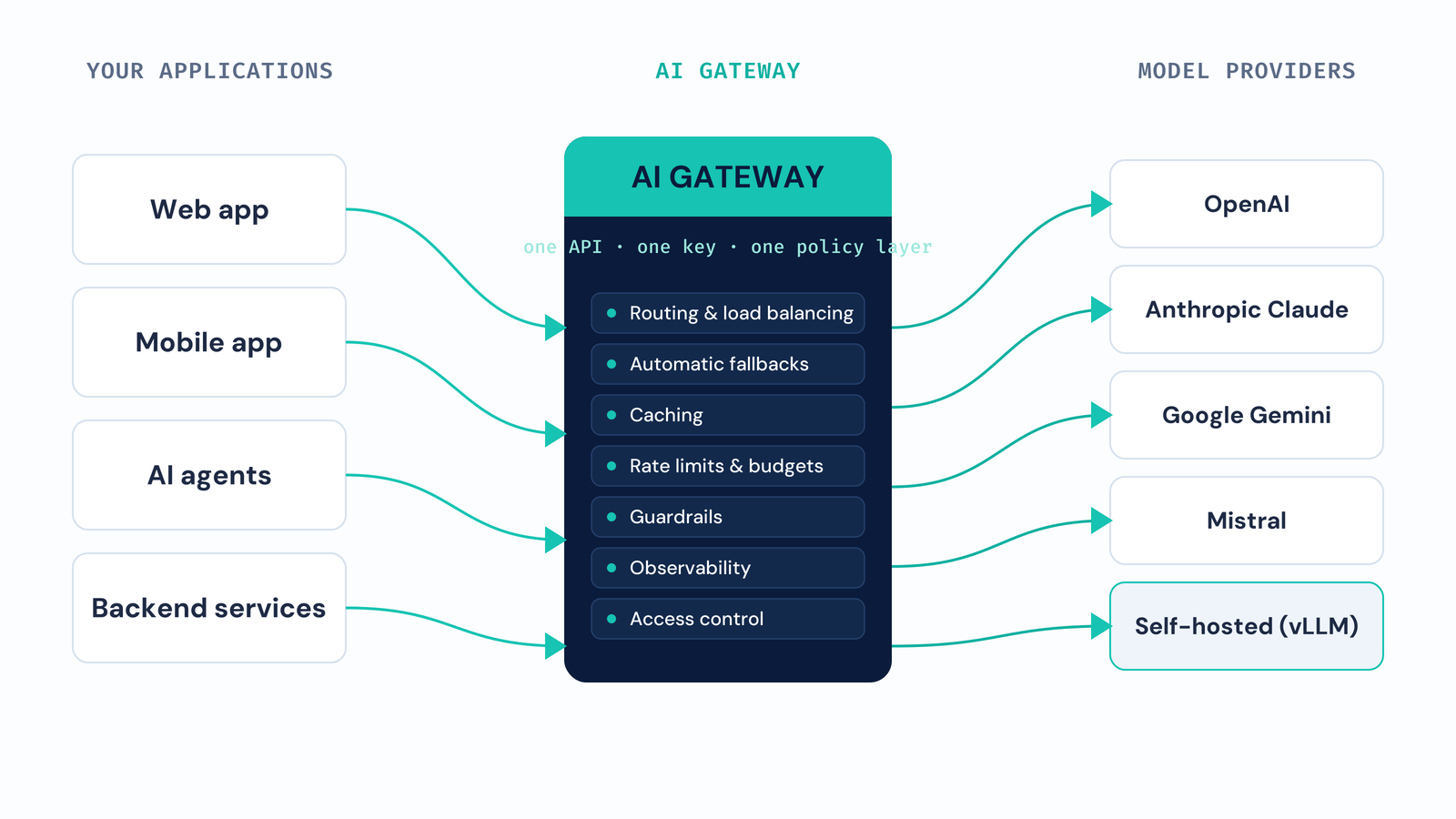
It helps to think of it the way you already think of an API gateway for microservices. A traditional API gateway gives you one entry point for many backend services, and handles auth, rate limiting, and routing so each service does not have to. An AI gateway does the same job, but the backends are model providers, and the policies understand the things that matter for LLMs: tokens, prompts, context windows, streaming responses, and per-token cost.
Without a gateway, every application owns its own integration with every provider. Each one carries its own keys, its own retry code, and its own idea of what a request costs. With a gateway, that logic lives in one layer. Applications send a request, name a model, and let the gateway handle the rest.
How does an AI Gateway work?
A request does not go straight from your app to a provider. It passes through the gateway, which runs it through an ordered set of steps before and after the model call.
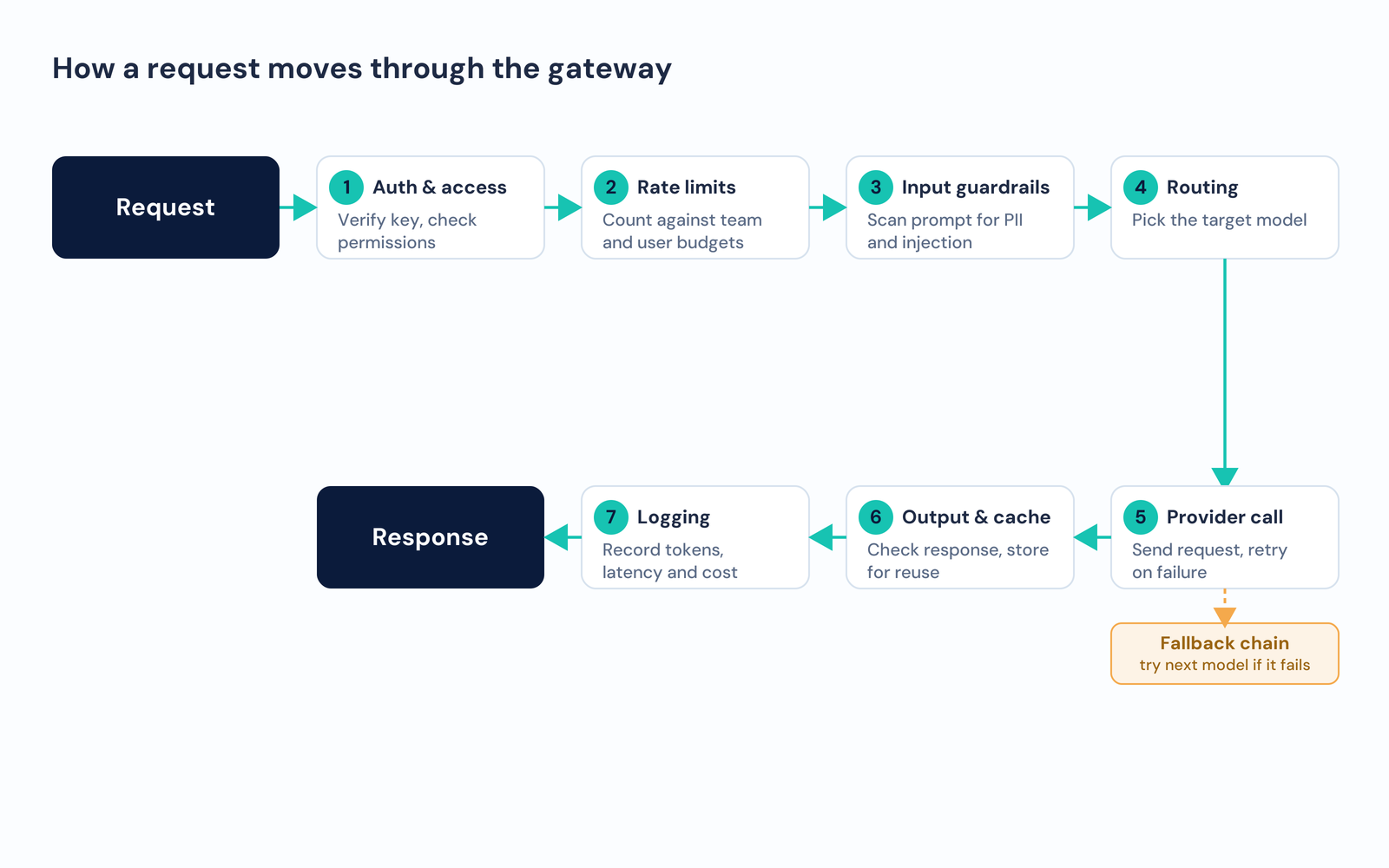
A typical request moves through the gateway like this:
- Authentication and access control. The gateway checks the caller's key or token and confirms the caller is allowed to use the requested model.
- Rate limit and budget check. It counts the request against the limits set for that team, user, or application, and rejects or throttles it if a limit is already hit.
- Input guardrails. It can scan the prompt for PII, toxicity, or prompt injection before the request ever reaches a provider.
- Routing and load balancing. It picks a target, which might be a specific model, the cheapest model that fits, or whichever provider is fastest right now.
- Provider call with fallback. It sends the request. If the provider errors or times out, the gateway retries against the next model in a fallback chain instead of returning a failure.
- Output guardrails and caching. It can check the response, then store it so an identical or similar future request can be served without another provider call.
- Logging and observability. It records tokens used, latency, cost, and metadata, then returns the response to the application.
The caller sees one clean request and one response. Everything in between is the gateway doing the work that would otherwise be copied into every service.
What are the core capabilities of an AI Gateway?
Gateways vary, but the strong ones cover the same set of functions. These are what separate an AI gateway from a plain proxy.
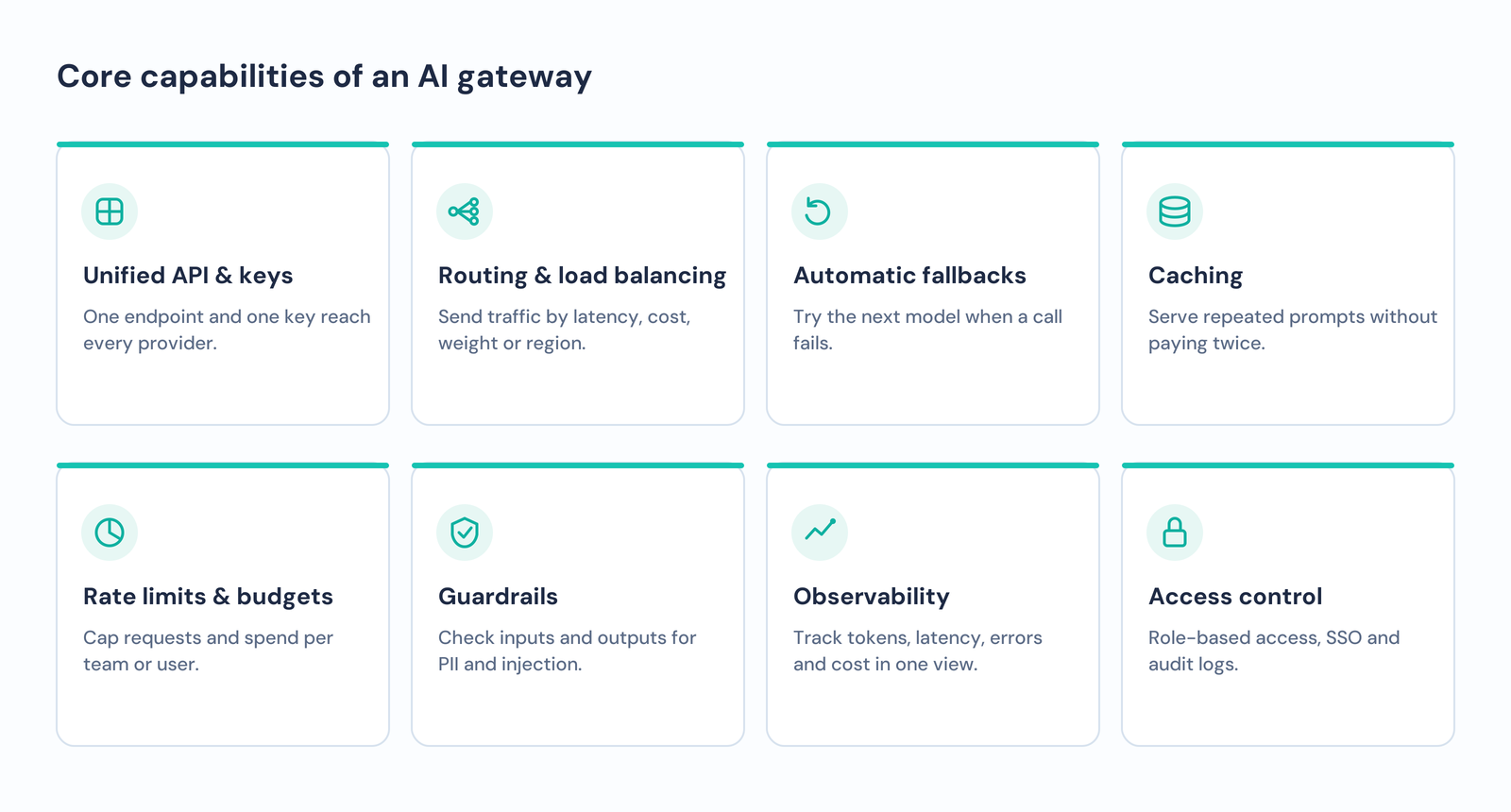
- Unified API and key management. One endpoint and one key reach every provider and model. Provider keys are stored centrally, so rotating a key or cutting off a provider is one change, not twenty.
- Routing and load balancing. Send traffic by latency, by cost, by weight across several models, or by region for data residency. This keeps response times steady and spreads load so no single provider becomes a bottleneck.
- Automatic fallbacks. Define an ordered chain of models. If the first call fails, the gateway tries the next one, which turns a provider outage into a slower response instead of a broken feature.
- Caching. Serve repeated prompts from a cache rather than paying for the same completion twice. This cuts both cost and latency for common requests.
- Rate limiting and budgets. Cap requests and spend per user, team, or endpoint. Over-budget traffic can be throttled, routed to a cheaper model, or blocked outright.
- Guardrails. Apply input and output checks for PII, toxicity, and prompt injection, often by plugging in services you already use for moderation.
- Observability. Track tokens, latency, error rates, and cost in one dashboard, with full request and response logs filterable by model, team, or tag.
- Access control. Role-based access, single sign-on, per-team keys, and audit logs, so you can govern who calls which models and prove it later.
AI Gateway vs. traditional API Gateway
The two share a shape, but they are not interchangeable. A traditional API gateway routes HTTP calls to backend services and knows nothing about tokens or prompts. Point it at an LLM and it will pass the traffic through, but it cannot count tokens, cap spend by model, cache a completion, or fall back to a second provider when the first one fails.
An AI gateway is built for that world. It understands that a request has a token count and a cost, that a response can be streamed, that two prompts can be similar enough to share a cached answer, and that a failed call should try another model rather than return an error. If your traffic is LLM traffic, those differences are the whole point.
Why do teams need an AI Gateway?
The case for a gateway grows with every model and every team you add.
- Cost control. Spend on LLM calls is easy to lose track of when it is spread across providers. A gateway gives you one view of cost and the levers to cap it.
- Reliability. Providers have outages and rate limits. Fallbacks and load balancing keep your product working through them.
- Security and compliance. Central guardrails, access control, and audit logs are far easier to enforce in one layer than in every service.
- Speed of change. When switching models is a config change at the gateway instead of a code change in each app, teams can adopt new models as they ship.
- Visibility. One place to answer who used which model, how much it cost, and how fast it responded.
When should you use an AI Gateway?
A gateway is not free complexity, so it is worth being honest about when it pays off.
You likely want one when you call more than one model or provider, when several teams or services share the same AI budget, when you need audit logs and access control for compliance, or when reliability and cost are starting to matter as much as the output itself.
You probably do not need one yet if you have a single application calling a single model with a small, predictable volume. At that scale the gateway's routing, fallback, and governance features do not have much to do. The moment a second model or a second team arrives, the calculation changes.
Best practices for running an AI Gateway
- Start with one unified API and migrate services to it before adding advanced policies, so you get the single-pane view first.
- Set budgets and rate limits early, per team, so cost control is in place before spend grows.
- Define fallback chains for your critical paths rather than every route, and test them by forcing a provider failure.
- Turn on caching for high-volume, repetitive prompts, and measure the hit rate so you know it is working.
- Keep guardrails close to the gateway so every application inherits the same checks without extra code.
- Watch latency added by the gateway itself, and keep that overhead small relative to the model call.
Conclusion
An AI gateway turns a scattered set of model integrations into one governed control layer. It gives every team a single API, keeps requests flowing through fallbacks and load balancing, caps cost with budgets and rate limits, enforces security with guardrails and access control, and shows you what is happening across every model in one place.
TrueFoundry's AI Gateway brings these together in a layer you run in your own infrastructure. It provides one API and one key across a large catalog of models and providers, latency-based and weighted routing, fallback chains, rate limits and budgets, guardrails for PII and prompt injection, and full observability on tokens, latency, and cost, with role-based access and audit logging on top. It can be deployed in your VPC, on-prem, hybrid, or air-gapped, and it serves open-source models through engines like vLLM alongside hosted providers. If you are moving more than one model into production, it is worth a look.

Govern, Deploy and Trace AI in Your Own Infrastructure
Frequently Asked Questions
What is an AI gateway in simple terms?
It's the gateway to connect your applications with the artificial intelligence models utilized by you. Rather than having applications connect individually to providers, there is the intermediary gateway through which they can connect and that will perform all of these functions.
What is the difference between an AI gateway and an API gateway?
The API Gateway redirects web traffic to the back-end services. It is designed for model flows, hence it knows how to handle tokens, cost per request, streaming, caching, and failing-over models. These are features that cannot be achieved through an ordinary API Gateway.
Does an AI gateway add latency?
But there is an increase in overhead because data needs to take an additional step. An optimally constructed gateway ensures such latency in only a few milliseconds. This latency becomes insignificantly small when compared to that of the actual model.
Can an AI gateway reduce my LLM costs?
Yes. The ability to cache frequently repeated queries, forward user requests to less expensive models that will do, as well as manage budgets to prevent excessive costs, is one of them.
Do I need an AI gateway for a single model?
Usually not. Low quantity requests of an app that runs only one model will produce nothing from the gateway. This starts to make sense when you factor in a second model, another team, and other considerations such as cost, reliability, and compliance.


- © 2022 ENSEMBLE Technologies



Subscribe to our newsletter
The latest news, articles, and resources sent to your inbox


