



October 1, 2026
|
5 min read


احصل على وصول فوري إلى بيئة TrueFoundry مباشرة. انشر النماذج، ووجّه حركة مرور LLM، واستكشف المنصة بالكامل — بيئة الاختبار الخاصة بك جاهزة في ثوانٍ، ولا يلزم وجود بطاقة ائتمان.


Published: July 8, 2026

Blazingly fast way to build, track and deploy your models!
GPU capacity is one of the hardest constraints for AI teams right now. Provisioning Amazon EC2 P5 instances or Azure ND H100 v5-series VMs can run into quota limits, regional capacity constraints, or commercial commitments that are difficult to absorb. That has made specialized GPU clouds — CoreWeave, Lambda, Fluidstack, and several others — viable production targets, not just overflow capacity. Each of these providers offers a managed Kubernetes path for GPU workloads: CoreWeave Kubernetes Service (CKS), Lambda Managed Kubernetes (MK8s) on a 1-Click Cluster, and Fluidstack managed Kubernetes.
Running across these alongside a hyperscaler footprint creates real operational complexity: separate dashboards, separate identity systems, separate observability, separate deployment flows. TrueFoundry's role here is to attach each of these Kubernetes clusters to a single Control Plane, present them as deploy targets in one UI, and provide a consistent K8s operational layer on top — without replacing the cluster-native automation each provider already ships.
This post walks through what that actually looks like: the architecture, what attaching a cluster requires, where the platform's automation ends and the provider's begins, and the practical patterns we recommend.
TrueFoundry uses a split-plane architecture. The Control Plane (TrueFoundry-managed or self-hosted) holds metadata, RBAC, deployment manifests, and the UI. The Compute Plane is your own Kubernetes cluster. Multiple Compute Planes can connect to a single Control Plane — meaning an EKS cluster, an AKS cluster, a CKS cluster, an MK8s cluster, and a Fluidstack managed K8s cluster can all report to the same dashboard.
The tfy-agent runs in each cluster and opens a secure outbound WebSocket to the Control Plane. The agent streams cluster state, while the agent proxy lets the Control Plane apply Kubernetes changes through that outbound connection without requiring an inbound endpoint on the cluster. Workloads, data-plane traffic, and provider credentials remain inside each cluster's cloud account, and traffic does not flow between Compute Planes through the Control Plane — they remain independent clouds with independent identities.
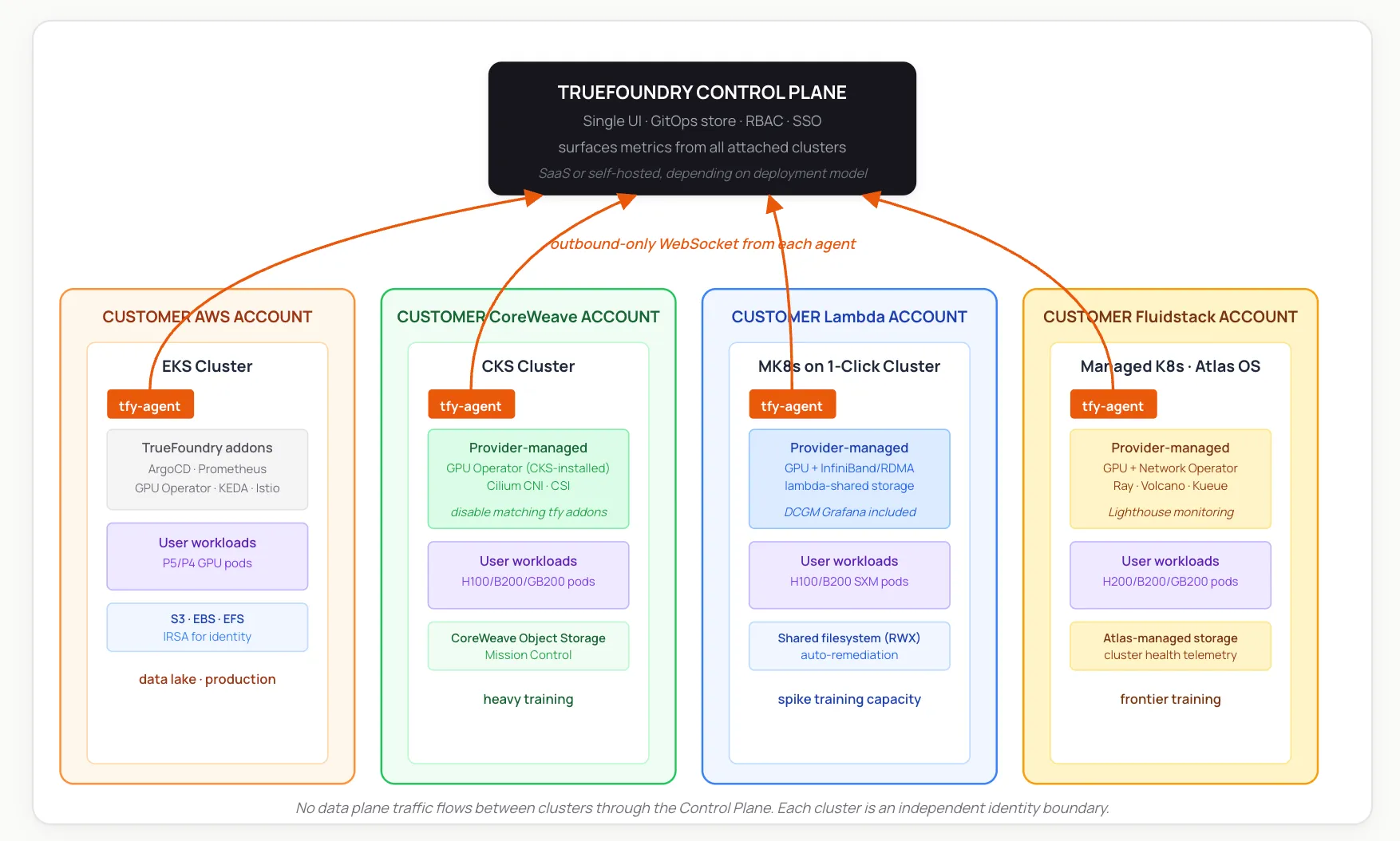
The agent install itself is a single helm command — but it sits at the end of a setup that has real prerequisites. For any cluster (hyperscaler or specialized) to attach cleanly, the cluster needs:
public.ecr.aws, quay.io, ghcr.io, tfy.jfrog.io, docker.io/natsio, nvcr.io, registry.k8s.io*.lambda-pool.example.com) and a TLS certificate — cert-manager + Let's Encrypt is the documented patterntruefoundry.com/nodepool=<pool-name> on every node, and truefoundry.com/gpu_type=<GPU_TYPE> on GPU nodes (TrueFoundry auto-discovers node pools on EKS/GKE/AKS only)On managed hyperscale K8s, TrueFoundry's OpenTofu/Terraform modules cover most of this. On specialized clouds, you use the provider's managed K8s offering directly — provision through their console, prepare the prerequisites, then attach. The exact agent install command is generated by the platform UI when you click Attach Existing Cluster; it typically follows this shape:
helm repo add truefoundry https://truefoundry.github.io/infra-charts/
helm upgrade --install tfy-agent truefoundry/tfy-agent \
  --set tenantName=my-org \
  --set clusterName=lambda-h100-pool \
  --set controlPlaneURL=https://<YOUR_CONTROL_PLANE> \
--set clusterTokenSecret=<YOUR_CLUSTER_TOKEN_SECRET>This is the part many architecture posts gloss over. The specialized clouds named earlier already provide Kubernetes components that overlap with parts of TrueFoundry's default addon stack. If both sides install the same component, you can get conflicts that range from duplicated dashboards to unsupported GPU operator deployments.
CoreWeave is explicit about this: CoreWeave manages the NVIDIA GPU Operator on CKS clusters and warns against double-installing it. The platform-managed deployment is the only supported one. Disable TrueFoundry's GPU Operator addon when attaching a CKS cluster.
Concretely:
lambda-shared StorageClass, NVIDIA DCGM Grafana dashboards, and automated node remediation. Disable TrueFoundry's GPU Operator addon if Lambda is already managing GPU enablement. The provider's DCGM dashboard is separate from TrueFoundry's observability and can run alongside it.The Attach Existing Cluster form has a Cluster Addons section where you toggle off any addon the provider already supplies. This is a one-time decision per cluster.
Once a cluster is attached, the platform layers a consistent operational experience on top of whatever K8s the provider gave you:
cluster_name field — provided the prerequisites on the destination cluster match (matching GPU type, registry access, secrets, storage class).لتوضيح النطاق تمامًا — هذه قدرات حقيقية يطلبها العملاء، لكنها ليست ميزات للنظام الأساسي اليوم:
إذا كانت حالة استخدامك تتطلب حقًا تنسيقًا عبر المجموعات — على سبيل المثال، مهمة تدريب يجب أن تنتقل إلى أرخص سحابة متاحة — فاتخذ هذا القرار في طبقة التنسيق (منطق CI/CD الخاص بك، أو مجدول مخصص صغير، أو أداة سير عمل مثل Argo Workflows أو Temporal) فوق واجهة برمجة تطبيقات النشر لكل مجموعة من TrueFoundry. توفر لك المنصة أساسيات نشر متسقة عبر المجموعات؛ ويبقى قرار التوجيه لديك.
تسلسل واضح لضبط التوقعات بشكل صحيح:
kubectl get nodes يظهر عمال GPU الخاصين بك على أنهم جاهز.lambda-shared StorageClass موجود إذا كنت بحاجة إلى تخزين مشترك، والتحقق من خروج البيانات إلى سجلات الحاويات المطلوبة لـ TrueFoundry.يستغرق الوقت الإجمالي على مجموعة مُجهزة عادةً 30-60 دقيقة، ويعود ذلك بشكل أساسي إلى انتشار DNS وإصدار الشهادات وتثبيت helm.
استراتيجية وحدات معالجة الرسوميات (GPU) متعددة السحابات حقيقية، وتزداد جدواها مع تحول القدرة الحاسوبية إلى قيد على خرائط طريق الذكاء الاصطناعي. يتمثل المسار العملي في التعامل مع كل مجموعة — سواء كانت EKS أو AKS أو GKE أو CKS أو MK8s أو Kubernetes المُدار من Fluidstack — كملحق Kubernetes قياسي، مع توفير المنصة لطبقة تشغيل متسقة فوقها.
ما تحصل عليه: واجهة مستخدم واحدة عبر كل مجموعة قمت بربطها، وأنماط نشر وGitOps متسقة بغض النظر عن السحابة، وقابلية نقل أعباء العمل على مستوى البيان (حيث تتطابق المتطلبات الأساسية)، وفصل كامل للبيانات عبر حسابات العملاء السحابية. ما لا تحصل عليه اليوم: الجدولة التلقائية عبر المجموعات، أو تجميع السعة، أو التوجيه المدرك للتكلفة — تبقى هذه القرارات معك، مبنية على واجهة برمجة تطبيقات النشر لكل مجموعة الخاصة بالمنصة.
إذا كنت تقيّم هذه الحزمة التقنية، فإن نقطة البداية الطبيعية هي ربط مجموعتين — واحدة من مزود سحابي كبير (hyperscaler) وواحدة متخصصة — وتشغيل مهمة تمثيلية على كل منهما للتحقق من سهولة التشغيل قبل التوسع.
TrueFoundry AI Gateway delivers ~3–4 ms latency, handles 350+ RPS on 1 vCPU, scales horizontally with ease, and is production-ready, while LiteLLM suffers from high latency, struggles beyond moderate RPS, lacks built-in scaling, and is best for light or prototype workloads.





أحدث الأخبار والمقالات والموارد تصلك مباشرة إلى بريدك الوارد
.png)



.png)
.png)
.png)

.png)
.png)
.png)
.png)
.png)
.png)
.png)


