



October 1, 2026
|
5 min read


احصل على وصول فوري إلى بيئة TrueFoundry مباشرة. انشر النماذج، ووجّه حركة مرور LLM، واستكشف المنصة بالكامل — بيئة الاختبار الخاصة بك جاهزة في ثوانٍ، ولا يلزم وجود بطاقة ائتمان.



Published: July 4, 2026
Blazingly fast way to build, track and deploy your models!
Every engineering Slack channel we've been in over the past six months has probably had the same argument. Cursor or Copilot? The question won't go away because, from a distance, the tools look almost identical. Both write code. Both run on frontier LLMs. Both shipped agent capabilities in the past year.
Look closer, and the resemblance falls apart. Cursor is a standalone IDE—Anysphere forked VS Code and rebuilt the whole editor around AI. Copilot is an extension that plugs into whatever editor you already use. VS Code, JetBrains, Visual Studio, Neovim, Xcode, Eclipse—Copilot meets you where you are.
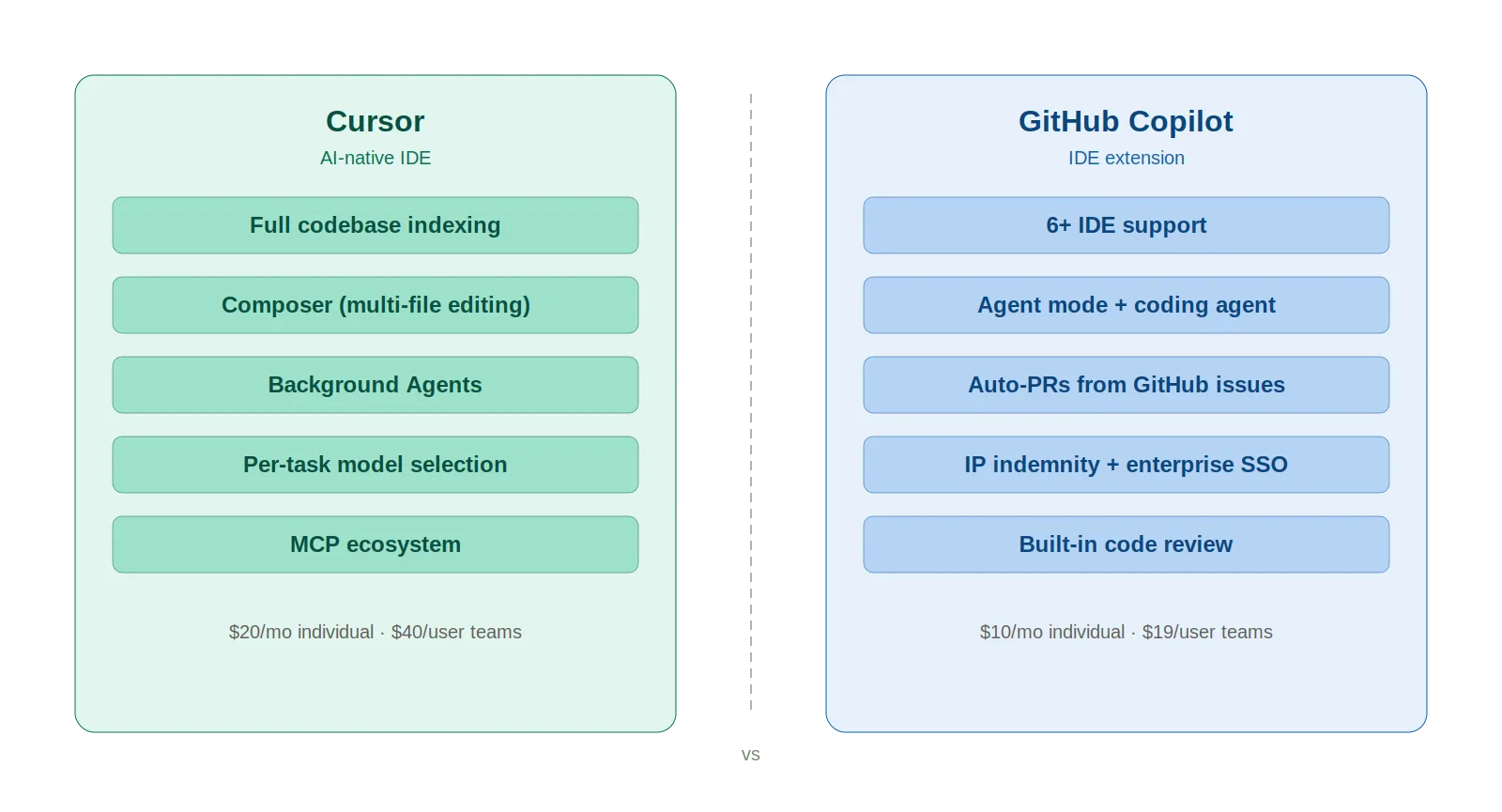
That architectural split ripples through everything. Context handling. Multi-file editing. Team scaling. Cost. We won't declare a winner here—your workflow decides that. What we will do is lay out the differences honestly enough that you can make your own call.

Cursor is an AI-first code editor from Anysphere, a YC-backed startup. VS Code fork at the core, so the interface feels immediately familiar—extensions, keybindings, settings all carry over. The difference is that AI runs through the entire product, not as a sidebar plugin.
March 2026 feature highlights:
Growth has been fast. $500 million ARR in 2025, reportedly nearing $2 billion by early 2026. Over 90% of Salesforce's developers now use it.
Copilot came out in June 2022, a GitHub and OpenAI joint project. The first version was basically autocomplete—write a comment, watch it fill in code. Clean, simple, effective. Fast forward to 2026, and it barely resembles that original product.
What you get now is a suite of tools under one name:
4.7 million paid subscribers as of January 2026, up 75% year-over-year. Satya Nadella said Copilot now represents a bigger business than GitHub was worth when Microsoft acquired it for $7.5 billion.
The structural advantage Copilot holds? IDE support. Six editors and counting. Cursor only runs in its own editor.
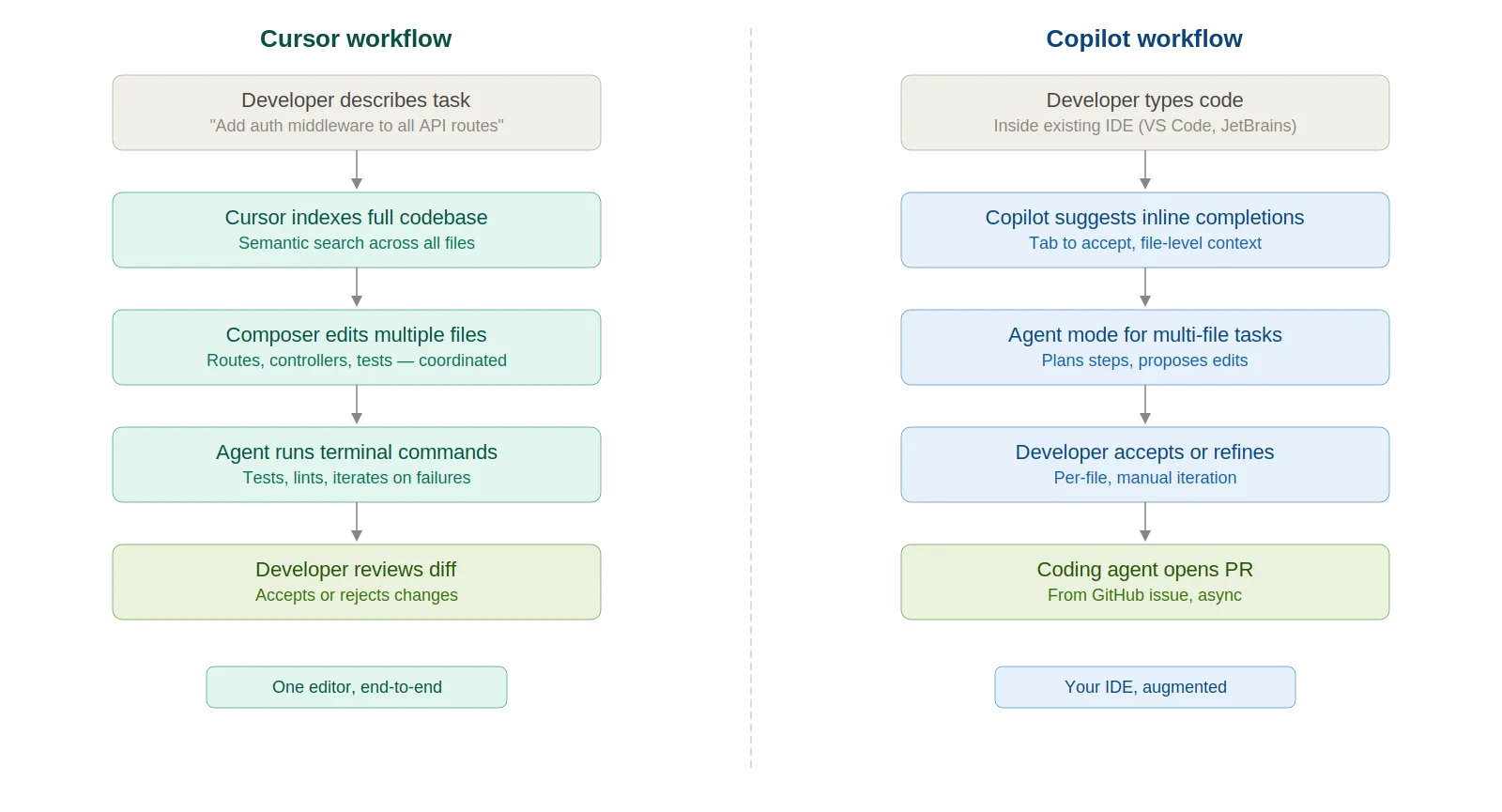
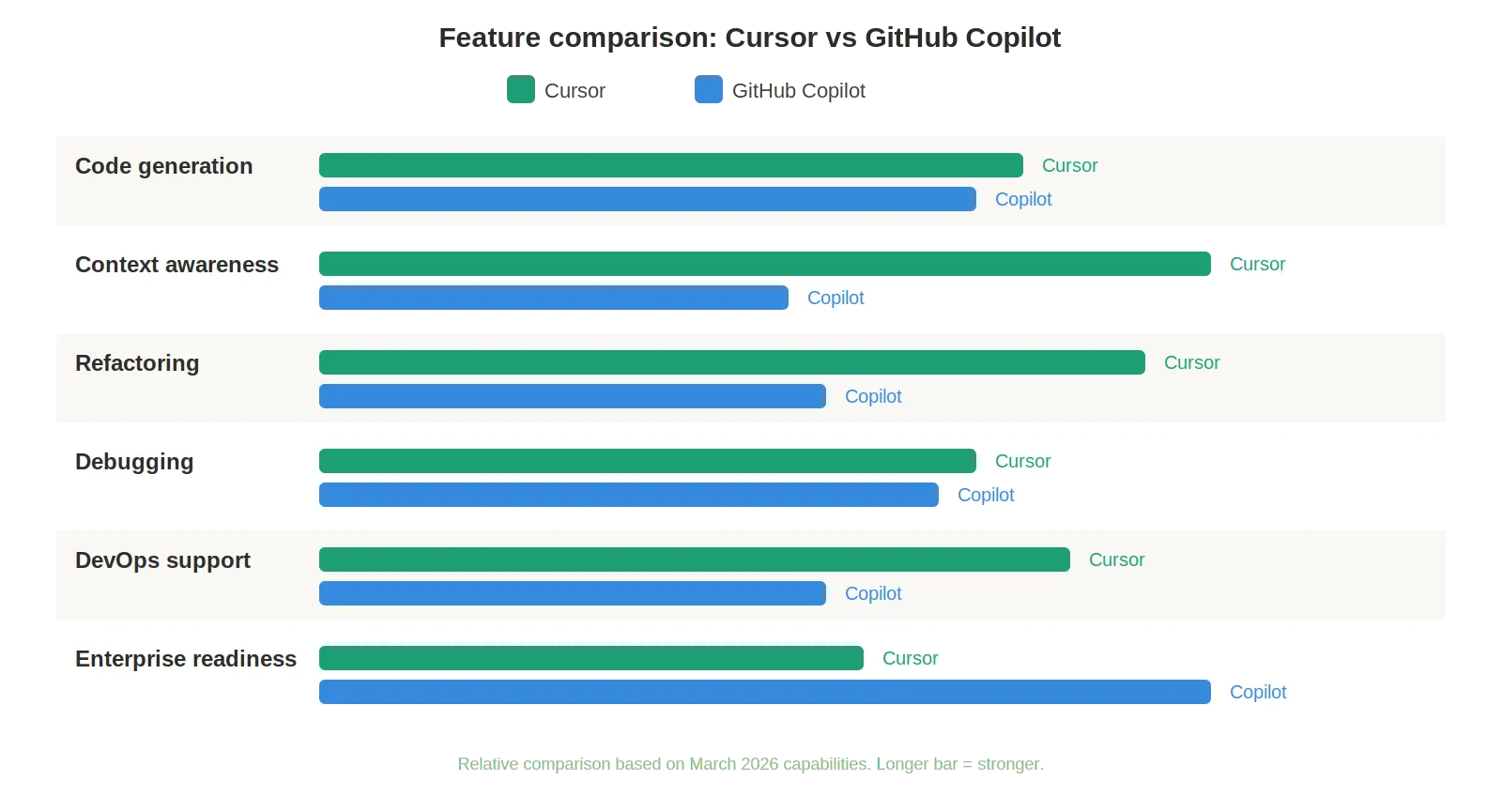
Copilot's inline autocomplete is fast and reliable for single-file work. Type a function signature, get the implementation. For boilerplate and well-trodden patterns, the speed is hard to beat.
Cursor takes a different angle. Composer accepts a natural-language description and orchestrates changes across multiple files at once—route, controller, service layer, tests—wired together automatically. Quick, focused tasks? Copilot is faster. Larger tasks that need cross-file awareness? Cursor wins.
Probably the single biggest technical gap between these two tools right now. Cursor indexes your whole codebase and builds semantic search on top. Ask "where is the auth middleware defined?" and it finds the file. You didn't have to open it first.
Copilot's context handling has gotten a lot better since 2024, to be fair. Agent mode works across files now. Copilot Spaces lets you pin relevant code, docs, and specs. But the window is still narrower—Copilot sees the active workspace and whatever you explicitly attach. Cursor sees everything it indexed. That gap shrinks with every update. It just hasn't closed yet.
Cursor's Composer was built for coordinated multi-file changes. Rename a type—every reference updates across the project. Extract a service—imports get rewired. For refactors touching 15+ files, Composer is the stronger tool today.
Copilot's agent mode handles multi-file refactors, but the experience needs more hand-holding. Sometimes it nails the scope on the first try. Sometimes it misses files or creates inconsistencies you catch in review.
Different strengths here. Cursor has the Datadog MCP integration, which lets the agent pull production logs, metrics, and traces without leaving the editor. Paste a stack trace, and it follows the code path with full project context.
Copilot's debugging story is more GitHub-native. The coding agent picks up CI failures, iterates on fixes, and automatically pushes updates to a PR. Agent mode self-heals runtime errors in a loop. If your daily workflow revolves around GitHub PRs and CI pipelines, Copilot fits more naturally.
Both handle Terraform, Kubernetes, and Helm charts. Cursor tends to do better on larger IaC codebases because it traces module references, variable files, and provider configs at the project level. Copilot is solid for quick fixes and well-scoped tasks, but doesn't traverse module chains as deeply.
Pros:
Cons:
Pros:
Cons:
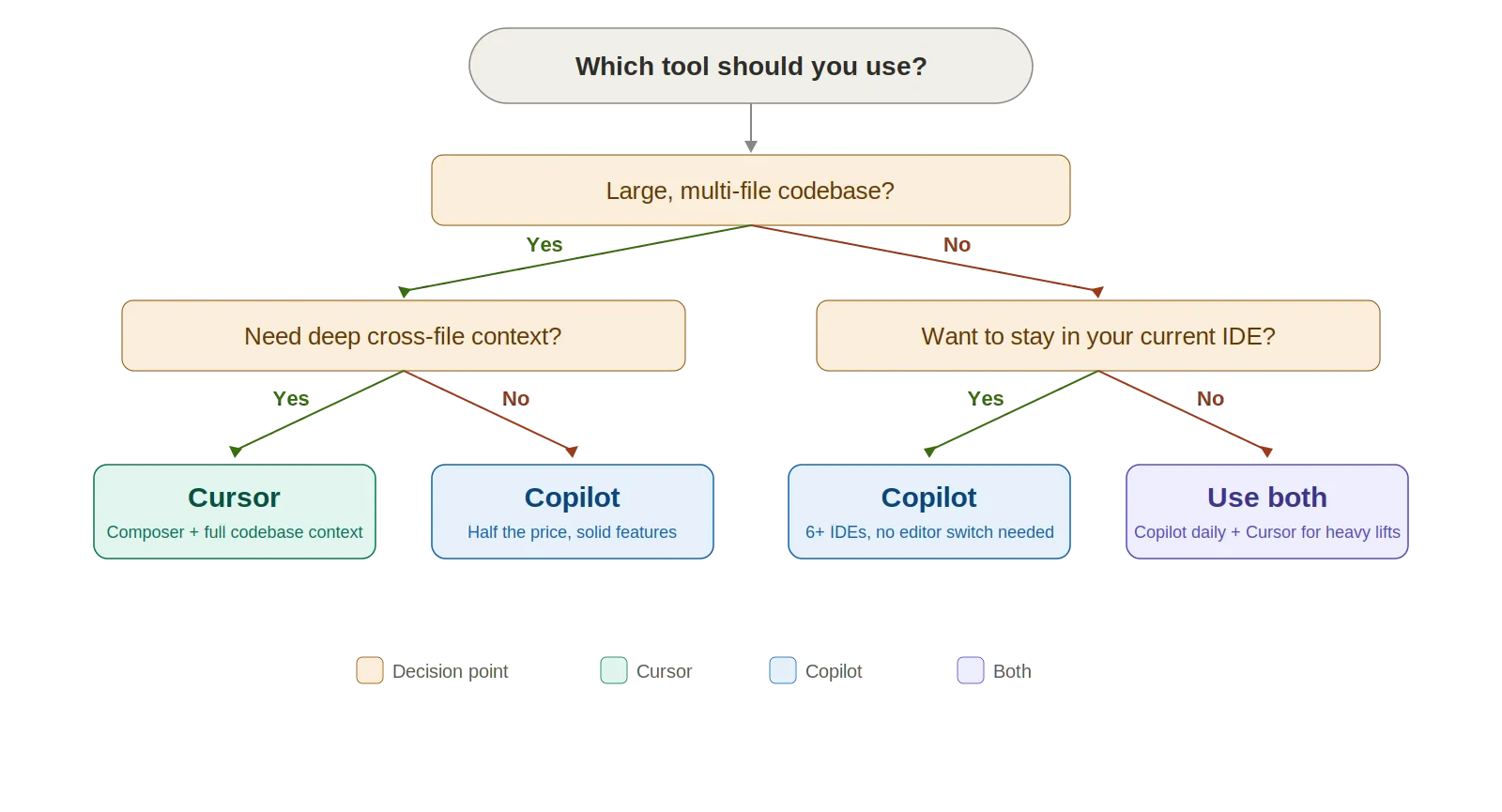
Cursor makes sense when:
Copilot makes sense when:
Here's The Evaluation Framework for Proposal Template
| Criteria | What should you evaluate ? | Priority | TrueFoundry |
|---|---|---|---|
| Gateway & Developer Experience | |||
| Unified model access | Does the platform provide one consistent interface for hosted models, self-hosted models, and provider-native requests? | Must have | ✅ Supported: unified access to 1000+ LLMs. |
| OpenAI-compatible API | Can teams keep existing OpenAI, Anthropic, or provider-compatible client code while moving traffic behind a governed gateway? | Must have | ✅ Supported: OpenAI-compatible API plus native SDK support. |
| Prompt lifecycle management | Can prompts be created, versioned, A/B tested, and reused with a built-in playground for rapid iteration? | Should have | ✅ Supported: versioned prompts, playground, and experimentation. |
| Playground and experimentation | Is there a playground UI for non-developers to test prompts, models, and tools without code? | Should have | ✅ Supported: playground with model and tool experimentation. |

بالتأكيد. الكثير من المطورين يفعلون ذلك بالفعل. الإعداد الشائع: Copilot يعمل في JetBrains أو VS Code لإكمال سريع ومباشر (سريع، ولا يعيق العمل)، ثم الانتقال إلى Cursor للمهام المعقدة متعددة الملفات التي تتطلب Composer أو سياقًا أعمق لقاعدة الكود. 30 دولارًا شهريًا لكلاهما. بالنسبة لمطور يتقاضى 100 دولار أو أكثر في الساعة، فإن توفير خمس دقائق فقط يوميًا يغطي تكلفة الاشتراكين عدة مرات.
يستخدم Cursor نظام فوترة قائم على الرصيد (تغير في يونيو 2025). رصيد كل خطة يعادل سعر الاشتراك. وضع "التلقائي" غير محدود. اختيار النماذج المتميزة مثل Claude Opus 4.6 يستهلك الرصيد بشكل أسرع.
يستخدم Copilot "طلبات مميزة". الدردشة، وضع الوكيل، مراجعة الكود، واختيار النموذج كلها تستهلك هذه الطلبات. عمليات الإكمال الأساسية غير محدودة في الخطط المدفوعة. الطلبات الإضافية تكلف 0.04 دولار لكل منها.
الحسابات: يكلف Copilot حوالي نصف سعر Cursor في كل مستوى. ما إذا كانت إمكانيات Cursor الأعمق تبرر السعر الإضافي يعتمد على طريقة عملك. هل تقوم بتحرير ملفات متعددة بكثافة يوميًا؟ العائد على الاستثمار موجود. هل تحتاج في الغالب إلى إكمال تلقائي سريع؟ Copilot يقدم قيمة أكبر مقابل المال.
لا يوجد فائز واحد هنا، ونحن متشككون في أي شخص يدعي خلاف ذلك. Copilot هو الرهان الأكثر أمانًا لمعظم الفرق. تكلفته أقل. يعمل في بيئة التطوير المتكاملة (IDE) التي تستخدمها بالفعل. الطبقة المجانية تتيح لك تجربته قبل الالتزام. استغرقت ضوابط المؤسسات سنوات لتنضج. إذا كنت بحاجة إلى توحيد أداة واحدة عبر مؤسسة تضم 50 شخصًا، فإن Copilot هو الأسهل في النشر والخيار الأقل مخاطرة.
Cursor أقوى للعمل العملي والمعقد. السياق الشامل لقاعدة الكود، Composer، الوكلاء في الخلفية — هذه الميزات تمنحه ميزة حقيقية عندما تكون منغمسًا في مشروع كبير. يميل المهندسون الكبار المستعدون لتغيير المحررات إلى أن يصبحوا أكثر إنتاجية بشكل ملحوظ باستخدامه.
بصراحة؟ ينتهي المطاف بالعديد من المطورين باستخدام كليهما. Copilot للبرمجة اليومية. Cursor للمهام الشاقة. وهذا يمثل تقسيمًا فعالًا للغاية.

TrueFoundry AI Gateway delivers ~3–4 ms latency, handles 350+ RPS on 1 vCPU, scales horizontally with ease, and is production-ready, while LiteLLM suffers from high latency, struggles beyond moderate RPS, lacks built-in scaling, and is best for light or prototype workloads.


يُعتبر كيرسور عمومًا أكثر قدرة من جيت هاب كوبايلوت في مهام البرمجة المعقدة والحساسة للسياق. تمنحه قدرة كيرسور على فهرسة قاعدة أكواد برمجية كاملة، واستخدام سياق متعدد الملفات، وإجراء تعديلات وكيلية ميزة كبيرة للمشاريع الضخمة. ومع ذلك، يتفوق جيت هاب كوبايلوت في تكامله الوثيق مع سير عمل جيت هاب، ودعمه الأوسع لبيئات التطوير المتكاملة (IDE)، واعتماده من قبل الشركات، مما يجعله الخيار المفضل للفرق المتعمقة في بيئة جيت هاب.
لا يقدم GitHub Copilot حتى الآن نفس مستوى القواعد القابلة للتخصيص الذي توفره ميزة "القواعد" في Cursor. يتيح Cursor للمطورين تحديد تعليمات دائمة توجه سلوك الذكاء الاصطناعي عبر الجلسات، مثل فرض معايير الترميز أو تقييد الأدوات التي يستخدمها. بينما يعتبر تخصيص Copilot أكثر محدودية، على الرغم من أن GitHub يعمل على توسيع خيارات التكوين الخاصة به من خلال ميزة "تعليمات Copilot".
تم تصميم GitHub Copilot للاستخدام ضمن ملحقات بيئة التطوير المتكاملة (IDE) المدعومة من GitHub (مثل VS Code و JetBrains وغيرهما)، وهو غير متاح مباشرة كواجهة خلفية للنموذج داخل Cursor. يستخدم Cursor بنيته التحتية الخاصة بالذكاء الاصطناعي وتكاملات النماذج. يجب على المطورين الذين يرغبون في استخدام كلتا الأداتين تشغيلهما في بيئاتهما الخاصة بدلاً من دمجهما في بيئة تطوير متكاملة واحدة.
لا يمكن لـ GitHub Copilot أن يحل محل Cursor بالكامل، خاصة للمستخدمين الذين يعتمدون على فهرسة Cursor العميقة لقواعد التعليمات البرمجية، والتعديلات التلقائية متعددة الملفات، واختيار النماذج المرن. يُعد Copilot أداة قوية للإكمال المباشر والمساعدة البرمجية القائمة على الدردشة ضمن تجربة المحرر المدعومة من GitHub، ولكنه يفتقر إلى الاستقلالية التلقائية وعمق التخصيص الذي يوفره Cursor.
تشمل العيوب الرئيسية لـ GitHub Copilot محدودية خيارات النماذج، وضعف فهم سياق الملفات المتعددة، والتخصيص المقيد نسبيًا مقارنةً بـ Cursor. أما عيوب Cursor فتشمل التكلفة الأعلى للمستخدمين المتقدمين، وقيودًا عرضية على نافذة السياق في قواعد الأكواد الكبيرة جدًا، وحقيقة أنه تطبيق منفصل وليس مكونًا إضافيًا لبيئة تطوير متكاملة (IDE) موجودة، مما قد يعطل سير عمل المطورين المعتاد.
كيرسور أفضل بشكل عام لمهام البرمجة المعقدة على مستوى المشروع التي تتطلب فهم قواعد أكواد برمجية ضخمة، وإجراء تعديلات على ملفات متعددة، وتنفيذ سير عمل قائم على الوكلاء. أما غيت هاب كوبايلوت فهو أفضل للإكمال المباشر، والتعديلات على ملف واحد، والفرق التي تعطي الأولوية لتكامل نظام غيت هاب البيئي والمكونات الإضافية المألوفة لبيئات التطوير المتكاملة (IDE). يعتمد الاختيار الصحيح على مدى تعقيد العمل ومجموعة الأدوات الحالية للفريق.
اعتبارًا من عام 2026، لا يزال Cursor يتفوق على GitHub Copilot في مهام البرمجة المتقدمة القائمة على الوكلاء، ويرجع ذلك أساسًا إلى فهرسة قاعدة التعليمات البرمجية المتفوقة لديه، ونظام القواعد القابل للتخصيص، واختيار النماذج المرن. لقد حسّن GitHub Copilot قدراته بشكل كبير ولا يزال الخيار المهيمن من حيث حجم التبني، خاصة في بيئات الشركات، لكن Cursor يواصل الصدارة في القدرة الأساسية لسير عمل التطوير المعقدة.



أحدث الأخبار والمقالات والموارد تصلك مباشرة إلى بريدك الوارد
.png)



.png)
.png)
.png)

.png)
.png)
.png)
.png)
.png)
.png)
.png)


