Once AI applications go to production, they handle real user data and — in the case of agents — call external tools on their own. Things can go wrong fast:
A customer support chatbot leaks a user’s credit card number because PII wasn’t stripped from the context.
A coding agent runs rm -rf / through an MCP tool after hallucinating a shell command — and nothing stopped it.
A healthcare assistant makes up drug dosage numbers. The response reaches the patient unchecked.
An internal Q&A bot gets jailbroken through prompt injection, leaking confidential company data.
Guardrails prevent these scenarios. They sit between your application and the LLM (or MCP tool), inspecting and — when needed — blocking or rewriting data before it causes damage. You can attach them to LLM requests (check the prompt going in, check the response coming out) and to MCP tool calls (check the arguments before the tool runs, check the results after it returns).
Looks at the data, blocks the request if something is wrong. Doesn’t touch the data itself. E.g., a content moderation guardrail sees hate speech in the prompt and blocks the request outright.
LLM Input Validation can run in parallel with the model request (see below). LLM Output Validation and MCP Pre/Post Tool validation run synchronously in the request path before the response or tool result is released.
Mutate
Looks at the data and rewrites it. Can also block. E.g., a PII guardrail rewrites ”My SSN is 123-45-6789”to”My SSN is REDACTED” and lets the request through.
Runs sequentially by priority (lower = first)
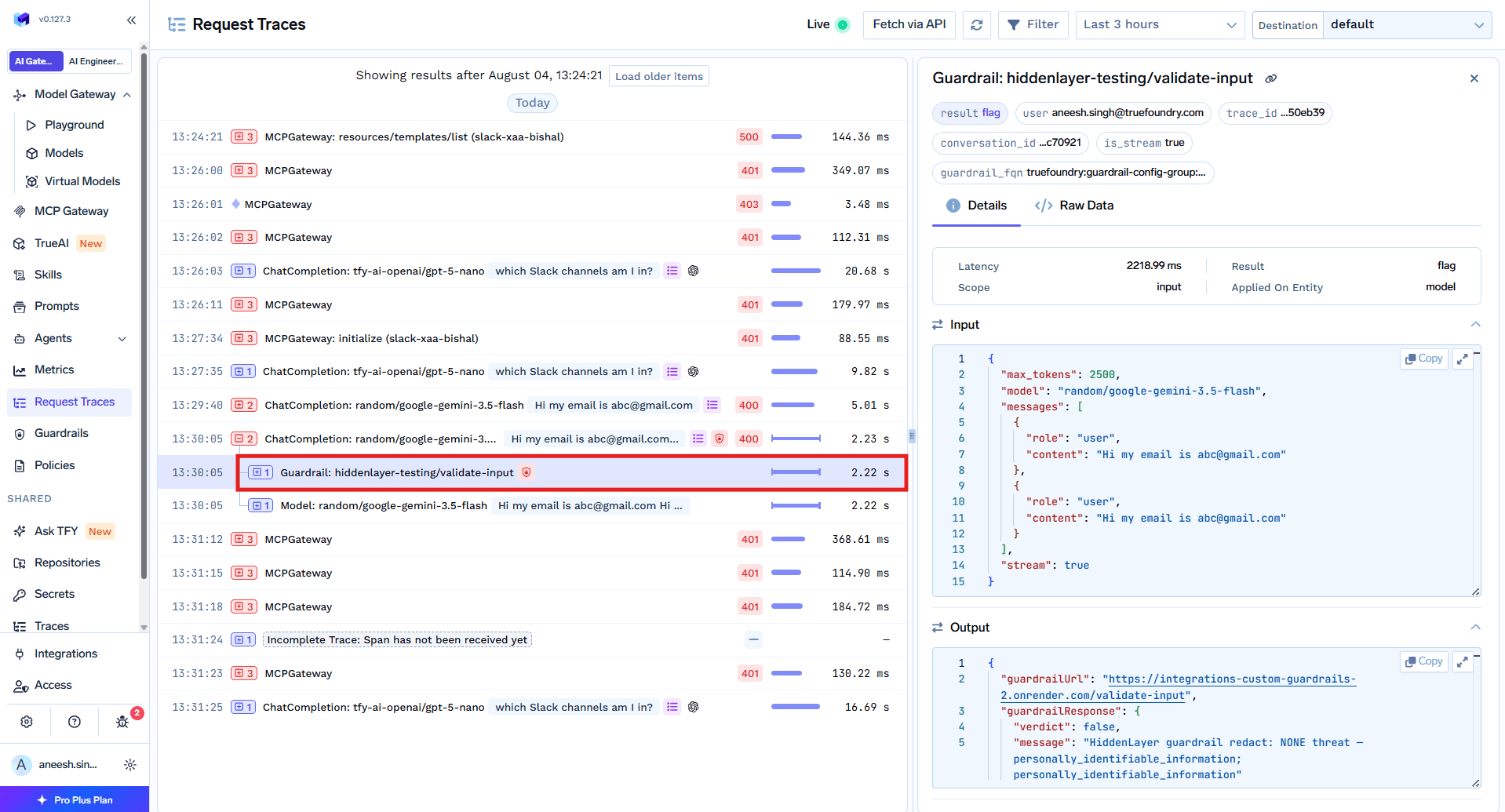
Request Traces vs. this table: Traces show each guardrail as its own span with start/end times. LLM Input Validation spans often overlap the model span because validation runs alongside the in-flight model request. Output and MCP guardrail spans typically appear after the model or tool span finishes — that ordering reflects synchronous evaluation, not a contradiction with the execution model above.
This decides what happens when a guardrail catches a violation — and also what happens if the guardrail itself has a problem (like a timeout or a provider outage).
Strategy
On Violation
On Guardrail Error
Enforce
Block
Block
Enforce But Ignore On Error
Block
Let through (graceful degradation)
Audit
Let through (log only)
Let through
How to roll out safely:
Start with Audit so you can see what guardrails would catch without affecting users.
Once things look right, switch to Enforce But Ignore On Error — you get protection, but a guardrail provider outage won’t take your app down.
Where guardrails run depends on whether you’re making an LLM call or invoking an MCP tool.
LLM Requests
MCP Tool Invocations
LLM requests have two hooks — Input (before the model sees the prompt) and Output (after the model responds):
LLM Input
Runs before the prompt reaches the LLM:
PII masking and redaction
Prompt injection detection
Content moderation
LLM Output
Runs after the LLM responds:
Hallucination detection
Secrets detection
Content filtering
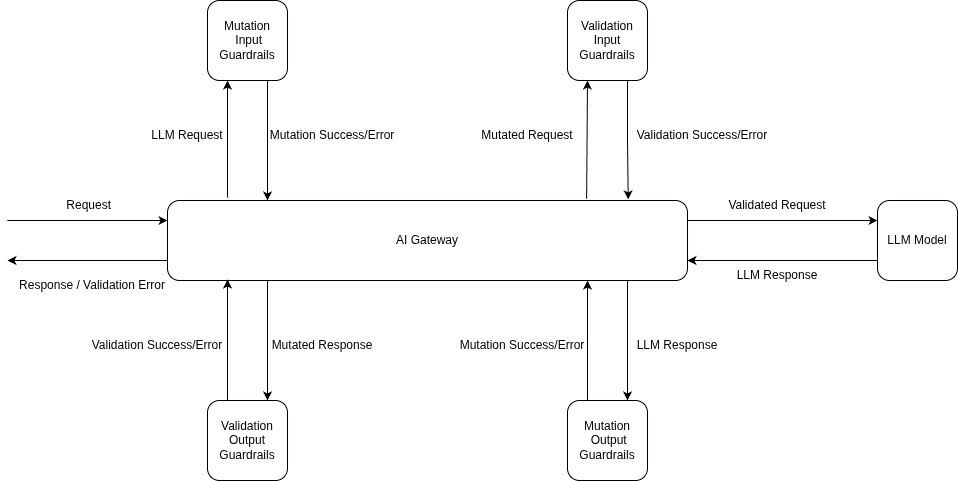
LLM Request Guardrail Flow
Here’s the order of operations when a request hits the AI Gateway:
Input Mutation guardrails run first and block until they finish (e.g., redacting PII from the prompt).
Input Validation kicks off in the background — it checks for things like prompt injection while the model request is already in flight.
The model request starts with the mutated prompt.
If Input Validation fails while the model is still running, the AI Gateway cancels the model request right away so you don’t pay for it.
Once the model responds, Output Mutation guardrails process the response (e.g., stripping secrets).
Output Validation checks the final result. If it fails, the response is blocked — though model costs have already been incurred at this point.
The clean response goes back to the client.
Hook
Execution
What Happens on Failure
Input Validation
Async (parallel with model request)
Model request cancelled
Input Mutation
Sync (before model request)
Request blocked
Output Mutation
Sync (after model response)
Response blocked
Output Validation
Sync (after output mutation)
Response rejected
Streaming (stream: true) and LLM output guardrails: Output guardrails are not applied when the response is streamed ("stream": true). This is because output guardrails need the complete response text to evaluate, but streaming sends the response in chunks as they are generated. If you need output guardrails to run, set "stream": false in your request. Input guardrails work the same way regardless of streaming mode — they always run before the request is sent to the model. Guardrails are also not applied on text-to-speech, speech-to-text, or realtime requests. See the FAQ for more details.
MCP tool calls have two hooks — Pre Tool (before the tool runs) and Post Tool (after it returns):
MCP Pre Tool
Runs before the tool is called:
SQL injection prevention
Parameter validation
Permission checks (Cedar/OPA policies)
MCP Post Tool
Runs after the tool returns:
Code safety checks
Secrets detection in outputs
PII redaction from results
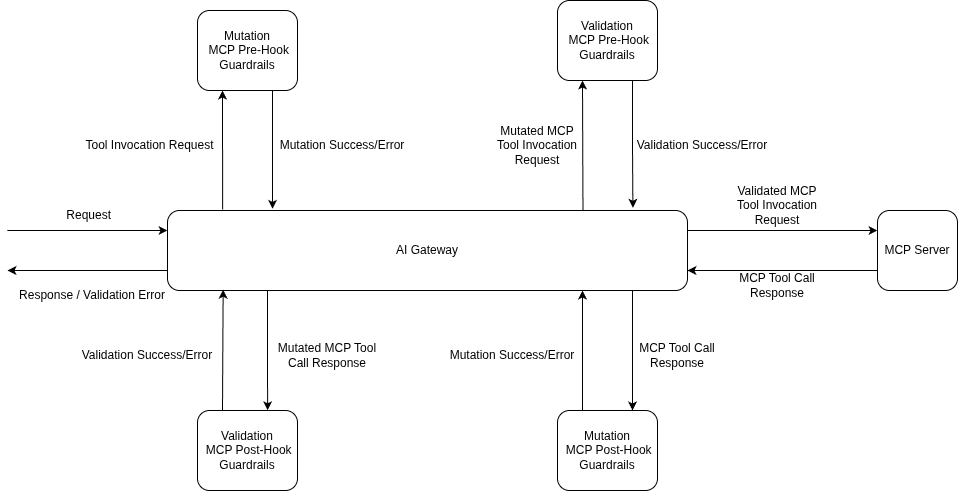
MCP Tool Guardrail Flow
The flow is straightforward:
Pre Tool guardrails all run before the tool is called. If any of them fail, the tool never executes.
The tool runs only after all pre-tool guardrails pass.
Post Tool guardrails check (and optionally rewrite) the tool’s output.
The validated result goes back to the model.
Hook
Execution
What Happens on Failure
MCP Pre Tool
Sync (before tool invocation)
Tool doesn’t run
MCP Post Tool
Sync (after tool returns)
Result withheld from model
Guardrails run on every tool call separately. If an agent calls five tools in a row, each one gets its own guardrail checks.
MCP hooks matter most in agentic setups where the model decides which tools to call on its own. Use Pre Tool to stop bad actions before they happen (e.g., blocking a DROP TABLE query), and Post Tool to clean up results before the model sees them (e.g., redacting secrets from a database response).
Guardrails add processing time — but the AI Gateway is designed to keep that impact small.
LLM Requests
MCP Tool Invocations
Input Validation runs in parallel with the model request, so in the happy path, it adds no extra wait time before you see the first token.
Input Mutation runs before the model request, so its processing time is added directly.
When Input Validation fails, the model request gets cancelled immediately — you don’t pay for a response you were going to throw away.
Execution Flow Examples
All Guardrails Pass
Input validation runs in parallel with the model request. Output guardrails process the response before it’s returned.
Input Validation Failure
Input validation fails while the model is running — the model request gets cancelled immediately to save costs.
Output Validation Failure
The model finishes, but output validation fails — the response is rejected. Model costs are already incurred at this point.
All MCP guardrails run synchronously — pre-tool guardrails block before the tool executes, and post-tool guardrails block after.
Pre-tool guardrail latency adds directly to the tool call time since the tool cannot start until all pre-tool checks pass.
When a pre-tool guardrail fails, the tool never executes — you avoid the cost and side effects of a bad tool call entirely.
You can track the latency impact of each guardrail in AI Gateway → Monitor → Request Traces. Each guardrail span shows its execution time, result, scope, and which entity it was applied on.
Gateway policies attach guardrails to matching traffic. You can also add more guardrails on a single request with a header. The header is additive: those extra guardrails run together with the policies, and the policies still run.
Add extra guardrails on one request
Pass the X-TFY-GUARDRAILS header to add LLM input or output guardrails for that request. Handy for testing, or when one request needs an extra check. Matching gateway policies still run. MCP tool hooks come from the policy, not this header.
First register your guardrails in AI Gateway → Guardrails, then set up guardrail policies in AI Gateway → Policies → Guardrails to apply them automatically based on who’s making the request, which model they’re calling, or which MCP tool is being used. This is the way to go for org-wide enforcement.For a step-by-step walkthrough, see the Getting Started guide. For the full policy guide, see Configure Guardrail Policies.
Ready to use out of the box — no external credentials needed.These integrations run on TrueFoundry-managed infrastructure: you configure them in the AI Gateway; TrueFoundry operates the guardrail execution path (no third-party API keys required for the built-ins listed here). If you need a specific vendor (for example OpenAI Moderations, Azure Content Safety, Bedrock Guardrails, or Google Model Armor), use an integration from External Providers or Custom Guardrails.Among TrueFoundry guardrails, these guardrails use the following services under the hood:
Detects and optionally redacts personally identifiable information (PII) and protected health information (PHI) such as names, addresses, SSNs, and medical record numbers.
Detects jailbreak attempts and prompt injection attacks designed to manipulate LLM behavior.
These three guardrails are only available on TrueFoundry SaaS. They are not available on self-hosted deployments. In case of non-SaaS (self-hosted) deployments, you can use the following alternatives:
If the built-in and provider integrations don’t cover your use case, you can write your own. Build a custom guardrail with Guardrails.AI, a plain Python function, or any framework you prefer, and plug it into the AI Gateway.
Custom Guardrails
Build and integrate your own guardrail using the template repo, or start from the reference integrations above.
How do I control which messages guardrails evaluate?
By default, guardrails look at all messages in the conversation. Use the X-TFY-GUARDRAILS-SCOPE header to narrow that:
all (default): Checks the full conversation history
last: Checks only the most recent message
positive integer (e.g. 10): Checks the last N messages
Use a last-N window when a single request can append several new turns at once (for example tool results followed by a user message in an agent loop). Checking only last would miss the new-but-not-final messages in that request. Pure one-message-per-request chat can use last.MCP tool pre/post guardrails always scan the full tool arguments or result — scope does not apply there. Oversized text is still split into character-limited chunks for providers with per-request limits.
curl -X POST "{GATEWAY_BASE_URL}/chat/completions" \
  -H "Authorization: Bearer YOUR_API_KEY" \
  -H "Content-Type: application/json" \
  -H 'X-TFY-GUARDRAILS: {"llm_input_guardrails":["my-group/pii-redaction"]}' \
  -H "X-TFY-GUARDRAILS-SCOPE: 10" \
  -d '{
    "model": "openai/gpt-4o",
    "messages": [
      {"role": "system", "content": "You are a helpful assistant."},
      {"role": "user", "content": "Hello, how can you help me today?"}
    ]
  }'
What happens if a guardrail service is down?
Depends on the enforcement strategy you picked:
Enforce: Request gets blocked.
Enforce But Ignore On Error: Request goes through anyway. This is the safest default — you stay protected when guardrails work, but a provider outage won’t break your app.
Audit: Request always goes through.
How can I monitor guardrail execution?
Go to AI Gateway → Monitor → Request Traces. You’ll see:
Which guardrails ran on each hook
Whether they passed or failed, and how long they took
What they found (secrets, SQL issues, unsafe patterns, etc.)
What mutations were applied
Traces are logged for both successful and blocked requests.
Do output guardrails work with streaming responses?
No. Output guardrails are skipped when the response is streamed ("stream": true). Output guardrails need the complete response text to evaluate, but streaming sends tokens to the client as they are generated — so there is no full response to check before delivery begins.What you can do:
Set "stream": false if you need output guardrails to run. This ensures the AI Gateway receives the full response, evaluates it against your output guardrails, and only then returns it to the client.
Handle checks client-side — assemble the full streamed response on the client and run your own output validation after the stream completes.
Use input-only guardrails with streaming — input guardrails always run regardless of streaming mode, so you still get protection on the prompt side.
# Output guardrails WILL run:response = client.chat.completions.create( model="my-model", messages=[{"role": "user", "content": "Hello"}], stream=False # output guardrails are applied)# Output guardrails will NOT run:response = client.chat.completions.create( model="my-model", messages=[{"role": "user", "content": "Hello"}], stream=True # output guardrails are skipped)
Are system prompts evaluated by guardrails?
No. System prompts are excluded from guardrails by default — the AI Gateway strips them before sending content to any guardrail, so they are never inspected, blocked, or redacted.The one exception is CrowdStrike AIDR, which sees the system prompt for analysis but never modifies it.
Was this page helpful?
Assistant
Responses are generated using AI and may contain mistakes.