

support-bot example so you can see how the pieces connect. When you’re ready to write code, follow one of the two paths in Getting started.
Core concepts
Interaction with an agent follows a strict hierarchy: one Agent → many Sessions → many Turns → many Events → some Deltas. The sections below walk through each layer using a single running example, a customer support agent namedsupport-bot.
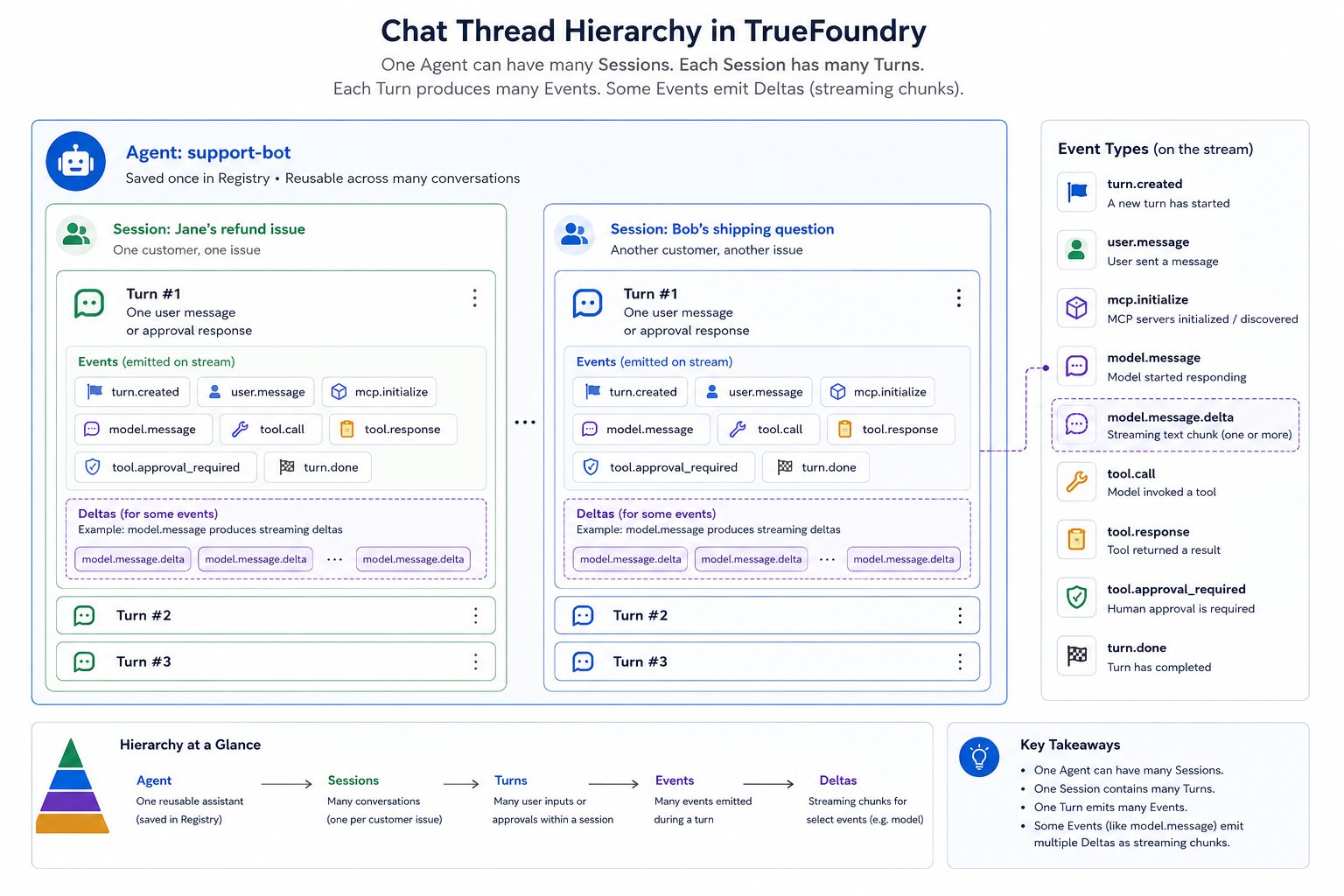
One agent serves many sessions (one per customer issue); each session has many turns; each turn emits events; some events stream as deltas
Agent
An agent is a saved definition in the Agent Registry — not a running process. You define it once (model, instructions, tools, config) and any number of customers can invoke it by name. Imaginesupport-bot: a customer support assistant that looks up orders and processes refunds via an MCP server. Its spec might look like this:
support-bot — AgentManifest
Session
A session is one issue worked through with the agent. It is the conversation context: all turns on that issue chain together, and the agent remembers what happened earlier in the same session. Each new issue — whether from the same customer or a different one — gets its own session. Example — two independent sessions:
Jane’s follow-up messages about the refund stay in
sess-7f2a9c1b. Bob’s question runs in a separate session, so the two conversations never share context.
Session for Jane's refund issue
session.id so Jane can return tomorrow and pick up where she left off. Only one turn runs inside a session at a time.
Turn
A turn is one request in the conversation — a single back-and-forth boundary between your app and the agent. Each time Jane sends a message (or your app sends an approval), you create a new turn. Turns inside a session chain automatically: the agent sees every earlier turn in that session. Example — three turns in Jane’s refund session:
Your code calls
session.prepare_turn(input=...) and turn.execute(stream=True) once per row and consumes the returned event stream. Turn 2 knows Jane asked about ORD-2031 in Turn 1 without you resending that history — the harness chains turns for you.
A turn can also end paused when the agent asks a clarifying question (
tool.response_required) or needs MCP OAuth (mcp.auth_required). You resume with a new turn, just like Turn 3 above.Event
While a turn runs, the agent emits events over Server-Sent Events (SSE) — one JSON object at a time. Events tell your app what the agent is doing: calling a tool, getting a result, writing a reply, or finishing. Example — events during Turn 1 (Jane asks for order status):
Sample payloads:
turn.created
tool.response
turn.done
id, a thread_id ("main" for the root agent, or null for turn-level events like turn.created), and a sequence_number. The stream always opens with turn.created and closes with turn.done.
All event types:
For full field-level schemas of every event, see the Turn events reference.
Delta
Most events arrive as a complete payload. Model output is different — the LLM streams token by token, so the harness sends a basemodel.message event first, then a series of model.message.delta fragments that you merge into it. All deltas share the base event’s id.
Example — streaming Jane’s reply in Turn 1:
The agent’s full reply is: “Your order ORD-2031 shipped on June 12. Total: $1,240.00.”
Your client receives this sequence:
Base event (empty shell)
Deltas (merge into msg-a1 as they arrive)
events["msg-a1"].content on every chunk:
is_event_delta and merge_event_delta from truefoundry_gateway_sdk.agents (Python) or truefoundry-gateway-sdk/agents (TypeScript) — see Handling Event Delta. When the turn completes, turn.list_events() returns one pre-merged model.message — no deltas to handle on replay.
Thread is a related concept: an execution context inside a session. The root agent runs on
thread_id: "main"; sub-agents get their own thread IDs. Events carry thread_id so you can partition a single turn stream when sub-agents run in parallel.End-to-end walkthrough
The three turns from Turn above, shown together with the actual SDK calls and event payloads for Jane’s refund session (sess-7f2a9c1b) against support-bot. Solid arrows are SDK calls you make; dashed arrows are SSE events streamed back from turn.execute(stream=True).
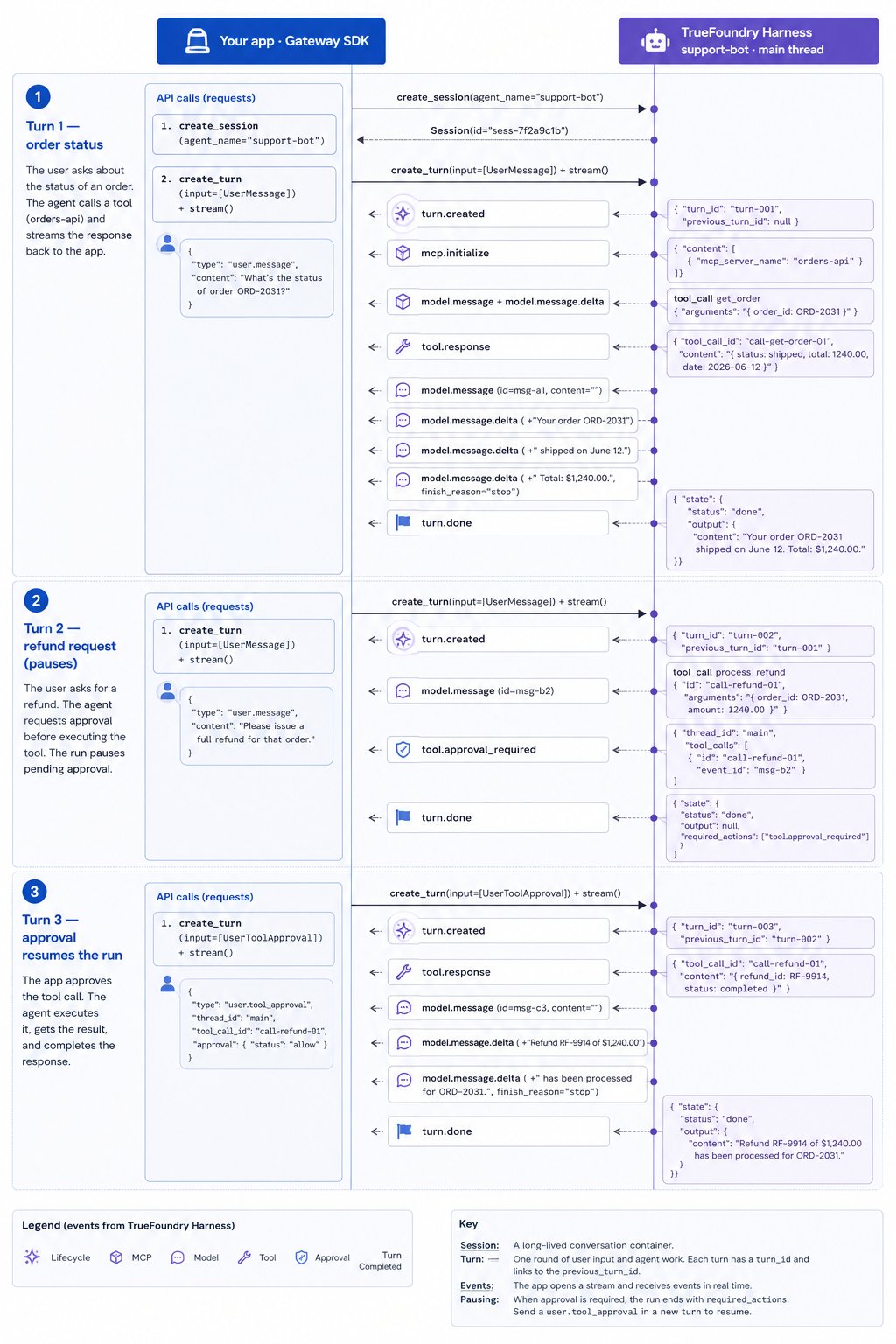
Three chained turns in one session: SDK calls (solid) from your app and SSE events (dashed) streamed back from the TrueFoundry Harness, annotated with real payloads
- Turn 1 — Order status
- Turn 2 — Refund (pauses)
- Turn 3 — Approve (resume)
Input:
"What's the status of order ORD-2031?"
A separate issue — Bob’s shipping question, or even Jane’s next problem — runs in its own session, where Turn 1 starts fresh with no refund history carried over.
Getting started
Two SDK packages, two paths. You can create agents in the Playground and skip the create path entirely.Create an agent
Define an
AgentManifest and save it to the Registry with the truefoundry client — model, MCP tools, skills, and runtime config.Use an agent
Invoke a saved agent with the AI Gateway SDK —
AgentSessionClient in Python and TypeScript — sessions, turns, event streaming, delta merging, approvals, threads, and reconnects.Complete example
Runnable terminal chat client handling every event type.
Agent Playground
Build and test agents in the UI, then invoke them from code.
Reference
Agent manifest
Every field on
AgentManifest.Turn events
All event types with field schemas.
Runtime API
SDK methods and turn input types.