

A concrete use case
Suppose a user says “Create a new environment calledtesting-1” to an agent backed by the TrueFoundry MCP server. The create_or_update_environment tool requires fields like isProduction (boolean) and optimizeFor (AVAILABILITY or COST) that the user never specified.
A naive agent would either invent values or send back a wall of text asking for clarification. With ask_user_question, the agent instead inspects the tool schema, identifies the fields it cannot infer, and asks the user one structured question at a time:
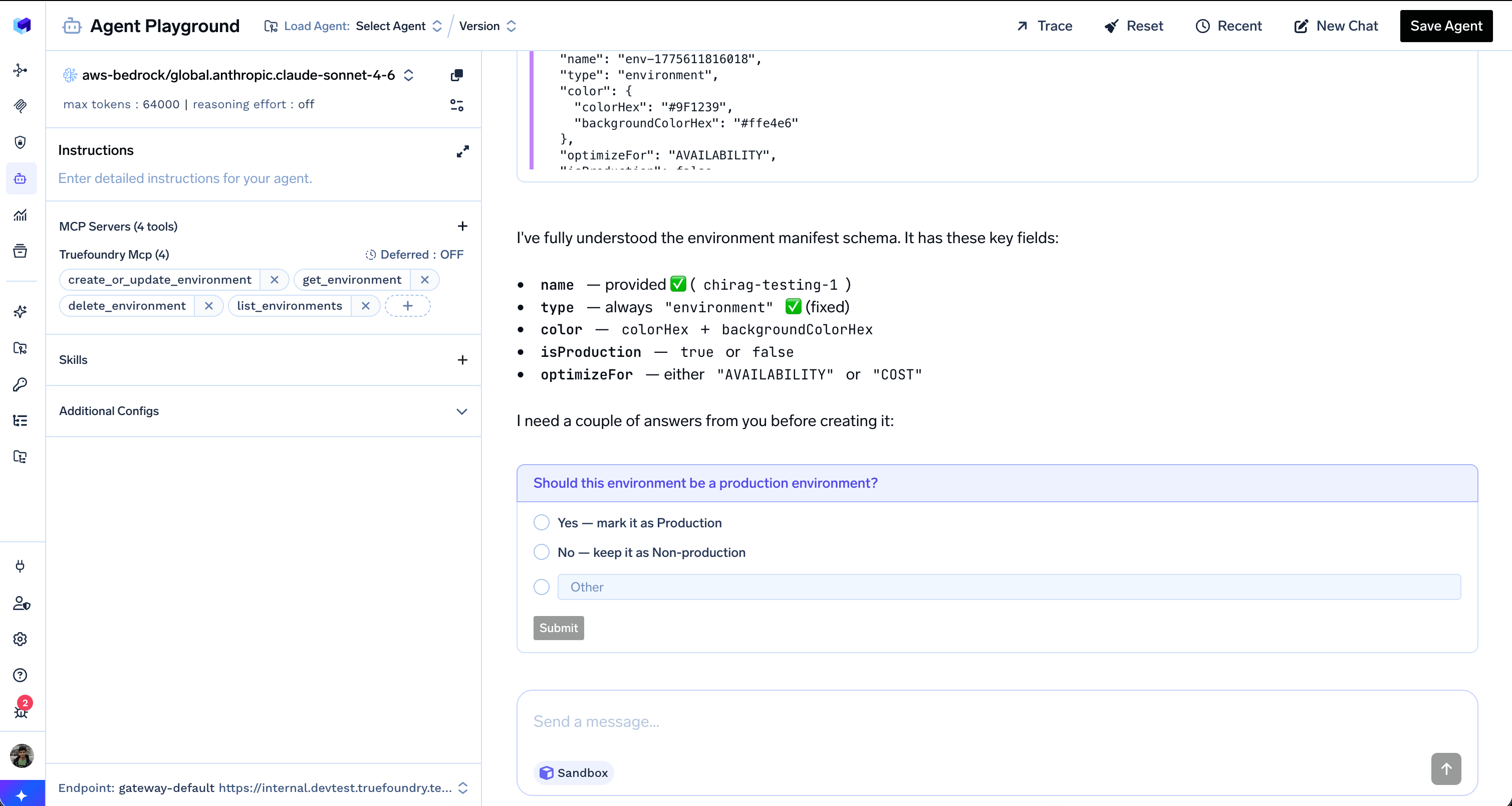
The agent inspects the tool schema, identifies that isProduction is required, and asks the user with concrete options instead of guessing
Answered and the agent immediately asks the next required field — optimizeFor — with options drawn from the schema’s allowed values:
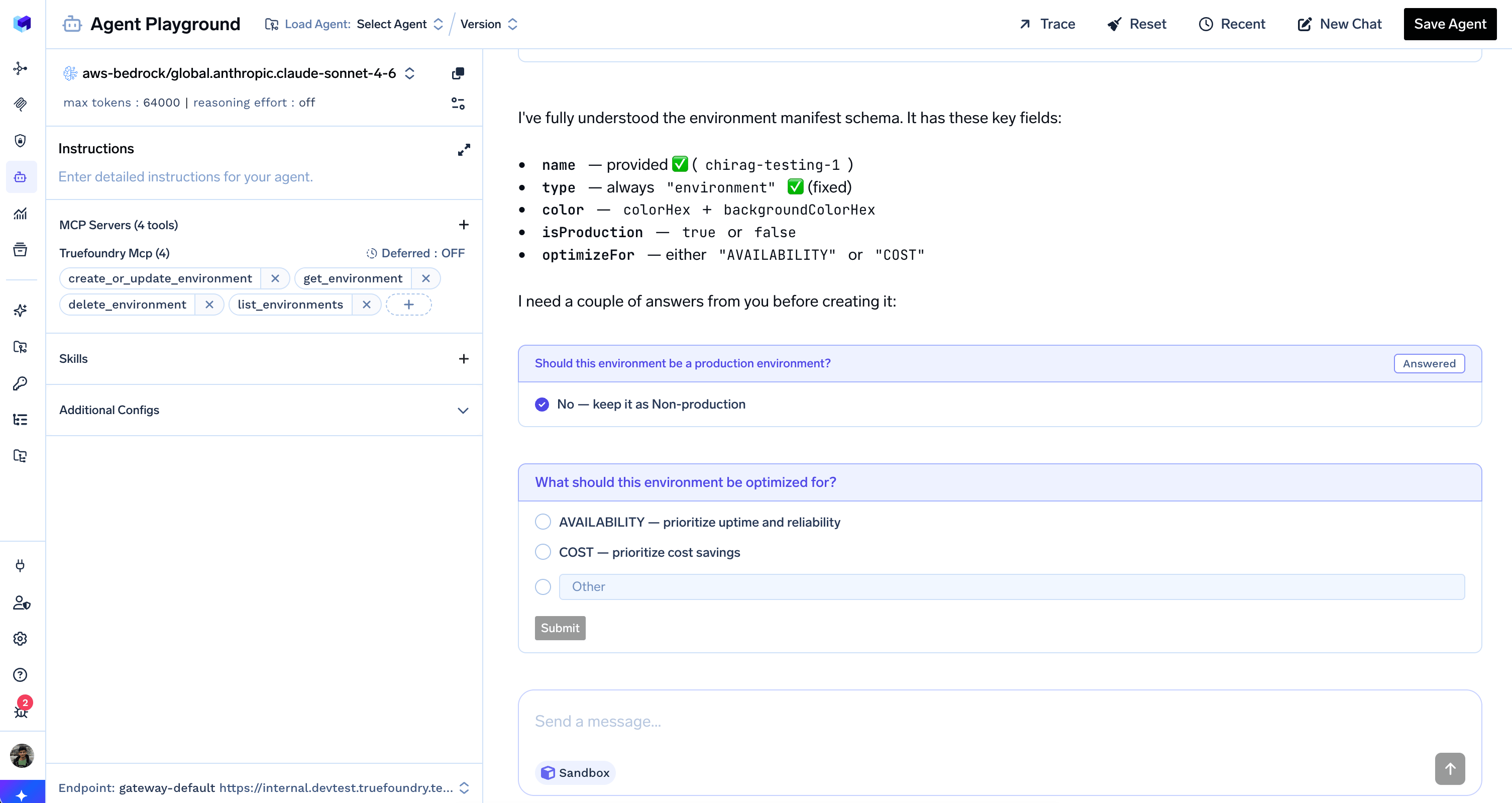
After the first question is answered, the agent asks the next clarifying question with options taken directly from the tool schema
create_or_update_environment after every required clarification has a concrete answer — turning an ambiguous request into a deterministic, auditable sequence of decisions.
How it works
The AI Gateway registersask_user_question as a client-side tool. The server never executes it; instead, the harness emits tool.response_required and waits for your application to collect the user’s choice and resume with a new turn containing a UserToolResponseEvent (user.tool_response).
The user selects one of the listed options or types a free-form answer into the Other field. The agent receives the response as a regular tool result and continues from where it paused.
Sub-agents cannot ask the user questions. Only the root agent can call
ask_user_question — sub-agents must resolve ambiguity from the context the root agent provides them.When to use Ask User Questions
Useask_user_question when the agent genuinely cannot proceed without a user decision and the answer comes from a small, enumerable set — for example:
- Choosing a target environment, cluster, account, or workspace
- Disambiguating between multiple matches (e.g. “I found 3 services named
api, which one?”) - Resolving required tool-call fields that the user did not specify (booleans, enums, modes)
- Picking between alternative strategies before a destructive or expensive operation
Skip
ask_user_question for decisions the agent can confidently infer from context, conversation history, or sensible defaults. Asking too often turns the agent into a form and breaks autonomy.Example
User
Create a new environment called
chirag-testing-1.Assistant
I need a couple of answers before creating it.
ask_user_question
ask_user_question
Tool CallTool Response — execution paused; answer required from client
User
No — keep it as Non-production
Assistant
ask_user_question
ask_user_question
Tool CallTool Response — execution paused; answer required from client
User
COST — prioritize cost savings
Assistant
Creating environment chirag-testing-1 (non-production, optimized for COST) …
Handling questions from the API
Handletool.response_required, then resume the session with a UserToolResponseEvent (type: "user.tool_response") containing the user’s choice. Turns in the same session are chained automatically (previous_turn_id: "auto").
For the streaming events, JSON payloads, and a full client implementation, see Use an agent and Turn events — ToolResponseRequiredEvent.
Disabling Ask User Questions
To turn it off, setconfig.ask_user_questions.enabled: false on the agent. See config.ask_user_questions in the agent manifest reference.