

Who Is Affected
- If you manage access from the TrueFoundry UI: no action is required. Existing access is preserved and can be managed from Access Control.
- If you manage resources through GitOps or keep resource YAML in Git: update those manifests during the transition period.
What Is Changing
We are in the process of removing collaborators from each resource. This is our effort to decouple a resource from its authorization. Until now, access to a resource—for example, who can use a model provider account—was stored inside the resource itself. Similarly, what a virtual account could access was stored inside the virtual account. This coupled each resource configuration to its access list. From v0.172.0, access is described separately from the resource. You grant a role on a resource to a subject — a user, team, virtual account, or agent — from the Access Control screen, or with a standalonerole-binding manifest. A single grant is just the sentence “this subject has this role on this resource”.
Collaborators Move Off Resource Forms
The Collaborators section is removed from resources that supported it, including model provider accounts, clusters, ML repos, secret groups, MCP servers, agents, and workspaces. In its place, the form points to Access Control. The examples below use provider accounts from environments running before and after this change.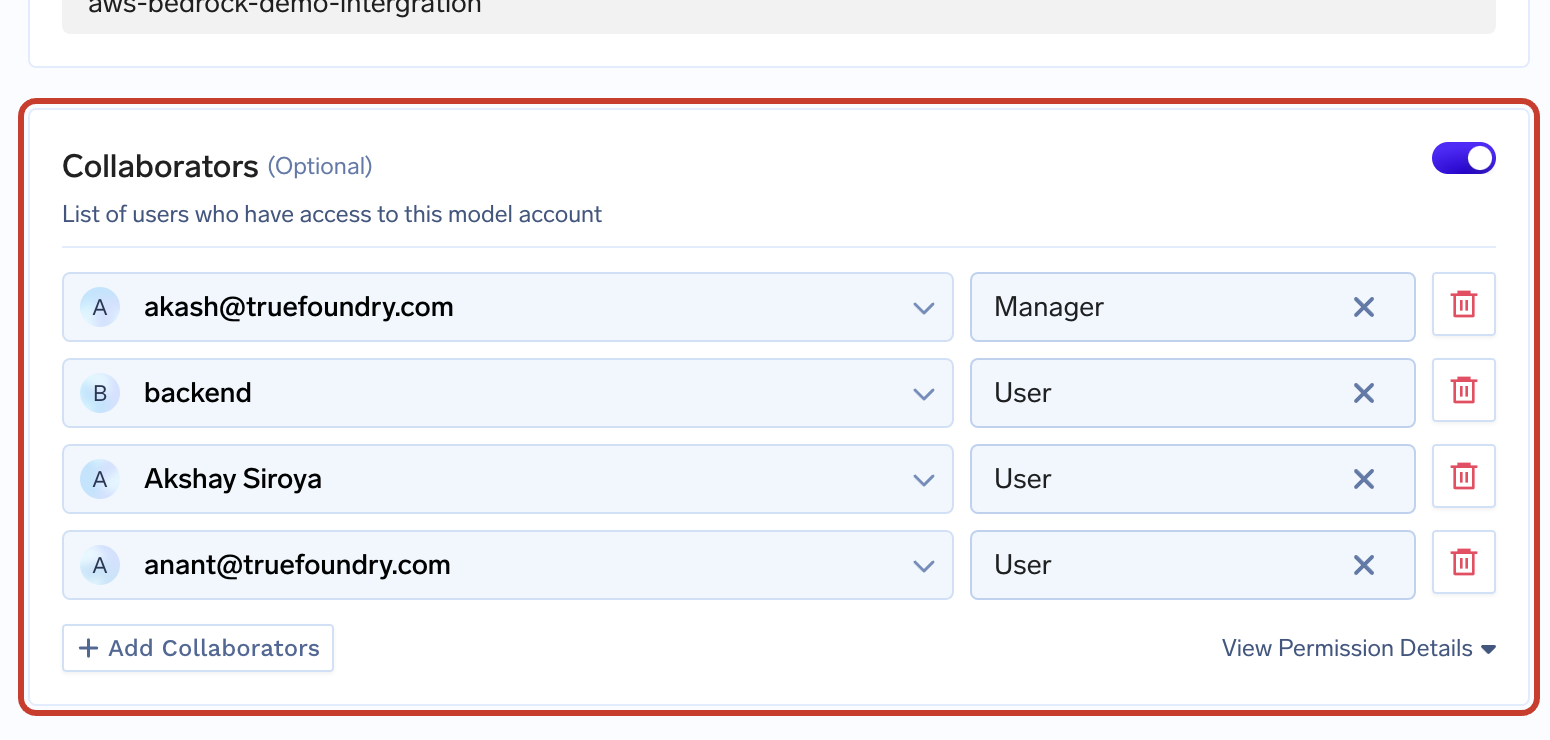
Before: access was managed from the provider account form
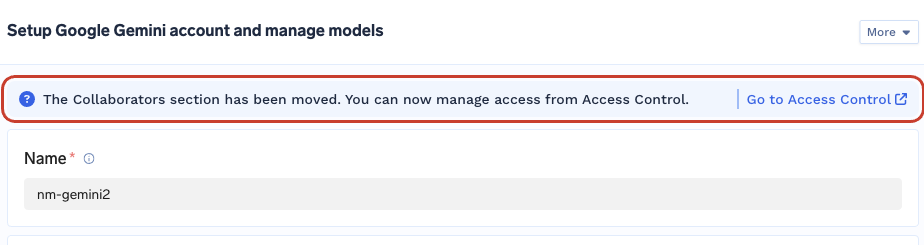
After: the form points to Access Control
How to Reach Access Control
The access list now has its own screen. On the resource list, click the three dots at the end of the row and choose Access Control.
Model provider account → three dots → Access Control
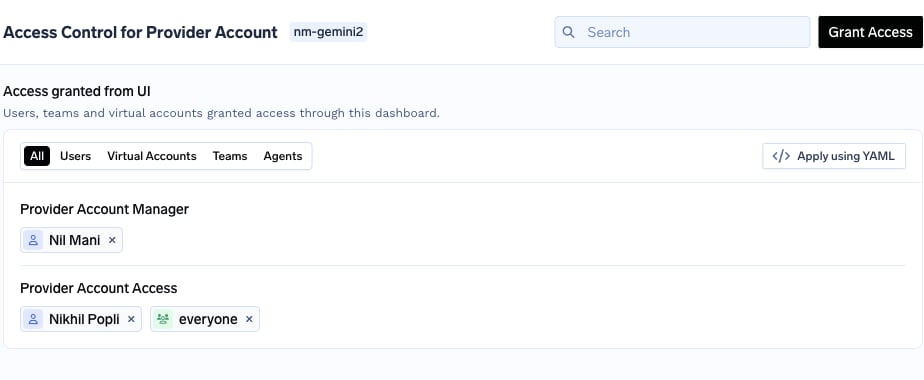
Access Control for nm-gemini2: existing grants are preserved and grouped by role
collaborators, TrueFoundry shows the removal in the confirmation diff first. The block leaves the configuration; the access it described is kept under Access Control.
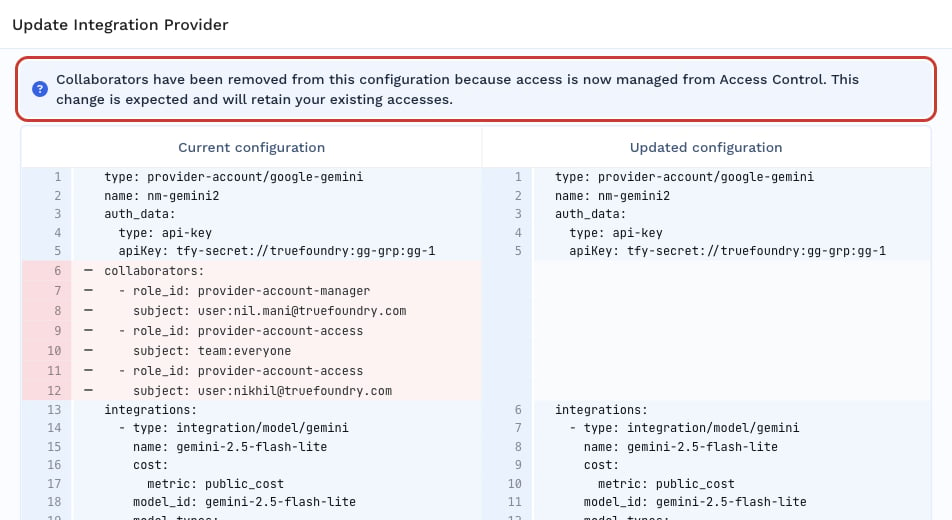
Saving nm-gemini2: collaborators leave the configuration, existing access is retained
Permissions Move Off Virtual Accounts
The Permissions section is gone from the virtual account form. A virtual account is now treated like any other subject: you give it access the same way you would a user or a team.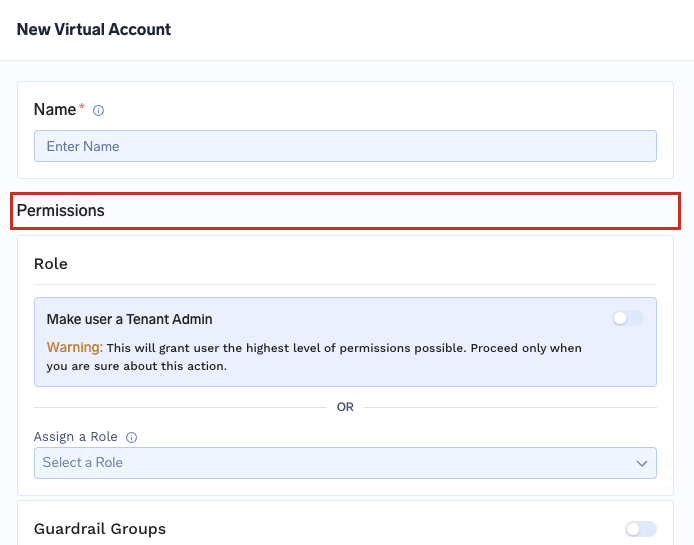
Before: the form carried role selection and per-resource-type permissions
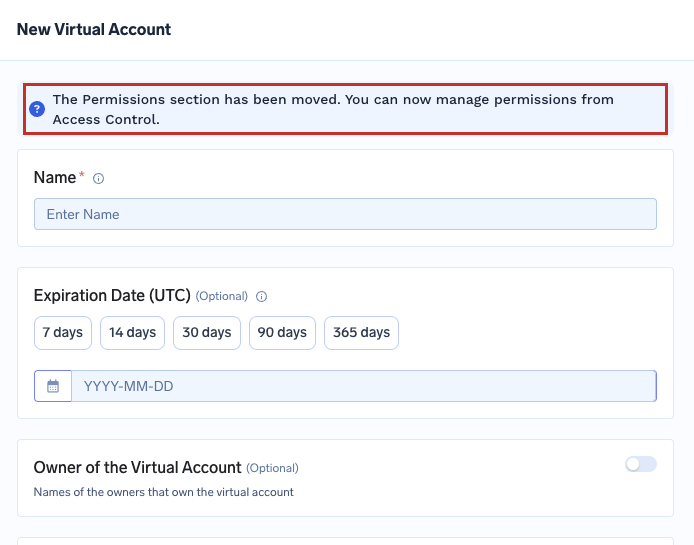
After: the form points to Access Control instead
How to Reach Virtual Account Permissions
On the Virtual Accounts list, click the three dots at the end of the row and choose Manage Permissions. This is the same screen the form’s notice links to.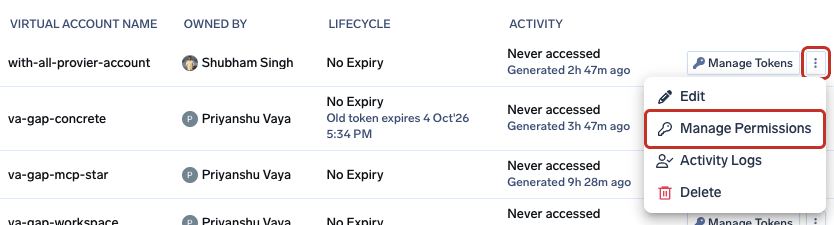
Virtual Accounts list → three dots at the end of the row → Manage Permissions
permissions from a virtual account is recorded in your activity log — see what audit logs will show.
Generated YAML No Longer Contains These Fields
YAML that TrueFoundry generates for you — including the Apply using YAML drawer — no longer includescollaborators or virtual account permissions. If you copy a manifest out of the dashboard and notice the access list missing, that is expected.
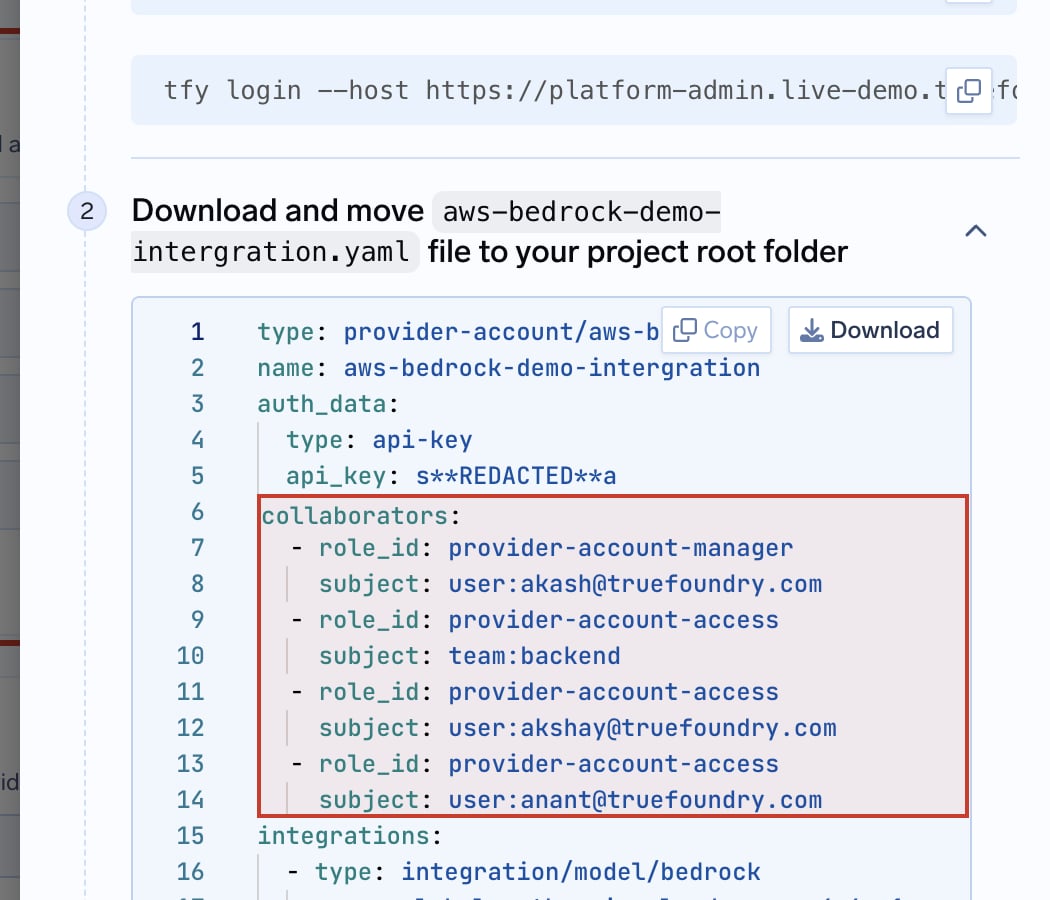
Before: the generated manifest included collaborators
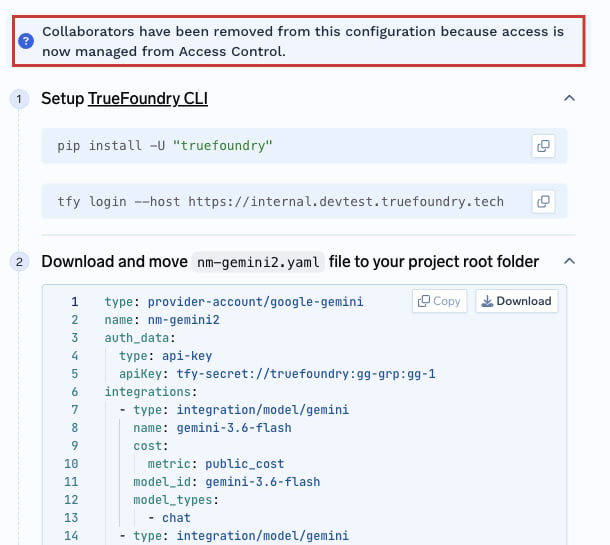
After: the manifest describes only the provider account
What You Need to Do
If you manage access from the TrueFoundry UI, no action is required. Continue using Access Control for resources and Manage Permissions for virtual accounts.GitOps and YAML
This is the only part of the change that asks something of you, and it applies if you keep resource YAML in Git — through GitOps,tfy apply, Terraform, or your own API client.
Nothing You Have in Git Breaks
collaborators is accepted for two months (collaborators will retire on 15th November 2026). Nothing fails on release day, and no pipeline needs an emergency fix.collaborators list is a deliberate instruction to revoke.How to Migrate Your Repository
The CLI rewrites your manifests for you (TrueFoundry CLI >= 0.17.4). It convertscollaborators, virtual-account permissions, and non-model authorized_subjects into role-binding documents placed next to the resource they belong to, in the same file.
Commit your current state
Rewrite your manifests
role-binding documents are appended to the same file. There is no dry-run flag — generated binding names include a random suffix, so a preview would not match what a later write produces. If any manifest cannot be converted, nothing is written. Review the git diff before continuing.Preview and apply against the platform
--dry-run.What the Rewrite Looks Like
A model provider account with collaborators. Before—access is embedded in the provider account:va-<account name>. Before:
subjects[].typeis one ofuser,team,virtualaccount, oragent. Foruser,nameis the email address; for the rest it is the resource name.resourceFqnidentifies the resource receiving the grant. The CLI generates it during migration. If you write a binding by hand, copy the exact FQN from the resource page. In the example above, replacetfy-tenantwith your tenant FQN.- Each binding must be either one subject with many permissions or many subjects with one permission — not both many at once. Splitting per role, as above, always satisfies this.
nameis your own identifier for the binding, 3–64 lowercase characters. The CLI generates names for you; if you write bindings by hand, pick something you will recognize in a diff.
Timeline
FAQ
What will I see in audit logs when collaborators or permissions are removed?
What will I see in audit logs when collaborators or permissions are removed?
Collaborators among the updated fields.
Updating nm-gemini2: the summary reports Collaborators among the changed fields
collaborators block leaves the document. This records authorization being lifted out of the resource — it does not mean anyone lost access. The grants themselves live on as role bindings.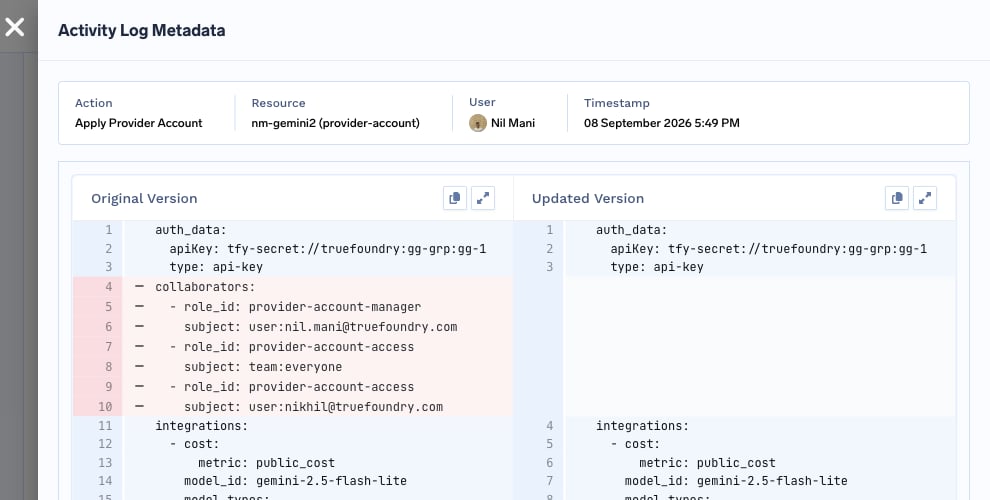
The collaborators block leaves the provider account document; the grant it described lives on as a role binding
permissions is recorded against the virtual account, and the grants it described are preserved.What do audit logs look like when access is granted or revoked from the dashboard?
What do audit logs look like when access is granted or revoked from the dashboard?
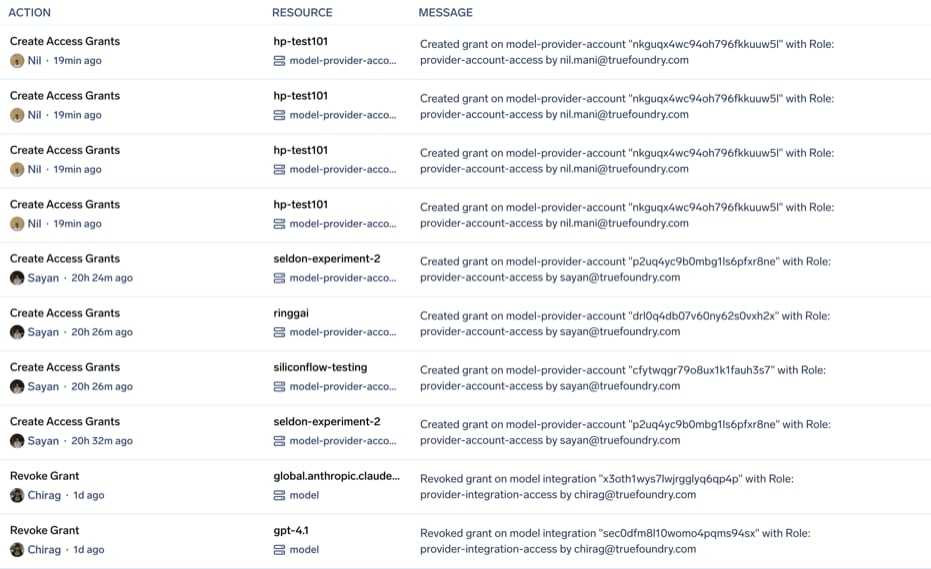
Grants created and revoked, each naming the resource, its type, and the role
What do audit logs look like when role bindings are applied from YAML?
What do audit logs look like when role bindings are applied from YAML?
role-binding manifest is recorded as Apply Role Binding, naming the binding and how many subjects it covers. This is what you will see after running the migration and applying.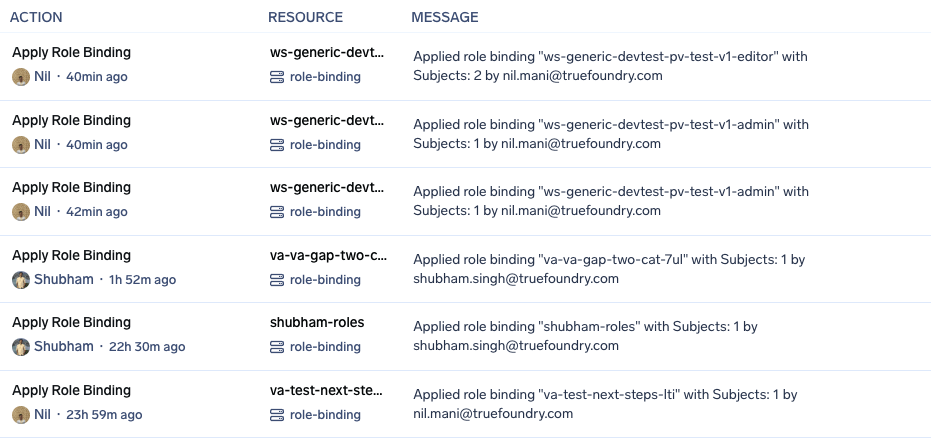
Role bindings applied from YAML, each naming the binding and its subject count
Will anyone lose access when collaborators disappear from the form or YAML?
Will anyone lose access when collaborators disappear from the form or YAML?
I don't use GitOps. Do I need to do anything?
I don't use GitOps. Do I need to do anything?
How do I give someone access to a resource now?
How do I give someone access to a resource now?
How do I give a virtual account access to resources?
How do I give a virtual account access to resources?
permissions to virtual account YAML going forward.Can I keep using my old manifests until the removal date?
Can I keep using my old manifests until the removal date?
Can I roll back if the migration output looks wrong?
Can I roll back if the migration output looks wrong?
tfy migrate-gitops only edits local files, so git checkout restores them. Nothing reaches the platform until you run tfy apply.References
- Manage User Roles and Permissions
- Virtual Account Management
- Setup GitOps using TrueFoundry
- Using
tfy apply - Audit Logging
If you have questions about the migration or run into anything unexpected, reach out to support@truefoundry.com — we’re happy to help.