

What Is Changing
All models used by the Gemini CLI must now be added to the Gemini account registered on TrueFoundry that is used to access Gemini CLI via the TFY AI Gateway. After v0.118.1, requests will fail if the models from Gemini are not registered in TrueFoundry.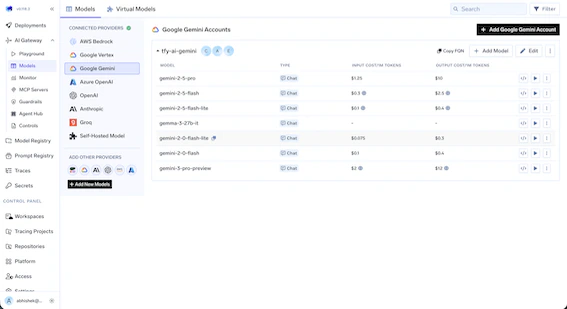
Why This Change
This change enables cost calculation and attribution for Gemini CLI usage. After this, you’ll be able to see the cost for each request and view it in metrics as well.What You Need to Do
- Go to the Gemini account configuration in TrueFoundry.
- Register all models that you use via Gemini CLI.
- Ensure the model display name exactly matches the model ID.
If you are facing any issues after the upgrade with Gemini CLI, reach out and we’ll be happy to assist.