

Documentation Index
Fetch the complete documentation index at: https://www.truefoundry.com/llms.txt
Use this file to discover all available pages before exploring further.
What is context engineering?
Context engineering is the practice of providing the right information in the right format so an agent can reliably accomplish tasks. In Agent Harness, context is everything the model sees on each step — from system instructions and skills to tool definitions, conversation history, and tool results. Getting context right has a direct impact on agent quality:- Too little context — the agent lacks the information it needs and produces wrong or incomplete answers.
- Too much context — the model overflows its context window or the signal gets buried in noise, degrading reasoning quality and increasing cost and latency.
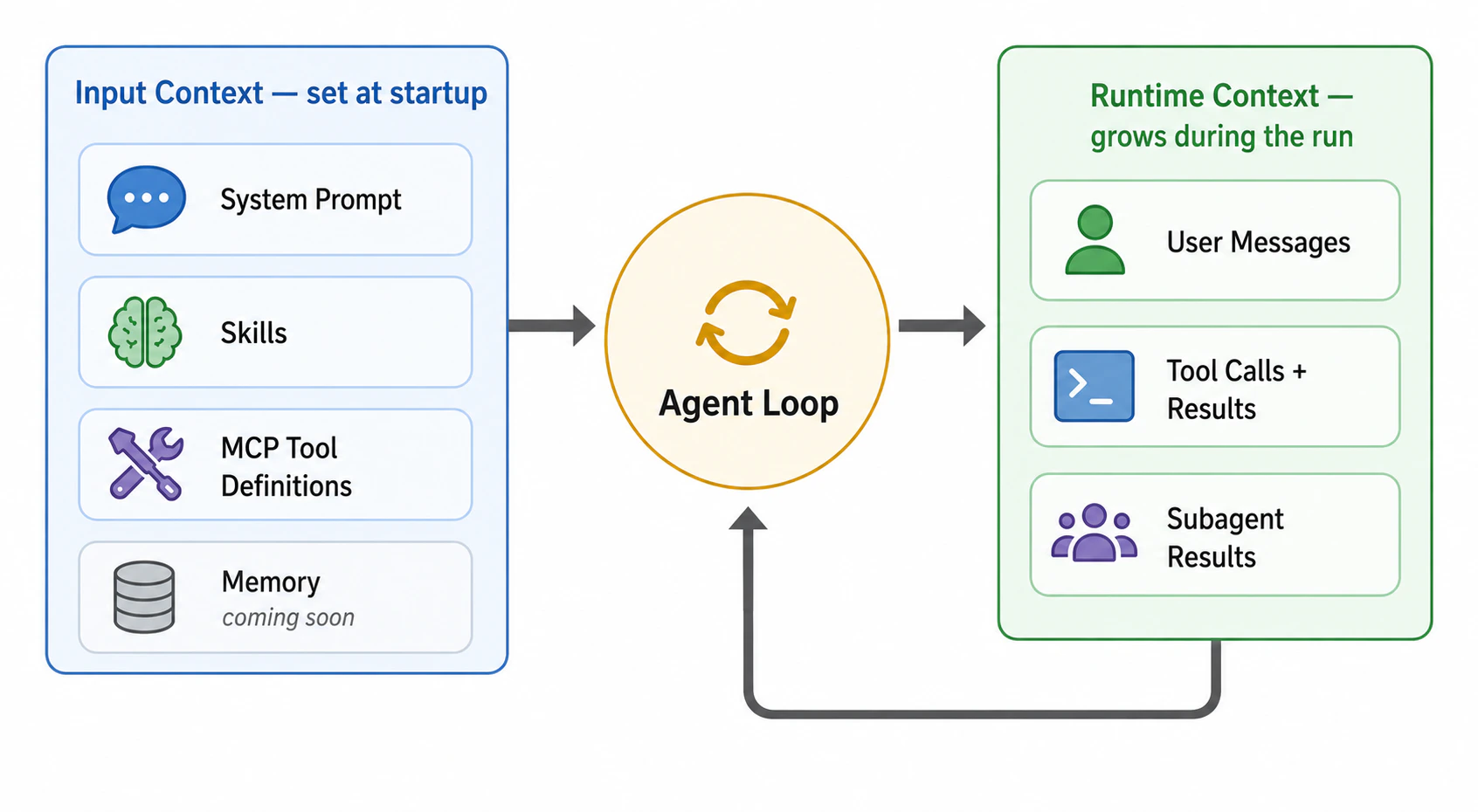
Input context
Information loaded into the model’s context at the start of every run. You configure this when you build the agent: the system prompt, skills, and which MCP servers are available.
Runtime context
Information that accumulates during the run as the agent works: user messages, tool calls, tool results, subagent outputs. This grows turn by turn and is what the harness actively manages.
Input context
Input context is everything the model receives at the start of a run, before the user sends their first message. It is mostly static across runs of the same agent — you configure it once in the agent builder and the harness loads it every time. The smaller and more focused your input context, the more room the model has to reason and the more runtime context it can absorb before hitting limits. Each source below describes what enters the context and how to keep it lean.System prompt
System prompt
The system prompt is your custom instructions plus built-in harness guidance for using the sandbox, subagents, and other capabilities. It is the single biggest lever you control.To keep it focused:
- Stick to this agent’s role — what it does, who it’s for, how it should behave.
- Don’t duplicate MCP tool docs or skill content — the harness already injects those for you.
- Move long procedures into skills — anything that reads like a workflow or playbook belongs in a skill, not the system prompt.
Skills
Skills
By default each attached skill contributes only its
name and description to the input context (a few hundred tokens). The full SKILL.md body is loaded on demand when the agent decides the skill is relevant — this is called progressive disclosure.You can override this per skill with the Preload skill into agent context toggle:- Leave preload off (default) for long skills or skills used only in some conversations. The body never enters context unless needed.
- Turn preload on for short, always-relevant skills like style guides, formatting conventions, or safety policies, where the agent should always have the body available without an extra turn to read it.
MCP tool definitions
MCP tool definitions
Each MCP tool definition — name, description, input schema, output schema — consumes tokens. With many MCP servers each exposing dozens of tools, the schemas alone can fill a large portion of the context window before the user types anything.By default each attached MCP server contributes only its
name and description to the input context. Individual tool schemas are discovered on demand at runtime — the same progressive disclosure pattern used for skills.You can override this per MCP server with the Preload MCP tools into agent context toggle:- Leave preload off (default) for any MCP server with more than a handful of tools, or any server the agent uses only occasionally.
- Turn preload on only for small, frequently-used servers where the upfront tool schemas pay for themselves on every run.
Memory (coming soon)
Memory (coming soon)
Long-term memory is not yet available in Agent Harness. A dedicated mechanism — an
AGENTS.md-style file always loaded into the system prompt for project conventions, user preferences, and other always-relevant context — is on the roadmap.Until it ships, put always-relevant guidance in your system prompt and task-specific procedures in skills. Within a session, the sandbox filesystem provides limited persistence for files the agent itself writes.Runtime context
Runtime context is everything that gets added to the model’s context as the run progresses. Unlike input context, it is dynamic and grows turn by turn:| Source | What it is |
|---|---|
| User messages | Whatever the user sends, including follow-ups in a multi-turn conversation |
| Assistant messages | The model’s reasoning and replies on each step |
| Tool calls | Each tool invocation made by the agent, with its arguments |
| Tool results | Whatever the tool returns — JSON payloads, file contents, search results, error messages |
| Subagent outputs | Final results returned from delegated subagents |
Managing runtime context
Even with a tight input context, runtime context grows as the agent works. Long tool results, multi-turn conversations, and complex research tasks can push the active context beyond what the model can comfortably handle. The harness applies a layered set of strategies — automatically, with no manual intervention during a run — to keep runtime context lean while preserving the agent’s ability to reason.Subagents
The harness delegates focused subtasks to parallel subagents, each running with its own clean context. Only the final result flows back to the root agent — the dozens of intermediate tool calls never touch the main context.
Large Result Offloading
When a tool returns more data than fits comfortably in context, the harness writes the full output to a sandbox file and replaces it with a short reference and preview. The agent reads back specific parts on demand.
Code Mode
Instead of returning raw tool output to the model, the agent calls MCP tools from a Python script in the sandbox, processing and aggregating results in code. Only the printed summary enters context.
Context Compaction
When context approaches the model’s limit, the harness replaces older history with a compact in-context summary, keeps recent messages verbatim, and preserves the full original transcript in the sandbox for later recovery.
Subagents — context isolation
Subagents solve the context bloat problem by isolating heavy work. When the root agent spawns a subagent:- The subagent runs with its own fresh context — system prompt, tools, but no shared message history.
- It executes autonomously, makes its own tool calls, and produces a final result.
- Only the final result is returned to the root agent. Intermediate tool calls, large search results, and reasoning steps never enter the root agent’s context.
Large result offloading
Sometimes a single tool call returns far more data than the agent actually needs to reason about — a large JSON list, a long file, a detailed search response. Offloading prevents that data from polluting context: The agent can then use sandbox tools to inspect the file, infer its schema, extract specific fields, or filter the data — all without the raw payload ever entering the conversation. See Handling Large Tool Response.Code Mode — process tool output in code
For tasks that involve aggregating, filtering, or transforming tool output (counts, group-bys, joins across multiple tool calls), Code Mode lets the agent run a Python script in the sandbox that calls MCP tools directly. The script processes the data in code and prints only the summary. This avoids two failure modes at once:- Context bloat — raw tool output never enters context, only the printed result.
- Hallucinated arithmetic — counts, sums, and group-bys are computed in code, not inferred from prose.
Context compaction
When the conversation grows longer than offloading alone can manage and the active context approaches the model’s limit (around 85% ofmax_input_tokens), the harness triggers compaction. Compaction is a summarization-based approach with two components working in tandem:
- In-context summary — an LLM generates a structured summary of the conversation so far: original intent, key decisions, artifacts created, tools used, and next steps. This summary replaces the older message history in the agent’s working memory, freeing tokens for continued reasoning.
- Sandbox preservation — the full, original conversation is written to a file in the agent’s sandbox as a canonical record. The agent can re-read or search this file later if it needs exact details the summary glossed over.
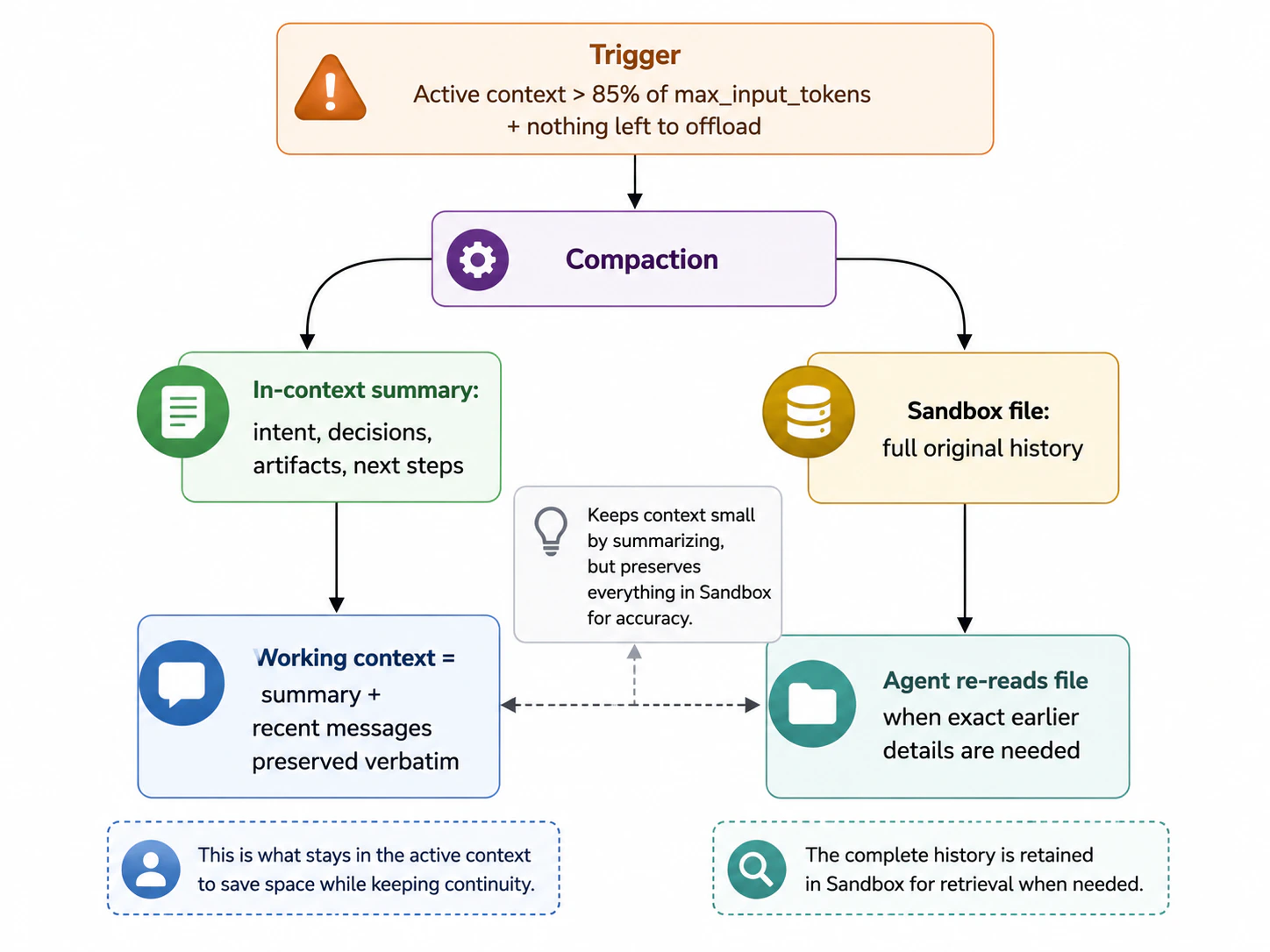
- Compaction kicks in once the active context crosses ~85% of the model’s
max_input_tokensand there is no more content eligible for offloading. - A configurable slice of the most recent messages is kept verbatim so the agent doesn’t lose immediate continuity with the user.
- If a model call ever fails with a context-overflow error mid-run, the harness immediately compacts and retries the call with the summary plus preserved recent messages.
Compaction is lossy in the working context — fine-grained details from early messages are condensed into the summary. Nothing is permanently lost: the harness keeps the full original transcript in the sandbox, so the agent can re-read it when exact earlier outputs matter.
How the strategies compose
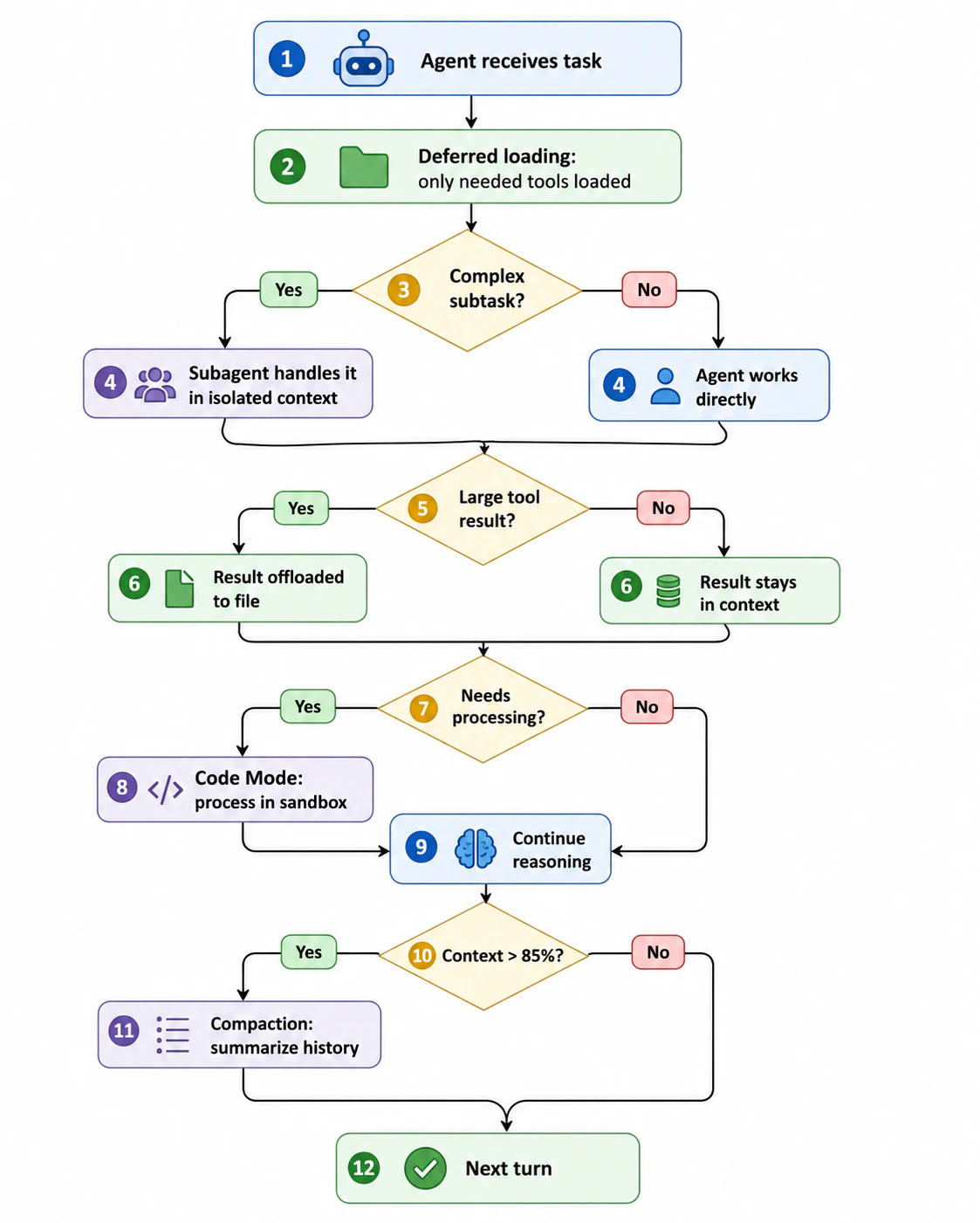
In practice, these strategies stack. A single agent run might:- Start with Preload Tools off so only a handful of schemas are in input context.
- Delegate a research subtask to a subagent that makes dozens of tool calls in isolation.
- Offload a large tool result inside the subagent to a sandbox file.
- Use Code Mode to aggregate the offloaded data into a small summary.
- Return the summary to the root agent — keeping the root’s runtime context clean.
- Compact the root agent’s history later if a long multi-turn conversation eventually approaches the limit.
Best practices
- Start with input context discipline. Keep the system prompt focused on this agent’s role; move detailed procedures into skills; leave Preload Tools off for large MCP servers.
- Let progressive disclosure do the work. Default to
preload = offfor both skills and MCP servers. Override only when a skill or server is truly needed on every run. - Delegate heavy work to subagents. Multi-step research or tasks with large intermediate outputs belong in subagents — the root agent’s context stays clean.
- Use Code Mode for aggregation. When the model needs to count, group, filter, or join tool output, Code Mode keeps raw data out of context entirely and avoids arithmetic hallucinations.
- Monitor context usage in traces. Traces show context size at each step, helping you spot which strategies are activating and where context is being consumed.